
🎉 ani-cli-arabic v2.0 - Major Release
💖 Support This Open Source Project
Your support helps maintain the project and keeps the updates coming!

Terminal-based anime streaming with Arabic subtitles











📑 Navigation
Installation • Features • How to Use • Keyboard Shortcuts • Configuration • Contributors • License
لإختيار اللغة العربية اضغط على الزر:

https://github.com/user-attachments/assets/a6c6882a-7c50-4a8d-aa9c-e56a6d4ff7eb
📦 Installation
Requirements
Before installing, make sure you have:
- Python 3.8 or newer (Python 3.12 recommended, avoid 3.13+ due to numpy compilation issues)
- MPV media player (for streaming)
- ffmpeg (for video processing)
- fzf (for fuzzing results)
⚠️ Important Note: if you are using mac os, build from source.
Method 1: Install via pip (Recommended)
The easiest way to get started:
pip install ani-cli-arabic
Launch the app:
ani-cli-arabic
# or use the shorter command
ani-cli-ar
To update to the latest version:
pip install --upgrade ani-cli-arabic
Method 2: Arch Linux (AUR)
For Arch Linux users, install from the AUR:
# Using yay
yay -S ani-cli-arabic

# Using paru
paru -S ani-cli-arabic
Method 3: From Source
Want to run the development version?
On Windows:
# Install MPV first
scoop install mpv

# Clone the repo and install dependencies
git clone https://github.com/np4abdou1/ani-cli-arabic.git
cd ani-cli-arabic
pip install -r requirements.txt
python main.py
On Linux (Debian/Ubuntu):
# Get the dependencies
sudo apt update && sudo apt install mpv git python3-pip ffmpeg

# Clone and run
git clone https://github.com/np4abdou1/ani-cli-arabic.git
cd ani-cli-arabic
pip install -r requirements.txt
python3 main.py
🎯 What Can You Do?
Here's everything this tool offers:
Streaming & Playback
- Multiple Quality Options: Watch in 1080p, 720p, or 480p depending on your internet speed
- Batch Download: Download multiple episodes at once to watch offline
- Trailer Support: Watch YouTube trailers before committing to an anime
- Resume from History: Pick up exactly where you left off ( buggy )
Discovery & Browsing
- Search Anime: Find any anime and anime movie by name (supports both English and Japanese titles and arabic titles)
- Trending Now: See what's currently popular
- Top Rated: Browse the highest-rated anime of all time
- Browse by Genre: Filter by Action, Romance, Isekai, and 12 other genres
- Browse by Studio: Find anime from Toei Animation, MAPPA, Ufotable, and 20+ more studios
- Latest Releases: Stay updated with the newest anime
Personal Library
- Watch History: Keep track of everything you've watched with timestamps
- Favorites System: Bookmark your favorite anime for quick access
- Episode Tracking: The app remembers which episode you're on
Interface & Experience
- Rich TUI (Terminal User Interface): Beautiful terminal interface built with Rich library
- 17 Color Themes: Choose from blue, red, purple, sunset, mint, lavender, and more
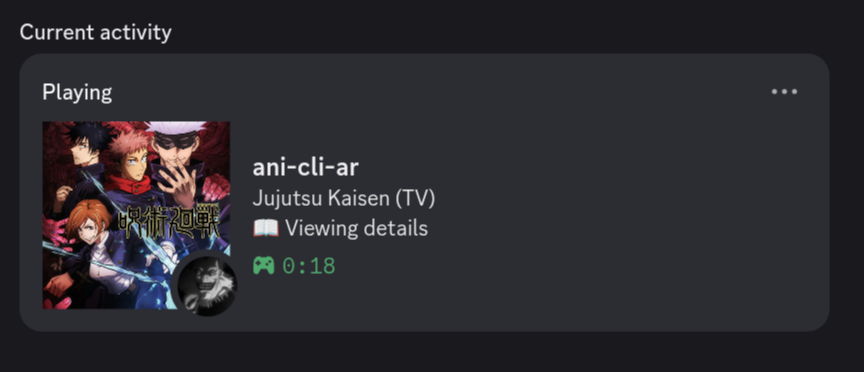
- Discord Rich Presence: Show off what you're watching on Discord with anime posters
- Smooth Navigation: Intuitive keyboard controls
Technical Features
- Zero Ads: Clean streaming experience
- Automatic Updates: Built-in version checker notifies you of new releases, and yes this can be turned off.
- MPV/VLC Support: Choose your preferred media player
- Dependency Auto-installer: Automatically checks and installs missing dependencies, too lazy...
- CLI Mode: Simple command-line mode for quick searches (
ani-cli-ar -i "Naruto") interactive mode also runs if the terminal is too narrow - Cross-platform: Works on Windows and Linux
🎮 How to Use
- Launch the app: Run
ani-cli-arabicorani-cli-ar - Browse or Search: Use the main menu to search, view trending, or browse genres
- Select an Anime: Navigate with arrow keys and press Enter
- Pick an Episode: Choose which episode to watch
- Select Quality: Pick your preferred video quality
- Enjoy: MPV will launch and start streaming
You can also use interactive mode for quick searches:
ani-cli-ar -i "One Piece"
⌨️ Keyboard Shortcuts
| Key | What it Does |
|---|---|
| ↑ / ↓ | Navigate through lists |
| Enter | Select/Confirm choice |
| G | Jump directly to an episode number |
| B | Go back to previous screen |
| Q / Esc | Quit the application |
| Space | Pause/Resume video (in player) |
| ← / → | Rewind/Forward 5 seconds |
| F | Toggle fullscreen |
⚙️ Configuration
Settings are stored locally in ~/.ani-cli-arabic/database/config.json
Available Settings
Access the settings menu from the main screen to customize:
- Default Quality: Set your preferred quality (1080p, 720p, or 480p)
- Media Player: Choose between MPV or VLC
- Auto-next Episode: Toggle automatic episode continuation
- Discord Rich Presence: Show or hide Discord activity
- Theme Color: Pick from 17 beautiful color schemes:
- blue, red, green, purple, cyan, yellow, pink, orange, teal, magenta
- lime, coral, lavender, gold, mint, rose, sunset
- Analytics: Opt-in/out of anonymous usage stats - this is auto enabled by default.
- Update Checking: Toggle automatic update notifications
You can also manually edit the config file if you prefer.
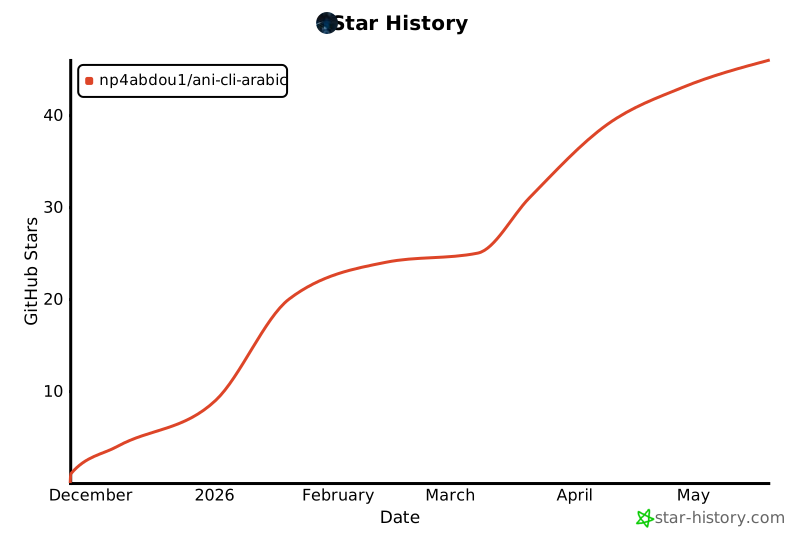
Star History
👥 Contributors
Special thanks to everyone who helped make this project happen:

Key Contributors:
- @np4abdou1 - Creator and main developer
- @Anas-Tou - Contributor
- @ilyes-pro - Contributor
Want to contribute? Feel free to open issues or submit pull requests!
📄 License
This project is licensed under the GNU General Public License v3.0.
You're free to use, modify, and distribute this software under the terms of the GPL-3.0 license. See the LICENSE file for the full legal text.
In simple terms:
- ✅ Use it for personal or commercial purposes
- ✅ Modify the source code
- ✅ Distribute it to others
- ⚠️ Any modifications must also be open source under GPL-3.0
- ⚠️ Include the original copyright notice
[! CAUTION] By using this software you understand:
- Anonymous usage statistics are collected for the GitHub page stats banner (can be disabled in settings)
- The project is licensed under GPL-3.0 - see LICENSE for details
- We do not host any content; all streams are from third-party sources
- This tool is for personal use and educational purposes only
Made with ❤️ by the anime community
1 maintainer

Metadata
1 maintainer
Release files for ani-cli-arabic 2.0.0
For a detailed explanation of source distributions (sdists) and built distributions (wheels), please see the package formats documentation.
Source distribution (sdist)
| File | Size | Uploaded | |
|---|---|---|---|
| ani_cli_arabic-2.0.0.tar.gz | 149.2 kB | Details |
Built distribution (wheel)
| File | Interpreter | ABI | Platform | Reset |
|---|---|---|---|---|
| ani_cli_arabic-2.0.0-py3-none-any.whl | Python 3 | none | any | Details |
Total release size: 305.3 kB
Release files / ani_cli_arabic-2.0.0.tar.gz
| Download URL | ani_cli_arabic-2.0.0.tar.gz |
|---|---|
| Size | 149.2 kB |
| Tags | Source |
|
SHA-256 checksum How to use checksums |
76661339ee76085fce740668ff65e179fc1db543934c4b90015795feeaf95d99
|
|
BLAKE2b-256 checksum How to use checksums |
a1473d854097dc13ddfb8cfe29302a7220ec3634511fd6a696456434fab3cf68
|
| Upload date | |
|
Uploaded using Trusted Publishing? What is trusted publishing? |
No |
| Uploaded via |
twine/7.0.0 CPython/3.13.14
|
Release files / ani_cli_arabic-2.0.0-py3-none-any.whl
| Download URL | ani_cli_arabic-2.0.0-py3-none-any.whl |
|---|---|
| Size | 156.1 kB |
| Tags | Python 3 |
|
SHA-256 checksum How to use checksums |
f198aa4978c3d4723ffdbe14fc9c03cefc97c7f0542f5259b83d59bc4d3ffb10
|
|
BLAKE2b-256 checksum How to use checksums |
10076b499df9a60eeaebb8f31e5f3ad9f983fa02b0fb52e35d4503abb7dd25b3
|
| Upload date | |
|
Uploaded using Trusted Publishing? What is trusted publishing? |
No |
| Uploaded via |
twine/7.0.0 CPython/3.13.14
|














