
Anime Character Segmentation with DINOv2
Verified details
These details have been verified by PyPIProject links
GitHub Statistics
Maintainers

Project description
AnimeSeg



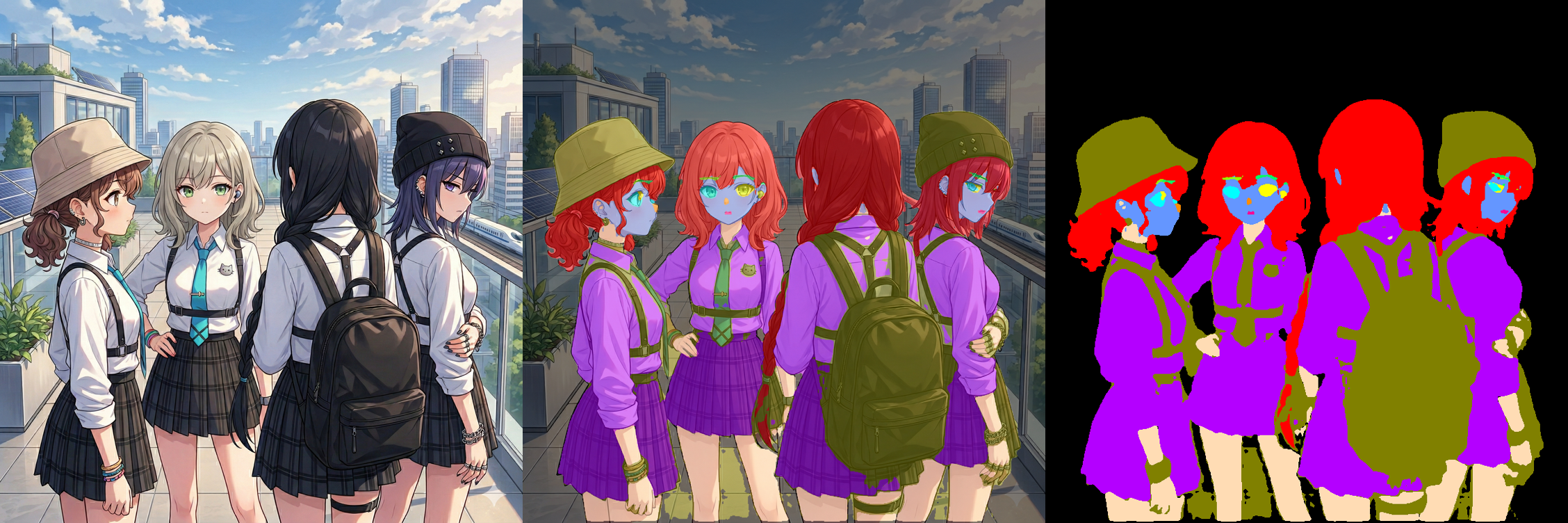
Anime Character Segmentation using Mask2Former and DINOv2 + U-Net++ with LoRA fine-tuning. Also integrates Background Removal via anime-segmentation.
sample image
Installation
pip install anime_seg
Usage
from anime_seg import AnimeSegPipeline
pipe = AnimeSegPipeline.from_mask2former().to("cuda")
mask = pipe("path/to/image.jpg")
mask.save("output.png")

# Background Removal (powered by anime-segmentation)
bg_pipe = AnimeSegPipeline.from_bg_remover().to("cuda")
no_bg_img = bg_pipe("path/to/image.jpg")
no_bg_img.save("no_bg_output.png")
AnimeSegPipeline() default constructor is deprecated. Use from_mask2former(), from_dinoV2(), or from_bg_remover().
Optional: output size
# Same as input size (default)
mask_same = pipe("path/to/image.jpg")

# Fixed output size
mask_fixed = pipe("path/to/image.jpg", width=1024, height=1024)

# Width/height can be specified independently
mask_w = pipe("path/to/image.jpg", width=1024)
mask_h = pipe("path/to/image.jpg", height=1024)
Advanced Usage
# Load specific file from HF repo
pipe = AnimeSegPipeline.from_mask2former(
    repo_id="suzukimain/AnimeSeg",
    filename="models/anime_seg_mask2former_v3.safetensors"
).to(device="cuda")

# DINOv2 backend
pipe_dino = AnimeSegPipeline.from_dinoV2(
    filename="models/anime_seg_dinov2_v2.safetensors"
).to("cuda")

# Use PIL Image
from PIL import Image
img = Image.open("image.jpg")
mask = pipe(img)

# Background Removal (powered by anime-segmentation)
bg_pipe = AnimeSegPipeline.from_bg_remover().to("cuda")
no_bg_img = bg_pipe("path/to/image.jpg")
no_bg_img.save("no_bg_output.png")
Model Files
Models should follow the naming convention:
models/anime_seg_{architecture}_v{version}.safetensors
Example:
models/anime_seg_dinov2_v2.safetensorsmodels/anime_seg_mask2former_v3.safetensors
Resolution order:
models/model_config.json- fallback scan by
models/anime_seg_{architecture}_v{max_version}.{ext}
Segmentation Classes and Mask Colors
Default from_mask2former() returns 12 classes:
| ID | Class Key | RGB | Color |
|---|---|---|---|
| 0 | background | (0, 0, 0) | Black |
| 1 | skin | (255, 220, 180) | Pale Orange |
| 2 | face | (100, 150, 255) | Blue |
| 3 | hair_main | (255, 0, 0) | Red |
| 4 | left_eye | (0, 255, 255) | Cyan |
| 5 | right_eye | (255, 255, 0) | Yellow |
| 6 | left_eyebrow | (150, 255, 0) | Yellow Green |
| 7 | right_eyebrow | (0, 255, 100) | Emerald Green |
| 8 | nose | (255, 140, 0) | Dark Orange |
| 9 | mouth | (255, 0, 150) | Magenta Pink |
| 10 | clothes | (180, 0, 255) | Purple |
| 11 | accessory | (128, 128, 0) | Olive |
from_dinoV2() returns 13 classes (includes unknown as ID 12).
DINOv2 Compatibility Note
Earlier versions primarily used DINOv2. Current recommendation is from_mask2former(), while from_dinoV2() remains for compatibility.
Project details
Verified details
These details have been verified by PyPIProject links
GitHub Statistics
Maintainers
Release history Release notifications | RSS feed


Download files
Download the file for your platform. If you're not sure which to choose, learn more about installing packages.
Source Distribution
Built Distribution
Filter files by name, interpreter, ABI, and platform.
If you're not sure about the file name format, learn more about wheel file names.
Copy a direct link to the current filters
File details
Details for the file anime_seg-0.3.1.tar.gz.
File metadata
- Download URL: anime_seg-0.3.1.tar.gz
- Upload date:
- Size: 19.9 kB
- Tags: Source
- Uploaded using Trusted Publishing? Yes
- Uploaded via: twine/6.1.0 CPython/3.13.7
File hashes
| Algorithm | Hash digest | |
|---|---|---|
| SHA256 |
160e907aedea18a7601b6494b9fd6948865f0f8f20da5d1919955e7d95af89b2
|
|
| MD5 |
c789bb88a19dc19aac8e672d374c1eaf
|
|
| BLAKE2b-256 |
47bd37d30f0a9a170eda0111350a23613210922ee115b80d4b82012915fae96e
|
File details
Details for the file anime_seg-0.3.1-py3-none-any.whl.
File metadata
- Download URL: anime_seg-0.3.1-py3-none-any.whl
- Upload date:
- Size: 24.3 kB
- Tags: Python 3
- Uploaded using Trusted Publishing? Yes
- Uploaded via: twine/6.1.0 CPython/3.13.7
File hashes
| Algorithm | Hash digest | |
|---|---|---|
| SHA256 |
262ff452adbe2242ac48cb8071f183d36733b345e98b4ee84590885057e95039
|
|
| MD5 |
f16ceebe150109ef4cf4c372ded1d92d
|
|
| BLAKE2b-256 |
d8b3bb6d193c814943018ccfdf5bdac144bbffe7a2faebc699b4fe25dca73cde
|






