
Anki Eudic
🔠 Transfer Eudic's unfamiliar words to Anki, to review, remember and revive.


Anki Eudic is a terminal app that downloads a study list from
Eudic and exports it as an Anki deck (.apkg). With a local
Longman Dictionary of Contemporary English (LDOCE5++), each card also gets English
definitions with Chinese translations, examples, and British and American
pronunciation audio.
Website: anki-eudic.sorosliu.xyz
Features
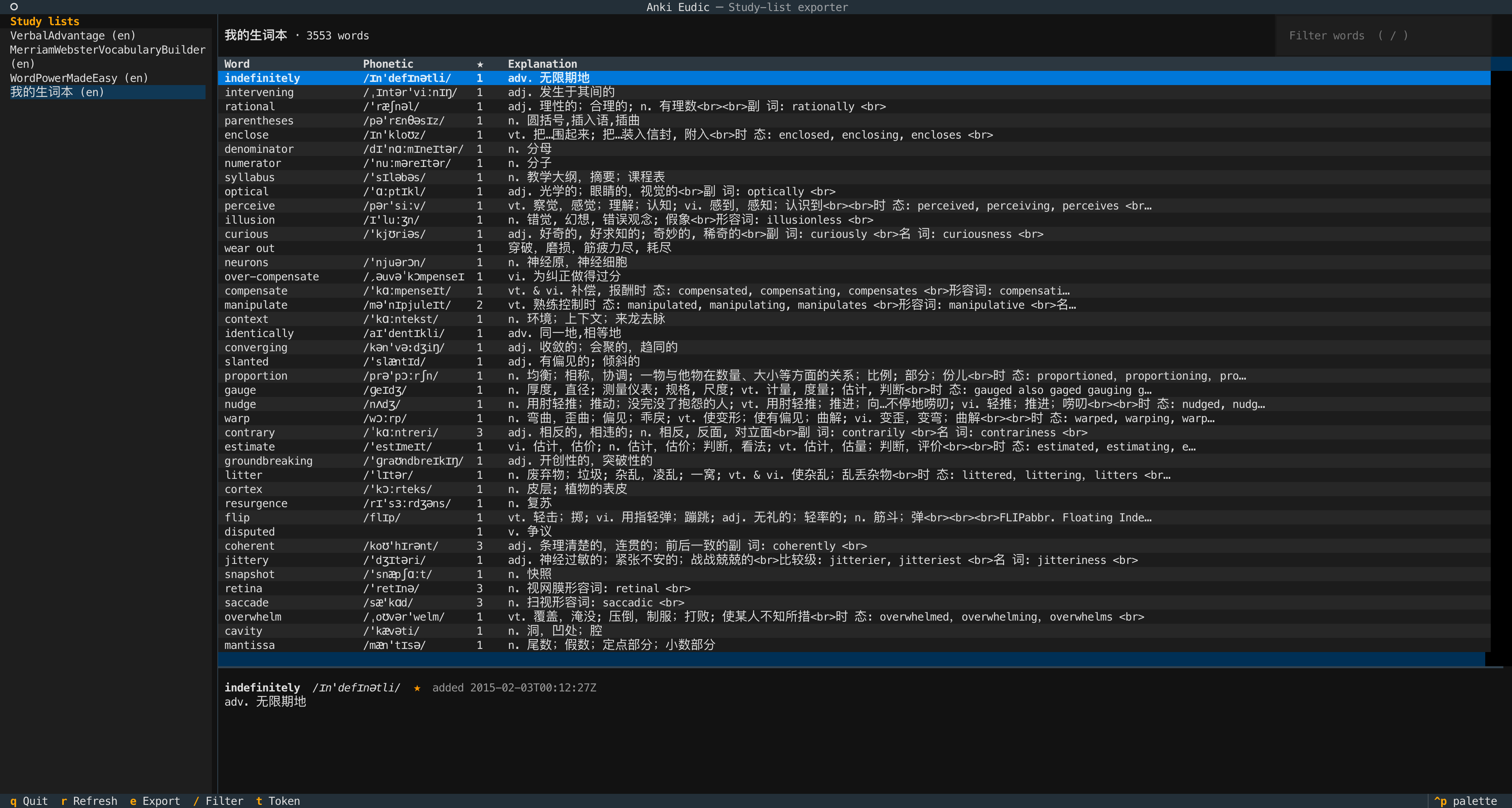
- Keyboard-driven TUI. Study lists in a sidebar, a filterable word preview with a detail pane, and an export dialog with a progress bar.
- Rich cards. BrE/AmE IPA and audio, part of speech, numbered senses with examples, collocations and word origin from LDOCE5++. Click a definition to reveal its Chinese translation. Eudic's own explanation is used when the dictionary lacks a word.
- Your context kept. The sentence you saved the word from, its added date and star rating come along to the card.
- Safe re-exports. Notes are identified by word, so exporting the same list again updates existing cards in place and keeps their review progress.
- Complete lists. Every API page is fetched and case-insensitive duplicates are removed.
- No Anki add-on. Anki doesn't need to be running; import the
.apkgfile. - Private token. Stored only in the OS credential store (macOS Keychain, Windows Credential Locker, Secret Service), never in a plaintext file.
Install
Install from PyPI (Python 3.10 or newer):
uv tool install anki-eudic
# or
pipx install anki-eudic
Then run:
anki-eudic
Usage
- Connect. On first run, paste the authorization token from Eudic's Open API page (my.eudic.net) and press Enter. The token is checked with Eudic before it is saved. Use without saving keeps it for this session only.
- Pick a list. Select a study list in the sidebar to load its words. Press
/to filter and Escape to clear the filter. - Export. Press
e, choose the deck name, output file and LDOCE5++.mdxpath, and export. The dialog tells you whether the dictionary will add definitions and audio. - Import. In Anki Desktop choose File → Import and select the
.apkg.
| Key | Action |
|---|---|
e |
Export the open list |
/ |
Filter words |
r |
Reload study lists |
t |
Change or forget the token |
q |
Quit |
Token
Either abc... or the full NIS abc... value is accepted. There is deliberately no
plaintext fallback: if the machine has no usable keyring, pass the token to the process
instead, preferably without putting it in your shell history:
read -rsp 'Eudic token: ' EUDIC_TOKEN && export EUDIC_TOKEN && anki-eudic
EUDIC_TOKEN takes precedence over a saved token.
Dictionary
The LDOCE5++ path defaults to $ANKI_EUDIC_LDOCE, or an LDOCE5*.mdx in
~/Library/Eudb_en (Eudic's dictionary folder on macOS). Audio comes from the .mdd
file next to the .mdx. Leave the path empty to export Eudic's data only.
The dictionary files are only read. On first use a key index is built in the user cache
directory (~/Library/Caches/anki-eudic on macOS, $XDG_CACHE_HOME/anki-eudic on
Linux; override with ANKI_EUDIC_CACHE_DIR). MDict 2.x files with zlib or uncompressed
blocks are supported; LZO-compressed files also need python-lzo.
Cards
Notes use the Anki-Eudic Word note type (fields: Word, PhoneticUK, PhoneticUS, AudioUK, AudioUS, PartOfSpeech, Definition, Explanation, Context, Extra, Added, Star). The front shows the word with its pronunciations; the back adds everything else. Re-import with Anki's default Update notes: if newer to update cards without resetting progress. Words removed from Eudic are not deleted in Anki. See spec/anki-development.md for details.
Development
Requires uv.
git clone https://github.com/Sorosliu1029/Anki-Eudic.git
cd Anki-Eudic
uv run anki-eudic      # creates .venv with the locked dependencies and runs the app
uv run pytest          # tests, including Textual pilot tests of the TUI
uv run ruff check .
uv run ruff format .
Releasing
The version lives only in pyproject.toml (anki_eudic.__version__ reads it from the
installed metadata). From an up-to-date master with tests passing:
uv version --bump minor            # or patch / major; updates pyproject.toml and uv.lock
git commit -am "Release v$(uv version --short)"   # via a PR, then merge
git tag "v$(uv version --short)" && git push origin "v$(uv version --short)"

rm -rf dist && uv build            # sdist and wheel in dist/
uvx twine check dist/*
uvx twine upload dist/*            # reads the [pypi] token from ~/.pypirc
gh release create "v$(uv version --short)" dist/* --generate-notes
uv publish works too, with the token in UV_PUBLISH_TOKEN.
Layout:
| Path | Contents |
|---|---|
src/anki_eudic/app.py |
Main TUI screen |
src/anki_eudic/screens.py |
Token and export dialogs |
src/anki_eudic/client.py |
Eudic Open API client |
src/anki_eudic/auth.py |
Token storage via keyring |
src/anki_eudic/apkg.py |
Anki package export |
src/anki_eudic/dictionary.py, mdict.py |
LDOCE5++ MDict reader and parser |
spec/ |
Design specs and Anki import notes |
docs/ |
Product page, served by GitHub Pages |
The API implementation follows the Eudic development guide in
eudic-develop-guide.html. The LDOCE5++ test runs against real dictionary files when
they exist (set LDOCE_DIR if they are not in ~/Library/Eudb_en).
anki_eudic.dictionary can also be used as a library:
from anki_eudic.dictionary import LdoceDictionary

base = "~/Library/Eudb_en/LDOCE5++ V 1-35"
with LdoceDictionary(f"{base}.mdx", f"{base}.mdd") as ldoce:
    entry = ldoce.lookup("pronounce")          # None when the word is missing
    print(entry.headword, entry.parts_of_speech, entry.pronunciation.ipa_bre)
    for sense in entry.homographs[0].senses:
        print(sense.number, sense.grammar, sense.definition)
Limitations
- Exports only; nothing in Eudic is modified, and AnkiConnect is not used.
- Credential store availability and unlocking behaviour depend on the OS.
License
1 maintainer

Metadata
1 maintainer
Release files for anki-eudic 0.2.0
For a detailed explanation of source distributions (sdists) and built distributions (wheels), please see the package formats documentation.
Source distribution (sdist)
| File | Size | Uploaded | Provenance | |
|---|---|---|---|---|
| anki_eudic-0.2.0.tar.gz | 1.1 MB | Without provenance | Details |
Built distribution (wheel)
| File | Interpreter | ABI | Platform | Reset |
|---|---|---|---|---|
| anki_eudic-0.2.0-py3-none-any.whl | Python 3 | none | any | Details |
Total release size: 1.1 MB
Release files / anki_eudic-0.2.0.tar.gz
| Download URL | anki_eudic-0.2.0.tar.gz |
|---|---|
| Size | 1.1 MB |
| Tags | Source |
|
SHA-256 checksum How to use checksums |
d231ec0a3e7cef78036f19579c34ab1d5ef6ea6ec66d696e2561d660df7a248a
|
|
BLAKE2b-256 checksum How to use checksums |
2dfd7ccf3c4abfe2c104cb0b935809f46a65857968c31b90f834f3dc4400e02d
|
| Upload date | |
|
Uploaded using Trusted Publishing? What is trusted publishing? |
No |
| Uploaded via |
twine/7.0.0 CPython/3.14.7
|
Release files / anki_eudic-0.2.0-py3-none-any.whl
| Download URL | anki_eudic-0.2.0-py3-none-any.whl |
|---|---|
| Size | 31.5 kB |
| Tags | Python 3 |
|
SHA-256 checksum How to use checksums |
3b6f7e32bfaea847863cf57380664a866b1ed08c276fbfd052e58bd0463c459f
|
|
BLAKE2b-256 checksum How to use checksums |
b29b00c6b7dd430e923f7bb332d3c017d8a47943bbc2d33df36297787f69bc14
|
| Upload date | |
|
Uploaded using Trusted Publishing? What is trusted publishing? |
No |
| Uploaded via |
twine/7.0.0 CPython/3.14.7
|
Security for anki-eudic 0.2.0
Provenance
Provenance describes where a file came from. On PyPI, provenance is shared via attestations, which provide a verifiable record of the build or publishing details. View details, limitations and caveats.
No provenance found
None of the files in this release were uploaded with provenance metadata.
A note on package security
PyPI is a repository for distributing packages, not a service for auditing them. While third-party security researchers and our staff do their best to detect and remove malicious packages, PyPI cannot guarantee the quality, security or suitability of any given package.
To learn more about protecting yourself from malicious actors, visit our package security documentation.














