
AnkiNote

Turn any word, sentence, or STEM problem into a ready-to-review Anki card in seconds.




English | 简体中文 | 日本語 | Español | Français
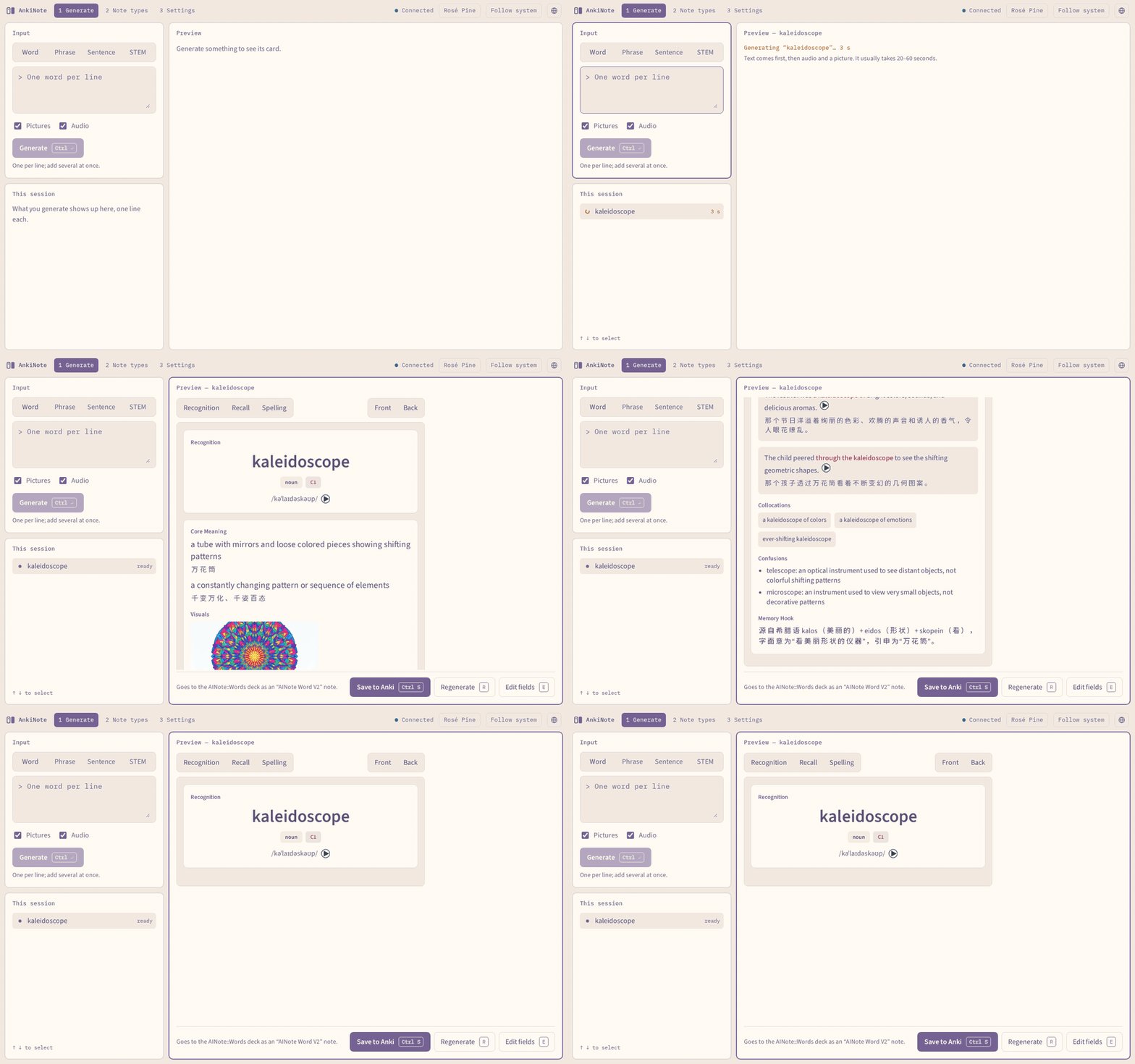
Making great Anki cards shouldn't take longer than reviewing them. AnkiNote is an AI-powered Anki card studio that turns a single word, phrase, sentence, or STEM problem into a complete, styled flashcard — with explanations, examples, memory hooks, custom illustrations, and native-sounding audio — and syncs it straight to your AnkiWeb account.
No manual formatting. No copy-pasting between ChatGPT and Anki. Bring your own API key, run it anywhere, and review on your phone, tablet, or desktop.
✨ Why AnkiNote?
- Built-in Anki & AnkiWeb Sync — No Anki Desktop or AnkiConnect required. AnkiNote embeds the Anki engine directly and syncs with AnkiWeb automatically, so cards added from a browser or NAS appear on every device. (Already use Anki Desktop? AnkiConnect is supported too.)
- One-Key Setup Wizard — Paste a single Gemini AI Studio key and the 5-step onboarding wizard configures text, image, and speech routes for you. Or mix and match OpenAI, Claude, DeepSeek, fal.ai, Google Cloud TTS, and any OpenAI-compatible endpoint.
- 4 Card Modes: Word, Phrase, Sentence & STEM
- Language Learning: Definitions, natural examples, memory hooks/mnemonics, AI-generated illustrations, and TTS audio. Supports English, French, Spanish, German, Japanese, Chinese (Simplified & Traditional, with ruby/pinyin), and Korean (beta) — learn any of them, explained in any other.
- STEM & Problem Solving: Type a question or upload a photo of a problem to generate a structured, step-by-step explanation card with MathJax formulas and optional diagrams.
- Live Preview, Inline Editing & AI Rewrite — Flip front/back and toggle Light/Dark mode before saving. Tweak any field directly, ask AI to rewrite a STEM explanation, or fix broken LaTeX with one click (with undo).
- Curated Card Themes — Choose from Rosé Pine, Kanagawa, Tokyo Night, and Gruvbox in both Light and Dark modes, with responsive layouts for desktop and mobile Anki.
- Works with your AI agent — The
ankinoteCLI lets Claude Code, Codex, or any agent that can run commands turn what you're reading into cards.
📸 Card & UI Showcase
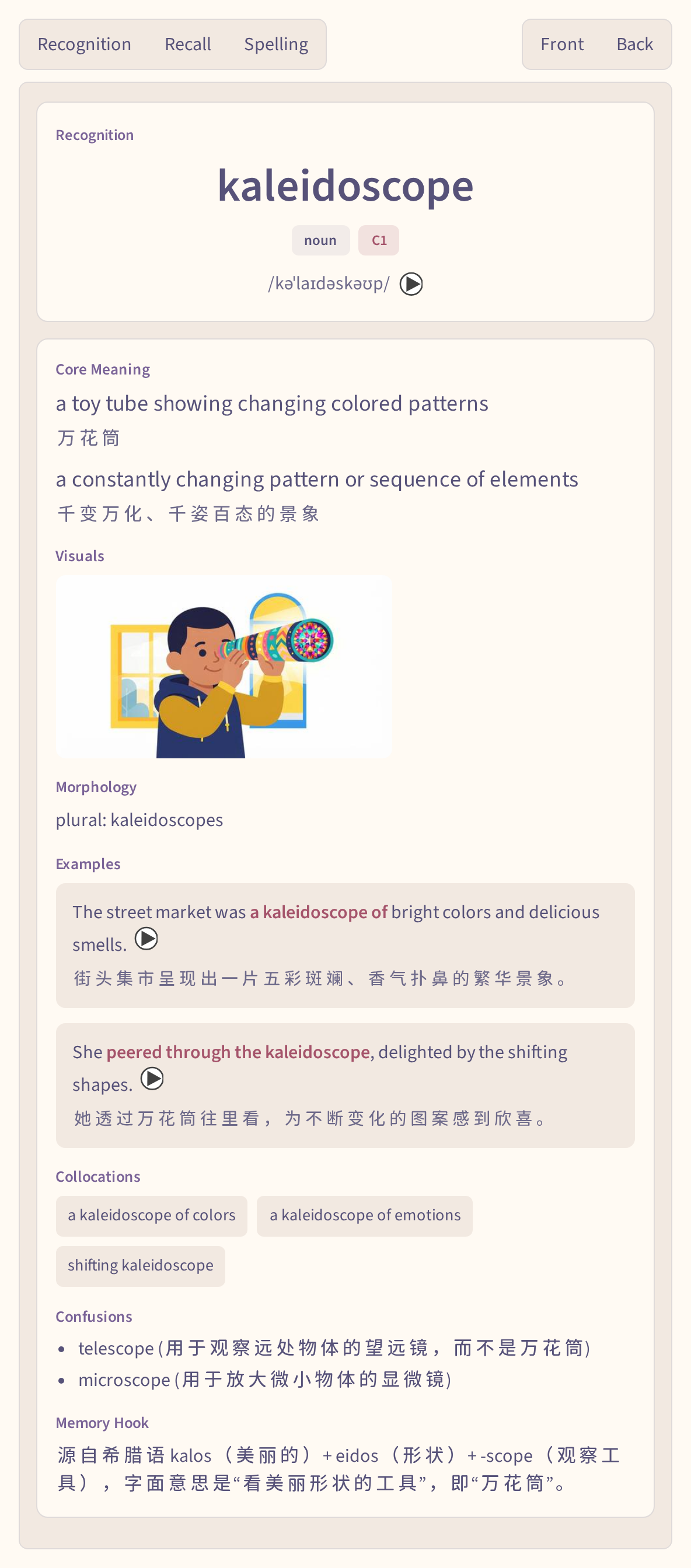 Language card: definition, illustration, examples |
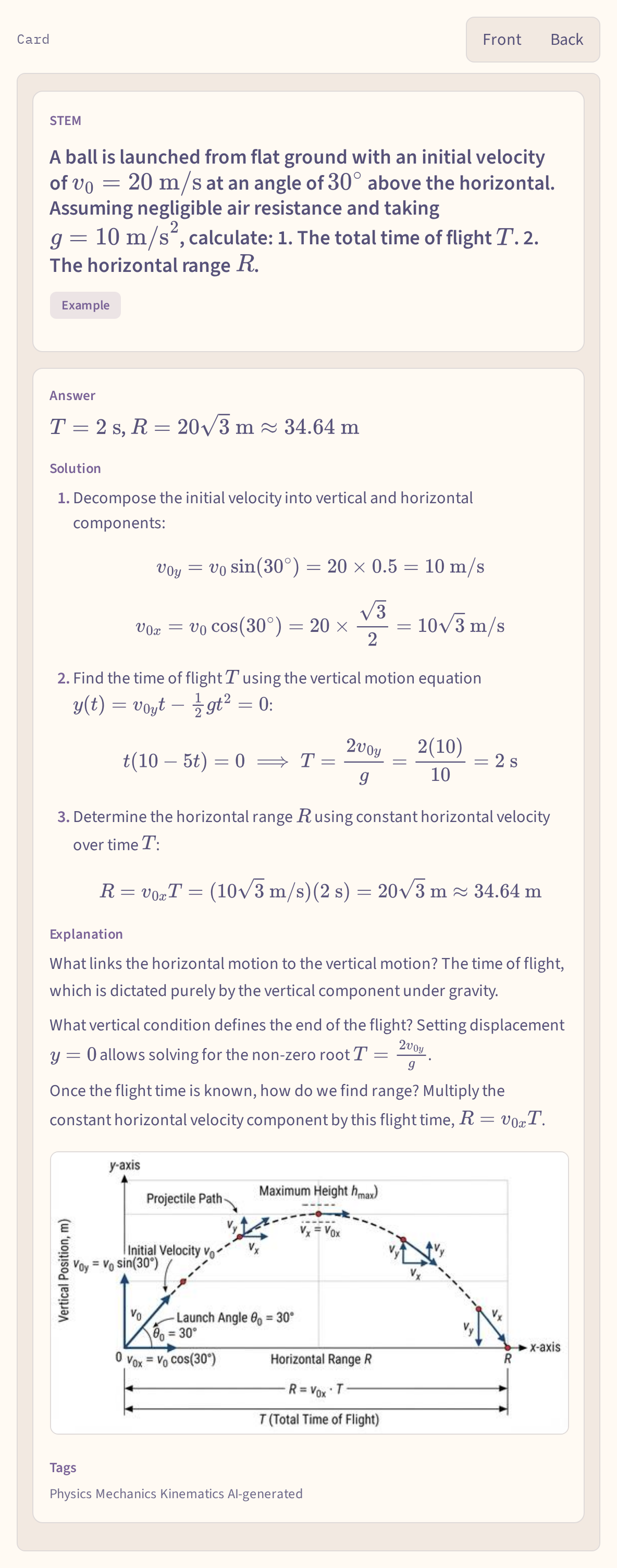 STEM card: formulas and a step-by-step solution |
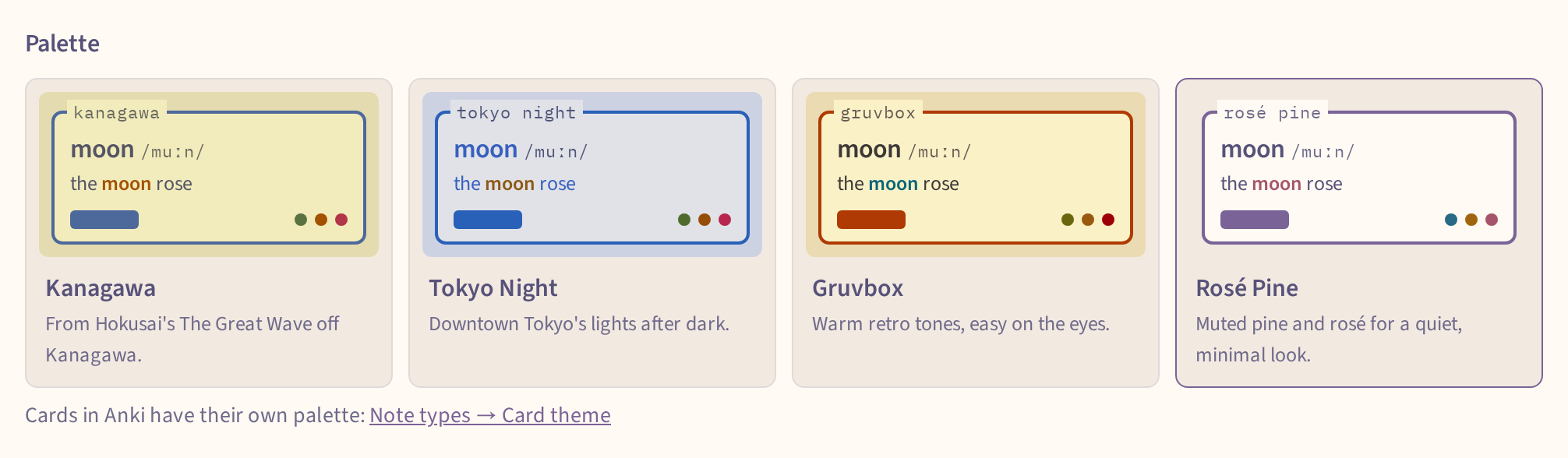
🚀 Quick Start (1 Minute)
The only prerequisite is uv (it manages Python for you):
curl -LsSf https://astral.sh/uv/install.sh | sh
Run AnkiNote directly without installing:
uvx --from ankinote-ai ankinote-web
Then open http://127.0.0.1:8000 in your browser. On first launch, the Setup Wizard walks you through:
- AI Provider — Paste a Gemini API key (covers text, image, and speech) or expand Advanced for OpenAI, Claude, DeepSeek, fal.ai, or custom endpoints.
- Anki Connection — Choose Built-in Anki and sign in to AnkiWeb (or choose AnkiConnect if you keep Anki Desktop open).
- Languages — Pick your native and target languages.
- Appearance — Choose a color palette and light or dark mode; your Anki cards get the same palette.
- First Card — Generate and save your first card right inside the wizard.
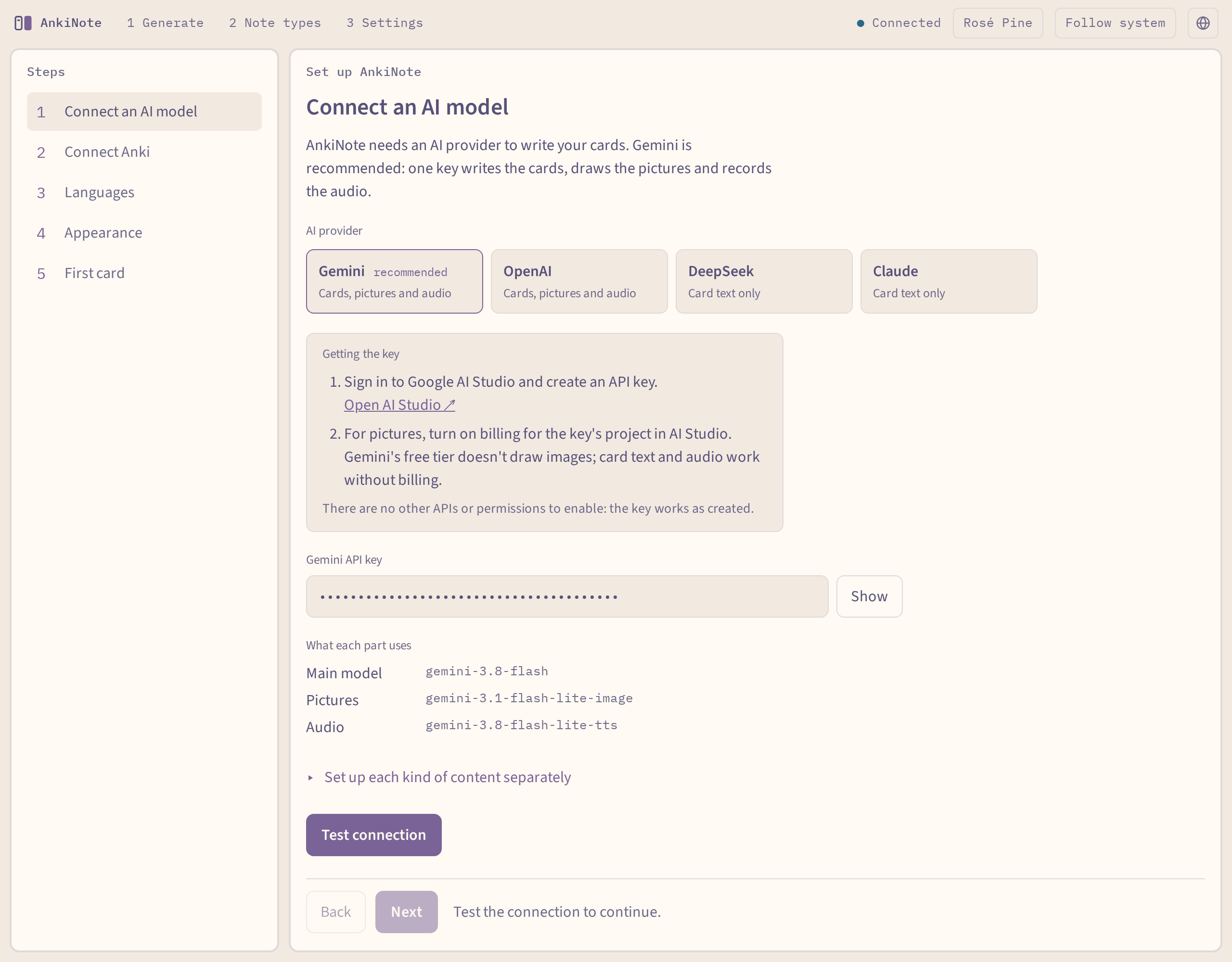 Setup wizard, step 1: connect an AI model |
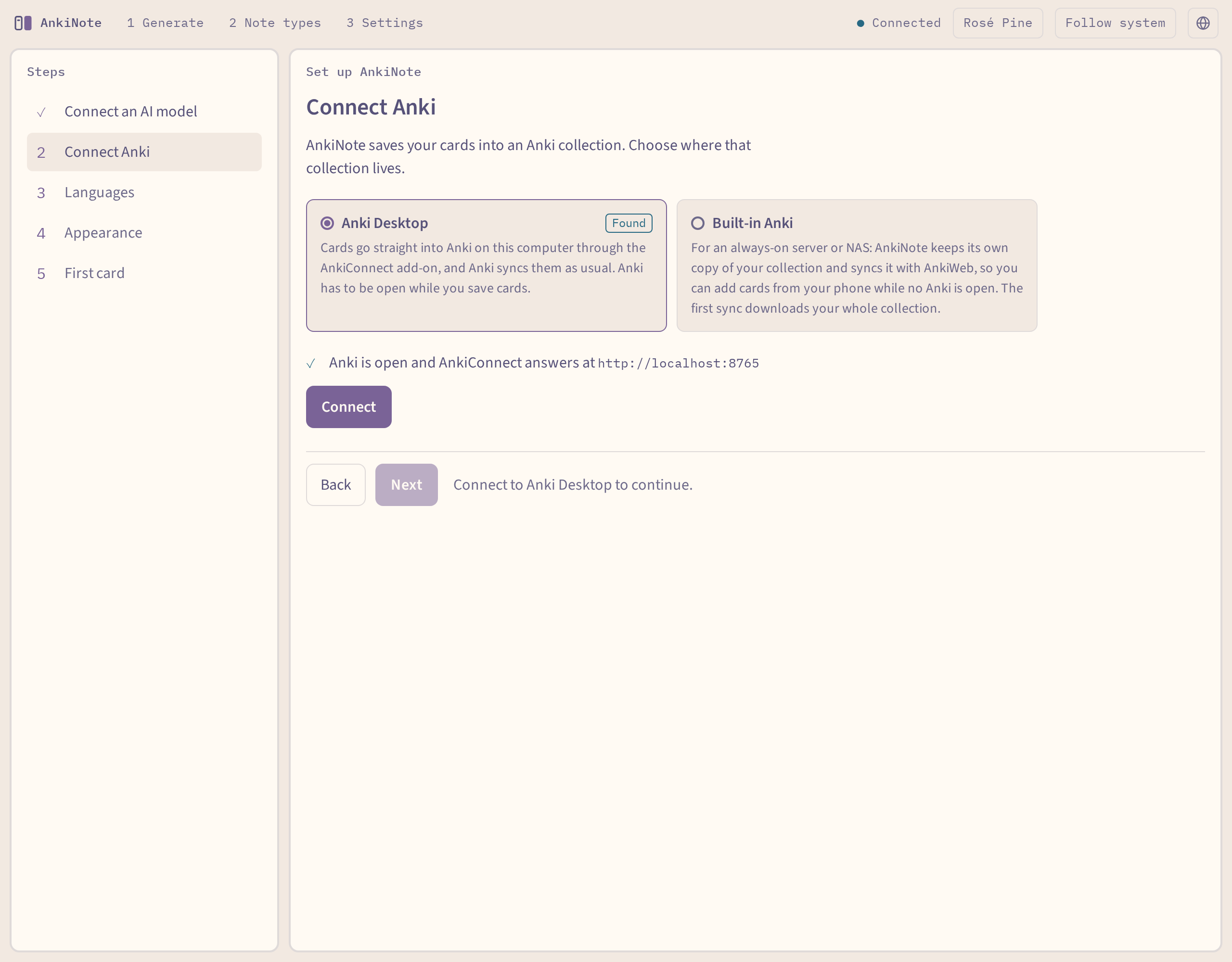 Setup wizard, step 2: connect Anki |
To install globally as a command:
uv tool install ankinote-ai
ankinote-web
Note: On Linux,
ankinote-airequiresglibc >= 2.35(Ubuntu 22.04+, Debian 12+, or similar). macOS 12+ and Windows are also supported.
🐳 Self-Hosting with Docker
Run AnkiNote 24/7 on a server, VPS, or NAS so you can create cards from your phone's browser anytime. Multi-arch images (amd64 + arm64) are published to ghcr.io/ankinote-ai/ankinote and ignity21/ankinote-ai.
# Standalone mode (recommended — built-in Anki + AnkiWeb sync, no desktop app needed)
cd deploy/headless
cp .env.example .env      # optional: set ANKIWEB_USERNAME / ANKIWEB_PASSWORD, port, etc.
docker compose up -d      # open http://localhost:8080
Already running Anki Desktop with AnkiConnect? Use deploy/standard instead. See deploy/README.md for full deployment options, reverse-proxy tips, and migration guides.
AnkiNote answers only to localhost and IP addresses. To open it by a host name (a reverse proxy, a Tailscale name), list that name in ANKINOTE_ALLOWED_HOSTS, comma-separated.
⌨️ From the Terminal or an AI Agent
The ankinote command makes cards without opening a browser, using the same settings as the web app. That makes it a tool any AI agent that can run commands (Claude Code, Codex, …) can use for you.
From a photo of what you're reading. Photograph a page where you underlined new words and tell your agent: "Make Anki cards for the underlined words." It reads the picture, picks out the words, and runs:
ankinote word batch serendipity ephemeral eloquent
From a list you already have. One word per line:
ankinote word batch --file words.txt --rpm 30
Cards from the CLI go straight to Anki without a preview. To check each card before it's saved, paste the same list into the web app's Generate page instead.
Run ankinote on its own for a menu in the terminal. The CLI Usage Guide covers phrases, sentences, STEM, and every option.
🤖 Supported Providers
| Capability | Built-in Presets & Compatibility |
|---|---|
| Text Generation | Gemini, OpenAI, Claude, DeepSeek, or any OpenAI-compatible endpoint (via litellm) |
| Image Generation | Gemini, OpenAI (gpt-image), fal.ai |
| Text-to-Speech | Gemini TTS, OpenAI TTS, Google Cloud TTS |
All API keys and settings stay on your machine, in ~/.config/ankinote/settings.json.
🛠️ Development
git clone https://github.com/ankinote-ai/ankinote.git
cd ankinote-ai

uv sync                   # install Python dependencies (Python 3.14+)
make web-dev              # run Svelte + Vite frontend dev server
uv run ankinote-web       # run FastAPI backend
                          # (ANKINOTE_API_DOCS=1 serves API docs at /api/docs)

make test                 # run pytest suite
make format               # format with ruff
make check                # lint & type-check (ruff + ty)
📚 Documentation
- CLI Usage Guide
- Docker Deployment Guide
- Note Types Reference
- Agent Skill — for using AnkiNote with AI coding assistants
📄 License
MIT License — see LICENSE for details.
1 maintainer

Metadata
1 maintainer
Release files for ankinote-ai 1.2.0
For a detailed explanation of source distributions (sdists) and built distributions (wheels), please see the package formats documentation.
Source distribution (sdist)
| File | Size | Uploaded | Provenance | Actions |
|---|---|---|---|---|
| ankinote_ai-1.2.0.tar.gz | 7.6 MB | With provenance | Details for ankinote_ai-1.2.0.tar.gz |
Built distribution (wheel)
| File | Interpreter | ABI | Platform | Actions Reset |
|---|---|---|---|---|
| ankinote_ai-1.2.0-py3-none-any.whl | Python 3 | none | any | Details for ankinote_ai-1.2.0-py3-none-any.whl |
Total release size: 9.4 MB
Release files / ankinote_ai-1.2.0.tar.gz
| Download URL | ankinote_ai-1.2.0.tar.gz |
|---|---|
| Size | 7.6 MB |
| Tags | Source |
|
SHA-256 checksum How to use checksums |
c277da2c3b122990f3adef69867b8fe4aabba52cc541199cb997e19caa838958
|
|
BLAKE2b-256 checksum How to use checksums |
d4bf268bdebb25e235d0681134318c817e7ef5634378b947953021703907cb20
|
| Upload date | |
|
Uploaded using Trusted Publishing? What is trusted publishing? |
Yes |
| Uploaded via |
twine/7.0.0 CPython/3.13.16
|
Provenance
Provenance describes where a file came from. On PyPI, provenance is shared via attestations, which provide a verifiable record of the build or publishing details. View details, limitations and caveats.


PyPI Publish Attestation
PyPI verified that this artifact, at this checksum, originated from the publisher listed below.
Signed by GitHub Actions, verified by PyPI on Nov 18, 2026.
Transparency logRelease files / ankinote_ai-1.2.0-py3-none-any.whl
| Download URL | ankinote_ai-1.2.0-py3-none-any.whl |
|---|---|
| Size | 1.8 MB |
| Tags | Python 3 |
|
SHA-256 checksum How to use checksums |
8aaa7a947749d9a4619cb5ba76fa031ad9b5e37777191613a1116cb55410b18b
|
|
BLAKE2b-256 checksum How to use checksums |
4adda355ae41be4c175c1cc2043bf1689d6b72cadb7432d7c27f639aed6ff286
|
| Upload date | |
|
Uploaded using Trusted Publishing? What is trusted publishing? |
Yes |
| Uploaded via |
twine/7.0.0 CPython/3.13.16
|
Provenance
Provenance describes where a file came from. On PyPI, provenance is shared via attestations, which provide a verifiable record of the build or publishing details. View details, limitations and caveats.
PyPI Publish Attestation
PyPI verified that this artifact, at this checksum, originated from the publisher listed below.
Signed by GitHub Actions, verified by PyPI on Nov 18, 2026.
Transparency logSecurity for ankinote-ai 1.2.0
Provenance
Provenance describes where a file came from. On PyPI, provenance is shared via attestations, which provide a verifiable record of the build or publishing details. View details, limitations and caveats.
Full provenance
Both files in this release have been uploaded with provenance metadata.
Attestation for ankinote_ai-1.2.0.tar.gz
PyPI Publish Attestation
PyPI verified that this artifact, at this checksum, originated from the publisher listed below.
Signed by GitHub Actions, verified by PyPI on Nov 18, 2026.
Transparency logA note on package security
PyPI is a repository for distributing packages, not a service for auditing them. While third-party security researchers and our staff do their best to detect and remove malicious packages, PyPI cannot guarantee the quality, security or suitability of any given package.
To learn more about protecting yourself from malicious actors, visit our package security documentation.














