
ankispiel
Nightly fresh example sentences (with audio) for an Anki vocabulary deck, via AnkiConnect.
Every night it takes the cards coming up next, writes fresh example sentences with any OpenAI-compatible LLM, and synthesizes pronunciation with a local Kokoro voice. This way you do not end up memorising example sentences while progressing through your deck.
Install
Requires ffmpeg on your PATH (used to encode the audio).
pip install ankispiel
# or isolated:
uv tool install ankispiel
# or run without installing:
uvx ankispiel doctor
Quick start
ankispiel init                  # writes ~/.config/ankispiel/config.toml
$EDITOR ~/.config/ankispiel/config.toml
ankispiel doctor                # checks AnkiConnect, provider, TTS voice, ffmpeg
ankispiel migrate --sample 5    # port 5 notes, review them on your devices
ankispiel migrate --all         # port the rest (review progress is preserved)
ankispiel run                   # the nightly job
Deployment
ankispiel run needs a running Anki with the AnkiConnect add-on reachable at the
configured url, and the profile logged in to AnkiWeb (sync uses the profile's stored
credentials). On a headless server do the one-time setup once over ssh -X: pick the
language, log in to AnkiWeb, install AnkiConnect (add-on code 2055492159). After that
keep Anki alive under a virtual display (xvfb-run -a anki) and fire ankispiel run
from cron.
Commands
| command | what it does |
|---|---|
init |
write a starter config file |
doctor |
preflight checks: config, AnkiConnect, provider, TTS voice, ffmpeg |
migrate |
one-time port of an existing deck to the ankispiel note type |
run |
the nightly job: sync, refresh upcoming-day notes, sync, report |
run prints one line per note as it works; pass --quiet to print only the final summary.
migrate keeps all review progress (cards, due dates, FSRS state are untouched). Your
deck's original content is backed up twice: a .apkg export and a full field archive in
~/.local/share/ankispiel/.
Configuration
The config lives at ~/.config/ankispiel/config.toml (override with --config).
[provider]
# Any OpenAI-compatible chat endpoint.
base_url = "https://your-provider/v1"
model = "your-model"
api_key_env = "ANKISPIEL_API_KEY"   # name of the env var holding the API key
# request_delay = 4.0               # optional: seconds to pause after each request,
                                    # to respect a rate-limited free tier
# input_price_per_mtok = 0.15       # optional: USD per 1M tokens; adds cost to the run
# output_price_per_mtok = 0.60      # report. set both or neither.
# [provider.headers]                # optional: extra request headers, e.g. a gateway
# x-opencode-session = "ankispiel"  # that requires a session header

[anki]
url = "http://localhost:8765"       # AnkiConnect
deck = "B1 Goethe"
new_notes_per_night = 20            # beyond cards due tomorrow, how many new notes to fill

[languages]
source = "en"                       # the language you know
target = "de"                       # the language you are learning
level = "B1"                        # CEFR level of generated sentences

[examples]
min = 2                             # example sentences per note; fixed number if
max = 2                             # min == max, else the model chooses within the range

[history]
k = 3                               # last generated sentences shown to the model as
                                    # "avoid these", per note

[tts.de]
# One section per language code. Kokoro ONNX model with the community German
# voice "Martin" (https://huggingface.co/Godelaune/Kokoro-82M-ONNX-German-Martin).
engine = "kokoro"
voice = "martin"                    # voice name inside voices_file
lang = "de"
speed = 1.125
model = "Godelaune/Kokoro-82M-ONNX-German-Martin"   # Hugging Face repo
model_file = "kokoro-martin.onnx"
voices_file = "voices-martin.npz"

[notify]
ntfy_url = "https://ntfy.sh/your-topic"   # optional ntfy topic for the nightly report

[migrate]
# One-time port: which legacy note type to convert and where its words live.
legacy_notetype = "B1 goethe"
source_word_field = "english"
target_word_field = "german"           # bare word, so the front does not reveal gender
new_notetype = "ankispiel"
# Optional: field spoken as the word audio (played on reveal), taken up to the first
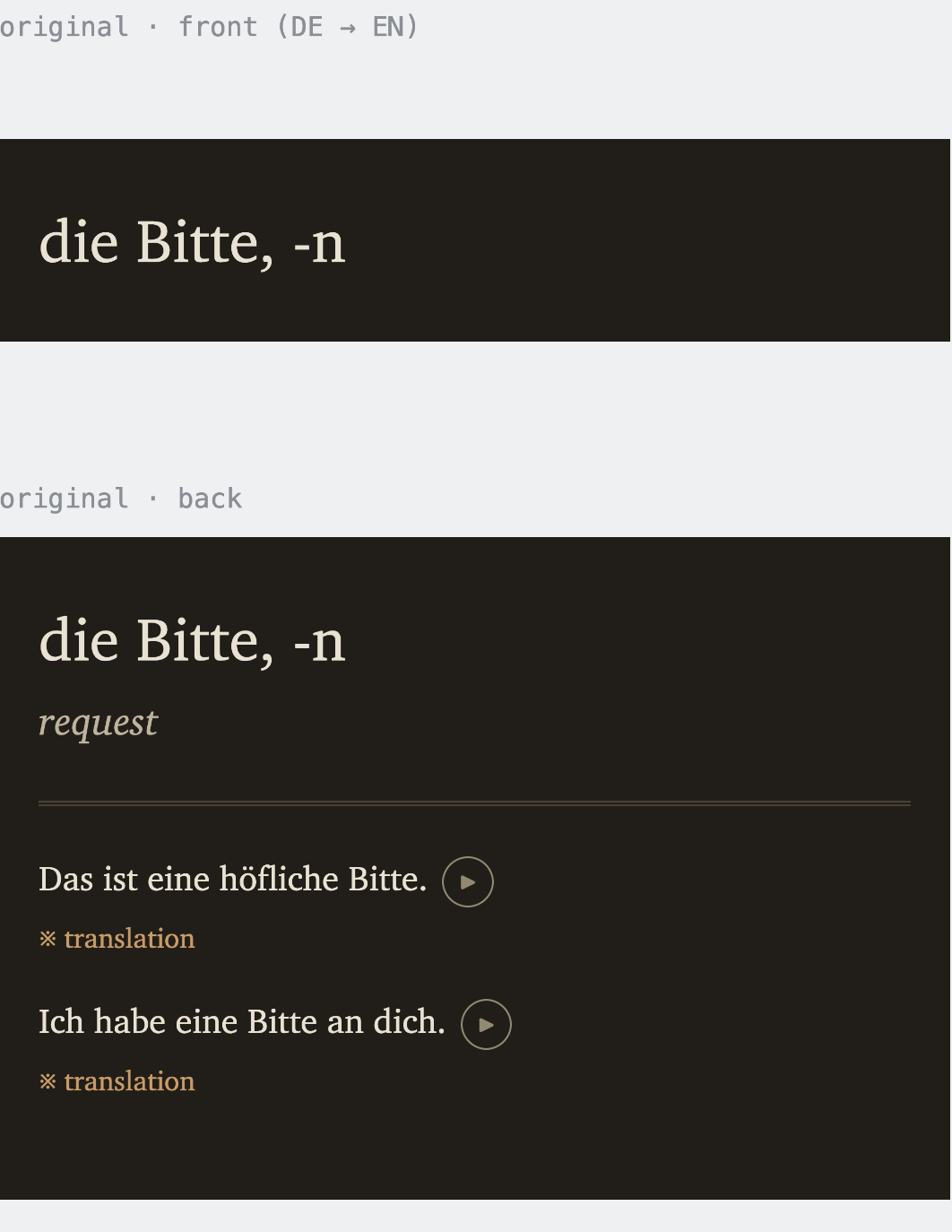
# comma, so "die Bitte, -n" is spoken "die Bitte". Unset -> the target word is spoken.
full_form_field = "german_full"

# Optional: legacy fields to carry over, each shown under the translation on the answer,
# in the translation style. Repeat [[extra]] for more fields.
[[extra]]
name = "forms"                      # field on the ankispiel note type
legacy_field = "full_form"          # field in your legacy note type
strip_word = true                   # remove the target word: "die Bitte, -n" -> "die, -n"
strip_word shows a field with the card's target_word removed. Set target_word to the
bare word (so the front does not reveal gender/inflection) and carry the full form as an
[[extra]] with strip_word = true; the answer then adds only the extra part (article and
plural for nouns, tense forms for verbs). Leave strip_word off to copy a field verbatim.
migrate keeps the source/target words and any [[extra]] fields; example slots are
empty and the nightly run fills them as notes come due. Point tts.<lang> at any Kokoro
ONNX model the same way to support other languages.
Note type
The tool generates content for notes with these fields (migrate creates the note type;
its name is new_notetype in [migrate]):
| field | filled by | meaning |
|---|---|---|
source_word |
migrate | the word in the source language |
target_word |
migrate | the word in the target language (bare; no gender/inflection on the front) |
target_word_full |
migrate | spoken form for the audio (full_form_field up to the first comma); optional |
[[extra]] fields |
migrate | legacy fields carried over, shown under the translation on the answer |
target_word_audio |
run | pronunciation of target_word_full (or target_word), played on reveal |
ex1..exN |
run | example sentences in the target language |
ex1t..exNt |
run | their translations in the source language (tap to reveal) |
ex1a..exNa |
run | audio of the example sentences |
N is the max of [examples] at the time migrate creates the note type. Each note
has two cards: original (target→source) and reverse (source→target), sharing the note's
content. The nightly run only touches notes of this type.
License
MIT (see LICENSE) — covers this project's code only. The bundled XCharter fonts keep
their own license; see ankispiel/fonts/LICENSE.
1 maintainer

Download files
Download the file for your platform. If you're not sure which to choose, learn more about installing packages.
Source Distribution
Built Distribution
Filter files by name, interpreter, ABI, and platform.
If you're not sure about the file name format, learn more about wheel file names.
Copy a direct link to the current filters
File details
Details for the file ankispiel-0.1.0.tar.gz.
File metadata
- Download URL: ankispiel-0.1.0.tar.gz
- Upload date:
- Size: 478.8 kB
- Tags: Source
- Uploaded using Trusted Publishing? No
- Uploaded via:
uv/0.9.9 {"installer":{"name":"uv","version":"0.9.9"},"python":null,"implementation":{"name":null,"version":null},"distro":{"name":"macOS","version":null,"id":null,"libc":null},"system":{"name":null,"release":null},"cpu":null,"openssl_version":null,"setuptools_version":null,"rustc_version":null,"ci":null}
File hashes
| Algorithm | Hash digest | |
|---|---|---|
| SHA256 |
66012568b7c4128bd0621f16376870f63c62de9829cc134fb0aae98ad52bbe7c
|
|
| MD5 |
f6430715371f979de79847e2031b77e9
|
|
| BLAKE2b-256 |
549ca4ff49489384f056b1481a78cb4992c1e530a1f35b136ae03ca3c29adf75
|
File details
Details for the file ankispiel-0.1.0-py3-none-any.whl.
File metadata
- Download URL: ankispiel-0.1.0-py3-none-any.whl
- Upload date:
- Size: 346.9 kB
- Tags: Python 3
- Uploaded using Trusted Publishing? No
- Uploaded via:
uv/0.9.9 {"installer":{"name":"uv","version":"0.9.9"},"python":null,"implementation":{"name":null,"version":null},"distro":{"name":"macOS","version":null,"id":null,"libc":null},"system":{"name":null,"release":null},"cpu":null,"openssl_version":null,"setuptools_version":null,"rustc_version":null,"ci":null}
File hashes
| Algorithm | Hash digest | |
|---|---|---|
| SHA256 |
5cc77992153ac3ba6953e43872687ceea5e145fb41b325edc5752f4f03027ed0
|
|
| MD5 |
fa01ccf88fed04841fee21a60a6882cc
|
|
| BLAKE2b-256 |
c7c420a2406e617ba9aed3dfcb9eb1a0ca7c5b29ee01db4267b303185f169f97
|













