

ANNchor



A python library implementing ANNchor:
k-nearest neighbour graph construction for slow metrics.
User Guide
For user guide and documentation visit https://annchor.readthedocs.io
What is ANNchor?
ANNchor is a python library which constructs approximate k-nearest neighbour graphs for slow metrics. The k-NN graph is an extremely useful data structure that appears in a wide variety of applications, for example: clustering, dimensionality reduction, visualisation and exploratory data analysis (EDA). However, if we want to use a slow metric, these k-NN graphs can take an exceptionally long time to compute. Typical slow metrics include the Wasserstein metric (Earth Mover's distance) applied to images, and Levenshtein (Edit) distance on long strings, where the time taken to compute these distances is significantly longer than a typical Euclidean distance.
ANNchor uses Machine Learning methods to infer true distances between points in a data set from a variety of features derived from anchor points (aka landmarks/waypoints). In practice, this means that ANNchor does not make as many calls to the underlying metric as other state of the art k-NN graph generation techniques. This translates to quicker run times, especially when the metric is slow.
Results from ANNchor can easily be combined with other popular libraries in the Data Science community. In the docs we give examples of how to use ANNchor in an EDA pipeline alongside UMAP and HDBSCAN.
Installation
Clone this repo and install with pip:
pip install git+https://github.com/gchq/annchor.git
Basic Usage
import numpy as np
import annchor

X =          #your data, list/np.array of items
distance =   #your distance function, distance(X[i],X[j]) = d

ann = annchor.Annchor(X,
                      distance,
                      n_anchors=15,
                      n_neighbors=15,
                      p_work=0.1)
ann.fit()

print(ann.neighbor_graph)
Examples
We demonstrate ANNchor by example, using Levenshtein distance on a data set of long strings. This data set is bundled with the annchor package for convenience.
Firstly, we import some useful modules and load the data:
import os
import time
import numpy as np

from annchor import Annchor, compare_neighbor_graphs
from annchor.datasets import load_strings

strings_data = load_strings()
X = strings_data['X']
y = strings_data['y']
neighbor_graph = strings_data['neighbor_graph']

nx = X.shape[0]

for x in X[::100]:
    print(x[:50]+'...')
cuiojvfnseoksugfcbwzrcoxtjxrvojrguqttjpeauenefmkmv...
uiofnsosungdgrxiiprvojrgujfdttjioqunknefamhlkyihvx...
cxumzfltweskptzwnlgojkdxidrebonxcmxvbgxayoachwfcsy...
cmjpuuozflodwqvkascdyeosakdupdoeovnbgxpajotahpwaqc...
vzdiefjmblnumdjeetvbvhwgyasygrzhuckvpclnmtviobpzvy...
nziejmbmknuxdhjbgeyvwgasygrhcpdxcgnmtviubjvyzjemll...
yhdpczcjxirmebhfdueskkjjtbclvncxjrstxhqvtoyamaiyyb...
yfhwczcxakdtenvbfctugnkkkjbcvxcxjwfrgcstahaxyiooeb...
yoftbrcmmpngdfzrbyltahrfbtyowpdjrnqlnxncutdovbgabo...
tyoqbywjhdwzoufzrqyltahrefbdzyunpdypdynrmchutdvsbl...
dopgwqjiehqqhmprvhqmnlbpuwszjkjjbshqofaqeoejtcegjt...
rahobdixljmjfysmegdwyzyezulajkzloaxqnipgxhhbyoztzn...
dfgxsltkbpxvgqptghjnkaoofbwqqdnqlbbzjsqubtfwovkbsk...
pjwamicvegedmfetridbijgafupsgieffcwnmgmptjwnmwegvn...
ovitcihpokhyldkuvgahnqnmixsakzbmsipqympnxtucivgqyi...
xvepnposhktvmutozuhkbqarqsbxjrhxuumofmtyaaeesbeuhf...
We see a data set consisting of long strings. A closer inspection may indicate some structure, but it is not obvious at this stage.
We use ANNchor to find the 25-nearest neighbour graph. Levenshtein distance is included in Annchor, and can be called by using the string 'levenshtein' (we could also define the levenshtein function beforehand and pass that to Annchor instead). We will specify that we want to do no more than 12% of the brute force work (since the data set is size 1600, brute force would be 1600x1599/2=1279200 calls to the metric, so we will make around ~153500 to the metric). To get accurate timing information, bear in mind that the first run will be slower than future runs due to the numba.jit compile time.
start_time = time.time()
ann = Annchor(X, 'levenshtein', n_neighbors=25, p_work=0.12)

ann.fit()
print('ANNchor Time: %5.3f seconds' % (time.time()-start_time))


# Test accuracy
error = compare_neighbor_graphs(neighbor_graph,
                                ann.neighbor_graph,
                                k)
print('ANNchor Accuracy: %d incorrect NN pairs (%5.3f%%)' % (error,100*error/(k*nx)))
ANNchor Time: 34.299 seconds
ANNchor Accuracy: 0 incorrect NN pairs (0.000%)
Not bad!
We can continue to use ANNchor in a typical EDA pipeline. Let's find the UMAP projection of our data set:
from umap import UMAP
from matplotlib import pyplot as plt

# Extract the distance matrix
D = ann.to_sparse_matrix()

U = UMAP(metric='precomputed',n_neighbors=k-1)
T = U.fit_transform(D)
# T now holds the 2d UMAP projection of our data

# View the 2D projection with matplotlib
fig,ax = plt.subplots(figsize=(7,7))
ax.scatter(*T.T,alpha=0.1)
plt.show()
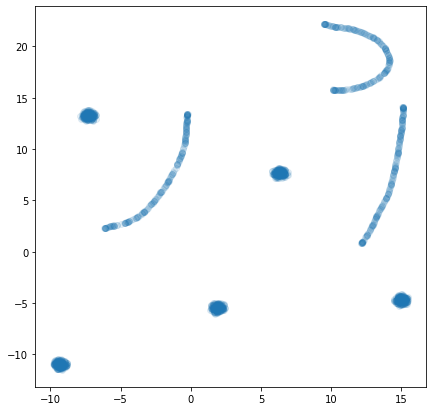
Finally the structure of the data set is clear to us! There are 8 clusters of two distinct varieties: filaments and clouds.
More examples can be found in the Examples subfolder. Extra python packages will be required to run the examples. These packages can be installed via:
pip install -r annchor/Examples/requirements.txt
2 maintainers


Metadata
2 maintainers
Release files for annchor 1.1.1
For a detailed explanation of source distributions (sdists) and built distributions (wheels), please see the package formats documentation.
Source distribution (sdist)
| File | Size | Uploaded | |
|---|---|---|---|
| annchor-1.1.1.tar.gz | 9.2 MB | Details |
Built distribution (wheel)
| File | Interpreter | ABI | Platform | Reset |
|---|---|---|---|---|
| annchor-1.1.1-py3-none-any.whl | Python 3 | none | any | Details |
Total release size: 18.6 MB
Release files / annchor-1.1.1.tar.gz
| Download URL | annchor-1.1.1.tar.gz |
|---|---|
| Size | 9.2 MB |
| Tags | Source |
|
SHA-256 checksum How to use checksums |
9ed63ae32289a8b959af5097664d86f9c9b68cc1052b4785586deb606c019fc9
|
|
BLAKE2b-256 checksum How to use checksums |
30e2c9f2c5f47ec783e2a576b3934fff957e13d83f9ed5748050324f19de73c9
|
| Upload date | |
|
Uploaded using Trusted Publishing? What is trusted publishing? |
No |
| Uploaded via |
twine/6.1.0 CPython/3.13.7
|
Release files / annchor-1.1.1-py3-none-any.whl
| Download URL | annchor-1.1.1-py3-none-any.whl |
|---|---|
| Size | 9.3 MB |
| Tags | Python 3 |
|
SHA-256 checksum How to use checksums |
6d1b952820e056ddd37703b0a9dde0f57ad1282a91926e4f835c446b3e80cb6a
|
|
BLAKE2b-256 checksum How to use checksums |
1afdfb6b1002c1ed8136912a55c357a3da1a6657215c274d90465f2d65e15bbe
|
| Upload date | |
|
Uploaded using Trusted Publishing? What is trusted publishing? |
No |
| Uploaded via |
twine/6.1.0 CPython/3.13.7
|














