
Annealage Mesh
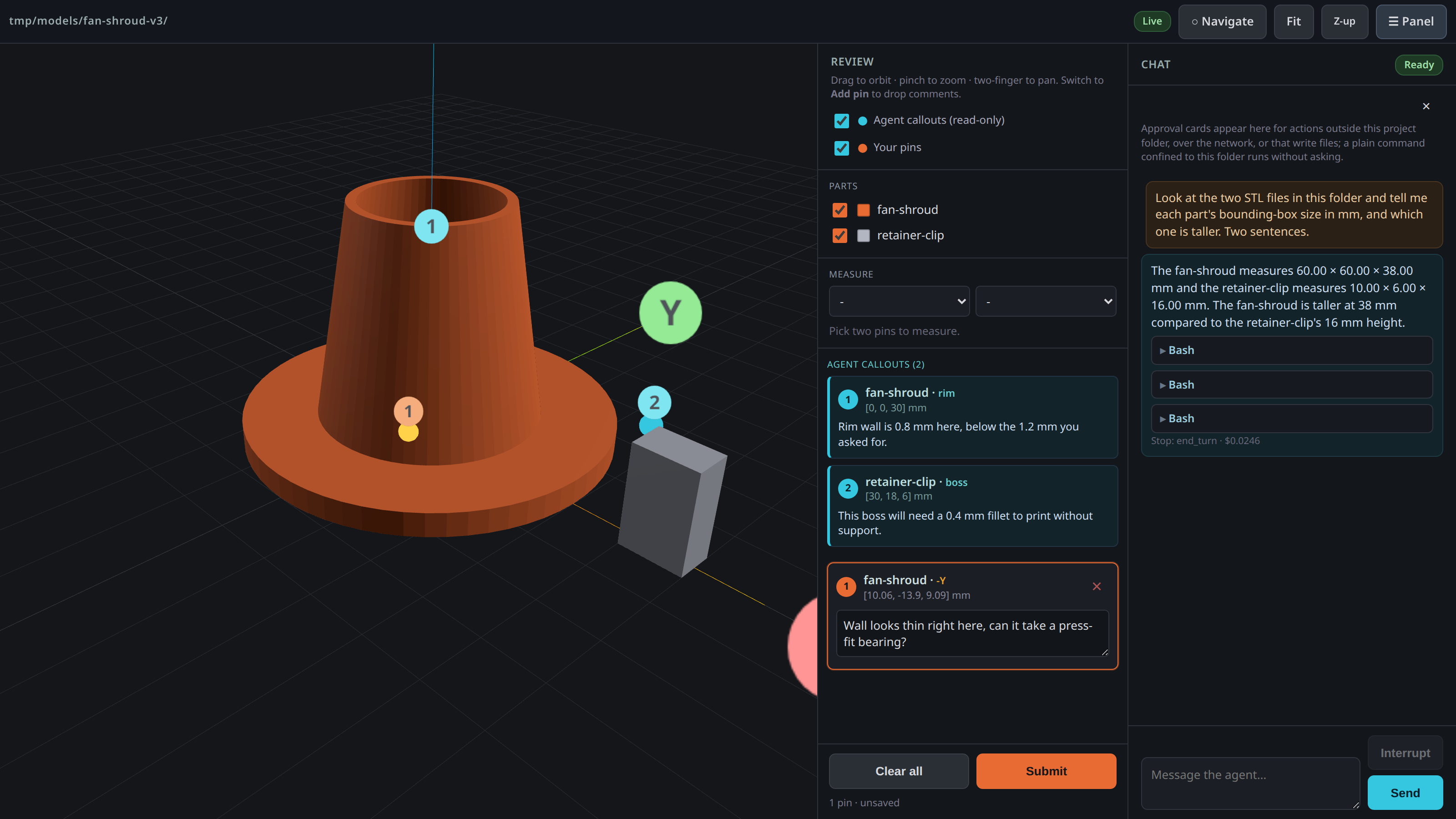
Annealage Mesh is a little web tool for building 3D-printable parts with an agent, by pointing at them. You give it a folder, it serves up a 3D viewer in the browser with a Claude Code chat pane beside it, and the two of you get to work in there.
Ask for a part and the agent writes the CAD script in that folder, runs it, and the STL turns up in the viewer. Click the face that's wrong, say what's wrong with it, and off it goes to fix the script.
Why
I built this while iterating on a 3D-printed part with Claude Code. The CAD was generated from a script, I'd look at a render, and then spend ages typing things like "no, the inside corner on the far wall near the fan, not that one" trying to describe which face I meant. It was a pain, and half the time the agent picked the wrong spot anyway.
Pointing at the thing is just so much easier. So we built a viewer where I click the face and type the comment right there, and the agent gets it back with the actual coordinates, no guessing.
It's bidirectional too, which turned out to be the good bit. The agent can write its own callouts (a location plus a note) and they show up as pins in the viewer for me to see and reply to. So it ends up being a shared surface, I mark up what I want changed, the agent pins its questions on the geometry, and we go back and forth pointing at the same model instead of describing it in words.
Install
Python 3.10+. Four runtime dependencies, and only one of them is large: microdot for the server, platformdirs to find where your settings file belongs on your OS, tomli to read that file on Python 3.10 (3.11 and up have tomllib built in), and the Claude Agent SDK, which is how the chat pane talks to Claude Code. The SDK bundles the Claude Code CLI, so installing this pulls about 90 MB; the other three are pure Python and tiny. three.js 0.160.0 is vendored inside the package and served locally, so the viewer itself needs no network access at all.
On Linux you'll also want bubblewrap and socat:
apt install bubblewrap socat
That's what keeps the agent's shell contained, and agent mode won't start without them rather than quietly running you an uncontained one. macOS has its own sandbox built into the OS so there's nothing to install there. If you'd rather not bother, annealage-mesh view gives you the viewer on its own and needs neither.
Run it straight from GitHub, nothing to install, via uv:
uvx --from git+https://github.com/Annealage/mesh annealage-mesh ./path/to/part
Or install it as a tool:
uv tool install git+https://github.com/Annealage/mesh
# or
pipx install git+https://github.com/Annealage/mesh
Once it's up on PyPI that shortens to uvx annealage-mesh ./part.
Usage
Point it at a folder:
annealage-mesh ./build
It sets the folder up if it isn't already (a models/ and images/ directory, a CLAUDE.md stub, a .gitignore, and git init with one commit if git is installed), starts a local server, prints the URL with a per-run token in it, and opens your browser. Every .stl in there shows up in the viewer, toggle them on/off in the side panel.
There are three subcommands for when you want less than all of that:
annealage-mesh view ./build     # the viewer alone: no agent, no scaffold, no git
annealage-mesh init ./build     # set the folder up and stop
annealage-mesh doctor ./build   # what's installed, what's configured, then stop
If a folder of yours is actually called view, init or doctor, spell it ./view and it's read as the directory. Running inside Claude Code already? The bare form flips to viewer-only and says so, so you don't get an agent inside an agent.
- Drag to orbit, scroll / pinch to zoom, right-drag or two-finger to pan.
- Flip to "Add pin" mode, click the model to drop a pin, then type a comment against it in the panel.
- Hit Submit. Your pins get written to
mesh-comments.jsonin the served folder, which is what the agent reads. - Type in the chat pane to put the agent to work in that folder. Interrupt stops a turn mid-flight, and each turn shows what it cost.
- The agent works the viewer too, not just the folder. It can move the camera, hide and show parts, screenshot what's on screen and pin its own callouts, so "show me the underside of that boss" is something it does rather than tells you to do.
- Hit Pause in the topbar and everything that changes the view gets refused until you hit it again, so you can line up a shot or type a comment without it moving underneath you. It can still look while paused.
- Need a distance between two features? Pick any two placed pins (yours or the agent's) in the "Measure" panel for ΔX/ΔY/ΔZ and the direct distance, drawn as a line in the view.
- Attach a picture to a message with the paperclip, a paste, or a drag and drop: a photo of the printed part, a slicer screenshot, a reference drawing.
- Hit "Sketch" to draw straight on the 3D view, circle the wall that's wrong, and send that as the picture. Quicker than a pin when the shape of the problem is the point.
- "Export" in the chat header writes the conversation into
review/as markdown you can commit. The agent can do it too, with your approval, when you ask it for a record of what you decided. - The gear opens Settings: port, host, model, effort, and a couple of viewer preferences, each shown with where its value came from (a flag, this project's config, your own settings, or the built-in default) so you know which file to edit. Anything that needs a restart says so rather than pretending to apply. There's a Diagnostics block in there too, the same facts
doctorprints, which is what you want when you're looking at this on a phone with no terminal.
It works on a phone too, the three panes become tabs and navigation is all touch (one finger orbits, two fingers pan / zoom). --host tailscale binds your tailnet address instead of loopback, which is what I use to look at a part on my phone while the agent iterates on the desktop.
Sessions are kept, so -c picks up the most recent conversation for that folder and -r lists what's there. Reloading the browser mid-turn doesn't lose anything, the conversation belongs to the session rather than the socket.
There's a fuller walkthrough in docs/user-guide.md covering the loop, the flags, remote access and what to do when something's off.
A few files turn up in the served folder:
mesh-comments.json- your pins and comments, written on submit (also appended tomesh-comments.log).mesh-callouts.json- callouts to show in the viewer. Write pins here and they appear live (cyan, read-only). This is how an agent points back at the model.images/- pictures you attached, sketches you drew, and screenshots the agent saved. Meant to be committed..mesh/- session event logs, this project's own config, any allow-always decisions you made, and a lock file so two servers can't fight over one folder. All of it gitignored exceptconfig.toml, which is shareable and holds no secret.review/- transcripts you exported. Created the first time you export one, not before.CLAUDE.md- a stub describing the folder's contract, generated once if you don't already have one. Never overwritten.
What it'll ask you about
The agent's shell runs sandboxed, so a command that stays inside the project folder just runs without asking. That's deliberate, regenerating a part twenty times would be miserable otherwise. Anything that writes through its edit tools, wants out of the folder, or reaches the network gets you a card in the chat pane with the full command or file contents on it, and you allow it, allow it for the rest of the session, or deny it with a reason. The reason goes to the agent verbatim, so "not that file, do the enclosure instead" is more use to it than a bare no.
Its viewer tools split by what a mistake would cost. Reading anything, and driving the view itself, never asks: it can move the camera and hide parts freely, because you're looking at the screen while it happens and a card per camera move would just get clicked without reading. Pause is the control for that, not a prompt. What does ask is the three that leave something behind after you close the page: writing a callout, deleting one, and saving a screenshot into the folder.
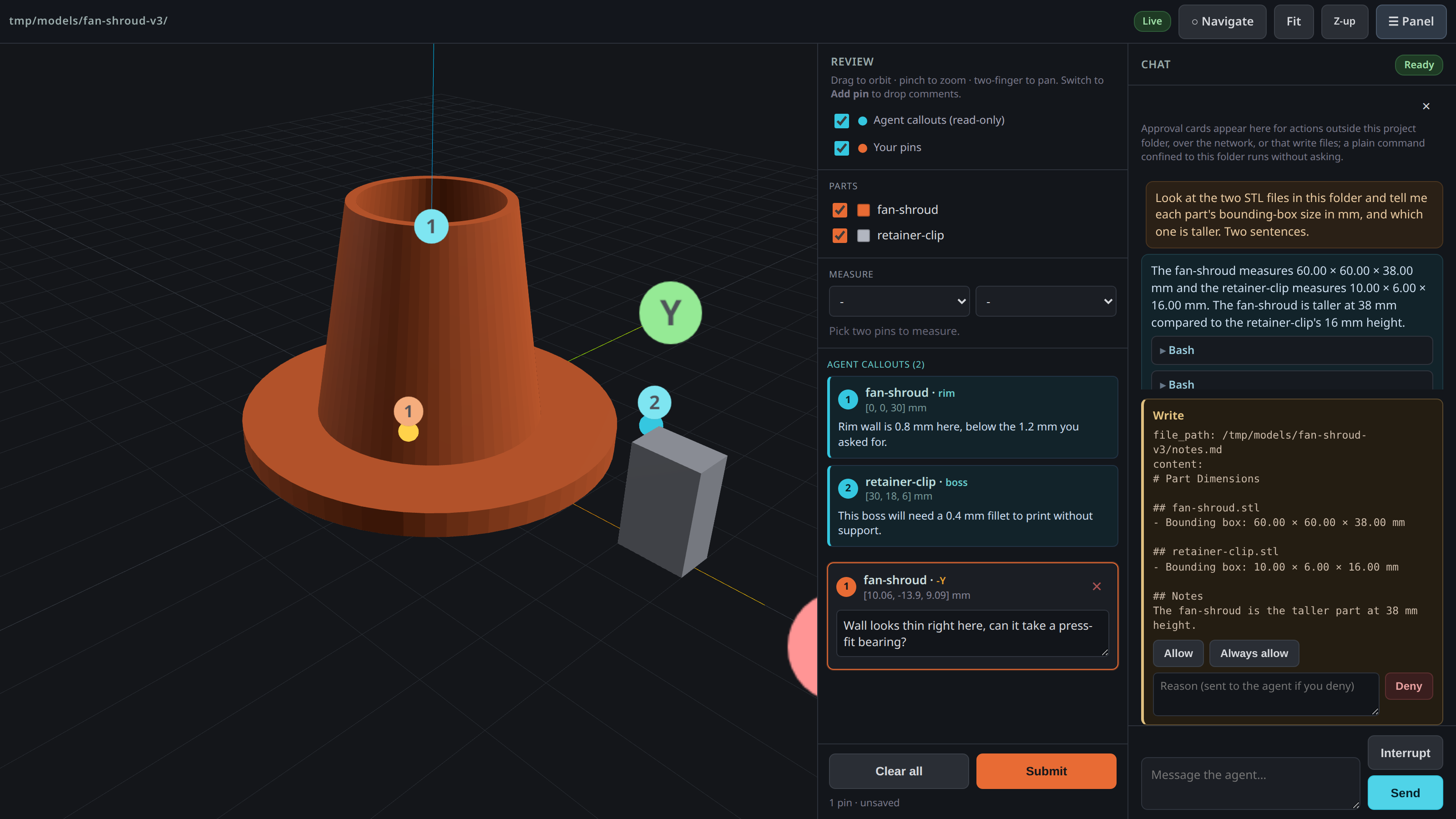
Two things worth knowing about the containment. It stops writes and network, not reads, so a sandboxed shell can still read anything your user can. And the model can't drop the sandbox for a command by asking, which it does try if you let it.
If the folder you point it at has its own .claude/settings.json or .mcp.json in it, mesh won't start the agent until you've said you trust that folder. Those files can declare hooks, hooks are shell commands, and one kind runs before you've typed anything at all, so an unpacked model archive off the internet isn't something to hand a shell to sight unseen. Read them, then --trust-project-config accepts them, recorded against the exact contents you read so any later edit asks again.
It binds to 127.0.0.1 by default, and the startup banner tells you what it's reachable on every run. On anything that isn't loopback the token in the URL stops being defence in depth and becomes the only thing between the network and an agent with a shell, so keep that URL to yourself.
For AI agents
If you're an agent (or setting one up) working outside the chat pane, the contract is still just two JSON files in the served folder, unchanged.
Read the human's feedback from mesh-comments.json:
{
  "submitted_at": "...",
  "count": 1,
  "annotations": [
    { "id": 1, "part": "bracket", "label": "+Z", "point": [12.5, -3.2, 44.0],
      "normal": [0, 0, 1], "faceIndex": 1234, "comment": "this fillet's too sharp" }
  ]
}
point is the click location in model space (same units as the STL), so you can map a comment straight to a spot in the CAD script that generated it.
Write your own callouts to mesh-callouts.json and they show up as cyan pins in the viewer, live:
{
  "annotations": [
    { "id": 1, "author": "agent", "part": "bracket", "label": "+Y", "point": [0, 20, 10],
      "comment": "moved this wall out 2mm, that clear enough?" }
  ]
}
point and comment are the only fields that really matter, the rest are display niceties.
There's also a Claude Code skill in skill/ that wires this up as a workflow, so you can just tell Claude to use Annealage Mesh when it's working on printable models.
Licence
PolyForm Noncommercial 1.0.0, free to use for any noncommercial purpose. Commercial use needs a separate licence; see COMMERCIAL.md.
The Claude Code skill in skill/annealage-mesh/ is MIT, so it can be copied into any agent configuration without restriction.
1 maintainer

Download files
Download the file for your platform. If you're not sure which to choose, learn more about installing packages.
Source Distribution
Built Distribution
Filter files by name, interpreter, ABI, and platform.
If you're not sure about the file name format, learn more about wheel file names.
Copy a direct link to the current filters
File details
Details for the file annealage_mesh-2.0.0.tar.gz.
File metadata
- Download URL: annealage_mesh-2.0.0.tar.gz
- Upload date:
- Size: 684.5 kB
- Tags: Source
- Uploaded using Trusted Publishing? Yes
- Uploaded via:
twine/7.0.0 CPython/3.13.14
File hashes
| Algorithm | Hash digest | |
|---|---|---|
| SHA256 |
2e503d9805889709e2aff2aca0900985bb3e74e1736ec5b469d2145bf3adaf15
|
|
| MD5 |
c3e45acb034a82da33d604c5210be48f
|
|
| BLAKE2b-256 |
52baf29ee68ca13e12e229bb9c5133b69bbcb0ad86bee3679138f381303ae5fe
|
Provenance
The following attestation bundles were made for annealage_mesh-2.0.0.tar.gz:
Publisher:
publish.yml on Annealage/mesh
-
Statement:
-
Statement type:
https://in-toto.io/Statement/v1 -
Predicate type:
https://docs.pypi.org/attestations/publish/v1 -
Subject name:
annealage_mesh-2.0.0.tar.gz -
Subject digest:
2e503d9805889709e2aff2aca0900985bb3e74e1736ec5b469d2145bf3adaf15 - Sigstore transparency entry: 2453472227
- Sigstore integration time:
-
Permalink:
Annealage/mesh@417066877d750b8fddba8eb8f1598cc05a5008e3 -
Branch / Tag:
refs/tags/v2.0.0 - Owner: https://github.com/Annealage
-
Access:
public
-
Token Issuer:
https://token.actions.githubusercontent.com -
Runner Environment:
github-hosted -
Publication workflow:
publish.yml@417066877d750b8fddba8eb8f1598cc05a5008e3 -
Trigger Event:
release
-
Statement type:
File details
Details for the file annealage_mesh-2.0.0-py3-none-any.whl.
File metadata
- Download URL: annealage_mesh-2.0.0-py3-none-any.whl
- Upload date:
- Size: 550.9 kB
- Tags: Python 3
- Uploaded using Trusted Publishing? Yes
- Uploaded via:
twine/7.0.0 CPython/3.13.14
File hashes
| Algorithm | Hash digest | |
|---|---|---|
| SHA256 |
e502653087f5b8ace2ad466ef25840f091a80d2367eceb6042c477e473c0f8a7
|
|
| MD5 |
b50cf2794dc2b724fe29101aa2a8d8c4
|
|
| BLAKE2b-256 |
4bbbda4df53bd65ec59967bd995b76803e9eb757d206e2079db0031c02761173
|
Provenance
The following attestation bundles were made for annealage_mesh-2.0.0-py3-none-any.whl:
Publisher:
publish.yml on Annealage/mesh
-
Statement:
-
Statement type:
https://in-toto.io/Statement/v1 -
Predicate type:
https://docs.pypi.org/attestations/publish/v1 -
Subject name:
annealage_mesh-2.0.0-py3-none-any.whl -
Subject digest:
e502653087f5b8ace2ad466ef25840f091a80d2367eceb6042c477e473c0f8a7 - Sigstore transparency entry: 2453472271
- Sigstore integration time:
-
Permalink:
Annealage/mesh@417066877d750b8fddba8eb8f1598cc05a5008e3 -
Branch / Tag:
refs/tags/v2.0.0 - Owner: https://github.com/Annealage
-
Access:
public
-
Token Issuer:
https://token.actions.githubusercontent.com -
Runner Environment:
github-hosted -
Publication workflow:
publish.yml@417066877d750b8fddba8eb8f1598cc05a5008e3 -
Trigger Event:
release
-
Statement type:







