
Local-first browser UI to explore, inspect, and validate a video annotation dataset.
Verified details
These details have been verified by PyPIProject links
GitHub Statistics
Maintainers

Project description

Local-first browser UI to explore, inspect, and validate a video annotation dataset







Annie visualizes a video dataset alongside its frame-wise annotations and lets you curate and (soon) author them — all in one local, browser-based UI that runs on a single machine. The motivating datasets are CMU-MOSEI and First Impression V2 (face detections + derived face tracks), but Annie is dataset-agnostic.
Screenshots
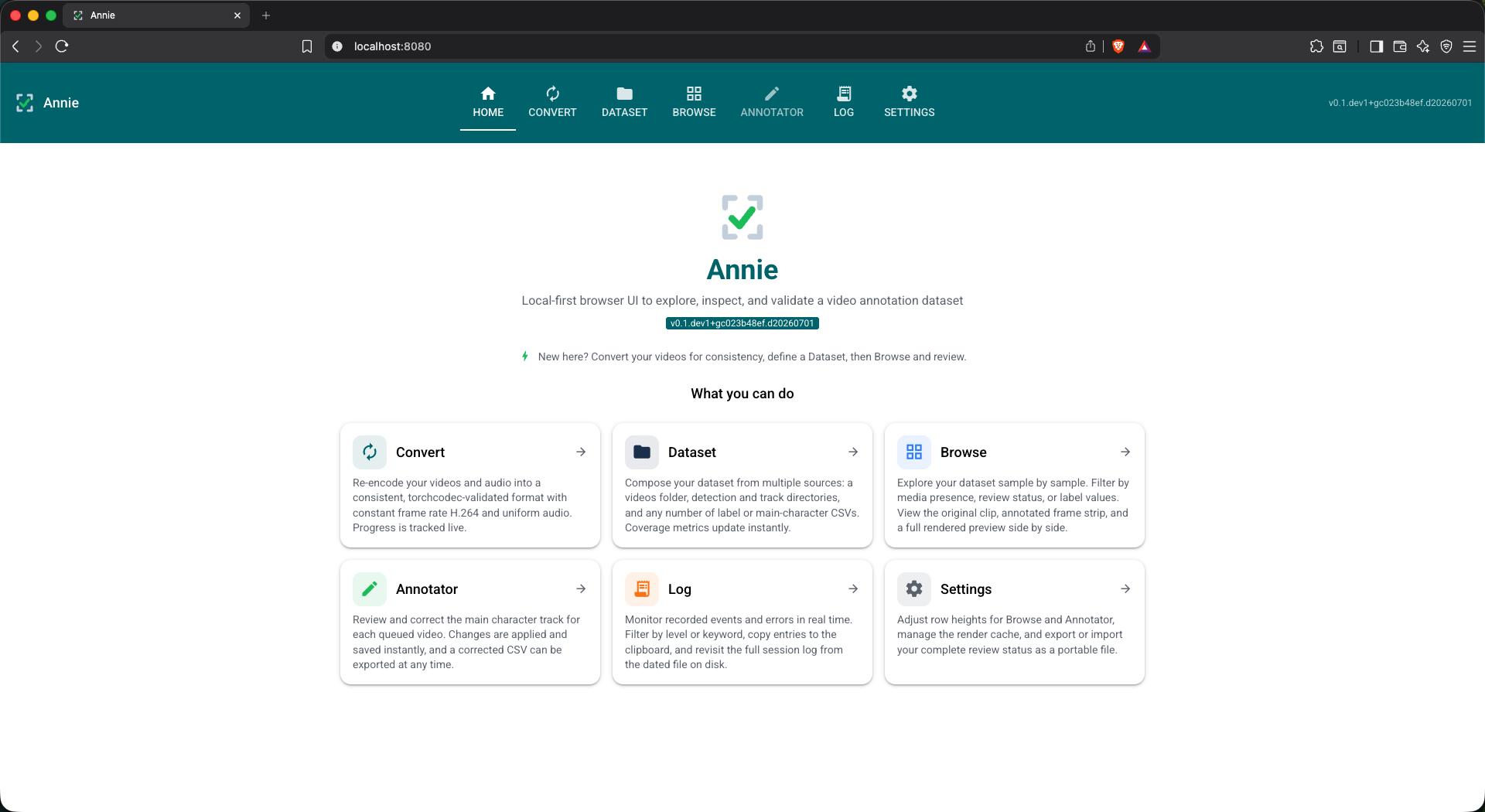
Home tab — landing page with a summary card for each tab.
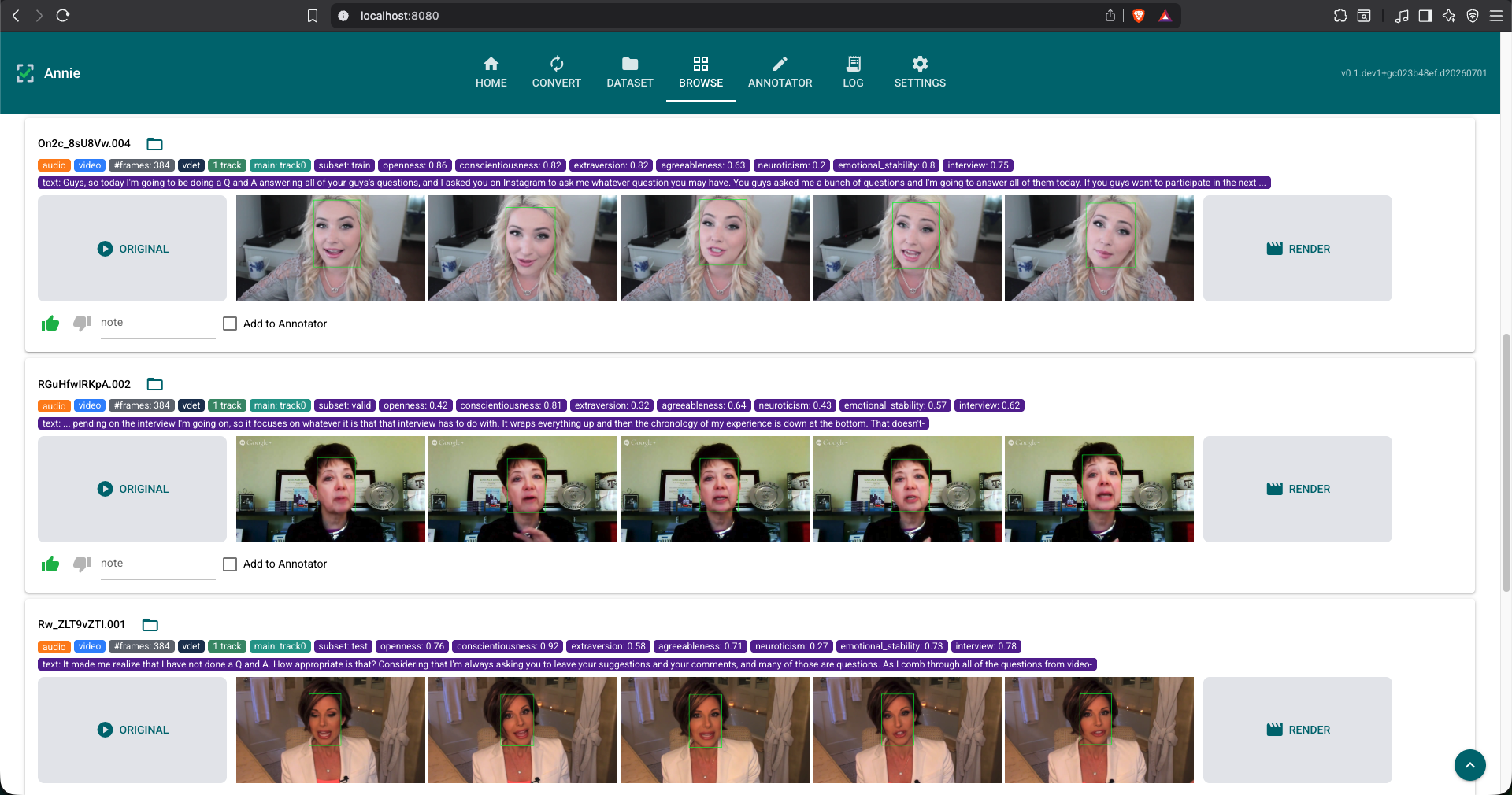
Browse tab — per-video rows with original clip, annotated frame strip, label tags, and review controls.
Features
| Tab | What it does |
|---|---|
| Home | A landing page (the default) summarising each tab; click a card to jump there. |
| Convert | Re-encode an audio/video dataset to a consistent, torchcodec-validated form: uniform audio (format/rate/channels) and constant-frame-rate H.264 video, with explicit audio muxing (or black-frame videos for audio-only). A background batch shows live X/Y progress, %, elapsed, and ETA. |
| Dataset | Build the dataset from a list of data sources (videos folder, vdet/track folders, and any number of label/main-character CSVs). Add a source and it scans in place — no Scan button — with live counts and an Available/Unavailable chip per source. |
| Browse | Scrollable, per-video visualizer with an always-visible filter bar (name, video/audio/vdet/track presence, review, labels): an ORIGINAL placeholder, five-frame strip, on-the-fly annotated render, media/annotation/label tags, and per-video review (liked by default, dislike, note, "Add to Annotator"). Row height is configurable. |
| Annotator | Greys out until videos are queued from Browse; then shows only those, in taller rows, to fix the main-character track — pick a track, see it re-render green, Save, and export the corrected datasource as CSV. |
| Settings | Browse/Annotator row height, render-cache TTL, and review-status export/import (CSV/JSON). |
Highlights
- Extensible data sources — a dataset is an ordered set of sources; a CSV joins
to videos by a chosen key column, exposing its value columns as Browse tags and
filter facets (e.g.
Sentiment: negative,Angry: 0.33). Dataset-agnostic by construction. - Stem matching — videos pair with vdet/track files by filename stem (exact + prefix, longest-stem-first), aggregated into one row per video.
- Composable filtering — filter by vdet/track coverage, review verdict, notes, annotator selection, and label values; facets combine with AND, label values OR.
- Frame-accurate decode — torchcodec
with
exactmode for the annotator andapproximatefor fast scrubbing. - Render-on-demand — a background job burns annotations into a browser-playable clip (libx264 via FFmpeg, audio muxed back); temp clips auto-purge on a TTL.
- Main-character correction — pick the true main character; the fix is written
to a separate
_manualfile (resolutionmanual ▸ source ▸ -1) so human judgement never overwrites the pristine heuristic record, and the resolved datasource exports to a standalone CSV.
Installation
Prerequisites
Required for the source and PyPI install paths. Docker bundles everything automatically.
| Tool | Purpose | Install |
|---|---|---|
| uv | Python package manager | curl -LsSf https://astral.sh/uv/install.sh | sh |
| FFmpeg (4–8) | Frame decode, render pipeline, audio probe | brew install ffmpeg |
| ffprobe | Audio-stream detection (ships with FFmpeg) | included with FFmpeg |
From PyPI
uv pip install "annie[all]"     # core + torch / torchcodec for frame decode & render
annie                           # starts the UI at http://127.0.0.1:8080
From source (development)
git clone https://github.com/fodorad/Annie
cd Annie
make dev      # installs annie[all,dev] in editable mode (torch + torchcodec included)
make run      # starts the UI at http://127.0.0.1:8080
Docker
No Python, uv, or FFmpeg required on the host — Docker bundles everything.
git clone https://github.com/fodorad/Annie
cd Annie
cp .env.example .env   # fill in your HDD paths
make docker-build      # ~5–10 min first time (downloads CPU torch)
make docker-run        # starts the UI at http://localhost:8080
Or pull the pre-built image without cloning:
curl -O https://raw.githubusercontent.com/fodorad/Annie/main/docker-compose.yml
curl -O https://raw.githubusercontent.com/fodorad/Annie/main/.env.example
cp .env.example .env   # fill in your HDD paths
docker compose up      # pulls fodorad/annie:latest automatically
Annie state (logs, session DBs, render cache, saved configs) is stored in
./annie-home/ next to docker-compose.yml by default, so all files are
directly accessible from Finder / Explorer. Exported review CSVs land in
annie-home/tmp/. Override the path with ANNIE_HOME_HOST in .env.
macOS + external HDDs: If
/Volumesis already in Docker Desktop → Settings → Resources → File Sharing, individual drives under/Volumeswork without any additional configuration.
Extras
| Extra | What it adds |
|---|---|
media |
torch, torchcodec — frame decoding & rendering |
dev |
ruff, ty, coverage, pre-commit |
docs |
sphinx, furo, sphinx-autoapi, myst-parser |
all |
media |
Architecture
Annie is a single process with a strict layered architecture; each layer calls only the layer directly beneath it, enforced by import direction:
UI layer          annie/app.py, annie/pages/*          (NiceGUI tabs)
   │  calls down only
Service layer     annie/dataset/*, annie/media/*        (scanning, rendering, filtering, …)
   │
Domain layer      annie/core/models.py, annie/parsers/* (pure data, no I/O frameworks)
   │
Infrastructure    annie/core/config.py, annie/core/theme.py,
                  annie/dataset/storage.py (SQLite), annie/media/decode.py (torchcodec)
The UI never imports sqlite3 or torchcodec directly — it calls a service
function. The core layers install without a heavyweight torch dependency; only the
frame decode and render pipeline need the media extra.
Annotation formats
Both .vdet and .track files share one 17-column CSV schema (CRLF, with header):
frame_id, source, score, x, y, w, h,
left_eye_x, left_eye_y, right_eye_x, right_eye_y,
nose_x, nose_y, left_mouth_x, left_mouth_y, right_mouth_x, right_mouth_y
.vdet— all raw detections for a video; may have several rows per frame.{video_id}__track{N}.csv— one tracked face across frames (one row/frame).- main-character CSV — e.g.
participant_face_track_heuristic.csvwithuuid,track_id, the active main character per video (-1= none). The key and track-id columns are chosen when the source is added; manual corrections go to the_manualsibling. - label CSV — any CSV; pick a key column (joined to the video id) and value columns to surface as Browse tags and filter facets.
Development
git clone https://github.com/fodorad/Annie
cd Annie
make dev      # install in editable mode with all extras
make check    # lint + type-check + test + docs (mirrors CI)
make run      # start the app at http://127.0.0.1:8080
Tip — skip re-clicking paths on every restart: set ANNIE_* environment
variables and Annie will seed those sources automatically at launch. This is
equivalent to manually adding sources on the Dataset tab, but saves time during
development when you always work with the same dataset.
export ANNIE_VIDEOS_DIR=/path/to/videos
export ANNIE_VDET_DIR=/path/to/vdets
export ANNIE_TRACK_DIR=/path/to/tracks
export ANNIE_PARTICIPANTS_FILE=/path/to/participant_face_track_heuristic.csv
make run
Sources seeded via env vars are session-only; curation and corrections always
persist. Save your source configuration from the Dataset tab to a named config
file to reload it in one click without relying on env vars. Every setting has a
corresponding ANNIE_* variable (see annie/core/config.py).
See CONTRIBUTING.md for the commit convention and release flow.
Documentation
Related Projects
- exordium — multimodal feature extraction (the detectors/trackers that produce Annie's
.vdet/.trackinputs).
Contact
Ádám Fodor — adamfodor.com · fodorad201@gmail.com
License
Project details
Verified details
These details have been verified by PyPIProject links
GitHub Statistics
Maintainers
Release history Release notifications | RSS feed


Download files
Download the file for your platform. If you're not sure which to choose, learn more about installing packages.
Source Distribution
Built Distribution
Filter files by name, interpreter, ABI, and platform.
If you're not sure about the file name format, learn more about wheel file names.
Copy a direct link to the current filters
File details
Details for the file annie-1.0.1.tar.gz.
File metadata
- Download URL: annie-1.0.1.tar.gz
- Upload date:
- Size: 45.7 MB
- Tags: Source
- Uploaded using Trusted Publishing? Yes
- Uploaded via: twine/6.1.0 CPython/3.13.12
File hashes
| Algorithm | Hash digest | |
|---|---|---|
| SHA256 |
cc18e3b7cbbc8b585678d83f39058c4f97a26c3147dd2f5ae00e3f8bb351ecb3
|
|
| MD5 |
3f4697549dbbeb01dabf6979a002b5d4
|
|
| BLAKE2b-256 |
f099b482b73d3d5046faa2fcbde06339399ac9e37a7b05f6fe61e7bbd1a50a78
|
Provenance
The following attestation bundles were made for annie-1.0.1.tar.gz:
Publisher:
cd.yml on fodorad/Annie
-
Statement:
-
Statement type:
https://in-toto.io/Statement/v1 -
Predicate type:
https://docs.pypi.org/attestations/publish/v1 -
Subject name:
annie-1.0.1.tar.gz -
Subject digest:
cc18e3b7cbbc8b585678d83f39058c4f97a26c3147dd2f5ae00e3f8bb351ecb3 - Sigstore transparency entry: 2058836966
- Sigstore integration time:
-
Permalink:
fodorad/Annie@310f16acc09502a48228cb31d6cb63649ba95b78 -
Branch / Tag:
refs/tags/v1.0.1 - Owner: https://github.com/fodorad
-
Access:
public
-
Token Issuer:
https://token.actions.githubusercontent.com -
Runner Environment:
github-hosted -
Publication workflow:
cd.yml@310f16acc09502a48228cb31d6cb63649ba95b78 -
Trigger Event:
push
-
Statement type:
File details
Details for the file annie-1.0.1-py3-none-any.whl.
File metadata
- Download URL: annie-1.0.1-py3-none-any.whl
- Upload date:
- Size: 110.6 kB
- Tags: Python 3
- Uploaded using Trusted Publishing? Yes
- Uploaded via: twine/6.1.0 CPython/3.13.12
File hashes
| Algorithm | Hash digest | |
|---|---|---|
| SHA256 |
6ddee0eb779c8dabdad80eebcf77b2b0aa8e3bb21ba3cdcb0fc1777fbabd803e
|
|
| MD5 |
e95298881be8b69b4a694c20940ec696
|
|
| BLAKE2b-256 |
881619b5db3c6eb5509fdd82c0d7a44af0fdd0013cda9d8b5f440611960b9206
|
Provenance
The following attestation bundles were made for annie-1.0.1-py3-none-any.whl:
Publisher:
cd.yml on fodorad/Annie
-
Statement:
-
Statement type:
https://in-toto.io/Statement/v1 -
Predicate type:
https://docs.pypi.org/attestations/publish/v1 -
Subject name:
annie-1.0.1-py3-none-any.whl -
Subject digest:
6ddee0eb779c8dabdad80eebcf77b2b0aa8e3bb21ba3cdcb0fc1777fbabd803e - Sigstore transparency entry: 2058837084
- Sigstore integration time:
-
Permalink:
fodorad/Annie@310f16acc09502a48228cb31d6cb63649ba95b78 -
Branch / Tag:
refs/tags/v1.0.1 - Owner: https://github.com/fodorad
-
Access:
public
-
Token Issuer:
https://token.actions.githubusercontent.com -
Runner Environment:
github-hosted -
Publication workflow:
cd.yml@310f16acc09502a48228cb31d6cb63649ba95b78 -
Trigger Event:
push
-
Statement type:






