
annnet - Annotated Network Data Structure for Science





annnet keeps a network, its annotations, and analysis contexts in one Python object. Import an interaction table or an existing graph, attach measurements and results, select the part you need, and use it with other graph libraries.
🚧 annnet is under active development.
Feedback and bug reports are very welcome via GitHub issues.
Why annnet?
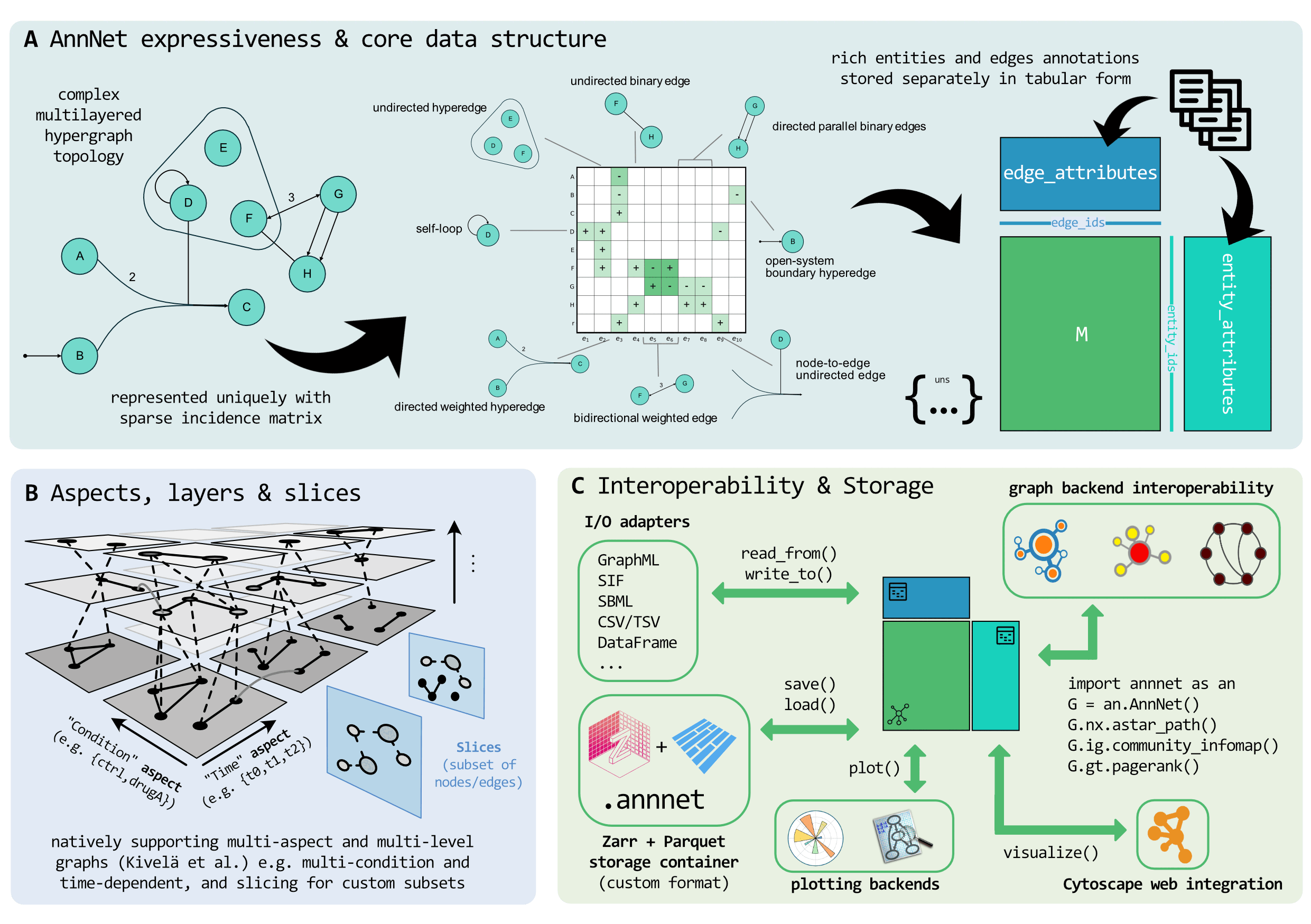
annnet aims to combine graph expressiveness, annotation-centric data handling, and practical interoperability in one model:
- Rich graph semantics: directed and undirected edges, parallel edges, self-loops, hyperedges, and edge-as-entity semantic.
- Multilayer and slice-aware modeling: represent layers, aspects, inter-layer links, and named graph slices.
- Annotated tables throughout: keep structured metadata for nodes, edges, slices, layers, and graph-level state, using Narwhals-compatible dataframes.
- Import and export: NetworkX, igraph, graph-tool, GraphML, GEXF, SIF, SBML, CX2 (Cytoscape exchange format v2), Excel/CSV/TSV/JSON, Parquet graph directories, and dataframes.
- Algorithm access: lazy calls into NetworkX/igraph/graph‑tool via the graph-owned
anet.nx,anet.ig, andanet.gtaccessors. - Native storage: persist graph structure and annotations in a
.annnetlayout built from Zarr, Parquet, and JSON.
Features
Minimal core dependencies



The base package keeps the required runtime small. numpy, scipy, narwhals, and pkg-infra are required, which gives you the core graph model, sparse structure handling, and dataframe interoperability layer without forcing heavyweight optional backends.
Graph modeling
- Simple graphs, directed graphs, and multigraphs
- Hyperedges, including directed source-to-target groups
- Signed and weighted relations with rich node and edge annotations
- Efficient indexing, lookup helpers, and slice-based views
- Edge-, node-, and graph-level semantics in the same container
Data and file interoperability



annnet separates tabular in-memory backends from file formats. For annotated tables in memory, it can work through Narwhals with Polars DataFrames, pandas DataFrames, or PyArrow-backed tabular objects, letting you keep the table engine that best fits the rest of your workflow.
The file-format IO modules cover graph exchange and persistence formats such as:
- GraphML, GEXF, SIF, and SBML
- CX2 (Cytoscape exchange)
- Parquet graph directories
- CSV/TSV, JSON/NDJSON, and Excel
Runtime backend interoperability



- NetworkX via
anet.nxandto_nx/from_nx - igraph via
anet.igandto_igraph/from_igraph - graph-tool via
anet.gtandto_graphtool/from_graphtool
Cytoscape Web integration and other network visualizations




annnet can export CX2 for Cytoscape and also show Cytoscape.js views directly from Python. That makes it practical to inspect graphs in a browser or notebook-oriented workflow without first leaving the annnet data model. For static outputs, annnet.utils.plot draws with Graphviz, pydot or Matplotlib, and annnet.utils.save writes the drawing to a file.
Disk-backed storage


The native .annnet format is intended to be lossless and analysis-friendly. Sparse structure is stored in Zarr, annotated tables are stored in Parquet, and metadata is stored in JSON so graphs can be reopened without flattening away structure or annotations.
Installation
The latest stable release is published on PyPI:



Base install:
pip install annnet
Optional extras let you add tabular backends, graph backends, plotting backends, and IO/storage support only when needed:
# Graph backends
pip install "annnet[networkx,igraph]"

# IO and serialization helpers
pip install "annnet[io]"

# Plotting helpers
pip install "annnet[plot]"

# More granular extras
pip install "annnet[polars]"
pip install "annnet[pandas]"
pip install "annnet[pyarrow]"
pip install "annnet[parquet]"
pip install "annnet[zarr_io]"
pip install "annnet[excel]"
pip install "annnet[sbml]"
pip install "annnet[matplotlib]"
pip install "annnet[pydot]"
pip install "annnet[graphviz]"

# Common pip-installable extras in one bundle
pip install "annnet[all]"
graph-tool is supported through the adapters and the anet.gt accessor when installed, but it is not distributed on PyPI. Install it through your OS or conda-based package manager and annnet will detect it.
Quick Start
Install annnet[polars,storage]. From a repository checkout, import the small
synthetic interaction table:
import annnet as an
import polars as pl

interactions = pl.read_csv('docs/guide/data/interactions.csv')
anet = an.from_edge_frame(
    interactions,
    edge_id='edge_id',
    sign='effect',
    directed=True,
    slice='prior',
)
anet.attrs.backend = 'polars'
anet.summary()  # 10 nodes, 11 edges

supported = anet.view(edges=anet.E.select(confidence__gte=0.85))
supported.attrs.table('edges', derived=True)

anet.attrs.update('nodes', {'ERK': {'label': 'ERK response'}})
anet.write('analysis.annnet')
restored = an.read('analysis.annnet')
The quickstart explains the input columns and each step. The Guide has five topic notebooks covering the model, annotations and views, slices, layers, and computation and storage. Longer analyses and integrations are in Tutorials.
Backend-Specific Integration
If an optional backend is installed, annnet can dispatch directly to that backend while handling conversion for you:
centrality = anet.nx.degree_centrality(anet)
anet.nx.<function> is the function networkx.<function>: annnet converts the graph, puts the converted graph in place of anet in the call, and returns the result of NetworkX. anet.ig and anet.gt do the same for igraph and graph-tool. The converted graphs are cached. After edits, call the accessor's clear() or use a fresh adapter conversion; automatic invalidation does not cover every mutation. See Backend accessors.
Use anet.nx.backend(...), anet.ig.backend(...), or anet.gt.backend(...) when you want the concrete projected graph object. Use anet.nx.<function>(anet, ...), anet.ig.<function>(anet, ...), or anet.gt.<namespace>.<function>(anet, ...) when you want conversion plus dispatch in one step.
Examples:
# Operate on the active slice
bc = anet.nx.betweenness_centrality(anet)

# Build a projected NetworkX graph explicitly
nx_graph = anet.nx.backend(
    directed=True,
    hyperedge_mode='skip',  # or "expand"
    slice='prior',
    simple=True,
)

# igraph interoperability
pagerank = anet.ig.pagerank()
Interoperability
High-fidelity conversions aim to preserve IDs, attributes, and directionality. When a target format is inherently lossy, annnet exposes manifests that can be reused during re-import to recover as much structure as possible.
Two adapter families are involved:
- Runtime backend adapters for in-memory conversion and algorithm dispatch with NetworkX, igraph, and graph-tool
- IO adapters for file formats and tabular exchange such as GraphML, GEXF, SIF, SBML, CX2, Parquet, Excel, JSON, and Narwhals-backed dataframes
NetworkX:
import annnet as an

nx_graph, manifest = an.adapters.to_nx(anet, directed=True, hyperedge_mode='skip')

# ... run algorithms or edit nx_graph ...

from_networkx = an.adapters.from_nx(nx_graph, manifest)
igraph:
ig_graph, ig_manifest = an.adapters.to_igraph(anet, directed=True, hyperedge_mode='skip')
from_igraph = an.adapters.from_igraph(ig_graph, ig_manifest)
File formats and dataframes:
import annnet as an

# GraphML / GEXF / SIF
# What the format cannot hold goes into a sidecar file beside it
an.io.to_graphml(anet, 'graph.graphml', directed=True, hyperedge_mode='reify')
from_graphml = an.io.from_graphml('graph.graphml')

an.io.to_sif(anet, 'graph.sif')
from_sif = an.io.from_sif('graph.sif')

# JSON / NDJSON
an.io.to_json(anet, 'graph.json')
from_json = an.io.from_json('graph.json')

# Parquet graph directory
an.io.to_parquet(anet, 'graph_dir/')
from_parquet = an.io.from_parquet('graph_dir/')

# CX2 (Cytoscape exchange format v2)
cx2 = an.io.to_cx2(anet, hyperedges='reify')
from_cx2 = an.io.from_cx2(cx2, hyperedges='manifest')
Notes:
- Hyperedges may be dropped, expanded, or reified depending on the target and conversion mode.
- Backend graphs are single-view projections, so slice handling should be chosen explicitly when it matters.
- Returned manifests and sidecar files improve round-trip fidelity when the external target cannot encode all annnet semantics directly. See What each format keeps.
Storage
The .annnet format is the native persisted representation for annnet graphs. It is designed to preserve structure, attributes, slices, and metadata in a layout that is both lossless and inspectable on disk.
import annnet as an

an.io.write(anet, 'my_graph.annnet', overwrite=True)
restored = an.io.read('my_graph.annnet')
Layout highlights:
manifest.jsonstores versioning, counts, and slice metadatastructure/incidence.zarrstores sparse topology datastructure/*.parquetstores structural indices and edge definitionstables/*.parquetstores node, edge, and slice annotationsslices/,audit/,uns/and, for a multilayer graph,layers/keep slice state, history, unstructured metadata and multilayer state
Package Overview
annnet is organized in layers. Most users interact with the high-level graph API, while adapters, IO, and backend-specific helpers stay separated underneath so graph semantics do not get tangled with storage or third-party conversions.
annnet/
├── core/              # Main Graph API, managers, views, and backend accessors
├── adapters/          # In-memory conversion layers for external graph libraries
├── io/                # File readers/writers and native .annnet persistence
├── algorithms/        # Algorithms implemented against AnnNet data-structure
└── utils/             # Plotting and other shared utilities
Internal design
- Sparse incidence matrix for the core topology
- Attributes decoupled from structure through annotated tables
- Lazy conversion to external backends on demand
- Optional caching for converted backend graphs
Philosophy
- One consistent interface across multiple graph families
- Interoperability first, not ecosystem replacement
- Performance-aware design with room for richer semantics
- Modular internals rather than a monolithic graph object
Development
Local dev and test setup


For local development, uv is the lightest path for syncing dependency groups and running day-to-day checks. Pixi is the heavier but more complete route when you need the broader environment, including graph-tool where supported.
# Dev tools
uv sync --group dev

# Test dependencies
uv sync --group tests
uv run pytest
For the full Pixi environment:
pixi install
pixi run test-all
Notes:
graph-toolis only available on selected platforms.- The Pixi configuration includes Python and graph-tool-aware test tasks for the supported platforms.
Docs setup
Use the module entrypoint for MkDocs in this repository:
uv sync --group docs
uv run --group docs python -m mkdocs serve --dev-addr 127.0.0.1:8000
Open http://127.0.0.1:8000. The build executes the five Guide notebooks and
renders saved outputs for the Tutorials. Run uv run --group docs python -m mkdocs build --strict to validate the site. See the documentation contribution
guide for faster previews and notebook environments.
Contributing
Contributions are welcome, especially around public API, interoperability, file adapters, and algorithms. For changes that affect graph semantics or round-trip behavior, include tests that demonstrate the intended behavior and guard against regressions.



Useful contributor tooling includes pre-commit, ruff, black, pytest, and tox. If you are changing IO or backend conversion code, it is worth testing both happy-path import/export and round-trip fidelity.
CI and repository activity






The repository uses GitHub Actions for testing, linting, docs, and security checks. Open issues and pull requests are the best place to discuss design questions or proposed changes before a larger refactor.
License
annnet is licensed under the BSD-3 License.
3 maintainers


Metadata
3 maintainers
Release files for annnet 0.4.1
For a detailed explanation of source distributions (sdists) and built distributions (wheels), please see the package formats documentation.
Source distribution (sdist)
| File | Size | Uploaded | |
|---|---|---|---|
| annnet-0.4.1.tar.gz | 917.7 kB | Details |
Built distribution (wheel)
| File | Interpreter | ABI | Platform | Reset |
|---|---|---|---|---|
| annnet-0.4.1-py3-none-any.whl | Python 3 | none | any | Details |
Total release size: 1.4 MB
Release files / annnet-0.4.1.tar.gz
| Download URL | annnet-0.4.1.tar.gz |
|---|---|
| Size | 917.7 kB |
| Tags | Source |
|
SHA-256 checksum How to use checksums |
ffbb9bfb3a630db8ee789e0ac3227501a7a66c8ef64d2d21cefb5ebfe3a4e4a8
|
|
BLAKE2b-256 checksum How to use checksums |
6c24f9fa5ab76cb9271a9f48d8310e606b55bec810876944e7f31a5aac30b381
|
| Upload date | |
|
Uploaded using Trusted Publishing? What is trusted publishing? |
No |
| Uploaded via |
twine/7.0.0 CPython/3.13.9
|
Release files / annnet-0.4.1-py3-none-any.whl
| Download URL | annnet-0.4.1-py3-none-any.whl |
|---|---|
| Size | 474.1 kB |
| Tags | Python 3 |
|
SHA-256 checksum How to use checksums |
525a76126265573d8b52f7fd15672fc3b8c8b81723d3b27d7ef129857049d171
|
|
BLAKE2b-256 checksum How to use checksums |
d6b05480e1795db60a3b6bbfcd9c9479257d1c07d03c3172f1f752e0b5e33c17
|
| Upload date | |
|
Uploaded using Trusted Publishing? What is trusted publishing? |
No |
| Uploaded via |
twine/7.0.0 CPython/3.13.9
|














