
Local YOLO annotation viewer and editor

Project description
Anno Viz
Anno Viz is a local YOLO annotation viewer and editor for image datasets. It opens a native desktop window backed by a web UI, shows the current image with editable bounding boxes, and includes a thumbnail timeline for moving through the dataset quickly.
Screenshot
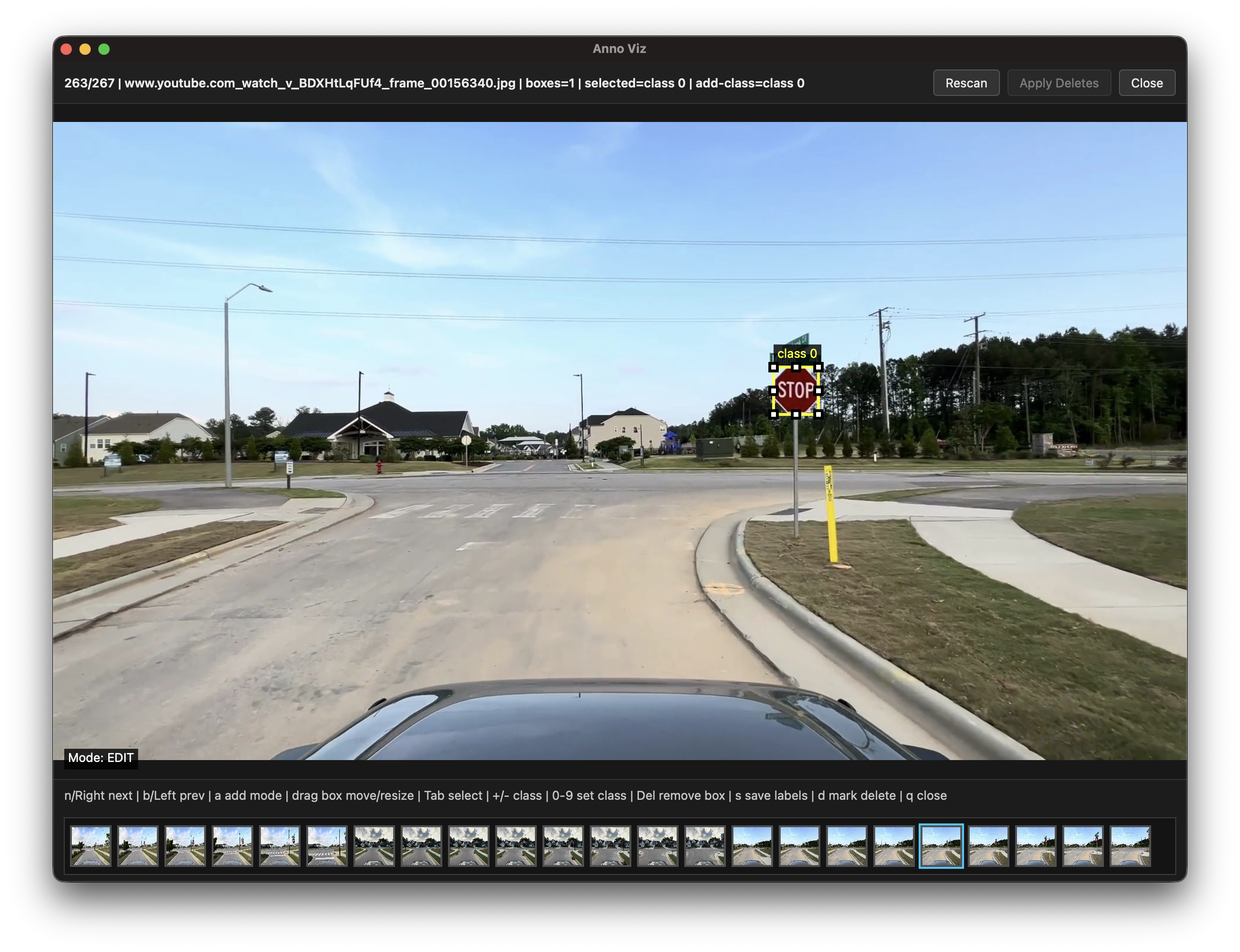
Dataset Layout
Anno Viz expects a dataset directory with this structure:
dataset/
  images/
    image_001.jpg
    image_002.jpg
  labels/
    image_001.txt
    image_002.txt
  classes.txt
You can also use data.yaml instead of classes.txt for class names.
Labels use standard YOLO text format:
class_id x_center y_center width height
The coordinate values are normalized from 0 to 1.
Install
Create and activate a virtual environment if you want to keep dependencies isolated:
python3 -m venv .venv
source .venv/bin/activate
Install the published package directly with:
python3 -m pip install annoviz
Install Anno Viz and its dependencies from the project root:
python3 -m pip install .
This installs the annoviz command. If you install outside a virtual environment and your shell cannot find annoviz, add your Python user scripts directory to PATH. On macOS with the system/Xcode Python this is often:
export PATH="$HOME/Library/Python/3.9/bin:$PATH"
For active development, install it in editable mode:
python3 -m pip install -e .
pywebview is required because the editor opens in a native desktop window. On macOS with Python 3.9, requirements.txt pins the PyObjC packages below version 12 because PyObjC 12 may try to build from source and fail on that toolchain.
On Ubuntu and other Linux desktops, pywebview also needs system GUI libraries:
sudo apt install python3-gi python3-gi-cairo gir1.2-gtk-3.0 gir1.2-webkit2-4.1
If you run Anno Viz from a virtualenv on Ubuntu, create the virtualenv with access to system packages so it can import gi:
python3 -m venv --system-site-packages .venv
Configure Dataset Directory
If you run annoviz inside a folder that already has this layout:
images/
labels/
classes.txt or data.yaml
Anno Viz will use the current directory as the dataset automatically. No anno_viz_config file is needed for that case.
Otherwise, set the default dataset directory for the current workspace:
annoviz --set-dataset-dir /path/to/dataset
This creates a local workspace config file named anno_viz_config. It is ignored by git, so each workspace can point at its own dataset.
When you use a saved workspace dataset, Anno Viz also remembers the last image index you were viewing and resumes from there on the next launch.
You can also use the underscore alias:
annoviz --set_dataset_dir /path/to/dataset
The slideshow delay defaults to 50 ms. To save a different delay for the current workspace:
annoviz set slideshow delay 75
annoviz --set-slideshow-delay 75
Run
After setting the dataset directory, or from inside a dataset folder that matches the default layout:
annoviz
You can also run from source without installing through the compatibility wrappers:
python3 app.py
python3 anno_viz.py
python3 -m annoviz
To temporarily open a different dataset without changing the saved workspace config:
annoviz --dataset-dir /path/to/other/dataset
annoviz -dataset_dir /path/to/other/dataset
Optional Paths
Use these when your dataset does not follow the default images/, labels/, classes.txt or data.yaml layout:
annoviz \
  --images-dir /path/to/images \
  --labels-dir /path/to/labels \
  --classes-file /path/to/classes.txt
Other useful options:
annoviz --start-index 25
annoviz --port 8765
annoviz --save-dir /path/to/rendered/previews
annoviz --browser
Controls
Control
Action
n, Right Arrow
Next image
b, Left Arrow
Previous image
c
Move back 5 images
v
Move forward 2 images
x
Move back 10 images
Play
Start or stop slideshow playback
<, > direction button
Toggle slideshow direction
Any key during slideshow
Stop slideshow playback
a
Toggle add-annotation mode
Drag box
Move or resize an annotation
Tab
Select next box
+, -
Change selected/add class
0 to 9
Set selected/add class id
Delete, Backspace
Remove selected box from the label
s
Save label edits
d
Toggle current image in the pending-delete list
Click a red thumbnail
Undo pending delete for that image
Apply Deletes
Delete all marked images and matching label files
q, Escape, Close
Close the editor
Delete Flow
Press d to mark the current image for deletion, or press d again to undo it. Marked thumbnails are shown in red, and the current marked image gets a translucent red overlay.
Deletion is not applied immediately. You can undo a pending delete by clicking the red thumbnail. To permanently remove all marked images and their label files, click Apply Deletes.
When closing from q, Escape, or the Close button with pending deletes, Anno Viz asks whether to apply the pending deletes before closing.
Config
The workspace config file is:
anno_viz_config
It stores JSON like:
{
  "dataset_dir": "/path/to/dataset",
  "last_index": 42,
  "slideshow_delay_ms": 50
}
This file is intentionally ignored by git because it is machine/workspace-specific.
Troubleshooting
If the editor says the dataset directory is not set, run:
annoviz --set-dataset-dir /path/to/dataset
If you are already inside the dataset folder, make sure it contains images/, labels/, and either classes.txt or data.yaml. In that case annoviz will use the current directory automatically without creating anno_viz_config.
If pywebview is missing, run:
python3 -m pip install .
If the native window does not open on Ubuntu and the error mentions No module named 'gi', install the GTK/WebKit packages listed above and make sure your virtualenv can import gi. You can also run:
annoviz --browser
If no images appear, check that your image files are inside the configured images/ directory. Supported extensions are handled by the local image collector in io_utils.py.
Release history Release notifications | RSS feed


Download files
Download the file for your platform. If you're not sure which to choose, learn more about installing packages.
Source Distribution
Built Distribution
Filter files by name, interpreter, ABI, and platform.
If you're not sure about the file name format, learn more about wheel file names.
Copy a direct link to the current filters
File details
Details for the file annoviz-0.2.4.tar.gz.
File metadata
- Download URL: annoviz-0.2.4.tar.gz
- Upload date:
- Size: 38.9 kB
- Tags: Source
- Uploaded using Trusted Publishing? No
- Uploaded via: twine/6.2.0 CPython/3.13.5
File hashes
| Algorithm | Hash digest | |
|---|---|---|
| SHA256 |
10717c4d2a7cdc4b5ce1177ce973ce36fd17f50fe633a0f89e9f5a927ad39018
|
|
| MD5 |
db355efc4553e9aef5cb61ceee34bdc8
|
|
| BLAKE2b-256 |
568ed0001c386478729a40643c34342d0336936ecb965c96596e62238c9c1f7e
|
File details
Details for the file annoviz-0.2.4-py3-none-any.whl.
File metadata
- Download URL: annoviz-0.2.4-py3-none-any.whl
- Upload date:
- Size: 37.9 kB
- Tags: Python 3
- Uploaded using Trusted Publishing? No
- Uploaded via: twine/6.2.0 CPython/3.13.5
File hashes
| Algorithm | Hash digest | |
|---|---|---|
| SHA256 |
82a1b4beb5ae607a25810c18c96d47a9cde214331a209bbb7eed6ac674d033b9
|
|
| MD5 |
ea0ace09b6c527389fa20675d1931eb2
|
|
| BLAKE2b-256 |
94e7cbb95e8aaf1fe4c440a284d9f3e2ec061e8e47573c5f02085ae29f28a366
|






