
annt: Simple annotation tools for object detection task.

Project description
annt
Simple annotated file loader for object detection task.
Description
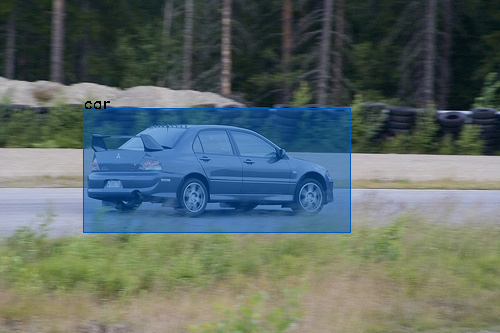
Various tools have been developed so far for object detection tasks. However, there are no standard in annotation tools and formats and developers still write their own json or xml parser of annotation files. annt is an annotation tool that operates in the form of cloud services such as dropbox. annt provides not only simple and comfortable annotation exprience, but also powerful library for loading annotated images.
This is the python library which can read images annotated with annt. You can load annotated images in a simple way and focus on the essential AI development. Also, this library has a basic build-in preprocessing functions. So you can save time to write extra code.
Usage and Example
Example 1. Load annotated images
import annt

# annotations is list of annotation data
annotations = annt.load('~/Dropbox/app/project_name')

# Display ths information of each annotation file.
for a in annotations:
    image = a.image  # opencv2 image array
    boxes = a.boxes  # list of bounding boxes

    height, width, colors = image.shape  # you can

    for box in boxes:
        # Tag information (str)
        print(f'~ tag name : box.tag ~')

        # You can get coordination information of the box by two methods,
        # Left Top Style and Edge Style.
        # Coordination information based on left top of the box. (Left-Top Style)
        print(f'x : {box.x}')
        print(f'y : {box.y}')
        print(f'w : {box.w}')
        print(f'h : {box.h}')

        # Coordination information based on the distance from each edge of the image. (Edge Style)
        print(f'left : {box.left}')
        print(f'right : {box.right}')
        print(f'top : {box.top}')
        print(f'bottom : {box.bottom}')

        # If you change these coordination properties, all of them will recomputed.
        box.w = 300  # This operation will also change box.right property.
Example 2. Data augumentation
import annt
import random

# annotations is list of annotation data
annotations = annt.load('./Dropbox/App/annt/test')
sample_n = 10  # Number of samples from one image

# Display ths information of each annotation file.
augumented = []
for raw_a in annotations:
    for i in range(sample_n):

        # Rotate image
        rot_deg = random.choice([0, 90, 180, 270, 360])
        a = raw_a.rotate(rot_deg)

        # Tilt image
        tilt_deg = random.randint(-8, 8)
        a = a.rotate(tilt_deg)

        # Flip image
        flip_x = random.randint(0, 1)
        flip_y = random.randint(0, 1)
        a = a.flip(flip_x, flip_y)
        augumented.append(a)

# Show first augumented image.
augumented[0].show()
Getting Started
- Register annt and annotate imaes.
- Install this libary from pip.
- Develop you own project.
Install
you can install from pip.
pip install annt
Documentations


Download files
Download the file for your platform. If you're not sure which to choose, learn more about installing packages.
Source Distribution
Built Distribution
Filter files by name, interpreter, ABI, and platform.
If you're not sure about the file name format, learn more about wheel file names.
Copy a direct link to the current filters
File details
Details for the file annt-0.0.6.tar.gz.
File metadata
- Download URL: annt-0.0.6.tar.gz
- Upload date:
- Size: 4.1 kB
- Tags: Source
- Uploaded using Trusted Publishing? No
- Uploaded via: twine/1.12.1 pkginfo/1.4.2 requests/2.25.0 setuptools/47.1.1 requests-toolbelt/0.8.0 tqdm/4.28.1 CPython/3.6.3
File hashes
| Algorithm | Hash digest | |
|---|---|---|
| SHA256 |
b4c48b99cd908658aae89cf060845621695600cb8a9ad75afc2d13e6c27d3ef8
|
|
| MD5 |
87d355aa68674e52f110bdeb6a3a79b1
|
|
| BLAKE2b-256 |
e899322e958fb687ba6d6395ae5bc024120198f59dd12264a64ca7dd02df04d0
|
File details
Details for the file annt-0.0.6-py3-none-any.whl.
File metadata
- Download URL: annt-0.0.6-py3-none-any.whl
- Upload date:
- Size: 3.2 kB
- Tags: Python 3
- Uploaded using Trusted Publishing? No
- Uploaded via: twine/1.12.1 pkginfo/1.4.2 requests/2.25.0 setuptools/47.1.1 requests-toolbelt/0.8.0 tqdm/4.28.1 CPython/3.6.3
File hashes
| Algorithm | Hash digest | |
|---|---|---|
| SHA256 |
2e8e129eba327c052705387634468084c1473b0adb6e6efcd315e04d7822d415
|
|
| MD5 |
3b7756b3a96fb07441d3cc7c4508b43b
|
|
| BLAKE2b-256 |
a6d949ca522df09902b1e0d8e65d0b6ce3d54f4d23a07ddd8faa60f4a4ea2799
|






