
AnonTestLab
hashtagRR.github.io/AnonTestLab


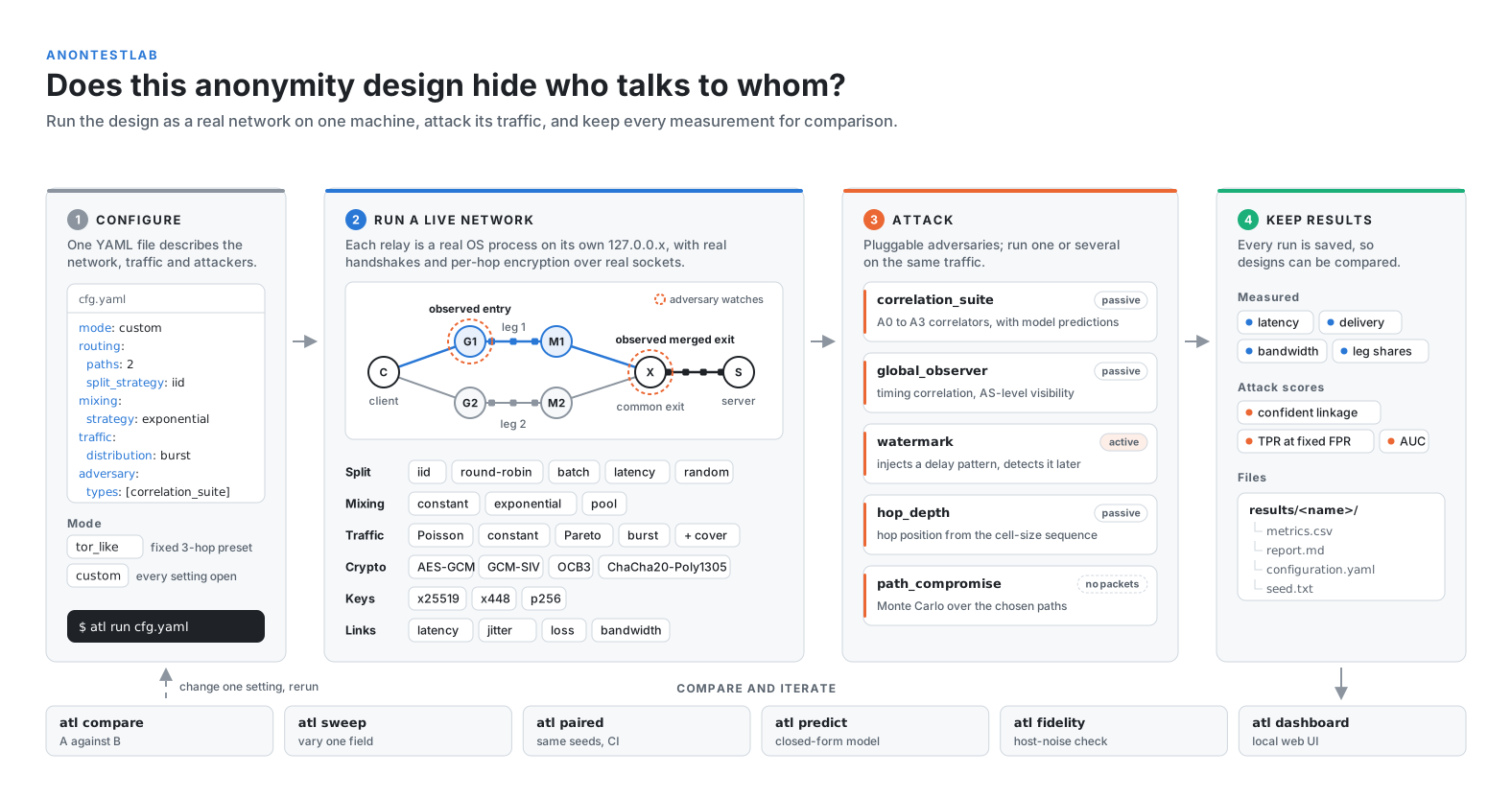
A local network emulator for testing anonymous communication designs. Relays run as real processes with real handshakes, encryption and sockets, so latency, delivery and attack results are measured rather than modelled.
Quickstart
python3 -m venv .venv && .venv/bin/pip install "anontestlab[dashboard]"
curl -O https://raw.githubusercontent.com/hashtagRR/AnonTestLab/main/examples/tor_like.yaml
.venv/bin/atl run tor_like.yaml                 # run an example experiment
.venv/bin/atl dashboard                         # optional web UI
The other example configs are in examples/. Windows, installing from the source code, and troubleshooting: INSTALL.md.
Documentation
| Guide | What it covers |
|---|---|
| Experiment configs | every YAML option, split policies, crypto, and the four example configs |
| Tools | the atl commands (run, compare, sweep, paired, predict, fidelity, wizard) and the dashboard |
| Adversaries | the five attackers, what each measures, and how to add one |
| Architecture | what happens during a run, and how to extend routing, traffic, crypto or adversaries |
| Known limitations | simplifications to keep in mind when reading results |
| Install guide | platform setup, including Windows |
| Contributing | development setup and how releases are made |
| Changelog | what changed in each version |
| Project site | the project's overview page |
Versions
Every release and its changes are in the changelog; each one is archived on Zenodo under the concept DOI above.
v0.5.0: rebuilt dashboard with PDF reports, and a fix to the model's predictions for cover traffic on split legs.v0.4.0(10.5281/zenodo.23211928): the version used for the experiments of a paper on correlation risk in multipath anonymous communication (under review).
AnonTestLab grew out of the test harness of Anon-Sec-Net, a dual-path anonymous communication prototype, and works for other designs too.
License
GPL-3.0-or-later. See LICENSE.
1 maintainer

Metadata
1 maintainer
Release files for anontestlab 0.5.2
For a detailed explanation of source distributions (sdists) and built distributions (wheels), please see the package formats documentation.
Source distribution (sdist)
| File | Size | Uploaded | |
|---|---|---|---|
| anontestlab-0.5.2.tar.gz | 192.1 kB | Details |
Built distribution (wheel)
| File | Interpreter | ABI | Platform | Reset |
|---|---|---|---|---|
| anontestlab-0.5.2-py3-none-any.whl | Python 3 | none | any | Details |
Total release size: 375.6 kB
Release files / anontestlab-0.5.2.tar.gz
| Download URL | anontestlab-0.5.2.tar.gz |
|---|---|
| Size | 192.1 kB |
| Tags | Source |
|
SHA-256 checksum How to use checksums |
52c8ce25350df82e6f83810c6ddcdd360942cf3c821a5accb0120432fcf2ee9f
|
|
BLAKE2b-256 checksum How to use checksums |
b8666a94bb4ddfc02fb5c0960a9199b8efb897b496b97f2b9876596b5b16579b
|
| Upload date | |
|
Uploaded using Trusted Publishing? What is trusted publishing? |
Yes |
| Uploaded via |
twine/7.0.0 CPython/3.13.14
|
Provenance
Provenance describes where a file came from. On PyPI, provenance is shared via attestations, which provide a verifiable record of the build or publishing details. View details, limitations and caveats.


PyPI Publish Attestation
PyPI verified that this artifact, at this checksum, originated from the publisher listed below.
Signed by GitHub Actions, verified by PyPI on Oct 17, 2026.
Transparency logRelease files / anontestlab-0.5.2-py3-none-any.whl
| Download URL | anontestlab-0.5.2-py3-none-any.whl |
|---|---|
| Size | 183.5 kB |
| Tags | Python 3 |
|
SHA-256 checksum How to use checksums |
c22cb34626b8f8a02ffc05b090da0bf66585a2d7abf0cb7223415d0ede96df9a
|
|
BLAKE2b-256 checksum How to use checksums |
aa06e2aac2d3cd2f5b8216aa08efa10f31b10671044cab671d30dc52cc667d1d
|
| Upload date | |
|
Uploaded using Trusted Publishing? What is trusted publishing? |
Yes |
| Uploaded via |
twine/7.0.0 CPython/3.13.14
|
Provenance
Provenance describes where a file came from. On PyPI, provenance is shared via attestations, which provide a verifiable record of the build or publishing details. View details, limitations and caveats.
PyPI Publish Attestation
PyPI verified that this artifact, at this checksum, originated from the publisher listed below.
Signed by GitHub Actions, verified by PyPI on Oct 17, 2026.
Transparency log













