
A text-based user interface (TUI) for the Red Hat Ansible Automation Platform


Project description
ansible-navigator
A text-based user interface (TUI) for the Red Hat Ansible Automation Platform
Quick start
Using a virtual environment and pip
mkdir project_directory
cd project_directory
python3 -m venv venv
source venv/bin/activate
pip install ansible-navigator
ansible-navigator --help
By default, ansible-navigator uses execution environments, to use ansible-navigator without an execution environment, ansible is required
pip install ansible
ansible-navigator --execution-environment false
RHEL8/Centos8 prerequisites:
sudo dnf install python3
sudo dnf install gcc python3-devel
Welcome
Start at the welcome page, from the welcome page you can run playbooks, browse collections, explore inventories, review docs and more.
ansible-navigator
Other things to try direct from the command line
Using interactive mode, which is the default
Review and explore available collections
ansible-navigator collections
Review and explore current ansible configuration
ansible-navigator config
Review and explore documentation (default mode is interactive)
ansible-navigator doc ansible.netcommon.cli_command
Review and explore an inventory
ansible-navigator inventory -i inventory.yaml
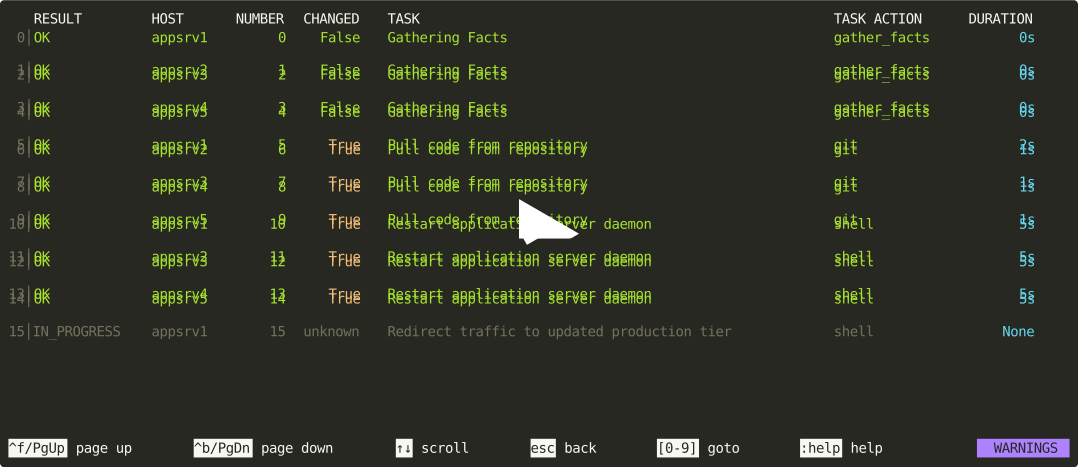
Run and explore a playbook
ansible-navigator run site.yaml -i inventory.yaml
Using stdout mode, which returns Ansible's familiar command-line interface (CLI) output
Show the current ansible configuration
ansible-navigator config dump -m stdout
Show documentation
ansible-navigator doc sudo -t become -m stdout
Show an inventory
ansible-navigator inventory --list -i inventory.yaml -m stdout
Run a playbook
ansible-navigator run site.yaml -i inventory.yaml -m stdout
Available subcommands
For the full list of available subcommands and their mapping to ansible commands, see the subcommand guide
Configuring ansible-navigator:
ansible-navigator can be configured:
- using default values
- with a settings file
- with environment variables
- at the command line
- while issuing
:commands within the text-based user interface (TUI)
Setting are applied in that order. For an overview of these approaches, see the settings guide
Key bindings and colon commands
While using the terminal user interface keys and commands are available, the following
is also available within the application by typing :help:
## GENERAL
--------------------------------------------------------------------------------------
esc                                     Go back
^f/PgUp                                 Page up
^b/PgDn                                 Page down
arrow up, arrow down                    Scroll up/down
:collections                            Explore installed collections
:config                                 Explore the current Ansible configuration
:d, :doc <plugin>                       Show a plugin doc
:r, :run <playbook> -i <inventory>      Run a playbook using in interactive mode
:f, :filter <re>                        Filter page lines using a regex
:h, :help                               This page
:i, :inventory <inventory>              Explore the current or alternate inventory
:l, :log                                Review current log file
:o, :open                               Open current page in the editor
:o, :open {{ some_key }}                Open file path in a key's value
:q, :quit                               Quit the application
:q!, :quit!, ^c                         Force quit while a playbook is running
:rr, :rerun                             Rerun the playbook
:s, :save <file>                        Save current plays as an artifact
:st, :stream                            Watch playbook results real time
:w, :write <file>                       Write current page to a new file
:w!, :write! <file>                     Write current page to an existing or new file
:w>>, :write>> <file>                   Append current page to an existing file
:w!>>, :write!>> <file>                 Append current page to an existing or new file

## MENUS
--------------------------------------------------------------------------------------
[0-9]                                   Go to menu item
:<number>                               Go to menu item
:{{ n|filter }}                         Template the menu item

## TASKS
--------------------------------------------------------------------------------------
[0-9]                                   Go to task number
:<number>                               Go to task number
+, -                                    Next/Previous task
_, :_                                   Toggle hidden keys
:{{ key|filter }}                       Template the key's value
:d, :doc                                Show the doc for the current task's module
:j, :json                               Switch to JSON serialization
:y, :yaml                               Switch to YAML serialization

## LINE INPUT
--------------------------------------------------------------------------------------
esc                                     Exit line input
^A                                      Beginning of line
^E                                      End of line
insert                                  Enable/disable insert mode
arrow up, arrow down                    Previous/next command in history
Release history Release notifications | RSS feed


Download files
Download the file for your platform. If you're not sure which to choose, learn more about installing packages.
Source Distribution
Built Distribution
Filter files by name, interpreter, ABI, and platform.
If you're not sure about the file name format, learn more about wheel file names.
Copy a direct link to the current filters






