
ansible-rehearse




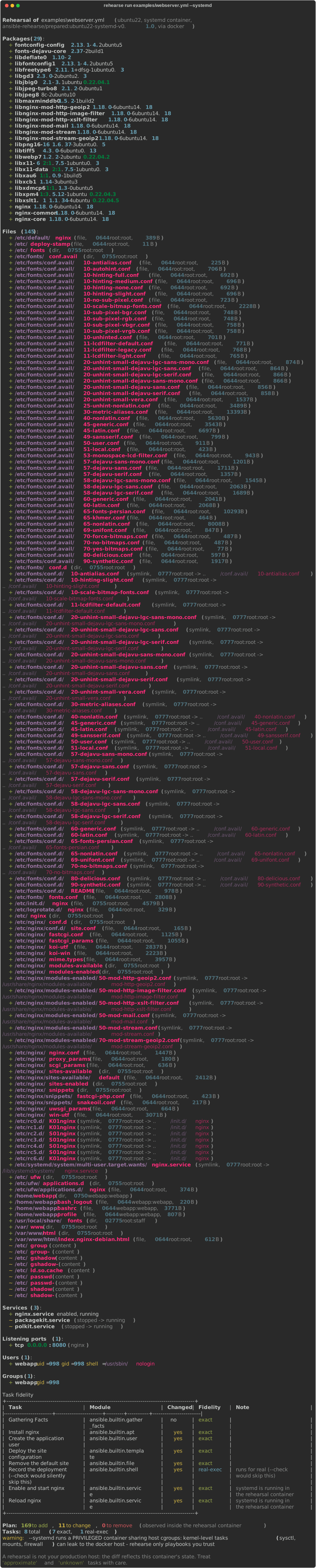
Rehearse your Ansible playbook in a throwaway container and see the real state diff — packages, files, services, ports, users — before you touch production.
Think terraform plan, but for Ansible: instead of predicting what a playbook
might do, rehearse actually runs it inside an ephemeral container matched to
your target distro, snapshots the system before and after, and shows you exactly
what changed.
Why not just --check?
ansible-playbook --check lies by omission:
- Modules without check-mode support are silently skipped —
shell,command,script,rawtasks are never executed, so their effects are invisible. - Registered variables stay undefined, so
when:conditionals silently take the wrong branch and dependent tasks are mis-simulated or explode. - Some modules simply behave differently under
--check(a task that works in a real run can fail in check mode, and vice versa).
rehearse takes the opposite approach: run everything for real, in a sandbox,
and measure what actually happened. Your shell tasks run. Your register +
when chains take the same branches they would take on a real host. Then you get
a terraform-plan-style diff of observed state — not a simulation.
Quick start
pip install ansible-rehearse
You need Docker (or Podman) running. Ansible itself is not required on your
machine — it runs inside the container, so rehearse works from Linux, macOS and
Windows hosts alike.
# Rehearse against a plain Ubuntu 22.04 container
rehearse run site.yml

# Service state too? Use a systemd-enabled container
rehearse run site.yml --systemd

# Match your target distro
rehearse run site.yml --distro rocky9

# Machine-readable output for CI
rehearse run site.yml --json result.json
The first run per distro prepares the container (installs a pinned
ansible-core into an isolated venv) and caches it as an image; later runs
start in seconds.
What you get
- Packages — installed / removed / upgraded, with versions
- Files — created / deleted / modified under watched directories
(
/etc,/usr/local,/opt,/srv,/root,/home,/var/spool/cron,/var/www, plus--watch DIR), including mode / owner / content changes - Services — enabled / started / stopped (in
--systemdmode) - Listening ports — opened / closed, with the owning process
- Users & groups — added / removed / modified
- A per-task fidelity table — how much to trust each result (see below)
The fidelity model
A container is not your production host, and pretending otherwise is how preview tools lose your trust. Every task gets an explicit fidelity label:
| Label | Meaning |
|---|---|
exact |
The state change happens for real in the container and is fully observable. |
real-exec |
Arbitrary code (shell, command…) executed for real — the thing --check can never show you. |
needs-systemd |
Service state needs a service manager; rerun with --systemd. |
approximate |
Runs, but a container's shared kernel / missing subsystems may differ from a real host (sysctl, firewall, SELinux). |
not-rehearsable |
No meaningful container equivalent (reboot, kernel modules, partitioning). |
external |
Would touch systems outside the container — refused by default. |
Run rehearse modules to see the full matrix.
Safety model
- External-effect gate. Before anything runs, the playbook is statically
scanned. Tasks that would touch real infrastructure — cloud collections
(
amazon.aws.*,azure.*,kubernetes.core.*…), notification modules, mutatinguricalls — causerehearseto refuse to run (exit code 3) unless you pass--allow-external. Both modern FQCN and legacyaction:/local_action:syntax are scanned. - No tampering window. The state collector is piped into the container over stdin for each snapshot; there is no on-disk script a playbook could rewrite between snapshots.
--systemdis privileged. Systemd-in-docker requires a privileged container sharing host cgroups: kernel-level operations can leak to the docker host.rehearselabels those tasks accordingly and warns loudly — only rehearse playbooks you trust, especially in--systemdmode.- Third-party content. Roles/collections from
requirements.ymlare installed at runtime inside the container and are not covered by the static gate — review them yourself.
A rehearsal is not your production host
Honest limitations, so you can decide what to trust:
- The container starts clean: the diff shows what the playbook does to a fresh OS-matched system, not to your drifted production host with its years of accumulated state.
- Kernel, hardware, network topology and cross-host orchestration are not reproduced. Cloud/network modules cannot be rehearsed at all (they are blocked by default precisely because they would run for real).
- Facts differ (hostname, IPs, memory), so playbooks branching on them may take different paths than in production.
What it is great at: catching broken task logic, missing packages, wrong paths, template errors, misbehaving conditionals, unintended file/permission changes, and services that do not come up — before any real host is involved.
How it compares
| executes tasks | real state diff | needs test code | target | |
|---|---|---|---|---|
ansible-playbook --check |
no (simulates, skips) | no | no | your real hosts |
| check-mode formatters | no (same skips, prettier) | no | no | your real hosts |
| Molecule | yes | no (you write assertions) | yes | fresh test instance |
| rehearse | yes | yes (packages/files/services/ports/users) | no | throwaway container |
Molecule is the right tool for testing roles with assertions in CI over time;
rehearse answers a different question — "what exactly will this playbook do,
right now, before I run it for real?" — with zero test code.
Supported targets
| profile | plain image | --systemd image |
|---|---|---|
ubuntu22 (default) |
ubuntu:22.04 |
geerlingguy/docker-ubuntu2204-ansible |
ubuntu24 |
ubuntu:24.04 |
geerlingguy/docker-ubuntu2404-ansible |
debian12 |
debian:12 |
geerlingguy/docker-debian12-ansible |
rocky9 |
rockylinux:9 |
geerlingguy/docker-rockylinux9-ansible |
fedora44 |
fedora:44 |
geerlingguy/docker-fedora44-ansible |
Or bring your own image with --image.
Exit codes
| code | meaning |
|---|---|
| 0 | rehearsal completed, playbook succeeded |
| 1 | rehearsal completed, playbook failed (partial diff shown) |
| 2 | usage / playbook / internal error |
| 3 | refused: playbook contains external-effect tasks |
| 4 | container engine unavailable |
Contributing
See CONTRIBUTING.md. Bug reports with a failing playbook snippet are gold; so are fidelity-matrix corrections from people who know a module better than we do.
License
MIT
1 maintainer

Metadata
1 maintainer
Release files for ansible-rehearse 0.1.1
For a detailed explanation of source distributions (sdists) and built distributions (wheels), please see the package formats documentation.
Source distribution (sdist)
| File | Size | Uploaded | |
|---|---|---|---|
| ansible_rehearse-0.1.1.tar.gz | 71.2 kB | Details |
Built distribution (wheel)
| File | Interpreter | ABI | Platform | Reset |
|---|---|---|---|---|
| ansible_rehearse-0.1.1-py3-none-any.whl | Python 3 | none | any | Details |
Total release size: 108.6 kB
Release files / ansible_rehearse-0.1.1.tar.gz
| Download URL | ansible_rehearse-0.1.1.tar.gz |
|---|---|
| Size | 71.2 kB |
| Tags | Source |
|
SHA-256 checksum How to use checksums |
a270a6e36a641c0c008d1c92d25ec0845251e22c4b252b2a547451fbd7403243
|
|
BLAKE2b-256 checksum How to use checksums |
2e001cd9ec867596b0efb4dfe11bc9c802a093cc9ca41ad6b6b5d4dbd287ac15
|
| Upload date | |
|
Uploaded using Trusted Publishing? What is trusted publishing? |
Yes |
| Uploaded via |
twine/7.0.0 CPython/3.13.14
|
Provenance
Provenance describes where a file came from. On PyPI, provenance is shared via attestations, which provide a verifiable record of the build or publishing details. View details, limitations and caveats.


PyPI Publish Attestation
PyPI verified that this artifact, at this checksum, originated from the publisher listed below.
Signed by GitHub Actions, verified by PyPI on Sep 15, 2026.
Transparency logRelease files / ansible_rehearse-0.1.1-py3-none-any.whl
| Download URL | ansible_rehearse-0.1.1-py3-none-any.whl |
|---|---|
| Size | 37.4 kB |
| Tags | Python 3 |
|
SHA-256 checksum How to use checksums |
5215a5285329c1087923726879c189fc6b7c295d494e9744266a89eb82ad9401
|
|
BLAKE2b-256 checksum How to use checksums |
9ae52e565a11d5163c033e5e44f2a83b61a13b0f42737c9c3716d916fffdc1a0
|
| Upload date | |
|
Uploaded using Trusted Publishing? What is trusted publishing? |
Yes |
| Uploaded via |
twine/7.0.0 CPython/3.13.14
|
Provenance
Provenance describes where a file came from. On PyPI, provenance is shared via attestations, which provide a verifiable record of the build or publishing details. View details, limitations and caveats.
PyPI Publish Attestation
PyPI verified that this artifact, at this checksum, originated from the publisher listed below.
Signed by GitHub Actions, verified by PyPI on Sep 15, 2026.
Transparency log













