
ansible-variables




The Ansible inventory provides a very powerful framework to declare variables in a hierarchical manner. There a lof of different places where a variable can be defined (inventory, host_vars, groups_vars, ...) and Ansible will merge them in a specific order (variable precedence).
ansible-variables will help to keep track of your host context variables:
- inventory file or script group vars
- inventory group_vars/all
- inventory group_vars/*
- inventory file or script host vars
- inventory host_vars/*
Based on one host it will return a list with all variables, values and variable type.
Tested with ansible-core 2.11 - 2.18.
Installation
pip install ansible-variables
Usage
The command line usage is similar to the official Ansible CLI tools, especially like ansible-inventory, thus to see all possible commands and options run
ansible-variables --help
Get all variables for a host
The basic usage is pretty simple, you only need to pass the Ansible hostname to it:
ansible-variables mywebserver
This results in following simple rich formatted output
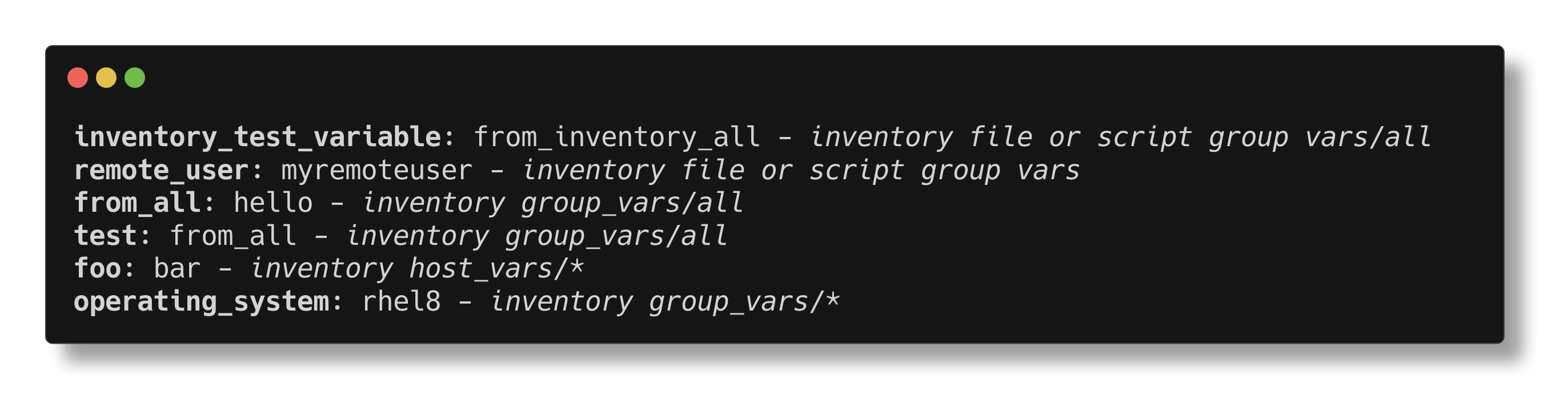
The verbosity can be increased Ansible like with -v, -vvv, ...
With -v the inventory files where the variable is defined, will be printed. The last file wins.
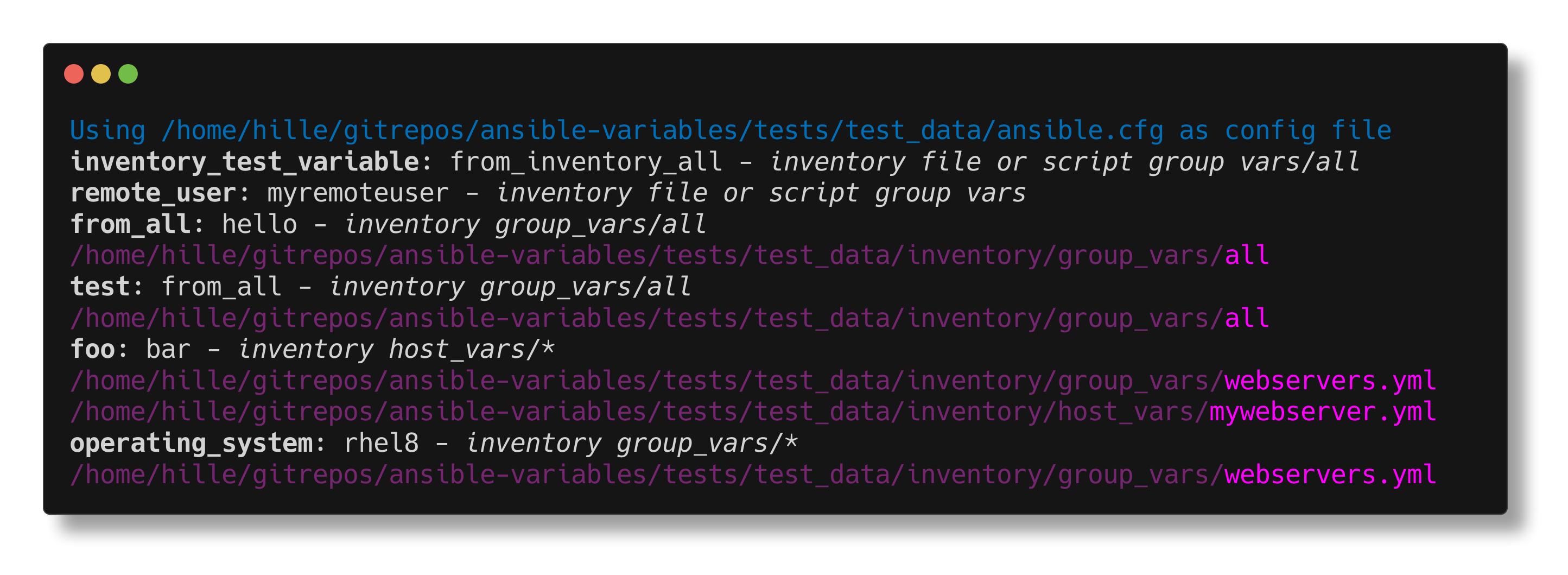
With -vvv it will also print all files which were considered to look for the variable.
Get one specific variables for a host
If you are only interested in one variable you can specify it with --var:
ansible-variables mywebserver --var foo
Same es above, the verbosity can also increase here.
More customization
With --help you will see which further arguments are possible, e.g. you can set the path to your inventory with -i
ansible-variables mywebserver -i /path/to/inventory
Implementation
This tool is tightly coupled to the Ansible library (ansible-core) and simple reuses what is already there.
The whole structure and implementation was inspired and oriented by the implementation of
ansible-inventory.
To get the source and the inventory files in which Ansible will look for a variable,
we are using a debug flag
in Ansible's get_vars method.
As as result, the output of ansible-variables can be fully trusted
as it uses the same methods as Ansible to get the variable precedence.
Limitations
- as written in the description, this tool only shows host context variables and does not know anything about playbook or role variables or command line options.
Credits
- the screenshots used in this README where created with termshot
License
This project is licensed under the GNU General Public License v3.0
1 maintainer

Metadata
1 maintainer
Release files for ansible-variables 0.9.1
For a detailed explanation of source distributions (sdists) and built distributions (wheels), please see the package formats documentation.
Source distribution (sdist)
| File | Size | Uploaded | |
|---|---|---|---|
| ansible_variables-0.9.1.tar.gz | 48.5 kB | Details |
Built distribution (wheel)
| File | Interpreter | ABI | Platform | Reset |
|---|---|---|---|---|
| ansible_variables-0.9.1-py3-none-any.whl | Python 3 | none | any | Details |
Total release size: 82.3 kB
Release files / ansible_variables-0.9.1.tar.gz
| Download URL | ansible_variables-0.9.1.tar.gz |
|---|---|
| Size | 48.5 kB |
| Tags | Source |
|
SHA-256 checksum How to use checksums |
551220b56a8c76faaf89a162d9b10dada28b5de0abad9d565bc17bf8fb86d241
|
|
BLAKE2b-256 checksum How to use checksums |
b38b567a887e8322ce61eecaa9ebdac679d927b593a602d4862b82d8ef450396
|
| Upload date | |
|
Uploaded using Trusted Publishing? What is trusted publishing? |
No |
| Uploaded via |
twine/6.1.0 CPython/3.12.9
|
Release files / ansible_variables-0.9.1-py3-none-any.whl
| Download URL | ansible_variables-0.9.1-py3-none-any.whl |
|---|---|
| Size | 33.7 kB |
| Tags | Python 3 |
|
SHA-256 checksum How to use checksums |
2cdd5633bbaa8cd2e85e845f26c2fb5dd4294f4b66a0695339c4891017205082
|
|
BLAKE2b-256 checksum How to use checksums |
5909f487e41cd54da462b0d8153ed158f0f99bd5076cbc6a43c79d45cdae76e6
|
| Upload date | |
|
Uploaded using Trusted Publishing? What is trusted publishing? |
No |
| Uploaded via |
twine/6.1.0 CPython/3.12.9
|














