
ansiplus





A Python package designed to enhance code readability and CLI experience.
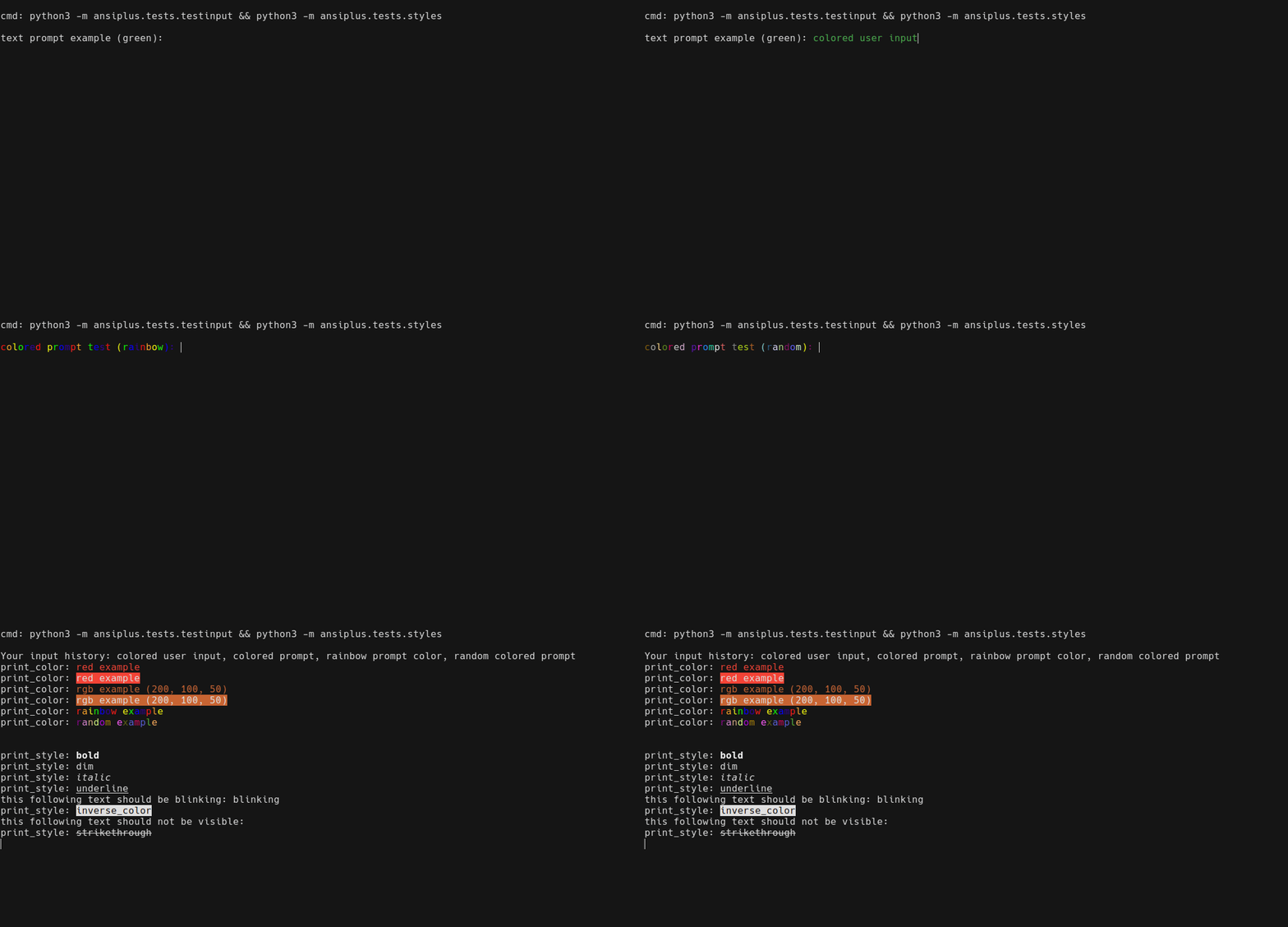
Usage
Prerequisites
- Python version >=3.10
- A terminal emulator that accepts ANSI codes
- A terminal emulator that uses xterm-256color
Tested Terminals on Linux
Terminal ($TERM)
- Konsole (xterm-256color) - no missing features
- Xterm (xterm) - no missing features
- Alacritty (alacritty) - blinking text does not work
- Kitty (xterm-kitty) - blinking text does not work
Colors
This package introduces the ability to print colors via name, id, rgb, and hex codes with a single function:
>>> from ansiplus import print_color
>>> print_color("my colored text", color=(100, 200, 255), bgcolor=198)
'my colored text'
>>> print_color("red text", color="red")
>>> print("hex color 'f06'", color="#f06")
Colors may also be manually printed:
>>> from ansiplus.ansi.colors import Fore
>>> print(f"{Fore.GREEN}green text{Fore.RESET}")
Rainbow & Random Colors
Text can be colored to resemble a rainbow:
>>> from ansiplus import print_color
>>> print_color("this text is rainbow colored", "rainbow")
'this text is rainbow colored'
>>> print_color("each character will be a random color", "random")
'each character will be a random color'
User Input
Along with colors, users can be prompted for input which can be colored:
>>> from ansiplus import input_color
>>> txt = input_color("example: ", color="blue")
>>> print(txt)
'my input'
Prompting input can also store history if you assign it to a variable:
>>> from ansiplus import NewPrompt
>>> ui = NewPrompt()
>>> ui.set_color("red")
>>> ui.set_prompt_color("green")
>>> ui.prompt("prompt class example: ")
>>> ui.history
['my text']
>>> ui.latest
'my text'
>>> ui.prompt("prompt class example 2: ", "yellow")
>>> ui.latest
'this text is yellow, but default is red'
Rainbow & Random Colors
Prompt foreground text can also be colored rainbow:
>>> from ansiplus import input_color
>>> input_color("this text is rainbow: ", prompt_color="rainbow")
Clearing Prompt Lines
After receiving user input, the line can be cleared:
from ansiplus import input_color
while True:
    input_color("forever input: ", clearline=True)
The above code sample will ask for input forever, after every input, the line will clear and the input will be prompted again on the same line.
Text Styles
This package includes several several styles that can be used:
>>> from ansiplus import print_style
>>> print_style("underline text", "underline")
'underline text'
Like colors, styles may also be used manually:
>>> from ansiplus.ansi.styles import BOLD, BOLD_RESET
>>> print(f"{BOLD}bold text{BOLD_RESET}")
'bold text'
>>>
More Functions
There are more ANSI codes featured beyond colors and styles, these could be viewed by using help(ansiplus) inside the python interpreter.
Developers
When building the package for testing, it is recommended to use python3 -m build.
Wheels
When building the package for testing, it is recommended to use python3 -m build.
PIP Virtual Environments
Virtual environments should be named ".venv" or ".env", as this is used in the ".gitignore" file.
Contributing
Contributions must not include:
- breaking code
- major changes
- changes to the version number
- wheel files or egg-info files
- spaghetti code
1 maintainer

Metadata
1 maintainer
Release files for ansiplus 3.1
For a detailed explanation of source distributions (sdists) and built distributions (wheels), please see the package formats documentation.
Source distribution (sdist)
| File | Size | Uploaded | Provenance | |
|---|---|---|---|---|
| ansiplus-3.1.tar.gz | 12.1 kB | Without provenance | Details |
Built distribution (wheel)
| File | Interpreter | ABI | Platform | Reset |
|---|---|---|---|---|
| ansiplus-3.1-py3-none-any.whl | Python 3 | none | any | Details |
Total release size: 26.0 kB
Release files / ansiplus-3.1.tar.gz
| Download URL | ansiplus-3.1.tar.gz |
|---|---|
| Size | 12.1 kB |
| Tags | Source |
|
SHA-256 checksum How to use checksums |
1810a9c57f1bd05575ab51691cadf7e77d04386a427975254f192731150b4262
|
|
BLAKE2b-256 checksum How to use checksums |
3f261785fe065b58c7e6349044a02228ad8cf718d318415713df68738703db84
|
| Upload date | |
|
Uploaded using Trusted Publishing? What is trusted publishing? |
No |
| Uploaded via |
twine/5.0.0 CPython/3.12.4
|
Release files / ansiplus-3.1-py3-none-any.whl
| Download URL | ansiplus-3.1-py3-none-any.whl |
|---|---|
| Size | 13.9 kB |
| Tags | Python 3 |
|
SHA-256 checksum How to use checksums |
33af5af41a2a18c16376a817afc257725ab25d802015536af35e7cf117378b60
|
|
BLAKE2b-256 checksum How to use checksums |
9de729dc5d708d1c0edbaa802b3f3a4a9d2c53474cd26b33bafe0e80be9cb51e
|
| Upload date | |
|
Uploaded using Trusted Publishing? What is trusted publishing? |
No |
| Uploaded via |
twine/5.0.0 CPython/3.12.4
|
Security for ansiplus 3.1
Provenance
Provenance describes where a file came from. On PyPI, provenance is shared via attestations, which provide a verifiable record of the build or publishing details. View details, limitations and caveats.
No provenance found
None of the files in this release were uploaded with provenance metadata.
A note on package security
PyPI is a repository for distributing packages, not a service for auditing them. While third-party security researchers and our staff do their best to detect and remove malicious packages, PyPI cannot guarantee the quality, security or suitability of any given package.














