DPF - Ansys Data Processing Framework









Ansys Data Processing Framework (DPF) provides numerical simulation users and engineers with a toolbox for accessing and transforming simulation data. With DPF, you can perform complex preprocessing or postprocessing of large amounts of simulation data within a simulation workflow.
DPF is an independent, physics-agnostic tool that you can plug into many apps for both data input and data output, including visualization and result plots. It can access data from solver result files and other neutral formats, such as CSV, HDF5, and VTK files.
For information on file support, see the main page in the PyDPF-Core documentation.
Using the many DPF operators that are available, you can manipulate and transform this data. You can also chain operators together to create simple or complex data-processing workflows that you can reuse for repeated or future evaluations.
The data in DPF is defined based on physics-agnostic mathematical quantities described in self-sufficient entities called fields. This allows DPF to be a modular and easy-to-use tool with a large range of capabilities.

The ansys.dpf.core package provides a Python interface to DPF, enabling
rapid postprocessing of a variety of Ansys file formats and physics solutions
without ever leaving the Python environment.
Documentation and issues
Documentation for the latest stable release of PyDPF-Core is hosted at PyDPF-Core documentation.
In the upper right corner of the documentation's title bar, there is an option for switching from viewing the documentation for the latest stable release to viewing the documentation for the development version or previously released versions.
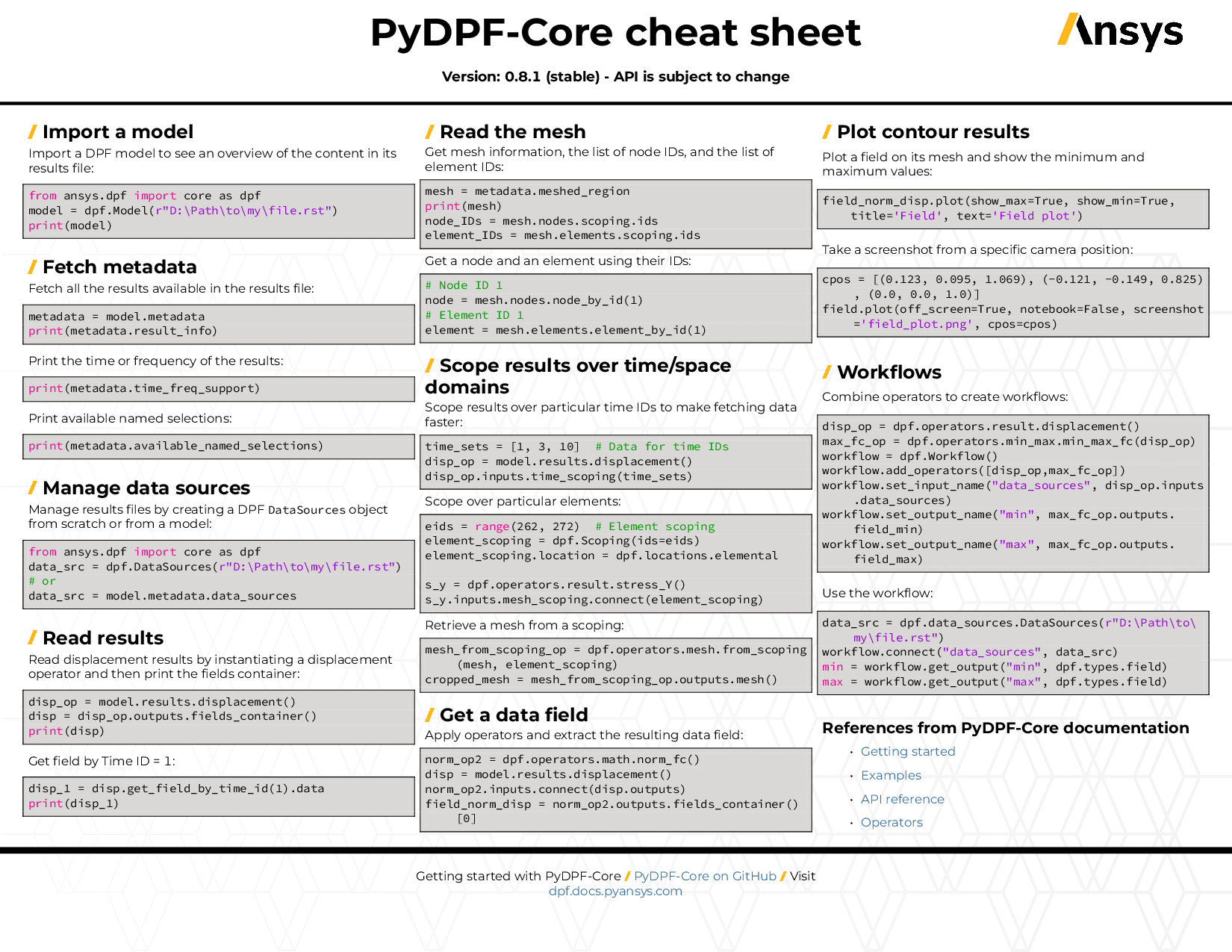
You can also view or download the PyDPF-Core cheat sheet. This one-page reference provides syntax rules and commands for using PyDPF-Core.
On the PyDPF-Core Issues page, you can create issues to report bugs and request new features. On the PyDPF-Core Discussions page or the Discussions page on the Ansys Developer portal, you can post questions, share ideas, and get community feedback.
To reach the project support team, email pyansys.core@ansys.com.
Installation
PyDPF-Core requires DPF to be available. You can either have a compatible Ansys version installed
or install the standalone ansys-dpf-server server package. For more information, see
Getting Started with DPF Server
in the PyDPF-Core documentation.
For the compatibility between PyDPF-Core and Ansys, see Compatibility in the PyDPF-Core documentation.
To use PyDPF-Core with the standalone ansys-dpf-server server package 8.0 or later; or with Ansys 2024 R1 or later, install the latest version with this command:
pip install ansys-dpf-core
PyDPF-Core plotting capabilities require PyVista <https://pyvista.org/>_ to be installed.
To install PyDPF-Core with its optional plotting functionalities, use this command:
pip install ansys-dpf-core[graphics]
For more information on PyDPF-Core plotting capabilities, see Plot in the PyDPF-Core documentation.
To use PyDPF-Core with Ansys 2022 R2 up to Ansys 2023 R2, install the latest compatible version with this command:
pip install ansys-dpf-core<0.16.0
To use PyDPF-Core with Ansys 2022 R1, install the latest compatible version with this command:
pip install ansys-dpf-core<0.10.0
To use PyDPF-Core with Ansys 2021 R2, install the latest compatible version with this command:
pip install ansys-grpc-dpf<0.4.0; pip install ansys-dpf-core<0.10.0
To use PyDPF-Core with Ansys 2021 R1, install the latest compatible version with this command:
pip install ansys-grpc-dpf<0.3.0; pip install ansys-dpf-core<0.3.0
Brief demo
Provided you have DPF available, a DPF server automatically starts once you start using PyDPF-Core.
To open a result file and explore what's inside, use this code:
>>> from ansys.dpf import core as dpf
>>> from ansys.dpf.core import examples
>>> model = dpf.Model(examples.find_simple_bar())
>>> print(model)

    DPF Model
    ------------------------------
    Static analysis
    Unit system: Metric (m, kg, N, s, V, A)
    Physics Type: Mechanical
    Available results:
         -  displacement: Nodal Displacement
         -  element_nodal_forces: ElementalNodal Element nodal Forces
         -  elemental_volume: Elemental Volume
         -  stiffness_matrix_energy: Elemental Energy-stiffness matrix
         -  artificial_hourglass_energy: Elemental Hourglass Energy
         -  thermal_dissipation_energy: Elemental thermal dissipation energy
         -  kinetic_energy: Elemental Kinetic Energy
         -  co_energy: Elemental co-energy
         -  incremental_energy: Elemental incremental energy
         -  structural_temperature: ElementalNodal Temperature
    ------------------------------
    DPF  Meshed Region:
      3751 nodes
      3000 elements
      Unit: m
      With solid (3D) elements
    ------------------------------
    DPF  Time/Freq Support:
      Number of sets: 1
    Cumulative     Time (s)       LoadStep       Substep
    1              1.000000       1              1
Read a result with this command:
>>> result = model.results.displacement.eval()
Then, start connecting operators with this code:
>>> from ansys.dpf.core import operators as ops
>>> norm = ops.math.norm(model.results.displacement())
Starting the service
The ansys.dpf.core library automatically starts a local instance of the DPF service in the
background and connects to it. If you need to connect to an existing
remote or local DPF instance, use the connect_to_server method:
>>> from ansys.dpf import core as dpf
>>> dpf.connect_to_server(ip='10.0.0.22', port=50054)
Once connected, this connection remains for the duration of the module. It closes when you exit Python or connect to a different server.
License and acknowledgments
PyDPF-Core is licensed under the MIT license. For more information, see the LICENSE file.
PyDPF-Core makes no commercial claim over Ansys whatsoever. This library extends the functionality of Ansys DPF by adding a Python interface to DPF without changing the core behavior or license of the original software.
1 maintainer

Metadata
1 maintainer
Release files for ansys-dpf-core 0.16.3
For a detailed explanation of source distributions (sdists) and built distributions (wheels), please see the package formats documentation.
Built distributions (wheels)
| File | Actions Reset | |||
|---|---|---|---|---|
| ansys_dpf_core-0.16.3-py3-none-win_amd64.whl | Python 3 | none | Windows x86-64 | Details for ansys_dpf_core-0.16.3-py3-none-win_amd64.whl |
| ansys_dpf_core-0.16.3-py3-none-manylinux_2_17_x86_64.whl | Python 3 | none | Linux glibc 2.17+ x86-64 | Details for ansys_dpf_core-0.16.3-py3-none-manylinux_2_17_x86_64.whl |
| ansys_dpf_core-0.16.3-py3-none-manylinux1_x86_64.whl | Python 3 | none | Linux glibc 2.5+ x86-64 | Details for ansys_dpf_core-0.16.3-py3-none-manylinux1_x86_64.whl |
| ansys_dpf_core-0.16.3-py3-none-any.whl | Python 3 | none | any | Details for ansys_dpf_core-0.16.3-py3-none-any.whl |
Total release size: 37.5 MB
Release files / ansys_dpf_core-0.16.3-py3-none-win_amd64.whl
| Download URL | ansys_dpf_core-0.16.3-py3-none-win_amd64.whl |
|---|---|
| Size | 8.8 MB |
| Tags | Python 3 Windows x86-64 |
|
SHA-256 checksum How to use checksums |
0a4da18d0a49a12a8094c4466fb230ae1c45e378c8fedeb29736f9729197a1ea
|
|
BLAKE2b-256 checksum How to use checksums |
0b2ed3ec8012d6f40318a1f34d8c47056de87f791c37694ecf99885c0c58f4c6
|
| Upload date | |
|
Uploaded using Trusted Publishing? What is trusted publishing? |
Yes |
| Uploaded via |
twine/7.0.0 CPython/3.13.14
|
Provenance
Provenance describes where a file came from. On PyPI, provenance is shared via attestations, which provide a verifiable record of the build or publishing details. View details, limitations and caveats.


PyPI Publish Attestation
PyPI verified that this artifact, at this checksum, originated from the publisher listed below.
Signed by GitHub Actions, verified by PyPI on Oct 16, 2026.
Transparency logRelease files / ansys_dpf_core-0.16.3-py3-none-manylinux_2_17_x86_64.whl
| Download URL | ansys_dpf_core-0.16.3-py3-none-manylinux_2_17_x86_64.whl |
|---|---|
| Size | 12.8 MB |
| Tags | Linux glibc 2.17+ x86-64 Python 3 |
|
SHA-256 checksum How to use checksums |
a4cf40c54c7d723eef1fddc0119370db1eeee8311ac6d2d829dce19c4fb81f0a
|
|
BLAKE2b-256 checksum How to use checksums |
7c4a9308e1d52f4db4418bddae1f034f81dae6a71e9e210a601532b72bdf27ac
|
| Upload date | |
|
Uploaded using Trusted Publishing? What is trusted publishing? |
Yes |
| Uploaded via |
twine/7.0.0 CPython/3.13.14
|
Provenance
Provenance describes where a file came from. On PyPI, provenance is shared via attestations, which provide a verifiable record of the build or publishing details. View details, limitations and caveats.
PyPI Publish Attestation
PyPI verified that this artifact, at this checksum, originated from the publisher listed below.
Signed by GitHub Actions, verified by PyPI on Oct 16, 2026.
Transparency logRelease files / ansys_dpf_core-0.16.3-py3-none-manylinux1_x86_64.whl
| Download URL | ansys_dpf_core-0.16.3-py3-none-manylinux1_x86_64.whl |
|---|---|
| Size | 12.8 MB |
| Tags | Linux glibc 2.5+ x86-64 Python 3 |
|
SHA-256 checksum How to use checksums |
c0ee948c43f11458fe217a8d9777cc2f23f0acb7ebf9a5b8d9b2e1b677ab41e5
|
|
BLAKE2b-256 checksum How to use checksums |
64e895a75afda4f658edba5fafedaa12de1cd8598107f789f3aebe54824ebcd0
|
| Upload date | |
|
Uploaded using Trusted Publishing? What is trusted publishing? |
Yes |
| Uploaded via |
twine/7.0.0 CPython/3.13.14
|
Provenance
Provenance describes where a file came from. On PyPI, provenance is shared via attestations, which provide a verifiable record of the build or publishing details. View details, limitations and caveats.
PyPI Publish Attestation
PyPI verified that this artifact, at this checksum, originated from the publisher listed below.
Signed by GitHub Actions, verified by PyPI on Oct 16, 2026.
Transparency logRelease files / ansys_dpf_core-0.16.3-py3-none-any.whl
| Download URL | ansys_dpf_core-0.16.3-py3-none-any.whl |
|---|---|
| Size | 3.1 MB |
| Tags | Python 3 |
|
SHA-256 checksum How to use checksums |
20fabc1067ca984edc8dcb10b101697e3f9201b712b1076223b1b4b9ce0529b1
|
|
BLAKE2b-256 checksum How to use checksums |
4065c6eb045474ba35d222de324c5b045c751c1739e22ea7dd693006cc41ea2b
|
| Upload date | |
|
Uploaded using Trusted Publishing? What is trusted publishing? |
Yes |
| Uploaded via |
twine/7.0.0 CPython/3.13.14
|
Provenance
Provenance describes where a file came from. On PyPI, provenance is shared via attestations, which provide a verifiable record of the build or publishing details. View details, limitations and caveats.
PyPI Publish Attestation
PyPI verified that this artifact, at this checksum, originated from the publisher listed below.
Signed by GitHub Actions, verified by PyPI on Oct 16, 2026.
Transparency logSecurity for ansys-dpf-core 0.16.3
Provenance
Provenance describes where a file came from. On PyPI, provenance is shared via attestations, which provide a verifiable record of the build or publishing details. View details, limitations and caveats.
Full provenance
All 4 files in this release have been uploaded with provenance metadata.
Attestation for ansys_dpf_core-0.16.3-py3-none-win_amd64.whl
PyPI Publish Attestation
PyPI verified that this artifact, at this checksum, originated from the publisher listed below.
Signed by GitHub Actions, verified by PyPI on Oct 16, 2026.
Transparency logA note on package security
PyPI is a repository for distributing packages, not a service for auditing them. While third-party security researchers and our staff do their best to detect and remove malicious packages, PyPI cannot guarantee the quality, security or suitability of any given package.
To learn more about protecting yourself from malicious actors, visit our package security documentation.