Overview
PyDynamicReporting is the Python client library for Ansys Dynamic Reporting, previously documented as Nexus. Ansys Dynamic Reporting is a service for pushing items of many types, including images, text, 3D scenes, and tables, into a database, where you can keep them organized and create dynamic reports from them. When you use PyDynamicReporting to connect to an instance of Ansys Dynamic Reporting, you have a Pythonic way of accessing all capabilities of Ansys Dynamic Reporting.
Documentation and issues
Documentation for the latest stable release of PyDynamicReporting is hosted at PyDynamicReporting documentation.
In the upper right corner of the documentation’s title bar, there is an option for switching from viewing the documentation for the latest stable release to viewing the documentation for the development version or previously released versions.
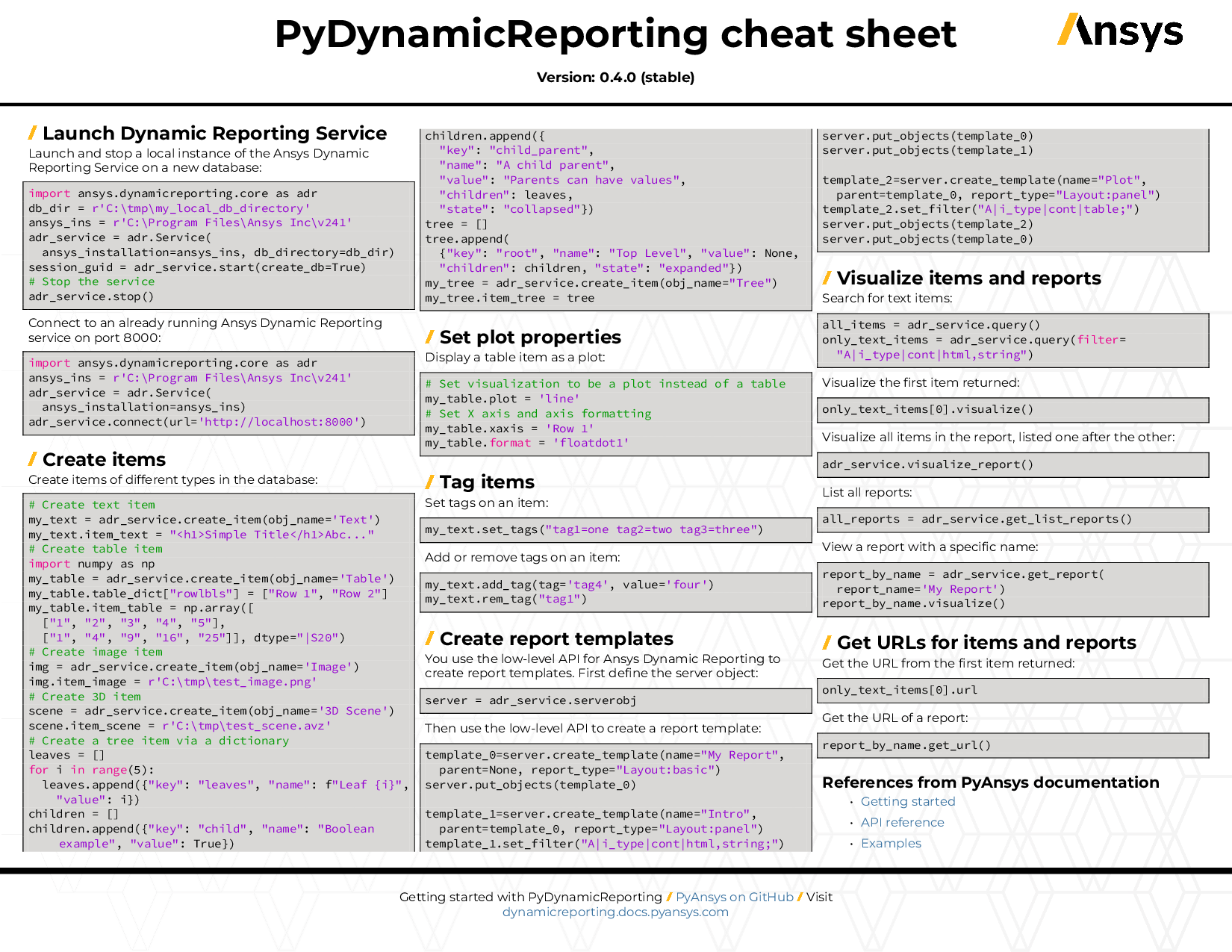
You can also view or download the PyDynamicReporting cheat sheet. This one-page reference provides syntax rules and commands for using PyDynamicReporting.
On the PyDynamicReporting Issues page, you can create issues to report bugs and request new features. On the Discussions page on the Ansys Developer portal, you can post questions, share ideas, and get community feedback.
To reach the project support team, email pyansys.core@ansys.com.
Installation
The pydynamicreporting package supports Python 3.10 through 3.12 on Windows and Linux. It is currently available on the PyPi repository.
To install the package, simply run
pip install ansys-dynamicreporting-coreDeveloper installation
To clone and install the pydynamicreporting package in development mode, run this code:
git clone https://github.com/ansys/pydynamicreporting
cd pydynamicreporting
pip install virtualenv
virtualenv venv  # create virtual environment
source venv/bin/activate  # (.\venv\Scripts\activate for Windows shell)
make install-dev  # install pydynamicreporting in editable mode
The preceding code creates an “editable” installation that lets you develop and test PyDynamicReporting at the same time.
To build and create a production-like installation on Windows (not required on other OSes), first install chocolatey. Then:
choco install make  # install make on Windows
make clean  # clean
make build   # build
# this replaces the editable installation done previously. If you don't want to replace,
# switch your virtual environments to test the new install separately.
make install
# you can skip the steps above and just do 'make all'
make smoketest  # test import
Local GitHub Actions
To run GitHub Actions on your local desktop (recommended), install the act package.
choco install act-cliTo run a job, such as the style job from the ci_cd.yml file, use this command, where style is the job name:
act -W '.github/workflows/ci_cd.yml' -j style --bindDeploy and upload steps must always be ignored. If they are not ignored, before running GitHub Actions locally, add if: ${{ !env.ACT }} to the workflow step and commit this change if required.
Creating a Release
This project now uses tag-driven releases and dynamic versions powered by hatch-timestamp-version (based on hatch-vcs). Stable releases are cut from Git tags (vX.Y.Z). Development builds use UTC timestamped versions derived from the most recent tag. Release branches are no longer needed; the version is always derived from tags.
Versioning model
Stable releases: The version is the exact Git tag (for example, v0.10.0 → package version 0.10.0).
Development builds: Version is computed from the latest tag plus a timestamp, e.g. 0.10.1.devYYYYMMDDHHMMSS.
No manual editing of pyproject.toml for versions — [tool.hatch.version] drives everything.
What the automation does
Create Draft Release (on tag push): builds wheels/sdist and opens a draft GitHub Release attaching artifacts.
Publish Release (when the GitHub Release is published): uploads artifacts to PyPI via Trusted Publisher, then builds & deploys stable docs.
Failure notifications: posts to Microsoft Teams on workflow failure.
Prerequisites
Ensure CHANGELOG.md has a section for the release dated today (the helper script validates this).
Working tree must be clean (no uncommitted changes).
CI secrets for publishing and docs deploy are configured in GitHub.
Cutting a Stable Release
Make sure your CHANGELOG.md entry for the version is dated today (this check runs automatically from make tag).
Create and push the release tag:
make tagThis runs all safety checks, validates the changelog date, and pushes the Git tag (for example, v0.10.0).
Once the tag is pushed: - The Create Draft Release workflow builds the package and opens a draft GitHub Release with artifacts. - After reviewing and finalizing notes, publish the GitHub Release.
Publishing the release automatically triggers the Release workflow, which: - Uploads artifacts to PyPI using Trusted Publisher. - Builds and deploys the stable documentation.
Patch releases
For a patch, update the changelog, ensure the working tree is clean, then run make tag again (which tags the next patch version determined by hatch version from your last tag).
No separate “release branch” is required; the version is derived from tags.
Local dry-runs (optional)
You can use act to exercise non-publishing parts locally. Steps that publish or deploy are already guarded in workflows (e.g., with if: ${{ !env.ACT }}). Build and validation steps still run:
act -W '.github/workflows/release.yml' -j release --bindCI workflows (reference)
.github/workflows/create_draft_release.yml - Triggers on: tag push v*, or manual dispatch. - Builds artifacts and opens a draft GitHub Release attaching dist/*.
.github/workflows/release.yml - Triggers on: published GitHub Release, or manual dispatch. - Rebuilds/validates, downloads artifacts, publishes to PyPI, builds docs, and deploys stable docs.
CLI helpers
Print the resolved version (dev or stable):
make versionBuild locally (sdist + wheel):
make build
make check-dist
Clean:
make clean
Changelog guards
Releases are blocked if today’s dated entry is missing:
❌ ERROR: CHANGELOG.md is not ready for release.
   Expected line: ## [0.10.0] - YYYY-MM-DD
   Tip: Check if it's still marked as '[Unreleased]' and update it to today's date.
Troubleshooting
“No Git tag found” during checks: Create a tag via make tag (or git tag vX.Y.Z && git push origin vX.Y.Z).
Draft already exists: The draft release is unique per tag. Delete or publish the existing one, or bump the tag properly.
Version mismatch: hatch version determines the version from the last tag; ensure you pushed the intended tag and your clone has all tags (git fetch --tags).
Dependencies
To use PyDynamicReporting, you must have a locally installed and licensed copy of Ansys 2023 R2 or later.
To use PyDynamicReporting Serverless (ansys.dynamicreporting.core.serverless), you must have a locally installed and licensed copy of Ansys 2025 R1 or later.
Basic usage
This code shows how to start the simplest PyDynamicReporting session:
>>> import ansys.dynamicreporting.core as adr
>>> adr_service = adr.Service(ansys_installation=r"C:\Program Files\ANSYS Inc\v232")
>>> ret = adr_service.connect()
>>> my_img = adr_service.create_item()
>>> my_img.item_image = "image.png"
>>> adr_service.visualize_report()
License and acknowledgements
PyDynamicReporting is licensed under the MIT license.
PyDynamicReporting makes no commercial claim over Ansys whatsoever. This library extends the functionality of Ansys Dynamic Reporting by adding a Python interface to Ansys Dynamic Reporting without changing the core behavior or license of the original software. The use of PyDynamicReporting requires a legally licensed copy of an Ansys product that supports Ansys Dynamic Reporting.
To get a copy of Ansys, visit the Ansys website.
1 maintainer

Metadata
1 maintainer
Release files for ansys-dynamicreporting-core 0.10.7
For a detailed explanation of source distributions (sdists) and built distributions (wheels), please see the package formats documentation.
Source distribution (sdist)
| File | Size | Uploaded | |
|---|---|---|---|
| ansys_dynamicreporting_core-0.10.7.tar.gz | 172.9 kB | Details |
Built distribution (wheel)
| File | Interpreter | ABI | Platform | Reset |
|---|---|---|---|---|
| ansys_dynamicreporting_core-0.10.7-py3-none-any.whl | Python 3 | none | any | Details |
Total release size: 347.5 kB
Release files / ansys_dynamicreporting_core-0.10.7.tar.gz
| Download URL | ansys_dynamicreporting_core-0.10.7.tar.gz |
|---|---|
| Size | 172.9 kB |
| Tags | Source |
|
SHA-256 checksum How to use checksums |
4fa5fe1e5264fcbf24751763121ece9ece42df195efef5bfe0e53a79100d7bf5
|
|
BLAKE2b-256 checksum How to use checksums |
859a6112d384e364e01a5a04e444762fa34c0aadaba314162d7f1c510c0f0c6c
|
| Upload date | |
|
Uploaded using Trusted Publishing? What is trusted publishing? |
Yes |
| Uploaded via |
twine/6.1.0 CPython/3.13.7
|
Provenance
Provenance describes where a file came from. On PyPI, provenance is shared via attestations, which provide a verifiable record of the build or publishing details. View details, limitations and caveats.


PyPI Publish Attestation
PyPI verified that this artifact, at this checksum, originated from the publisher listed below.
Signed by GitHub Actions, verified by PyPI on Mar 12, 2026.
Transparency logRelease files / ansys_dynamicreporting_core-0.10.7-py3-none-any.whl
| Download URL | ansys_dynamicreporting_core-0.10.7-py3-none-any.whl |
|---|---|
| Size | 174.6 kB |
| Tags | Python 3 |
|
SHA-256 checksum How to use checksums |
398ad08ba3d9118de443277b376e3a6af64ad513ea4aff655c355a89d3d2fc90
|
|
BLAKE2b-256 checksum How to use checksums |
0ba57672b6390a706b4d39e98558823182dfd1c3ad7c00a5ba20a30ac9f7d527
|
| Upload date | |
|
Uploaded using Trusted Publishing? What is trusted publishing? |
Yes |
| Uploaded via |
twine/6.1.0 CPython/3.13.7
|
Provenance
Provenance describes where a file came from. On PyPI, provenance is shared via attestations, which provide a verifiable record of the build or publishing details. View details, limitations and caveats.
PyPI Publish Attestation
PyPI verified that this artifact, at this checksum, originated from the publisher listed below.
Signed by GitHub Actions, verified by PyPI on Mar 12, 2026.
Transparency log