A Python wrapper for Ansys MAPDL.

Project description









Overview
The PyMAPDL project supports Pythonic access to MAPDL to be able to communicate with the MAPDL process directly from Python. The latest ansys-mapdl-core package enables a more comprehensive interface with MAPDL and supports:
All the features of the original module (for example, Pythonic commands and interactive sessions).
Remote connections to MAPDL from anywhere via gRPC.
Direct access to MAPDL arrays, meshes, and geometry as Python objects.
Low-level access to the MAPDL solver through APDL math in a SciPy- like interface.
Here’s a quick demo of PyMAPDL within Visual Studio Code:

PyMAPDL works within Jupyter Notebooks, the standard Python console, or in batch mode on Windows, Linux, and even Mac OS.
Documentation and issues
Documentation for the latest stable release of PyMAPDL is hosted at PyMAPDL Documentation.
In the upper right corner of the documentation’s title bar, there is an option for switching from viewing the documentation for the latest stable release to viewing the documentation for the development version or previously released versions.
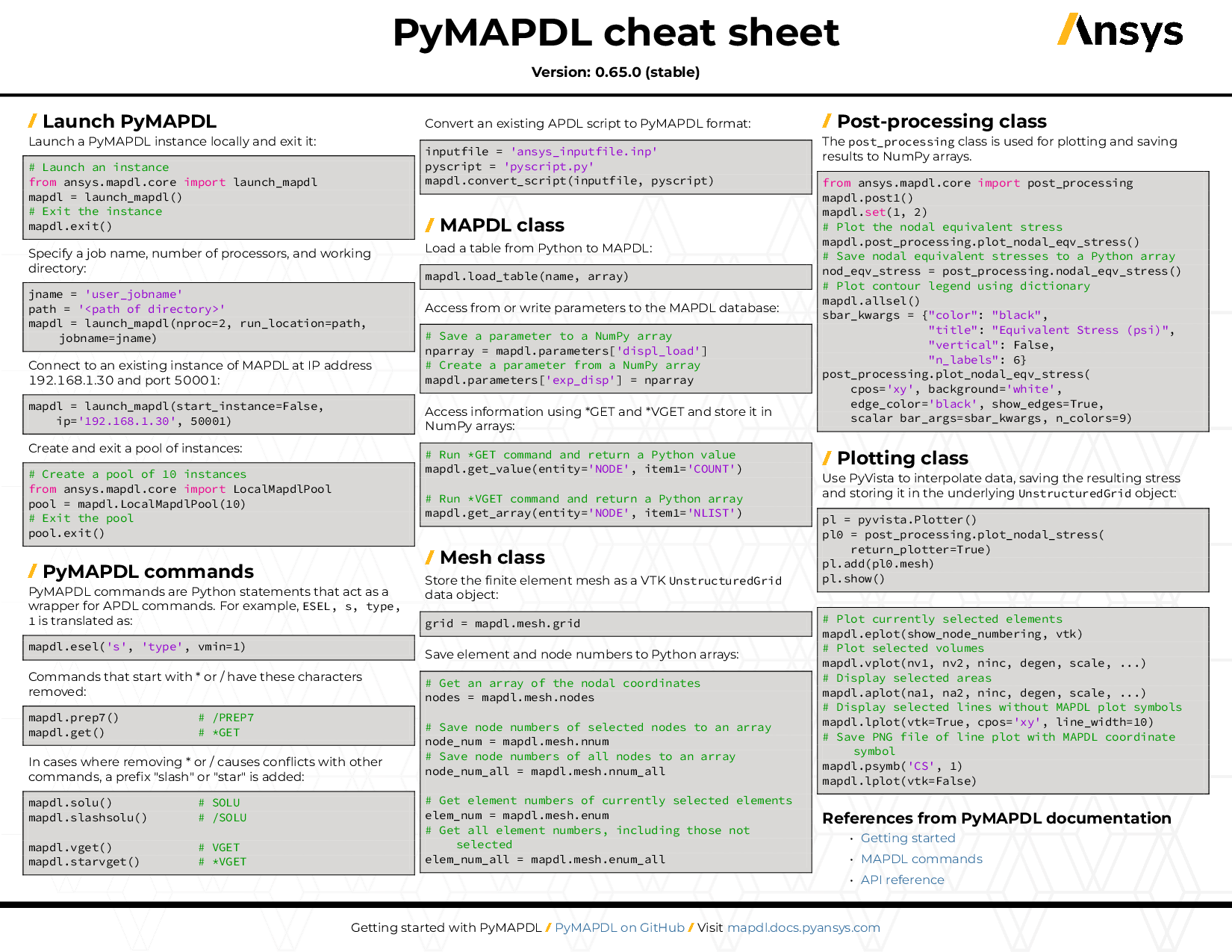
You can also view or download the PyMAPDL cheat sheet. This one-page reference provides syntax rules and commands for using PyMAPDL.
On the PyMAPDL Issues page, you can create issues to report bugs and request new features. On the PyMAPDL Discussions page or the Discussions page on the Ansys Developer portal, you can post questions, share ideas, and get community feedback.
To reach the project support team, email pyansys.core@ansys.com.
Project transition - legacy support
This project was formerly known as pyansys, and we’d like to thank all the early adopters, contributors, and users who submitted issues, gave feedback, and contributed code through the years. The pyansys project has been taken up at Ansys and is being leveraged in creating new Pythonic, cross-platform, and multi-language service-based interfaces for Ansys’s products. Your contributions to pyansys has shaped it into a better solution.
The pyansys project is expanding beyond just MAPDL, and while there are many new features and changes to the original Python module, many steps have been taken to ensure compatibility with legacy code while supporting new features. The original python module has been split up into the following projects and modules:
For more information on each project, visit their GitHub pages.
Installation
The ansys-mapdl-core package currently supports Python 3.8 through Python 3.11 on Windows, Mac OS, and Linux.
Install the latest release from PyPi with:
pip install ansys-mapdl-coreAlternatively, install the latest from PyMAPDL GitHub via:
pip install git+https://github.com/ansys/pymapdl.gitFor a local “development” version, install with (requires pip >= 22.0):
git clone https://github.com/ansys/pymapdl.git
cd pymapdl
pip install -e .
Offline installation
If you lack an internet connection on your install machine, the recommended way of installing PyMAPDL is downloading the wheelhouse archive from the Releases Page for your corresponding machine architecture.
Each wheelhouse archive contains all the python wheels necessary to install PyMAPDL from scratch on Windows and Linux for Python 3.8 and 3.11. You can install this on an isolated system with a fresh python or on a virtual environment.
For example, on Linux Ubuntu with Python 3.10, unzip it and install it with the following:
  unzip ansys-mapdl-core-v0.65.0-wheelhouse-ubuntu-latest-3.10.zip
wheelhouse
  pip install ansys-mapdl-core -f wheelhouse --no-index --upgrade --ignore-installed
If you’re on Windows with Python 3.10, unzip manually to a wheelhouse directory and install using the same command as above.
Consider installing using a virtual environment.
Dependencies
You must have a local licenced copy of Ansys to run MAPDL prior and including 2021R1. If you have the latest version of 2021R1 you do not need MAPDL installed locally and can connect to a remote instance.
Getting started
Launch MAPDL locally
You can launch MAPDL locally directly from Python using launch_mapdl:
from ansys.mapdl.core import launch_mapdl

mapdl = launch_mapdl()
This automatically searches for the latest local version of MAPDL, launches it as a background process, and immediately connects to it. You can then start sending python commands to MAPDL.
Launching manually or connecting to a remote instance
If you want to connect to a session of MAPDL on a remote computer (either locally the LAN or through the internet), first ensure you have MAPDL started in gRPC server mode. This example assumes that you are launching an instance locally from Windows, but it can be easily adapted to run from Linux, or the LAN provided the necessary ports are open. This example specifies the port with -port 50052, but this option can be left out if you plan on using the default port 50052.
start "MAPDL" "%ANSYS211_DIR%\bin\winx64\ANSYS211.exe" -port 50052 -grpcNext, connect to the instance of MAPDL from python with:
>>> from ansys.mapdl.core import Mapdl
>>> ip = "127.0.0.1"
>>> mapdl = Mapdl(ip=ip, port=50052, start_instance=False)
>>> print(mapdl)
A successful connection returns:
Product:             ANSYS Mechanical Enterprise
MAPDL Version:       RELEASE  2020 R2           BUILD 20.2TEST  UPDATE 20200601
ansys.mapdl.core Version: 0.57.0
Should you want to connect to this instance of MAPDL from a remote computer, you substitute ip= with the LAN or WAN address of the computer you wish to connect to. Depending on your network settings, you may have to open local ports or enable port redirection across the WAN.
Basic usage
You run MAPDL commands via:
mapdl.run("/PREP7")Nearly all the built-in MAPDL commands have an associated pythonic method mapped to it. For example, /PREP7 is:
mapdl.prep7()There are also non-mapdl commands such as mapdl.eplot which plot elements using vtk and pyvista rather than relying on MAPDL’s graphics server. Another is mapdl.vget, which leverages gRPC to rapidly exchange binary arrays from MAPDL to Python rather than relying on file IO to exchange data.
Additionally, there are the post_processing, geometry, and mesh properties, which you can use to perform remote (or local) post processing without result file exchange, display geometry properties, or view mesh statistics. Additionally, there’s the parameters property which shows the active MAPDL parameters, and you can use to send or receive arrays between MAPDL and Python.
For more information, see the full documentation at PyMAPDL Documentation.
Citing this module
If you use PyMAPDL for research and would like to cite the module and source, you can visit pyansys Zenodo and generate the correct citation. For example, the BibTex citation is:
@software{alexander_kaszynski_2020_4009467,
  author       = {Alexander Kaszynski},
  title        = {{pyansys: Python Interface to MAPDL and Associated
                   Binary and ASCII Files}},
  month        = aug,
  year         = 2020,
  publisher    = {Zenodo},
  version      = {0.43.2},
  doi          = {10.5281/zenodo.4009467},
  url          = {https://doi.org/10.5281/zenodo.4009467}
}
Because the citation here might not be current, visit the link above to obtain the most recent citation.
License and acknowledgments
PyMAPDL is licensed under the MIT license.
ansys-mapdl-core package makes no commercial claim over Ansys whatsoever. This tool extends the functionality of MAPDL by adding a Python interface to the MAPDL service without changing the core behavior or license of the original software. The use of the interactive APDL control of PyMAPDL requires a legally licensed local copy of Ansys.
To get a copy of Ansys, visit Ansys.
Release history Release notifications | RSS feed


Download files
Download the file for your platform. If you're not sure which to choose, learn more about installing packages.
Source Distribution
Built Distribution
Filter files by name, interpreter, ABI, and platform.
If you're not sure about the file name format, learn more about wheel file names.
Copy a direct link to the current filters
File details
Details for the file ansys_mapdl_core-0.67.0.tar.gz.
File metadata
- Download URL: ansys_mapdl_core-0.67.0.tar.gz
- Upload date:
- Size: 1.2 MB
- Tags: Source
- Uploaded using Trusted Publishing? No
- Uploaded via: twine/4.0.2 CPython/3.9.18
File hashes
| Algorithm | Hash digest | |
|---|---|---|
| SHA256 |
c2270639b8f6c5c92898d0c32184bf5c37de4599e78f23386dd75b3fee2067ad
|
|
| MD5 |
7e3f5a7885a71f6542349d6adb88caeb
|
|
| BLAKE2b-256 |
7a2f37e38e373f1e043d27edebd03df8e71f2cb498852001202ad540731a8e90
|
File details
Details for the file ansys_mapdl_core-0.67.0-py3-none-any.whl.
File metadata
- Download URL: ansys_mapdl_core-0.67.0-py3-none-any.whl
- Upload date:
- Size: 1.5 MB
- Tags: Python 3
- Uploaded using Trusted Publishing? No
- Uploaded via: twine/4.0.2 CPython/3.9.18
File hashes
| Algorithm | Hash digest | |
|---|---|---|
| SHA256 |
a859a2b9b558150a95e3f97c2da56850d23cbe9815f8e1e3ecb3f42fe23e43cd
|
|
| MD5 |
9e138c2df88a974e01f86cdbe5117649
|
|
| BLAKE2b-256 |
e6dd4bfcb14d53a7148cd7ab9489a9bdea5a2d1f2de69bb7fef7b4e022b5c140
|