PyPrimeMesh








Overview
PyPrimeMesh is a Python client to Ansys Prime Server, which delivers core Ansys meshing technology.
Documentation and issues
Documentation for the latest stable release of PyPrimeMesh is hosted at PyPrimeMesh documentation.
In the upper right corner of the documentation's title bar, there is an option for switching from viewing the documentation for the latest stable release to viewing the documentation for the development version or previously released versions.
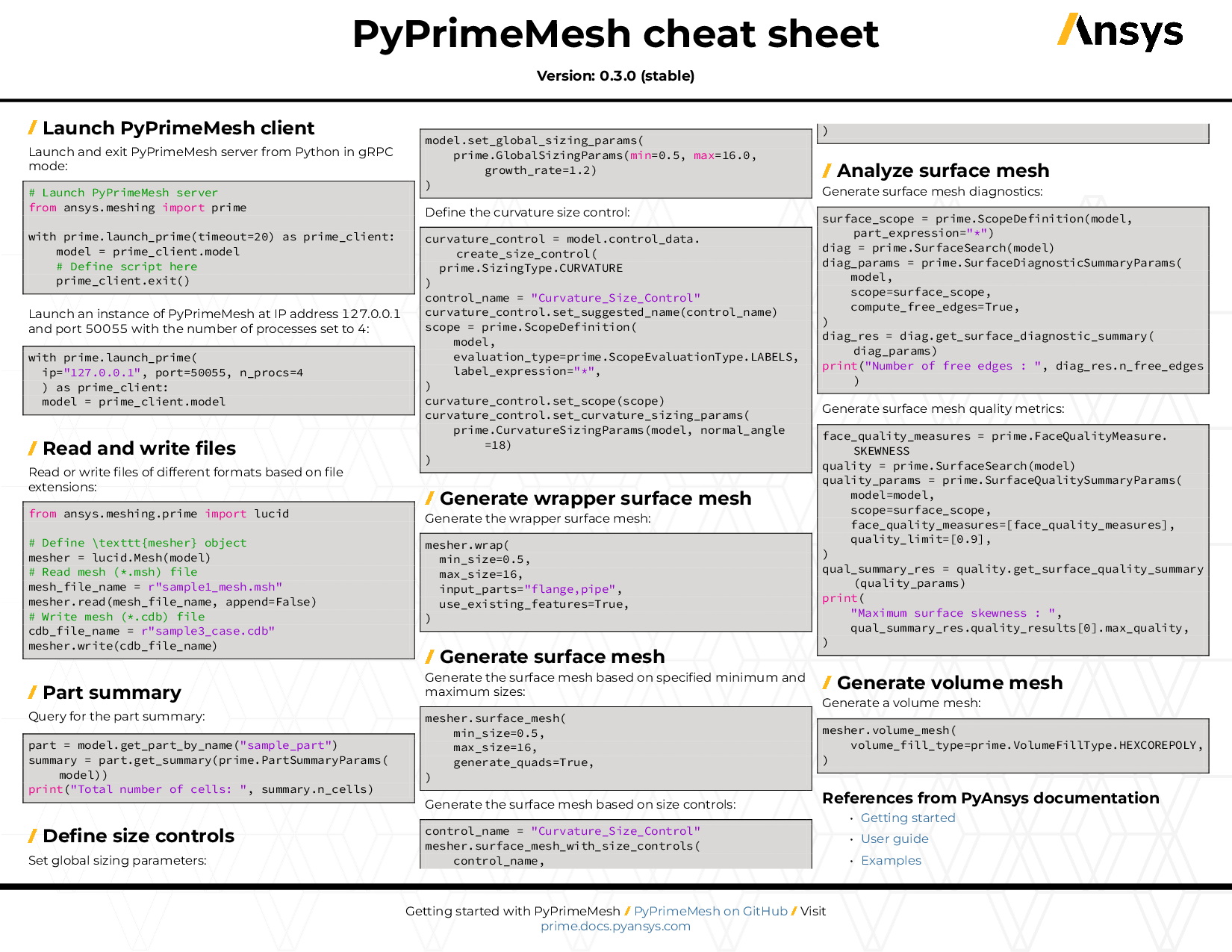
You can also view or download the PyPrimeMesh cheat sheet. This one-page reference provides syntax rules and commands for using PyPrimeMesh.
On the PyPrimeMesh Issues page, you can create issues to report bugs and request new features. On the PyPrimeMesh Discussions page or the Discussions page on the Ansys Developer portal, you can post questions, share ideas, and get community feedback.
To reach the project support team, email pyansys.core@ansys.com.
Installation
The ansys-meshing-prime package supports Python 3.10 to Python 3.14 on the Windows and Linux
operating systems.
PyPrimeMesh can be installed with all dependencies directly from PyPi by running this command:
pip install ansys-meshing-prime[all]
Alternatively, you can clone this repository and install the client using these commands:
git clone https://github.com/ansys/pyprimemesh
cd pyprimemesh
pip install -e .[all]
The preceding commands install all functionality that is important to development. To install a basic version of the client, use this command instead:
pip install -e .
Dependencies
You must have Ansys 2023 R1 or later installed to have access to Ansys Prime Server. Optionally, CAD readers can be configured.
Ansys Prime Server requires one of the following licenses to run. The system checks out the first available license from the list in the following order:
-
CFD PrepPost
-
CFD PrepPost Pro
-
Mechanical Enterprise PrepPost
-
Mechanical Enterprise
-
Mechanical Pro
-
Mechanical Premium
-
Ansys LS-DYNA
Get started
Launch PyPrimeMesh
To launch PyPrimeMesh, use this code:
import ansys.meshing.prime as prime

with prime.launch_prime() as prime_client:
    model = prime_client.model
Run tests
Run tests locally with this command:
pytest
License and acknowledgments
PyPrimeMesh is licensed under the MIT license.
PyPrimeMesh makes no commercial claim over Ansys whatsoever. This library extends the functionality of Ansys Prime Server by adding a Python interface without changing the core behavior or license of the original software. The use of Ansys Prime Server requires a legally licensed copy of Ansys 2023 R1 or later.
1 maintainer

Metadata
1 maintainer
Release files for ansys-meshing-prime 0.10.5
For a detailed explanation of source distributions (sdists) and built distributions (wheels), please see the package formats documentation.
Source distribution (sdist)
| File | Size | Uploaded | |
|---|---|---|---|
| ansys_meshing_prime-0.10.5.tar.gz | 433.3 kB | Details |
Built distribution (wheel)
| File | Interpreter | ABI | Platform | Reset |
|---|---|---|---|---|
| ansys_meshing_prime-0.10.5-py3-none-any.whl | Python 3 | none | any | Details |
Total release size: 1.0 MB
Release files / ansys_meshing_prime-0.10.5.tar.gz
| Download URL | ansys_meshing_prime-0.10.5.tar.gz |
|---|---|
| Size | 433.3 kB |
| Tags | Source |
|
SHA-256 checksum How to use checksums |
f3168c08a41331ab08d4fcea731de08d8770696e90fe185cad39aa055ee657af
|
|
BLAKE2b-256 checksum How to use checksums |
3506796ea6f3ef31ac1f3497234436f104667bd196e887c95c5584cd40d2baaf
|
| Upload date | |
|
Uploaded using Trusted Publishing? What is trusted publishing? |
Yes |
| Uploaded via |
twine/6.1.0 CPython/3.13.7
|
Provenance
Provenance describes where a file came from. On PyPI, provenance is shared via attestations, which provide a verifiable record of the build or publishing details. View details, limitations and caveats.


PyPI Publish Attestation
PyPI verified that this artifact, at this checksum, originated from the publisher listed below.
Signed by GitHub Actions, verified by PyPI on Oct 12, 2026.
Transparency logRelease files / ansys_meshing_prime-0.10.5-py3-none-any.whl
| Download URL | ansys_meshing_prime-0.10.5-py3-none-any.whl |
|---|---|
| Size | 593.1 kB |
| Tags | Python 3 |
|
SHA-256 checksum How to use checksums |
46becd3b0e8a70c1128d6a6cbf264c76ff5c6ecef7fd75397ac09b5c5a4be2d9
|
|
BLAKE2b-256 checksum How to use checksums |
751bc1ff9643ef756d5a19bf4de94046cefcb8e944ce00b0566c2c7960c6f904
|
| Upload date | |
|
Uploaded using Trusted Publishing? What is trusted publishing? |
Yes |
| Uploaded via |
twine/6.1.0 CPython/3.13.7
|
Provenance
Provenance describes where a file came from. On PyPI, provenance is shared via attestations, which provide a verifiable record of the build or publishing details. View details, limitations and caveats.
PyPI Publish Attestation
PyPI verified that this artifact, at this checksum, originated from the publisher listed below.
Signed by GitHub Actions, verified by PyPI on Oct 12, 2026.
Transparency log