
This release is a pre-release and may not be stable for production use.



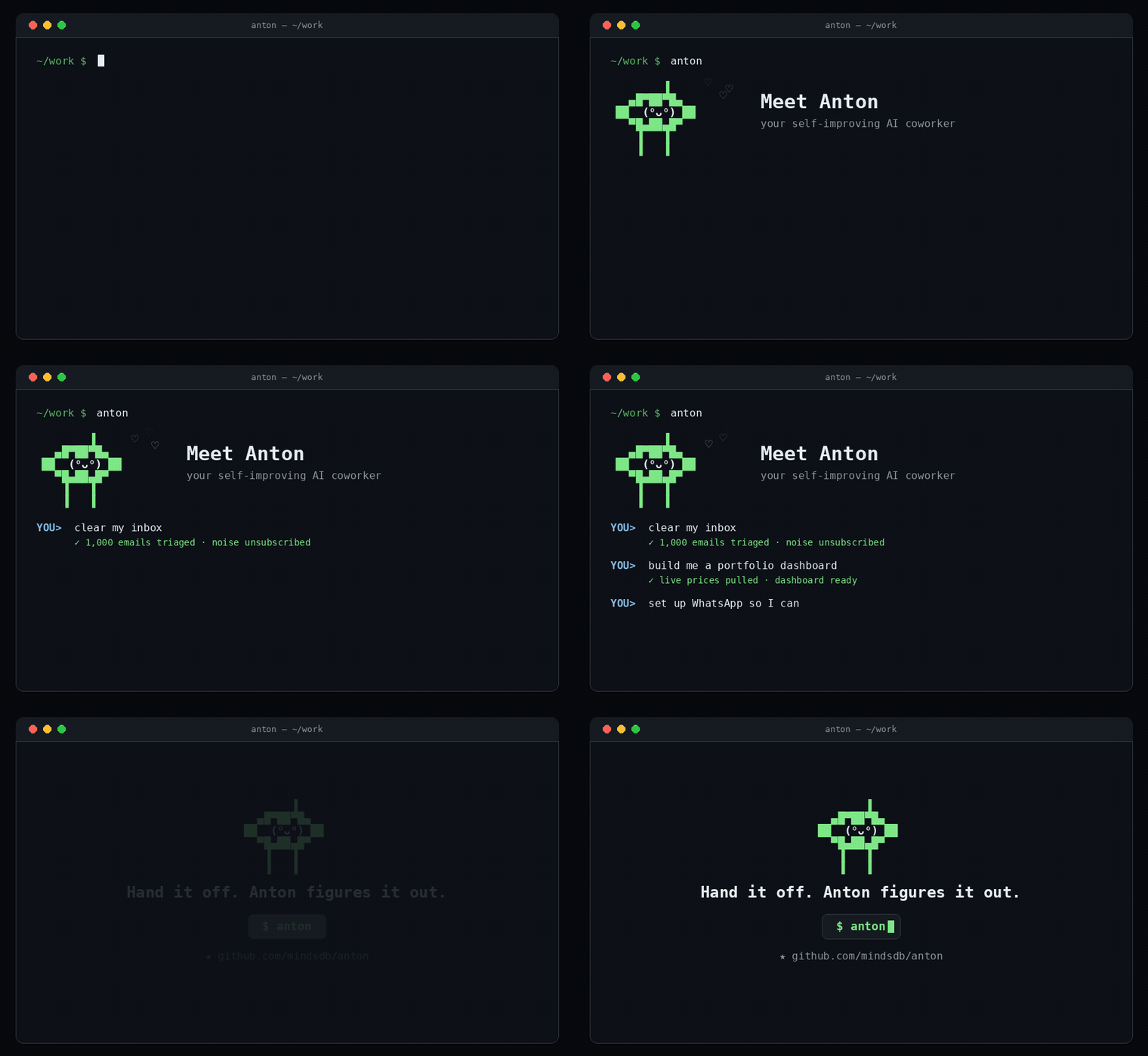
Anton is the open-source agentic harness that powers MindsHub Cowork — a self-improving AI agent you can hand any task to. Built and maintained by the MindsHub team, Anton runs as the default agent inside Cowork, and just as well standalone in your terminal — anywhere, with any model.
Hand it real work: create and send reports, clear your inbox, manage your calendar and CRM, book flights, and more. You describe the outcome — Anton figures out the steps.
Get started
Anton is the default agent in MindsHub Cowork, the unified workspace with data connectors, a model router, and artifacts. Get the full experience, or run Anton on its own from the terminal.
MindsHub Cowork app
- Web — nothing to install: open console.mindshub.ai.
- macOS — download the desktop app (
.pkg). - Windows — download the desktop app (
.exe).
Anton CLI (standalone)
Run Anton directly in your terminal:
- macOS/Linux
curl -sSf https://raw.githubusercontent.com/mindsdb/anton/main/install.sh | sh && export PATH="$HOME/.local/bin:$PATH"
- Windows (PowerShell)
irm https://raw.githubusercontent.com/mindsdb/anton/main/install.ps1 | iex
That's it — now run it by typing:
anton
What can Anton do?
🔧 Ask for anything that requires action
- Send emails — connect accounts, draft messages, or even send them on your behalf.
- Manage calendars — summarize your day, create meetings, block time, and more, all just by asking.
- Automated reporting — pull from multiple databases, crunch numbers, deliver a report on a schedule.
- Workflow automation — monitor a source, react to changes, take action.
- Research & synthesis — scrape the web, summarize findings, build a reference document.
- Data pipeline prototyping — connect sources, transform data, load into a destination.
- System administration — audit configurations, generate reports, fix issues.
The pattern is always the same: you describe the outcome, Anton figures out the steps. From one-off tasks to scheduled workflows — Anton handles it. Here are a few examples:
📊 Data analysis & reports
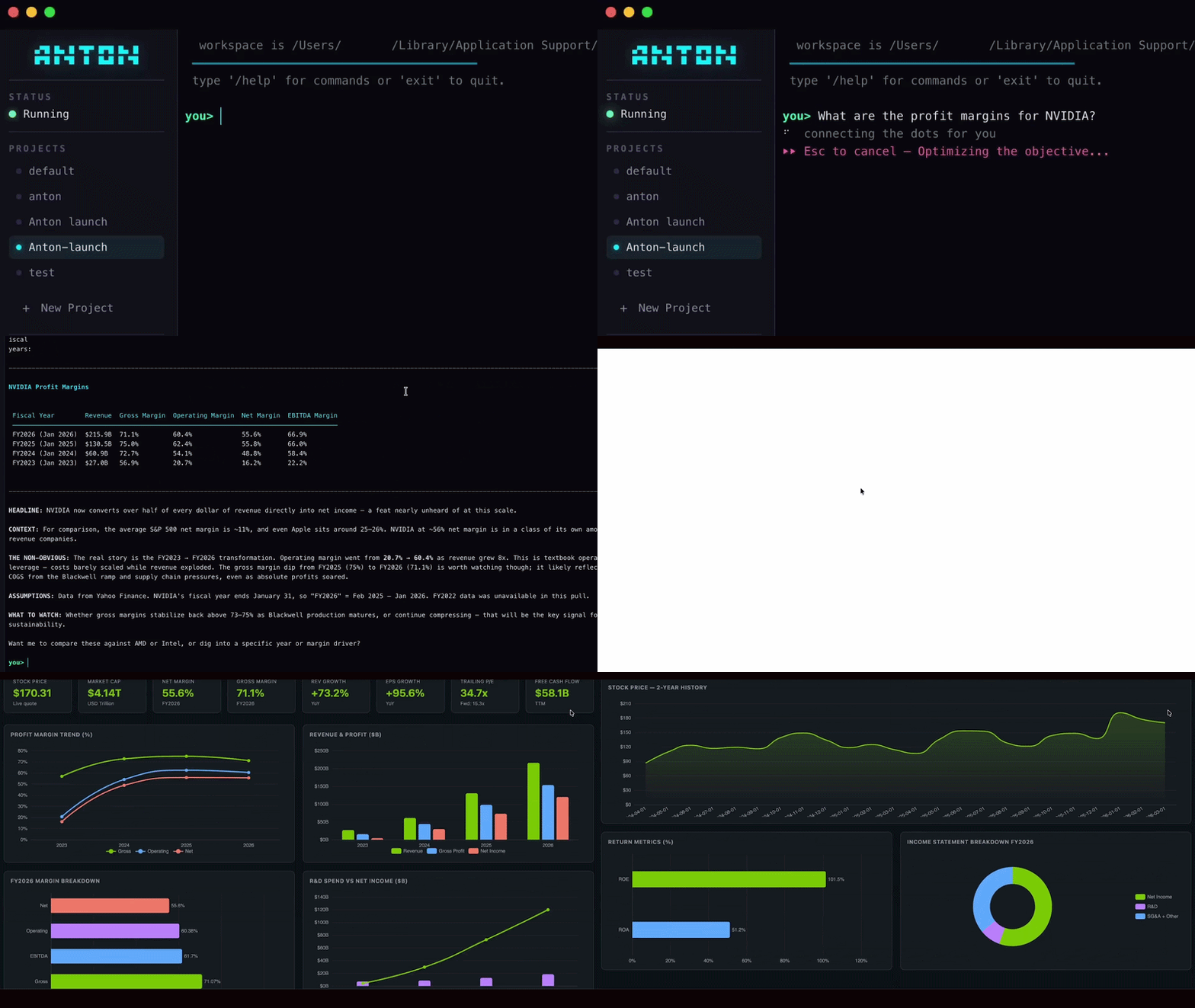
I hold 50 AAPL, 200 NVDA, and 10 AMZN. Get today's prices, calculate my
total portfolio value, show me the 30-day performance of each stock, and
any other information that might be useful. Give me a complete dashboard.
What happens next is the interesting part. At first, Anton doesn't have any particular skill related to this question. However, it figures it out live: scrapes live prices, writes code on the fly, crunches the numbers, and builds you a full dashboard — all in one conversation, with no setup.
📬 Email cleanup
Dear Anton, please help me clear unwanted emails...
Anton scans your inbox, classifies emails by signal vs. noise, identifies unsubscribable marketing, cold outreach, and internal tool notifications — then surfaces a breakdown and handles the cleanup. One user ran it on ~1,000 emails and found ~35% were unsubscribable. Anton surfaced everything AND handled the cleanup.
💬 Build its own integrations
Set up a WhatsApp integration so I can message you from my phone.
Anton doesn't wait for someone to build a connector. It writes the integration code itself, sets it up, and gets it running — so you can chat with it from WhatsApp, Telegram, or whatever channel you need.
Key features
- Credential vault — prevents secrets from being exposed to LLMs.
- Isolated code execution — protected, reproducible "show your work" environment.
- Multi-layer memory & continuous learning — session, semantic, and long-term knowledge. Anton remembers what it learned and gets better at your specific workflows over time.
- Web search & fetch — the agent can query the live web and retrieve URL contents. Routed natively through your LLM provider when possible (no extra setup), with a transparent fallback for third-party endpoints. See below.
Web search & fetch
Anton exposes two web tools to the agent — web_search and web_fetch — both on by default. How they execute depends on your LLM provider:
| Provider | web_search |
web_fetch |
Setup |
|---|---|---|---|
| Anthropic BYOK | Anthropic native server tool | Anthropic native server tool | None — billed on your Anthropic key |
| OpenAI BYOK | OpenAI Responses API native | covered by web_search |
None — billed on your OpenAI key |
| MindsHub Model Router | passthrough | passthrough | None — billed on your MindsHub API key |
| Generic OpenAI-compatible (Together, Groq, Ollama, vLLM, …) | Exa.ai or Brave (you choose at setup) | stdlib HTTP GET (no key) | Run anton setup-search once |
For the first three rows there's nothing to configure — the LLM provider executes the tools server-side and the results are folded directly into its response. For the fourth row, after anton setup finishes configuring a custom OpenAI-compatible endpoint Anton will offer to set up Exa or Brave; you can also (re)run that step at any time with anton setup-search. The chosen search-provider key is persisted to ~/.anton/.env so it carries across sessions and workspaces, exactly like your LLM key.
To opt out, set ANTON_WEB_SEARCH_ENABLED=false and/or ANTON_WEB_FETCH_ENABLED=false.
Caveats: provider rate limits apply; web_fetch has a 30-second timeout and strips HTML to plain text (works best on article-style pages); paywalled and JS-heavy SPAs may return little useful content; treat fetched page bodies as untrusted input.
Connect your data and apps
Anton can connect to and interact with files, databases, applications, APIs, and more.
/connect

(anton) What type of datasource (postgres, posthog, gmail, ..):
Tell Anton to connect and ask questions about your data. It will find credentials in the vault, fetch the schema, and retrieve what it needs.
YOU> Connect to my Gmail and find emails from potential customers that haven't been handled.

ANTON>
⎿ Connecting and fetching emails...
   ~3s
What's inside
A big part of what makes Anton work is that it doesn't need a huge collection of separate tools for web, DB, files, etc. Most of the work is done through one core harness: the execution scratchpad, which can dynamically become whatever Anton needs for the task.
For the full architecture of Anton, and the developer guide, see anton/README.md.
Workspace layout
When you run anton in a directory:
.anton/— workspace folder containing scratchpad state, episodic memory, and local secrets..anton/anton.md— optional project context (Anton reads this at conversation start)..anton/.env— workspace configuration variables file (local file)..anton/episodes/*— episodic memories, one file per session..anton/memory/rules.md— behavioral rules: always/never/when rules (e.g., never hardcode credentials, how to build HTML)..anton/memory/lessons.md— factual knowledge: things I've learned (stock API quirks, dashboard patterns, data fetching notes)..anton/memory/topics/*— topic-specific lessons: deeper notes organized by subject (dashboard-visualization, stock-data-api, etc.).
Override the working folder:
anton --folder /path/to/workspace
Windows scratchpad firewall
The Windows installer can add a firewall rule so the scratchpad can reach the internet. If you skipped it, run in an elevated PowerShell:
netsh advfirewall firewall add rule name="Anton Scratchpad" dir=out action=allow program="$env:USERPROFILE\.anton\scratchpad-venv\Scripts\python.exe"
How Anton differs from coding agents
Anton is a doing agent: code is a means, not the end. Where coding agents focus on producing code for a codebase, Anton focuses on delivering the outcome — a cleaned inbox, a live dashboard, a working integration, an automated workflow — and will write whatever code is necessary to achieve that goal.
💬 Help & community
- Chat with us — join the Discord community.
- Report a bug or request a feature — open a GitHub issue with reproduction steps.
- Read the docs — guides and setup at docs.mindshub.ai.
🤝 Contributing
Anton is open source (MIT) and contributions are welcome — new capabilities, integrations, docs, and bug reports. Non-hotfix PRs target the dev branch (see Dev guidelines). Say hi in the #contributors space on Discord.
Security: Found a vulnerability? Please don't open a public issue — report it privately via our security policy.
Is "Anton" a Mind?
Yes. At MindsHub we build AI systems that collaborate with people to accomplish tasks, inspired by the Culture series of books — so yes, Anton is a Mind :)
Why the name "Anton"?
We really enjoyed the show Silicon Valley. Gilfoyle's AI — Son of Anton — was an autonomous system that wrote code, made its own decisions, and occasionally went rogue. We thought it was a great name for an AI that can learn on its own, so we kept Anton and dropped the "Son of".
Analytics
Anton collects anonymous usage events (e.g. session started, first query) to help us understand how the product is used. No personal data or query content is sent.
To disable analytics, set the environment variable:
export ANTON_ANALYTICS_ENABLED=false
Or add it to your workspace config (.anton/.env):
ANTON_ANALYTICS_ENABLED=false
Trace headers
When the planning provider is openai-compatible Anton can attach Langfuse-Session-Id, Langfuse-Tags, and Langfuse-Metadata headers so the router can attribute traces. To enable the same headers against any other openai-compatible endpoint (e.g. a self-hosted Langfuse proxy in front of ollama or vLLM), set:
export ANTON_LANGFUSE_HEADERS=1
Or add it to your workspace config (.anton/.env):
ANTON_LANGFUSE_HEADERS=1
Dev guidelines
We use three long-lived branches: dev → staging → main.
feature/*  ──▶  dev  ──▶  staging  ──(soak ~1 day)──▶  main
                                                        ▲
                            hotfix/*  ──────────────────┘  (and back-merged to dev)
Branch policy
- Anything you're working on that you feel is ready for production gets merged into
dev. That's the integration line. - All non-hotfix PRs target
dev. Don't open feature PRs againststagingormain. stagingis for soak — never merge feature branches into it directly. It only receives the scheduleddev → stagingpromotion.mainis the release line. The only things that land onmainare the scheduledstaging → mainpromotion and hotfixes.
Hotfixes
- Production-only fixes target
maindirectly. - Every hotfix that lands on
mainmust also be merged back intodevso the branches don't drift. Ifstagingis mid-soak when the hotfix ships, bring it intostagingtoo — otherwise the next promotion will overwrite it.
Promotion cadence
Twice a week, on a fixed schedule:
- Bump the version in
dev, then mergedev → staging. Leave it for ~1 day for soak tests. - The day after the soak, merge
staging → main. The release workflow tags and publishes frommainautomatically (see Releasing).
Net rhythm: two dev → staging promotions and two staging → main promotions per week, each promotion offset by a soak day.
Versioning
Anton versions follow a calendar-derived scheme:
<MAJOR>.<YY>.<MONTH>.<DAY>.<PATCH>
| Field | Meaning | When it bumps |
|---|---|---|
MAJOR |
Milestone or breaking-change signal | Only when we hit an announced milestone (e.g. a launch, a major rewrite, a public "X.0" event) or ship a breaking change. Intentional and announced — never bumped automatically. |
YY |
Last two digits of the calendar year | Auto-bumps on the first release of each January. |
MONTH |
Month of the release (1–12) | Each release. No zero-padding. |
DAY |
Day of the release (1–31) | Each release. No zero-padding. |
PATCH |
Hotfix counter for the specific dated release | 0 for scheduled releases. 1, 2, … for hotfixes patching that release. |
Rules
- The package version is derived from the release git tag, not written by hand.
pyproject.tomlsets[tool.hatch.version] source = "vcs", so hatch-vcs reads the version off the tag at build time;anton/__init__.pyre-exports it at runtime viaimportlib.metadata. There is no__version__literal to edit. - The tag is minted automatically on release — you never push it or bump a version file. The release workflows fill
YY/MONTH/DAYfrom the ship date and derivePATCH; the version is the actual ship date. - Hotfix back-merges to
dev/stagingcarry the fix only — there's no version file for them to touch.
Worked example
2026-04-30   2.26.4.30.0     ← cutover release
2026-07-15   3.26.7.15.0     ← announced milestone or breaking change → MAJOR bumps
2026-12-20   3.26.12.20.0
2027-01-05   3.27.1.5.0      ← YY auto-bumps; MAJOR stays
hotfix       3.26.7.15.1     ← patches the 3.26.7.15.0 release
Cutover note. Anton was on 2.0.4 under the old SemVer scheme. The first CalVer release is 2.26.4.30.0 — keeping MAJOR=2 (no announced milestone or break warrants a bump) and letting YY=26 carry the year. PEP 440 sees 2.0.4 < 2.26.4.30.0 so nothing rolls backward.
Releasing
Anton uses an automated release flow with two publish streams — stable from main and release candidates from staging. The package version is derived from the git tag by hatch-vcs (see Versioning), so there is nothing to bump by hand.
How to ship a new version
- Merge the scheduled
staging → mainpromotion (reviewed as usual). No version file to touch — the tag carries the version. - That's it. On merge,
.github/workflows/release.ymlautomatically:- Computes today's CalVer version and creates the matching git tag (e.g.
v2.26.7.24.1). - Builds the wheel (hatch-vcs derives the version from that tag) and publishes it to PyPI.
- Publishes a GitHub release with auto-generated notes.
- Triggers
tests_e2e_release.ymlto run live e2e tests against the released version.
- Computes today's CalVer version and creates the matching git tag (e.g.
The version computation, tag push, and release creation are shared with the other
service repos through the calver-release.yml reusable workflow in
mindsdb/github-actions; this repo's
workflow supplies the major component and consumes the resulting tag/version outputs.
Staging release candidates
Every push to staging publishes a release candidate through .github/workflows/publish-staging.yml: it cuts a PEP 440 pre-release tag (v2.YY.M.DD.SEQrcN), publishes a GitHub pre-release, and uploads the wheel to PyPI — so cowork-server staging installs an immutable, versioned Anton instead of a mutable branch or hand-pinned commit (ENG-1159). These never reach production: resolvers ignore pre-releases unless a specifier names one, and PyPI's info.version (read by the prod desktop updater) excludes them.
What you should NOT do
- Don't create GitHub releases manually. The
v*tag namespace is locked via a repo ruleset — only the release workflow can create them. Manual attempts will be rejected by GitHub. - Don't push
v*tags directly. Same protection applies. - Don't hand-edit a version. There's no version file to bump — the tag is the source of truth, and both publishers derive the wheel version from it.
Editing CI / workflows
Anything under .github/ is owned by @mindsdb/devops via CODEOWNERS. PRs touching workflows, actions, or release configuration require their review before merge.
Hotfixes / out-of-band releases
If you genuinely need to release outside the normal flow (e.g. an admin hotfix), coordinate with @mindsdb/devops to bypass the tag ruleset. The e2e workflow's version-match guard will still verify the release tag matches anton.__version__ and fail loudly on mismatch.
1 maintainer

Download files
Download the file for your platform. If you're not sure which to choose, learn more about installing packages.
Source Distribution
Built Distribution
Filter files by name, interpreter, ABI, and platform.
If you're not sure about the file name format, learn more about wheel file names.
Copy a direct link to the current filters
File details
Details for the file anton_agent-2.26.9.13.3rc1.tar.gz.
File metadata
- Download URL: anton_agent-2.26.9.13.3rc1.tar.gz
- Upload date:
- Size: 2.6 MB
- Tags: Source
- Uploaded using Trusted Publishing? Yes
- Uploaded via:
twine/7.0.0 CPython/3.13.14
File hashes
| Algorithm | Hash digest | |
|---|---|---|
| SHA256 |
9478f1612fdffec3f20bf4c45d1bfd48ae899483e523ead43b670abd71c7d8ac
|
|
| MD5 |
5480161675419ed7691720b182d7b9a1
|
|
| BLAKE2b-256 |
485fe85a5703883276ec36f7eb458fa7919c891c4a4da51fde0cbdc0d95d672c
|
Provenance
The following attestation bundles were made for anton_agent-2.26.9.13.3rc1.tar.gz:
Publisher:
publish-staging.yml on mindsdb/anton
-
Statement:
-
Statement type:
https://in-toto.io/Statement/v1 -
Predicate type:
https://docs.pypi.org/attestations/publish/v1 -
Subject name:
anton_agent-2.26.9.13.3rc1.tar.gz -
Subject digest:
9478f1612fdffec3f20bf4c45d1bfd48ae899483e523ead43b670abd71c7d8ac - Sigstore transparency entry: 2822981421
- Sigstore integration time:
-
Permalink:
mindsdb/anton@3f03049bd86a345b3d42fa94a05806d2439a62be -
Branch / Tag:
refs/heads/staging - Owner: https://github.com/mindsdb
-
Access:
public
-
Token Issuer:
https://token.actions.githubusercontent.com -
Runner Environment:
github-hosted -
Publication workflow:
publish-staging.yml@3f03049bd86a345b3d42fa94a05806d2439a62be -
Trigger Event:
push
-
Statement type:
File details
Details for the file anton_agent-2.26.9.13.3rc1-py3-none-any.whl.
File metadata
- Download URL: anton_agent-2.26.9.13.3rc1-py3-none-any.whl
- Upload date:
- Size: 740.8 kB
- Tags: Python 3
- Uploaded using Trusted Publishing? Yes
- Uploaded via:
twine/7.0.0 CPython/3.13.14
File hashes
| Algorithm | Hash digest | |
|---|---|---|
| SHA256 |
f6ff9b5aa88d16586ec04d961ae34ba0b30a3c856b85cd0ab76ace05f33215b1
|
|
| MD5 |
ada95047231b35a02411f9298f34cb2c
|
|
| BLAKE2b-256 |
bed665ca3693cc71bc57a1cc7db0347e90da9260f318366c3c3b4ba6b6c62d83
|
Provenance
The following attestation bundles were made for anton_agent-2.26.9.13.3rc1-py3-none-any.whl:
Publisher:
publish-staging.yml on mindsdb/anton
-
Statement:
-
Statement type:
https://in-toto.io/Statement/v1 -
Predicate type:
https://docs.pypi.org/attestations/publish/v1 -
Subject name:
anton_agent-2.26.9.13.3rc1-py3-none-any.whl -
Subject digest:
f6ff9b5aa88d16586ec04d961ae34ba0b30a3c856b85cd0ab76ace05f33215b1 - Sigstore transparency entry: 2822981440
- Sigstore integration time:
-
Permalink:
mindsdb/anton@3f03049bd86a345b3d42fa94a05806d2439a62be -
Branch / Tag:
refs/heads/staging - Owner: https://github.com/mindsdb
-
Access:
public
-
Token Issuer:
https://token.actions.githubusercontent.com -
Runner Environment:
github-hosted -
Publication workflow:
publish-staging.yml@3f03049bd86a345b3d42fa94a05806d2439a62be -
Trigger Event:
push
-
Statement type:














