
anxwritter




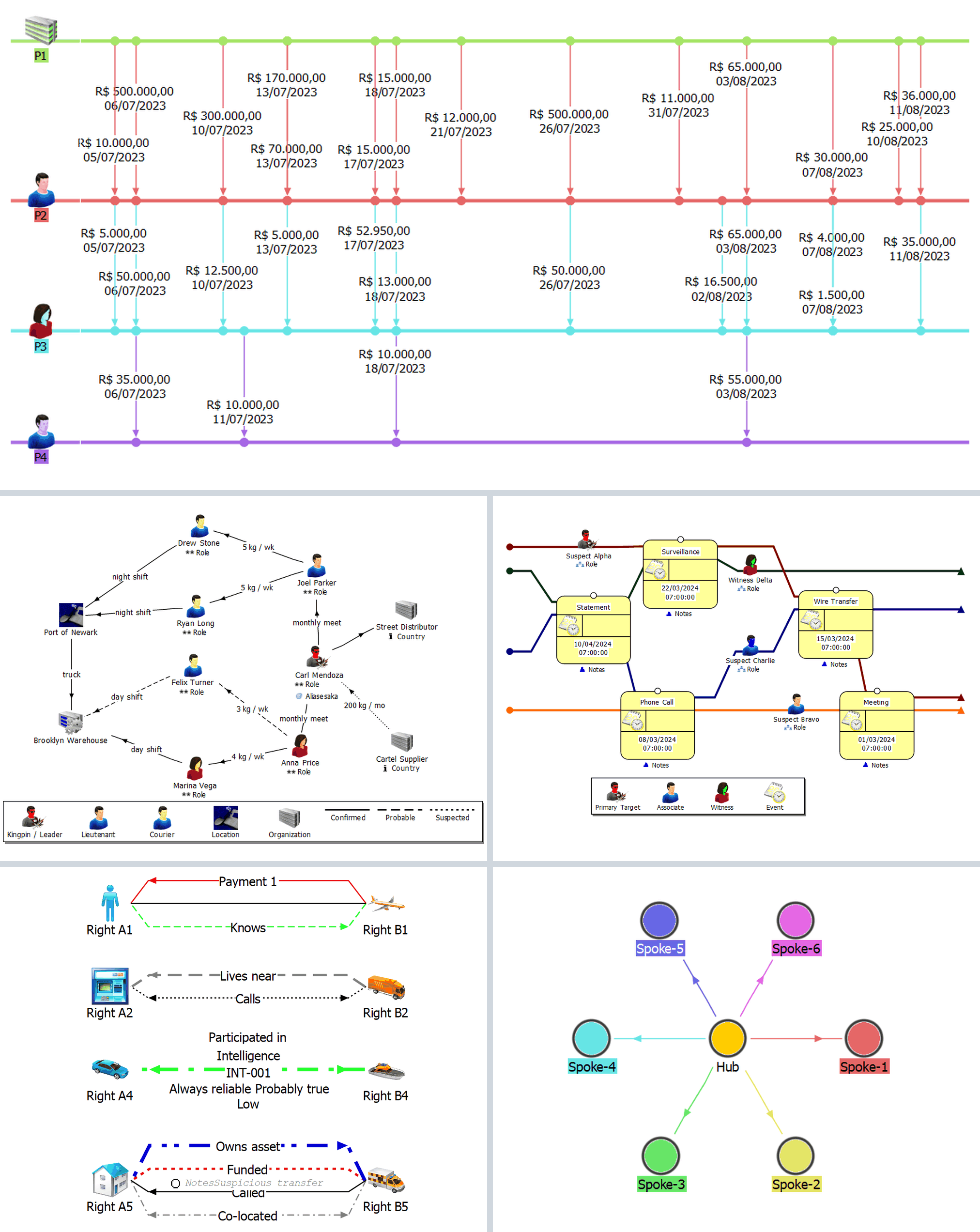
For law enforcement, OSINT practitioners, and intelligence analysts who need to generate i2 Analyst's Notebook charts programmatically from case data, scrapers, or ETL pipelines, with reusable organization-level defaults instead of dragging entities by hand.
Write i2 Analyst's Notebook Exchange (.anx) files from Python, JSON, or YAML.
i2 Analyst's Notebook is an excellent link-analysis tool, and I've always appreciated how intuitive and powerful it is. But as someone who develops applications that produce data for it, I wanted a simpler workflow than exporting denormalized data into .xlsx or .csv files and maintaining separate .ximp import specifications. So I created anxwritter to generate .anx charts directly, making chart creation faster, cleaner, and easier for both developers and analysts.
Independent project — not affiliated with IBM, i2 Group, N.Harris Computer Corporation, or any other vendor. "i2", "i2 Analyst's Notebook", and "ANB" are trademarks of their respective owners (nominative use). See NOTICE.md for the full interoperability, trademark, and attribution statement.
Status: active development. See CHANGELOG.md for breaking changes between releases. API stabilization targeted for 2.0.
Install
# As a library — import in your own code
pip install anxwritter

# As a command-line tool only (isolated venv, no env conflicts)
pipx install anxwritter
With uv:
# Add to a uv-managed project
uv add anxwritter

# Install globally as a CLI tool
uv tool install anxwritter

# One-off run without installing
uvx anxwritter chart.yaml -o my_chart.anx
Requires Python 3.10+.
Want a standalone executable?
pip install pyinstaller(ornuitka) and point it atanxwritter/cli.py. anxwritter does not ship pre-built binaries.
Quick example
from anxwritter import ANXChart

chart = ANXChart()

chart.add_icon(id='Alice', type='Person', color='Blue')
chart.add_icon(id='Bob',   type='Person', color='Red')

chart.add_link(
    from_id='Alice', to_id='Bob',
    type='Telephone Call', arrow='->',
    date='2024-01-15',
)

chart.to_anx('output/my_chart')
This writes output/my_chart.anx. Open it in ANB.
YAML + CLI
# chart.yaml
entities:
  icons:
    - { id: Alice, type: Person, color: Blue }
    - { id: Bob,   type: Person, color: Red }
links:
  - { from_id: Alice, to_id: Bob, type: Telephone Call, arrow: '->', date: '2024-01-15' }
anxwritter chart.yaml -o output/my_chart.anx
What's in the box
- Geographic positioning — map entity attributes to lat/lon for canvas layout and/or ANB Esri Maps
- Org-level config files — separate entity types, link types, attribute classes, and palettes from per-chart data; layered configs with append-and-dedup or wholesale-replace semantics
- Semantic types — full
lcx:LibraryCataloguesupport with custom type extension; per-instance overrides - Auto-layout — geometric (circle, grid, radial, random) plus topology-aware force-directed: Fruchterman-Reingold, ForceAtlas2, tidy tree (Reingold-Tilford). Manual
x/yalways wins; pinned entities act as anchors - Auto-coloring — distribute HSV hues across entities; matching link colors that follow the target entity
- Data-driven link styling — width and/or color from a numeric attribute via a configurable scale (linear, log, sqrt, power, quantile) and color ramp; or per-value lookup on a string attribute. Optional auto-generated legend.
- Value enforcement — declarative regex / closed-enum rules on entity ids, attribute values, and per-type required attributes; org-level policy that flags drift across data sources so the same identity stays matchable across charts
- CLI —
anxwritter [--config org.yaml ...] data.{json,yaml} -o out.anx, with--show-configprovenance and--geo-datafor external geo lookups - Three input forms — Python objects, JSON, or YAML; all paths produce identical output
- Typed dataclass API —
Icon,Box,Circle,ThemeLine,EventFrame,TextBlock,Label,Link,Card - Validation — collects every error in one pass before writing the file
Customize everything ANB exposes
No fixed catalog — every configurable surface in ANB is yours to define:
- Entity types & link types — names, icons, colors, shading, semantic-type bindings
- Attribute classes — type, prefix/suffix, decimals, font, merge behavior, icons, visibility
- Palettes — your own "Insert from Palette" panels with grouped types and pre-filled attribute entries
- Legend — 8 item types (icon, link, line, font, text, attribute, timezone, icon-frame) with full styling
- Colors — 40 named, hex, COLORREF, or auto-distributed HSV with link colors that follow the entity
- Strengths, grades, source types, datetime formats, semantic types — all configurable
Define your defaults once in config.yaml, layer overrides on top, reuse across every chart.
Documentation
- Getting started — install, first chart, where to go next
- Analyst guide — every feature via practical examples
- Reference docs — field-by-field API reference
License
MIT — see LICENSE. Copyright (c) 2024-2026 gustavo-gkmi.
Developed with the help of AI coding assistants.
1 maintainer

Metadata
1 maintainer
Release files for anxwritter 1.25.0
For a detailed explanation of source distributions (sdists) and built distributions (wheels), please see the package formats documentation.
Source distribution (sdist)
| File | Size | Uploaded | |
|---|---|---|---|
| anxwritter-1.25.0.tar.gz | 452.8 kB | Details |
Built distribution (wheel)
| File | Interpreter | ABI | Platform | Reset |
|---|---|---|---|---|
| anxwritter-1.25.0-py3-none-any.whl | Python 3 | none | any | Details |
Total release size: 638.4 kB
Release files / anxwritter-1.25.0.tar.gz
| Download URL | anxwritter-1.25.0.tar.gz |
|---|---|
| Size | 452.8 kB |
| Tags | Source |
|
SHA-256 checksum How to use checksums |
8053de1e182753df096ddfbef679d63168b444fb48bc4135d2309b5c0e306cf0
|
|
BLAKE2b-256 checksum How to use checksums |
ed42de8cdb144bfa64aa59a8a381aa6b6fba46db72f40dae853d007e23f875ce
|
| Upload date | |
|
Uploaded using Trusted Publishing? What is trusted publishing? |
Yes |
| Uploaded via |
twine/6.1.0 CPython/3.13.12
|
Provenance
Provenance describes where a file came from. On PyPI, provenance is shared via attestations, which provide a verifiable record of the build or publishing details. View details, limitations and caveats.


PyPI Publish Attestation
PyPI verified that this artifact, at this checksum, originated from the publisher listed below.
Signed by GitHub Actions, verified by PyPI on Jul 8, 2026.
Transparency logRelease files / anxwritter-1.25.0-py3-none-any.whl
| Download URL | anxwritter-1.25.0-py3-none-any.whl |
|---|---|
| Size | 185.5 kB |
| Tags | Python 3 |
|
SHA-256 checksum How to use checksums |
552fdbdb2591f94e560a50376da3362bb412499faea69f19974df8bf290ac4d7
|
|
BLAKE2b-256 checksum How to use checksums |
dceceabb41c9f17eb6f88467b939e438fa906fab223f04266d26ace5b6d53eb0
|
| Upload date | |
|
Uploaded using Trusted Publishing? What is trusted publishing? |
Yes |
| Uploaded via |
twine/6.1.0 CPython/3.13.12
|
Provenance
Provenance describes where a file came from. On PyPI, provenance is shared via attestations, which provide a verifiable record of the build or publishing details. View details, limitations and caveats.
PyPI Publish Attestation
PyPI verified that this artifact, at this checksum, originated from the publisher listed below.
Signed by GitHub Actions, verified by PyPI on Jul 8, 2026.
Transparency log













