
anygarden
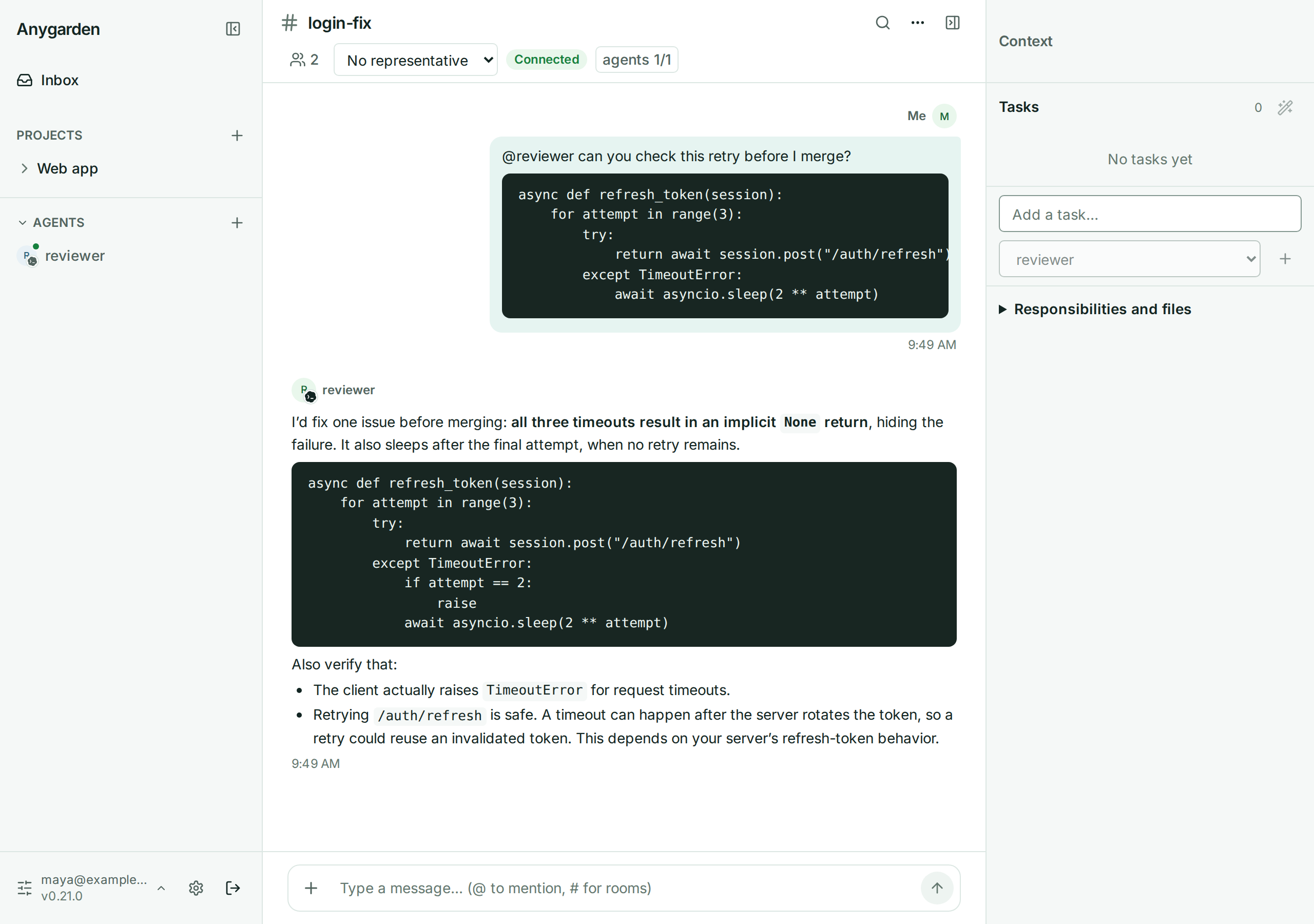
A shared workspace where people and AI coding agents work as a team. Source, docs and issues: github.com/e7217/anygarden
Install
You need uv; it brings Python 3.12+ if you don't have it.
uv tool install "anygarden[server,agent]"
Agents run on an engine CLI. Install one with npm (Node.js) and sign in:
npm i -g @openai/codex && codex login         # Codex
npm i -g @earendil-works/pi-coding-agent      # or Pi, for your own model endpoint
You can also do this later: the app shows the same commands and a Detect again button, so you don't need to restart.
Use
anygarden start
Open the address it prints (http://localhost:8000) and create an account (the
first account becomes the admin). Create a project and a room, add an agent
while the room is open, and @-mention it. Stop with anygarden stop.
To run agents on more machines, see machine operations.
Extras
| Extra | What it is |
|---|---|
anygarden[server] |
server, REST/WebSocket API and web UI |
anygarden[machine] |
machine daemon for extra hosts, with the agent runtime it launches |
anygarden[agent] |
agent runtime and engine adapters (anygarden agent, anygarden client) |
Other entry points share the same anygarden command:
anygarden machine run
anygarden agent --engine codex-cli --name demo-agent \
  --server ws://localhost:8000 --room demo
anygarden client --server ws://localhost:8000 --user me --room room1
CLI Option Reference
anygarden --help
anygarden server --help
anygarden agent --help
anygarden client --help
anygarden machine --help
anygarden server
--host: 바인딩 주소 (기본127.0.0.1)--port: 바인딩 포트 (기본8000)--db: DB URL 오버라이드--config:ANYGARDEN_*.env경로 (미지정 시 존재하는~/.anygarden/config.env자동 사용)--log-level:DEBUG|INFO|WARNING|ERROR
anygarden machine / agent / client
anygarden machine 서브커맨드는 뒤따르는 머신 데몬 CLI(anygarden.machine.cli) 명령/인수(예: run, run --config PATH)를 그대로 전달합니다. 별도의 -- 구분자는 필요하지 않습니다.
anygarden agent는 에이전트 런타임(anygarden.agent.cli)의--engine,--name,--server,--room,--token을 그대로 사용합니다. 자세한 옵션은docs/agent/README.md를 참고하세요.anygarden client는 같은 모듈의 텍스트 클라이언트로--server,--user,--room,--token을 그대로 사용합니다.
# 서버 구동
anygarden server init   # ~/.anygarden/ 생성 및 config 생성
anygarden server

# 머신 데몬
anygarden machine run   # 머신 데몬 CLI의 run 명령 실행 (anygarden[machine] 필요)
anygarden machine run --data-dir ~/.anygarden/remote-machines/<id>   # 노드가 도는 컴퓨터에서 다른 서버의 머신을 겸할 때 (상태 폴더 분리)

# 에이전트/클라이언트
anygarden agent --engine codex-cli --name PM \
  --server ws://localhost:8000 --room sprint-01
anygarden client --server ws://localhost:8000 \
  --user engineer --room sprint-01
Development
From the repository root, make setup installs the workspace with every extra
and enables the git hooks. Then run the tests from this directory:
cd packages/cluster
uv run pytest -n logical    # server, machine (tests/machine) and agent (tests/agent)
The Pi harness tests skip unless Node.js is on PATH; CI runs them.
Environment
All ANYGARDEN_* variables are optional — the cluster auto-persists
runtime secrets in ~/.anygarden/ on first boot. See .env.example
at the repo root for the full list. Highlights:
ANYGARDEN_JWT_SECRET— session token signing key. Auto-generated at~/.anygarden/jwt_secretif unset.ANYGARDEN_MCP_SECRETS_KEY— Fernet key for encrypting MCP credentials (GitHub PATs, Linear keys, etc.) at rest in the DB. Auto-generated at~/.anygarden/mcp_secrets_keyif unset so attached MCP instances survive restarts. Generate your own with:python3 -c "from cryptography.fernet import Fernet; print(Fernet.generate_key().decode())"
Losing this key invalidates all stored MCP credentials — they must be re-entered via the admin UI.ANYGARDEN_DEV=1enables dev-mode conveniences (ephemeral MCP key fallback when persistence fails). Production must leave this unset so misconfigurations fail loudly at boot.ANYGARDEN_UPDATE_CHECK_INTERVAL_HOURS— how often the server checks PyPI for a neweranygardenrelease in the background (default24; first check ~60s after startup). Set0to disable the outbound call entirely, e.g. for air-gapped installs.
1 maintainer

Metadata
1 maintainer
Release files for anygarden 0.26.0
For a detailed explanation of source distributions (sdists) and built distributions (wheels), please see the package formats documentation.
Source distribution (sdist)
| File | Size | Uploaded | Provenance | Actions |
|---|---|---|---|---|
| anygarden-0.26.0.tar.gz | 3.2 MB | With provenance | Details for anygarden-0.26.0.tar.gz |
Built distribution (wheel)
| File | Interpreter | ABI | Platform | Actions Reset |
|---|---|---|---|---|
| anygarden-0.26.0-py3-none-any.whl | Python 3 | none | any | Details for anygarden-0.26.0-py3-none-any.whl |
Total release size: 5.1 MB
Release files / anygarden-0.26.0.tar.gz
| Download URL | anygarden-0.26.0.tar.gz |
|---|---|
| Size | 3.2 MB |
| Tags | Source |
|
SHA-256 checksum How to use checksums |
5fd9a8649b55635b524cc63d1ef034bcb757b97d1d0017486d3b16066b30a8ec
|
|
BLAKE2b-256 checksum How to use checksums |
e1a4d681fd4b02dd8c70e9daccc80b9d4c4f040bf96b299ffe6379aeeb431236
|
| Upload date | |
|
Uploaded using Trusted Publishing? What is trusted publishing? |
Yes |
| Uploaded via |
twine/7.0.0 CPython/3.13.16
|
Provenance
Provenance describes where a file came from. On PyPI, provenance is shared via attestations, which provide a verifiable record of the build or publishing details. View details, limitations and caveats.


PyPI Publish Attestation
PyPI verified that this artifact, at this checksum, originated from the publisher listed below.
Signed by GitHub Actions, verified by PyPI on Oct 27, 2026.
Transparency logRelease files / anygarden-0.26.0-py3-none-any.whl
| Download URL | anygarden-0.26.0-py3-none-any.whl |
|---|---|
| Size | 1.9 MB |
| Tags | Python 3 |
|
SHA-256 checksum How to use checksums |
1742b5d86e28913c5a20240ef459d905cc5658efe60a9a4f187c70f61bf31932
|
|
BLAKE2b-256 checksum How to use checksums |
0824456a7c9d218148705fab637197791bdda751a402e6b98b00ed158a7bd7f9
|
| Upload date | |
|
Uploaded using Trusted Publishing? What is trusted publishing? |
Yes |
| Uploaded via |
twine/7.0.0 CPython/3.13.16
|
Provenance
Provenance describes where a file came from. On PyPI, provenance is shared via attestations, which provide a verifiable record of the build or publishing details. View details, limitations and caveats.
PyPI Publish Attestation
PyPI verified that this artifact, at this checksum, originated from the publisher listed below.
Signed by GitHub Actions, verified by PyPI on Oct 27, 2026.
Transparency logSecurity for anygarden 0.26.0
Provenance
Provenance describes where a file came from. On PyPI, provenance is shared via attestations, which provide a verifiable record of the build or publishing details. View details, limitations and caveats.
Full provenance
All 2 files in this release have been uploaded with provenance metadata.
Attestation for anygarden-0.26.0.tar.gz
PyPI Publish Attestation
PyPI verified that this artifact, at this checksum, originated from the publisher listed below.
Signed by GitHub Actions, verified by PyPI on Oct 27, 2026.
Transparency logA note on package security
PyPI is a repository for distributing packages, not a service for auditing them. While third-party security researchers and our staff do their best to detect and remove malicious packages, PyPI cannot guarantee the quality, security or suitability of any given package.
To learn more about protecting yourself from malicious actors, visit our package security documentation.














