
anygrep



anygrep searches your notes, PDFs and screenshots by meaning, from the terminal. It runs one model (EmbeddingGemma 2, int8 ONNX) on the CPU and keeps one local index.
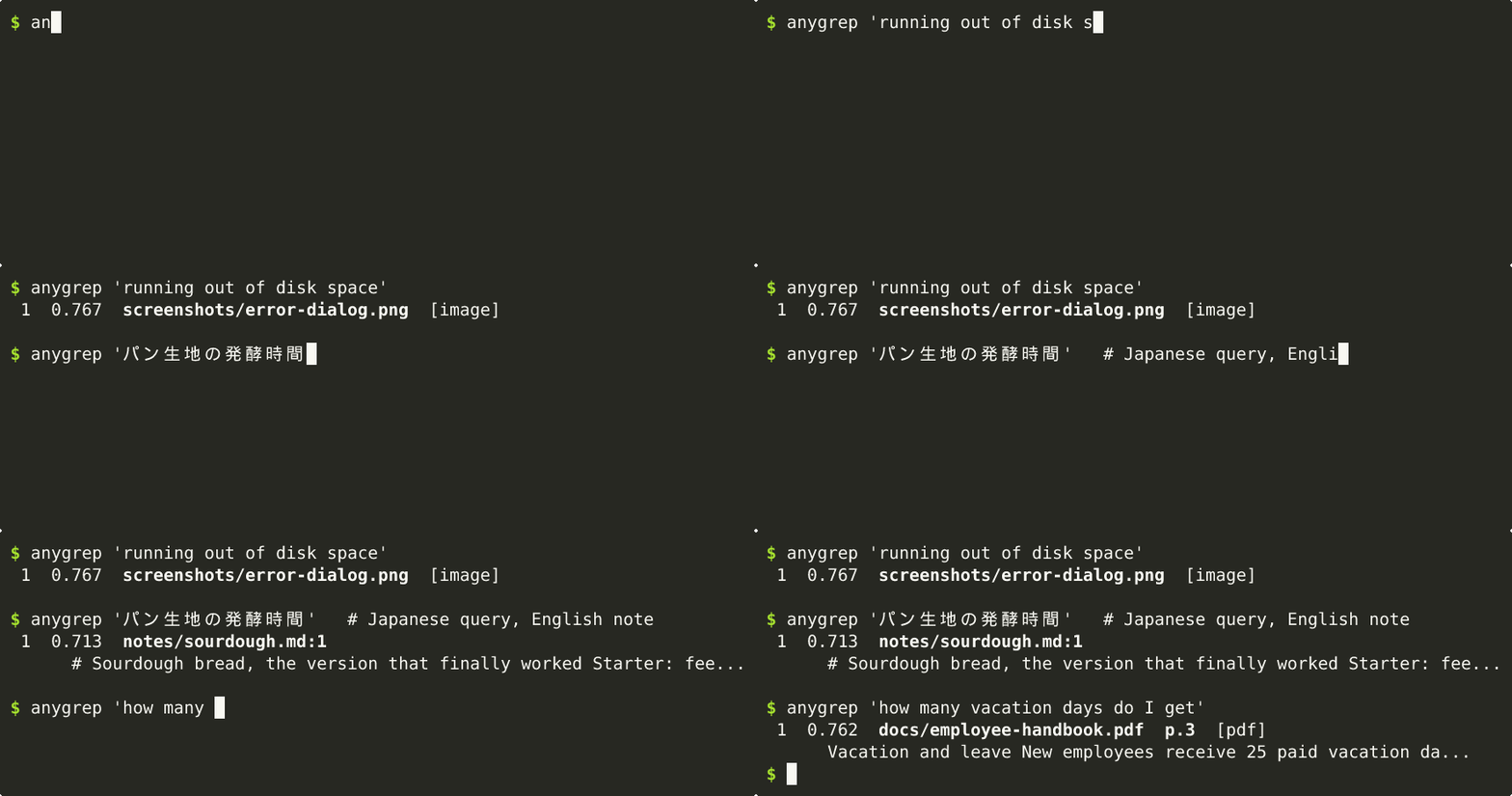
The demo searches a folder that was already indexed, and the wait for the model to load is sped up.
Install
pipx install anygrep        # or: uv tool install anygrep
uvx anygrep "when is the tax return due" ~/notes   # or try it without installing
Requires Python 3.10+. Tested on Linux; CI also runs the tests on Windows and macOS (Apple silicon). The model is downloaded on first use: about 350 MB, and 200 MB more once you index images. See docs/usage.md for Intel Macs, Windows on ARM and uninstalling.
Usage
anygrep "wifi password reset"                 # search here (new files are indexed first)
anygrep "when is the tax return due" ~/notes  # search one folder
anygrep --image whiteboard.jpg ~/Screenshots  # find similar pictures
anygrep -l "invoice from acme"                # file names only; piped output is path:line:text
anygrep -Q ~/notes                            # interactive: the model stays loaded
anygrep index --background ~/Pictures         # big folder: index in a low-priority process
Results are up to 10 files, closest in meaning first (-m N for more), not every match; queries are not
regular expressions. A file whose text or name contains a query of 3 or more characters as typed (an
invoice number, an error code) comes first, marked (exact); words found in many files are not boosted
this way (details). Queries and documents can be in different languages.
Weak matches are hidden (--weak shows them) and near-duplicate files are shown once. See anygrep -h
and docs/usage.md.
On a terminal, the first search in a big folder indexes the new files first, with a progress bar; Ctrl-C
keeps what is done and the next run continues. index --background does it while you work (your home
folder is never indexed automatically, so name a folder inside it). In a script or cron job, a search
indexes new files only if that takes under about 30 seconds; run anygrep index beforehand for a big
folder (details).
It reads text files (.md .txt .html and more), the text layer of PDFs, and .jpg .png .webp .bmp .gif images. Hidden, ignored and binary files are skipped.
Use from Python
import anygrep

with anygrep.Index() as idx:  # the index the command uses
    idx.update("~/notes")  # index new and changed files
    for hit in idx.search("when is the tax return due", k=5):
        print(hit.score, hit.path, hit.snippet)
Install it with pip in your project's environment. It uses the same index, scores and filtering as the command and prints nothing. The API may change before 1.0; see docs/python-api.md.
Performance
On a Ryzen 7 7700 with the default 8 threads, text indexes at about 1,100 tokens/s and an image takes about 1.2 s. A search command takes about 1.5 s, mostly loading the model. More in docs/benchmarks.md.
See also how it works, relevance and comparison with other tools.
Limitations
- No OCR: small text inside images is often missed, and scanned PDFs are skipped.
- No audio, video or Office documents yet (anygrep says how many Office files it skipped), and no
file watching (run
anygrep indexfrom cron).
License
MIT. The model is downloaded separately: an int8 ONNX conversion of Google's EmbeddingGemma 2, released under the Apache License 2.0 (its model card also points to the Gemma Prohibited Use Policy). anygrep is not affiliated with Google.
1 maintainer

Metadata
1 maintainer
Release files for anygrep 0.1.0
For a detailed explanation of source distributions (sdists) and built distributions (wheels), please see the package formats documentation.
Source distribution (sdist)
| File | Size | Uploaded | |
|---|---|---|---|
| anygrep-0.1.0.tar.gz | 422.1 kB | Details |
Built distribution (wheel)
| File | Interpreter | ABI | Platform | Reset |
|---|---|---|---|---|
| anygrep-0.1.0-py3-none-any.whl | Python 3 | none | any | Details |
Total release size: 675.6 kB
Release files / anygrep-0.1.0.tar.gz
| Download URL | anygrep-0.1.0.tar.gz |
|---|---|
| Size | 422.1 kB |
| Tags | Source |
|
SHA-256 checksum How to use checksums |
b58221c3cabe1840dd6d2530f853807c7b6036cda6ea31982df2804758d817b7
|
|
BLAKE2b-256 checksum How to use checksums |
08686ccf57d82d5331ba38215a89a598efc6837403ad6c6cf05a34ba192ad3d5
|
| Upload date | |
|
Uploaded using Trusted Publishing? What is trusted publishing? |
Yes |
| Uploaded via |
twine/7.0.0 CPython/3.13.14
|
Provenance
Provenance describes where a file came from. On PyPI, provenance is shared via attestations, which provide a verifiable record of the build or publishing details. View details, limitations and caveats.


PyPI Publish Attestation
PyPI verified that this artifact, at this checksum, originated from the publisher listed below.
Signed by GitHub Actions, verified by PyPI on Oct 12, 2026.
Transparency logRelease files / anygrep-0.1.0-py3-none-any.whl
| Download URL | anygrep-0.1.0-py3-none-any.whl |
|---|---|
| Size | 253.5 kB |
| Tags | Python 3 |
|
SHA-256 checksum How to use checksums |
2fcb3ca3f25bb1f2494a0bc14ecb6b9fdb8eb4e2496679d052df3bf3e50b77d0
|
|
BLAKE2b-256 checksum How to use checksums |
b02ddc38bd901a49d713683fd9522051f94712f71248e1d441295ecbfe46d5e6
|
| Upload date | |
|
Uploaded using Trusted Publishing? What is trusted publishing? |
Yes |
| Uploaded via |
twine/7.0.0 CPython/3.13.14
|
Provenance
Provenance describes where a file came from. On PyPI, provenance is shared via attestations, which provide a verifiable record of the build or publishing details. View details, limitations and caveats.
PyPI Publish Attestation
PyPI verified that this artifact, at this checksum, originated from the publisher listed below.
Signed by GitHub Actions, verified by PyPI on Oct 12, 2026.
Transparency log












