





anyhop
A universal VPN client that manages multiple VPN connections with rule-based routing, with interfaces for human (Web UI and CLI) and programs (REST API and Docker image). Works with commercial VPN services and with your own self-hosted WireGuard servers.
Platforms
Supported
 Docker |
 CLI |
 Web UI |
Planned

macOS |
 Linux |
 Windows |
 OpenWrt (LuCI) |
VPN Providers
Supported
 NordVPN |
 Proton VPN |
 Self-hosted customized |
Not only commercial VPNs: the customized provider takes any WireGuard
server — one you host yourself, or a provider not listed here. Import its
standard .conf under a name you choose (optionally with a country/city), and
it becomes a channel like any other:
anyhop providers add customized
anyhop channels add customized --name home --config ~/wg/home.conf --country Germany
Planned
 ExpressVPN |
 Surfshark |
 CyberGhost |
 PIA |
 Windscribe |
 IPVanish |
 Mullvad |
 PureVPN |
 VyprVPN |
 HideMyAss |
 VPN Unlimited |
 PrivadoVPN |
 TorGuard |
 PrivateVPN |
 FastestVPN |
 IVPN |
 AirVPN |
 VPN.ac |
 VPNSecure.me |
 SlickVPN |
See VPN provider research for setup archetypes, provider-specific constraints, and excluded providers.
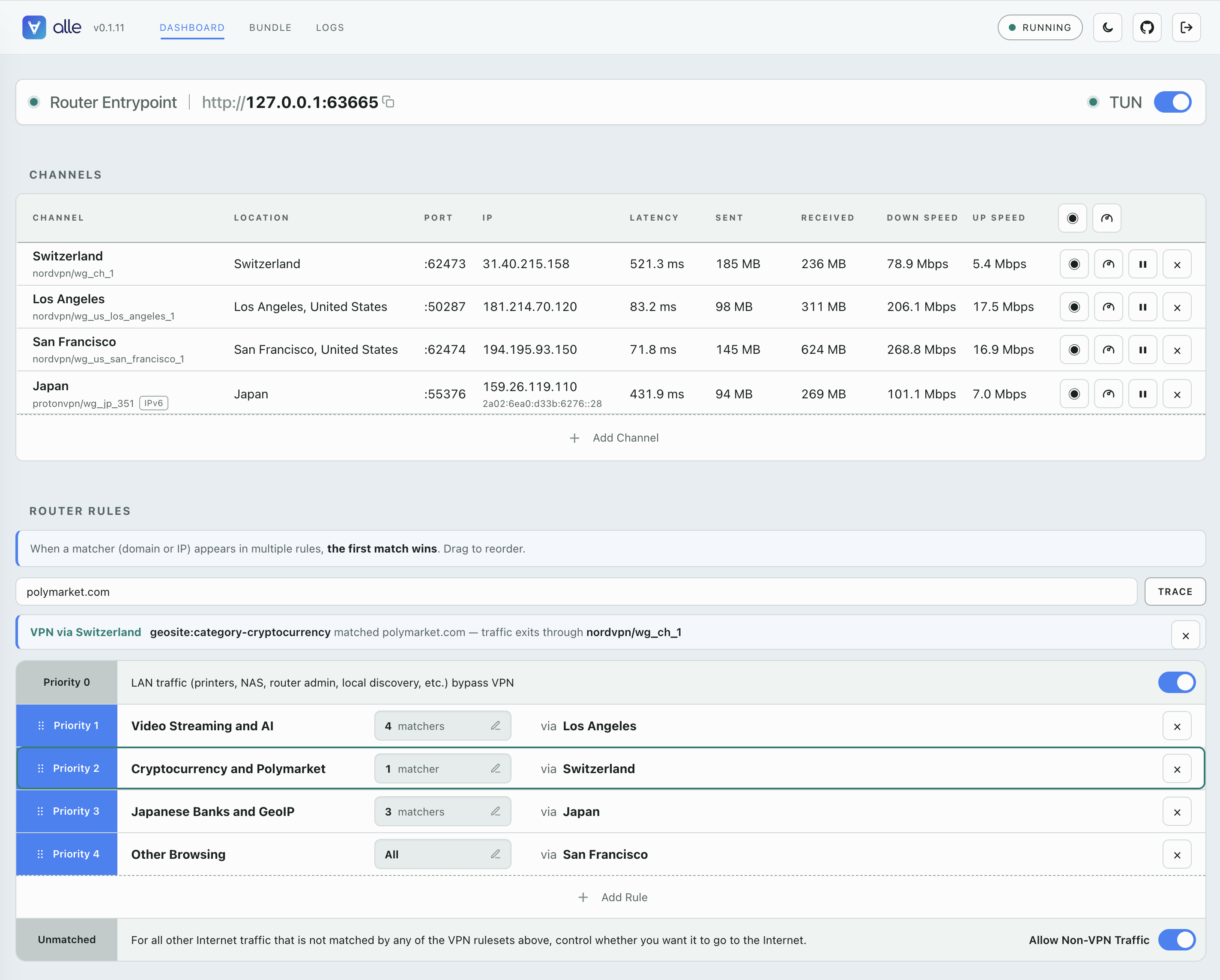
Web UI
Why anyhop
For people
You already pay for a commercial VPN (or run your own WireGuard servers) — but a VPN client connects to one location at a time. Switching countries means disconnecting, reconnecting, and breaking whatever was using the old exit. Two locations at once is not on offer.
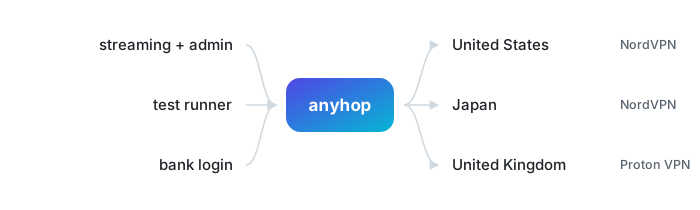
anyhop keeps several exits live simultaneously, from one provider or mixed across
providers and your own servers. Different traffic leaves through different VPN servers, decided by
anyhop's routing rules:
For programs
Every action the CLI performs is also a REST call, and each exit is a stable
127.0.0.1:<port> proxy. So another program can drive the whole lifecycle of
many VPN connections — create, probe, rotate, retire — on its own schedule,
with no human clicking a client. That is what makes proxy rotation across
regions, and reaching geofenced resources from wherever they are served,
something you can script.
It also ships as a container image (ghcr.io/anyhop/anyhop)
so a compose stack can add it as one service and let sibling containers reach
the internet through whichever exit the rules pick.
You may also have heard of gluetun or vopono — anyhop and gluetun and anyhop and vopono compare anyhop to each.
What anyhop does
anyhop runs multiple VPN exits side by side, each its own local HTTP+SOCKS
proxy. One router entrypoint sends traffic by rule to an exit, straight out, or
nowhere at all — see Rule-based routing. For a whole-machine
VPN through those same rules there is an optional TUN mode (anyhop tun on,
one-time privilege grant): CLI reference,
runbook.
The runtime model — one sing-box process, state, ports, probes — is in
How it works. What is supported today is in
Current status.
For AI Coding Agents
anyhop for agents — copy-paste to your coding agent to teach them how to use anyhop. It carries the model, the facts that change how the code is written, and links it can fetch on demand.
Quick Start
For macOS + Linux: installs anyhop and its user-level login service
curl -LsSf https://github.com/anyhop/anyhop/releases/latest/download/install.sh | sh
Then add a VPN provider (use NordVPN as example) and create a connection ("channel").
anyhop providers add nordvpn      # will ask you for NordVPN token
anyhop channels add nordvpn --country "United States"
anyhop start
anyhop channels ls                # prints each channel's local proxy port
Homebrew, uv, pipx, Docker, the checksum-verified manual install, and the
uninstaller are all in Getting started; container
deployments are in Docker.
Documentation
Using anyhop
- Getting started — install, quick start, provider setup, everyday commands, channel enable/disable.
- Rule-based routing — the router entrypoint: rulesets, first-match priority, kill-switch, built-in LAN bypass.
- Web UI — the browser dashboard (
anyhop ui): pages, sign-in, remote access over SSH. - CLI reference — every command, flag, and environment variable.
Automating anyhop
- anyhop for agents — the entry point to hand a coding agent: model, minimal call set, failure modes, progressive links.
- REST API — the
/api/v1contract: everything the CLI can do, over HTTP with Bearer auth. Loopback by default; opt-in network exposure for compose siblings. Machine-readable spec: openapi.yaml. - Declarative setup and the bundle format — the whole setup (providers, channels, rules) as one YAML file: backup/restore, startup config, secret indirection.
Deploying anyhop
- Docker — image design, proxy hub, VPN gateway container (tun), trust boundaries.
- Docker Compose walkthrough — bundle authoring, secrets, managing anyhop from a sibling container, day-2 operations, troubleshooting.
- TUN runbook — whole-machine capture: privilege models per platform, verification, rollback.
Understanding anyhop
- How it works — the runtime model: one sing-box, state, ports, probes.
- Current status — supported providers and platforms, feature matrix, what is planned, and the non-goals.
- Security model — trust boundaries, credential handling, Web UI/API hardening, fail-closed routing.
- VPN provider research — which providers can be supported next, and why some can't.
- anyhop and gluetun — how the two differ, and how to choose between them.
- anyhop and vopono — request-level routing vs. per-process network-namespace isolation.
Security and privacy
See the Security model.
License
MIT
1 maintainer

Metadata
1 maintainer
Release files for anyhop 0.1.20
For a detailed explanation of source distributions (sdists) and built distributions (wheels), please see the package formats documentation.
Source distribution (sdist)
| File | Size | Uploaded | |
|---|---|---|---|
| anyhop-0.1.20.tar.gz | 1.4 MB | Details |
Built distribution (wheel)
| File | Interpreter | ABI | Platform | Reset |
|---|---|---|---|---|
| anyhop-0.1.20-py3-none-any.whl | Python 3 | none | any | Details |
Total release size: 1.8 MB
Release files / anyhop-0.1.20.tar.gz
| Download URL | anyhop-0.1.20.tar.gz |
|---|---|
| Size | 1.4 MB |
| Tags | Source |
|
SHA-256 checksum How to use checksums |
568ceaf8fc813b6c69ef13adfd3a9e6c0772d27a6cdbdaa08a7bfd0673658034
|
|
BLAKE2b-256 checksum How to use checksums |
1f4a5960d01897f2536f425a0598faa56bd0f9a70c8b8f8122034afc9e903bb2
|
| Upload date | |
|
Uploaded using Trusted Publishing? What is trusted publishing? |
Yes |
| Uploaded via |
twine/7.0.0 CPython/3.13.14
|
Provenance
Provenance describes where a file came from. On PyPI, provenance is shared via attestations, which provide a verifiable record of the build or publishing details. View details, limitations and caveats.


PyPI Publish Attestation
PyPI verified that this artifact, at this checksum, originated from the publisher listed below.
Signed by GitHub Actions, verified by PyPI on Oct 1, 2026.
Transparency logRelease files / anyhop-0.1.20-py3-none-any.whl
| Download URL | anyhop-0.1.20-py3-none-any.whl |
|---|---|
| Size | 357.6 kB |
| Tags | Python 3 |
|
SHA-256 checksum How to use checksums |
7b06bd810c275c1000dcd43200da800c51210002c7caae8d1d23092ada7715e3
|
|
BLAKE2b-256 checksum How to use checksums |
40b762d4788eb036287104aa2435d410c93435fb188ee1c95628a13d0adda1d5
|
| Upload date | |
|
Uploaded using Trusted Publishing? What is trusted publishing? |
Yes |
| Uploaded via |
twine/7.0.0 CPython/3.13.14
|
Provenance
Provenance describes where a file came from. On PyPI, provenance is shared via attestations, which provide a verifiable record of the build or publishing details. View details, limitations and caveats.
PyPI Publish Attestation
PyPI verified that this artifact, at this checksum, originated from the publisher listed below.
Signed by GitHub Actions, verified by PyPI on Oct 1, 2026.
Transparency log













