
📦
anyprompt



Installation
pip install anyprompt
What is anyprompt?
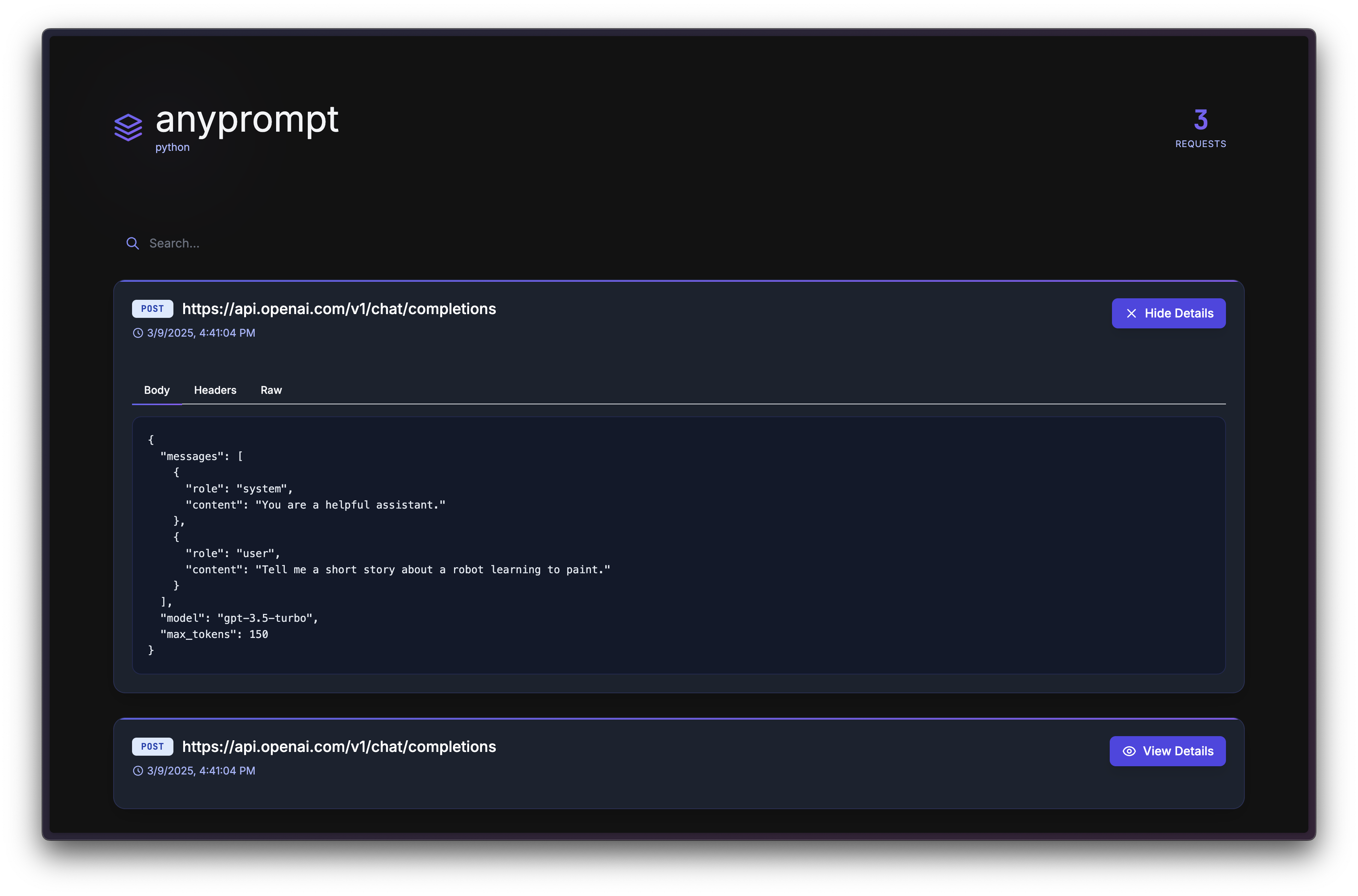
anyprompt is a lightweight tool that automatically captures and visualizes LLM prompts in your Python projects. With a single import, you get a beautiful web interface to inspect all communications with AI providers.
Quick Start
Just import and go!
import anyprompt # Automatically starts at http://localhost:2400
That's it! Visit http://localhost:2400 in your browser to see your captured prompts.
Compatibility
| Library | Status |
|---|---|
| browser-use | ✅ Supported |
| langchain | ✅ Supported |
| openai | ✅ Supported |
| anthropic | ✅ Supported |
| requests | ✅ Supported |
| httpx | ✅ Supported |
| aiohttp | ✅ Supported |
| urllib | ✅ Supported |
| http.client | ✅ Supported |
Examples
browser-use
import anyprompt
# This automatically starts the anyprompt server at http://localhost:2400
# Then, use browser-use as normal!

from langchain_openai import ChatOpenAI
from browser_use import Agent
import asyncio

async def main():
    agent = Agent(
        task="Compare the price of gpt-4o and DeepSeek-V3",
        llm=ChatOpenAI(model="gpt-4o"),
    )
    await agent.run()

asyncio.run(main())
LangChain
import anyprompt
# This automatically starts the anyprompt server at http://localhost:2400
# Then, use browser-use as normal!

from langchain_openai import ChatOpenAI
from langchain.schema import HumanMessage

# Initialize the LLM
llm = ChatOpenAI(model="gpt-3.5-turbo")

# Make a call - anyprompt will automatically capture it
response = llm.invoke([HumanMessage(content="What's the capital of France?")])
print(response.content)
Privacy & Security
- Runs locally on your machine
- No data sent to external servers
- All prompts stored locally in your project directory
⭐ Contributing
Contributions are welcome! Please feel free to submit a Pull Request.
1 maintainer

Release files for anyprompt 0.4.0
For a detailed explanation of source distributions (sdists) and built distributions (wheels), please see the package formats documentation.
Source distribution (sdist)
| File | Size | Uploaded | |
|---|---|---|---|
| anyprompt-0.4.0.tar.gz | 18.1 kB | Details |
Built distribution (wheel)
| File | Interpreter | ABI | Platform | Reset |
|---|---|---|---|---|
| anyprompt-0.4.0-py3-none-any.whl | Python 3 | none | any | Details |
Total release size: 35.4 kB
Release files / anyprompt-0.4.0.tar.gz
| Download URL | anyprompt-0.4.0.tar.gz |
|---|---|
| Size | 18.1 kB |
| Tags | Source |
|
SHA-256 checksum How to use checksums |
55e4f8bf96b439c8598f1c06cba09ffbbf46c6a79e8c5029c9a9df8d8a881ce2
|
|
BLAKE2b-256 checksum How to use checksums |
4d29c1962d75f854d83bdd4d20079fc92933da57373209c262b459a3fa088c81
|
| Upload date | |
|
Uploaded using Trusted Publishing? What is trusted publishing? |
No |
| Uploaded via |
twine/6.1.0 CPython/3.11.11
|
Release files / anyprompt-0.4.0-py3-none-any.whl
| Download URL | anyprompt-0.4.0-py3-none-any.whl |
|---|---|
| Size | 17.3 kB |
| Tags | Python 3 |
|
SHA-256 checksum How to use checksums |
730beee46b2c0fba9a70139840cbcb627f3f9c0ad6f137e108ee19eef6de9e28
|
|
BLAKE2b-256 checksum How to use checksums |
e91b5f167e37b819ea04059673869306dea5fd64292bc5d0db4c8df5d1c85bc6
|
| Upload date | |
|
Uploaded using Trusted Publishing? What is trusted publishing? |
No |
| Uploaded via |
twine/6.1.0 CPython/3.11.11
|














