
Run any VM anywhere: bootstrap BSD, Illumos, and Linux guests with QEMU on Linux, macOS, and Windows
Verified details
These details have been verified by PyPIProject links
GitHub Statistics
Maintainers

Project description
Run any VM anywhere
anyvm is a single-file tool for bootstrapping BSD, Illumos, and Linux guests with QEMU on Linux, macOS, and Windows. It downloads cloud images, sets up firmware, and starts the VM with sane defaults so you can focus on the guest.
1. Quick launch
-
Github CodeSpace:
Enable KVM in Codespaces before running:
sudo chmod o+rw /dev/kvm

sudo apt-get update

sudo apt-get --no-install-recommends -y install \
zstd ovmf xz-utils qemu-utils ca-certificates \
qemu-system-x86 qemu-system-arm qemu-efi-aarch64 \
qemu-efi-riscv64 qemu-system-riscv64 qemu-system-misc u-boot-qemu \
qemu-system-ppc qemu-system-s390x qemu-system-sparc \
openssh-client
-
Google Cloud Shell:


2. Quick start (local)
Install from PyPI (installs the anyvm.py and anyvm commands):
pip install anyvm.py

anyvm.py --os freebsd
On Debian/Ubuntu the system Python refuses pip install (PEP 668,
"externally-managed-environment"). Install with pipx instead:
sudo apt-get install -y pipx
pipx install anyvm.py
pipx ensurepath   # first time only, then re-open the shell

anyvm.py --os freebsd
Or use a virtual environment: python3 -m venv ~/.venvs/anyvm && ~/.venvs/anyvm/bin/pip install anyvm.py.
Or download the single file and run it directly:
#command line release
python3 anyvm.py --os freebsd
python3 anyvm.py --os freebsd --release 15.1
python3 anyvm.py --os freebsd --release 14.4
python3 anyvm.py --os freebsd --release 14.4 --arch aarch64
python3 anyvm.py --os openbsd --release 7.5 --arch aarch64
python3 anyvm.py --os solaris
python3 anyvm.py --os tribblix
python3 anyvm.py --os ubuntu
python3 anyvm.py --os ubuntu --release 24.04
python3 anyvm.py --os ghostbsd
python3 anyvm.py --os blissos

python3 anyvm.py --os freebsd --release 14.4 --arch riscv64
python3 anyvm.py --os freebsd --release 15.1 --arch riscv64
python3 anyvm.py --os freebsd --release 15.1 --arch powerpc64

python3 anyvm.py --os netbsd --release 11.0 --arch sparc64
python3 anyvm.py --os netbsd --release 11.0 --arch riscv64
python3 anyvm.py --os openbsd --release 7.9 --arch sparc64

python3 anyvm.py --os ubuntu --release 24.04 --arch aarch64
python3 anyvm.py --os ubuntu --release 24.04 --arch riscv64
python3 anyvm.py --os ubuntu --release 24.04 --arch s390x
python3 anyvm.py --os ubuntu --release 24.04 --arch ppc64le


#desktop release

python3 anyvm.py --os freebsd  --release 15.1-xfce
python3 anyvm.py --os freebsd  --release 15.1-gnome
python3 anyvm.py --os freebsd  --release 15.1-kde6

python3 anyvm.py --os openbsd  --release 7.9-xfce
python3 anyvm.py --os openbsd  --release 7.9-gnome
python3 anyvm.py --os openbsd  --release 7.9-kde6
python3 anyvm.py --os openbsd  --release 7.9-mate
python3 anyvm.py --os openbsd  --release 7.9-lxqt
python3 anyvm.py --os openbsd  --release 7.9-lumina
python3 anyvm.py --os openbsd  --release 7.9-enlightenment

python3 anyvm.py --os ghostbsd                       # MATE (default)
python3 anyvm.py --os ghostbsd --release 26.1-xfce
python3 anyvm.py --os ghostbsd --release 26.1-gershwin

# BlissOS (Android-x86): root ssh + the Android desktop on the VNC console
# -v folder sync uses scp (the only backend the Android guest supports).
python3 anyvm.py --os blissos                        # latest (16, Android 13)
python3 anyvm.py --os blissos --release 15           # Android 12L
python3 anyvm.py --os blissos --release 14           # Android 11


# Run a command inside the VM (everything after `--` is sent to the VM via ssh):
python3 anyvm.py --os freebsd -- uname -a
3. Run in a Docker container
Prefer containers? Use the Dockerized wrapper.
docker run --rm -it ghcr.io/anyvm-org/anyvm:latest --os freebsd
More examples and tags: https://github.com/anyvm-org/docker
4. Guest build matrix (CI)
| Guest | x86_64 | aarch64 (arm64) | riscv64 | powerpc64 | sparc64 | s390x | Builder |
|---|---|---|---|---|---|---|---|
Ubuntu |
✅ | ✅ | ✅ | ✅ | — | ✅ |  |
FreeBSD |
✅ | ✅ | ✅ | ✅ | — | — |  |
OpenBSD |
✅ | ✅ | ✅ | — | ✅ | — |  |
NetBSD |
✅ | ✅ | ✅ | — | ✅ | — |  |
DragonFlyBSD |
✅ | — | — | — | — | — |  |
MidnightBSD |
✅ | — | — | — | — | — |  |
GhostBSD |
✅ | — | — | — | — | — |  |
Solaris |
✅ | — | — | — | — | — |  |
OmniOS |
✅ | — | — | — | — | — |  |
OpenIndiana |
✅ | — | — | — | — | — |  |
Tribblix |
✅ | — | — | — | — | — |  |
Haiku |
✅ | — | — | — | — | — |  |
BlissOS (Android) |
✅ | — | — | — | — | — |  |
5. Host support
| Host | x86_64 guests | aarch64 guests | riscv64 guests | s390x guests | powerpc64 guests | sparc64 guests |
|---|---|---|---|---|---|---|
| Linux x86_64 | ✅ | ✅ | ✅ | ✅ | ✅ | ✅ |
| Linux aarch64 (arm64) | — | ✅ | — | — | — | — |
| Linux s390x (IBM Z) | — | — | — | ✅ (KVM) | — | — |
| MacOS Apple silicon | ✅ | ✅ | — | — | — | — |
| Windows x86_64 Native | ✅ | — | — | — | — | — |
| Windows x86_64 WSL | ✅ | ✅ | ✅ | ✅ | ✅ | ✅ |
6. Install dependencies
6.1 Linux (apt-based) 
sudo apt-get --no-install-recommends -y install \
  zstd ovmf xz-utils qemu-utils ca-certificates \
  qemu-system-x86 qemu-system-arm qemu-efi-aarch64 \
  qemu-efi-riscv64 qemu-system-riscv64 qemu-system-misc u-boot-qemu \
  qemu-system-ppc qemu-system-s390x qemu-system-sparc \
  ssh-client
6.2 macOS 
brew install qemu
6.3 Windows 
- Download QEMU for Windows: https://www.qemu.org/download/#windows or https://qemu.weilnetz.de/w64/
- Or install with MSYS2 pacman:
pacman.exe -S --noconfirm mingw-w64-ucrt-x86_64-qemu
- Or install with Chocolatey:
choco install qemu
7. Notes
- Hardware virtualization (KVM, HVF, or Hyper-V) is applied automatically when available for best performance.
- On a nested AMD KVM host (e.g. KVM inside WSL2 / Hyper-V), AVX512 is
dropped from
-cpu hostautomatically: nested AMD-V corrupts the guest's AVX512 state, which makes modern guests (Ubuntu 26.04+) randomly segfault. Bare-metal hosts keep full AVX512; override with--cpu-type. - Click the quick launch buttons above to start in a ready-to-use cloud environment.
8. VNC Web UI (Display)
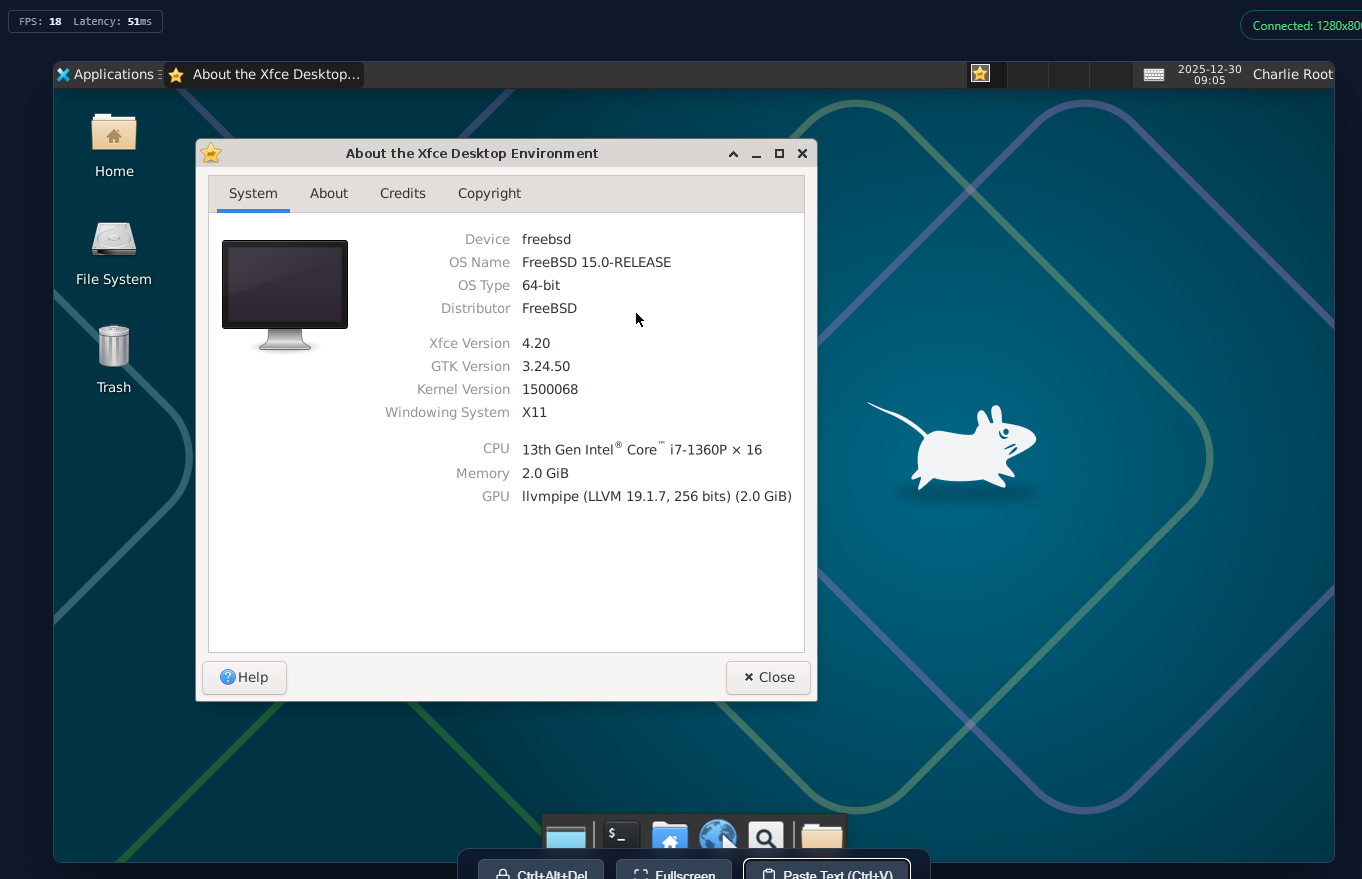
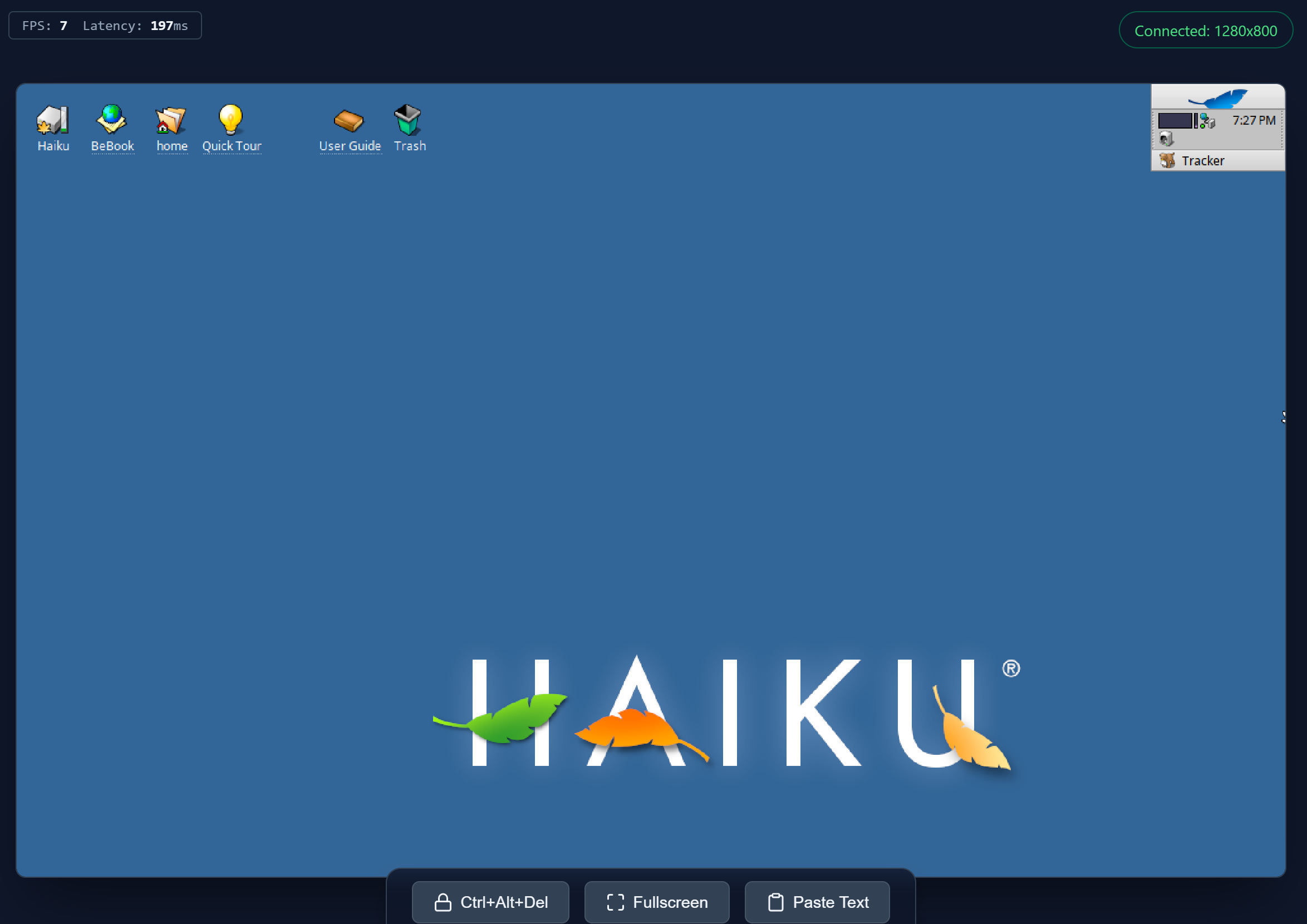
AnyVM includes a built-in, premium VNC Web UI that allows you to access the VM's graphical console directly from your browser.
- Automatic Launch: Enabled by default (unless
--vnc offis specified). AnyVM automatically starts a VNC-to-Web proxy. - Modern Interface: Features a sleek dark mode, glassmorphism aesthetics, and smooth animations.
- Clipboard Support: Use the "Paste Text" button or
Ctrl+Vto send your local clipboard to the VM. - Special Keys: Dedicated "Ctrl+Alt+Del" button.
- Fullscreen: Toggle fullscreen mode for an immersive experience.
- Stats: Real-time FPS and latency monitoring.
- Clipboard Support: Use the "Paste Text" button or
- Accessibility: Available at
http://localhost:6080by default. If the port is occupied, AnyVM will automatically try the next available port (e.g., 6081, 6082). - Security: Protect your VNC session with
--vnc-password <pwd>. When set, the browser will prompt for credentials when accessing the Web UI. (Note: The username can be anything, but the password must be correct). - Remote Access: Use
--remote-vncto automatically create a public, secure tunnel (via Cloudflare, Localhost.run, Pinggy, or Serveo) to access your VM's display from anywhere in the world. (In Google Cloud Shell, this is enabled by default; use--remote-vnc noto disable).
9. CLI options (with examples)
All examples below use python3 anyvm.py .... You can also run python3 anyvm.py --help to see the built-in help.
Required
--os <name>: Target guest OS (required).- Supported:
freebsd/ghostbsd/openbsd/netbsd/dragonflybsd/midnightbsd/solaris/omnios/openindiana/tribblix/haiku/ubuntu/blissos - Example:
python3 anyvm.py --os freebsd
- Supported:
Release / arch / resources
-
--release <ver>: Guest release version. If omitted, anyvm auto-selects an available release.- Example:
python3 anyvm.py --os freebsd --release 14.4
- Example:
-
--arch <arch>: Guest architecture.- Common values:
x86_64/aarch64/riscv64/s390x/powerpc64/ppc64le/sparc64 - Example:
python3 anyvm.py --os openbsd --release 7.5 --arch aarch64 - Notes for ubuntu guests on emulated arches (always TCG, slow):
aarch64defaults to-cpu cortex-a72(distro QEMU 8.2 aborts with aregime_is_userassertion when the 26.04 kernel uses VHE under-cpu max).riscv6426.04 requires QEMU >= 9.1 (-cpu rva23s64is selected automatically; the RVA23 userspace baseline and the 7.0 kernel do not run on QEMU 8.2). 22.04 / 24.04 work on stock QEMU.s390xworks best with QEMU >= 10; the distro 8.2 intermittently freezes guest systemd at startup (a TCG-only bug). On a real IBM Z host with/dev/kvm, KVM is used automatically (-cpu host) and stock QEMU is fine.ppc64le22.04 requires QEMU >= 10; under the distro 8.2 pseries TCG the jammy python3.10 segfaults (every cloud-init / apt run crashes). 24.04 / 26.04 work on stock QEMU.- For the riscv64 26.04, s390x and ppc64le 22.04 cases, on Linux x86_64
hosts anyvm.py automatically downloads and uses pinned QEMU 10.2.3
whenever the system QEMU is too old -- no manual setup needed.
ubuntu-builder compiles
these from source in its release-files job (they are no longer
committed to git) and publishes them as release assets; see its
files/README.md.
openbsd --arch sparc64: anyvm.py automatically downloads the patched OpenBIOS firmware the image needs (QEMU's bundled OpenBIOS crashes every OpenBSD >= 7.3 sparc64 kernel on cold boot) and passes it via-bios. openbsd-builder rebuilds it from source in its release-files job and publishes it as a release asset; see itsbios/README.md.netbsd --arch sparc64: host-dir sync (-v) defaults toscp(override with--sync). The QEMU sun4u machine boots only off the CMD646 PCI IDE, whose TCG emulation loses interrupts under sustained concurrent net+disk DMA -- a livesshfs/nfsmount drives exactly that and wedges the guest, and the 11.0 base image ships norsync. A one-shotscpavoids both. (sparc64 is headless / console-only on either OS.)
- Common values:
-
--mem <MB>: Memory size in MB (default: 4096 when the host has more than 4 GB of RAM, else 2048).- Example:
python3 anyvm.py --os freebsd --mem 4096
- Example:
-
--cpu <num>: vCPU count (default: host core count, capped at 8 when hardware acceleration is available and at 2 under TCG; pass--cpuexplicitly for more).- Example:
python3 anyvm.py --os freebsd --cpu 4
- Example:
-
--cpu-type <type>: QEMU CPU model (e.g.host,cortex-a72).- Example:
python3 anyvm.py --os openbsd --arch aarch64 --cpu-type cortex-a72
- Example:
Images / builders
-
--builder <ver>: Pin a specific builder version (used to download matching cloud images).- Example:
python3 anyvm.py --os netbsd --builder 2.0.1
- Example:
-
--qcow2 <path>: Use a local qcow2 image (skip downloading).- Example:
python3 anyvm.py --os freebsd --qcow2 .\\output\\freebsd\\freebsd-14.4.qcow2
- Example:
-
--snapshot: Enable QEMU snapshot mode. Changes made to the disk are not saved.- Works with
--cache-dirto run directly from the cache without copying to the data directory. - Example:
python3 anyvm.py --os freebsd --snapshot
- Works with
Networking (user-mode networking / slirp)
-
--ssh-port <port>/--sshport <port>: Host port forwarded to guest SSH (:22). If omitted, anyvm auto-picks a free port.- Example:
python3 anyvm.py --os freebsd --ssh-port 10022
- Example:
-
--ssh-name <name>: Add an extra SSH alias name for convenience (so you canssh <name>).- Example:
python3 anyvm.py --os freebsd --ssh-name myvm
- Example:
-
--host-ssh-port <port>: The host SSH port as reachable from the guest (default: 22). Used for generating aHost hostentry inside the guest.- Example:
python3 anyvm.py --os freebsd --host-ssh-port 2222
- Example:
-
-p <mapping>: Additional port forwards (repeatable).- Form 1:
host:guest(TCP by default)- Example:
python3 anyvm.py --os freebsd -p 8080:80
- Example:
- Form 2:
tcp:host:guest- Example:
python3 anyvm.py --os freebsd -p tcp:8443:443
- Example:
- Form 3:
udp:host:guest- Example:
python3 anyvm.py --os freebsd -p udp:5353:5353
- Example:
- Form 1:
-
--public: Listen on0.0.0.0for forwarded ports instead of127.0.0.1.- Example:
python3 anyvm.py --os freebsd --public -p 8080:80
- Example:
-
--enable-ipv6: Enable IPv6 in QEMU user networking (slirp).- Default: IPv6 is disabled (anyvm adds
ipv6=offto-netdev user,...). - Example:
python3 anyvm.py --os freebsd --enable-ipv6
- Default: IPv6 is disabled (anyvm adds
Shared folders (-v) and sync mode (--sync)
-
-v <host:guest>: Add a shared/synced folder mapping (repeatable).- Linux/macOS example:
python3 anyvm.py --os freebsd -v $(pwd):/data - Windows example:
python3 anyvm.py --os freebsd -v D:\\data:/data
- Linux/macOS example:
-
--sync <mode>: Sync mechanism used for-v. Strictly validated.- Supported:
rsync(default),sshfs,nfs,sys-nfs,scp. Empty string also defaults torsync. Any other value will cause an error. nfsruns the bundled user-space NFS server (anyvm-org/nfsd, a single pure-Python file downloaded on demand, serving NFSv3/v4 plus a portmapper): no kernel nfsd, no root needed, works on Linux/macOS/Windows hosts (mynfsis an accepted alias). Most guests mount it with their NFSv4 client (FreeBSD family, illumos family, Linux). OpenBSD/NetBSD/DragonFlyBSD guests are NFSv3-only and mount it through its portmapper on port 111 -- free and unprivileged on Windows/macOS hosts, but usually owned by the system rpcbind (or root-only) on Linux hosts: usesys-nfsfor these three guests on a Linux host. There is no automatic fallback between the two backends.sys-nfsforces the host kernel NFS server for every guest. Needs a Linux host with root/sudo and the kernel NFS server installed; not available on macOS/Windows hosts.- Examples:
python3 anyvm.py --os freebsd --sync rsync -v $(pwd):/datapython3 anyvm.py --os solaris --sync scp -v D:\\data:/datapython3 anyvm.py --os freebsd --sync nfs -v D:\\data:/data
- Supported:
Console / display / debugging
-
--console/-c: Run in the foreground (console mode).- Example:
python3 anyvm.py --os freebsd --console
- Example:
-
--detach/-d: Run in the background (do not auto-enter SSH).- Example:
python3 anyvm.py --os freebsd --detach
- Example:
-
--serial <port>: Expose the guest serial console via a host TCP port (if omitted, auto-select starting at 7000).- Example:
python3 anyvm.py --os freebsd --serial 7000
- Example:
-
--vnc <display>: Enable VNC (e.g.0means:0/ port 5900).- VNC Web UI: Enabled by default starting at port
6080(auto-increments if busy). Use--vnc offto disable. - Example:
python3 anyvm.py --os freebsd --vnc 0
- VNC Web UI: Enabled by default starting at port
-
--vnc-password <pwd>: Set a password for the VNC Web UI. Empty or omitted means no password. (Note: On the login page, the username can be anything, but the password must be correct).- Example:
python3 anyvm.py --os freebsd --vnc-password mysecret
- Example:
-
--remote-vnc: Create a public tunnel for the VNC Web UI using Cloudflare, Localhost.run, Pinggy, or Serveo.- Example:
python3 anyvm.py --os freebsd --remote-vnc - Advanced: Use
cf,lhr,pinggy, orserveoto specify a service:python3 anyvm.py --os freebsd --remote-vnc cf - Disable: Use
noto disable (e.g., in Google Cloud Shell where it's default):python3 anyvm.py --os freebsd --remote-vnc no
- Example:
-
--mon <port>: Expose the QEMU monitor via telnet on localhost.- Example:
python3 anyvm.py --os freebsd --mon 4444
- Example:
-
--debug: Enable verbose debug logging.- Example:
python3 anyvm.py --os freebsd --debug
- Example:
Boot / platform
-
--uefi: Enable UEFI boot (FreeBSD enables this implicitly).- Example:
python3 anyvm.py --os freebsd --uefi
- Example:
-
--disktype <type>: Disk interface type (e.g.virtio,ide).- Example:
python3 anyvm.py --os dragonflybsd --disktype ide
- Example:
-
--boot-timeout-sec <n>: Boot timeout in seconds before QEMU is killed and retried once. Default:600(10 minutes).- Exception: OpenBSD on
aarch64defaults to1200(20 minutes) because it boots much slower under emulation. - Exception: when running under TCG (no hardware acceleration -- e.g. Windows runners with chocolatey QEMU, or any host without
/dev/kvm/ HVF / WHPX), the default is bumped to1800(30 minutes). TCG is 10-50x slower than KVM, and heavy guests like Solaris or DragonFlyBSD often need more time to boot. - Both exceptions only apply when
--boot-timeout-secis not explicitly passed; an explicit value always wins. - Useful for slow hosts (emulated arches, low-resource CI runners) or for failing fast in tests.
- Example:
python3 anyvm.py --os openbsd --boot-timeout-sec 1200
- Exception: OpenBSD on
-
--enable-pmu: Expose the host PMU (performance monitoring unit / hardware performance counters) to the guest.- Disabled by default. Exposing the host PMU via
-cpu hostcan trigger intermittent#GP-in-wrmsrcrashes during early guest boot when the host CPU generation exposes PMU MSRs that KVM refuses writes to. DragonFlyBSD is the most affected guest; this manifested as random boot failures across CI runners with different Intel CPU generations. - Only applies to x86_64 with hardware acceleration (
kvm/whpx/hvf). TCG and non-x86 arches are unaffected. - Pass
--enable-pmuif you needperf/pmcstat/ VTune or similar profilers to work inside the guest. - Example:
python3 anyvm.py --os ubuntu --enable-pmu -- perf stat ls
- Disabled by default. Exposing the host PMU via
-
--tcg: Force pure software emulation (no KVM / HVF / WHPX). Slow; useful when hardware acceleration is unavailable or misbehaving. Generic -- works for any guest.- Example:
python3 anyvm.py --os tribblix --tcg - Note (Windows): WHPX acceleration is enabled automatically when the Windows Hypervisor Platform is running (checked at startup via
WHvGetCapability), so--whpxis no longer needed; pass--tcgto opt out. Under WHPX anyvm also picks a vendor-matched named CPU model (newest EPYC / Xeon model your QEMU ships) instead of-cpu host, because QEMU's WHPX-cpu host/-cpu maxpath can hang on recent host CPUs. The guest still sees the real host CPU features -- under WHPX the guest CPUID comes from Hyper-V, not from the model -- so nothing is lost. Override with--cpu-type. Safety nets: if QEMU aborts mid-boot under auto-enabled WHPX (some guests hit instructions the WHPX emulator cannot decode), anyvm automatically relaunches the VM under TCG; GhostBSD is known to hit this and skips WHPX entirely (its boot aborts with "failed to decode instruction f 10"). An explicit--whpxdisables both fallbacks. - Historical note: older
tribblixreleases froze a CPU-vendor-specificlibc_hwcapvariant into/lib/libc.so.1at build time, which crash-looped (initkilled bySIGKILL) when run under KVM on the other vendor's CPU; anyvm used to auto-fall-back to TCG on Intel hosts to dodge it. Sincev2.0.3(tribblix-builder'sfinalizeImagehook) the release ships the generic, capability-neutral libc that boots under KVM on both Intel and AMD and re-optimizes per-CPU at first boot, so no fallback is needed. Use--tcgonly if you must run a pre-v2.0.3image on a mismatched CPU.
- Example:
Data directory
--data-dir <dir>: Directory used to store images and caches (default:./output).- Example:
python3 anyvm.py --os freebsd --data-dir output
- Example:
Run a command inside the VM
-- <cmd...>: Everything after--is passed through to the finalsshinvocation and executed inside the VM.- Examples:
python3 anyvm.py --os freebsd -- uname -apython3 anyvm.py --os freebsd -- sh -lc "id; uname -a"
- Examples:
Project details
Verified details
These details have been verified by PyPIProject links
GitHub Statistics
Maintainers


Download files
Download the file for your platform. If you're not sure which to choose, learn more about installing packages.
Source Distribution
Built Distribution
Filter files by name, interpreter, ABI, and platform.
If you're not sure about the file name format, learn more about wheel file names.
Copy a direct link to the current filters
File details
Details for the file anyvm_py-0.5.1.tar.gz.
File metadata
- Download URL: anyvm_py-0.5.1.tar.gz
- Upload date:
- Size: 106.1 kB
- Tags: Source
- Uploaded using Trusted Publishing? Yes
- Uploaded via: twine/6.1.0 CPython/3.13.12
File hashes
| Algorithm | Hash digest | |
|---|---|---|
| SHA256 |
779af3d7e6e562fb5934698a64141294265835a52c06fb99be578fb3a65d721b
|
|
| MD5 |
a8deeb29bfdcfd7e0e6b9d3940732c96
|
|
| BLAKE2b-256 |
cf26dd4c7af20c5034c71678163837a73b83b9884ad2dcebe22de7f29434c553
|
Provenance
The following attestation bundles were made for anyvm_py-0.5.1.tar.gz:
Publisher:
pypi.yml on anyvm-org/anyvm
-
Statement:
-
Statement type:
https://in-toto.io/Statement/v1 -
Predicate type:
https://docs.pypi.org/attestations/publish/v1 -
Subject name:
anyvm_py-0.5.1.tar.gz -
Subject digest:
779af3d7e6e562fb5934698a64141294265835a52c06fb99be578fb3a65d721b - Sigstore transparency entry: 2194838133
- Sigstore integration time:
-
Permalink:
anyvm-org/anyvm@3a6ae462f0fb91011b3af2ed64335f104a8ad1bb -
Branch / Tag:
refs/tags/v0.5.1 - Owner: https://github.com/anyvm-org
-
Access:
public
-
Token Issuer:
https://token.actions.githubusercontent.com -
Runner Environment:
github-hosted -
Publication workflow:
pypi.yml@3a6ae462f0fb91011b3af2ed64335f104a8ad1bb -
Trigger Event:
release
-
Statement type:
File details
Details for the file anyvm_py-0.5.1-py3-none-any.whl.
File metadata
- Download URL: anyvm_py-0.5.1-py3-none-any.whl
- Upload date:
- Size: 106.6 kB
- Tags: Python 3
- Uploaded using Trusted Publishing? Yes
- Uploaded via: twine/6.1.0 CPython/3.13.12
File hashes
| Algorithm | Hash digest | |
|---|---|---|
| SHA256 |
b26f1f1eb2ac8442ac688f000122a86a0595547501cb5336255b5b40bddb3dea
|
|
| MD5 |
62de247948dbd34f58c1688ac07093b8
|
|
| BLAKE2b-256 |
88de834b58339883a087b8d82599d1fc2d5e71a86159aecbbc55cc8048a7b4e3
|
Provenance
The following attestation bundles were made for anyvm_py-0.5.1-py3-none-any.whl:
Publisher:
pypi.yml on anyvm-org/anyvm
-
Statement:
-
Statement type:
https://in-toto.io/Statement/v1 -
Predicate type:
https://docs.pypi.org/attestations/publish/v1 -
Subject name:
anyvm_py-0.5.1-py3-none-any.whl -
Subject digest:
b26f1f1eb2ac8442ac688f000122a86a0595547501cb5336255b5b40bddb3dea - Sigstore transparency entry: 2194838146
- Sigstore integration time:
-
Permalink:
anyvm-org/anyvm@3a6ae462f0fb91011b3af2ed64335f104a8ad1bb -
Branch / Tag:
refs/tags/v0.5.1 - Owner: https://github.com/anyvm-org
-
Access:
public
-
Token Issuer:
https://token.actions.githubusercontent.com -
Runner Environment:
github-hosted -
Publication workflow:
pypi.yml@3a6ae462f0fb91011b3af2ed64335f104a8ad1bb -
Trigger Event:
release
-
Statement type:






