
anywidget-archimate
Interactive ArchiMate model viewer for Jupyter, Marimo, and VS Code notebooks.
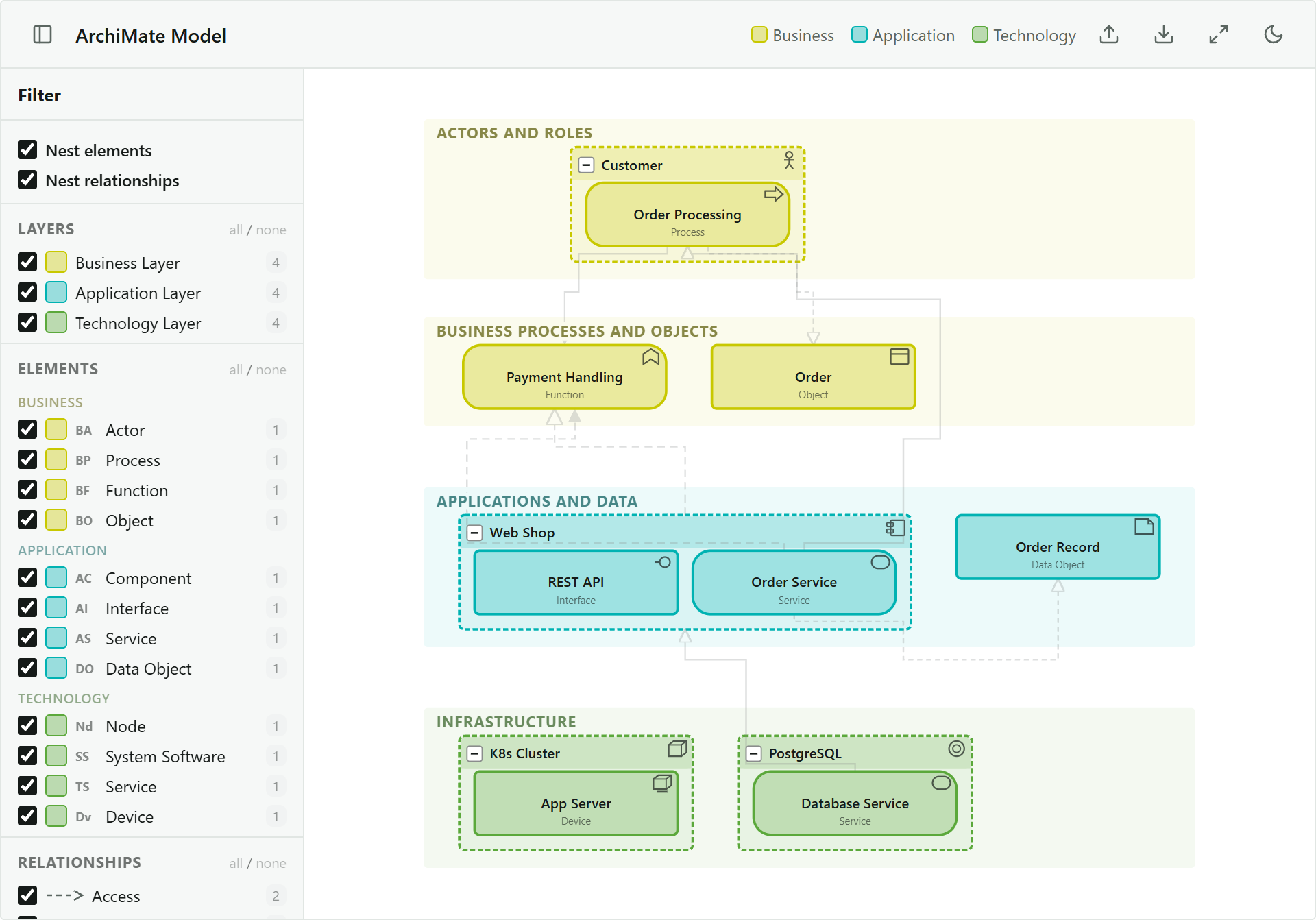
Renders ArchiMate models from Open Exchange Format XML or Archi .archimate files, or from Python data, in layer bands from top to bottom:
- Lilac: Motivation
- Tan: Strategy
- Yellow: Business
- Blue: Application
- Green: Technology, including the Physical elements
- Pink: Implementation & Migration
- Grey: Other (Location, Grouping, and any other layer)
A band only appears when the model has elements in it. Every ArchiMate 3.2 element type is drawn with its notation icon, junctions as small dots (filled for And, hollow for Or) in the band of the elements they join, and all 11 relationship types with their notation. Elements joined by Composition or Aggregation are nested.
Install
uv add anywidget-archimate
Usage
from anywidget_archimate import ArchiMate

# From an XML file
widget = ArchiMate.from_xml("model.xml")
widget
# Or load later
widget = ArchiMate()
widget.load_xml("model.xml")
From Python data
widget = ArchiMate(
    elements=[
        {"id": "a1", "name": "Web shop", "type": "ApplicationComponent", "layer": "Application", "documentation": ""},
        {"id": "t1", "name": "App server", "type": "Node", "layer": "Technology", "documentation": ""},
    ],
    relationships=[
        {"id": "r1", "source": "t1", "target": "a1", "type": "Serving", "name": ""},
    ],
    height=500,
)
layerisMotivation,Strategy,Business,Application,Technology,ImplementationorOther, in any case;Implementation & MigrationandPhysical(Technology) work too. Without a layer, or with one the widget does not know, the element goes to the layer of its type, else to Other.typeis an ArchiMate 3.2 element type such asBusinessProcess,Capability,GoalorWorkPackage; a junction isAndJunctionorOrJunction. Other types draw as a plain box.- Relationship
typeis one ofComposition,Aggregation,Assignment,Realization,Serving,Access,Influence,Triggering,Flow,SpecializationorAssociation. - Names, documentation and the other values are shown as text, never as HTML.
Selection and highlights
Clicking an element sets selected_element to its dict and opens its details. The host can also select or outline elements:
widget.selected_element = {"id": "a1"}  # a dict with at least the id
widget.highlight_ids = ["a1", "t1"]     # outline several elements
widget.observe(lambda change: print(change["new"]), names="selected_element")
Comparison styling
To show several runs of one model, give elements and relationships an optional status:
status |
Element | Relationship |
|---|---|---|
partial |
dashed and faded | faded |
changed |
amber fill | amber line |
only_a |
red fill | red line |
only_b |
green fill | green line |
ghost |
very faint and dashed | very faint |
stable or no status draws as usual. An optional badge on an element (for example "2/3") is drawn in its top left corner; text longer than 26 characters is cut.
Toolbar
The toolbar opens the filter panel (hide layers, element types and relationship types, or turn off nesting), uploads an .xml or .archimate file, exports the diagram as SVG or PNG, fits the diagram to the view and switches between light and dark. The theme follows the host page (marimo, Jupyter, VS Code, or the operating system) unless you choose one: pass dark_mode=True or dark_mode=False, set widget.dark_mode, or use the toolbar switch.
Development
git clone https://github.com/StevenBtw/anywidget-archimate.git
cd anywidget-archimate
uv sync
uv run pytest
The examples/demo_marimo.py example needs marimo, which is an optional extra:
uv sync --extra examples
License
Apache-2.0
1 maintainer

Metadata
1 maintainer
Release files for anywidget-archimate 0.5.0
For a detailed explanation of source distributions (sdists) and built distributions (wheels), please see the package formats documentation.
Source distribution (sdist)
| File | Size | Uploaded | Provenance | Actions |
|---|---|---|---|---|
| anywidget_archimate-0.5.0.tar.gz | 279.3 kB | With provenance | Details for anywidget_archimate-0.5.0.tar.gz |
Built distribution (wheel)
| File | Interpreter | ABI | Platform | Actions Reset |
|---|---|---|---|---|
| anywidget_archimate-0.5.0-py3-none-any.whl | Python 3 | none | any | Details for anywidget_archimate-0.5.0-py3-none-any.whl |
Total release size: 382.5 kB
Release files / anywidget_archimate-0.5.0.tar.gz
| Download URL | anywidget_archimate-0.5.0.tar.gz |
|---|---|
| Size | 279.3 kB |
| Tags | Source |
|
SHA-256 checksum How to use checksums |
49c6b690be4dddfdf05599c6622f4d9b0f3f422390cfa25c97c2c25c67b81dd1
|
|
BLAKE2b-256 checksum How to use checksums |
c74511bc1bbc427d06d86fd5a7a8aa8be0cff0fc4d9619db52ef34e1b6b08880
|
| Upload date | |
|
Uploaded using Trusted Publishing? What is trusted publishing? |
Yes |
| Uploaded via |
twine/7.0.0 CPython/3.13.16
|
Provenance
Provenance describes where a file came from. On PyPI, provenance is shared via attestations, which provide a verifiable record of the build or publishing details. View details, limitations and caveats.


PyPI Publish Attestation
PyPI verified that this artifact, at this checksum, originated from the publisher listed below.
Signed by GitHub Actions, verified by PyPI on Oct 28, 2026.
Transparency logRelease files / anywidget_archimate-0.5.0-py3-none-any.whl
| Download URL | anywidget_archimate-0.5.0-py3-none-any.whl |
|---|---|
| Size | 103.2 kB |
| Tags | Python 3 |
|
SHA-256 checksum How to use checksums |
fde892a13bbc2c9c0b7b029d0eb1826eec3d6a5ef9ea9388f2ae3ce1f9f4e598
|
|
BLAKE2b-256 checksum How to use checksums |
2e25ca28cb2a38b03030ab7575792f4ccad1a26c6443160df8bf68abd35709be
|
| Upload date | |
|
Uploaded using Trusted Publishing? What is trusted publishing? |
Yes |
| Uploaded via |
twine/7.0.0 CPython/3.13.16
|
Provenance
Provenance describes where a file came from. On PyPI, provenance is shared via attestations, which provide a verifiable record of the build or publishing details. View details, limitations and caveats.
PyPI Publish Attestation
PyPI verified that this artifact, at this checksum, originated from the publisher listed below.
Signed by GitHub Actions, verified by PyPI on Oct 28, 2026.
Transparency logSecurity for anywidget-archimate 0.5.0
Provenance
Provenance describes where a file came from. On PyPI, provenance is shared via attestations, which provide a verifiable record of the build or publishing details. View details, limitations and caveats.
Full provenance
Both files in this release have been uploaded with provenance metadata.
Attestation for anywidget_archimate-0.5.0.tar.gz
PyPI Publish Attestation
PyPI verified that this artifact, at this checksum, originated from the publisher listed below.
Signed by GitHub Actions, verified by PyPI on Oct 28, 2026.
Transparency logA note on package security
PyPI is a repository for distributing packages, not a service for auditing them. While third-party security researchers and our staff do their best to detect and remove malicious packages, PyPI cannot guarantee the quality, security or suitability of any given package.
To learn more about protecting yourself from malicious actors, visit our package security documentation.














