
A previous release had provenance metadata, but this release does not. View details.



Experimental:
anywidget-mcpis experimental software. Its API is subject to breaking changes.
anywidget-mcp runs AnyWidgets inside AI
conversations. You can interact with a widget directly, and the model can
respond to your input.
Start with a widget from an existing package, or bring the same widget you use in Jupyter or marimo.
Try a multi-widget conversation
Requires Python 3.11 or newer. Serve
Wigglystuff's ColorPicker and
LiveEdit together:
uvx --with wigglystuff anywidget-mcp serve \
  wigglystuff:ColorPicker \
  wigglystuff:LiveEdit \
  --port 8010
Connect a host that supports MCP Apps. For a quick local setup, start the mcp-use Inspector in another terminal:
npx --yes @mcp-use/inspector@12.0.3 \
  --url http://127.0.0.1:8010/mcp \
  --port 7878
Open Inspector Chat, configure a model provider, then ask:
let me pick a color
Choose a color using ColorPicker, then ask:
given my current selection help explain the HEX to RGB algo interactively
The model reads the picker's current color and opens LiveEdit for the interactive explanation. One server exposes both widgets, so the conversation can move from selection to explanation without leaving the chat.
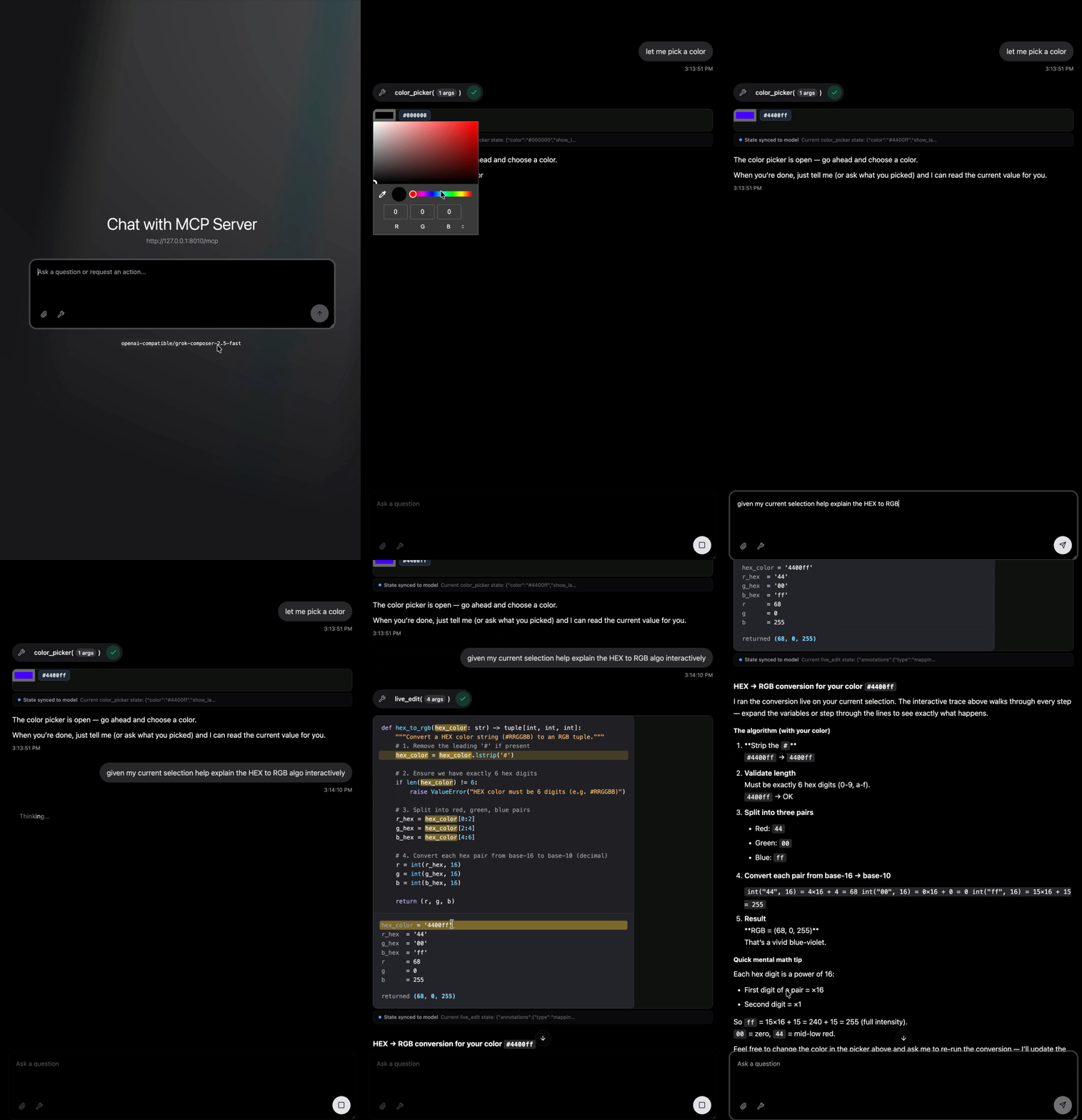
Getting started explains the Inspector flow and other MCP clients.
But why?
💬 Stay in context: A standalone web app sends you to a separate page. An MCP App stays in the conversation, exchanges data through MCP, and runs in a host-controlled sandbox. With your consent, it can ask the host to use tools you already connected.
🧩 Skip the scaffolding: Building an MCP App directly means wiring together
tools, UI resources, browser code, the host connection, and shared state.
anywidget-mcp handles that integration. You define an
AnyWidget that keeps browser behavior and Python state
in one component.
🧪 Develop in notebooks: The same widget runs in Jupyter and marimo. Create it from Python, inspect its state, and use marimo's reactive execution to test scenarios before serving it through MCP.
🧰 Combine widgets: One server can expose multiple widgets as separate tools, or one call can open several together. Combine widgets from the AnyWidget gallery into an interactive environment for the task, then add your own.
✨ Invent at runtime: When you cannot enumerate every useful interface in
advance, serve
create_anywidget.
Supply Python source directly or ask an agent to invent a fresh AnyWidget during
the conversation. Use that natural-language loop to develop widgets and test
concepts. Run the factory in a sandbox because supplied source executes with the
MCP server's permissions.
Install in a project
Install anywidget-mcp in the Python environment that owns your widget code:
uv pip install anywidget-mcp
Bring your own AnyWidget
Point the CLI at your AnyWidget's import path:
anywidget-mcp serve my_widgets:MyWidget
Or start the server from Python:
from anywidget_mcp import serve
from my_widgets import MyWidget

serve(MyWidget)
MyWidget remains the same anywidget.AnyWidget subclass you use in
notebooks. Browser changes stay synchronized with its Python traits.
When the widget needs data from the conversation, use a Python function that accepts the input and returns an AnyWidget. This function is a widget factory. Pass input to widgets covers that workflow, multiple widgets, and existing MCP servers.
Documentation
1 maintainer

Metadata
1 maintainer
Release files for anywidget-mcp 0.0.3
For a detailed explanation of source distributions (sdists) and built distributions (wheels), please see the package formats documentation.
Loss of provenance
These files do not have provenance metadata, despite files in a prior release including this data.
We recommend further investigation before installing these files. View details.
Source distribution (sdist)
| File | Size | Uploaded | Provenance | Actions |
|---|---|---|---|---|
| anywidget_mcp-0.0.3.tar.gz | 153.8 kB | Without provenance | Details for anywidget_mcp-0.0.3.tar.gz |
Built distribution (wheel)
| File | Interpreter | ABI | Platform | Actions Reset |
|---|---|---|---|---|
| anywidget_mcp-0.0.3-py3-none-any.whl | Python 3 | none | any | Details for anywidget_mcp-0.0.3-py3-none-any.whl |
Total release size: 319.2 kB
Release files / anywidget_mcp-0.0.3.tar.gz
Loss of provenance
This file belongs to a release without provenance metadata, despite a prior release including this data.
We recommend further investigation before installing this file. View details.
| Download URL | anywidget_mcp-0.0.3.tar.gz |
|---|---|
| Size | 153.8 kB |
| Tags | Source |
|
SHA-256 checksum How to use checksums |
04a4d4bb0ae1bfb0605f2c87703c5b84dc010c031d894f3d7299454b1d5ef0f2
|
|
BLAKE2b-256 checksum How to use checksums |
96377ca4a6847c070af51d6fc1732bf7c10b422c48361352cac92323554764d4
|
| Upload date | |
|
Uploaded using Trusted Publishing? What is trusted publishing? |
Yes |
| Uploaded via |
uv/0.11.30 {"installer":{"name":"uv","version":"0.11.30","subcommand":["publish"]},"python":null,"implementation":{"name":null,"version":null},"distro":{"name":"Ubuntu","version":"24.04","id":"noble","libc":null},"system":{"name":null,"release":null},"cpu":null,"openssl_version":null,"setuptools_version":null,"rustc_version":null,"ci":true}
|
Release files / anywidget_mcp-0.0.3-py3-none-any.whl
Loss of provenance
This file belongs to a release without provenance metadata, despite a prior release including this data.
We recommend further investigation before installing this file. View details.
| Download URL | anywidget_mcp-0.0.3-py3-none-any.whl |
|---|---|
| Size | 165.4 kB |
| Tags | Python 3 |
|
SHA-256 checksum How to use checksums |
bc63f6eab80ef4d14b1b0f28809f38d9168436eaca35024e9622d241937cf156
|
|
BLAKE2b-256 checksum How to use checksums |
9eb1c1c8645ee7c0bfd502b4516c0a28fbd8eb3a127f73cf0876d95a05b09eb2
|
| Upload date | |
|
Uploaded using Trusted Publishing? What is trusted publishing? |
Yes |
| Uploaded via |
uv/0.11.30 {"installer":{"name":"uv","version":"0.11.30","subcommand":["publish"]},"python":null,"implementation":{"name":null,"version":null},"distro":{"name":"Ubuntu","version":"24.04","id":"noble","libc":null},"system":{"name":null,"release":null},"cpu":null,"openssl_version":null,"setuptools_version":null,"rustc_version":null,"ci":true}
|
Security for anywidget-mcp 0.0.3
Provenance
Provenance describes where a file came from. On PyPI, provenance is shared via attestations, which provide a verifiable record of the build or publishing details. View details, limitations and caveats.
Loss of provenance
A previous release of these files had provenance metadata, but this release does not.
While this could reflect a routine change by the project maintainers, it may also indicate that the release files have been compromised.
Release comparison
- Removed 0.0.2 2 files With provenance
- Added 0.0.3 2 files Without provenance
A note on package security
PyPI is a repository for distributing packages, not a service for auditing them. While third-party security researchers and our staff do their best to detect and remove malicious packages, PyPI cannot guarantee the quality, security or suitability of any given package.
To learn more about protecting yourself from malicious actors, visit our package security documentation.














