



















AON is a self-hosted chat agent that runs on your own hardware with local models. It answers questions, runs tools in a workspace (files, shell commands, web fetch and search), remembers you across chats, searches your own documents, and can be extended with skills and MCP servers. It has a web UI, an Android app and an optional Telegram bot.
🔒 Nothing is sent to a cloud LLM: chat runs on Ollama or vLLM, embeddings on Ollama.
💡 What makes AON different
Memory and RAG are table stakes now. What AON adds:
- 🔓 Obliterated and fully yours. It runs an uncensored ("obliterated") 27B model on a single consumer GPU (RTX 4090), with no cloud, no API bills and no provider filtering or logging. Your chats, memory and documents never leave the box.
- 🧬 It extends itself. Paste a link and AON works out what it is: a GGUF model it can pull (it checks the VRAM budget and tool support first), an MCP server it can connect, a skill repo it can import, or docs it can learn from. It can also draft a new skill from any web page and test it with evals.
- 👥 A private AI for your whole crew, from one GPU. The chat model is served by vLLM, so several people use it at once. Access goes through Cloudflare Access email PIN, and every user is approved by hand.
- 🛡️ Honest by design. Shell commands and file writes wait for your approval. A reply that claims "done" without a tool having run is not trusted, so the real loop runs instead. Secrets such as tokens and keys are never saved to memory.
- 🗺️ Grounded, not guessed. Places and routes come from OpenStreetMap geocoding and routing, drawn on a 3D globe. Distances and times are computed by the routing service, not written by the model.
- 📱 Everywhere you are. The web UI, the Android app and an optional Telegram bot all reach the same agent on your server.
📱 Android app
Download AON.apk (260 KB, Android 7.0 or newer).
- Open the link on your phone and download the APK.
- Allow installs from your browser when Android asks (Install unknown apps), then tap Install.
- Open AON and sign in with your approved email address (see Trying the live instance).
The app opens https://aon.vulkron.uk by default. To use your own server, press Back in the
app and choose Change server, for example http://192.168.1.84:8700 on your home network.
The APK is signed (APK Signature Scheme v2, certificate CN=AON, O=Vulkron, C=GB); its SHA-256 is
listed on the release page.
🎬 Demo
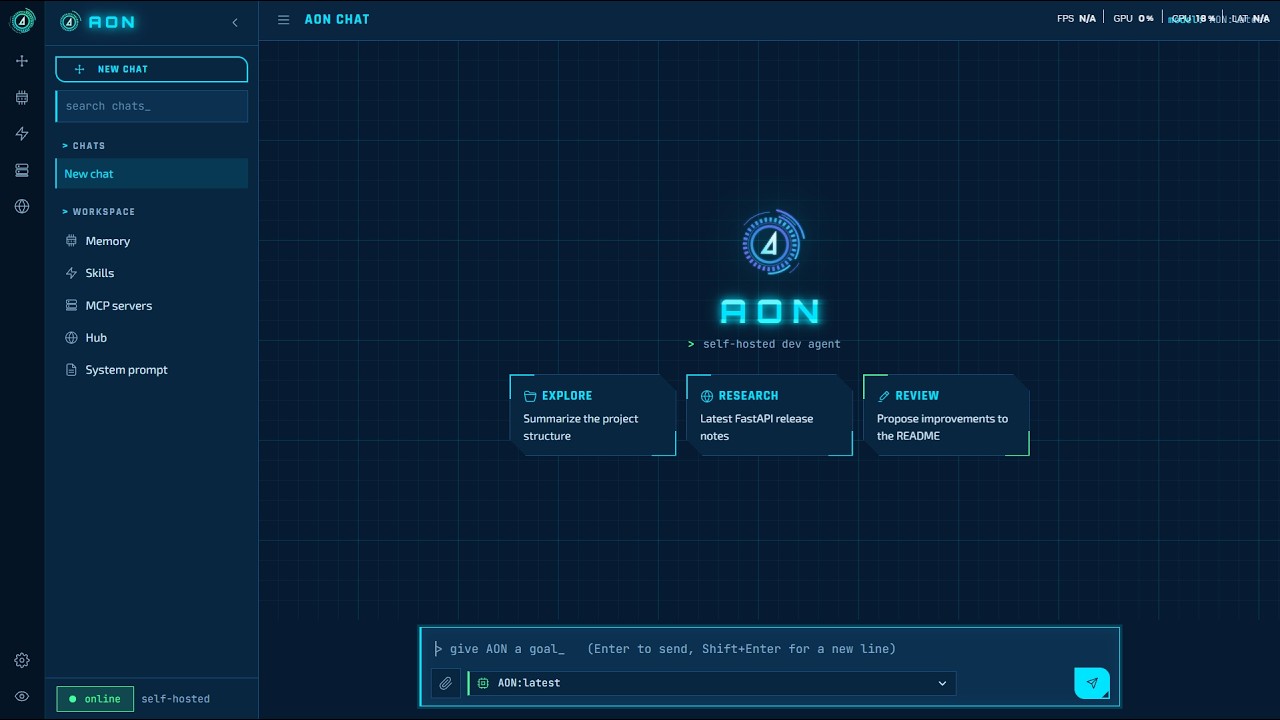
▶️ Click the image to watch on YouTube
🔑 Trying the live instance
Access to the live instance is by approval only:
- 📝 Request access. Open an issue titled Access request, saying who you are and what you would like to use AON for. Please do not post your email address in the issue; the maintainer will reply and tell you how to send it.
- ⏳ Wait for approval. Requests are reviewed by hand. Once yours is approved, your email address is added to the allowed list and the issue is closed with a note.
- ✅ Sign in. Open https://aon.vulkron.uk, enter the approved email address, and type the one-time PIN that is emailed to you. The PIN sign-in is handled by Cloudflare Access.
Access can be withdrawn at any time. The instance runs on private hardware with limited capacity: please do not use it for anything illegal, for automated or bulk traffic, or to process other people's personal data, and expect a short wait when several people are using it.
✨ Features
- 🛠️ Agent loop with tools: read, write and edit files, run shell commands, fetch and search the web, show maps, remember facts. Commands and file writes ask for your approval first.
- 🧠 Long memory
- Episodic memory: facts about you and your work, stored and searched by meaning; a duplicate or an updated fact is merged by the model.
- Chat recall: older turns of a chat (and of your other chats) are found by meaning and by exact strings (IPs, codes, numbers) and added to the request.
- Rolling summary of each chat, plus a numbered outline of everything you asked, so "what did I ask first?" works in long chats.
- 📚 Document library (RAG): add text, code, Markdown, HTML, Word (.docx) and PDF files in the Documents panel or by attaching them in chat. They are chunked, embedded and indexed (SQLite FTS5 + vectors); the relevant passages are added to answers, with the document name.
- 📏 Context budget: every request is fitted to the model's window using the server's exact token count (vLLM), so long chats never overflow.
- 🧩 Skills: reusable procedures in the Agent Skills (
SKILL.md) format. Import from a zip, a GitHub URL or pasted text; draft one from a web page; run evals. - 🔌 MCP: connect stdio or HTTP MCP servers; browse the Glama MCP directory in the Hub.
- 📎 Attachments: files and photos in chat; images go to vision models.
- 🗺️ Maps: places and routes from OpenStreetMap (Nominatim, OSRM), shown with MapLibre.
- 👥 Multi-user serving: put the chat model on vLLM to serve several users at once.
📋 Requirements
- Linux (runs on Ubuntu), Python 3.11 or newer (3.12 in use).
- Ollama with:
- an embedding model:
ollama pull nomic-embed-text - a chat model with tool support, for example
ollama pull qwen3:14b, unless chat runs on vLLM
- an embedding model:
- Optional: a GPU server running vLLM (see
vllm/README.md). - Optional: Node.js 20 for
npx-based MCP servers (bin/npxis a wrapper for a bundled copy).
📦 Install
pipx install aon-agent            # or: pip install aon-agent
aon init                          # creates ~/.aon with a starter config.toml
aon init takes --ollama URL, --model NAME, --bind HOST:PORT and --home DIR. Then pull the
models it names:
ollama pull nomic-embed-text
ollama pull qwen3:14b             # or the chat model you chose with --model
From source (for development):
git clone https://github.com/leo007-htun/AON.git && cd AON
python3 -m venv venv && venv/bin/pip install -e ".[test]"
venv/bin/aon init
Everything AON keeps (config, chats, memory, documents, skills) lives in its home folder:
--home DIR, else $AON_HOME, else ~/.aon.
⚙️ Configure (config.toml)
aon init writes this file into the home folder; edit it to taste.
| Key | Meaning | Example |
|---|---|---|
ollama_base_url |
Ollama's OpenAI-compatible endpoint (embeddings, and chat unless chat_base_url is set) |
"http://localhost:11434/v1" |
default_model |
Model used when the UI does not pick one | "qwen3:14b" |
workdir |
The agent's workspace; chats and documents are stored here | "~/app/workspace" |
bind |
Address and port of the web UI | "0.0.0.0:8700" |
max_steps |
Tool calls allowed per request | 40 |
command_timeout |
Seconds before a shell command is stopped | 120 |
always_ask |
Extra tools that always need approval | [] |
embed_model |
Embedding model on Ollama | "nomic-embed-text" |
context_window |
The chat model's context length, in tokens | 16384 |
reply_reserve |
Tokens kept free for thinking and the answer | 6144 |
history_tokens |
Recent chat turns sent word for word | 5000 |
cross_chat_recall |
Also recall relevant turns from your other chats | true |
chat_base_url |
Optional separate chat backend (vLLM) | "http://gpu-box:8001/v1" |
chat_model |
The model name served there; only this model goes to chat_base_url |
"aon" |
chat_temperature, chat_top_p, chat_repetition_penalty |
Sampling for the chat backend | 0.2, unset, 1.15 |
chat_vision |
The chat backend model accepts images | true |
telegram_bot_token, telegram_allowed_chat_ids |
Optional Telegram bot | "", [] |
Keep context_window equal to vLLM's --max-model-len (or the Ollama model's context).
🚀 Run
aon serve                         # web UI on the bind address from config.toml
aon serve --port 9000             # or override host/port
aon --help
Then open http://<bind address> in a browser.
🌙 In the background
setsid nohup aon serve >> ~/.aon/aon.log 2>&1 < /dev/null &
pgrep -af '[a]on serve'           # is it running?
tail -f ~/.aon/aon.log            # its log
pkill -f '[a]on serve'            # stop it
🔁 As a service (starts at boot, restarts on failure)
sudo tee /etc/systemd/system/aon.service >/dev/null <<'EOF'
[Unit]
Description=AON agent
After=network-online.target
Wants=network-online.target

[Service]
User=ubuntu
Environment=AON_HOME=/home/ubuntu/.aon
ExecStart=/home/ubuntu/.local/bin/aon serve
Restart=always
RestartSec=5

[Install]
WantedBy=multi-user.target
EOF
sudo systemctl daemon-reload && sudo systemctl enable --now aon
journalctl -u aon -f
Change User, AON_HOME and the aon path (which aon) to match your setup. Python code changes need a restart;
static/index.html is read on every request, so UI changes show on reload.
🔌 Use AON from other AI apps (MCP)
aon mcp runs AON as an MCP server over stdio, so Claude
Desktop, Claude Code, Cursor and other MCP clients can use it:
| Tool | What it does |
|---|---|
ask_aon |
Hand AON a task or question; it answers with its own model, memory, documents and tools. Use chat to continue a conversation. |
search_memory |
Search AON's long-term memory about you (read-only) |
remember |
Save a fact to AON's memory |
search_documents |
Search your document library (read-only) |
list_documents |
List the library (read-only) |
add_document |
Add a text document to the library |
Shell commands and file writes are always refused over MCP, because there is no one to approve them there.
Claude Desktop (claude_desktop_config.json) and Cursor (~/.cursor/mcp.json):
{
  "mcpServers": {
    "aon": { "command": "aon", "args": ["mcp"] }
  }
}
Claude Code:
claude mcp add aon -- aon mcp
Add "--home", "/path/to/home" to args to use a different home folder. If the client cannot find
aon, give the full path from which aon.
⚡ Chat on vLLM (several users at once)
Ollama answers one request at a time for some models. To serve several users, run the chat model on vLLM and point AON at it:
chat_base_url = "http://<gpu-box>:8001/v1"
chat_model = "aon"
default_model = "aon"
context_window = 16384
vllm/ has the systemd unit, the chat template and the exact package versions used.
Measured on one RTX 4090 (24 GB) with a 27B 4-bit model: 16K context serves 2–3 full-length
requests at once and the rest queue; 8K serves 4.
🌐 Remote access
AON has no login of its own. Keep bind on your LAN and, to reach it from outside, put it behind
an authenticating proxy, for example a Cloudflare Tunnel with Cloudflare Access (email PIN).
Geolocation in the map needs HTTPS.
🧪 Tests
pip install -e ".[test]"
pytest -q
🗂️ Project layout
| Path | What it is |
|---|---|
src/aon/cli.py |
The aon command: init, serve, mcp |
src/aon/main.py |
Builds AON from config.toml (shared by serve and mcp) |
src/aon/mcp_server.py |
AON as an MCP server |
src/aon/web.py |
FastAPI app: REST API and the chat WebSocket |
src/aon/engine.py |
The agent loop (tool calls, approval, loop guard) |
src/aon/router.py |
Planner: answer directly, ask, or plan tool steps |
src/aon/llm_client.py, backends.py |
Model calls; Ollama or vLLM per model |
src/aon/context.py |
Fitting requests into the context window |
src/aon/recall.py, summary.py |
Chat recall, rolling summary, outline |
src/aon/memory*.py |
Episodic memory, extraction, consolidation |
src/aon/docs.py |
Document library (RAG) |
src/aon/skills.py, skill_*.py |
Skills: store, import, authoring, evals |
src/aon/mcp_client.py, mcp_tools.py, hub.py |
MCP servers and the Glama hub |
src/aon/tools/ |
Built-in tools (files, shell, web, map) |
src/aon/static/ |
Web UI (index.html), icons, fonts, map library |
src/aon/default_skills/ |
Skills copied into a new home by aon init |
tests/ |
Test suite |
specs/ |
Design notes |
vllm/ |
vLLM server setup |
💾 Data
AON keeps its data in its home folder: workspace/app.db (chats), workspace/docs.db (document
library), memory/episodes.db (memory) and workspace/uploads/ (attachments). This repository
includes a snapshot of them from 2026-10-14. A fresh install creates empty ones; to start clean,
delete them before the first run. The Glama API key is kept in .glama_key, which is git-ignored.
📄 License
AON is released under the MIT License. © 2026 Sithu Htun (@leo007-htun).
Bundled third-party files keep their own licenses, included next to them: CybercoreCSS (MIT), MapLibre GL JS (BSD-3-Clause), highlight.js (BSD-3-Clause), and the Exo 2, JetBrains Mono, Orbitron and Rajdhani fonts (SIL Open Font License).
1 maintainer

Metadata
1 maintainer
Release files for aon-agent 1.0.0
For a detailed explanation of source distributions (sdists) and built distributions (wheels), please see the package formats documentation.
Source distribution (sdist)
| File | Size | Uploaded | |
|---|---|---|---|
| aon_agent-1.0.0.tar.gz | 865.2 kB | Details |
Built distribution (wheel)
| File | Interpreter | ABI | Platform | Reset |
|---|---|---|---|---|
| aon_agent-1.0.0-py3-none-any.whl | Python 3 | none | any | Details |
Total release size: 1.7 MB
Release files / aon_agent-1.0.0.tar.gz
| Download URL | aon_agent-1.0.0.tar.gz |
|---|---|
| Size | 865.2 kB |
| Tags | Source |
|
SHA-256 checksum How to use checksums |
c37cddf71d039bff5e203517eac22f4f2f227387e6a54b0b284e042db8036024
|
|
BLAKE2b-256 checksum How to use checksums |
d1dc288ee41c0b5bb8da42925eb3be6a6467157c6687e96784bf0d777aa77d2d
|
| Upload date | |
|
Uploaded using Trusted Publishing? What is trusted publishing? |
No |
| Uploaded via |
twine/7.0.0 CPython/3.12.3
|
Release files / aon_agent-1.0.0-py3-none-any.whl
| Download URL | aon_agent-1.0.0-py3-none-any.whl |
|---|---|
| Size | 809.6 kB |
| Tags | Python 3 |
|
SHA-256 checksum How to use checksums |
60138bb6e0bc052171dddf5edeb4970a21f2902acb10f08f7e590d4341584923
|
|
BLAKE2b-256 checksum How to use checksums |
5a2ba9c6f02b291e1b78aa02269bc2e4af93de5e32da726bfc92994f90765acd
|
| Upload date | |
|
Uploaded using Trusted Publishing? What is trusted publishing? |
No |
| Uploaded via |
twine/7.0.0 CPython/3.12.3
|














