



A community-built MCP (Model Context Protocol) server that connects LLM agents to Apache Atlas metadata governance platform. Not affiliated with the Apache Software Foundation.
Read-only by default. Write operations (create/delete entities, manage classifications) require explicit opt-in via --write flag or ATLAS_ALLOW_WRITE=true.
Why?
Apache Atlas is a widely-used open-source metadata governance framework for Hadoop ecosystems and beyond. With the 2.4.0 release (Jan 2025) breaking a 2-year gap and 2.5.0 (RC) adding PostgreSQL backend support and Trino extractor, Atlas is seeing renewed activity.
This MCP server lets AI agents:
- Search data assets across your entire metadata catalog
- Trace lineage — understand how data flows from source to destination
- Browse glossaries — look up business terms and definitions
- Inspect types — understand the metadata schema structure
- Manage classifications — apply governance tags like PII, GDPR, Confidential (write mode)
- Create/delete entities — modify metadata catalog (write mode)
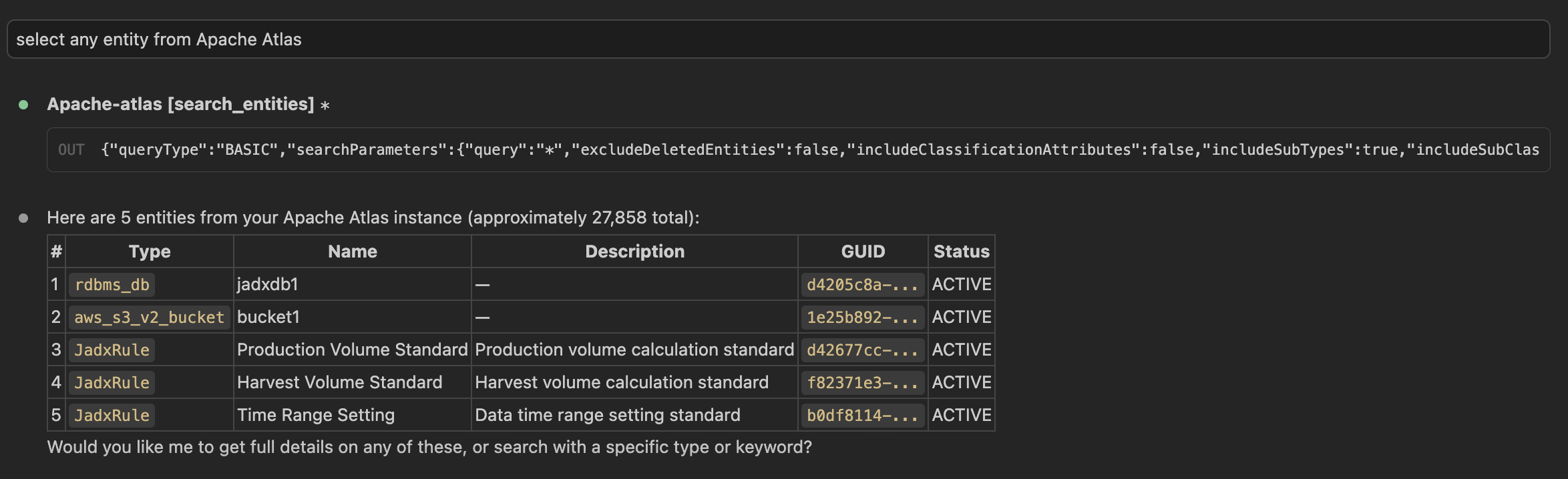
Quick Start
Installation
# Using uv (recommended)
uv add apache-atlas-mcp

# Using pip
pip install apache-atlas-mcp

# Run without installing
uvx apache-atlas-mcp
Configuration
Set environment variables to connect to your Atlas instance:
export ATLAS_BASE_URL=http://your-atlas-server:21000
export ATLAS_USERNAME=your-username
export ATLAS_PASSWORD=your-password
All configuration options:
| Variable | Default | Description |
|---|---|---|
ATLAS_BASE_URL |
(required) | Atlas server URL (e.g., http://localhost:21000) |
ATLAS_USERNAME |
(required) | Authentication username |
ATLAS_PASSWORD |
(required) | Authentication password |
ATLAS_VERIFY_SSL |
true |
Verify SSL certificates |
ATLAS_TIMEOUT |
30 |
HTTP request timeout (seconds) |
ATLAS_ALLOW_WRITE |
false |
Enable write operations (create, delete, classify) |
Usage with Claude Desktop
Add to your claude_desktop_config.json:
{
  "mcpServers": {
    "apache-atlas": {
      "command": "uvx",
      "args": ["apache-atlas-mcp"],
      "env": {
        "ATLAS_BASE_URL": "http://your-atlas-server:21000",
        "ATLAS_USERNAME": "your-username",
        "ATLAS_PASSWORD": "your-password"
      }
    }
  }
}
To enable write operations:
{
  "mcpServers": {
    "apache-atlas": {
      "command": "uvx",
      "args": ["apache-atlas-mcp", "--write"],
      "env": {
        "ATLAS_BASE_URL": "http://your-atlas-server:21000",
        "ATLAS_USERNAME": "your-username",
        "ATLAS_PASSWORD": "your-password"
      }
    }
  }
}
Usage with Claude Code
# Read-only (default)
claude mcp add atlas-server -- uvx apache-atlas-mcp

# With write operations enabled
claude mcp add atlas-server -- uvx apache-atlas-mcp --write
Run Directly
# Read-only (default)
apache-atlas-mcp

# With write operations enabled
apache-atlas-mcp --write
Available Tools
Read-Only Tools (always available)
Entity Search
| Tool | Description |
|---|---|
search_entities |
Basic search by keyword, type, or classification |
dsl_search |
Advanced search using Atlas DSL query language |
quick_search |
Fast partial-match search (autocomplete-style) |
get_entity |
Get full entity details by GUID |
get_entity_by_attribute |
Get entity by unique attribute (e.g., qualifiedName) |
get_entities_bulk |
Fetch multiple entities by GUIDs |
Lineage
| Tool | Description |
|---|---|
get_lineage |
Trace upstream/downstream data flow by GUID |
get_lineage_by_attribute |
Trace lineage by unique attribute |
Classifications
| Tool | Description |
|---|---|
get_classifications |
List all classifications on an entity |
Glossary
| Tool | Description |
|---|---|
list_glossaries |
List all business glossaries |
get_glossary |
Get glossary details with terms and categories |
get_glossary_terms |
List terms in a glossary |
get_glossary_term |
Get full details of a glossary term |
Type Definitions
| Tool | Description |
|---|---|
get_all_type_definitions |
Get the complete Atlas type system |
get_type_definition |
Get a specific type definition by name |
get_entity_type_definition |
Get an entity type with all attributes |
Write Tools (requires --write or ATLAS_ALLOW_WRITE=true)
| Tool | Description |
|---|---|
create_entity |
Create or update an entity |
delete_entity |
Soft-delete an entity |
add_classification |
Apply a classification tag (with lineage propagation) |
remove_classification |
Remove a classification from an entity |
Architecture
LLM Agent  <-->  MCP Protocol  <-->  Apache Atlas MCP Server  <-->  Atlas REST API v2
                                              |
                                       FastMCP + httpx
                                              |
                                     Apache Atlas Instance
                                     (HBase / PostgreSQL backend)
The server wraps the Atlas REST API v2 using:
- FastMCP for MCP protocol handling
- httpx for async HTTP communication
- Pydantic V2 for data validation and serialization
The REST API is backend-independent — it works regardless of whether Atlas uses HBase, Cassandra, or the new PostgreSQL backend (Atlas 2.5.0+).
Compatibility
- Apache Atlas: 2.1.0+ (tested with 2.3.2 and 2.4.0)
- Python: 3.11+
- Authentication: HTTP Basic (Atlas file-based auth, LDAP, or AD — all use Basic HTTP headers)
Development
# Clone the repository
git clone https://github.com/DanMeon/apache-atlas-mcp.git
cd apache-atlas-mcp

# Install dependencies
uv sync --group dev

# Run tests
uv run pytest tests/ -v --cov

# Lint & type check
uv run ruff check src/ tests/
uv run pyright src/apache_atlas_mcp/
License
MIT
1 maintainer

Metadata
1 maintainer
Release files for apache-atlas-mcp 0.1.1
For a detailed explanation of source distributions (sdists) and built distributions (wheels), please see the package formats documentation.
Source distribution (sdist)
| File | Size | Uploaded | Provenance | |
|---|---|---|---|---|
| apache_atlas_mcp-0.1.1.tar.gz | 297.8 kB | With provenance | Details |
Built distribution (wheel)
| File | Interpreter | ABI | Platform | Reset |
|---|---|---|---|---|
| apache_atlas_mcp-0.1.1-py3-none-any.whl | Python 3 | none | any | Details |
Total release size: 315.1 kB
Release files / apache_atlas_mcp-0.1.1.tar.gz
| Download URL | apache_atlas_mcp-0.1.1.tar.gz |
|---|---|
| Size | 297.8 kB |
| Tags | Source |
|
SHA-256 checksum How to use checksums |
65740b9a4d509d0d8d39d8ee4b20035336d8f3167cf0b7013da0b2d64c9de955
|
|
BLAKE2b-256 checksum How to use checksums |
fa63e7b1250b514b3e77da5683fc2984391846edcb4f4f6f844acbb89a0d8899
|
| Upload date | |
|
Uploaded using Trusted Publishing? What is trusted publishing? |
Yes |
| Uploaded via |
twine/6.1.0 CPython/3.13.7
|
Provenance
Provenance describes where a file came from. On PyPI, provenance is shared via attestations, which provide a verifiable record of the build or publishing details. View details, limitations and caveats.


PyPI Publish Attestation
PyPI verified that this artifact, at this checksum, originated from the publisher listed below.
Signed by GitHub Actions, verified by PyPI on Mar 30, 2026.
Transparency logRelease files / apache_atlas_mcp-0.1.1-py3-none-any.whl
| Download URL | apache_atlas_mcp-0.1.1-py3-none-any.whl |
|---|---|
| Size | 17.3 kB |
| Tags | Python 3 |
|
SHA-256 checksum How to use checksums |
840b3ce3b6492ad77bf77c48e749bf98ee07cba80e9f9989a9bda323a6e1a970
|
|
BLAKE2b-256 checksum How to use checksums |
82d2bd25c629a6313e536a2d281e65ee4ea017f2b8ee9ea03a120e4ffc3bc1f7
|
| Upload date | |
|
Uploaded using Trusted Publishing? What is trusted publishing? |
Yes |
| Uploaded via |
twine/6.1.0 CPython/3.13.7
|
Provenance
Provenance describes where a file came from. On PyPI, provenance is shared via attestations, which provide a verifiable record of the build or publishing details. View details, limitations and caveats.
PyPI Publish Attestation
PyPI verified that this artifact, at this checksum, originated from the publisher listed below.
Signed by GitHub Actions, verified by PyPI on Mar 30, 2026.
Transparency logSecurity for apache-atlas-mcp 0.1.1
Provenance
Provenance describes where a file came from. On PyPI, provenance is shared via attestations, which provide a verifiable record of the build or publishing details. View details, limitations and caveats.
Full provenance
All 2 files in this release have been uploaded with provenance metadata.
Attestation for apache_atlas_mcp-0.1.1.tar.gz
PyPI Publish Attestation
PyPI verified that this artifact, at this checksum, originated from the publisher listed below.
Signed by GitHub Actions, verified by PyPI on Mar 30, 2026.
Transparency logA note on package security
PyPI is a repository for distributing packages, not a service for auditing them. While third-party security researchers and our staff do their best to detect and remove malicious packages, PyPI cannot guarantee the quality, security or suitability of any given package.
To learn more about protecting yourself from malicious actors, visit our package security documentation.














