
This release is a pre-release and may not be stable for production use.
Introduction
Apache Gravitino is a high-performance, geo-distributed, and federated metadata lake. It manages the metadata directly in different sources, types, and regions, also provides users the unified metadata access for data and AI assets.
Gravitino Python client helps data scientists easily manage metadata using Python language.
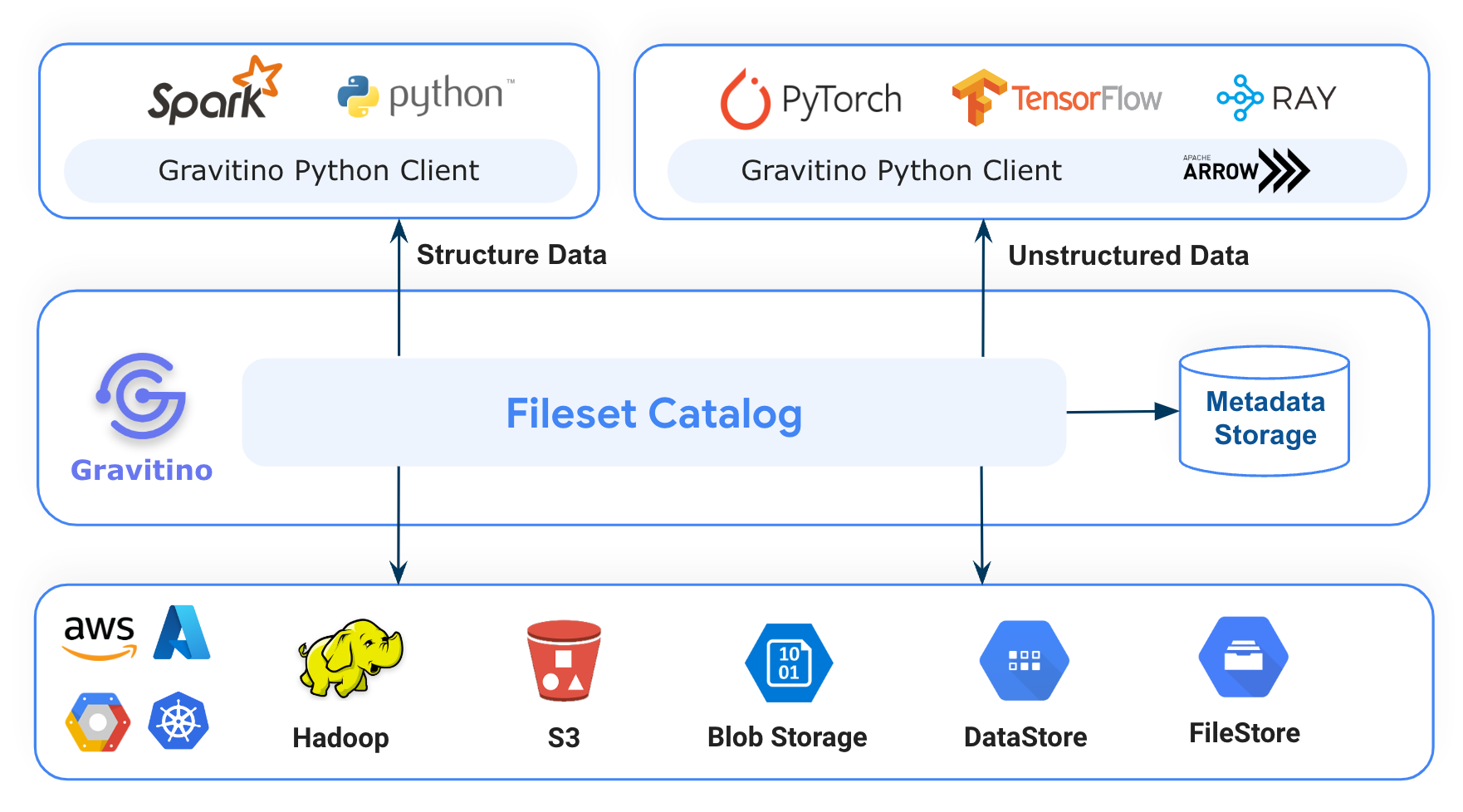
Usage
Use Gravitino Python client library with Spark, PyTorch, Tensorflow, Ray and Python environment.
First of all, You must have a Gravitino server set up and run, You can refer document of How to install Gravitino to build Gravitino server from source code and install it in your local.
Python Client API
pip install apache-gravitino
The base installation provides the Gravitino metadata client. For GVFS with local file:// paths
and no remote backend, install only the shared GVFS dependencies:
pip install "apache-gravitino[gvfs]"
For a remote storage backend, install its extra, for example:
pip install "apache-gravitino[hdfs]"
pip install "apache-gravitino[s3]"
pip install "apache-gravitino[gcs]"
pip install "apache-gravitino[oss]"
pip install "apache-gravitino[azure]"
To preserve the previous installation profile that included all GVFS backends, install
apache-gravitino[storage]. Ray Data applications that only use Gravitino for metadata can install
the base Gravitino client alongside their Ray Data dependencies without installing these storage
extras.
- Manage metalake using Gravitino Python API
- Manage fileset metadata using Gravitino Python API
- Manage Semantic Model metadata using Gravitino Python API
- Manage view metadata using Gravitino Python API
View Operations
Use as_view_catalog() on a loaded relational catalog to manage views. The
View guide includes Python examples for view
creation, list/load, alteration (rename, set/remove property, and replace), and drop operations.
HTTP Error Handling
Valid Gravitino and OAuth2 error responses retain their existing domain exceptions.
When an HTTP error has an empty, unreadable or invalid error response, the client raises
gravitino.exceptions.base.HTTPResponseException, a subclass of RESTException.
Its status_code, request_method and endpoint attributes describe the HTTP status,
the original client request method and its origin (scheme, hostname and optional port).
Applications can catch RESTException to include these fallback failures.
Fallback diagnostics omit URL credentials, paths, query parameters, fragments, request data, response headers and response bodies. The default traceback suppresses the underlying HTTP and decoding exception chain. Existing domain error messages are unchanged. This replaces the decoding or validation exceptions previously exposed for invalid HTTP error responses, and bypasses custom error handlers for empty or invalid error responses. Connection failures and timeouts before an HTTP error response retain their existing behavior. The client does not retry requests as part of this error handling.
Runtime dependency ranges
The metadata client and optional storage or Lance integrations use these runtime requirements. Development and standard integration-test dependencies are pinned separately.
| Installation | Runtime requirements |
|---|---|
| Core | dataclasses-json>=0.6.7,<0.7, simplejson>=3.20.1,<5 |
| GVFS shared | cachetools>=7.1.4,<8, fsspec>=2023.12.1, readerwriterlock>=1.0.9,<2 |
| HDFS | pyarrow>=17.0.0,<27 |
| S3 | s3fs>=2023.12.1 |
| GCS | gcsfs>=2023.12.1 |
| OSS | ossfs>=2025.5.0 |
| Azure | adlfs>=2026.2.0 |
| Lance | ray>=2.55.1, lance-ray>=0.3.0,<1 |
Backend libraries also constrain their dependencies. For example, s3fs and gcsfs
2023.12.1 both require fsspec 2023.12.1. The installer selects a compatible combination
when multiple extras or [storage] are requested. The storage profile does not include
[lance]; request both extras when both features are needed.
Python package compatibility also applies. For example, PyArrow 26 requires Python 3.11 or later. The allowed ranges do not imply that every version combination has been tested.
Semantic Model Ossie Import and Export
Use as_semantic_model_catalog() on a loaded relational catalog to manage Semantic Models.
The Semantic Model guide
includes Python examples for native creation, list/load, alteration, deletion, and Apache Ossie
YAML/JSON import and export, along with the source and permission requirements.
The SDK transfers Ossie document text directly and requires no YAML parser. Import and export
default to document_format="yaml"; use "json" for JSON documents.
Fileset Example
We offer a playground environment to help you quickly understand how to use Gravitino Python client to manage non-tabular data on HDFS via Fileset in Gravitino. You can refer to the document How to use the playground to launch a Gravitino server, HDFS and Jupyter notebook environment in you local Docker environment.
Waiting for the playground Docker environment to start, you can directly open
http://localhost:18888/lab/tree/gravitino-fileset-example.ipynb in the browser and run the example.
The gravitino-fileset-example contains the following code snippets:
- Install HDFS Python client.
- Create a HDFS client to connect HDFS and to do some test operations.
- Install the Gravitino Python client with HDFS support:
pip install "apache-gravitino[hdfs]". - Initialize Gravitino admin client and create a Gravitino metalake.
- Initialize Gravitino client and list metalakes.
- Create a Gravitino
Catalogand specialtypeisCatalog.Type.FILESETandprovideris fileset - Create a Gravitino
Schemawith thelocationpointed to a HDFS path, and usehdfs clientto check if the schema location is successfully created in HDFS. - Create a
Filesetwithtypeis Fileset.Type.MANAGED, usehdfs clientto check if the fileset location was successfully created in HDFS. - Drop this
Fileset.Type.MANAGEDtype fileset and check if the fileset location was successfully deleted in HDFS. - Create a
Filesetwithtypeis Fileset.Type.EXTERNAL andlocationpointed to exist HDFS path - Drop this
Fileset.Type.EXTERNALtype fileset and check if the fileset location was not deleted in HDFS.
Python Client Development
Use any IDE to develop Gravitino Python Client. Directly open the client-python module project in the IDE.
Prerequisites
- Python 3.10+
- Refer to How to build Gravitino to have necessary build environment ready for building.
Develop with uv
The Python client also provides an optional uv development workflow. The existing Gradle build, CI, and release commands continue to use their existing environment setup.
Install uv, then run the following commands from clients/client-python:
uv sync --locked --extra dev --python 3.12
uv run --locked --extra dev python scripts/generate_version.py
uv run --locked --extra dev black --check gravitino tests scripts
uv run --locked --extra dev pylint gravitino tests scripts
PYTHONPATH="$PWD" uv run --locked --extra dev --directory tests/unittests python -m unittest
The version-generation command is required after a fresh checkout. Configure your IDE to use
clients/client-python/.venv/bin/python (or .venv/Scripts/python.exe on Windows).
For another supported Python version, select it with --python. Use a separate environment
when switching between Python versions or dependency combinations.
The unit-test command sets PYTHONPATH to make the existing shared test helpers importable,
as the Gradle test task does.
setup.py and the existing requirements*.txt files continue to declare package metadata
and dependencies. uv.lock records the resolved development environment; SDK users can
continue installing the published package with pip. After changing a requirement file,
run uv lock, review the lockfile changes, and verify uv lock --check. Use
uv sync --locked --all-extras to install all existing optional extras in the
development environment.
For an independent lock, metadata-equivalence and cache-invalidation check, run:
uv run --locked python scripts/check_uv_workflow.py
This lightweight check needs only the core client and the default setuptools development tool. It changes README and requirements only in temporary source copies, reuses the uv cache, and exits nonzero on failure. The uv commands above do not run integration tests; use the existing Gradle commands below with their server or storage prerequisites.
Build and Test
-
Clone the Gravitino project.
git clone git@github.com:apache/gravitino.git
-
Build the Gravitino Python client module
# Default Python version is 3.12
./gradlew :clients:client-python:build
# If you want to build Python client with specific Python version,
# add `-PpythonVersion` with version number:
./gradlew :clients:client-python:build -PpythonVersion=3.11
-
Run unit tests
./gradlew :clients:client-python:test -PskipITs
-
Run integration tests
Because Python client connects to Gravitino Server to run integration tests, So it runs
./gradlew compileDistribution -x testcommand automatically to compile the Gravitino project in thedistributiondirectory. When you run integration tests via Gradle command or IDE, Gravitino integration test framework (integration_test_env.py) will start and stop Gravitino server automatically../gradlew :clients:client-python:test -
Distribute the Gravitino Python client module
./gradlew :clients:client-python:distribution -
Deploy the Gravitino Python client to https://pypi.org/project/apache-gravitino/
./gradlew :clients:client-python:deploy
IDE Specific Settings
JetBrains IntelliJ IDEA
We use Conda Environment to manage Python Environment, to configure Python SDK, you need to:
-
Make sure you installed Python Plugin.
-
Make sure you followed the step to build python module in Build and Test
-
Make sure you are at the root directory of Gravitino Git repository.
-
Find conda executable by executing this command
find $(pwd)/.gradle/python/*/Miniforge3/bin/conda

# example output
/Users/YOUR_USER_NAME/gravitino/.gradle/python/MacOSX/Miniforge3/bin/conda
-
Find Python Interpreter with this command:
find $(pwd)/.gradle/python/*/Miniforge3/envs/*/bin/python

# example output
/Users/YOUR_USER_NAME/gravitino/.gradle/python/MacOSX/Miniforge3/envs/python-3.12/bin/python
-
Follow steps in Create a conda environment, and at step 5, choose Existing conda environment
-
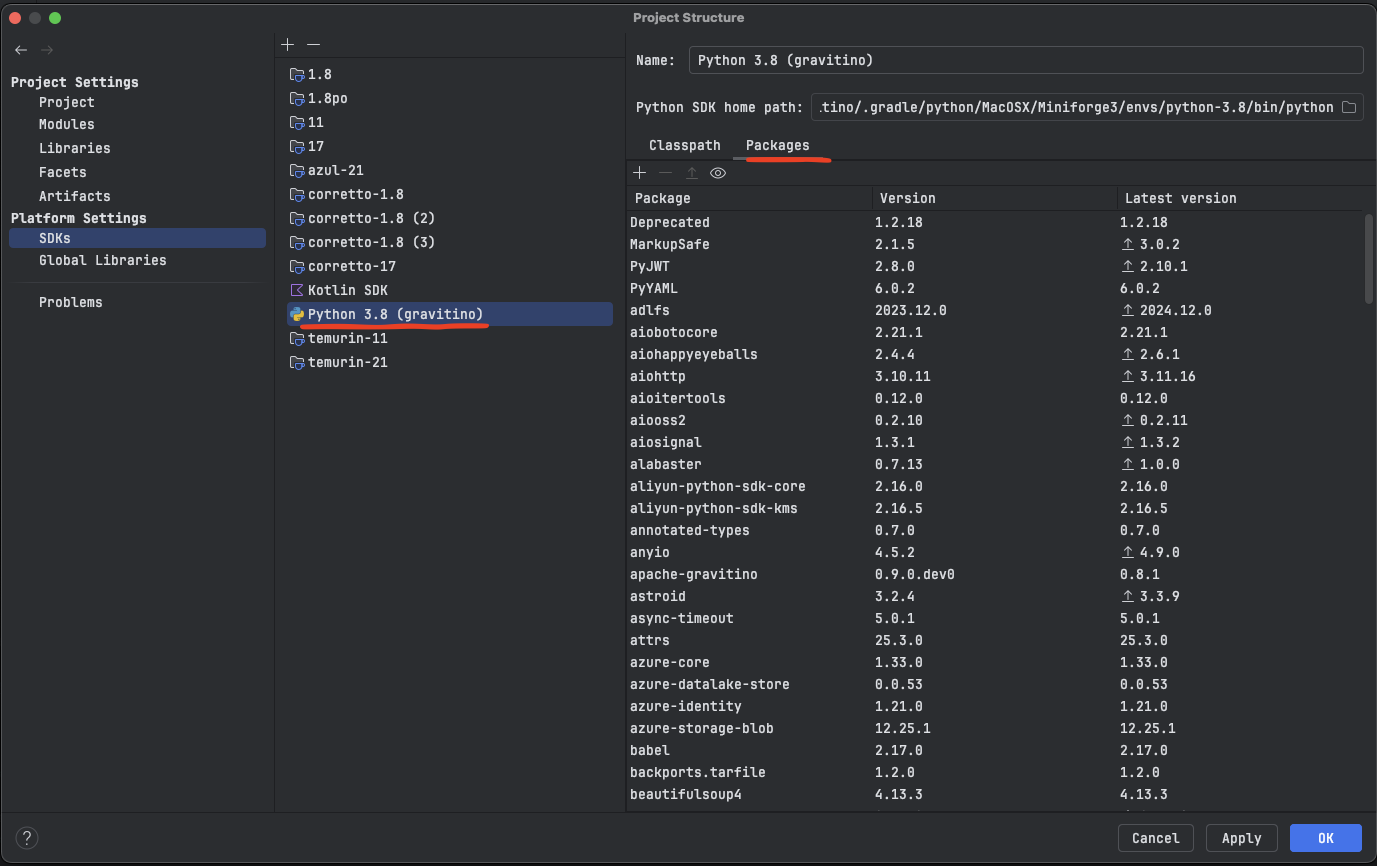
Fill in the output from step 4 into Conda executable field, step 5 into Interpreter field.
And you will see a new Python SDK is added, and it has several packages installed.
-
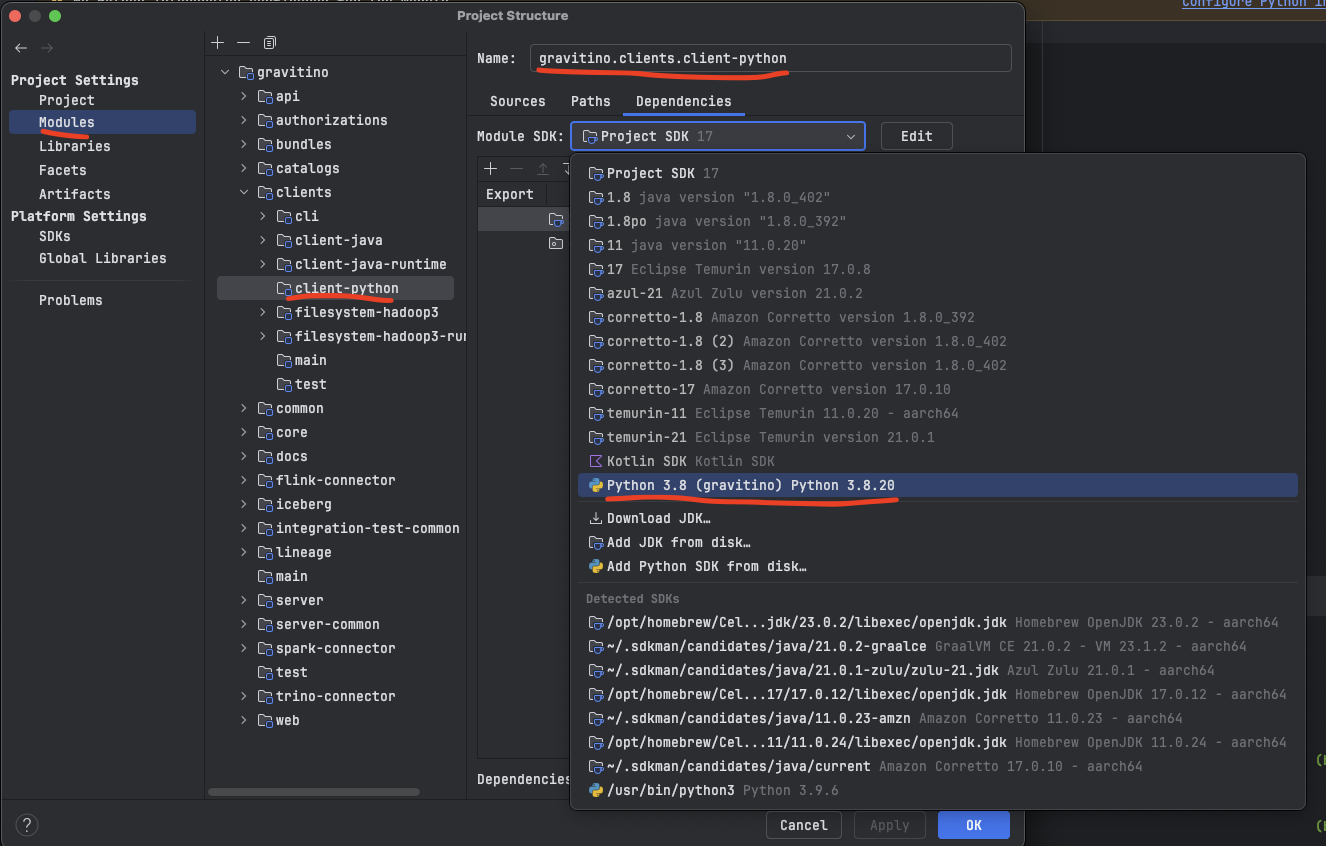
Set
clients/client-pythonmodule sdk to the one we set in previous step. -
Done! Now, open any python files and start developing Gravitino Python Client.
Running Integration Tests in IntelliJ IDEA
Since integration tests require Gravitino Java distribution, so you cannot run tests with IntelliJ Run tests button, Please execute this gradle task with Gradle Plugin or in command line to run integration tests.
./gradlew clients:client-python:integrationTest
Or, you would see errors like:
...
ERROR:tests.integration.integration_test_env:Gravitino Python client integration test must configure `GRAVITINO_HOME`

Process finished with exit code 0
Resources
- Official website https://gravitino.apache.org/
- Project home on GitHub: https://github.com/apache/gravitino/
- Playground with Docker: https://github.com/apache/gravitino-playground
- User documentation: https://gravitino.apache.org/docs/
- Slack Community: https://the-asf.slack.com#gravitino
Domains
See Manage domains for a complete executable example covering creation, publication, tag membership, reverse lookup and cleanup.
License
Gravitino is under the Apache License Version 2.0, See the LICENSE for the details.
2 maintainers


Metadata
2 maintainers
Release files for apache-gravitino 2.0.0rc1
For a detailed explanation of source distributions (sdists) and built distributions (wheels), please see the package formats documentation.
Source distribution (sdist)
| File | Size | Uploaded | Provenance | Actions |
|---|---|---|---|---|
| apache_gravitino-2.0.0rc1.tar.gz | 319.9 kB | Without provenance | Details for apache_gravitino-2.0.0rc1.tar.gz |
Release files / apache_gravitino-2.0.0rc1.tar.gz
| Download URL | apache_gravitino-2.0.0rc1.tar.gz |
|---|---|
| Size | 319.9 kB |
| Tags | Source |
|
SHA-256 checksum How to use checksums |
546d1ac713a209fb3b693cd67ba9bc58fd85ddba51be40756e13cd7e5f4b4c5c
|
|
BLAKE2b-256 checksum How to use checksums |
b86bca51cb2718016c24194a71221cbff9e2f232f938a0960152d902bc4fee4a
|
| Upload date | |
|
Uploaded using Trusted Publishing? What is trusted publishing? |
No |
| Uploaded via |
twine/7.0.0 CPython/3.10.12
|
Security for apache-gravitino 2.0.0rc1
Provenance
Provenance describes where a file came from. On PyPI, provenance is shared via attestations, which provide a verifiable record of the build or publishing details. View details, limitations and caveats.
No provenance found
None of the files in this release were uploaded with provenance metadata.
A note on package security
PyPI is a repository for distributing packages, not a service for auditing them. While third-party security researchers and our staff do their best to detect and remove malicious packages, PyPI cannot guarantee the quality, security or suitability of any given package.
To learn more about protecting yourself from malicious actors, visit our package security documentation.














