





English | Português (Brasil)
aparta isolates your development accounts, git, GitHub CLI, gcloud, SSH keys, per project folder, and makes your terminal AI agents (Claude Code, Codex, Gemini CLI, Antigravity) use the right identity, always. Aparta is Portuguese for "set apart".

Why aparta?
If you work with more than one identity, a day job, a side gig, freelance clients, open source, you know the drill:
- You commit to a client's repo and only later notice the commit went out with your personal e-mail (or worse: your personal work went out with your employer's e-mail). Rewriting published history is painful; sometimes it's impossible.
ghandgcloudhave one globally active account. Switching in one terminal switches everywhere, including that other terminal where a deploy script was about to run against the wrong project.- Terminal AI agents inherit whatever identity your shell happens to have. An agent that clones, commits, pushes, or calls cloud APIs on your behalf multiplies the odds of an accident.
The fix is well known among people who've been burned: [includeIf "gitdir:..."] blocks in ~/.gitconfig, parallel gh config directories selected via GH_CONFIG_DIR, named gcloud configurations selected via CLOUDSDK_ACTIVE_CONFIG_NAME, per-host SSH aliases. It works beautifully, but it's tedious to set up by hand, easy to get subtly wrong, and nobody documents how to make AI agents respect it.
aparta automates the whole thing. Folder decides identity. Enter a project under ~/work/acme, and git, gh, gcloud, and your AI agents are the acme you. Enter ~/personal, and they're you-you. No switching, no remembering, no accidents.
How it works
One command, one interactive wizard:
- Scans what you already have, logged-in gh/gcloud accounts, SSH keys and host aliases, existing
includeIfblocks, and every git repo on disk grouped by folder and commit e-mail. Existing setups become pre-filled suggestions: confirming a profile is just pressing Enter. - Or starts from zero, connect a new GitHub account (
gh auth loginscoped to the profile's own config dir), a new Google account, generate a fresh SSH key (and upload it to GitHub for you). - Applies safely, every file it touches is backed up first (
.bak-aparta-<timestamp>) and merged, never overwritten.--dry-runshows the full diff without changing anything. Nothing ever leaves your machine. - Verifies,
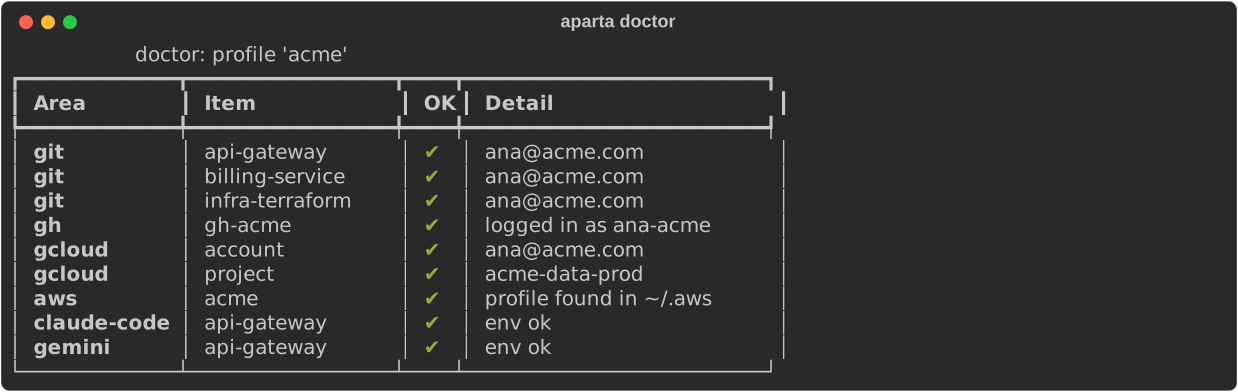
aparta doctorchecks the real state: the resolved git e-mail in each repo, gh auth, gcloud config, injected agent env.
Screenshots
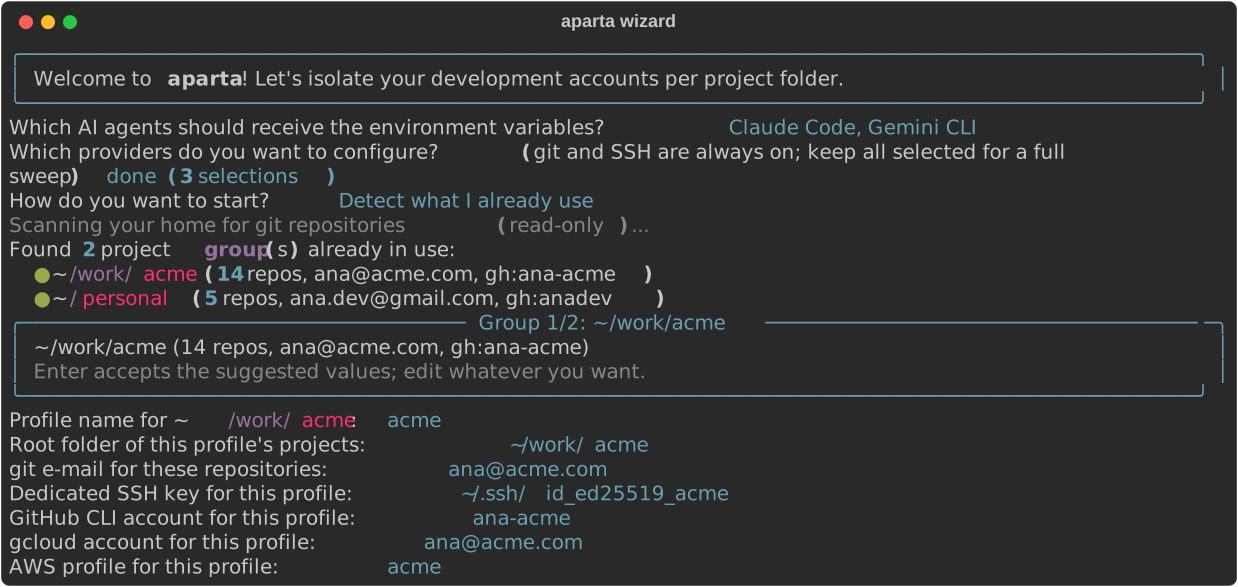
The wizard detects your existing setup and pre-fills everything:
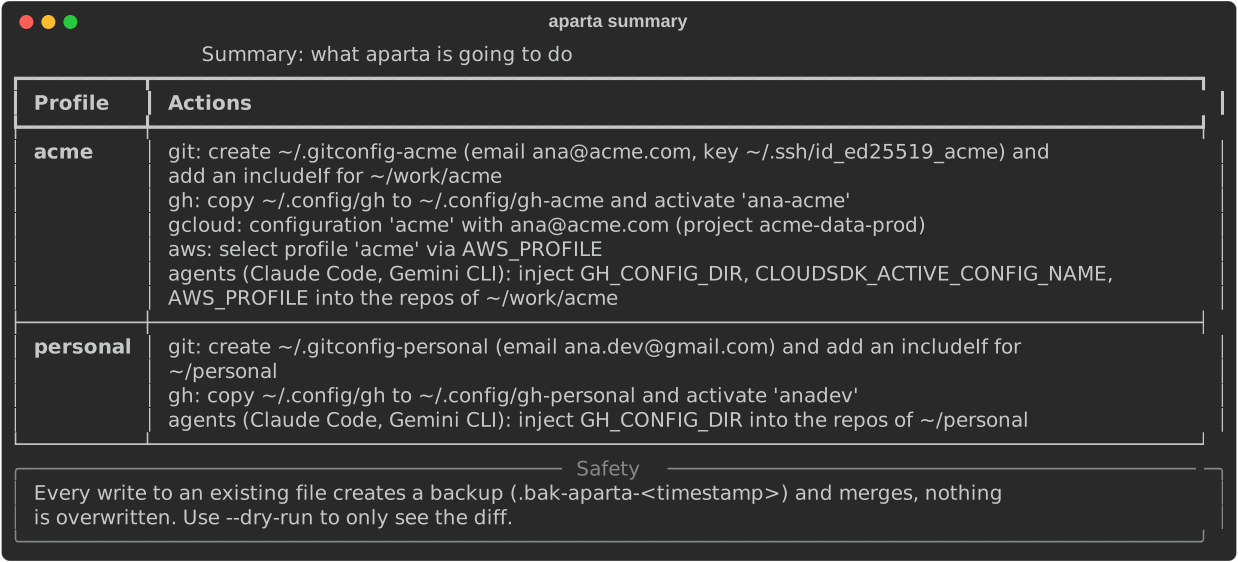
One summary, one confirmation, with a safety net:
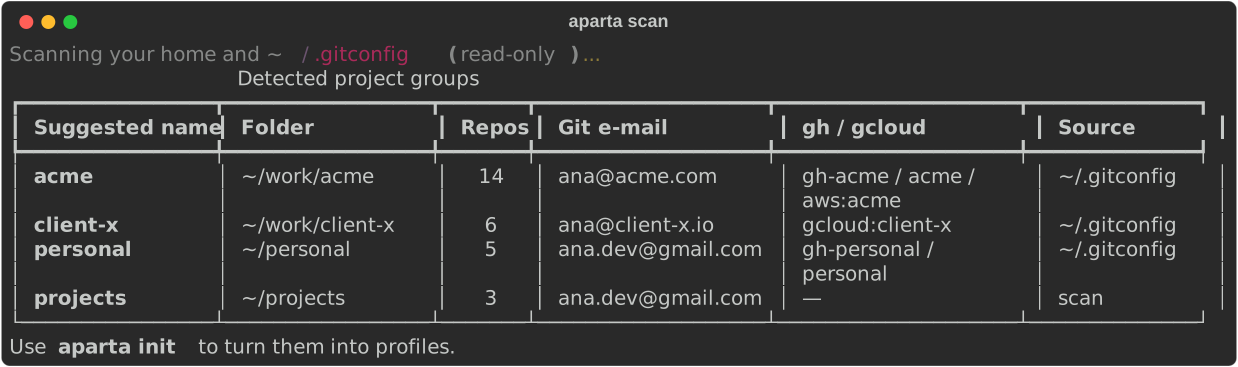
aparta scan shows what it found without touching anything:
aparta doctor proves each profile is actually working:
Installation
Works on macOS, Linux and Windows through WSL. Requires Python ≥ 3.10. gh and gcloud are optional, aparta selects credentials for the tools you use; it never logs in for you (unless you ask it to, in the wizard).
Recommended: install it as a permanent tool with uv, it is fast, isolated from your projects, and trivial to upgrade:
uv tool install aparta     # recommended
aparta                     # from now on it is just this
Other ways, whatever fits your setup:
uvx aparta            # try it without installing anything
pipx install aparta   # same idea as uv tool, using pipx
pip install aparta    # plain pip, goes into the active environment
npx aparta-cli        # Node ecosystem launcher (needs uv or pipx installed)
Upgrading later: uv tool upgrade aparta (or the equivalent in your chosen tool). Shell autocompletion: aparta --install-completion.
Languages
The CLI speaks English and Brazilian Portuguese. The first run of the wizard asks which one you prefer and remembers it; APARTA_LANG=en or APARTA_LANG=pt overrides the saved choice, and without any of that the locale (LANG) decides.
Quick start
aparta # first run opens the wizard; later runs open a menu
- Pick which AI agents should receive per-project environment (Claude Code, Codex, Gemini CLI, Antigravity, or a generic
.envrcvia direnv). - Choose "Detect what I already use" (recommended) or "Start from zero".
- Confirm each suggested profile, name, folder, git e-mail, SSH key, remote alias, gh account, gcloud account/project all come pre-filled from the scan.
- Optionally adopt stray repos that live outside your profile folders (they keep their location; identity is applied locally via a git
include.path). - Review the summary, confirm once. Done.
aparta doctor     # verify everything actually resolves to the right identity
aparta scan       # read-only: show detected project groups
aparta apply X    # re-apply a profile (e.g. after cloning new repos)
aparta list       # list configured profiles
aparta --dry-run  # any command: show diffs, change nothing
What each profile configures
| Tool | Mechanism |
|---|---|
| git | ~/.gitconfig-<profile> with user.email, core.sshCommand (dedicated key), optional url insteadOf rewrite; included via [includeIf "gitdir:~/folder/"] |
| GitHub CLI | copy of ~/.config/gh to ~/.config/gh-<profile> + gh auth switch inside the copy; selected via GH_CONFIG_DIR (tokens stay in your keyring, no re-login) |
| gcloud | named configuration (--no-activate) with account/project; selected via CLOUDSDK_ACTIVE_CONFIG_NAME |
| SSH | per-profile key; optional ~/.ssh/config host-alias rewrite so any clone URL uses the right key |
| Stray repos | local include.path in the repo's .git/config pointing at the profile's gitconfig, full identity without moving the folder |
Supported AI agents
| Agent | Injection mechanism |
|---|---|
| Claude Code | env field in .claude/settings.local.json (merged) |
| Codex CLI | [env] section in the repo's .codex/config.toml |
| Gemini CLI | project .gemini/.env (loaded natively by the CLI) |
| Antigravity | terminal.integrated.env.{osx,linux} in .vscode/settings.json |
| opencode | generated shell.env plugin in .opencode/plugins/aparta-env.js |
| Cursor CLI | no native per-project env, inherits the shell, covered by the direnv adapter |
| direnv (generic) | export lines in .envrc, works for any tool (needs direnv installed and a one-time direnv allow per repo) |
Adding a new agent = dropping one file in src/aparta/agents/ (auto-registered).
Safety model
- Every write to an existing file creates a timestamped backup and merges: aparta never overwrites your dotfiles.
--dry-runpreviews every change as a diff.- The scan is 100% read-only.
- Nothing is sent anywhere. No telemetry, no network calls beyond the ones you trigger (
gh auth login,gcloud auth login).
Roadmap
- More agents as they gain per-project config support
Works great with
- Orca: an Agent Development Environment that runs several AI agents at once in isolated worktrees, with terminals, editor and browser in one app. Every agent Orca launches inherits the per-folder identity that aparta configured, so parallel agents across different clients stay on the right accounts.
- Universal Memory (U-Mem): a local-first, vendor-agnostic memory layer for AI agents. aparta makes every agent use the right account per folder; U-Mem makes them remember your context and preferences across sessions and tools. Together they cover identity and memory. Keep its
.umem/directory out of version control (this repo's .gitignore already does).
Contributing
Issues and PRs are welcome, see CONTRIBUTING.md. Release history lives in the CHANGELOG.
License
1 maintainer

Download files
Download the file for your platform. If you're not sure which to choose, learn more about installing packages.
Source Distribution
Built Distribution
Filter files by name, interpreter, ABI, and platform.
If you're not sure about the file name format, learn more about wheel file names.
Copy a direct link to the current filters
File details
Details for the file aparta-0.4.4.tar.gz.
File metadata
- Download URL: aparta-0.4.4.tar.gz
- Upload date:
- Size: 55.9 kB
- Tags: Source
- Uploaded using Trusted Publishing? Yes
- Uploaded via:
twine/7.0.0 CPython/3.13.14
File hashes
| Algorithm | Hash digest | |
|---|---|---|
| SHA256 |
c4819f7d6b3f3dfb26167250188a764f206ae25b1d6de560153bac443f8edd36
|
|
| MD5 |
e637908d73aa83e04a1c788db094ef60
|
|
| BLAKE2b-256 |
6e3e9b5b8d4ad33851e72651a7b1c0e843ff2b4c25a1496f5ebd48fa303f19b5
|
Provenance
The following attestation bundles were made for aparta-0.4.4.tar.gz:
Publisher:
release.yml on lucascarvalhal/aparta
-
Statement:
-
Statement type:
https://in-toto.io/Statement/v1 -
Predicate type:
https://docs.pypi.org/attestations/publish/v1 -
Subject name:
aparta-0.4.4.tar.gz -
Subject digest:
c4819f7d6b3f3dfb26167250188a764f206ae25b1d6de560153bac443f8edd36 - Sigstore transparency entry: 2516131670
- Sigstore integration time:
-
Permalink:
lucascarvalhal/aparta@960b6f8e4bf1f219eb602219b92b85ab3cbb4a8c -
Branch / Tag:
refs/tags/v0.4.4 - Owner: https://github.com/lucascarvalhal
-
Access:
public
-
Token Issuer:
https://token.actions.githubusercontent.com -
Runner Environment:
github-hosted -
Publication workflow:
release.yml@960b6f8e4bf1f219eb602219b92b85ab3cbb4a8c -
Trigger Event:
push
-
Statement type:
File details
Details for the file aparta-0.4.4-py3-none-any.whl.
File metadata
- Download URL: aparta-0.4.4-py3-none-any.whl
- Upload date:
- Size: 48.2 kB
- Tags: Python 3
- Uploaded using Trusted Publishing? Yes
- Uploaded via:
twine/7.0.0 CPython/3.13.14
File hashes
| Algorithm | Hash digest | |
|---|---|---|
| SHA256 |
20b933bbdbf80dc89aba27181e19ca65d6e773a6015bd4acb689cbe7ca164aa6
|
|
| MD5 |
fcb5b116c5b0a1fe9b6d3d796bf7dac5
|
|
| BLAKE2b-256 |
4c8fdd08c1a65cc0b5bee0e8c2751247877ee3f2ee87fb5d225dee40979df764
|
Provenance
The following attestation bundles were made for aparta-0.4.4-py3-none-any.whl:
Publisher:
release.yml on lucascarvalhal/aparta
-
Statement:
-
Statement type:
https://in-toto.io/Statement/v1 -
Predicate type:
https://docs.pypi.org/attestations/publish/v1 -
Subject name:
aparta-0.4.4-py3-none-any.whl -
Subject digest:
20b933bbdbf80dc89aba27181e19ca65d6e773a6015bd4acb689cbe7ca164aa6 - Sigstore transparency entry: 2516131694
- Sigstore integration time:
-
Permalink:
lucascarvalhal/aparta@960b6f8e4bf1f219eb602219b92b85ab3cbb4a8c -
Branch / Tag:
refs/tags/v0.4.4 - Owner: https://github.com/lucascarvalhal
-
Access:
public
-
Token Issuer:
https://token.actions.githubusercontent.com -
Runner Environment:
github-hosted -
Publication workflow:
release.yml@960b6f8e4bf1f219eb602219b92b85ab3cbb4a8c -
Trigger Event:
push
-
Statement type:







