
apicmp
Did this API quietly change? Find out in one command.




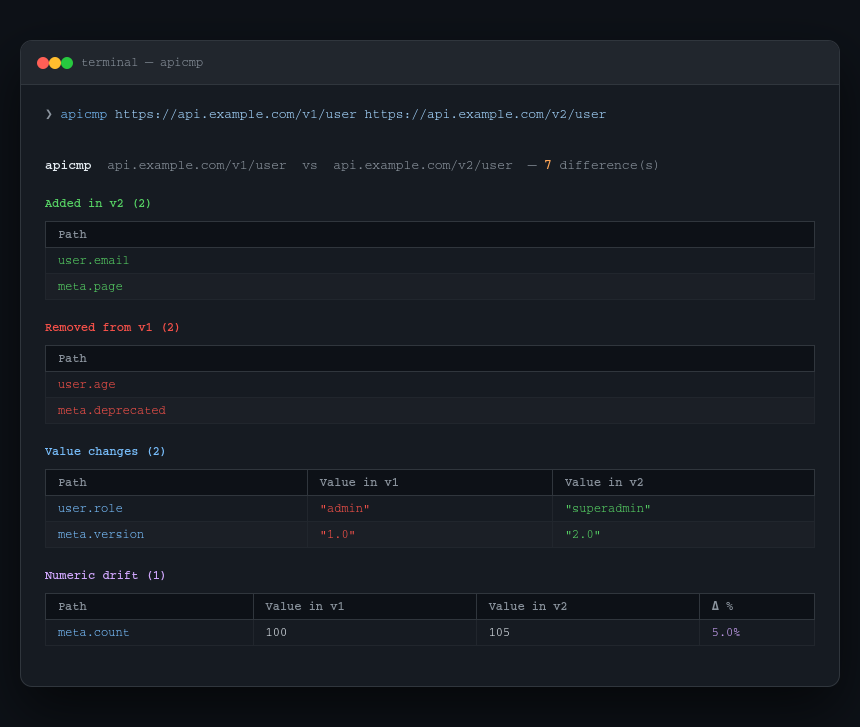
APIs change silently. A field gets renamed. A type flips from string to integer. A key disappears. A number drifts 15% without anyone noticing.
apicmp compares two JSON responses — from URLs, files, or stdin — and tells you exactly what changed: fields added, fields removed, type changes, value changes, and numeric drift beyond a threshold.
No auth setup. No config files. No enterprise pricing. Just point it at two things and see the diff.
Install
pip install apicmp
Or with pipx:
pipx install apicmp
Usage
# Two live URLs
apicmp https://api.example.com/v1/user https://api.example.com/v2/user

# Two local files
apicmp before.json after.json

# File vs live URL
apicmp snapshot.json https://api.example.com/endpoint

# Pipe first response from stdin
curl https://api.example.com/v1 | apicmp - https://api.example.com/v2

# Flag numeric drift over 10% (default is 5%)
apicmp a.json b.json --threshold 0.1

# Add auth or custom headers
apicmp a.json b.json -H "Authorization: Bearer TOKEN"
apicmp a.json b.json -H "X-Api-Key: abc123"

# Export diff as Markdown
apicmp a.json b.json --output diff.md

# JSON output — pipe to jq
apicmp a.json b.json --format json | jq '.added'
What it compares
apicmp flattens nested JSON to dot-notation paths and compares them structurally:
| Category | What it catches |
|---|---|
| Added | Keys present in B but not in A |
| Removed | Keys present in A but not in B |
| Type changed | Same key, different type (string → integer, null → object) |
| Value changed | Same key, same type, different value |
| Numeric drift | Numbers that changed beyond your threshold (default 5%) |
Nested objects are flattened — user.address.city is a single comparable path. Arrays are compared by index up to 20 elements, and array lengths are tracked separately.
Output formats
--format table (default) — colour-coded rich terminal tables, one per change category.
--format markdown — GitHub-flavored Markdown, paste into PRs, wikis, or incident reports.
--format json — machine-readable, pipe to jq or use in scripts.
All options
Arguments:
  SOURCE_A      First JSON source (URL, file, or '-' for stdin).
  SOURCE_B      Second JSON source (URL or file).

Options:
  -t, --threshold   Flag numeric values that differ by more than this fraction
                    (default: 0.05 = 5%).
  -H, --header      Extra HTTP headers (format: 'Name: Value'). Repeatable.
  --timeout         HTTP request timeout in seconds (default: 15).
  -o, --output      Write Markdown diff to this file.
  -f, --format      Output format: table | markdown | json (default: table).
  --help            Show this message and exit.
Examples
Snapshot an API before a deploy, diff after:
curl https://api.example.com/user/1 > before.json
# deploy...
apicmp before.json https://api.example.com/user/1
Compare staging vs production:
apicmp https://staging.api.example.com/config \
         https://api.example.com/config \
         -H "Authorization: Bearer $TOKEN"
Export diff for a PR comment:
apicmp before.json after.json --output diff.md
cat diff.md
Use in CI — fail if APIs diverge:
apicmp snapshot.json https://api.example.com/endpoint \
  --format json | python -c "
import json, sys
d = json.load(sys.stdin)
if d['added'] or d['removed'] or d['type_changed']:
    sys.exit(1)
"
Development
git clone https://github.com/gitwingo/apicmp
cd apicmp
pip install -e .
Support
If apicmp has been useful to you, consider supporting its development:

Connect
- GitHub: @gitwingo
- Reddit: u/gitwingo
- X / Twitter: @gitwingo
License
MIT © gitwingo
1 maintainer

Metadata
1 maintainer
Release files for apicmp 0.1.0
For a detailed explanation of source distributions (sdists) and built distributions (wheels), please see the package formats documentation.
Source distribution (sdist)
| File | Size | Uploaded | |
|---|---|---|---|
| apicmp-0.1.0.tar.gz | 59.6 kB | Details |
Built distribution (wheel)
| File | Interpreter | ABI | Platform | Reset |
|---|---|---|---|---|
| apicmp-0.1.0-py3-none-any.whl | Python 3 | none | any | Details |
Total release size: 67.8 kB
Release files / apicmp-0.1.0.tar.gz
| Download URL | apicmp-0.1.0.tar.gz |
|---|---|
| Size | 59.6 kB |
| Tags | Source |
|
SHA-256 checksum How to use checksums |
c989a99592ac1c70a60d7e93f43bc64e14af8acdbafc104f1d34b1a6af7bfb40
|
|
BLAKE2b-256 checksum How to use checksums |
6282c5208c617a8068731089fb045c7d60885a864b7676888cc045b1dbd7b7ae
|
| Upload date | |
|
Uploaded using Trusted Publishing? What is trusted publishing? |
Yes |
| Uploaded via |
twine/6.1.0 CPython/3.13.12
|
Provenance
Provenance describes where a file came from. On PyPI, provenance is shared via attestations, which provide a verifiable record of the build or publishing details. View details, limitations and caveats.


PyPI Publish Attestation
PyPI verified that this artifact, at this checksum, originated from the publisher listed below.
Signed by GitHub Actions, verified by PyPI on May 4, 2026.
Transparency logRelease files / apicmp-0.1.0-py3-none-any.whl
| Download URL | apicmp-0.1.0-py3-none-any.whl |
|---|---|
| Size | 8.1 kB |
| Tags | Python 3 |
|
SHA-256 checksum How to use checksums |
5174a3e68a87cba5b0189e0c667be5c2ed5cdc58ef8bb827dce3e4fa459da6fd
|
|
BLAKE2b-256 checksum How to use checksums |
3662e4f780903d87a3d6d2914158c2612d0783dc63ad355bbde142111fe798e6
|
| Upload date | |
|
Uploaded using Trusted Publishing? What is trusted publishing? |
Yes |
| Uploaded via |
twine/6.1.0 CPython/3.13.12
|
Provenance
Provenance describes where a file came from. On PyPI, provenance is shared via attestations, which provide a verifiable record of the build or publishing details. View details, limitations and caveats.
PyPI Publish Attestation
PyPI verified that this artifact, at this checksum, originated from the publisher listed below.
Signed by GitHub Actions, verified by PyPI on May 4, 2026.
Transparency log












