
ApiScout
ApiScout recovers the Windows API calls of malware from memory dumps.
A dumped process has no usable import table, but it still holds the addresses of the APIs it calls. ApiScout matches every pointer-sized value of a dump against a database of the API addresses of the system the dump came from. You get the APIs the code uses, where it references them, and an ApiVector: a fingerprint of API usage that points to the malware family.
Command line tool, Python library, and plugins for IDA Pro, Ghidra and Binary Ninja.
Quick start
Python 3.10 or newer:
pip install apiscout
apiscout dbs download
apiscout scan trickbot_dump_0x00400000 --db win7_prof-n_sp1_example.json --min-confidence 0
Results for API DB: Microsoft Windows 7 Professional N
idx: offset    ; VA                ; IT?; #ref;DLL                                     ; API
  1: 0x00409aef;         0x10006839; err;    1; devrtl.dll_0x10000000 (32bit)           ; NdxTableAddObjectToList
---------------------------------------------------------------------------------------------------
  2: 0x00420000;         0x41ac4b1b; err;    4; ws2_32.dll_0x41ac0000 (32bit)           ; freeaddrinfo
  3: 0x00420004;         0x41ac4296; err;    3; ws2_32.dll_0x41ac0000 (32bit)           ; getaddrinfo
  4: 0x00420008;         0x41aca05b; err;    2; ws2_32.dll_0x41ac0000 (32bit)           ; gethostname
  [...]
DLLs: 15, APIs: 183, references: 496

WinApi1024 Vector Results:
Microsoft Windows 7 Professional N: 154 / 181 (85.08%) APIs covered in WinApi1024 vector.
    Vector:     A22gQAAgABA6QACA9EAACA9gAIA9oCA4kAgRAABAAwA7CEARBADCggIAEAAJAIB.gBAEEIoAjEBIACTGgwdjTATJnJCCHpAgwNKeAJ^BFJuYAgCYQEYdn_^?
    Confidence: 89.37009000226523
dbs download fetches the example API DBs. Those for Windows XP SP3 and 7 SP1 fit most dumps of Malpedia. The base address is read from a file name ending in 0x and 8 to 16 hex digits, otherwise give --base-addr. Without a dump, apiscout scan program.exe --import-table reads the imports of a program instead.
A Windows minidump (MDMP signature, e.g. crash.dmp) is scanned as it is, range by range at its own addresses: offsets are virtual addresses (relative to --base-addr, if given), and references inside the images of the system DLLs of its module list are left out.
How to read the listing
| Column | Meaning |
|---|---|
offset |
Where the API address is stored in the dump. |
VA |
The API address found there. |
IT? |
Whether the location lies in the import table of the dump: yes, no, or err if the dump has no import table that can be read, which is normal for dumped code. |
#ref |
The location itself plus the call and jmp instructions that go through it. |
DLL |
The DLL, the address it is loaded at according to the DB, and whether it is the 32bit or 64bit one. |
A single API far away from all others, like the first row, is usually a chance hit: bytes that happen to equal an API address. The example keeps it with --min-confidence 0; a plain apiscout scan drops it. --filter 32 drops APIs that have no other API within 32 bytes.
--min-confidence N is the finer tool: every hit gets a confidence from 0 to 100 (confidence in --json) from its neighbours, calls through it, the import table, its alignment and agreeing API DBs, and hits below N are dropped (apiscout scan --help has the formula). The default is 20, which drops the chance hits of a scan with the right API DB; --min-confidence 0 keeps every hit.
Confidence (0 to 100) says how much a vector is worth as a fingerprint. It is low when only few or only very common APIs were found.
Features
Name the family. --collection compares the vector with a collection of vectors, such as the one Malpedia publishes (apiscout update downloads it with a Malpedia API token in ~/.config/apiscout/malpedia-token):
apiscout scan trickbot_dump_0x00400000 --db win7_prof-n_sp1_example.json --collection 2026-11-09-apivectors-v26649.csv
Top 5 individual matches
win.trickbot    - 2021-10-05-v2000035/97b489b8[...]  - 1.000
win.trickbot    - 2017-07-24/2ebeef90[...]           - 0.492
Explain the match. --explain lists the APIs that drive a score, shared or only on one side, with their weights (apiscout match VECTOR OTHER --explain).
See what a sample does. apiscout export draws a vector as ApiQR diagram: each of the 1024 APIs has a fixed place and a colour for its topic (network, files, crypto, memory, ...), so similar samples look alike.

VECTOR=$(apiscout scan trickbot_dump_0x00400000 --db win7_prof-n_sp1_example.json --json | jq -r .apivector)
apiscout export "$VECTOR" --png vector.png --html vector.html
Find what is resolved at run time. --dynamic also looks for APIs that a program never stores as pointers: hashes of their names (ROR13, Metasploit block_api, CRC32, djb2, FNV-1a, sdbm, also when a sample XORs or adds a key of its own, which is listed) in groups of at least three, as shellcode and loaders compare them, and their names as strings, in runs of at least three. They are listed after the pointers and added to the ApiVector.
Script it. --json gives machine-readable output, - reads standard input:
apiscout scan dump_0x00400000 --json | jq -r '.apis[].api' | sort -u
apiscout scan dump_0x00400000 --json | apiscout match - --collection apivectors.csv
From Python
from apiscout.ApiScout import ApiScout

scout = ApiScout("win7_prof-n_sp1_example.json")
scout.setBaseAddress(0x400000)
with open("trickbot_dump_0x00400000", "rb") as f_dump:
    results = scout.crawl(f_dump.read())
for apis in results.values():
    for offset, api_address, dll, api, bitness, in_import_table, references, callers in apis:
        print(hex(0x400000 + offset), dll, api, references)
vector = scout.getPrimaryVector(scout.getWinApi1024Vectors(results))[1]["vector"]
Commands
| Command | Purpose |
|---|---|
apiscout scan <dump> |
List the APIs referenced in a memory dump, with its ApiVector |
apiscout match <vector> |
Compare a vector with another one or with a collection |
apiscout export <vector> |
Draw a vector as ApiQR diagram |
apiscout collect <folder> |
Build a collection from a folder of dumps |
apiscout update |
Download the current collection from Malpedia (pip install 'apiscout[update]') |
apiscout dbs |
Show the available API DBs |
apiscout dbs download |
Download the example API DBs |
apiscout <command> --help shows options and examples. Without --db, the DBs of --db-dir, $APISCOUT_DB_DIR, ./dbs or the download folder are used. Exit codes: 0 success, 1 error, 2 wrong usage.
API DBs
File in dbs |
System | ASLR offsets |
|---|---|---|
winxp_prof_sp3_example.json |
Windows XP Professional SP3, 32bit | no |
win7_prof-n_sp1_example.json |
Windows 7 Professional N SP1, 32 and 64bit | no |
win10_prof_1803_example.json |
Windows 10 Pro 1803, 32 and 64bit | yes |
win2022_server_21h2_example.json |
Windows Server 2022 21H2, 32 and 64bit | yes |
win11_pro_26h2_example.json |
Windows 11 Pro 26H2, 32 and 64bit | yes |
apiscout dbs download checks them against dbs/SHA256SUMS and stores them in ~/.local/share/apiscout/dbs, ~/Library/Application Support/apiscout/dbs or %LOCALAPPDATA%\apiscout\dbs. DBs with ASLR offsets fit dumps of the boot they were built in, and those of other boots when the load addresses are given as described above.
For your own analysis system, run the DB builder on it (Python 3.10 or newer, which Windows 7 has no build of: build the DB of such a system from a copy of its DLLs on another system, with --os_name, --os_version and --load_addresses as described below):
git clone https://github.com/danielplohmann/apiscout
cd apiscout
python -m apiscout.db_builder --auto
The builder needs only the standard library, so on a machine without a clone, a copy of the apiscout folder of it is enough: run the command in the folder that holds it.
--paths and --filter choose folders and DLLs, --os_name and --os_version build a DB from a copy of the DLLs on another system, and --load_addresses then takes the load addresses from a module list.
Without a machine of the build, python -m apiscout.db_builder.DllDownloader --windows 11-24H2 --update KB5046617 --out win11 downloads the DLLs of the filter from Microsoft's symbol server, finds them with Winbindex, checks each against its SHA-256 and builds the DB (standard library only, no ASLR offsets, so scan with --modules or a minidump). --update also takes a build such as 26100.2605, --list shows the Windows versions and updates, --windows 11-24H2 --list the updates of one.
IDA Pro
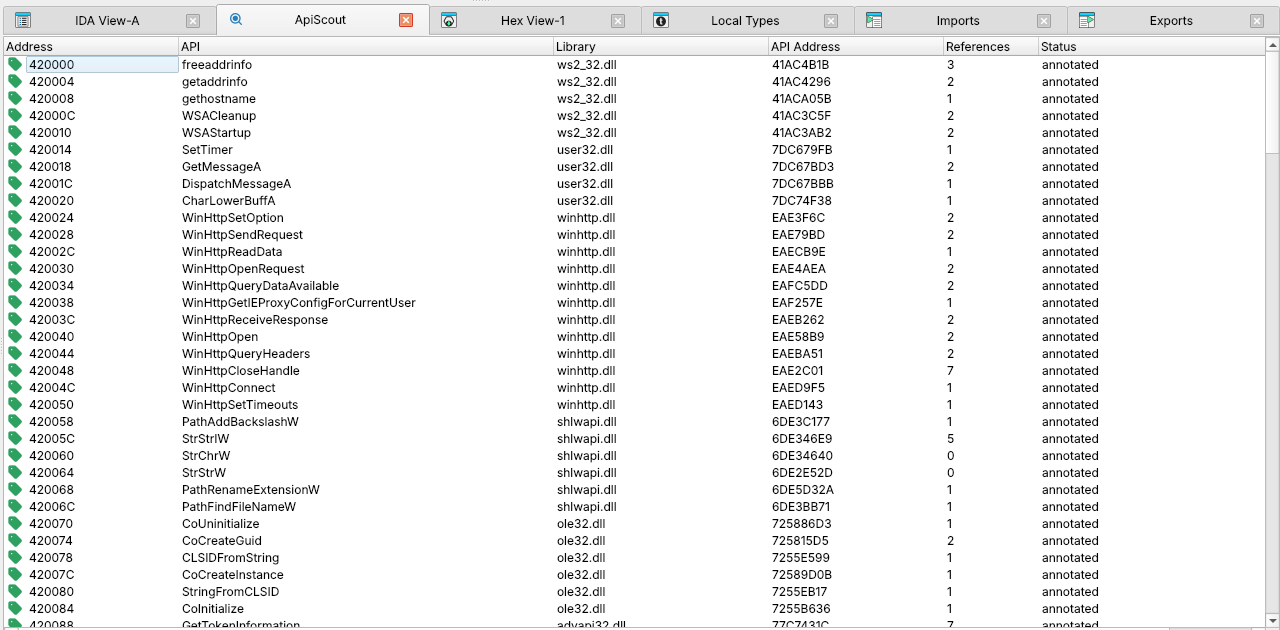
plugins/ida/ida_scout.py works as plugin (hcli plugin install <clone>/plugins/ida, which installs apiscout from PyPI, and apiscout dbs download for the DBs, then Edit > Plugins > ApiScout, Ctrl+Alt+A) or as script, with IDA 9.0 and newer. Load the dump as binary file with its address as loading offset and 0 as loading segment, choose the API DBs, and work in the ApiScout view:
| Key | Action |
|---|---|
| Enter | Jump to the reference |
| A / Shift+A | Annotate the selected / all APIs |
| F | Only APIs with a neighbour within a distance |
| Ctrl+U | Scan again |
Annotated APIs are named, typed as pointers to their prototype, and the calls through them get the prototype too.
The DLLs of the API DBs are placed at the load addresses of the module list file you give in the form (optional, lines of <hex load address> <DLL path> as for apiscout scan --modules), so one DB fits the dumps of every boot.
Batch mode
idat -A -TBinary -b<dump address / 16, hex> -pmetapc -S"<clone>/plugins/ida/ida_scout.py <API DB> [<API DB> ...] [--modules <module list>]" <dump>
Annotates everything and saves the database. The segment base from -b is reset to 0. DBs in the dbs folder of the clone or the download folder can be given by name. idat creates 64bit databases for binary files, so prepare 32bit dumps as database first.
Ghidra
plugins/ghidra/ghidra_scout.py runs in PyGhidra (Ghidra 12, tested with 12.2):
- Start Ghidra with
support/pyghidraRun. The first start creates its virtual environment. - Install ApiScout there, e.g.
~/.config/ghidra/ghidra_12.2_PUBLIC/venv/bin/python3 -m pip install apiscout(Windows:%APPDATA%\ghidra\ghidra_<version>_PUBLIC\venv\Scripts\python.exe, macOS:~/Library/ghidra/ghidra_<version>_PUBLIC/venv/bin/python3). - Copy the script into
~/ghidra_scripts, or addplugins/ghidraof a clone of the repository as script directory (then step 2 is not needed). - Run it from the Script Manager, category ApiScoutForGhidra.
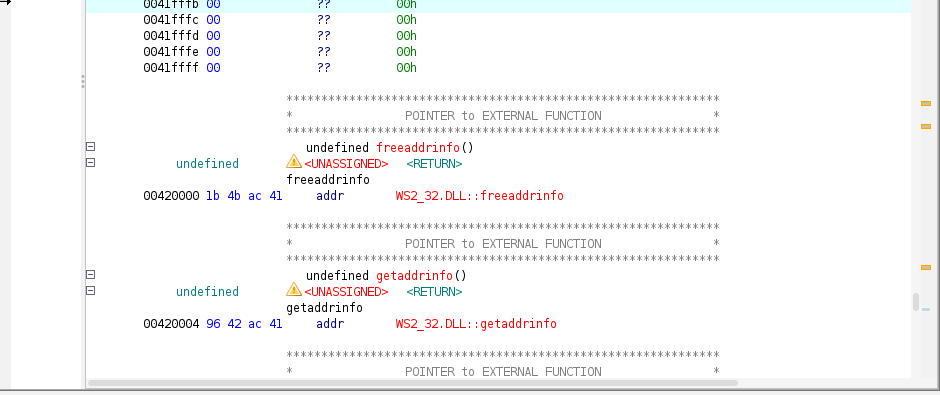
It asks once for the DB folder, scans the program's memory and annotates the references you select like imports, with prototypes from Ghidra's Windows data types.
The DLLs of the API DBs are placed at the load addresses of a module list file, as apiscout scan --modules does (choose Module list file... in the dialog).
Headless
pyghidraRun -H <project folder> <project name> -import <dump> -loader BinaryLoader -loader-baseAddr <address> \
    -processor x86:LE:64:default -scriptPath <clone>/plugins/ghidra \
    -postScript ghidra_scout.py <API DB> [<API DB> ...] [--modules <module list>]
Use -processor x86:LE:32:default for 32bit dumps.
Binary Ninja
The plugin in plugins/binja_scout works with Binary Ninja 6 (tested with 6.0):
- Install ApiScout for Binary Ninja's Python:
Install python3 modulein the command palette. - Link
plugins/binja_scoutinto thepluginsfolder of the user folder.
The extension manager needs neither step: it installs the repository with numpy.
Open the dump with Open with Options as Mapped view, with its address as image base and windows-x86 or windows-x86_64 as platform, then use Plugins > ApiScout to scan, show the results and annotate all or filtered references. Calls through annotated pointers read as API calls in HLIL.
The DLLs of the API DBs are placed at the load addresses of the module list file you give in the form (optional, modules= of scan_and_annotate), as apiscout scan --modules does.
Headless
import binaryninja
from apiscout.BinaryNinjaTools import scan_and_annotate

with binaryninja.load("dump.bin", options={"loader.platform": "windows-x86", "loader.imageBase": 0x400000}) as bv:
    result = scan_and_annotate(bv, ["dbs/win7_prof-n_sp1_example.json"])
    print(result["annotated"], "of", len(result["rows"]), "API references annotated")
A dump with PE header has to be opened as Mapped view through the load settings:
raw = binaryninja.BinaryView.open("trickbot_dump7_0x00400000")
settings = binaryninja.BinaryViewType["Mapped"].get_load_settings_for_data(raw)
settings.set_integer("loader.imageBase", 0x400000, raw)
settings.set_string("loader.platform", "windows-x86", raw)
raw.set_load_settings("Mapped", settings)
bv = binaryninja.load(raw, options={"loader.imageBase": 0x400000, "loader.platform": "windows-x86"})
Background
- ApiScout: Painless Windows API information recovery
- ApiVectors
- ApiScout: Robust Windows API Usage Recovery for Malware Characterization and Similarity Analysis (Botconf 2018)
Development
uv sync
uv run python -m unittest discover -s tests -p "test*.py" -t .
uv run ruff check && uv run ruff format --check && uv run ty check
Tests on Malpedia dumps run when APISCOUT_SAMPLES names their folder, the Binary Ninja tests when binaryninja can be imported. Changes are listed in the changelog.
Releases are cut by pushing a version tag, see RELEASING.md.
Questions, bug reports and pull requests are welcome on GitHub. ApiScout is licensed under the BSD 2-Clause License.
Credits
ApiScout is written by Daniel Plohmann and contributors. The idea has gone through multiple iterations until reaching this release.
- Thorsten Jenke and Steffen Enders for their previous endeavours and for evaluating a proof of concept of this method.
- Steffen Enders for his work on the visualization of ApiQR diagrams.
- Ero Carrera for pefile and Elias Bachaalany for the IDA Python AskUsingForm template.
- Andrea Garavaglia for the performance benchmarks that led to drastic speedups of the matching.
1 maintainer

Metadata
1 maintainer
Release files for apiscout 3.0.0
For a detailed explanation of source distributions (sdists) and built distributions (wheels), please see the package formats documentation.
Source distribution (sdist)
| File | Size | Uploaded | Provenance | Actions |
|---|---|---|---|---|
| apiscout-3.0.0.tar.gz | 157.8 kB | With provenance | Details for apiscout-3.0.0.tar.gz |
Built distribution (wheel)
| File | Interpreter | ABI | Platform | Actions Reset |
|---|---|---|---|---|
| apiscout-3.0.0-py3-none-any.whl | Python 3 | none | any | Details for apiscout-3.0.0-py3-none-any.whl |
Total release size: 317.2 kB
Release files / apiscout-3.0.0.tar.gz
| Download URL | apiscout-3.0.0.tar.gz |
|---|---|
| Size | 157.8 kB |
| Tags | Source |
|
SHA-256 checksum How to use checksums |
80eb57bcea7a4776dfa7a2690beafa042e4d2dbfba18cba90a9f72664351c35b
|
|
BLAKE2b-256 checksum How to use checksums |
e5a01c264915699e2415b5c784ea73599582747c7b1f01dcc109005603668d77
|
| Upload date | |
|
Uploaded using Trusted Publishing? What is trusted publishing? |
Yes |
| Uploaded via |
twine/7.0.0 CPython/3.13.16
|
Provenance
Provenance describes where a file came from. On PyPI, provenance is shared via attestations, which provide a verifiable record of the build or publishing details. View details, limitations and caveats.


PyPI Publish Attestation
PyPI verified that this artifact, at this checksum, originated from the publisher listed below.
Signed by GitHub Actions, verified by PyPI on Nov 18, 2026.
Transparency logRelease files / apiscout-3.0.0-py3-none-any.whl
| Download URL | apiscout-3.0.0-py3-none-any.whl |
|---|---|
| Size | 159.4 kB |
| Tags | Python 3 |
|
SHA-256 checksum How to use checksums |
bf7638e020b082d55df486f621a2183586fa461666fc6316a0aaa7934e9420c9
|
|
BLAKE2b-256 checksum How to use checksums |
628e12fdc5f381da65c2ce72a8d5c9fc2449b5e015272b0e0216178a6a2ad3d1
|
| Upload date | |
|
Uploaded using Trusted Publishing? What is trusted publishing? |
Yes |
| Uploaded via |
twine/7.0.0 CPython/3.13.16
|
Provenance
Provenance describes where a file came from. On PyPI, provenance is shared via attestations, which provide a verifiable record of the build or publishing details. View details, limitations and caveats.
PyPI Publish Attestation
PyPI verified that this artifact, at this checksum, originated from the publisher listed below.
Signed by GitHub Actions, verified by PyPI on Nov 18, 2026.
Transparency logSecurity for apiscout 3.0.0
Provenance
Provenance describes where a file came from. On PyPI, provenance is shared via attestations, which provide a verifiable record of the build or publishing details. View details, limitations and caveats.
Full provenance
Both files in this release have been uploaded with provenance metadata.
Attestation for apiscout-3.0.0.tar.gz
PyPI Publish Attestation
PyPI verified that this artifact, at this checksum, originated from the publisher listed below.
Signed by GitHub Actions, verified by PyPI on Nov 18, 2026.
Transparency logA note on package security
PyPI is a repository for distributing packages, not a service for auditing them. While third-party security researchers and our staff do their best to detect and remove malicious packages, PyPI cannot guarantee the quality, security or suitability of any given package.
To learn more about protecting yourself from malicious actors, visit our package security documentation.














