
A custom API dashboard for FastAPI endpoints.

Project description
APISEEK
APISEEK is a one-stop shop for every FastAPI request, providing essential metrics and insights for each API endpoint. It’s ideal for individuals and organizations looking to easily monitor API usage, performance, and user interactions.
Features
- Real-time Metrics: Track every FastAPI request as it happens.
- Comprehensive Dashboard: View data such as:
- Request Name
- Request Type (HTTP Method)
- Total Requests (since server startup)
- Successful Requests
- Failed Requests
- Average Response Time
- Minimum Response Time
- Median Response Time
- Maximum Response Time
- Most Recent Call (Timestamp & Response Time)
Installation and Setup
Prerequisites
- Python 3.7+
- FastAPI
- Uvicorn
Step 1: Prepare Your FastAPI Application
Ensure you have FastAPI and Uvicorn installed and your API endpoints are up and running. For example, you can install them via:
pip install fastapi uvicorn
Step 3: Integrate APISKEEK into Your Application
Install apiseek
pip install apiseek==0.2
Add the following code to your FastAPI application (e.g., in your main.py):
from fastapi import FastAPI
from apiseek import init_app

app = FastAPI()

# Initialize APISKEEK (dashboard will be available at /apiseek)
init_app(app)

# Define your API endpoints below
@app.get("/hello")
def hello():
    return {"message": "Hello, world!"}
Dashboard
Run your application using Uvicorn:
uvicorn main:app --reload
Then, open your browser and navigate to
http://127.0.0.1:8000/apiseek
or
localhost:8000/apiseek
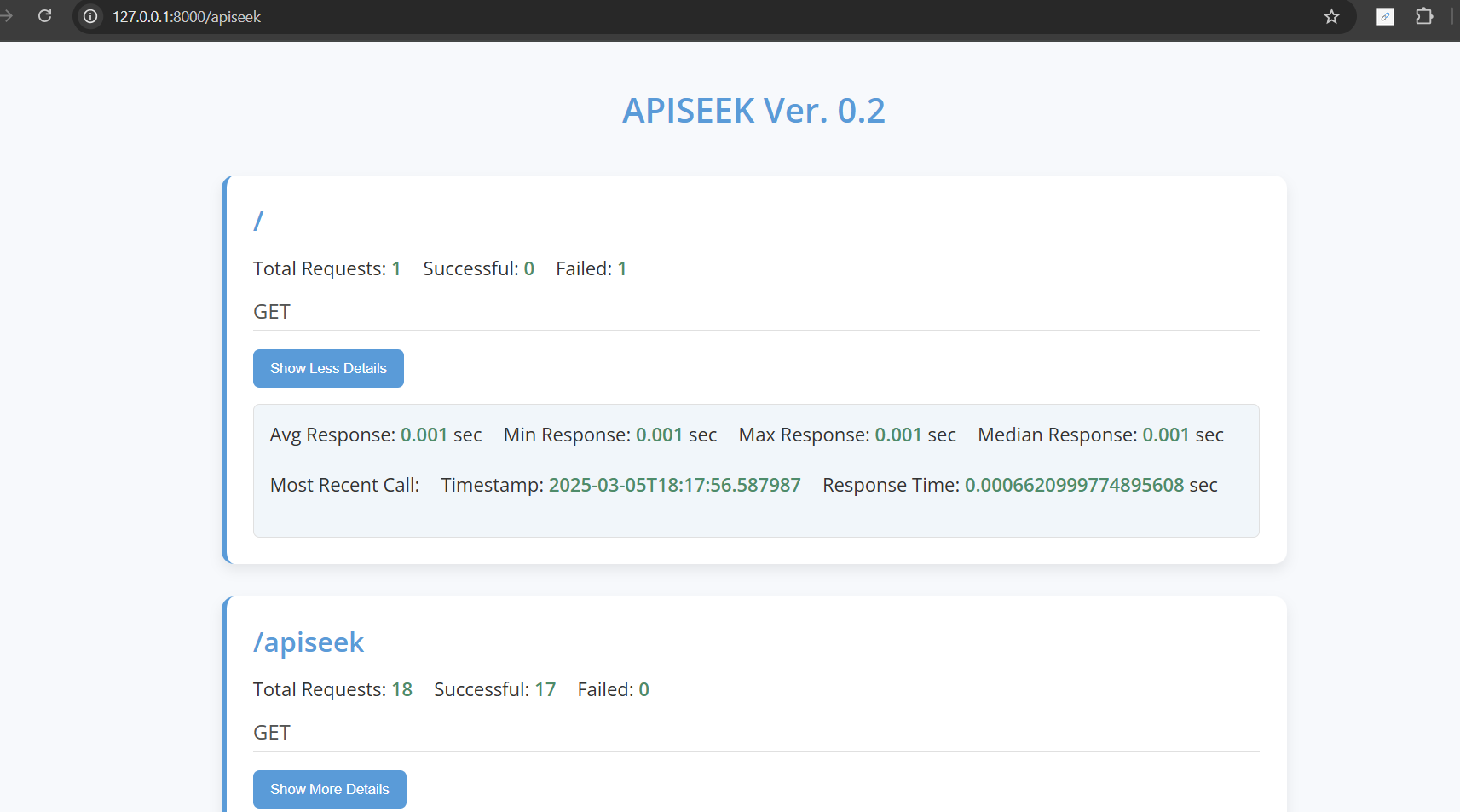
You'll see the clean, intuitive dashboard displaying all the key metrics for your API endpoints.
Data Shown
Currently, the dashboard displays the following data for each API endpoint:
Request Name Request Type Total Requests (from server startup) Successful Requests Failed Requests Average Response Time Minimum Response Time Median Response Time Maximum Response Time Most Recent Call Response Time
How to Contribute
Contributions are welcome! If you have suggestions, improvements, or bug fixes, please reach out:
Email: vikrant.th2014@gmail.com LinkedIn: Programming Vikrant Let's discuss new features and improvements that can take APISKEEK from version 0.2 to 0.5 and beyond. Once we reach a larger user base, we'll set up proper community channels and governance to further develop this project.
License
APISEEK is released under the MIT License.
Release history Release notifications | RSS feed


Download files
Download the file for your platform. If you're not sure which to choose, learn more about installing packages.
Source Distribution
Built Distribution
Filter files by name, interpreter, ABI, and platform.
If you're not sure about the file name format, learn more about wheel file names.
Copy a direct link to the current filters
File details
Details for the file apiseek-0.3.tar.gz.
File metadata
- Download URL: apiseek-0.3.tar.gz
- Upload date:
- Size: 8.4 kB
- Tags: Source
- Uploaded using Trusted Publishing? No
- Uploaded via: twine/6.1.0 CPython/3.11.8
File hashes
| Algorithm | Hash digest | |
|---|---|---|
| SHA256 |
1dec56d39199e6eaadce60b13e77b98b4b8f0b3ca978d207e21e3f3a7e539048
|
|
| MD5 |
c73e84072081d83563ed8d0ae0e46358
|
|
| BLAKE2b-256 |
f3fd2294e70ca201262afdb255c37493c41d7f1f597f1c19f1e3b8fbc87669dc
|
File details
Details for the file apiseek-0.3-py3-none-any.whl.
File metadata
- Download URL: apiseek-0.3-py3-none-any.whl
- Upload date:
- Size: 8.4 kB
- Tags: Python 3
- Uploaded using Trusted Publishing? No
- Uploaded via: twine/6.1.0 CPython/3.11.8
File hashes
| Algorithm | Hash digest | |
|---|---|---|
| SHA256 |
59001bbf83e25c97420b94892944862481bf8248218eb7af213203fb3d8610a2
|
|
| MD5 |
3ca358be327b98cf1e082b0b2f52ab2e
|
|
| BLAKE2b-256 |
f2306e1b53162518449b015ecc50bb5d83ffe62e144af8291996f649a6e99cfc
|






