
ApkPy — a Python to Android transpiler
ApkPy is a Python package (pip install apkpy) that transpiles Python UI code into native Android Java and XML. The generated APK does not bundle a Python interpreter and does not use a WebView.
Your Python is read at build time and turned into ordinary Android source — Activity classes, layout XML, res/ resources — so what installs on the phone is a normal Android app. A small app ships at about 1.5 MB, signed and shrunk with R8 (its debug build is about 5 MB) and starts with no interpreter to boot.
You write the whole app in Python with a CSS-style design system, see it on your desktop in a live Previewer, and then either apkpy run for an installable .apk or apkpy build for a project you can open in Android Studio. No Java, no Kotlin.
What it does not do: it does not run Python on the device, so pip packages such as requests, numpy or pandas cannot come along — ApkPy translates a documented subset of Python and gives you its own APIs (https, db, files, background_job) for the same jobs. Anything outside that subset stops the build and says so, rather than compiling to nothing. The engine is closed source; the examples and documentation are public.
ApkPy 1.8.0 — the camera, smaller releases, and Python that failed quietly
Version 1.8.0 opens a camera your app owns — photo and video, both lenses, zoom,
focus, exposure, flash and torch, a timer, pause and resume, a review step and
manual ISO/shutter/white balance — plus camera_view(), a live viewfinder you
place inside your own layout. apkpy release now runs R8: a measured release
went from 4,496 KB to 1,536 KB, and the Benchmark Notes app ships at 1,518 KB.
It also ends a class of silence. text.split() produced a Java array that a
for loop ran over zero times; a range() index was carried as text, so i + 1
printed 01 on the phone; "n=%s" % n, price * 2 on text, unpacking and
row["k"] = v compiled to nothing at all. Each one now either works or stops the
build with U2033 and a form that does compile. Code that relied on one of those
shapes quietly doing nothing will now stop the build.
Install with python -m pip install --upgrade apkpy==1.8.0, then regenerate your
Android project. See the release notes
and the camera guide.
ApkPy 1.7.0 — device features and notifications
Version 1.7.0 adds accelerometer/gyroscope/pressure streams, confirmed static
wallpapers, a portable regular-expression subset, and extended notifications
with channels, actions, images, inbox and progress. The Previewer has a new
in-device notification drawer. Android values written with set_value() now
survive Activity recreation, and conflicting button drawables no longer hide
labels across screens.
Install with python -m pip install --upgrade apkpy==1.7.0, then regenerate
your Android project. See the release notes
and notification examples.
Errors that explain the fix
Common startup, Previewer callback, Data Core, compiler and Android toolchain
failures now use one readable format. It shows a stable error code, the
relevant writehere.py line, the original technical cause and the most likely
correction.
APKPY E1102 - This import is not available

Received:
  bottom_nva

How to fix:
  1. Did you mean: from apkpy_lib import bottom_nav
Use apkpy preview to include syntax and startup errors. Run
apkpy preview --debug or set APKPY_DEBUG=1 only when you need the complete
traceback. Friendly errors can be disabled with APKPY_FRIENDLY_ERRORS=0.
Hardware, text processing and device services
The APIs below include earlier device features and the 1.7.0 additions. The documented testing limits remain important on real devices.
Regular expressions (1.7.0)
re.match, re.search, re.sub and re.findall now have a native Android
translation for a documented subset. Use constant patterns/flags in callbacks;
the text may come from inputs, files or APIs. Match groups, Unicode, common
flags and Python-style string replacements are supported without bundling
Python or adding an Android dependency.
import re

def check_reference():
    found = re.search(r"\bREF-(?P<code>[0-9]{4,8})\b", field.get_value(), re.I)
    if found is not None:
        result.set_value(found.group("code"))
    else:
        result.set_value("No reference found")
This enables format checks in forms, extraction of references/hashtags, text
cleanup and redaction. Unsupported constructs fail at build time with C1701;
this is not the whole re module. See the complete
Text Toolkit subset contract
and downloadable app.
See the 1.7.0 release notes.
Bluetooth, both radios
def incoming(ok, line):
    if ok:
        reading.set_value(line)

bluetooth.devices(on_result=found)          # classic: paired devices
ble.scan(on_result=found, seconds=8)        # low energy: advertising ones

bluetooth.connect(address, on_result=linked, on_line=incoming)
bluetooth.send("LED ON")
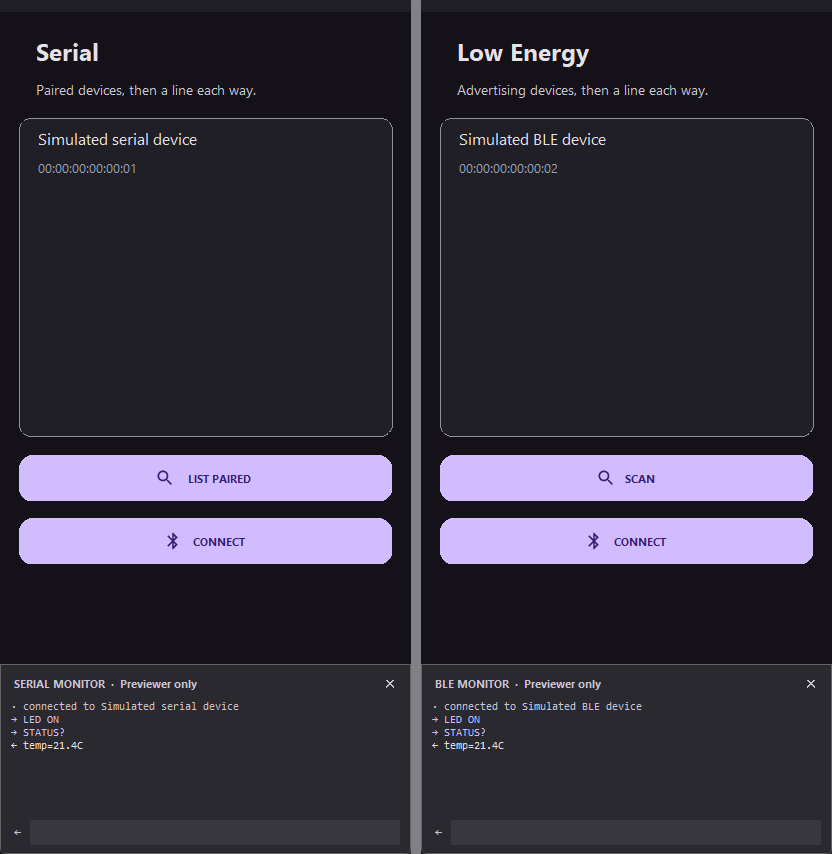
Talking to hardware over lines of text: an Arduino, an ESP32, a micro:bit, a thermal printer. Four verbs each, one result contract, ten shared reasons that are never an empty string.
- Classic declares no location permission at all.
devices()lists paired devices rather than scanning, because an RFCOMM socket needs a bonded device anyway. An app that only talks to a printer should never ask where its user is. Low Energy must scan, so its grant is capped at API 30 and carriesneverForLocationabove it. bledefaults to the Nordic UART Service, which is what an ESP32 or a micro:bit exposes, so the common case names no UUIDs.- The permission and the radio are asked for, not assumed: if the permission is missing the app asks and resumes what you called; if Bluetooth is off it offers Android's own prompt.
- The link outlives the screen. Connect on one screen and talk on the next;
a screen that wants the lines calls
connect()again, which is free when it is already open. terminator=for hardware that wants a carriage return rather than a newline -- the usual reason a board never answers.
Checked on a phone against a smartwatch: both prompts appear, a scan finds real devices, connecting establishes the link and discovers services, and every failure word comes back correctly. Not yet proven: lines actually arriving, which needs a board that speaks back.
Encryption
box = crypto.encrypt("the secret", password="open sesame")
crypto.decrypt(box, password="open sesame")

crypto.token(32)                       # random nobody can guess
crypto.hash(text) / crypto.hash_file(path)
crypto.totp("JBSWY3DPEHPK3PXP")        # the digits an authenticator shows
secure_screen(vault)                   # no screenshots, blank in recents
- A password makes the data portable. Without one the key lives in the
phone's Keystore and the value never leaves it, which is right for settings.
With one, the format is
pw1$rounds$salt$nonce$box-- PBKDF2 then AES-256-GCM, standard enough thatopensslopens it. Both runtimes write the same bytes, or it would not be portable at all. crypto.totpis checked against the six vectors published in RFC 6238 -- the rare piece of this project that can be proven rather than reviewed.crypto.token()exists because whoever needs a session id reaches forrandom, whose next output follows from its last two.
Fixed along the way: changing phone used to empty everything the app had
stored. Auto-backup copied the encrypted preferences to the new device while
the Keystore key stayed behind, so the restored app decrypted every value to
"" and reported it as never saved. The encrypted store is now excluded from
both cloud backup and direct device transfer.
Full guide: Data and security
Google Play billing
billing.prices(["pro_unlock", "coins_100"], on_result=shown)
billing.buy("pro_unlock", on_result=bought)
billing.buy("coins_100", consumable=True, on_result=bought)
billing.subscribe("monthly", on_result=bought)
billing.owned(on_result=restored)
One-time purchases and subscriptions, with the part that costs real money handled for you:
- Google refunds any purchase an app leaves unacknowledged for three days.
Every completed purchase is acknowledged before your callback is told it
worked -- including one that completed while the app was closed, which never
reaches the live listener and is settled by
owned()instead. pendingis not a purchase andownedis not an error. Both are their own words, because showing "payment failed" for either is lying to a paying customer.- Prices are asked of Play, so they arrive in the person's own currency and locale. A price written into the app is wrong in most of the world.
- Every purchase carries its
token, because on-device state can be faked and a server checking that token is the only real proof.
Compiled and reviewed, never sold. Play billing cannot be exercised on an emulator, and a real purchase needs a Play Console account and a published build. It is verified to compile against Billing Library 7.1.1, to acknowledge before reporting, and to run in the Previewer -- and no further.
Reading the generated Java against the classic mistakes of each API found nine
logic bugs that the compiler and the test suite had both passed: a purchase
made while the app was closed going unacknowledged, a dropped Low Energy link
leaking its GATT client, a disconnect() that announced itself as a link
failure. Where a feature cannot be tested, the review is the verification.
Full guides: Bluetooth · In-app purchases
ApkPy 1.5.0 — The same words on both sides
Two things that turned out to be one: the fingerprint check, and the two renderers agreeing about the words they share.
def unlocked(ok, reason):
    if ok:
        on_click_navigate(vault)
    else:
        toast(reason)

biometrics.unlock(title="Unlock the vault", subtitle="Use your fingerprint",
                  cancel_text="Use password", on_result=unlocked)
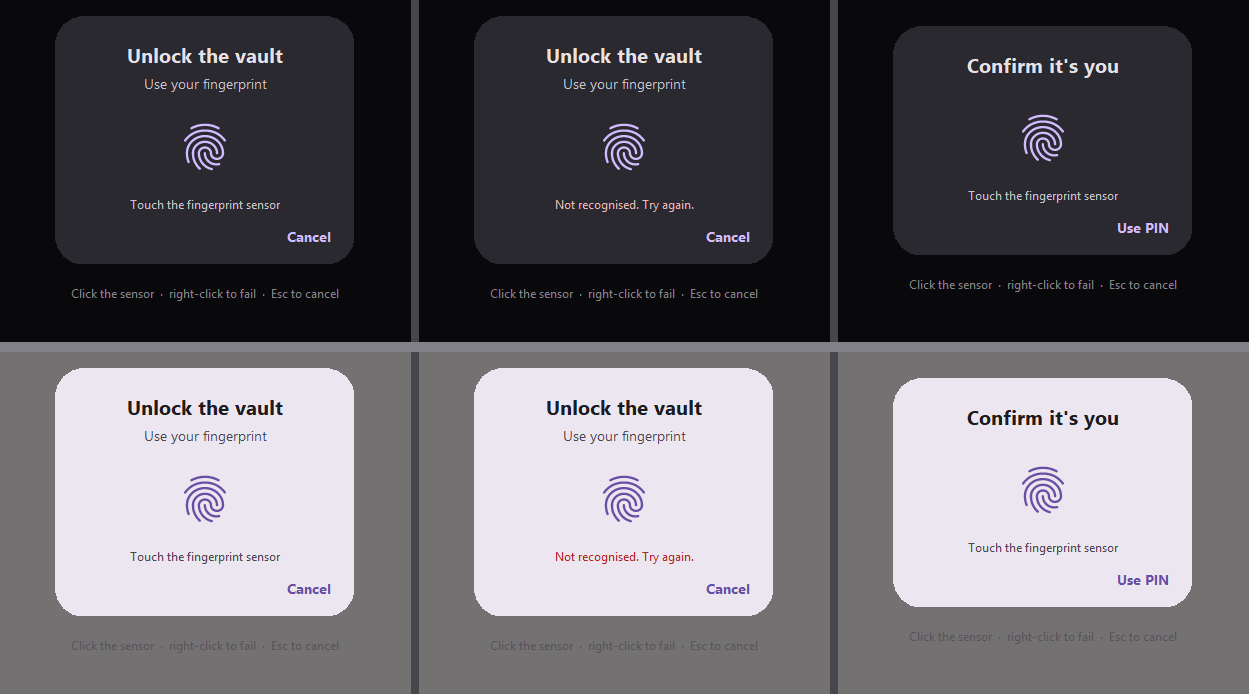
Android draws this dialog itself. BiometricPrompt is a system surface: an
app supplies the title, the subtitle and the words on the cancel button, and
the platform draws the rest — shape, colours, sensor, typeface. That is why
those three strings are the whole API, and why a typeface declared with
font() does not apply here on either runtime.
on_result receives (success, reason). reason is "ok", or one of
cancelled, no_hardware, not_enrolled, unavailable, lockout,
failed — never an empty string, so an app always has something to say.
Both runtimes read one table, and the generated Java's switch is emitted
from that table, so they cannot drift.
- the status is checked before the dialog is built, so a phone with no
sensor gets
no_hardwarerather than a prompt that cannot succeed; allow_pin=Trueadds the device PIN, pattern or password, and drops the cancel button — Android'sPromptInfo.Builderthrows if a negative button andDEVICE_CREDENTIALare both set;- a scan that simply does not match is not a result: the prompt stays open and the person tries again, on both runtimes;
- in the Previewer, click the fingerprint to scan, right-click it for a bad
scan,
Escto cancel.
Verified on a Pixel 9 Pro emulator: all four outcomes — not_enrolled with no
finger registered, the PIN sheet, a real fingerprint, and the cancel button.
A vocabulary for size and depth
--text-xs…--text-3xl— seven steps (11 / 12 / 14 / 16 / 20 / 24 / 32 at the default theme), scaling withTheme(font_size=), plus--leading-tight/-normal/-loose;--surface-low,--surface-high,--border-subtle— derived from the colours the app declared, not from Material's palette, and written as resource references sovalues-night/answers them.
Two renderers that disagreed
label("...")with no stylesheet was 14px on the desktop and 16sp on the phone — two literals in two files, invisible because "body text" had no shared name to disagree about. The phone's number wins, so no compiled app changes;- the bottom bar's active label was bold in the Previewer and normal on the phone. Material points the active and inactive text appearances at the same 12sp caption, so only the tint changes.
Guard rails
U2031— a token in a slot of the wrong kind (--textis a colour,--text-lgis a size, three characters apart);U2029— a stylesheet property no renderer reads;- the full stylesheet vocabulary is now a table in the docs, generated from the same set both renderers read. 87 properties.
Also fixed: box-shadow on a container and the clipping that cut shadows
off; padding with three or four values, and the four longhands.
Full notes: Version 1.5.0 · Biometrics guide
ApkPy 1.4.0 — Talking to a model, and an app that looks like yours
Two batches that turned out to be one: an app that can hold a conversation with an API, and an app that stops looking like every other app built with the same tool. An assistant app is not hard to build — it is hard to make look right, and every shape it needed was missing.
A dict is a JSON body, with its types intact
https.post(
    "https://api.anthropic.com/v1/messages",
    data={
        "model": "claude-sonnet-5",
        "max_tokens": 1024,
        "messages": [{"role": "user", "content": text}],
    },
    headers={"x-api-key": key, "anthropic-version": "2023-06-01"},
    timeout=120,
    on_response=answered,
)
max_tokens reaches the far end as the number 1024, not as "1024" — the
difference between an API accepting the request and rejecting it. Nested
objects and arrays nest, and because the serialiser writes the body, a quote
or a newline in what the user typed cannot break the JSON.
timeout= is in seconds on every verb, replacing a hard-coded 10 that nothing
slow could survive. A string body is still sent exactly as written, so
form-encoded and XML bodies are unaffected.
An answer is not a paragraph
thread = virtual_collection(
    turns,
    template={"avatar": "{author}", "title": "{author}", "markdown": "{message}"},
    item_height="auto",
    screen=chat,
)

thread.merge_items([{"id": reply_id, "author": "Ora", "message": ""}])
thread.scroll_to_end()
thread { code-copy: button; }
field  { rows: 1; max-rows: 6; }
markdownrenders the answer as Markdown — the same renderer themarkdown()component uses, so a fenced block looks the same in a row as it does on a page.item_height="auto"lets each row wrap its own content. One fixed height gives"yes"the same space as a twenty-line answer.avatardraws a circle of initials in a colour the name picks, from one palette both runtimes read.scroll_to_end()moves the viewport to the newest row.code-copy: buttonputs a tappable Copy under every fenced block.max-rowsis where a growing composer stops.
Shape: a drawer, settings rows and your own typeface
menu = drawer([chat, history, you],
              labels=["New chat", "History", "You"],
              icons=["message", "list", "person"],
              header="Ora")

app_bar("New chat", icon="menu", command=lambda: menu.open(), screen=chat)

key_row = list_row("API key", subtitle="Paste your own; it stays on the phone",
                   icon="bolt", trailing="Not set",
                   trailing_icon="chevron_right", screen=you)

font("Ora Serif", regular="fonts/Tiempos-Regular.ttf",
                  bold="fonts/Tiempos-Bold.ttf")
Plus divider-color / divider-inset for grouped rows, text-align on
labels, buttons and app bar titles, letter-spacing and line-height, and
flex-grow inside a stacked column.
An app that changes its colours while it runs
from apkpy_lib import appearance

appearance.set("light")     # "dark", "light" or "system"
appearance.get()            # what is in force

list_row("Dark", icon="dark_mode",
         command=lambda: appearance.set("dark"), parent=group)
list_row("Light", icon="light_mode",
         command=lambda: appearance.set("light"), parent=group)
list_row("Follow the system", icon="contrast",
         command=lambda: appearance.set("system"), parent=group)
The choice is remembered, so the app opens the way it was left.
Colours used to be written into the layouts as literals — 472 of them across 115 files in a two-screen app — and nothing at run time rewrites a compiled layout. A colour that came from a theme token is a resource reference now:
<!-- res/layout/activity_screen_you.xml -->
<TextView android:textColor="@color/apkpy_text" ... />
<!-- res/values/apkpy_theme.xml -->
<color name="apkpy_text">#1D1B20</color>

<!-- res/values-night/apkpy_theme.xml -->
<color name="apkpy_text">#E6E1E5</color>
Android answers that reference from one table or the other, so switching costs nothing at run time: the resource system does the work while the layout inflates. The same app carries 98 literals now, and the ones left are the ones that should be left.
A colour you wrote by hand stays exactly as you wrote it. #C96442 in a
stylesheet was a decision, not a default, and a decision that changes on its
own is a bug. You declare one mode and Theme.counterpart() builds the other:
the accent carries over, the surfaces flip — a background chosen at #1B1B19
was chosen because the mode was dark.
An app that declares Theme(mode="dark") and never calls appearance.set(...)
still opens dark on a phone set to light, exactly as before.
Nothing changes for an app that does not ask
Every addition is gated on being used. No markdown slot means the Markdown
renderer is never written into the project; no scroll_to_* means no scroll
helper; no font() means no res/font. An app that mentions none of it
generates byte-identical XML to the one 1.3.2 generated.
Honest limits: Markdown has no tables and no images in a row; https
still delivers the whole answer at once (no server-sent events); and every row
in a collection has the same shape, so a chat where your turn is an inset
bubble and the reply is full-width text is not expressible yet.
ApkPy 1.3.2 — One icon table, and motion on one dial
ApkPy used to carry two unrelated icon systems: one hand-drawn for the desktop
Previewer, one vector for Android. They agreed on 29 of their 48 names. The most
common name in a bottom bar, person, had no drawing on the desktop at all and
came out as a ring with a dot.
Geometry now lives in one shared table both backends read, and the Previewer rasterises it with antialiasing.
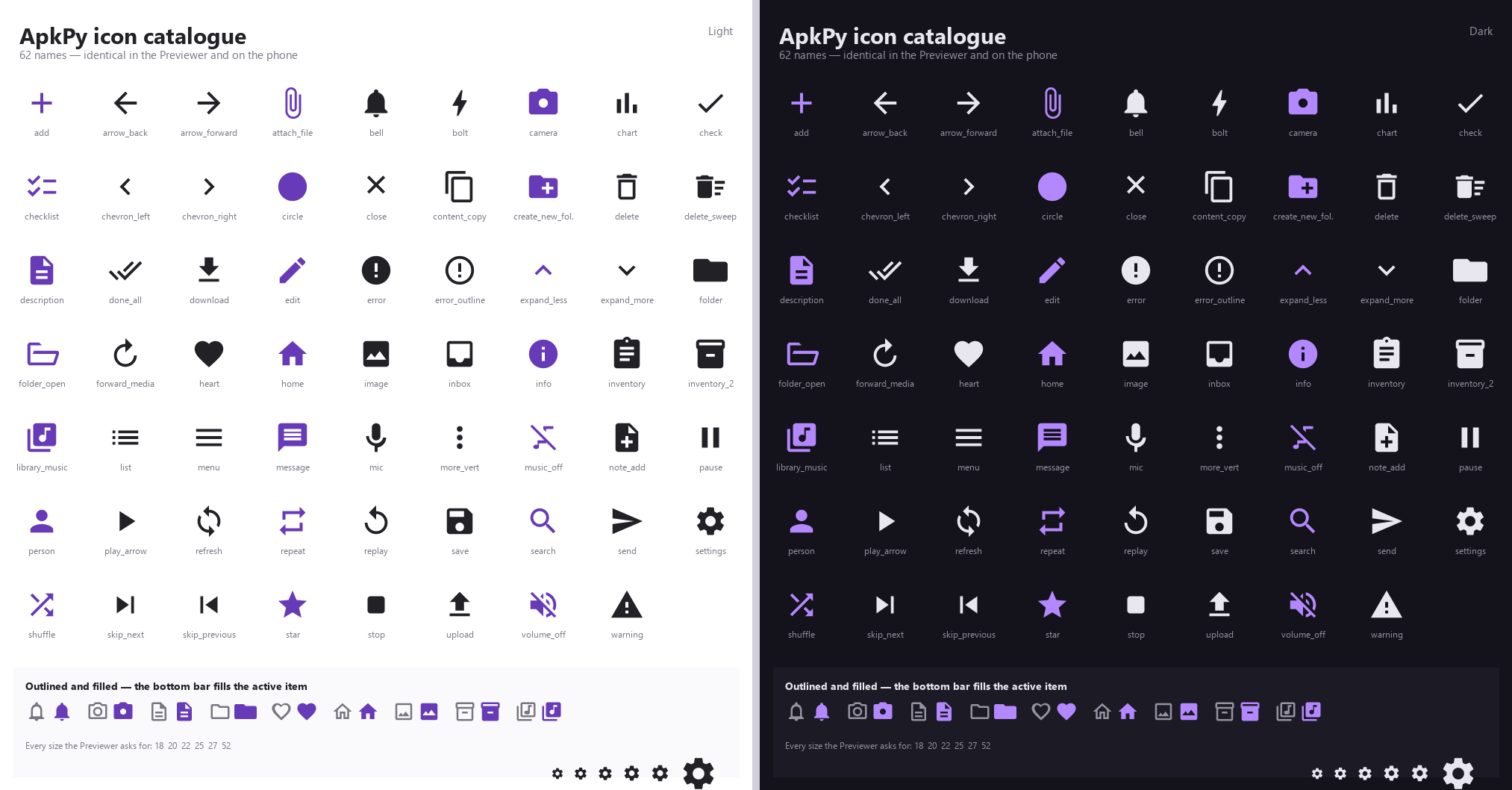
65 names, 96 with aliases — and icon= also takes your own artwork:
button("Share", icon="assets/logo.svg", screen=home)
The .svg is read at build time and turned into an Android vector drawable, so
there is no bitmap in the APK and it stays sharp at any size.
Motion moved onto a single dial:
run(start_screen=home, theme=Theme(motion="standard"))
none, subtle, standard, expressive. Components fade instead of popping,
the bottom bar fills its active item, and screens can slide:
bottom_nav([home, about], icons=["home", "info"], indicator="pill")
on_click_navigate(detail, transition="slide")
receipt  { transition: 240ms; }
add_item { press: none; }
Both runtimes resolve every duration from the same module, and animations honour Android's Remove animations accessibility setting.
ApkPy 1.3.2 — Any file, and errors that explain themselves
Version 1.3.2 also adds a picker for any file type — not just images — and a diagnostic engine that explains the parts of the pipeline that used to be silent, including the Gradle build.
upload_button(
    "SEND A FILE",
    url="https://api.example.com/files",
    types=["pdf", "docx"],
    headers={"Authorization": "Bearer YOUR_TOKEN"},
    on_file=file_chosen,        # (path, name, size, mime)
    on_progress=progress_changed,
    on_result=upload_done,
    id="send", screen=home,
)
One button that picks and uploads. The primitive underneath it, for when the upload has to be conditional:
def file_chosen(success, path, name, size, mime):
    if success and int(size) < 10000000:
        uploads.file("attachment", URL, path, on_result=upload_done)

files.pick(on_result=file_chosen, types=["pdf"])
On Android this becomes ActivityResultContracts.OpenDocument through the
Storage Access Framework:
- no storage permission —
READ_EXTERNAL_STORAGEis never declared; - no manifest change, no FileProvider entry, no new Gradle dependency;
types=becomesEXTRA_MIME_TYPES, resolved in Python at build time so both runtimes agree on what"pdf"means;- the file's name, size and MIME type are reported explicitly, because on
Android
pathis an opaquecontent://Uri that an app cannot parse.
upload_button is sugar: the compiler expands it into an ordinary button plus
two callbacks, so the generated Java is identical to the hand-written form — a
regression test asserts that equality.
Diagnostics: 64 codes across eight families, each with a Why this happened
explanation and a documentation link. Of the 167 messages the library raises,
166 are matched by a specific rule. Gradle failures are now diagnosed too, with
Received leading on the line that names the file, position and reason instead
of leaving a wall of log to scroll through.
Fixed: db.text(choices=[...]) broke the build with unreported exception
JSONException; upload progress delivered integers in the Previewer and strings
on Android, so the same line worked on the phone and failed on the desktop.
185 transpiler regression checks and 83 focused unit tests pass; the generated Java compiles into an installable APK.
ApkPy 1.3.2 — Persistent Tasks & Offline Queue
Version 1.3.2 adds work that outlives the screen that started it. A job keeps going when the app goes to the background, when the network disappears, when Android kills the process to reclaim memory, and across a reboot. There is still no Python interpreter, no WebView and no polling in the Android app.
sync_job = background_job(
    "sync_notes",
    run=sync_notes,
    requires_network=True,
    retry="exponential",
    unique=True,
)

sync_job.enqueue({"folder_id": 12})
sync_job.cancel()
sync_job.observe(on_change=show_progress, screen=home)
On Android this becomes a WorkManager OneTimeWorkRequest:
- Persistent queue — WorkManager stores the queue in its own database, so pending work survives process death and a reboot.
- Automatic retry —
retry="exponential"or"linear"withretry_seconds=sets the backoff policy. - Network and battery constraints —
requires_network,requires_unmetered,requires_chargingandrequires_battery_not_lowbecome aConstraintsobject; the system decides when to run. - Cancellation —
cancel()drops the queue and abandons the running attempt. - Observable progress —
observe()reads realWorkInfoupdates through LiveData, so the interface stays correct after a rotation or a restart. - Unique work —
unique=Truewithon_conflict="append","keep"or"replace"maps toExistingWorkPolicy, so duplicates are prevented and a queue really is a queue.
Inside the run function the job reads its payload, reports progress and
decides the outcome of the attempt:
def sync_notes():
    sync_job.progress(20, "Reading local changes")
    folder = sync_job.input("folder_id")
    storage.set("last_synced_folder", folder)
    sync_job.progress(100, "Synchronised")
job.input(key)reads a value passed toenqueue({...}).job.progress(percent, message)publishes to every observer.job.retry()asks for another attempt after the backoff;job.fail()stops for good. Both mark the attempt and let the rest of the function finish, so the result is the same in the Previewer and on the phone.
on_change receives one JSON status document — state, progress,
message, pending, running and attempt — in both runtimes:
def show_progress(status):
    queue_state.set_value("Queue · " + status["state"])
    queue_detail.set_value("pending " + status["pending"])
The Previewer runs the same contract on the desktop: the queue is stored in
~/.apkpy/jobs, so it is restored when you start the script again;
requires_network holds the queue while the machine is offline and drains it
when the connection returns; and retries use the same backoff.
Two things behave differently by nature. The run function executes off the
interface thread on both sides, so talk to the interface with progress() and
observe() rather than set_value(). And https is synchronous inside the
generated Worker but asynchronous in the Previewer, so decide the outcome in
the body of the job — calling job.retry() from an on_response callback
would arrive too late on the desktop.
Apps that never call background_job receive none of this code: no
ApkpyJobs.java, no worker and no WorkManager dependency.
The English Offline Outbox demo in playground/writehere.py queues
messages, holds them while offline, drains them on reconnection, restores
pending work after a restart and cancels the queue on demand.
The release passed all 172 transpiler checks, the Data Core, Reactive Data and diagnostic suites, and a real Gradle build of the generated project into an installable APK.
ApkPy 1.3.1 — Reactive Data
Version 1.3.1 connects Data Core to live interfaces with controlled
one-to-many relations, physical SQLite foreign keys, batched include reads
and lifecycle-safe observable queries. There is still no Room, polling,
WebView or Python runtime in the Android app.
folders = db.model("folders", fields={
    "id": db.integer(primary_key=True, auto_increment=True),
    "name": db.text(required=True),
})
notes = db.model("notes", fields={
    "id": db.integer(primary_key=True, auto_increment=True),
    "folder_id": db.integer(required=True),
    "title": db.text(required=True),
})

folder_notes = db.relation(
    "folder_notes", parent=folders, child=notes,
    foreign_key="folder_id", parent_as="folder",
    children_as="notes", on_delete="cascade",
)

schema = db.schema(
    "reactive_vault", version=1, models=[folders, notes],
    relations=[folder_notes],
)

notes_live = notes.observe(
    filters=[db.eq("folder_id", active_folder_id.get())],
    order_by=[db.desc("id")],
    include=["folder"],
    limit=50,
    screen=notes_screen,
    on_change=lambda rows: notes_feed.set_items(rows),
    on_error=show_database_error,
)
find(..., include=["notes"])attaches children with one batched relation query, not one query per parent.get(..., include=["folder"])attaches the parent object orNone.observe()followson_resume,on_pauseandon_destroy, delivers on the UI thread and ignores late results from an older query generation.- Successful writes invalidate only relevant model dependencies. Transactions send one invalidation after commit; failures and rollbacks send none.
refresh(),update_query()andclose()keep refreshes, dynamic search and early disposal explicit.- Android emits the tracker/subscription runtime only when observation is actually used.
The English Knowledge Vault Live demo in playground/writehere.py shows
folder counts through include=["notes"], dynamic observed search, CRUD,
favorites and cascading folder deletion without manual reload calls.
The release passed 21 focused Data Core/Reactive Data tests, 8 focused diagnostic tests, all 167 transpiler checks and a real Gradle Java compilation of the generated project.
ApkPy 1.3.0 — Data Core
Version 1.3.0 turns the original SQLite helpers into a typed, asynchronous data
layer. Declare models and migrations in Python; ApkPy validates the same
contract in the Previewer and generates native SQLiteOpenHelper repositories
for Android. The APK still contains no Python interpreter, Room database or
WebView.
notes = db.model(
    "notes",
    fields={
        "id": db.integer(primary_key=True, auto_increment=True),
        "title": db.text(required=True, max_length=120),
        "content": db.text(default=""),
        "favorite": db.boolean(default=False),
        "priority": db.integer(default=0, min_value=0, max_value=5),
        "metadata": db.json(optional=True),
        "updated_at": db.datetime(default=db.now()),
    },
    indexes=[
        db.index("idx_notes_favorite_updated", ["favorite", "updated_at"]),
    ],
)

migration_1_2 = db.migration(
    1,
    2,
    operations=[
        db.add_column(notes, "favorite", db.boolean(default=False)),
        db.create_index(
            notes,
            "idx_notes_favorite_updated",
            ["favorite", "updated_at"],
        ),
    ],
)

schema = db.schema(
    "notes_app",
    version=2,
    models=[notes],
    migrations=[migration_1_2],
)
Typed operations are asynchronous and return to the interface thread:
def loaded(rows):
    notes_feed.set_items(rows, has_more=len(rows) == 30)

def failed(message):
    status.set_value("Database error · " + str(message))

notes.find(
    filters=[
        db.eq("favorite", True),
        db.contains("title", search_input.get_value()),
    ],
    order_by=[db.desc("updated_at")],
    limit=30,
    offset=0,
    on_result=loaded,
    on_error=failed,
)
- Fields:
integer,real,text,boolean,datetime,jsonandblob, with defaults, nullability, uniqueness, bounds, choices and indexes. - CRUD:
insert,insert_many,get,find,update,deleteandcount. - Queries: bound comparisons, text matching, null checks, logical groups, ordering, limit and offset.
- Transactions: supported
tx.*operations share one connection and roll back completely after a failure. - Migrations: explicit consecutive steps, schema-hash protection, downgrade refusal and private backup/restore for destructive changes.
- Android: one ordered
ExecutorService, main-thread callbacks,SQLiteStatementbatches and a generated repository per model. - Conditional output: apps without
db.model()receive none of the new runtime or repository code.
The English Knowledge Vault app in playground/writehere.py demonstrates
indexed search, favorite filters, pagination, creation, editing, deletion,
batch archive, transactions, loading/empty/error states and a v1-to-v2
migration. Relations, observable queries and automatic offline synchronization
remain outside this release.
The existing db.execute(), db.query(), begin(), commit() and
rollback() APIs remain compatible.
Complete Data Core workflow
Create a note, handle the ID on the interface thread and reload the current page:
def created(note_id):
    status.set_value("Saved note #" + str(note_id))
    load_page()

def database_failed(message):
    status.set_value("Database error · " + str(message))

notes.insert(
    {
        "title": title_input.get_value(),
        "content": content_input.get_value(),
        "favorite": favorite_input.get_value(),
        "priority": priority_input.get_value(),
        "metadata": {"source": "editor"},
    },
    on_result=created,
    on_error=database_failed,
)
Use one transaction when several writes must succeed together:
def seed_workspace(tx):
    workspace_id = tx.insert(workspaces, {"name": "Research"})
    tx.insert_many(notes, initial_notes)
    return workspace_id

db.transaction(
    run=seed_workspace,
    on_result=workspace_created,
    on_error=database_failed,
)
The generated Android output includes ApkpyDatabase.java,
ApkpyDataExecutor.java and one repository per model. The Knowledge Vault
example exercises typed inserts, indexed search, favorite filters,
limit/offset pagination, update/delete, batch archive, transaction rollback
and a v1-to-v2 migration.
Reproducible Android benchmark
The Benchmark Notes test uses the same 100 deterministic rows and four visible behaviors in ApkPy, Flet, BeeWare/Toga and Kivy: search, add a note, toggle favorites and scroll.
Corrected on 2026-09-11. The ApkPy row first published here measured an app whose list was empty on the phone: ApkPy 1.3.0 compiled its module-level comprehension to nothing without a word, and the check only looked for four labels. The app was rewritten so it builds, driven on the device to show, filter, add and search its 100 notes, and timed again beside BeeWare/Toga in the same session:
| Same session, debug builds | App source | Debug APK | Cold start | PSS | Works |
|---|---|---|---|---|---|
| ApkPy 1.8.0 candidate | 104 lines | 5.37 MiB | 2,565 ms | 67.0 MiB | 5/5 |
| BeeWare/Toga, control | 73 lines | 34.46 MiB | 5,536 ms | 83.4 MiB | 4/5 |
About 2x sooner to start, about a fifth less memory and a 6.4x smaller APK, for this app in this session. Signed and shrunk with R8, the same ApkPy app comes to 1,518 KB; the 5.37 MiB is the debug build every stack is compared in. Cold start on this emulator moved by more than 2x within one day, so times from different sessions cannot be set side by side.
The 2026-08-17 run, kept as recorded (its ApkPy row is the empty-list app):
| Stack | App source | Debug APK | Cached build | Cold start | PSS |
|---|---|---|---|---|---|
| ApkPy 1.3.0 candidate | 83 lines | 5.38 MiB | 20.9 s | 590 ms | 46.3 MiB |
| Flet 0.86.5 | 70 lines | 25.28 MiB | 143.0 s | 1,824 ms | 206.1 MiB |
| BeeWare/Toga 0.5.6 | 73 lines | 33.98 MiB | 17.8 s | 2,334 ms | 79.7 MiB |
| Kivy 2.3.1 | 78 lines | not produced | not produced | not produced | not produced |
For this one small debug app, the ApkPy APK was 4.70x smaller than Flet and 6.32x smaller than BeeWare/Toga. Its measured PSS was 4.46x lower than Flet and 1.72x lower than BeeWare/Toga -- for the app with the empty list. These are scoped measurements, not a promise about every application.
The produced APKs were installed on the same Pixel 9 emulator running Android
API 35. Every package was force-stopped before three am start -W runs; total
PSS was sampled two seconds after launch. ApkPy, Flet and BeeWare/Toga exposed
all four required UI labels. Kivy source passed a smoke check, but this Windows
host had no Buildozer/python-for-Android or installed WSL distribution, so no
APK number was invented.
The exact benchmark application code contains no ApkPy library source:
- ApkPy application
- Flet application
- Kivy application
- BeeWare/Toga application
- Method, raw samples, hashes and configurations
“App source” is the physical count of the primary Python entry files, including blank lines and excluding package configuration and generated Java/XML/Gradle. The non-blank, non-comment counts are ApkPy 66, Flet 58, Kivy 67 and BeeWare/Toga 60.
ApkPy 1.2.2 - Keyed feed mutations
Version 1.2.2 builds on Production Feeds with efficient changes to records
that are already visible. Every operation uses a stable key (by default
id), so social timelines, chats, delivery tracking and product catalogues do
not need to replace the entire dataset after a like, edit, delete or live
event.
def like_post(post_id):
    feed.update_item(
        post_id,
        {"liked": True, "likes": 129},
        optimistic="like-" + post_id,
    )
    https.post(
        "https://api.example.com/posts/" + post_id + "/like",
        on_response=lambda success, body: (
            feed.commit("like-" + post_id)
            if success
            else feed.rollback("like-" + post_id)
        ),
    )

feed.prepend_items([new_post])
feed.merge_items(live_response, key="id")
feed.remove_item("post-42", optimistic="delete-post-42")
prepend_items(items)inserts records at the beginning and preserves the visible position.update_item(item_id, changes, key="id", optimistic=False)patches one dictionary record.remove_item(item_id, key="id", optimistic=False)removes one record.merge_items(items, key="id")updates matching IDs in their current positions and appends new IDs without duplicates.rollback(mutation_id=None)restores one optimistic snapshot; without an ID it restores the most recent pending transaction.commit(mutation_id=None)accepts a transaction and discards its snapshot.
Passing optimistic=True uses the item ID as the transaction ID. Passing a
string is recommended when a record may have different pending actions.
Reusing the same transaction ID keeps the first snapshot, so one rollback
reverses the complete local transaction.
Android uses notifyItemRangeInserted(), notifyItemChanged() and
notifyItemRemoved() for targeted changes. Arbitrary merges and rollbacks use
native DiffUtil; projects that never call the 1.2.2 methods receive neither
the helper code nor its state fields. The Previewer follows the same mutation
contract and preserves the collection offset.
Documentation:
ApkPy 1.2.1 — Production Feeds
Version 1.2.1 turns virtual_collection() into a small, explicit pagination
engine for production timelines and catalogues. The application still owns its
API cursor and records; ApkPy owns the loading latch, efficient insertion and
refresh gesture.
from apkpy_lib import Screen, https, json_get, storage, virtual_collection

home = Screen(id="home", scroll=False)
storage.set("feed_cursor", "first")

def page_loaded(success, body):
    if success:
        next_cursor = json_get(body, "next_cursor")
        storage.set("feed_cursor", next_cursor)
        feed.append_items(
            json_get(body, "items"),
            has_more=next_cursor != "",
        )
    else:
        # Release the loading latch so a retry can request the same page.
        feed.finish_load(has_more=True)

def load_more():
    https.get(
        "https://api.example.com/feed?cursor="
        + storage.get("feed_cursor", "first"),
        on_response=page_loaded,
    )

def refresh_loaded(success, body):
    if success:
        next_cursor = json_get(body, "next_cursor")
        storage.set("feed_cursor", next_cursor)
        feed.set_items(
            json_get(body, "items"),
            has_more=next_cursor != "",
        )
    else:
        feed.finish_load()

def reload_feed():
    https.get("https://api.example.com/feed", on_response=refresh_loaded)

feed = virtual_collection(
    [],
    template={
        "image": "{avatar}",
        "title": "{author}",
        "subtitle": "{message}",
        "meta": "{time}",
    },
    on_end_reached=load_more,
    on_refresh=reload_feed,
    prefetch=4,
    screen=home,
)
on_end_reachedruns when the last visible item enters the prefetch window.append_items(items, has_more=True)inserts a page without replacing the current dataset or moving the reader back to the top.finish_load()completes an empty or failed request without changing items.refresh()starts the same flow as a pull from the top.set_items(items, has_more=True)replaces the dataset and automatically completes an active refresh.- A loading latch prevents duplicate callbacks.
has_more=Falsedisables further end requests until the next refresh.
Android uses RecyclerView.OnScrollListener and
notifyItemRangeInserted(). SwipeRefreshLayout 1.2.0 is generated only when
on_refresh is present. A collection without pagination keeps the previous
output and receives no refresh dependency or pagination helper code.
The Previewer reproduces the end threshold, a compact loading indicator and a
top pull gesture while retaining list/grid templates, clicks and complete JSON
records. The full runnable example in playground/writehere.py includes a
social feed, a two-column catalogue, an intentional error, retry, refresh and
an explicit end-of-results state.
Scope: ApkPy keeps the in-memory dataset and UI loading state. The backend still decides pages and cursors. Version 1.2.1 does not add Paging 3, offline synchronization or automatic cache persistence. Version 1.2.2 adds keyed item-level changes without changing that backend boundary.
ApkPy 1.1.0 — the complete native design-system update
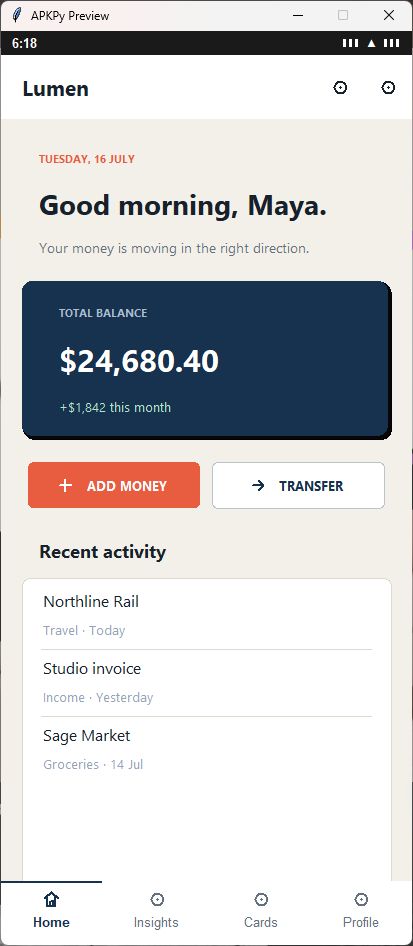
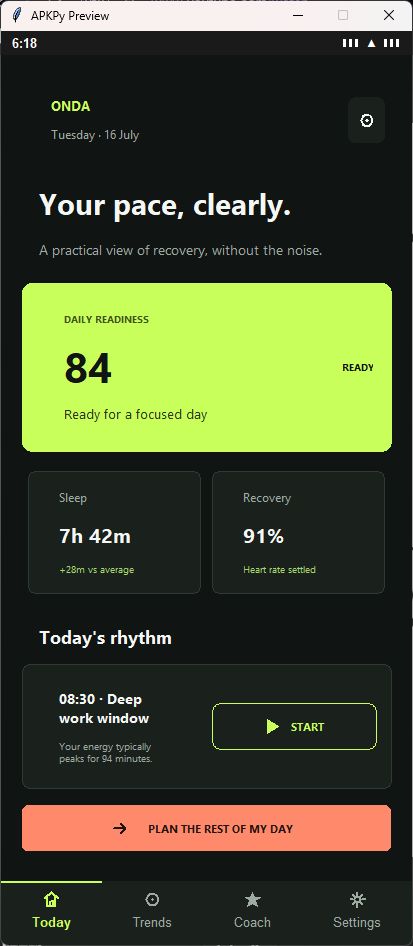
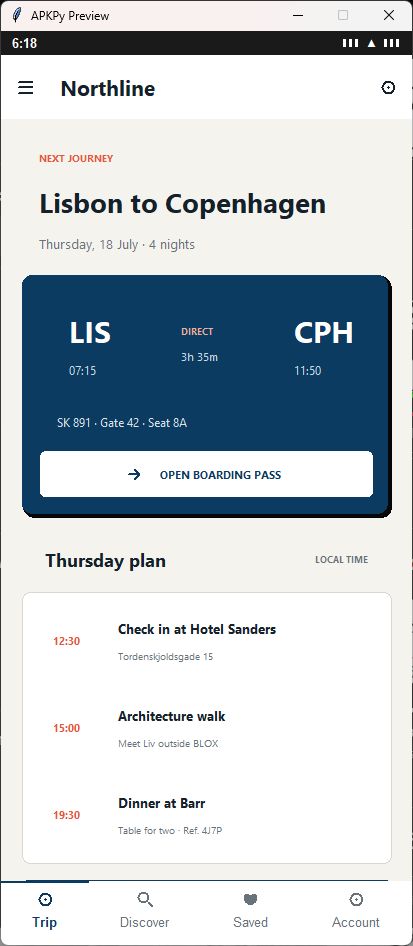
Version 1.1.0 brings the nine parts of ApkPy's new visual plan together: global themes, Material buttons and icons, responsive layouts, advanced flex/grid, cards, app bars, overlays, content states and smart images. They are not nine separate demos; they share one Theme/CSS cascade and generate optimized native Android output only for the features an app actually uses.
| Lumen · finance | Onda · wellbeing |
|---|---|
 |
 |
| Northline · travel | Afterglow · music |
 |
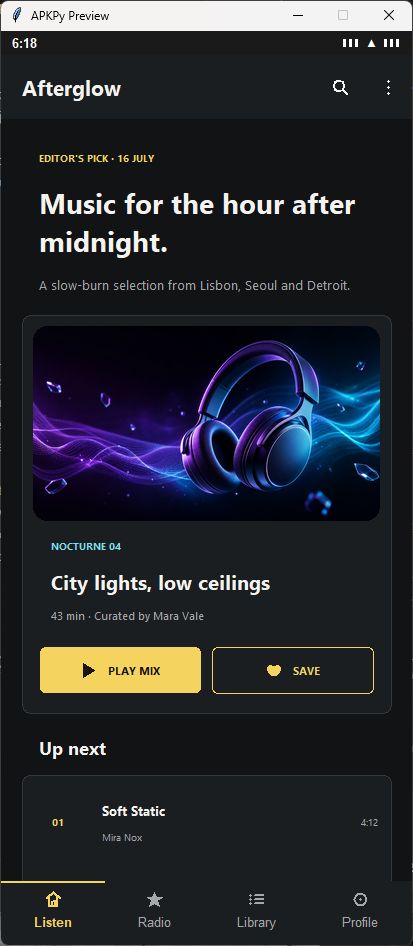 |
The complete syntax guide below explains each part with Python and CSS. The release also preserves ApkPy's SQLite, REST, encrypted storage, AES-256-GCM, PBKDF2 password hashing, background audio and editable playlist APIs.
ApkPy 1.2.0 — live data, media and native documents
ApkPy 1.2.0 makes the existing music stack explicit and adds the runtime pieces for large data, reactive interfaces, streaming uploads, real-time messages, native video, push, continuous location and structured documents. The support boundaries below remain precise: this release does not claim every advanced streaming feature.
Already available in the current library:
- URL and local-file playback with
play,pause,resume,stopand seek. - An Android foreground media service that keeps audio alive when Activities change, the app is backgrounded or the screen is locked.
- A native
MediaSessionand media notification with title, artist, artwork, play/pause, previous and next controls on the notification and lock screen. - Native audio-focus handling for pause, duck and resume behaviour.
- Metadata-aware queues, next/previous, shuffle, repeat and queue start by index or source URL.
- A synchronized full-player UI, mini-player, favourites and editable local playlists.
- Explicit offline downloads into app-private storage, without broad storage permission.
- Player reliability guards around buffering, unprepared-player polling and a failed prepare retry of the same track instead of silently skipping through the queue.
audio.play_playlist(
    ["https://cdn.example.com/one.mp3", "https://cdn.example.com/two.mp3"],
    titles=["First Light", "Night Drive"],
    artists=["Nova", "Nova"],
    arts=["one.jpg", "two.jpg"],
    start=0,
)

audio.now_playing(
    progress=seek_bar,
    time=elapsed,
    cover=cover,
    title=track_title,
    artist=track_artist,
)
audio.controls(play_pause=play_button, shuffle=shuffle_button,
               repeat=repeat_button)
mini_player(open=player_screen)
The honest boundary is equally important. ApkPy does not yet claim transparent audio caching, adaptive quality selection, guaranteed gapless playback, crossfade, DRM or resumable downloads with progress. Stream quality is the quality of the source supplied by the app; ApkPy does not transcode it.
Virtual collections with custom templates
ApkPy 1.2.0 also starts the scalable-feed work with
virtual_collection(...). Unlike a normal list_view, it does not create one
native view for every record. The Previewer keeps a bounded pool of visible
cells, while Android generates a native RecyclerView and recycles
ViewHolders as the user scrolls.
The same dataset can become a music queue, social feed, chat list, delivery catalogue or notes browser by changing the template:
from apkpy_lib import Screen, virtual_collection, toast, run

library = Screen(id="library")

TRACK_TEMPLATE = {
    "title": "{title}",
    "subtitle": "{artist} · {album}",
    "image": "{artwork}",
    "meta": "{duration}",
    "badge": "{quality}",
}

tracks = [
    {
        "title": "Afterimage",
        "artist": "North Arcade",
        "album": "Night Transit",
        "artwork": "https://cdn.example.com/afterimage.jpg",
        "duration": "3:42",
        "quality": "LOSSLESS",
    },
]

track_list = virtual_collection(
    tracks,
    template=TRACK_TEMPLATE,
    id="track_list",
    layout="list",       # or "grid"
    columns=2,           # used by grid layouts
    item_height=92,
    buffer=3,            # extra rows kept around the visible viewport
    on_click=lambda item: toast(item["title"]),
    screen=library,
)

# Runtime replacement keeps every JSON field available to the template/click.
track_list.set_items(tracks)
run(start_screen=library)
Template values can combine text with fields such as {title} and nested paths
such as {stats.likes}. The built-in visual slots are title, subtitle,
image, meta and badge; the source item is still passed intact to
on_click.
This virtualizes the views, which removes the main UI cost of long feeds. The Python/Java dataset is still held in memory. Since 1.2.1, optional application-controlled pagination can append server pages without rebuilding the list or losing its position.
The complete 1.2.0 runtime surface
Version 1.2.0 is organized into eight runtime areas:
| Area | What application code receives |
|---|---|
| Virtual collections | recycled list/grid templates for large feeds |
| Reactive state | observable values, visibility bindings and screen lifecycle |
| Uploads | streaming multipart files, images, audio and video with progress/cancel |
| WebSocket | persistent WSS messages, bounded send queue, ping/pong and reconnect |
| Video | real Previewer picture/sound and native Android Media3/ExoPlayer |
| Remote push | FCM token, message and topic callbacks when configured |
| Maps and GPS | OpenStreetMap, routes, continuous Fused Location and background tracking |
| Native documents | rich spans, Markdown and expandable visible-row trees |
Native documents use ordinary Python data:
from apkpy_lib import Screen, markdown, rich_text, tree_view

knowledge = Screen(id="knowledge", scroll=True)

rich_text(
    [
        {"text": "FIELD NOTE\n", "bold": True,
         "color": "#22D3EE", "size": 12},
        {"text": "Small interfaces, ", "bold": True, "size": 23},
        {"text": "deep structure.", "bold": True, "italic": True,
         "color": "#C4B5FD", "size": 23},
    ],
    selectable=True,
    screen=knowledge,
)

markdown(
    """## Build log

> Selectable, structured and native.

- [x] **Bold**, *italic*, ~~strike~~ and `inline code`
- [x] Lists, links, quotes and dividers
""",
    screen=knowledge,
)

tree_view(
    [{
        "key": "workspace",
        "title": "Workspace",
        "subtitle": "18 pages",
        "children": [
            {"title": "Roadmap", "subtitle": "Q3 planning"},
            {"title": "Release notes", "subtitle": "12 entries"},
        ],
    }],
    expand_depth=1,
    row_height=60,
    screen=knowledge,
)
Android renders the text through SpannableStringBuilder and the hierarchy
through a native RecyclerView containing only visible rows. No WebView or
JavaScript runtime is added. These components render application data; SQLite,
encrypted storage or an API remains responsible for persistence and sync.
1. The Vision & Philosophy 🌟
Forget the steep learning curves of Java or Kotlin, and avoid the massive footprint of cross-platform engines. Why choose ApkPy over interpreted frameworks like Kivy or Flet?
- Zero Bloat, Smaller APKs: Because we transpile to pure Android projects, you avoid bundling heavy Python interpreters into your deployment.
- Flawless Performance: By generating true native
Activity,Button,ImageView, andEditTextelements under the hood, your app runs at the maximum possible speed the OS allows. - 100% Native Look & Feel: Because your components interact directly with the Android SDK, OS-level features like haptics, text-selection, and system animations are preserved automatically.
2. How it Works (The Technical Secret) 🛠️
How it works: ApkPy parses your Python code into an Abstract Syntax Tree (AST) and maps UI calls to their corresponding Android XML Layouts and Java Activity classes. It's not a simulation; it's code generation.
Here's what happens under the hood every time you run apkpy build:
- Parsing — ApkPy reads your
writehere.pyfile and builds a full AST. - Component Mapping — Each
label(),button(),inputs(),image()call is translated to its native Android equivalent (TextView,Button,EditText,ImageView). - CSS Translation — Your
style = """ ... """string is parsed and converted to Android XML drawables,dpvalues, and color attributes. - Java/XML Generation — Full Java Activity classes and XML layout files are generated from scratch.
- ZIP Packaging — Everything is bundled into a
.zipfile you can open directly in Android Studio.
3. Full Installation & Setup 📥
Getting started is instantly accessible. You do not need any prior knowledge of Android Studio to start designing.
pip install apkpy
(Need the new features? Run pip install --upgrade apkpy)
Your First App — Full CLI Workflow
# 1. Create a new project
apkpy start my_project

# 2. Enter your project folder
cd my_project

# 3. Open writehere.py and design your app
# (edit it with any editor — VS Code, PyCharm, Notepad, etc.)

# 4. Preview it instantly on your computer (no Android needed!)
python writehere.py

# 5. When you're happy, compile straight to an installable APK
apkpy run
# → No Android Studio needed — produces my_project-debug.apk right here
# → add --qr to install over Wi-Fi, or --usb to push it over a cable

# (Prefer Android Studio? `apkpy build` makes a .zip project to open there instead.)
First run? Use
apkpy doctorto check your toolchain (a JDK 17–21 + the Android SDK). If you have Android Studio, ApkPy reuses its bundled JDK/SDK automatically; otherwise runapkpy setuponce to download them.
🎯 Jump-Start with a Ready-Made Example
Not sure where to begin? Use apkpy examples to instantly drop a complete, working app into any folder:
apkpy examples
What example do you want to use?

  [1] Hello World
  [2] Calculator
  [3] Notes
  [4] Settings
  [5] Login Screen
  [6] Location / GPS
  [7] Network Images
  [8] Loading Spinner
  [9] Secure Login
  [10] REST Client
  [11] DB Notes List

Enter a number: 3

Where do you want to create it? [.]: C:\Users\me\my_project

Done! "Notes" example created at:
  C:\Users\me\my_project\writehere.py

Preview it with:  python writehere.py
Build it with:    apkpy build
All 11 examples are fully working apps you can preview immediately and build for Android without changing a single line.
4. Complete Syntax Guide (v1.1.0) 🎨
ApkPy 1.1.0 extends the stable 1.0.0 foundation with a complete visual system, responsive composition and richer native components. The same Python component tree is rendered by the Hot Previewer and compiled into Android Java/XML.
The Screen
Everything belongs to a Screen. Screens translate directly to native Android Activities.
login_screen = Screen(id="login_container")
Pass scroll=True to make the whole screen vertically scrollable — all components, including long lists, will scroll together as one page:
home = Screen(id="home", scroll=True)
The Container (Nesting)
Containers allow you to group components together, creating complex layouts like cards, headers, or custom grids.
# Create a container on the screen
header_box = container(id="header_style", screen=login_screen)

# Add a label inside that container
label("Welcome Back", parent=header_box)
The CSS Engine
Say goodbye to complex dictionary configurations. ApkPy uses a multi-line string approach with standard CSS syntax. No quotes are needed around values!
style = """
login_container {
    gap: 15px;
    flex-direction: column;
}
"""
Global Themes & Design Tokens (1.1.0)
Theme gives the whole app a coherent light or dark palette, typography,
spacing and corner radius. The same normalized tokens are used by the Hot
Previewer and by the generated Android Java/XML project.
from apkpy_lib import Screen, label, button, inputs, Theme, run

home = Screen(id="home")
label("Welcome", screen=home)
inputs("Email", screen=home)
button("Continue", screen=home)

app_theme = Theme(
    mode="dark",                 # "light" or "dark"
    primary="#8B5CF6",
    secondary="#22D3EE",
    background="#09090B",
    surface="#18181B",
    text="#FAFAFA",
    text_secondary="#A1A1AA",
    border="#3F3F46",
    radius=18,
    spacing=14,
    font_family="sans-serif",
)

run(start_screen=home, theme=app_theme)
The built-in theme styles labels, buttons, inputs, containers, lists, grids, carousels, spinners, bottom navigation, the mini-player, and Android's status and navigation bars. Every value remains overridable through CSS.
Use design tokens in CSS with var(--token):
label {
    color: var(--text);
}

button {
    background-color: var(--secondary);
}

danger_button {
    background-color: var(--error);
}
Available tokens are primary, secondary, background, surface, text,
text_secondary, on_primary, error, success, border, radius,
spacing, and font-family.
The cascade is deterministic:
Theme defaults → component selector (button, label, inputs, …) → component ID
This means an ID rule always wins, while components without IDs still receive the complete visual theme.
Material 3 Button Variants (1.1.0)
Use variant= to get a complete, coherent button treatment without repeating
CSS. The Previewer and generated Android project use the same variant cascade.
button("Continue", variant="filled", icon="arrow_forward", screen=home)
button("Cancel", variant="text", screen=home)
button("Save", variant="tonal", icon="save", screen=home)
button("Delete", variant="danger", icon="delete", screen=home)
| Variant | Intended use |
|---|---|
filled |
Primary/high-emphasis action |
outlined |
Secondary action with a visible border |
tonal |
Medium-emphasis action using a soft theme colour |
text |
Low-emphasis action without a visible container |
danger |
Destructive action using the theme error colour |
icon |
Compact 48dp icon-only action with accessible text |
actions = container(id="actions", screen=home)
button("Favourite", variant="icon", icon="favorite", parent=actions)
button("Edit", variant="icon", icon="edit", parent=actions)
button("More options", variant="icon", icon="more_vert", parent=actions)
Common icon names include add, arrow_back, arrow_forward, check,
close, delete, download, edit, favorite, info, more_vert,
notifications, pause, play_arrow, save, search, settings, star,
and upload. Android receives native vector drawables; the Previewer uses
matching lightweight symbols.
The cascade for a variant button is:
Theme → button selector → Material variant → component ID
An ID therefore remains the final override. A whole variant can also be customized with a semantic selector:
button:outlined {
    border-color: var(--secondary);
    color: var(--secondary);
}
Omitting variant= preserves the legacy button behaviour.
Responsive Layouts (1.1.0)
Define the component tree once and only change its arrangement at each
breakpoint. column() and row() are layout descriptions consumed by
responsive(); the components themselves are not duplicated.
home = Screen(id="home", scroll=True)

profile = container(id="profile")
label("Profile", parent=profile)

details = container(id="details")
label("Details", parent=details)

layout = responsive(
    mobile=column(profile, details),
    tablet=row(profile, details),
    landscape=row(profile, details),
    breakpoint=600,
    id="dashboard",
    screen=home,
)
The default tablet breakpoint is 600dp. The optional landscape= layout is
selected whenever the viewport is wider than it is tall. CSS media queries use
the same viewport in the Previewer and Android generator:
dashboard {
    display: grid;
    grid-template-columns: 1fr;
    width: 100%;
    max-width: 720px;
    min-height: 100vh;
}

@media (min-width: 600px) {
    dashboard {
        grid-template-columns: 280px 1fr;
    }

    profile {
        width: 280px;
    }
}

@media (orientation: landscape) {
    dashboard { gap: 20px; }
}
Responsive dimensions support px/dp, %, vw, and vh, including
width, max-width, and min-height. For visual testing, use presets such as
device("Small Phone"), device("Pixel 9"), device("Tablet"),
device("Pixel 9 Landscape"), or use device("responsive") and resize the
Previewer freely.
During apkpy build, responsive screens receive native Android resource
variants in res/layout, res/layout-land, res/layout-sw600dp, and
res/layout-sw600dp-land. Android therefore selects the correct layout before
the Activity is drawn; no Java screen-size branching is required.
Advanced Flexbox, Grid & Layering (1.1.0)
Containers now support wrapping flex rows, flexible child sizing, real grid tracks/spans, fixed aspect ratios and layered elements. The same declarations are interpreted by the Hot Previewer and by the generated Android project:
actions = container(id="actions", screen=home)
button("Publish", id="publish", parent=actions)
button("Preview", id="preview", parent=actions)

gallery = container(id="gallery", screen=home)
featured = container(id="featured", parent=gallery)
label("NEW", id="badge", parent=featured)
actions {
    display: flex;
    flex-direction: row;
    flex-wrap: wrap;
    justify-content: space-between;
    align-items: center;
    gap: 12px;
}

publish { flex-grow: 1; flex-shrink: 1; flex-basis: 140px; }
preview { flex-shrink: 0; flex-basis: 120px; align-self: center; }

gallery {
    display: grid;
    grid-template-columns: repeat(2, 1fr);
    gap: 16px;
}

featured { grid-column: 1 / span 2; aspect-ratio: 16 / 7; }
badge { position: absolute; top: 12px; right: 12px; z-index: 3; }
Supported child properties are flex-grow, flex-shrink, flex-basis,
align-self, grid-column, grid-row, aspect-ratio, position: absolute,
the top/right/bottom/left offsets, and z-index. Grid tracks accept
fixed px/dp sizes, percentages and fr units, including repeat().
For performance, ApkPy keeps ordinary containers as native LinearLayouts.
The generated ApkpyLayout ViewGroup is added only when a project actually
uses advanced layout rules; it has no external runtime dependency.
Cards & Surfaces (1.1.0)
card() groups related content in a semantic Material surface. Use the
ready-made form when a card follows the usual media/title/body/actions pattern:
from apkpy_lib import Screen, card, card_action, toast

home = Screen(id="home", scroll=True)

card(
    title="Premium",
    subtitle="No ads and offline downloads",
    image="premium.jpg",
    content="High-quality audio on every device.",
    actions=[
        card_action("Learn more", variant="text"),
        card_action(
            "Try it", variant="filled",
            command=lambda: toast("Trial started"),
        ),
    ],
    variant="elevated",
    id="premium_card",
    screen=home,
)
card_action() creates a detached button specifically for the actions list;
it accepts the same variant, icon, command, and id options as a normal
button. Actions are aligned in one compact row automatically.
For a custom hierarchy, create an empty card and attach any components to it:
plan = card(id="premium_card", variant="outlined", screen=home)
label("PREMIUM", variant="overline", parent=plan)
label("Music without limits", variant="title", parent=plan)
label("Listen anywhere, even offline.", variant="body", parent=plan)
button("Try it", variant="text", parent=plan)
The card variants are elevated, filled, and outlined. Semantic labels can
use title, subtitle, body, and overline; all variants still participate
in the Theme/CSS cascade. On Android, each card becomes a native
MaterialCardView with one lightweight LinearLayout for its children. A
cards-only project does not ship the advanced ApkpyLayout helper.
App Bars & Collapsible Headers (1.1.0)
Attach navigation and page actions to a screen without placing toolbar widgets
inside its content. app_bar() stays fixed while a scrollable screen moves:
from apkpy_lib import Screen, action, app_bar, toast

library = Screen(id="library", scroll=True)

app_bar(
    title="Library",
    leading="menu",
    actions=[
        action("search", command=lambda: toast("Search"), label="Search library"),
        action("more_vert", command=lambda: toast("More"), label="More options"),
    ],
    screen=library,
)
Use sliver_app_bar() when the page needs a large media header. The image
collapses as the content scrolls; pinned=True keeps the 64dp toolbar visible:
from apkpy_lib import sliver_app_bar

profile = Screen(id="profile", scroll=True)
sliver_app_bar(
    title="Profile",
    image="cover.jpg",
    expanded_height=240,
    pinned=True,
    actions=[action("edit", command=lambda: toast("Edit"), label="Edit profile")],
    screen=profile,
)
Both bars use the Theme/CSS cascade through app_bar, sliver_app_bar, and
their optional IDs. Android output uses native MaterialToolbar,
AppBarLayout, and CollapsingToolbarLayout; menu icons are generated as
vector drawables. Generated apps use Theme.App, defined in themes.xml as a
descendant of Theme.MaterialComponents.DayNight.NoActionBar. The theme maps
ApkPy tokens such as apkpy_primary, apkpy_background, apkpy_surface, and
apkpy_text to the attributes required by Material widgets. A normal app bar
adds no ApkPy runtime or custom ViewGroup.
Overlays, Menus & Pickers (1.1.0)
Create temporary UI without adding invisible placeholder Views to the screen.
An overlay definition is lightweight and only creates its native component
when .open() is called:
from apkpy_lib import (
    Screen, bottom_sheet, button, context_menu, date_picker, menu, modal,
    label, snackbar, time_picker, tooltip,
)

library = Screen(id="library", scroll=True)
status = label("Ready", screen=library)

def selected(value):
    status.set_value("Selected: " + value)

playlist_sheet = bottom_sheet(
    "Add to playlist",
    content="Choose a destination",
    items=["Focus", "Workout", "Saved"],
    on_select=selected,
)
delete_dialog = modal(
    "Delete download?",
    content="The online copy stays available.",
    confirm_text="Delete",
    on_confirm=lambda: snackbar("Download deleted", action="Undo"),
)

button("Open sheet", command=lambda: playlist_sheet.open(), screen=library)
button("Open dialog", command=lambda: delete_dialog.open(), screen=library)

more = button("More", screen=library)
more_menu = menu(
    anchor=more,
    items=["Share", "Edit", "View artist"],
    on_select=selected,
)

track = button("Track options", screen=library)
track_menu = context_menu(
    track,
    items=["Play next", "Add to queue", "Remove"],
    on_select=selected,
)

release_date = date_picker(
    "Release date", initial="2026-07-14", on_select=selected,
)
reminder = time_picker(
    "Reminder", initial="18:30", on_select=selected,
)
date_button = button(
    "Pick date", command=lambda: release_date.open(), screen=library,
)
button("Pick time", command=lambda: reminder.open(), screen=library)
tooltip(date_button, "Opens the native date picker")
popup_menu() is an alias for menu(). A normal menu opens when its anchor is
clicked. A context menu opens with right-click in the Previewer and long press
on Android. snackbar(message, action=..., on_action=..., duration=...) appears
above the current screen chrome; duration is expressed in milliseconds.
Picker callbacks receive ISO-like strings: YYYY-MM-DD for dates and HH:MM
for times. Overlay definitions also expose .close() for programmatic dismiss.
Android output maps these APIs to BottomSheetDialog,
MaterialAlertDialogBuilder, PopupMenu, Snackbar, TooltipCompat,
DatePickerDialog, and TimePickerDialog. Imports, fields, and one helper per
used overlay are emitted only when the project uses these APIs; simple projects
do not carry this runtime.
Skeleton Loading & Content States (1.1.0)
Represent loading, empty content, and recoverable errors without maintaining three copies of the same layout:
from apkpy_lib import Screen, empty_state, error_state, skeleton, toast

library = Screen(id="library", scroll=True)

loading = skeleton(
    variant="music_card",
    count=4,
    id="library_loading",
    screen=library,
)

empty = empty_state(
    icon="music_off",
    title="You have no music yet",
    message="Explore the catalogue and save your first track.",
    action="Explore music",
    on_action=lambda: toast("Opening catalogue"),
    id="library_empty",
    visible=False,
    screen=library,
)

error = error_state(
    title="Could not load",
    message="Check your connection and try again.",
    retry=lambda: toast("Trying again"),
    retry_text="Try again",
    id="library_error",
    visible=False,
    screen=library,
)

def show_empty():
    loading.hide()
    error.hide()
    empty.show()
skeleton() supports music_card, list, card, and text variants plus a
configurable count. All three components support visible=..., .show(),
and .hide(), so a request can replace loading with its final state without
rebuilding the screen. Style them with the skeleton, empty_state, and
error_state selectors, or by ID as usual.
The Previewer animates each skeleton component with one Canvas and one timer,
not one widget per placeholder. Android emits ordinary View, ImageView,
TextView, and Button XML plus one shared AlphaAnimation helper per
Activity. The helper and animation imports are omitted completely when a
screen does not use skeleton().
Advanced Images & Avatars (1.1.0)
Remote artwork can show a local placeholder immediately, fall back cleanly when the network fails, reuse an in-memory cache, and fade into place:
from apkpy_lib import Screen, avatar, image

player = Screen(id="player", scroll=True)

cover = image(
    "https://example.com/cover.jpg",
    placeholder="cover_placeholder.png",
    fallback="broken_image.png",
    cache=True,
    fade_in=True,
    aspect_ratio="16:9",
    id="cover",
    screen=player,
)

avatar(
    "profile.jpg",
    size=48,
    status="online",
    id="profile",
    screen=player,
)
image() also accepts blur=12, tint="#7C3AED", and ratios such as
aspect_ratio="1:1". avatar() uses the same placeholder, fallback, cache,
fade, blur, and tint pipeline while adding a circular crop and an optional
online, away, busy, or offline status badge. Normal CSS image options
(object-fit, border-radius, opacity, borders, and shadows) still apply.
The Previewer downloads outside the UI thread, keeps a bounded 32-image cache,
ignores stale responses after set_src(), and draws its placeholder/status
icons as vectors. Android uses a three-worker executor and a bounded LRU cache,
emits local placeholder/fallback drawables, performs a native 220 ms fade, and
uses RenderEffect for blur on Android 12+. The executor, cache, blur code, and
remote loader are omitted from Activities that do not need them.
New Layout & Styling Features (v0.9.3+)
Our Android-generation engine has been completely rewritten to use XML-driven layouts, ensuring 1:1 parity between your code and the native Android rendering.
gap: 20px;– Automatically places calculateddpmargins between elements in your layout container.flex-direction: row; / column;– Orients your components mapped directly toandroid:orientation="horizontal"or"vertical".padding: 10px 20px;– Pushes text content away from your component edges.border-radius: 15px;– Generates native XML shape drawables for smooth rounded corners.border-color: #000;andborder-width: 2px;– Easily define component outlines.pressed-color: #cccccc;– Defines the feedback color when a button is clicked (native<selector>).focus-border-color: #2196F3;– When a user taps your inputs, ApkPy dynamically swaps the border colors via native XML states!font-size: 18px;– Set text size in pixels (automatically converted tospfor Android).font-weight: bold;– Makes your text thicker. Supportsboldor numeric values (700,800,900).font-family: 'sans-serif';– Choose between native font styles.
Typography Support 🔠
ApkPy ensures your text looks great and consistent across platforms by mapping CSS generic families to native system fonts:
sans-serif: The modern look. Maps to Roboto (Android) and Segoe UI (Windows) or Helvetica (macOS).serif: The classic look. Maps to Times New Roman.monospace: Perfect for code or alignment. Maps to Consolas (Windows) or Courier.
Note: You can also use font-style: italic; to add emphasis to your labels.
5. Component & Logic Workflow ⚙️
Adding elements and routing interactions is declarative and incredibly clean.
Adding Components:
Simply call the component and attach it to your screen. Give it an id to map it to your CSS string.
btn = button("Login", id="primary_btn", screen=login_screen)
inputs("Your email", type="text", id="email_input", screen=login_screen)
Nesting with parent:
Every component (label, button, inputs, container) now supports a parent parameter. If set, the component will be rendered inside that container instead of directly on the screen.
card = container(id="card_bg", screen=my_screen)
label("Title", parent=card)
button("Click Me", parent=card)
Supported Input Types:
| Type | What it does | How to use |
|---|---|---|
"text" |
Single-line text field | inputs("Placeholder", type="text", id="…", screen=…) |
"password" |
Text field that hides what you type | same as text |
"search" |
Text field with a ✕ clear button | same as text |
"textarea" |
Multi-line text area | same; add rows: 6; in CSS to control height |
"checkbox" |
A tick-box (checked = "true", unchecked = "false") |
inputs("Accept terms", type="checkbox", …) |
"switch" |
A toggle switch — ideal for on/off settings | inputs("Dark mode", type="switch", …) |
"range" |
A slider from 0 to 100 | inputs("Volume", type="range", …) |
"radio" |
Pick one option from a group | inputs("A|B|C", type="radio", …) |
"select" |
Dropdown / spinner — pick one from a menu | inputs("A|B|C", type="select", …) |
How get_value() and set_value() work for each type:
| Type | get_value() returns |
set_value() accepts |
|---|---|---|
text / password / search / textarea |
The text the user typed | Any string |
checkbox / switch |
"true" or "false" |
"true" or "false" |
range |
A number between "0" and "100" |
A number string, e.g. "75" |
radio |
The text of the selected option | The exact text of the option to select |
select |
The text of the selected option | The exact text of the option to select |
CSS properties specific to type="switch":
color:— the color of the label text next to the toggleaccent-color:— the color of the track when the switch is ONbackground-color:— legacy alias when set on the switch's own ID
With Theme, accent-color defaults to the theme's primary token. It is
kept separate from the input surface so a checked switch remains visible.
# Example: settings screen with two toggle switches
sw_dark  = inputs("Dark mode",     type="switch", id="sw_dark",  screen=settings)
sw_notif = inputs("Notifications", type="switch", id="sw_notif", screen=settings)

# Reading state
is_dark = sw_dark.get_value()   # → "true" or "false"

# Restoring saved state on startup
saved = storage.get("dark_mode", "false")
sw_dark.set_value(saved)  # pass "true" to turn it on, "false" to turn it off
sw_dark {
    color: #F8FAFC;              /* label text color */
    accent-color: #4F46E5;       /* track color when ON */
}
Linking Logic & Navigation:
Instead of fighting with Android Intent classes, handle navigation with a single method.
login_screen.on_click_navigate(button=btn, to=dashboard_screen)
The Application Lifecycle:
Your file must end by invoking the execution layer with run().
run(start_screen=login_screen)
5a. Dropdown (Select) 🔽
The type="select" input creates a native dropdown menu — the user taps it, a list of options slides out, and they pick one. Perfect for language selectors, country pickers, category filters, and any setting where there are more than 2-3 options.
How to use it
Pass the options as a single string separated by | (pipe character):
from apkpy_lib import Screen, inputs, button, label, toast, storage, run

settings = Screen(id="settings")

# Options separated by |
language = inputs("Português|English|Español|Français", type="select", id="lang", screen=settings)
country  = inputs("United States|Canada|Japan|Germany|Mexico", type="select", id="country", screen=settings)

# Auto-load the last saved choice
saved_lang    = storage.get("lang", "")
saved_country = storage.get("country", "")
if saved_lang    != "": language.set_value(saved_lang)
if saved_country != "": country.set_value(saved_country)

def save():
    storage.set("lang",    language.get_value())   # e.g. "Português"
    storage.set("country", country.get_value())    # e.g. "Canada"
    toast("Saved!")

button("SAVE", id="btn", command=save, screen=settings)

if __name__ == "__main__":
    run(start_screen=settings)
CSS styling
lang {
    color: #F8FAFC;              /* text color of the selected item */
    background-color: #1E293B;  /* background of the dropdown box */
    border-color: #334155;      /* border around the box */
    border-width: 1px;
    border-radius: 10px;        /* rounded corners */
}
Behaviour
| Method | What it does |
|---|---|
language.get_value() |
Returns the currently selected option, e.g. "English" |
language.set_value("English") |
Selects the option with that exact text |
[!TIP] The first option in the list is selected by default when the app starts. Use
set_value()at startup to restore the user's last saved choice.
5b. Multi-line Textarea 📝
The type="textarea" input creates a multi-line text field — just like a text input, but it grows vertically and lets the user write paragraphs, notes, or long descriptions.
How to use it
from apkpy_lib import Screen, inputs, button, label, toast, storage, run

my_screen = Screen(id="notes")

note = inputs("Write your note here...", type="textarea", id="note_field", screen=my_screen)

# Auto-load saved note
saved = storage.get("note", "")
if saved != "":
    note.set_value(saved)

def save():
    text = note.get_value()
    storage.set("note", text)
    toast("Note saved!")

button("SAVE NOTE", id="btn", command=save, screen=my_screen)

if __name__ == "__main__":
    run(start_screen=my_screen)
CSS styling — control the height with rows
note_field {
    rows: 6;                    /* height in lines (default is 4) */
    background-color: #1E293B;
    color: #F8FAFC;
    border-color: #334155;
    border-radius: 10px;
    border-width: 1px;
    padding: 14px;
}
Behaviour
| Method | What it does |
|---|---|
note.get_value() |
Returns everything the user typed as a string |
note.set_value("Hello!") |
Replaces the full content of the textarea |
[!TIP] Use
rowsin the CSS to make the field taller.rows: 4(default) is good for short messages,rows: 8or more for longer content like diary entries or descriptions.
5c. Toggle Switch 🔘
The type="switch" input creates a native on/off toggle switch — the kind you see in every Android settings screen. Much more natural than a checkbox for settings like "Dark mode", "Notifications", or "Auto-save".
How to use it
from apkpy_lib import Screen, inputs, button, label, toast, storage, run

settings = Screen(id="settings")

label("App Settings", id="title", screen=settings)

sw_dark  = inputs("Dark mode",      type="switch", id="sw_dark",  screen=settings)
sw_notif = inputs("Notifications",  type="switch", id="sw_notif", screen=settings)
sw_sound = inputs("Sound effects",  type="switch", id="sw_sound", screen=settings)

# Auto-load saved state when the app opens
if storage.get("dark",  "") != "": sw_dark.set_value(storage.get("dark",  ""))
if storage.get("notif", "") != "": sw_notif.set_value(storage.get("notif", ""))
if storage.get("sound", "") != "": sw_sound.set_value(storage.get("sound", ""))

def save():
    storage.set("dark",  sw_dark.get_value())   # "true" or "false"
    storage.set("notif", sw_notif.get_value())
    storage.set("sound", sw_sound.get_value())
    toast("Settings saved!")

button("SAVE", id="btn", command=save, screen=settings)

style = """
settings { background-color: #0F172A; padding: 24px; gap: 12px; }
title    { color: #F8FAFC; font-size: 20px; font-weight: bold; margin-bottom: 8px; }
sw_dark  { color: #F8FAFC; background-color: #4F46E5; }
sw_notif { color: #F8FAFC; background-color: #4F46E5; }
sw_sound { color: #F8FAFC; background-color: #4F46E5; }
btn      { background-color: #4F46E5; color: #F8FAFC; border-radius: 12px; font-weight: bold; padding: 14px; pressed-color: #3730A3; }
"""

if __name__ == "__main__":
    run(start_screen=settings)
CSS styling
sw_dark {
    color: #F8FAFC;              /* color of the label text */
    background-color: #4F46E5;  /* color of the track when the switch is ON */
}
Two CSS properties control the switch appearance:
color— the label text next to the toggle (e.g. "Dark mode")background-color— the track color when the switch is ON. When OFF, the track is always grey. Defaults to#4CAF50(Material green) if not set.
Behaviour
| Method | What it does |
|---|---|
sw_dark.get_value() |
Returns "true" if the switch is ON, "false" if OFF |
sw_dark.set_value("true") |
Turns the switch ON |
sw_dark.set_value("false") |
Turns the switch OFF |
[!TIP] Always save and reload the switch state with
storageso the user's settings are remembered between sessions. See the Storage section for the full pattern.
5d. Number Input 🔢
The type="number" input creates a text field that only accepts numeric values — on Android it opens the numeric keyboard automatically, so the user never has to switch. Works for integers, decimals, and negative numbers.
How to use it
from apkpy_lib import Screen, inputs, button, label, toast, run

my_screen = Screen(id="calculator")

inp_a = inputs("First number...",  type="number", id="inp_a", screen=my_screen)
inp_b = inputs("Second number...", type="number", id="inp_b", screen=my_screen)
result_lbl = label("Result: —", id="result", screen=my_screen)

def calculate():
    a = inp_a.get_value()   # always a string, e.g. "3.5"
    b = inp_b.get_value()   # e.g. "2"
    if a != "" and b != "":
        total = float(a) + float(b)
        result_lbl.set_value(f"Result: {total}")
    else:
        toast("Fill in both numbers!")

button("ADD", id="btn", command=calculate, screen=my_screen)

if __name__ == "__main__":
    run(start_screen=my_screen)
CSS styling
inp_a {
    color: #F8FAFC;
    background-color: #1E293B;
    border-color: #334155;
    border-width: 1px;
    border-radius: 10px;
}
Same CSS properties as a regular text input — color, background-color, border-color, border-width, border-radius, padding, font-size.
Behaviour
| Method | What it does |
|---|---|
inp_a.get_value() |
Returns the typed value as a string, e.g. "3.5" or "-10" |
inp_a.set_value("42") |
Pre-fills the field with that value |
[!IMPORTANT]
get_value()always returns a string (like all other input types). Convert toint()orfloat()in your Python code before doing arithmetic.
[!TIP] In the Hot Previewer, the field rejects any non-numeric character as you type — matching the numeric keyboard behaviour on Android. Decimals (
.) and negatives (-) are allowed.
5e. Date & Time Pickers 📅🕐
The type="date" and type="time" inputs open the native Android date/time dialogs — the same polished pickers the user already knows from their phone's Calendar or Clock app. No custom UI to build.
How to use them
from apkpy_lib import Screen, inputs, button, label, toast, storage, run

my_screen = Screen(id="booking")

label("Book your appointment", id="title", screen=my_screen)

inp_date = inputs("Select date...", type="date", id="inp_date", screen=my_screen)
inp_time = inputs("Select time...", type="time", id="inp_time", screen=my_screen)

# Auto-load saved values
saved_date = storage.get("date", "")
saved_time = storage.get("time", "")
if saved_date != "": inp_date.set_value(saved_date)
if saved_time != "": inp_time.set_value(saved_time)

def confirm():
    date = inp_date.get_value()   # e.g. "25/12/2024"
    time = inp_time.get_value()   # e.g. "14:30"
    if date == "" or time == "":
        toast("Please select a date and time!")
        return
    storage.set("date", date)
    storage.set("time", time)
    toast(f"Booked for {date} at {time}!")

button("CONFIRM", id="btn", command=confirm, screen=my_screen)

if __name__ == "__main__":
    run(start_screen=my_screen)
CSS styling
inp_date {
    color: #F8FAFC;
    background-color: #1E293B;
    border-color: #334155;
    border-width: 1px;
    border-radius: 10px;
}

inp_time {
    color: #F8FAFC;
    background-color: #1E293B;
    border-color: #334155;
    border-width: 1px;
    border-radius: 10px;
}
Same CSS properties as any other input — color, background-color, border-color, border-width, border-radius, padding.
Behaviour
| Method | What it does |
|---|---|
inp_date.get_value() |
Returns "" if nothing selected yet, or "DD/MM/YYYY" after the user picks a date |
inp_date.set_value("25/12/2024") |
Pre-fills the field with that date |
inp_time.get_value() |
Returns "" if nothing selected yet, or "HH:MM" after the user picks a time |
inp_time.set_value("14:30") |
Pre-fills the field with that time |
[!TIP] Always check
get_value() != ""before using the result — if the user hasn't tapped the picker yet, it returns an empty string.
[!NOTE] In the Hot Previewer, clicking the field opens a small dialog with spinboxes for day/month/year (or hour/minute). On Android it opens the native
DatePickerDialog/TimePickerDialog. Your code is 100% identical for both.
5f. Scrollable Screens 📜
Add scroll=True to any Screen to make it vertically scrollable. Every component on that screen — labels, inputs, lists, buttons — scrolls together as a single page. This is the right approach for forms, logs, or any screen where content might overflow the device height.
How to use it
from apkpy_lib import Screen, label, inputs, button, list_view, run

home = Screen(id="home", scroll=True)

label("Daily Check-in", id="title", screen=home)
inputs("How are you feeling?", type="textarea", id="notes", screen=home)
button("SAVE", id="btn", command=save, screen=home)
# ... add as many components as you need — they all scroll together
In the Hot Previewer
The screen becomes a scrollable canvas. Scroll with the mouse wheel from anywhere on the screen — no need to hover over a specific element.
On Android
The screen compiles to a NestedScrollView wrapping a LinearLayout. All components (including list_view) use native TextView containers instead of ListView, so there's no conflict between nested scrollable views and the outer scroll.
[!TIP]
scroll=Trueandlist_viewwork seamlessly together. The list items become part of the scrollable page — you get infinite scroll for free, without any fixed-height list box.
5g. List View 📋
list_view renders a vertical list of items with an optional click handler. Items can be plain strings or dicts with "title" and "subtitle" keys.
How to use it
from apkpy_lib import Screen, list_view, toast, run

home = Screen(id="home", scroll=True)

items = [
    {"title": "08/06/2026", "subtitle": "Mood: Great — Energy: 85"},
    {"title": "07/06/2026", "subtitle": "Mood: Good — Energy: 70"},
    {"title": "06/06/2026", "subtitle": "Mood: Okay — Energy: 55"},
]

history = list_view(
    items,
    id="history_list",
    screen=home,
    on_click=lambda item: toast(item["title"] + ": " + item["subtitle"]),
)

if __name__ == "__main__":
    run(start_screen=home)
Updating the list at runtime
Call .set_items(new_list) on the list view variable to replace its contents — for example after saving a new entry:
def save():
    items.insert(0, {"title": "today", "subtitle": "Mood: Great"})
    history.set_items(items)
    toast("Saved!")
Feeding the list from a database or API (set_items + JSON) 📊
set_items also accepts a JSON string directly — exactly what db.query() returns and what most REST APIs respond with. Use title= and subtitle= to pick which field of each JSON object to display:
def refresh():
    rows = db.query("SELECT content, created FROM notes ORDER BY id DESC")
    notes_list.set_items(rows, title="content", subtitle="created")
The same works with an API response:
def on_response(success, response):
    if success:
        # e.g. Supabase: [{"name": "Alice", "email": "a@x.com"}, ...]
        users_list.set_items(response, title="name", subtitle="email")
- Each row renders as
title — subtitle(subtitle omitted when empty). - Arrays of plain values (
["a", "b"]as JSON) also work — each value becomes one row. - Invalid JSON results in an empty list instead of a crash.
- Calling a refresh function at module level (e.g.
refresh()at the bottom of the file) runs it on app start — in the Previewer and in the AndroidonCreate— so the list is filled when the app opens.
This closes the data → UI loop: db.query/https fetch the rows, set_items shows them, on_click + on_click_navigate(data=...) handle the taps.
CSS styling
history_list {
    background-color: #1E293B;   /* background of each item */
    color: #F8FAFC;              /* text color */
    border-color: #334155;       /* color of the divider lines between items */
    height: 200px;               /* fixed height when scroll=False; ignored in scroll screens */
}
| CSS property | What it controls |
|---|---|
color |
Text color of each list item |
background-color |
Background color of each item row |
border-color |
Color of the 1dp divider between rows |
height |
Fixed height of the list box (only applies when scroll=False). Avoid using a tall fixed height with few items — on Android, the empty space below the last item is filled with background-color, creating a visible coloured box. Either omit height (list sizes to its content) or use scroll=True on the screen instead. See example below. |
Height warning
/* ❌ Avoid — creates a 400dp coloured box even with only 3 items */
my_list {
    background-color: #1E293B;
    height: 400px;
}

/* ✅ Correct — list wraps to fit its items */
my_list {
    background-color: #1E293B;
}
on_click lambda
The on_click parameter accepts an inline lambda. The argument item is the full string stored internally — for dict items it's "title — subtitle":
on_click=lambda item: toast(item["title"] + ": " + item["subtitle"])
item["title"] extracts everything before the — separator; item["subtitle"] extracts everything after it.
[!NOTE] In scroll screens,
list_viewcompiles toTextViewsinside aLinearLayoutrather than a nativeListView. This avoids the classic Android conflict between two nested scrollable containers, and is the same approach used by apps like Gmail and WhatsApp for chat lists inside scroll views.
5h. Rich Lists, Carousels & Grids 🖼️
For media-heavy apps, ApkPy supports cards with a title, subtitle, remote image and optional src payload:
tracks = [{
    "title": "Midnight Drive",
    "subtitle": "Neon Avenue",
    "image": "https://example.com/cover.jpg",
    "src": "https://example.com/song.mp3",
}]

def play_track(item):
    audio.play_background(item["src"], title=item["title"],
                          artist=item["subtitle"], art=item["image"])

results = list_view(tracks, screen=home, rich=True, on_click=play_track)
recent = carousel(tracks, screen=home, on_click=play_track)
genres = grid(tracks, screen=home, cols=2, on_click=play_track)
list_view(..., rich=True)renders thumbnail + title + subtitle rows.carousel(...)renders a horizontally scrolling shelf of cards.grid(..., cols=N)renders a native N-column grid.set_items(json, title=..., subtitle=..., image=...)maps API or SQLite fields into rich rows.- The complete dict is passed to
on_click, including fields such assrcthat are not directly visible.
Remote images load asynchronously and declare Android's INTERNET permission automatically.
5i. Audio, Queues & Background Playback 🎵
ApkPy's audio API is designed for music, radio and podcast apps. Basic playback is available through audio.play(src), pause(), resume(), stop() and seek(seconds).
Use play_background for a track that must continue when the app leaves the foreground:
audio.play_background(
    "https://example.com/song.mp3",
    title="Midnight Drive",
    artist="Neon Avenue",
    art="https://example.com/cover.jpg",
)
On Android this generates a foreground media service with a native media notification, lock-screen metadata and transport controls. It also handles audio focus, including pause, duck and resume behaviour.
Playlists, next/previous, shuffle and repeat
audio.play_playlist(
    ["https://example.com/one.mp3", "https://example.com/two.mp3"],
    titles=["First Track", "Second Track"],
    artists=["Example Band", "Example Band"],
    arts=["https://example.com/one.jpg", "https://example.com/two.jpg"],
    start=0,
)

audio.next()
audio.previous()
audio.shuffle()
audio.repeat()
start may also be the selected source URL, which makes a rich-list or carousel tap start the full queue at that item.
Bind a full player UI
progress = inputs("", type="range", screen=player)
time = label("0:00 / 0:00", screen=player)
cover = image("", screen=player)
title = label("", screen=player)
artist = label("", screen=player)
play_pause = button("▶", screen=player)
shuffle = button("Shuffle", screen=player)
repeat = button("Repeat", screen=player)

audio.now_playing(progress=progress, time=time, cover=cover,
                  title=title, artist=artist)
audio.controls(play_pause=play_pause, shuffle=shuffle, repeat=repeat)
now_playing keeps the components synchronized with the media service; moving the bound range input seeks through the track. controls updates ordinary buttons to reflect the current play/pause, shuffle and repeat state.
Persistent mini-player
mini_player(open=player)
The mini-player appears above bottom_nav across the app, follows the current track and opens the chosen full-player screen when tapped.
Favourites and user playlists
audio.like_button(like_btn, liked="❤️", unliked="🤍")
audio.liked_list(liked_tracks)
audio.add_to_playlist("Road trip")
audio.play_saved_playlist("Road trip")
audio.playlists_list(playlists)
audio.edit_playlist("Road trip")
audio.playlist_editor(editor)
audio.remove_from_playlist("Road trip")
audio.delete_playlist("Road trip")
These APIs persist the track source, title, artist and cover automatically. Bound lists refresh when their screens resume.
5j. Offline Downloads 📥
The files API downloads files asynchronously into app-private storage:
def downloaded(success, path):
    if success:
        audio.play(path)
    else:
        toast("Download failed")

files.download("https://example.com/song.mp3", "song.mp3", on_result=downloaded)

if files.exists("song.mp3"):
    audio.play(files.path("song.mp3"))

files.delete("song.mp3")
No broad Android storage permission is required.
5k. OAuth Login — Google, Spotify & GitHub 🔐
auth implements OAuth 2.0 Authorization Code flow with PKCE and includes provider defaults for Google, Spotify and GitHub:
def signed_in(user):
    name.set_value(user["name"])

auth.login(
    provider="spotify",
    client_id="YOUR_SPOTIFY_CLIENT_ID",
    scopes=["user-read-email", "user-read-private"],
    then=home,
)

auth.user(on_result=signed_in)   # {"name", "email", "picture"}
token = auth.token()
logged_in = auth.is_logged_in()
auth.logout()
Android returns from the browser through apkpy://auth; the Previewer uses a loopback URL such as http://127.0.0.1:8888/callback. Register both redirects with the provider. PKCE avoids embedding a client secret in the APK.
ApkPy provides the UI, playback and authentication primitives for a Spotify-style app, but does not bundle Spotify's catalogue. Only use tracks, artwork and APIs that you are authorized to access.
5l. Bottom Navigation Bar 🗂️
bottom_nav adds a native bottom tab bar that links multiple screens together — the standard Android pattern for apps with 2–5 top-level sections (think Instagram, WhatsApp, YouTube).
Basic usage
from apkpy_lib import Screen, label, bottom_nav, run

home     = Screen(id="home")
explore  = Screen(id="explore")
profile  = Screen(id="profile")

label("Home screen",    id="lbl1", screen=home)
label("Explore screen", id="lbl2", screen=explore)
label("Profile screen", id="lbl3", screen=profile)

bottom_nav(
    [home, explore, profile],
    labels=["Home", "Explore", "Profile"],
    icons=["home", "search", "person"]
)

if __name__ == "__main__":
    run(start_screen=home)
Parameters
| Parameter | Type | Description |
|---|---|---|
screens |
list[Screen] |
Screens to link — 2 to 5 |
labels |
list[str] |
Tab label text. Defaults to the screen id if omitted |
icons |
list[str] |
Icon name per tab. Defaults to "circle" if omitted |
Available icons
home · person · settings · search · list · add · star · bell · chart · message · heart · camera · info · circle
Complete example — 3-screen app
from apkpy_lib import Screen, label, button, inputs, list_view, toast, bottom_nav, run

# ── Screens ───────────────────────────────────────────
home     = Screen(id="home")
explore  = Screen(id="explore", scroll=True)
profile  = Screen(id="profile")

# ── Home ──────────────────────────────────────────────
label("Dashboard", id="dash_title", screen=home)
button("Get started", id="btn_start", command=lambda: toast("Let's go!"), screen=home)

# ── Explore (scrollable with a list) ──────────────────
label("Trending", id="exp_title", screen=explore)
explore_list = list_view(
    [
        {"title": "Morning Routine",   "subtitle": "10 min · Productivity"},
        {"title": "Deep Focus",        "subtitle": "25 min · Work"},
        {"title": "Evening Wind-Down", "subtitle": "15 min · Wellness"},
    ],
    id="exp_list",
    screen=explore,
    on_click=lambda item: toast(item["title"])
)

# ── Profile ───────────────────────────────────────────
label("Alex Johnson",        id="p_name",  screen=profile)
label("alex@example.com",    id="p_email", screen=profile)
button("Log out", id="btn_logout", command=lambda: toast("Bye!"), screen=profile)

# ── Bottom nav ────────────────────────────────────────
bottom_nav(
    [home, explore, profile],
    labels=["Home", "Explore", "Profile"],
    icons=["home", "search", "person"]
)

style = """
home    { background-color: #0F172A; padding: 24px; gap: 16px; }
explore { background-color: #0F172A; padding: 24px; gap: 14px; }
profile { background-color: #0F172A; padding: 32px; gap: 12px; }

dash_title { color: #F8FAFC; font-size: 26px; font-weight: bold; }
btn_start  { background-color: #6366F1; color: #FFFFFF; border-radius: 12px; padding: 14px; }

exp_title { color: #F8FAFC; font-size: 22px; font-weight: bold; }
exp_list  { background-color: #1E293B; color: #F8FAFC; border-color: #334155; height: 400px; }

p_name    { color: #F8FAFC; font-size: 22px; font-weight: bold; }
p_email   { color: #94A3B8; font-size: 14px; }
btn_logout { background-color: #1E293B; color: #F87171; border-radius: 12px; padding: 14px; }
"""

if __name__ == "__main__":
    run(start_screen=home)
How it works on Android
- Each screen gets a
RelativeLayoutwrapper so content always sits above the bar — no content is hidden behind it. - A single
res/menu/bottom_nav_menu.xmlis generated and shared by all screens. - Each icon is an auto-generated
res/drawable/ic_nav_*.xmlvector — no image assets or icon fonts needed. - Tab switches use
FLAG_ACTIVITY_REORDER_TO_FRONT— existing Activities are reused, not recreated. Switching tabs is instant. overridePendingTransition(0, 0)removes the default slide animation so tabs feel like tabs, not page navigation.- Each Activity overrides
onResume()to restore the correct selected tab — so pressing the system back button and returning to a screen always shows the right tab highlighted. - Active tab icon/label: white (
#FFFFFF). Inactive: grey (#64748B). Bar background:#1E293B.
Hot Previewer
Renders a 56 px dark bar at the bottom with one column per tab. The active tab shows a coloured indicator line and bold white label; inactive tabs are grey. Clicking any tab navigates instantly.
[!NOTE] Call
bottom_navonce, at the top level — outside any screen or function. It automatically applies to every screen in the list.
5m. Passing Data Between Screens 📦
Pass values from one screen to another using on_click_navigate(screen, data={...}) and screen.get_param("key"). This works with both button clicks and list taps — on Android it compiles to Intent.putExtra / getIntent().getStringExtra; in the Hot Previewer it uses an in-memory dictionary.
Quick example
from apkpy_lib import Screen, label, button, list_view, on_click_navigate, run

list_screen  = Screen(id="list_screen")
detail_screen = Screen(id="detail_screen")

items = [
    {"title": "Apple",  "subtitle": "A red fruit"},
    {"title": "Banana", "subtitle": "A yellow fruit"},
]

# Tap a list item → navigate and pass data
item_list = list_view(
    items,
    id="item_list",
    screen=list_screen,
    on_click=lambda item: on_click_navigate(detail_screen, data={"title": item["title"], "desc": item["subtitle"]})
)

# Detail screen: read the incoming data
lbl_name = label("", id="lbl_name", screen=detail_screen)
lbl_desc = label("", id="lbl_desc", screen=detail_screen)

# Populate labels on load using get_param
lbl_name.set_value(detail_screen.get_param("title"))
lbl_desc.set_value(detail_screen.get_param("desc"))

# Optional default value if the param is missing
lbl_name.set_value(detail_screen.get_param("title", "Unknown"))
You can also pass data via a regular button click:
btn_go = button("Open Detail", screen=list_screen,
                command=lambda: on_click_navigate(detail_screen, data={"title": "Manual"}))
on_click_navigate(screen, data={})
| Parameter | Type | Description |
|---|---|---|
screen |
Screen |
The destination screen to navigate to |
data |
dict |
Key/value pairs to pass. Values are converted to strings. |
screen.get_param(key, default="")
| Parameter | Type | Description |
|---|---|---|
key |
str |
The key to look up (must match a key passed in data=) |
default |
str |
Value to return if the key was not passed (default: "") |
Technical notes
Android: on_click_navigate(screen, data={"k": v}) compiles to:
Intent intent = new Intent(this, TargetActivity.class);
intent.putExtra("k", String.valueOf(v));
startActivity(intent);
screen.get_param("k") compiles to getIntent().getStringExtra("k").
Hot Previewer: params are stored on screen._params before navigation; get_param reads from that dict.
Setting component values on load: Assign the component to a variable and call set_value with get_param at module level — the compiler places these setText() calls in the correct Activity's onCreate:
lbl_title = label("", screen=detail_screen)
lbl_title.set_value(detail_screen.get_param("title"))  # → onCreate: lbl1.setText(getIntent().getStringExtra("title"))
5n. Loading Spinner ⏳
spinner() adds a native circular loading indicator — the spinning ring you see in every app while it's fetching data. It's the natural companion to https.get(), db.query(), camera.capture(), or any work that takes a moment: show it when the work starts, hide it when the result arrives.
How to use it
from apkpy_lib import Screen, button, label, spinner, https, json_get, run

main = Screen(id="main")
result = label("Press the button", id="result", screen=main)

# Start hidden — we only show it while loading.
loading = spinner(id="loading", screen=main, visible=False)

def on_response(success, response):
    loading.hide()                       # work finished → hide the spinner
    if success:
        result.set_value(json_get(response, "title"))
    else:
        result.set_value("Request failed")

def fetch():
    loading.show()                       # work starting → show the spinner
    https.get("https://jsonplaceholder.typicode.com/todos/1", on_response=on_response)

button("FETCH", id="btn", command=fetch, screen=main)

if __name__ == "__main__":
    run(start_screen=main)
Parameters & methods
| Description | |
|---|---|
spinner(id=..., screen=..., visible=True) |
Creates the spinner. Pass visible=False to start hidden. |
.show() |
Shows the spinner and starts it spinning. |
.hide() |
Hides the spinner and stops it. |
CSS styling
loading {
    color: #6366F1;   /* color of the spinning ring */
    width: 48px;      /* size (optional — defaults to the platform's standard size) */
    height: 48px;
}
How it works
| Environment | What spinner uses |
|---|---|
| Hot Previewer (your computer) | An animated rotating arc drawn on a Tkinter Canvas; .show() / .hide() start and stop the animation. |
| Android Build (real device) | An indeterminate ProgressBar (color → android:indeterminateTint). .show() / .hide() compile to setVisibility(View.VISIBLE) / setVisibility(View.GONE); visible=False starts it as android:visibility="gone". |
[!TIP] The pattern is always the same:
loading.show()right before the async call, andloading.hide()as the first line of youron_response/on_resultcallback — so it disappears the moment the result is back, whether it succeeded or failed.
6. The Two-Step Execution Flow 🔄
ApkPy makes the development lifecycle effortless via two distinct phases:
Phase 1: Development (Hot Previewer)
Simply run your Python file normally:
python writehere.py
This instantly boots up our Tkinter-based Hot Previewer on your computer. You get immediate visual feedback for your screens, interactive inputs, focus colors, buttons, and navigation without needing an emulator!
Phase 2: Production (Native Compilation)
When you're ready to deploy, run the CLI tool in your project folder:
apkpy build
This triggers the transpiler! ApkPy generates all Java classes, Manifests, XML Layouts, and Drawables completely from scratch. This new XML-driven approach ensures that complex layouts, margins, and alignments are handled natively by the Android OS for maximum stability. Open the resulting bundled .zip project and generate your production .apk!
7. What's New in v1.1.0 — the plan, completed
- Global themes and design tokens —
Theme(...)now supplies the palette, typography, spacing, radius, component defaults and Android system-bar colours. CSS reuses the same values withvar(--primary),var(--surface),var(--text)and the other normalized tokens. See Global Themes & Design Tokens above. - Material buttons and native vector icons —
filled,outlined,tonal,text,dangerandiconvariants share a predictable cascade. Icons no longer depend on whichever emoji font happens to be installed. See Material 3 Button Variants. - Responsive mobile, tablet and landscape layouts — compose the component
tree once with
responsive(),row()andcolumn(). Android receives real resource-qualified layouts instead of runtime screen-size branches. See Responsive Layouts. - Advanced flex, grid and layering — wrapping, grow/shrink/basis, grid tracks and spans, aspect ratios, absolute offsets and z-index now work in both targets. The custom native ViewGroup is emitted only when required. See Advanced Flexbox, Grid & Layering.
- Material cards and semantic surfaces — use the ready-made
title/subtitle/image/content/actions form or attach any components to an
empty
card(). Android generatesMaterialCardView, not a simulated panel. See Cards & Surfaces. - Fixed and collapsible app bars —
app_bar(),sliver_app_bar()andaction()generate Material toolbars outside scrollable content, with native menus and vector icons. See App Bars & Collapsible Headers. - Overlays, menus and pickers — bottom sheets, dialogs, popup/context menus, snackbars, tooltips, date pickers and time pickers share callbacks and dismiss behaviour across Previewer and Android. See Overlays, Menus & Pickers.
- Skeleton, loading, empty and error states — switch a shared content area
with
.show()/.hide()instead of rebuilding three copies of the screen. Animation code remains conditional. See Skeleton Loading & Content States. - Smart images and avatars — local placeholders, network fallbacks, bounded cache, fade, aspect ratio, blur, tint, circular crops and presence badges are now one coherent pipeline. See Advanced Images & Avatars.
The release includes four English showcase apps — Lumen, Onda, Northline and Afterglow — covering finance, wellbeing, travel and music. Their 16 Android Activities compiled with Gradle and opened on a Pixel 9 emulator without an AndroidRuntime crash. The generated output passed 108 XML parses, 24 Java structure checks and the complete 146-case transpiler suite.
A small 1.1.0 composition
from apkpy_lib import (
    Screen, Theme, action, app_bar, card, card_action, image, run, snackbar,
)

home = Screen(id="home", scroll=True)
app_bar("Library", actions=[action("search", label="Search")], screen=home)

image(
    "https://example.com/cover.jpg",
    placeholder="cover-placeholder.png",
    fallback="cover-fallback.png",
    cache=True,
    fade_in=True,
    aspect_ratio="16:9",
    screen=home,
)

card(
    title="Nocturne 04",
    subtitle="43 min · Curated by Mara Vale",
    actions=[card_action(
        "Play mix", variant="filled", icon="play_arrow",
        command=lambda: snackbar("Playing Nocturne 04"),
    )],
    screen=home,
)

run(
    start_screen=home,
    theme=Theme(
        mode="dark", primary="#8B5CF6", secondary="#22D3EE",
        background="#09090B", surface="#18181B", text="#FAFAFA",
    ),
)
The new visual layer works directly with the existing native features. For example, sensitive SQLite fields can still be encrypted before insertion:
from apkpy_lib import crypto, db

db.execute("CREATE TABLE IF NOT EXISTS notes (id INTEGER PRIMARY KEY, body TEXT)")
db.execute(
    "INSERT INTO notes (body) VALUES (?)",
    [crypto.encrypt("Private tour notes")],
)
rows = db.query("SELECT body FROM notes WHERE id = ?", [1])
On Android, crypto.encrypt() uses authenticated AES-256-GCM with a per-device
key protected by Android Keystore. Passwords should use
crypto.hash_password() and crypto.verify_password() instead. Values written
with storage.set() remain encrypted automatically before reaching disk.
What's New & Bug Fixes in v1.0.0
- 🔒 Automatic encrypted storage: Every
storage.set(key, value)is encrypted automatically before it reaches SharedPreferences, andstorage.get()decrypts it transparently. Existing code needs no changes, older plaintext values remain readable for migration, and stolen preference files contain onlyenc1$…ciphertext. On Android the encryption key is generated and protected by the Android Keystore. - 🛡️
crypto.encrypt()/crypto.decrypt()— AES-256-GCM for sensitive data: Encrypt values that must be read back, such as private notes, tokens or selected SQLite fields. Android uses authenticated AES‑256‑GCM with a random per-device Keystore key; tampered, malformed or foreign-device ciphertext safely returns""instead of exposing corrupted data. See §25. - 🔑 Secure password hashing with PBKDF2:
crypto.hash_password()creates a random salt and applies PBKDF2-HMAC with 200,000 iterations;crypto.verify_password()checks it with a constant-time comparison. Passwords and PINs should be hashed, not encrypted. See §25. - 🎵 Native audio and background playback:
audio.play,pause,resume,stop,seekandplay_backgroundnow cover music, radio and podcast playback. Background audio uses a foreground Android media service with notification/lock-screen metadata, transport controls and audio-focus handling. See §5i. - ⏭️ Queues and full player UI:
audio.play_playlist,next,previous,shuffleandrepeatmanage a real queue.audio.now_playing(...)binds progress/time/cover/title/artist components andaudio.controls(...)synchronizes play/pause, shuffle and repeat buttons. See §5i. - 🎛️ Persistent mini-player, favourites and playlists:
mini_player(open=...)adds a global now-playing bar.audio.like_button,liked_list,add_to_playlist,play_saved_playlist,playlists_list,edit_playlist,playlist_editor,remove_from_playlistanddelete_playlistprovide persistent library features. See §5i. - 🖼️ Rich lists, carousels and grids:
list_view(..., rich=True),carousel(...)andgrid(..., cols=N)render native media cards with remote covers, titles, subtitles and custom payloads such as an audiosrc. Dynamic rich lists acceptset_items(..., image="field"). See §5h. - 📥 Offline downloads with
files: Download asynchronously withfiles.download, then inspect, play or remove app-private files withexists,pathanddelete—no broad storage permission required. See §5j. - 🔐 OAuth 2.0 + PKCE with
auth: Browser sign-in for Google, Spotify and GitHub (or custom providers), token persistence, normalized user profiles and logout throughauth.login,token,is_logged_in,userandlogout. Android uses a generated deep-link Activity; the Previewer uses a localhost callback. See §5k. - 🗂️
bottom_nav(screens, labels=[], icons=[]): Native bottom navigation bar linking 2–5 screens. On Android, compiles toBottomNavigationViewwith auto-generated menu XML and vector drawables — zero assets to manage. Tab switches reuse Activities (FLAG_ACTIVITY_REORDER_TO_FRONT) for instant navigation with no re-creation. Each Activity has anonResume()guard so the correct tab is always highlighted when you return to a screen (e.g. after pressing the system back button). In the Hot Previewer, renders a dark bar at the bottom with active-tab indicator line and bold label. - 📜 Scrollable screens (
scroll=True): Passscroll=Trueto anyScreento make the entire page vertically scrollable — all components scroll together. In the Previewer, scroll with the mouse wheel from anywhere on the screen. On Android, compiles toNestedScrollViewwith aLinearLayoutinside. - 📋
list_view(items, id=..., screen=..., on_click=...): New native list component. Accepts plain strings or dicts with"title"and"subtitle"keys. Supports CSScolor,background-color,border-color, andheight. Update the list at runtime with.set_items(new_list)— which also accepts a JSON string fromdb.query()or anhttpsresponse, withtitle=/subtitle=field mapping. Lambdaon_clickcallbacks are fully supported. In scroll screens, compiles toTextViewsinside aLinearLayout(no nested scroll conflict). - 🐛 Fixed
type="range"(SeekBar) Gradle errors:set_value()now usessetProgress(Integer.parseInt(...))andget_value()usesString.valueOf(getProgress())— the previous code incorrectly calledsetText()/getText()on a SeekBar. - 🐛 Fixed
list_viewtoast duplication:item["title"]anditem["subtitle"]inon_clicklambdas now correctly extract the two parts of the stored string — the previous code duplicated the full item text. - 🐛 Fixed
list_viewtext always black on Android: A customArrayAdaptersubclass with agetView()override is now generated to apply the CSScolorandbackground-colorto every item row. - 🧩 User-defined functions with arguments: Define your own helper functions that take parameters —
def adjust(delta): ...— and call them from anycommand=oron_click=lambda with arguments (command=lambda: adjust("10")). Compiles to a real Java methodpythonCallback_adjust(String delta)with a typed call site, instead of being silently dropped. Identical behaviour in the Previewer and on Android. - 🔢 Comparison operators in
if(<,>,<=,>=): Conditions now support the full set of comparisons alongside==/!=. Numbers compare numerically — floats included (if price >= 1.5) — and strings compare lexicographically, just like Python. Compiles to nativeDouble.parseDouble(...)/compareTo(...)checks. - 🔁 Iterate
db.query()directly:for row in db.query("SELECT level FROM tank"):now works inline — no temporary variable needed. Previously only an assignedrows = db.query(...)would iterate on Android, while the inline form silently produced zero rows (it worked only in the Previewer). Both forms now compile to the same native SQLite read. - 🚀
apkpy run— compile straight to an installable APK: One command transpileswritehere.py, compiles it with Gradle, and drops a ready-to-install<app>-debug.apkright next to your script — no Android Studio needed. The.apkis always written to disk;--qradditionally serves it over your Wi-Fi with a scannable QR code, and--usbinstalls it to a connected device viaadb. (apkpy buildstill produces a.zipAndroid Studio project if you'd rather compile there.) - 🩺
apkpy doctor: Reports whether your machine has a compatible toolchain — a JDK 17–21, the Android SDK, and Gradle — and points at what's missing. If you have Android Studio, ApkPy auto-detects and reuses its bundled JDK and SDK, so there's noANDROID_HOMEto configure. - 📥
apkpy setup: For machines without Android Studio — downloads a compatible JDK, Gradle, and the Android SDK packages into~/.apkpysoapkpy runworks out of the box. - 🎲
random— bundled in apkpy_lib:from apkpy_lib import random(no stdlib import needed), thenrandom.randint(a, b),random.choice(list)andrandom.random(). Transpiles to native Android (java.util.Random/Math.random()) — perfect for dice, pickers, quizzes and games. Works the same in the Previewer (it wraps Python's realrandom) and on Android. The random values won't match between the two — that's expected: each side is independently random. - 📱 Preview on any device size —
device(...): A Previewer-only helper to resize the preview window to a specific phone (device("Pixel 8")) or go full-window (device("fullscreen")borderless with Esc to exit, ordevice("maximized")which keeps the title bar). Accepts every Pixel from the Pixel 4 to the Pixel 10 Pro; the default stays Pixel 9. It's ignored on Android — there the real screen is the device — so leaving it in your code never changes the APK. - 🧬 f-strings (
f"...{value}..."): Writef"Olá {nome}! Total: {preco:.2f} €"instead of gluing strings with+andstr(). Inserts variables and inline expressions ({a + b}); a format spec like{preco:.2f}fixes the decimals and compiles toString.format(Locale.US, "%.2f", ...), matching Python exactly. See §29. - 🔁
whileloops:while i < 5:now compiles to native Java, with the same condition set asif(<,and/or/not, …) and fullbreak/continuesupport. An automatic safety limit stops an accidental infinite loop from freezing the Android UI thread. See §29. - ➕ Augmented assignment (
+=,-=,*=,/=,%=):total += 5,i -= 1,texto += "!"— numeric maths or string concatenation, depending on the value. See §29. - ✅
.isdigit()— input validation:if valor.isdigit():beforeint(valor)so empty/non-numeric input shows a message instead of crashing. Compiles tomatches("\\d+")with the same truth value as Python. See §29. - 🔤
.startswith(x)/.endswith(x): Check prefixes and suffixes inside anif—if url.startswith("https://"),if email.endswith("@gmail.com"). Maps directly to Java's.startsWith(...)/.endsWith(...)for an exact match with Python. See §29. - 🕐
datetime— bundled in apkpy_lib:from apkpy_lib import datetime, thendatetime.now(),datetime.date(),datetime.time(),datetime.hour()(andyear/month/day/minute/second). Everything returns a string; compiles to nativeSimpleDateFormat. See §30. - 📦
from apkpy_lib import *: Import the whole library in one line — andcontaineris now exported too (it was missing). See §31. - 🐛 Fixed string-literal escaping: Strings containing a newline (
"a\nb"), tab or backslash now compile correctly. Previously only quotes were escaped, so a\ncould break the Android build witherror: unclosed string literal. The fix covers labels,set_value, f-strings, comparisons, module constants and list items. - 📦
apkpy.toml— app name, icon, package id & version:apkpy initscaffolds it;apkpy run/apkpy buildapply it automatically. Thenamebecomes the launcher label (it used to be hardcoded "ApkPy App"), theiconis generated in every density, andapplication_id/version_*flow into the build. No config and no--name?apkpy runasks for the name the first time and saves it. See §32. - 🔑
apkpy release— signed builds for the Play Store:apkpy releaseproduces a signed.apk(the unsigned ones don't install);apkpy release --aabproduces an App Bundle for Google Play. The signing key is created once per app and reused for every update — exactly what the store requires. See §32.
Previous Highlights (v0.9.9)
- 📅
type="date": Opens the native AndroidDatePickerDialog. Returns"DD/MM/YYYY"fromget_value(), or""if the user hasn't picked yet. In the Previewer opens a spinbox dialog (Day / Month / Year). - 🕐
type="time": Opens the native AndroidTimePickerDialog. Returns"HH:MM"fromget_value(). In the Previewer opens a spinbox dialog (Hour / Minute). - 🔢
type="number": Shows the numeric keyboard on Android automatically. In the Previewer, rejects non-numeric characters as you type. Supports decimals and negatives.get_value()always returns a string — useint()orfloat()in your code. - 🔘
type="switch": NativeSwitchCompattoggle. CSSbackground-colorsets the "on" track colour.get_value()returns"true"or"false". - 🔽
type="select": Native AndroidSpinnerdropdown. Pass options as"A|B|C".get_value()returns the selected option text. - 📝
type="textarea": Multi-lineEditText. Control height with CSSrows.
Previous Highlights (v0.9.8) 🚀
- 🗨️
alert(title, message): Show a native informational dialog with an OK button. Fire-and-forget — no callback needed. Compiles toAlertDialog.Builderon Android. In the Previewer, opens a custom dialog with an English "OK" button (unaffected by OS language). - ✅
confirm(title, message, on_result=callback): Show a native confirmation dialog with OK and Cancel buttons. Callson_result(True)if the user confirms,on_result(False)if they cancel — the same asyncon_resultpattern ascamera.capture/gallery.pick. Compiles toAlertDialog.Builderwith positive/negative buttons on Android.
We've been hard at work making ApkPy the most reliable Python-to-Android framework. Here's what's new in v0.9.8 (now superseded by v0.9.9):
- ⏱️ Background Services API (
service): Run code even when your app is closed.service.every(run=fn, minutes=N, id=...)schedules recurring work,service.once(run=fn, after_minutes=N, id=...)schedules a one-time delayed task, andservice.cancel(id=...)stops a scheduled task. Compiles to nativeWorkManager(PeriodicWorkRequest/OneTimeWorkRequest) with realonly_on_wifi/only_when_chargingconstraints — your background functions can usestorage,db,https,toastandnotifywith 100% identical code between the Previewer and Android. - 🔔
notify(title, message, id=...): Show native system notifications in the phone's notification bar — visible even when the app isn't open. The perfect companion to background services: tell the user something happened without requiring the app to be in the foreground. Compiles toNotificationCompat.Builder+NotificationManager, including the Android 13+ runtime permission request. - 📤
share(text, title=None): Open the native Android share sheet to send text to WhatsApp, Email, SMS, Bluetooth and more, with a single call. Compiles toIntent.ACTION_SEND+Intent.createChooser(...)and works from both screens and background services. - 📋
clipboard.copy(text): Copy text to the system clipboard withclipboard.copy(...). Compiles to nativeClipboardManager/ClipDataon Android, and writes to the real OS clipboard in the Previewer — soCtrl+Voutside the app pastes the actual text. - 📸
camera.capture(on_result=...)&gallery.pick(on_result=...): Open the native camera or image picker and get the resulting photo's path back through an asyncon_result(success, path)callback — same async pattern ashttps. Compiles toActivityResultContracts.TakePicture()/GetContent()with automaticCAMERApermission +FileProvidersetup (zero manifest editing). Since your computer has no camera or gallery, the Previewer simulates both by opening your OS's file picker — your code stays 100% identical either way. - 🐛 Bug fixes: Fixed
apkpy buildopening a blank Previewer window on every run; fixedtoast(f"...")(f-strings) generating empty messages; fixednotify()not requesting thePOST_NOTIFICATIONSruntime permission on Android 13+; fixedservice.cancel()/service.once()being dropped inside nested button-handler code paths. - Cross-platform parity: All new features are fully functional in Phase 1 (Tkinter Previewer) and compile to native Android code in Phase 2.
Previous Highlights (v0.9.7.1)
- 🗄️ SQLite Database API: Build fully offline, data-persistent Android apps with the new
dbobject. Usedb.execute()for writes anddb.query()for reads — with zero Java knowledge required. - 🌐 HTTPS Network API: Connect your app to any REST API on the internet with
https.get(),https.post(),https.put(),https.patch()andhttps.delete()— full CRUD. Supports customheadersfor Bearer tokens and API keys. Runs in a background thread — no UI freezes. Compiles to native AndroidHttpURLConnection. - 🔎
json_get()Helper: Safely navigate JSON results fromdb.query()orhttpsresponses using dot-notation paths (e.g.,json_get(result, "main.temp")). Works identically in the Previewer and on real Android.
Previous Highlights (v0.9.3)
- XML Layout Engine: Moved from programmatic Java UI to native Android XML layouts. This fixes 99% of layout inconsistencies.
- Named Builds: Running
apkpy buildnow interactively asks you for the project name. - Pixel 9 Pro Previewer: The Hot Previewer is now perfectly calibrated to match the Pixel 9 Pro screen.
- Automatic Gravity & Centering: Fixed bugs where elements wouldn't center correctly.
- Animation Stability: Fixed glitches in
@keyframesanimations.
8. FAQ (Quick Answers) ❓
"Does it support Android APIs?" Yes! Native permissions, camera, gallery, background services, notifications, sharing, clipboard and GPS/location are already supported — see Sections 12, 18-22 and 24 below. We're expanding support for vibration and more in upcoming versions.
"Does the Previewer use my webcam?"
No. The advanced camera added in 1.8.0 uses a labelled synthetic scene (or an image you explicitly import), with capture controls, real JPEG/silent MP4 output, and a review step. Earlier releases used a file picker for camera.capture(). gallery.pick() still opens the image picker. Android uses the actual camera. See Section 22 and the Lens Lab guide for supported controls and simulation limits.
"Do I need the Android SDK installed?"
To write and preview your app using python writehere.py, no SDK is required. However, apkpy build generates a native Android Studio project. To compile that project into a final .apk, you will need the Android SDK/Java installed on your machine (or just upload the generated folder to a CI/CD service like GitHub Actions).
"Can I use images in my app?"
Yes! See Section 10 below. Just put your image file next to writehere.py and use the image() component — ApkPy handles copying assets into Android's drawable folder automatically.
9. Spacing & Margins (Precision Layout) 📐
Margins allow you to create "invisible space" around your components. This is essential for moving buttons down, separating inputs, or creating breathing room between elements.
Example Code:
my_button {
    /* Move the button 50 pixels down from whatever is above it */
    margin-top: 50px;

    /* Push the button 20 pixels away from the left edge */
    margin-left: 20px;
}

header {
    /* Put a 30 pixel gap at the bottom of the title */
    margin-bottom: 30px;
}
Margin Guide (For Absolute Beginners):
| Property | What it does (in simple terms) |
|---|---|
margin |
Adds space to all four sides (top, bottom, left, and right) at once. It's like putting a bubble around the whole component. |
margin-top |
Pushes the component down. It adds space to the top edge. Use this if you want something to move lower on the screen. |
margin-bottom |
Pushes the next component away. It adds space to the bottom edge. |
margin-left |
Pushes the component to the right. It adds space to the left side. |
margin-right |
Pushes the component to the left. It adds space to the right side. |
[!TIP] In ApkPy, you can use
px(like20px). The compiler automatically converts this todpfor Android, so your app looks perfect on every phone screen size!
10. Images & Toast Notifications 🖼️
Images
The image() component renders a native Android ImageView. Just place your image file (.png, .jpg) in the same folder as writehere.py and reference it by filename. ApkPy will automatically copy it into the Android res/drawable folder during the build step.
from apkpy_lib import image, Screen

home = Screen(id="home_screen")

# Just place 'logo.png' next to your writehere.py file!
image("logo.png", id="app_logo", screen=home)
You can fully style the image through CSS just like any other component:
app_logo {
    width: 150px;
    height: 150px;
    border-radius: 75px;      /* Makes it circular! */
    margin-top: 60px;
    box-shadow: 0 8px 20px #000;
    animation-name: fadeIn;
    animation-duration: 1000ms;
}
[!IMPORTANT] ApkPy automatically handles the conversion of your image file into an Android-compatible resource. You do not need to manually add it to any resource folder — just place it next to your script and it works.
Images from the internet (URLs) 🌐
image() also accepts a full URL — perfect for avatars, product photos, or any image coming from a REST API. ApkPy detects the http:// / https:// prefix automatically and loads the image at runtime, in a background thread, so the UI never freezes.
from apkpy_lib import Screen, image, run

home = Screen(id="home")

# Local file → copied into res/drawable at build time
image("logo.png", id="logo", screen=home)

# Remote URL → downloaded on the device at runtime
image("https://picsum.photos/400/200", id="banner", screen=home)
| Environment | What happens with a URL |
|---|---|
| Hot Previewer (your computer) | The image is downloaded with urllib in a background thread; a "loading…" placeholder shows until it arrives, then it's drawn (with the same object-fit, border-radius, opacity, and filters as local images). |
| Android Build (real device) | Compiles to a background Thread + HttpURLConnection + BitmapFactory.decodeStream(...), then setImageBitmap(...) on the UI thread. The INTERNET permission is declared automatically. No third-party library (Glide/Picasso) needed. |
All the same CSS works on remote images — width, height, border-radius, object-fit, opacity, box-shadow, animations:
banner {
    width: 400px;
    height: 200px;
    border-radius: 12px;
}
[!TIP] Pair this with
https.get()+list_viewto show images from an API — e.g. a product list where each row's image comes from a URL in the JSON response.
[!NOTE] A remote
image()has noandroid:srcin the layout — it's blank until the download finishes (just like the "loading…" placeholder in the Previewer). If the URL fails (offline, 404), the image simply stays blank; it never crashes the app.
Toast Notifications 🍞
Toasts are small, temporary pop-up messages that appear at the bottom of the screen — a staple of Android UX. In ApkPy, triggering one is a single line of Python:
from apkpy_lib import toast

def on_save():
    toast("Your data was saved! ✅")
In the Hot Previewer (Phase 1), toasts appear as an overlay message at the bottom. On a real Android device (Phase 2), they compile to the native Toast.makeText(...) Java call — identical to what professional apps use.
You can call toast() from any function — button clicks, storage operations, permission results, or even on app startup:
from apkpy_lib import toast, run, Screen

home = Screen(id="home")
run(start_screen=home)
toast("Welcome back! 👋")  # Shows when the app launches
11. Storage & Persistence 💾
ApkPy provides a powerful, built-in storage API that allows you to persistently save data across app sessions — things like user preferences, saved form values, login tokens, and more.
How It Works Under the Hood
| Environment | What storage uses |
|---|---|
| Hot Previewer (your computer) | A local .json file saved next to your script |
| Android Build (real device) | Native Android SharedPreferences — the fastest and most battery-efficient persistent storage on Android |
This means your code is 100% identical in both environments. No special cases, no if platform: checks.
[!NOTE] Everything you store is encrypted automatically.
storage.set()encrypts every value before it touches the disk (AES-256 with an Android Keystore key on Android), andstorage.get()decrypts transparently — your code doesn't change at all. If someone steals the preferences file, all they see isenc1$…gibberish. Values saved by older versions in plain text are still read normally. See section 25. Crypto for details.
Importing Storage
from apkpy_lib import storage
The Full API
| Method | Description | Example |
|---|---|---|
storage.set(key, value) |
Saves a value permanently | storage.set("username", "Alice") |
storage.get(key, default) |
Reads a value (returns default if not found) |
storage.get("username", "Guest") |
storage.delete(key) |
Removes a single key | storage.delete("token") |
storage.clear() |
Wipes all stored data | storage.clear() |
Basic Example — Saving a User's Name
from apkpy_lib import Screen, inputs, button, toast, storage, run

my_screen = Screen(id="main")

name_field = inputs("Enter your name", type="text", id="name_field", screen=my_screen)

def save_name():
    name = name_field.get_value()
    if name != "":
        storage.set("username", name)
        toast(f"Saved: {name} ✅")

def load_name():
    saved = storage.get("username", "")
    if saved != "":
        name_field.set_value(saved)
        toast(f"Welcome back, {saved}! 👋")
    else:
        toast("No name saved yet.")

button("Save", id="btn_save", command=save_name, screen=my_screen)
button("Load", id="btn_load", command=load_name, screen=my_screen)

run(start_screen=my_screen)
Advanced Example — Settings Screen with Auto-load
One of the most useful patterns is auto-loading saved preferences when the app starts — so the user never has to set things up twice:
from apkpy_lib import Screen, inputs, button, label, toast, storage, run

settings_screen = Screen(id="settings")

# Dropdown for language
language_select = inputs("English|Portuguese|Spanish", type="select", id="lang_select", screen=settings_screen)

# Toggle switches for on/off settings
sw_notif = inputs("Notifications",  type="switch", id="sw_notif", screen=settings_screen)
sw_dark  = inputs("Dark mode",      type="switch", id="sw_dark",  screen=settings_screen)

status = label("", id="status", screen=settings_screen)

# ── Auto-load saved values when the app opens ────────────────────────────────
saved_lang  = storage.get("language", "")
saved_notif = storage.get("notifications", "")
saved_dark  = storage.get("dark_mode", "")

if saved_lang  != "": language_select.set_value(saved_lang)
if saved_notif != "": sw_notif.set_value(saved_notif)   # "true" turns it on
if saved_dark  != "": sw_dark.set_value(saved_dark)

# ── Save button ──────────────────────────────────────────────────────────────
def save_settings():
    storage.set("language",      language_select.get_value())  # e.g. "English"
    storage.set("notifications", sw_notif.get_value())         # "true" or "false"
    storage.set("dark_mode",     sw_dark.get_value())          # "true" or "false"
    toast("Settings saved! ⚙️")
    status.set_value("Saved: " + language_select.get_value())

button("SAVE SETTINGS", id="btn_settings", command=save_settings, screen=settings_screen)

style = """
settings {
    background-color: #0F172A;
    padding: 24px;
    gap: 16px;
}
lang_select { color: #F8FAFC; background-color: #1E293B; border-color: #334155; border-radius: 10px; }
sw_notif    { color: #F8FAFC; background-color: #4F46E5; }
sw_dark     { color: #F8FAFC; background-color: #4F46E5; }
status      { color: #38BDF8; font-size: 13px; }
btn_settings { background-color: #4F46E5; color: #F8FAFC; border-radius: 12px; font-weight: bold; pressed-color: #3730A3; }
"""

run(start_screen=settings_screen)
[!IMPORTANT] The
.get_value()and.set_value()methods work on virtually all interactive inputs — text fields, checkboxes, radio button groups, dropdowns, sliders, and even labels. String comparisons with==or!=work natively in both the Previewer (Python) and on the final Android device (Java).
[!TIP] Use
storage.get("key", "default_value")to safely provide a fallback for first-time users who have no saved data yet. This prevents crashes and unexpected empty states.
12. Native Permissions & Features 📱
ApkPy allows you to interact directly with Android system features using a simple Python API.
Declaring Manifest Permissions
Declare what your app needs so the compiler can update AndroidManifest.xml automatically.
from apkpy_lib import declare_permissions
declare_permissions(["CAMERA", "LOCATION_FINE", "INTERNET"])
Runtime Permission Requests & Toasts
Prompt users for permissions and provide instant feedback with native Toasts.
from apkpy_lib import permissions, toast

def ask_camera():
    def on_result(granted):
        if granted:
            toast("Camera access granted! 📸")
        else:
            toast("We need camera permission to continue.")

    permissions.request("CAMERA", on_response=on_result)
13. Master Example: "Coffee Haven" ☕
This is a complete, real-world multi-screen app built entirely with ApkPy. It demonstrates images, navigation, radio buttons, text inputs, storage persistence, toast notifications, and a fully custom CSS design all working together.
from apkpy_lib import Screen, button, label, inputs, image, run, toast, storage

# 1. Setup Screens
welcome_screen = Screen(id="welcome_container")
order_screen = Screen(id="order_container")

# 2. Logic: Handle Order
def place_order():
    # Save preferences to storage so the user's choices are remembered
    storage.set("coffee_select", coffee_select.get_value())
    storage.set("special_notes", special_notes.get_value())
    toast("Order placed! Your coffee will be ready soon. ☕")

# 3. Welcome Screen UI
image("logo.png", id="welcome_logo", screen=welcome_screen)
label("COFFEE HAVEN", id="welcome_title", screen=welcome_screen)
label("The best brew in town.", id="welcome_subtitle", screen=welcome_screen)
btn_start = button("EXPLORE MENU", id="btn_primary", screen=welcome_screen)

# Navigate to Order Screen on button click
welcome_screen.on_click_navigate(button=btn_start, to=order_screen)

# 4. Order Screen UI
label("SELECT YOUR COFFEE", id="menu_title", screen=order_screen)

# Radio buttons for coffee selection
coffee_select = inputs("Espresso|Latte|Cappuccino|Mocha", type="radio", id="coffee_select", screen=order_screen)

# Free-text for special instructions
special_notes = inputs("Special instructions (e.g., extra sugar)", type="text", id="special_notes", screen=order_screen)

# Auto-load saved preferences from last session!
saved_coffee = storage.get("coffee_select", "")
if saved_coffee != "":
    coffee_select.set_value(saved_coffee)

saved_notes = storage.get("special_notes", "")
if saved_notes != "":
    special_notes.set_value(saved_notes)

# Place Order button
button("PLACE ORDER", id="btn_order", command=place_order, screen=order_screen)

# 5. Full Custom CSS
style = """
welcome_container {
    background-color: #2D1E17;
    flex-direction: column;
    gap: 0px;
}

order_container {
    background-color: #FDF8F5;
    flex-direction: column;
    padding: 30px;
    gap: 20px;
}

welcome_logo {
    width: 180px;
    height: 180px;
    border-radius: 90px;
    margin-top: 100px;
    box-shadow: 0 10px 20px #000;
    animation-name: fadeInDown;
    animation-duration: 1000ms;
}

welcome_title {
    color: #FDF8F5;
    font-size: 32px;
    font-weight: bold;
    margin-top: 40px;
    animation-name: fadeInDown;
    animation-duration: 1200ms;
}

welcome_subtitle {
    color: #D4A373;
    font-size: 18px;
    margin-bottom: 60px;
    animation-name: fadeIn;
    animation-duration: 2000ms;
}

btn_primary {
    background-color: #D4A373;
    color: #2D1E17;
    border-radius: 30px;
    font-weight: bold;
    font-size: 18px;
    padding: 18px 45px;
    pressed-color: #B88B5B;
    animation-name: fadeInUp;
    animation-duration: 1000ms;
}

menu_title {
    color: #2D1E17;
    font-size: 24px;
    font-weight: bold;
    animation-name: fadeIn;
    animation-duration: 1000ms;
}

coffee_select {
    color: #3E2723;
    font-size: 18px;
}

special_notes {
    border-color: #D4A373;
    border-radius: 12px;
    padding: 20px;
    focus-border-color: #2D1E17;
}

btn_order {
    background-color: #2D1E17;
    color: #FDF8F5;
    border-radius: 15px;
    font-weight: bold;
    font-size: 18px;
    padding: 20px;
    pressed-color: #1A110D;
    margin-top: 30px;
    animation-name: zoomIn;
    animation-duration: 800ms;
}

@keyframes fadeInDown {
    from { opacity: 0; margin-top: -40px; }
    to   { opacity: 1; margin-top: 0px; }
}

@keyframes fadeInUp {
    from { opacity: 0; margin-top: 40px; }
    to   { opacity: 1; margin-top: 0px; }
}

@keyframes zoomIn {
    from { opacity: 0; scale: 0.8; }
    to   { opacity: 1; scale: 1.0; }
}

@keyframes fadeIn {
    from { opacity: 0; }
    to   { opacity: 1; }
}
"""

if __name__ == "__main__":
    run(start_screen=welcome_screen)
14. Master Example: Mini Profile App 👤
This example demonstrates inputs, permissions, toasts, and advanced CSS styling in a focused single-screen app.
from apkpy_lib import Screen, button, label, inputs, run, toast, declare_permissions, permissions

# 1. Declare permission for the compiler
declare_permissions(["CAMERA"])

# 2. Setup the Screen
profile_screen = Screen(id="profile_container")

# 3. Logic: Handle Camera Request
def update_photo():
    def on_perm(granted):
        if granted:
            toast("Thanks! Accessing camera for your photo...")
        else:
            toast("We need camera access to take a photo!")

    permissions.request("CAMERA", on_response=on_perm)

# 4. Build the UI
label("Mini Profile App", id="header", screen=profile_screen)
inputs("Enter your Full Name", type="text", id="name_field", screen=profile_screen)
inputs("Short Bio", type="text", id="bio_field", screen=profile_screen)

btn_photo = button("Set Profile Picture", id="btn_outline", command=update_photo, screen=profile_screen)
btn_save  = button("Save Profile", id="btn_primary", screen=profile_screen)

# 5. Advanced CSS System
style = """
profile_container {
    flex-direction: column;
    gap: 20px;
    background-color: #ffffff;
    padding: 30px;
}

header {
    color: #1a1a1a;
    font-size: 24px;
    font-weight: bold;
}

name_field, bio_field {
    border-color: #e0e0e0;
    border-radius: 12px;
    padding: 14px;
    focus-border-color: #6200EE;
}

btn_outline {
    background-color: #ffffff;
    color: #6200EE;
    border-color: #6200EE;
    border-width: 2px;
    border-radius: 20px;
    pressed-color: #f3e5f5;
}

btn_primary {
    background-color: #6200EE;
    color: white;
    border-radius: 20px;
    pressed-color: #3700B3;
}
"""

run(start_screen=profile_screen)
15. Declarative CSS Animations 🎬
ApkPy supports native declarative animations using a syntax inspired by CSS Keyframes. You can define how a component should transition from one state to another, and the framework will generate the corresponding native Android Animation XML and Java logic.
How it Works: The @keyframes Block
An animation is defined using the @keyframes keyword followed by a name. Inside, you define two states:
from(or0%): The starting state of the component when it appears.to(or100%): The final state where the component should end.
@keyframes slideUp {
  from {
      opacity: 0;
      margin-top: 50px;
  }
  to {
      opacity: 1;
      margin-top: 0px;
  }
}
Applying the Animation
my_button {
    animation-name: slideUp;
    animation-duration: 1500ms;
}
Supported Properties:
| Property | Description | Example |
|---|---|---|
opacity |
Fades the component in or out (0.0 is invisible, 1.0 is solid). | opacity: 0; to opacity: 1; |
margin-top |
Moves the component vertically (Y-axis). | margin-top: 100px; to 0px; |
margin-left |
Moves the component horizontally (X-axis). | margin-left: -50px; to 0px; |
scale |
Resizes the component (1.0 is normal size). | scale: 0.5; to scale: 1.0; |
Ready-to-Use Animation Presets:
1. Smooth Fade-In
@keyframes fadeIn {
    from { opacity: 0; }
    to { opacity: 1; }
}
2. Slide Down From Top
@keyframes fadeInDown {
    from { opacity: 0; margin-top: -40px; }
    to { opacity: 1; margin-top: 0px; }
}
3. Slide Up From Bottom
@keyframes fadeInUp {
    from { opacity: 0; margin-top: 40px; }
    to { opacity: 1; margin-top: 0px; }
}
4. The "Pop" / Zoom Effect
@keyframes zoomIn {
    from { scale: 0.5; opacity: 0; }
    to { scale: 1.0; opacity: 1; }
}
5. Side Slide From Left
@keyframes slideFromLeft {
    from { margin-left: -200px; opacity: 0; }
    to { margin-left: 0px; opacity: 1; }
}
[!IMPORTANT] Cross-Platform Support: These animations are fully functional in the Tkinter Previewer (Phase 1) so you can test the "vibe" of your app, and they compile to Native Android XML (Phase 2) for maximum performance on real devices.
16. SQLite Database 🗄️
ApkPy now supports native local databases powered by SQLite. Build offline-first apps that store structured data permanently on the device — no internet required.
How It Works Under the Hood
| Environment | What db uses |
|---|---|
| Hot Previewer (your computer) | Python's built-in sqlite3 module, saved as apkpy_app.db next to your script |
| Android Build (real device) | Native android.database.sqlite.SQLiteDatabase — the same engine used by Google apps |
Your code is 100% identical in both environments.
Importing the Database
from apkpy_lib import db, json_get
The Full API
| Method | Description | Example |
|---|---|---|
db.execute(sql) |
Runs an SQL statement that modifies data | db.execute("CREATE TABLE IF NOT EXISTS users (name TEXT)") |
db.execute(sql, params) |
Same, but fills the ? placeholders safely — use this whenever the SQL contains user data |
db.execute("INSERT INTO users (name) VALUES (?)", [name]) |
db.query(sql) |
Runs a SELECT and returns a JSON string |
result = db.query("SELECT * FROM users") |
db.query(sql, params) |
Same, with safe ? placeholders |
result = db.query("SELECT * FROM users WHERE name = ?", [name]) |
db.last_insert_id() |
The rowid (auto-increment id) of the last inserted row |
new_id = db.last_insert_id() |
db.begin() |
Starts a transaction (everything after is pending) | db.begin() |
db.commit() |
Saves everything done since db.begin() |
db.commit() |
db.rollback() |
Undoes everything done since db.begin() |
db.rollback() |
Getting the new row's id — last_insert_id() 🔑
Right after an INSERT into a table with an INTEGER PRIMARY KEY AUTOINCREMENT column, call db.last_insert_id() to get the id the database just generated — no extra SELECT needed:
db.execute("INSERT INTO users (name) VALUES (?)", [name])
new_id = db.last_insert_id()     # e.g. 42
toast(f"User created with id {new_id}")
It works in any expression (f-strings, set_value, even as a ? parameter for the next query). In the Hot Previewer it returns Python's cursor.lastrowid; on Android it transpiles to SELECT last_insert_rowid() on the same connection — the same value in both.
Transactions — all or nothing 🏦
Some operations only make sense if they all succeed together. A bank transfer is the classic case: debit one account and credit the other — never just one. Wrap them between db.begin() and db.commit() and they're written to disk atomically. If anything goes wrong, db.rollback() undoes everything since db.begin(), leaving the database exactly as it was.
def transfer(amount):
    db.begin()                                                              # start transaction
    db.execute("UPDATE accounts SET balance = balance - ? WHERE name = ?", [amount, "Ana"])
    db.execute("UPDATE accounts SET balance = balance + ? WHERE name = ?", [amount, "Bo"])
    db.execute("INSERT INTO movements (description) VALUES (?)", [f"Ana -> Bo: {amount}"])
    move_id = db.last_insert_id()
    db.commit()                                                             # save all 3 at once
    toast(f"Transfer done (movement #{move_id})")
Undoing instead of saving:
db.begin()
db.execute("UPDATE accounts SET balance = balance - 50 WHERE name = ?", ["Ana"])
db.rollback()      # nothing changed — Ana's balance is untouched
[!IMPORTANT] A transaction is one connection: every
db.execute()/db.query()betweenbegin()andcommit()shares it, so it's all-or-nothing. Always close a transaction with eithercommit()orrollback(). On Android this transpiles toSQLiteDatabase.beginTransaction()→setTransactionSuccessful()→endTransaction()(the native, durable way); arollback()simply ends the transaction without marking it successful.
[!TIP] Besides atomicity, wrapping a batch of inserts in a single transaction is also much faster than committing each one separately — SQLite only flushes to disk once.
Parameterized Queries — SQL Injection Protection 🛡️
Never build SQL by pasting user input into the string. This classic pattern is dangerous:
db.execute(f"INSERT INTO users (name) VALUES ('{name}')") # ❌ DON'T
Two things go wrong:
- Broken queries — if the user types
O'Brien, the apostrophe closes the SQL string and the statement crashes. - SQL injection — a malicious user types
x'); DROP TABLE users; --and your table is gone.
The fix is one small change — put a ? where the value goes and pass the values as a list:
db.execute("INSERT INTO users (name) VALUES (?)", [name])                    # ✅ DO
rows = db.query("SELECT * FROM users WHERE name = ? AND age > ?", [name, idade])
The values are bound by the SQLite engine itself (never concatenated into the SQL), so apostrophes are just text and injection is impossible. It works identically in the Previewer (Python sqlite3 placeholders) and on Android (SQLiteDatabase.execSQL(sql, args) / rawQuery(sql, args)).
[!IMPORTANT] Rule of thumb: if any part of the SQL comes from
get_value(), storage, or the network — use?placeholders. Only hardcoded SQL (likeCREATE TABLE) is fine without them.
Reading Data with json_get()
Since db.query() returns a JSON string, use json_get() to read values without complex parsing:
result = db.query("SELECT * FROM users ORDER BY id DESC")
first_name = json_get(result, "0.name")   # First row, "name" column
first_id   = json_get(result, "0.id")     # First row, "id" column
[!TIP] The dot-notation path works like:
"<row_index>.<column_name>". So"0.name"means "thenamecolumn of the first row (index 0)".
Showing query results in a list
To display all rows instead of one value, pass the JSON from db.query() straight to a list_view:
rows = db.query("SELECT content, created FROM notes ORDER BY id DESC")
notes_list.set_items(rows, title="content", subtitle="created")
See Feeding the list from a database or API in the list_view section (and apkpy examples → [11] DB Notes List / examples/14_db_notes_list.py) for the full pattern.
Full Example — Offline User Manager
from apkpy_lib import Screen, button, label, input_field, run, toast, db, json_get

# Create the table once on startup
db.execute("CREATE TABLE IF NOT EXISTS users (id INTEGER PRIMARY KEY AUTOINCREMENT, name TEXT)")

my_screen = Screen(id="main_container")

nome_input  = input_field("Enter a name", id="input_nome", screen=my_screen)
lbl_total   = label("Total users: 0", id="lbl_total", screen=my_screen)
lbl_last    = label("Last added: --", id="lbl_ultimo", screen=my_screen)

def refresh_ui():
    rows   = db.query("SELECT * FROM users ORDER BY id DESC")
    count  = db.query("SELECT COUNT(*) as total FROM users")
    lbl_last.set_value(f"Last: {json_get(rows, '0.name')}")
    lbl_total.set_value(f"Total users: {json_get(count, '0.total')}")

def add_user():
    name = nome_input.get_value()
    if name != "":
        # `?` placeholder = safe against SQL injection and apostrophes
        db.execute("INSERT INTO users (name) VALUES (?)", [name])
        toast("User added! ✅")
        nome_input.set_value("")
        refresh_ui()

button("ADD USER", id="btn_add", command=add_user, screen=my_screen)
refresh_ui()

if __name__ == "__main__":
    run(start_screen=my_screen)
[!IMPORTANT] Always create your table with
CREATE TABLE IF NOT EXISTS— this is safe to run every time the app starts and won't overwrite existing data.
17. HTTPS & Network Requests 🌐
ApkPy gives you a simple, non-blocking HTTP client that works identically in both environments. Connect your app to any REST API on the internet using https.get(), https.post(), https.put(), https.patch() and https.delete() — the five methods that make up full CRUD.
How It Works Under the Hood
| Environment | What https uses |
|---|---|
| Hot Previewer (your computer) | Python's urllib.request running in a background thread — the UI never freezes |
| Android Build (real device) | Native HttpURLConnection running in a Java background thread via AsyncTask pattern |
Importing
from apkpy_lib import https, json_get
The Full API
| Method | Description |
|---|---|
https.get(url, headers={}, on_response=callback) |
Reads a resource (GET) |
https.post(url, data={}, headers={}, on_response=callback) |
Creates a resource (POST) |
https.put(url, data={}, headers={}, on_response=callback) |
Replaces a resource entirely (PUT) |
https.patch(url, data={}, headers={}, on_response=callback) |
Partially updates a resource (PATCH) |
https.delete(url, headers={}, on_response=callback) |
Deletes a resource (DELETE) |
Together that's full CRUD against any REST backend — Supabase, Firebase, Django/FastAPI, anything that speaks HTTP.
The on_response callback always receives two arguments:
success—Trueif the HTTP status was 2xx,Falseotherwise.response— The response body as a plainString. On a 4xx/5xx error, this is the error body the server sent back (most APIs return a useful JSON error message), so you can show the user what went wrong.
Basic GET Request
from apkpy_lib import Screen, button, label, run, toast, https, json_get

my_screen = Screen(id="main")
result_lbl = label("Press the button!", id="result", screen=my_screen)

def on_response(success, response):
    if success:
        title = json_get(response, "title")  # Reads the 'title' key from JSON
        result_lbl.set_value(title)
    else:
        toast("Request failed: " + response)

def fetch_data():
    result_lbl.set_value("Loading...")
    https.get("https://jsonplaceholder.typicode.com/todos/1", on_response=on_response)

button("Fetch Data", id="btn", command=fetch_data, screen=my_screen)

if __name__ == "__main__":
    run(start_screen=my_screen)
Using Headers (API Keys & Bearer Tokens)
The headers parameter lets you pass any HTTP headers as a Python dictionary. This is how you authenticate with APIs that require tokens or keys:
# Example: Calling an API protected by a Bearer token
def fetch_private_data():
    my_headers = {
        "Authorization": "Bearer YOUR_TOKEN_HERE",
        "Content-Type": "application/json"
    }
    https.get("https://api.example.com/profile", headers=my_headers, on_response=on_response)
POST Request with JSON Body
def send_data():
    payload = {"title": "My Post", "body": "Hello World", "userId": 1}
    headers = {"Content-Type": "application/json"}
    https.post(
        "https://jsonplaceholder.typicode.com/posts",
        data=payload,
        headers=headers,
        on_response=on_post_response
    )
PUT, PATCH & DELETE — Updating and Removing Resources
https.put and https.patch work exactly like https.post (URL, body, headers, callback). https.delete works like https.get (no body):
def on_done(success, response):
    if success:
        toast("Done!")
    else:
        toast("Failed: " + response)   # response = the server's error body

# PUT — replace the whole resource
def update_profile():
    https.put(
        "https://api.example.com/users/42",
        '{"name": "Alex", "email": "alex@example.com"}',
        headers={"Content-Type": "application/json"},
        on_response=on_done
    )

# PATCH — change only the fields you send
def rename_user():
    https.patch(
        "https://api.example.com/users/42",
        '{"name": "Alex J."}',
        headers={"Content-Type": "application/json"},
        on_response=on_done
    )

# DELETE — remove the resource
def delete_user():
    https.delete("https://api.example.com/users/42", on_response=on_done)
[!NOTE] PATCH on Android: Android's
HttpURLConnectiondoesn't acceptPATCHnatively, so ApkPy automatically falls back toPOSTwith the standardX-HTTP-Method-Override: PATCHheader. Most APIs (Firebase, many REST frameworks) honor it; if yours doesn't, usePUTinstead. In the Hot Previewer,PATCHis always sent natively.
Real-World Example — Weather App
from apkpy_lib import Screen, button, label, inputs, run, toast, https, json_get

API_KEY = "your_openweathermap_api_key"

weather_screen = Screen(id="weather_screen")
city_input = inputs("Enter city...", type="text", id="city_input", screen=weather_screen)
temp_label  = label("-- °C", id="temp", screen=weather_screen)
desc_label  = label("---", id="desc", screen=weather_screen)

def on_weather(success, response):
    if success:
        temp = json_get(response, "main.temp")
        desc = json_get(response, "weather.0.description")
        temp_label.set_value(f"{temp} °C")
        desc_label.set_value(desc.capitalize())
    else:
        toast("Failed to get weather.")

def get_weather():
    city = city_input.get_value()
    if city != "":
        url = f"https://api.openweathermap.org/data/2.5/weather?q={city}&appid={API_KEY}&units=metric"
        https.get(url, on_response=on_weather)

button("GET WEATHER", id="btn_weather", command=get_weather, screen=weather_screen)

if __name__ == "__main__":
    run(start_screen=weather_screen)
[!IMPORTANT] The
httpsAPI is always non-blocking. Requests always run in a background thread, so your UI will never freeze while waiting for a response. Theon_responsecallback is always called safely back on the main UI thread.
[!TIP] Use
json_get()to read specific fields from API responses without complex JSON parsing. The dot-notation supports nested objects ("main.temp") and list indices ("weather.0.description").
18. Background Services ⏱️
Sometimes your app needs to do work even when nobody's looking at it — syncing data, checking for updates, sending a reminder. The service API lets you schedule Python functions to run in the background, with the exact same code running in the Hot Previewer (on a timer thread) and on a real Android device (compiled to native WorkManager).
How It Works Under the Hood
- In the Hot Previewer: ApkPy runs your function on a background daemon thread on a timer, so you can see the effects (via
storage,db,notify, etc.) while testing locally. - On Android: ApkPy compiles your function into a dedicated
Workerclass and schedules it withWorkManager— Android's official, battery-friendly API for deferrable background work.service.every(...)becomes aPeriodicWorkRequest,service.once(...)becomes aOneTimeWorkRequestwithsetInitialDelay(...), and constraints (only_on_wifi,only_when_charging) map to nativeConstraints.Builder()calls.
[!IMPORTANT] Background functions run without a UI — they can use
storage,db,https,toastandnotify, but cannot callset_value()/get_value()on screen components directly. The recommended pattern is: write the result tostorage, then read it fromstorageinside your normal UI-refresh function.
Importing
from apkpy_lib import service
The Full API
| Function | Description |
|---|---|
service.every(run, minutes, id, only_on_wifi=False, only_when_charging=False) |
Schedules run to repeat every minutes minutes. id uniquely identifies the task (required to cancel it later). |
service.once(run, after_minutes, id) |
Schedules run to execute exactly once, after a delay of after_minutes minutes. |
service.cancel(id) |
Cancels a previously scheduled task by its id — works for both every and once. |
[!NOTE] On Android,
WorkManagerenforces a minimum interval of 15 minutes for periodic work. ApkPy automatically respects this in the compiled app — small values likeminutes=0.05are only meant for quickly testing the flow in the Previewer.
Full Example — Background Sync + Cancel Button
from apkpy_lib import Screen, button, label, run, toast, notify, storage, service

main_screen = Screen(id="main_screen")
status_label = label("Background sync: waiting for first run...", id="status", screen=main_screen)

def atualizar_ui():
    status_label.set_value(storage.get("sync_status", "Background sync: waiting for first run..."))

def sincronizar_em_background():
    count = int(storage.get("sync_count", "0")) + 1
    storage.set("sync_count", str(count))
    storage.set("sync_status", f"Background sync #{count} completed")
    notify("Sync complete", f"Background sync #{count} finished successfully.", id="bg_sync")

def parar_sincronizacao():
    service.cancel(id="bg_sync")
    storage.set("sync_status", "Background sync: stopped by the user")
    toast("Background sync cancelled.")
    atualizar_ui()

button("STOP BACKGROUND SYNC", id="btn_stop", command=parar_sincronizacao, screen=main_screen)

# Repeats every 15 minutes — only when on Wi-Fi and charging.
service.every(run=sincronizar_em_background, minutes=15, id="bg_sync",
              only_on_wifi=True, only_when_charging=True)

atualizar_ui()

if __name__ == "__main__":
    run(start_screen=main_screen)
19. System Notifications 🔔
notify() shows a real notification in the phone's notification bar — unlike toast(), which only appears while the app is open, a notification stays visible (and can re-open the app) even after the user has switched to another app or locked the phone. It's the natural companion to service: tell the user something happened, without needing the app in the foreground.
How It Works Under the Hood
- In the Hot Previewer (1.7.0): persistent cards in a drawer inside the device window. Click the status strip to open it. A high-importance heads-up hides after about four seconds, but its card stays in the drawer. No extra notification window is opened.
- On Android: compiles to
NotificationCompat.Builder+NotificationManager, including a notification channel (required on Android 8+) and the runtimePOST_NOTIFICATIONSpermission request (required on Android 13+).
Importing
from apkpy_lib import notify
Usage
notify("New message", "You have 3 unread notifications", id="inbox")
notify("Sync complete", f"Background sync #{count} finished successfully.", id="bg_sync")
The id parameter uniquely identifies the notification — sending another notify() with the same id updates/replaces the existing notification instead of stacking a new one.
Extended notifications — 1.7.0
notifications.channel(id, name, importance="default") declares a channel.
Importance is min, low, default or high and cannot be raised after the
channel is created. Android's user settings always take precedence.
The extended notify() accepts channel, icon, style, picture, lines,
up to three actions, on_tap, on_dismiss, ongoing, progress, group
and when (epoch milliseconds, not a schedule). notifications.allowed()
checks permission; ask() requests it from an Activity; cancel(id) and
cancel_all() remove cards. Background workers and ApkPy-handled Firebase
push use the same publisher. The old three-argument form is unchanged.
from apkpy_lib import (
    Screen, button, label, notify, notifications, on_click_navigate, run,
)

home = Screen(id="home")
detail = Screen(id="detail")
status = label("Ready", screen=home)
label("Order #42 arrives tomorrow, 9 AM to noon.", screen=detail)
notifications.channel("orders", "Order updates", importance="high")


def viewed():
    notifications.cancel("order_42")
    status.set_value("Order #42 opened")
    on_click_navigate(detail)


def request_permission():
    notifications.ask()


def send_update():
    notify("Order shipped", "Arrives tomorrow, 9 AM to noon.",
           id="order_42", channel="orders", icon="local_shipping",
           style="big_text", actions=[("View", viewed)], on_tap=viewed)


button("Allow notifications", command=request_permission, screen=home)
button("Send update", command=send_update, screen=home)
run(start_screen=home)
Callbacks are zero-argument functions; on_tap also accepts a Screen.
Dismissal never forces an app launch: if its Activity is inactive, Android
queues on_dismiss until that Activity resumes. Android 14+ can allow users
to swipe some ongoing cards away; ongoing=True is not a dismissal lock.
Sound, vibration and lock-screen display are system settings, not simulated
by the Previewer. See the complete notification guide
(updated for 1.7.0) and playground/notifications_lab/.
Previewer redesign: a fixed header above scrollable rounded cards, readable title/body hierarchy, full-area action buttons with wrapping labels, themed light/dark surfaces, picture/inbox expansion, and permission/empty states. Click the status strip to open it, scroll with the wheel, and use the chevron to expand. No extra notification window is created. Android still controls the appearance of its own system notification shade.
The Order Desk demo includes View (open details and cancel) and Later (cancel
and confirm, not schedule a reminder). Actions must implement that behavior
explicitly; their labels do not determine it. Programmatic cancellation does
not run on_dismiss. Background jobs use def task():, not
def task(job, payload):.
Checked after the visual refresh: 970 feature tests, 21 focused notification tests (included in that suite), 258 transpiler checks, and both desktop visual/ interaction scripts. Earlier native validation built the lab with Gradle and passed 39 checkpoints on Android 16, plus actual system-drawer View/Later taps. Remote FCM delivery and a multi-device matrix remain unverified. Install ApkPy 1.7.0 or newer to use these additions.
20. Native Sharing 📤
share() opens Android's native share sheet — the same system menu you see when you tap the "share" icon in any app — letting the user send text to WhatsApp, Email, SMS, Bluetooth, or any other app that accepts shared text.
How It Works Under the Hood
- In the Hot Previewer: opens a popup that mimics the Android share sheet, listing common apps. Picking one just closes the popup (it doesn't actually send anything) — it's there so you can test the flow visually.
- On Android: compiles to
Intent.ACTION_SENDwrapped inIntent.createChooser(...), withFLAG_ACTIVITY_NEW_TASKso it works from both regular screens and background services.
Importing
from apkpy_lib import share
Usage
share("Check out this app I built with ApkPy! 🚀")
share(f"My app already has {total} registered users!", title="Share result")
| Parameter | Description |
|---|---|
text |
The text content to share (required). |
title |
Optional title shown at the top of the share sheet. Defaults to "Share via". |
21. Clipboard 📋
clipboard.copy() copies text to the device's system clipboard — perfect for sharing links, generated codes, or query results that the user might want to paste somewhere else.
How It Works Under the Hood
- In the Hot Previewer: writes to the real OS clipboard via Tkinter — pressing
Ctrl+Vin any other app on your computer pastes the actual copied text. - On Android: compiles to native
ClipboardManager/ClipData.newPlainText(...).
Importing
from apkpy_lib import clipboard
Usage
clipboard.copy("https://my-app-link.example.com")
clipboard.copy(f"My app has {total} registered users!")
toast("Copied to clipboard!")
22. Camera & Gallery 📸
New in 1.8.0: the advanced camera below. The original
camera.capture(on_result=...)signature remains compatible.
camera.capture() opens an in-app native camera to take a photo; camera.record() starts in video mode; camera.open() accepts either mode. gallery.pick() opens the native image picker. Results arrive through on_result(success, path) after the user confirms or cancels.
How It Works Under the Hood
- On Android: a CameraX Activity handles photo/video, permissions, front/back lenses, zoom, tap focus, exposure, flash/torch, timer, grid, pause/resume, and review. Manual ISO/shutter, focus distance and white balance use Camera2 interop when the lens supports them. Confirmed captures return private-file
content://URIs through FileProvider. Camera dependencies are added only to apps using this API.gallery.pick()remains the system image picker and does not need broad storage access. - In the Hot Previewer: a dark camera simulator renders a synthetic/imported scene without accessing your webcam or microphone. Photos are real JPEGs; videos are silent 640px/12fps MP4s. Optical controls are approximations, not real hardware measurements. Both compact and wide layouts support review, retake, confirmation, cancellation and simulated errors.
Importing
from apkpy_lib import camera, gallery
Usage
def foto_tirada(success, path):
    if success:
        lbl_foto.set_value(f"Photo taken: {path}")
        toast("Photo captured!")
    else:
        toast("No photo was taken.")

def imagem_escolhida(success, path):
    if success:
        lbl_foto.set_value(f"Picked from gallery: {path}")
        toast("Image picked!")
    else:
        toast("No image was picked.")

button("TAKE PHOTO", command=lambda: camera.capture(on_result=foto_tirada), screen=main)
button("PICK FROM GALLERY", command=lambda: gallery.pick(on_result=imagem_escolhida), screen=main)
| Function | Description |
|---|---|
camera.capture(on_result=callback) |
Opens the native camera, takes a photo, and calls callback(success, path). Auto-declares the CAMERA permission and sets up FileProvider for you — no manifest editing required. |
camera.record(on_result=callback, audio=True, max_duration=30) |
Opens video mode with pause/resume and review. Microphone permission is requested only for audio recording. |
camera.open(mode="photo", on_result=callback, on_error=failed, ...) |
Configurable camera, including lens, zoom, exposure, flash, timer, quality, iso, shutter_ms, focus_distance and white_balance. |
camera.capabilities(on_result=callback) |
Reports lens/hardware capabilities as a JSON object (dict in Python). |
camera.available() |
Checks Android camera hardware; in the Previewer reports simulator availability, not webcam presence. |
gallery.pick(on_result=callback) |
Opens the native image picker and calls callback(success, path) with the chosen image's path. No extra permissions needed. |
Note:
pathis acontent://URI on Android, not a filesystem path; use APIs that accept content URIs. The Previewer returns a filesystem path. Captures are not automatically uploaded or added to the gallery.
The camera UI is configurable with controls=["close", "shutter", "flip"], title, labels, colors, button_radius and controls_position (auto, top, bottom). Omitted controls do not leave empty slots; capture/close and the review actions remain available. Labels also apply to recording, pause/resume and review.
See the complete Lens Lab example, customization guide and option reference. RAW/DNG, vendor HDR/night/portrait extensions, high-speed recording, concurrent cameras and image-analysis frames are not implemented by this API. Hardware support is checked rather than assumed.
Embedded photo view, new in 1.8.0: camera_view(screen=home, on_capture=saved) places the visor directly inside your layout. Use ordinary buttons to call visor.capture(), flip(), set_zoom(), set_flash(), set_torch(), start() and stop(). Size it with CSS and keep your own forms and controls around it. This first embedded component captures photos; video remains in the fullscreen API. See the complete Field Capture example, API and limits.
23. Alert & Confirm Dialogs 🗨️
ApkPy provides two functions for showing native dialog boxes — identical code between the Hot Previewer and a real Android device.
alert(title, message) — Informational Dialog
Shows a dialog with a title, a message, and an OK button. Use it to inform the user of something that doesn't require a decision.
from apkpy_lib import alert

def save_data():
    # ... save logic ...
    alert("Saved!", "Your data has been saved successfully.")

def show_error():
    alert("Connection Error", "Could not reach the server. Please check your internet connection.")
confirm(title, message, on_result=callback) — Confirmation Dialog
Shows a dialog with OK and Cancel buttons. Calls on_result(True) if the user taps OK, on_result(False) if they tap Cancel. Follows the same async on_result pattern as camera.capture and gallery.pick.
from apkpy_lib import confirm, storage, toast

def on_delete_confirmed(confirmed):
    if confirmed:
        storage.clear()
        toast("All data deleted.")
    else:
        toast("Cancelled.")

def delete_all():
    confirm(
        "Delete all data?",
        "This will permanently erase all saved data. This action cannot be undone.",
        on_result=on_delete_confirmed
    )
How It Works Under the Hood
| Environment | What alert / confirm use |
|---|---|
| Hot Previewer (your computer) | A native Tkinter dialog window with English "OK" / "Cancel" buttons |
| Android Build (real device) | Native androidx.appcompat.app.AlertDialog.Builder — the standard Android dialog |
Full Example
from apkpy_lib import Screen, button, label, inputs, toast, alert, confirm, storage, run

main = Screen(id="main")

label("Settings", id="title", screen=main)
status = label("No action yet.", id="status", screen=main)
name_input = inputs("Your name", id="inp_name", screen=main)

def save():
    name = name_input.get_value()
    if name:
        storage.set("name", name)
        alert("Saved!", f"The name '{name}' was saved successfully.")
        status.set_value(f"Saved: {name}")
    else:
        alert("Missing name", "Please type a name before saving.")

def on_clear_confirmed(confirmed):
    if confirmed:
        storage.clear()
        status.set_value("All data cleared.")
        toast("Done!")
    else:
        status.set_value("Cancelled.")

def clear_data():
    confirm("Clear all data?", "This will erase everything. Are you sure?", on_result=on_clear_confirmed)

button("SAVE NAME",   id="btn_save",  command=save,       screen=main)
button("CLEAR DATA",  id="btn_clear", command=clear_data, screen=main)

style = """
main { background-color: #0F172A; }
title { color: #F8FAFC; font-size: 22px; font-weight: bold; margin-top: 28px; }
status { color: #38BDF8; font-size: 13px; margin-bottom: 8px; }
inp_name { background-color: #1E293B; color: #F8FAFC; border-radius: 10px; border-color: #334155; border-width: 1px; focus-border-color: #818CF8; }
btn_save { background-color: #4F46E5; color: #F8FAFC; border-radius: 12px; font-weight: bold; margin-top: 6px; pressed-color: #3730A3; }
btn_clear { background-color: #1E293B; color: #F87171; border-radius: 12px; font-weight: bold; margin-top: 6px; border-color: #F87171; border-width: 1px; pressed-color: #0F172A; }
"""

if __name__ == "__main__":
    run(start_screen=main)
24. Location / GPS 📍
location.get_current(on_result=callback) reads the device's current location and returns the latitude, longitude and city name asynchronously through an on_result(success, lat, lng, city) callback — the same async pattern as camera.capture and https.
How It Works Under the Hood
| Environment | What location uses |
|---|---|
| Hot Previewer (your computer) | Your PC has no GPS, so it opens a small dialog where you type the coordinates to simulate (defaults to New York 40.7580,-73.9855). The city name is then resolved via OpenStreetMap (Nominatim) in a background thread. |
| Android Build (real device) | Native LocationManager.getLastKnownLocation() (GPS, falling back to network), then android.location.Geocoder to turn the coordinates into a city name — off the UI thread. The ACCESS_FINE_LOCATION and INTERNET permissions are declared automatically, and ACCESS_FINE_LOCATION is requested at runtime — no manifest editing needed. |
Your Python code is 100% identical in both environments.
Importing
from apkpy_lib import location
Usage
from apkpy_lib import Screen, button, label, toast, location, run

main = Screen(id="main")
coords_lbl = label("Tap the button to locate me", id="coords", screen=main)

def on_location(success, lat, lng, city):
    if success:
        coords_lbl.set_value(f"{city} ({lat}, {lng})")
        toast("Location found! 📍")
    else:
        toast("Couldn't get your location.")

button("WHERE AM I?", id="btn_loc",
       command=lambda: location.get_current(on_result=on_location),
       screen=main)

if __name__ == "__main__":
    run(start_screen=main)
| Function | Description |
|---|---|
location.get_current(on_result=callback) |
Reads the current position and calls callback(success, lat, lng, city). Auto-declares ACCESS_FINE_LOCATION + INTERNET and requests location at runtime. |
The on_result callback always receives four arguments:
success—Trueif a location was obtained,Falseotherwise.lat— latitude as a string, e.g."38.7223"(or""on failure).lng— longitude as a string, e.g."-9.1393"(or""on failure).city— the resolved city name, e.g."New York". May be""if the device has no geocoding backend or there is no network —successis stillTruein that case, since the coordinates were obtained.
[!TIP]
latandlngare strings (like everyget_value()). Convert withfloat(lat)before doing distance maths. Raw GPS only ever gives you numbers — the human-readablecitycomes from reverse geocoding the coordinates.
[!NOTE] On Android, the first location request may return
success=Falsewhile the permission dialog is showing — the user grants it, then taps again. The advanced camera instead continues after its permission is granted.
25. Crypto / Password Hashing 🔒
Anyone can decompile an APK. If your app stores a password as plain text in storage (SharedPreferences) or in the SQLite db, it is exposed to anyone with a free decompiler. The built-in crypto module solves this with salted password hashing — and you don't need to import hashlib: it's part of ApkPy and compiles to native Java (java.security.MessageDigest + SecureRandom), with zero extra dependencies.
from apkpy_lib import Screen, label, inputs, button, toast, storage, crypto, run

login = Screen(id="login")

pw_in  = inputs("Password", id="pw_in", type="password", screen=login)
status = label("Register first.", id="status", screen=login)

def register():
    senha = pw_in.get_value()
    # Stores "sha256$<random salt>$<hash>" — never the password itself.
    storage.set("pw_hash", crypto.hash_password(senha))
    toast("Registered!")

def do_login():
    senha = pw_in.get_value()
    ok = crypto.verify_password(senha, storage.get("pw_hash", ""))
    if ok:
        status.set_value("Welcome back!")
    else:
        status.set_value("Wrong password.")

button("REGISTER", id="btn_reg", screen=login, command=register)
button("LOGIN",    id="btn_log", screen=login, command=do_login)

if __name__ == "__main__":
    run(start_screen=login)
| Function | Description |
|---|---|
crypto.hash_password(password, algo="sha256", iterations=200000) |
Generates a random 16-byte salt and returns "pbkdf2-algo$iterations$salt$hash". Uses PBKDF2 key stretching: every brute-force guess costs 200,000 hashes instead of 1, making GPU cracking ~200,000× slower. Use algo="sha512" for SHA-512. Store the result directly in storage or db. |
crypto.verify_password(password, stored) |
Returns True if the password matches a value created by hash_password, False otherwise (including malformed/empty stored values). Uses a constant-time comparison. |
crypto.encrypt(text) |
Two-way encryption with a per-device key. Returns "enc1$…" — store it in storage or db and read it back with decrypt. On Android, AES-256-GCM with the key in the Android Keystore (hardware-backed, non-extractable — even with root). |
crypto.decrypt(stored) |
Decrypts a value created by encrypt. Returns "" if the value was tampered with, is malformed, or was created on another device. |
How It Works Under the Hood
| Environment | What crypto uses |
|---|---|
| Hot Previewer (PC) | Python's hashlib.pbkdf2_hmac + os.urandom + hmac.compare_digest; encryption via a hash-based stream cipher + HMAC with a local device key file. |
Android (apkpy build) |
PBKDF2 via native javax.crypto.Mac (HMAC-SHA256/512), AES-256-GCM via javax.crypto.Cipher with an Android Keystore key — no external libraries, no new permissions. |
The hash format "pbkdf2-algo$iterations$salt_hex$hash_hex" is bit-for-bit identical on both platforms — a hash created in the Previewer verifies on Android and vice-versa. Encrypted values (enc1$…) are per-device by design: stealing the file is useless without the device's key.
What this protects you from (honest threat model)
| Attack | Protected? |
|---|---|
| Decompiling the APK looking for passwords/keys | ✅ Nothing sensitive is in the code |
Stealing apkpy_storage.xml / the SQLite file |
✅ Storage is encrypted automatically; db fields you wrapped in crypto.encrypt are unreadable |
| GPU brute-force against stolen password hashes | ✅ PBKDF2 makes each guess ~200,000× more expensive |
| Brute-forcing AES-encrypted values | ✅ Impossible in practice — the key is 256 random bits, not derived from a password |
| SQL injection through an input field | ✅ Use db.execute(sql, [params]) / db.query(sql, [params]) — values are bound by SQLite, never pasted into the SQL (see section 16) |
Trivially weak passwords (e.g. 1234) + stolen hash |
⚠️ PBKDF2 slows the attack massively but can't make a 4-digit PIN safe — encourage strong passwords |
| An attacker using the unlocked phone with the app open | ❌ No cryptography protects against that |
[!IMPORTANT] Because the salt is random, every call to
hash_passwordproduces a different string — even for the same password. Never compare two hashes directly; always usecrypto.verify_password.
[!TIP] Hash what you only need to verify (passwords, PINs). Encrypt what you need to read back (notes, emails, tokens).
storage.set()already encrypts automatically — usecrypto.encryptfor sensitive db fields.
26. For Loops — real Python iteration 🔁
for loops now compile to native Java. Write normal Python; the same loop runs in the Hot Previewer and on Android.
Three forms are supported:
# 1. Over a list (literal or variable)
for cidade in ["Lisboa", "Porto", "Braga"]:
    toast(cidade)

frutas = ["Maçã", "Pera"]
for f in frutas:
    db.execute("INSERT INTO itens (nome) VALUES (?)", [f])

# 2. Counting with range()
for i in range(5):          # 0..4  — range(2, 8) also works
    status.set_value(f"step {i}")

# 3. Over rows from the database or an API  ⭐
rows = db.query("SELECT nome, idade FROM pessoas")
for row in rows:
    toast(f"{row['nome']} tem {row['idade']} anos")
Form 3 is the big one: db.query() results and https responses are iterable row-by-row. Inside the loop, row["column"] reads each field — in the Previewer it's a real dict, on Android it compiles to safe JSON access (_jsonGet). The same works in an HTTP callback:
def on_posts(ok, resp):
    if ok:
        for post in resp:                 # resp = JSON array from the API
            db.execute("INSERT INTO cache (title) VALUES (?)", [post["title"]])

https.get("https://example.com/api/posts", on_response=on_posts)
Loops work inside callbacks, at module level (they run on app start), nested, and combined with if/else in the body. break and continue are supported — they compile to native Java break;/continue;:
for i in range(100):
    if i == 5:
        break            # stops the loop
    if i == 2:
        continue         # skips to the next item
    status.set_value(f"i = {i}")
| Where the data comes from | What each item is |
|---|---|
| List literal / list variable | The value as a string |
range(n) / range(a, b) |
The counter as a string |
db.query(...) |
A row — read fields with row["column"] |
https response (JSON array) |
An object — read fields with item["field"] |
[!NOTE] If the JSON isn't an array (an object, plain text, an error page), the loop simply runs zero times on both platforms — it never crashes the app.
forover dicts is not supported yet.
27. random — randomness bundled in apkpy_lib 🎲
random ships with apkpy_lib — import it straight from the library, no need for Python's stdlib random. It compiles to native Android (java.util.Random / Math.random()), with no runtime bundled.
from apkpy_lib import random

n     = random.randint(1, 6)                      # integer in [a, b] (both ends included)
prize = random.choice(["Gold", "Silver", "Bronze"])  # random element of a list
p     = random.random()                           # float in [0.0, 1.0)
It pairs naturally with functions that return a value:
def roll_dice():
    return random.randint(1, 6)

def play():
    result.set_value("You rolled " + str(roll_dice()))
| Call | Android equivalent |
|---|---|
random.randint(a, b) |
java.util.Random().nextInt(...), result in [a, b] |
random.choice(list) |
a random element of the list |
random.random() |
Math.random() (0.0–1.0) |
[!NOTE] Random values won't match between the Previewer (Python's
random) and Android (java.util.Random) — and that's correct. Unlike arithmetic, the guarantee here isn't "same number", it's "both sides produce a valid random result in range".
28. Preview on any device size — device(...) 📱
A Previewer-only helper to see your app at different screen sizes while you build. It does nothing on Android — there the real screen already is the device, so device(...) is stripped from the build and never changes the generated APK.
from apkpy_lib import device

device("Pixel 8")         # resize the preview window to that model
device("Pixel 9 Pro XL")  # a bigger screen
device("fullscreen")      # borderless full screen (press Esc to exit)
device("maximized")       # maximised window, keeps the title bar (X to close)
Call it once at module level (before run()). Without it, the preview defaults to the Pixel 9. Every Pixel from the Pixel 4 to the Pixel 10 Pro is accepted — models that share a screen size map to the same dimensions. In fullscreen / maximized, the content stays in a centred phone-width column.
29. More Python, natively 🐍
Several core Python constructs now transpile to native Java — write normal Python, get the same behaviour in the Hot Previewer and on Android.
f-strings — f"...{value}..."
Drop variables and expressions straight into text, instead of gluing strings with + and str():
nome = "Ana"
preco = 12.5
recibo.set_value(f"Olá {nome}! Total: {preco:.2f} €")   # → "Olá Ana! Total: 12.50 €"
{var}inserts the value;{a + b}runs the arithmetic inline.- A format spec like
{preco:.2f}fixes the decimals (great for money) — it compiles toString.format(Locale.US, "%.2f", ...), so the result matches Python exactly.
while loops
i = 0
total = ""
while i < 5:
    total += str(i)
    i += 1
status.set_value(total)        # "01234"
Conditions support the same set as if (<, >, ==, and/or/not, …). break and continue work inside. On Android, an automatic safety limit stops an accidental infinite loop from freezing the UI thread.
Augmented assignment — +=, -=, *=, /=, %=
total = 0
total += 5      # same as: total = total + 5
total -= 2
texto = ""
texto += "!"    # with strings it concatenates
It works as a loop counter (i += 1) and reads state straight from a label for a no-fuss counter:
def mais():
    n = int(mostrador.get_value())
    n += 1
    mostrador.set_value(str(n))
.isdigit() — validate input before converting
int("") and int("abc") crash on both platforms — but the Previewer just logs and survives, while Android force-closes. Always check first:
valor = campo.get_value()
if valor.isdigit():
    n = int(valor)
    resultado.set_value(f"O dobro é {n * 2}")
else:
    resultado.set_value("Escreve um número válido!")
Compiles to String.valueOf(valor).matches("\\d+") — same truth value as Python ("123" → yes, "12a" / "" → no).
.startswith(x) / .endswith(x) — check prefixes & suffixes
Two string checks for validating and filtering — perfect for emails, links, codes and file names. Use them inside an if (like .isdigit()):
url = url_in.get_value()
if not url.startswith("https://"):
    aviso.set_value("⚠️ Não é seguro (falta https://)")
elif url.endswith(".pt"):
    aviso.set_value("✅ Site português 🇵🇹")
else:
    aviso.set_value("✅ Seguro")
They map directly to Java's own .startsWith(...) / .endsWith(...) — so the result is identical to Python on both sides.
30. datetime — date & time bundled in apkpy_lib 🕐
Like random, datetime ships with apkpy_lib — no Python stdlib import. Everything returns a string and compiles to native SimpleDateFormat on Android.
from apkpy_lib import datetime

datetime.now()     # "2026-06-16 14:30:45"
datetime.date()    # "2026-06-16"
datetime.time()    # "14:30:45"
datetime.hour()    # "14"   (also year/month/day/minute/second)
A greeting based on the current hour:
def atualizar():
    hora = int(datetime.hour())
    if hora < 12:
        saudacao.set_value("Bom dia ☀️")
    elif hora < 20:
        saudacao.set_value("Boa tarde 🌤️")
    else:
        saudacao.set_value("Boa noite 🌙")
    relogio.set_value(datetime.date() + "\n" + datetime.time())
| Call | Android equivalent (pattern) |
|---|---|
datetime.now() |
SimpleDateFormat("yyyy-MM-dd HH:mm:ss") |
datetime.date() |
SimpleDateFormat("yyyy-MM-dd") |
datetime.time() |
SimpleDateFormat("HH:mm:ss") |
datetime.hour() / minute() / second() |
HH / mm / ss |
datetime.year() / month() / day() |
yyyy / MM / dd |
[!NOTE] The format is identical on both sides, but the exact second won't match between the Previewer and Android — they're two clocks read a moment apart, just like
random.
31. from apkpy_lib import * 📦
Import the whole library in one line:
from apkpy_lib import *

home = Screen(id="home")
label("Hi", id="t", screen=home)
run(start_screen=home)
It brings every public name — Screen, label, button, inputs, container, list_view, run, storage, crypto, db, https, random, datetime, and the rest. (container — the box for grouping/nesting components and laying them out in a row with display: flex; flex-direction: row — is now exported too.)
32. Ship your app — name, icon & signed releases 📦🔑
Two pieces turn your code into a real, publishable app: an apkpy.toml that gives it an identity, and apkpy release that produces a signed build for the Play Store.
apkpy.toml — your app's identity
Run apkpy init once to create it, then edit:
[app]
name = "Link Checker"                         # shown under the icon on the phone
application_id = "com.mycompany.linkchecker"   # unique Play Store id (don't change after publishing)
version_name = "1.0"                           # the version users see
version_code = 1                               # bump by 1 on every release
icon = "icon.png"                              # optional: a square PNG (needs Pillow)
apkpy run / apkpy build pick it up automatically — the name becomes the launcher label, the icon is generated in every density, and application_id / version_* flow into the build. If there's no apkpy.toml (and no --name), apkpy run simply asks you for the name the first time and saves it.
Before this, every app was hardcoded to show "ApkPy App" under the icon — now you control it.
apkpy release — a signed build for the Play Store
apkpy release          # signed .apk (installs on any phone — no "unsigned" error)
apkpy release --aab    # .aab App Bundle — the format Google Play requires
The first time, ApkPy creates a signing key (keystore) for your app and stores it under ~/.apkpy/keystores/. Every future release reuses the same key — which is exactly what the Play Store needs to accept updates.
[!IMPORTANT] Back up that keystore file. If you lose it, you can never publish another update of the same app on the Play Store. It's a binary file — opening it in a text editor shows gibberish (that's normal); inspect it properly with
keytool -list -v -keystore <path>.
A note on the install warnings
When you sideload a signed .apk (install it directly, not from the Play Store), Android still shows an "unknown developer" / Play Protect warning and offers to scan it. That's normal for every app installed outside the Play Store — signing makes the app installable and store-ready, but the warnings only disappear once the app is actually published on the store and installed from there.
Source availability and project continuity
ApkPy is actively developed as proprietary software. The core compiler is not open source today, and there is no current plan to publish it while active development and maintenance continue.
Open-sourcing may be considered later. If the maintainer ever decides to permanently abandon ApkPy, the core source will be released as open source so users can inspect it, maintain it and continue the project. A slower release period or temporary pause does not change the licence automatically; the transition will be announced explicitly together with the new source licence.
Until that explicit release happens, ApkPy remains governed by its current proprietary licence. This continuity commitment does not grant redistribution or modification rights to the current package source.
🤝 Community & Support
Found a bug? Open an issue on GitHub!
Want to help? Reproducible bug reports, documentation corrections and complete example apps are welcome. The core compiler remains proprietary while the project is under active development; see the source-availability policy above for the longer-term commitment.
📚 Full Documentation
This README covers the core features, but ApkPy has much more to offer. Our full documentation goes deeper into:
- Advanced multi-screen architectures & navigation stacks
- Deploying to the Google Play Store
- Customizing
build.gradleandAndroidManifest.xml - Using GitHub Actions to build APKs in the cloud (no local SDK needed)
- Full API reference for every component and CSS property
👉 View the ApkPy Repository on GitHub
Made with ❤️ for the Python Community.
1 maintainer

Download files
Download the file for your platform. If you're not sure which to choose, learn more about installing packages.
Source Distribution
Built Distribution
Filter files by name, interpreter, ABI, and platform.
If you're not sure about the file name format, learn more about wheel file names.
Copy a direct link to the current filters
File details
Details for the file apkpy-1.8.0.tar.gz.
File metadata
- Download URL: apkpy-1.8.0.tar.gz
- Upload date:
- Size: 1.2 MB
- Tags: Source
- Uploaded using Trusted Publishing? No
- Uploaded via:
twine/6.2.0 CPython/3.13.12
File hashes
| Algorithm | Hash digest | |
|---|---|---|
| SHA256 |
6e08de5d67d40ce682dd2e78c89355a7815d60ac4f3a73dea8917c6ac9d7ec4b
|
|
| MD5 |
dcac5ee7e208a4f1d598af481795644d
|
|
| BLAKE2b-256 |
270ccd80ba1dd15fe7655accaf914371e52bc8e13558bb5849b4051bcd524048
|
File details
Details for the file apkpy-1.8.0-py3-none-any.whl.
File metadata
- Download URL: apkpy-1.8.0-py3-none-any.whl
- Upload date:
- Size: 1.1 MB
- Tags: Python 3
- Uploaded using Trusted Publishing? No
- Uploaded via:
twine/6.2.0 CPython/3.13.12
File hashes
| Algorithm | Hash digest | |
|---|---|---|
| SHA256 |
26985f075507671be39c03f51de2346c33856f799c9428a0237aeb7ddf34df48
|
|
| MD5 |
18614377b437ef9f20bda01083b28d28
|
|
| BLAKE2b-256 |
7aca3e1ca160fdabfcbda153a28d525209b1a716ab05d282820061b668e19f68
|














