
app-graphs
Original repository (github). PyPI.
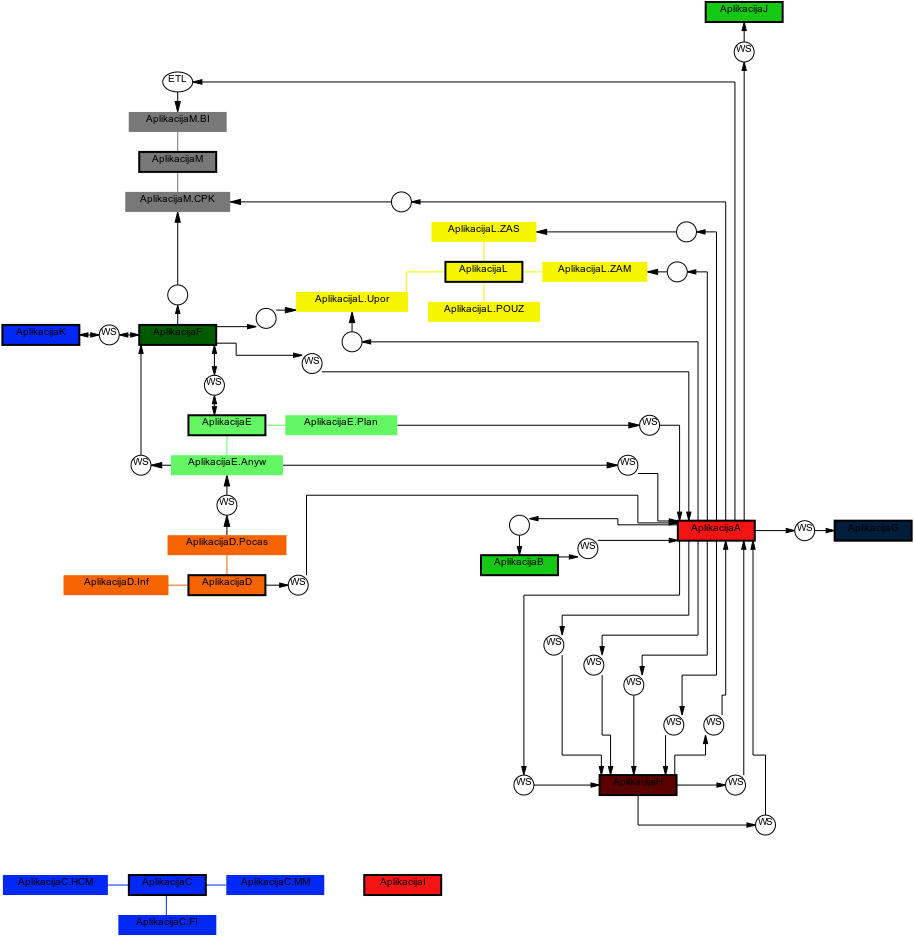
app-graphs uses ogdf-python which in turn uses OGDF. app-graphs draws a graph from data given in .xlsx format. Nodes are generated from given aplications and components as well as from interfaces, where interface represents node and two edges conected to it and source/target node. Edges are generated between aplication and its components and from directed edges provided.
Installation
First we need to install OGDF. This is done by downloading OGDF, unziping it and calling following commands in bash:
foo@bar:~ogdf$ mkdir ogdf-debug ogdf-release
foo@bar:~ogdf$ cd ogdf-debug
foo@bar:~ogdf/ogdf-debug$ cmake ..
foo@bar:~ogdf/ogdf-debug$ ccmake ..
Configure BUILD_SHARED_LIB=ON and CMAKE_BUILD_TYPE=Debug when calling last line.
foo@bar:~ogdf/ogdf-debug$ make
Repeat above for release (debug <-> release). And as a last step add ogdf to path.
foo@bar:~ogdf$ export OGDF_BUILD_DIR=~/ogdf/ogdf-debug
As a last step install app-graphs.
pip install app-graphs
Usage
from app_graphs import graph

# Define graph instance
my_graph = graph()

# Read data from filename_aplikacije and vmesniki_sheet_name
my_graph.read(filename_apps = r'example.xlsx',              # name of file containing information about apps and components
            apps_sheet_name = 'Aplication list',            # name of sheet in above file
            filename_interfaces = r'example.xlsx',          # name of file containing information about interfaces
            interfaces_sheet_name = 'Integration list',     # name of sheet in above file
            apps = 'Aplications',                           # name of apps names column
            components = 'Components',                      # name of components names column
            source = 'Source',                              # name of interface's source app/component column
            target = 'Target',                              # name of interface's target app/component column
            interface_direction = 'Direction',              # name of interface direction column
            technologies = 'Technology',                    # name of technologies names column
            colors = 'Colors'                               # name of colors column
            )

# Uses ogdf-python to generate graph
my_graph.draw()

# Saves genereted graph in desired format
my_graph.save_svg('test-graph')
1 maintainer

Metadata
1 maintainer
Release files for app-graphs 0.0.2
For a detailed explanation of source distributions (sdists) and built distributions (wheels), please see the package formats documentation.
Source distribution (sdist)
| File | Size | Uploaded | |
|---|---|---|---|
| app-graphs-0.0.2.tar.gz | 16.9 kB | Details |
Built distribution (wheel)
| File | Interpreter | ABI | Platform | Reset |
|---|---|---|---|---|
| app_graphs-0.0.2-py3-none-any.whl | Python 3 | none | any | Details |
Total release size: 33.5 kB
Release files / app-graphs-0.0.2.tar.gz
| Download URL | app-graphs-0.0.2.tar.gz |
|---|---|
| Size | 16.9 kB |
| Tags | Source |
|
SHA-256 checksum How to use checksums |
5cfd191dceda3a2d127df7189b7b957c6a844dc882a40c1ba08928b51cdd58d7
|
|
BLAKE2b-256 checksum How to use checksums |
e569576d2daf50b09d85cbc4f6fc236f7543a3f9071e25b1be8760ad05225b0b
|
| Upload date | |
|
Uploaded using Trusted Publishing? What is trusted publishing? |
No |
| Uploaded via |
twine/3.7.1 importlib_metadata/4.10.1 pkginfo/1.8.2 requests/2.22.0 requests-toolbelt/0.9.1 tqdm/4.62.3 CPython/3.8.10
|
Release files / app_graphs-0.0.2-py3-none-any.whl
| Download URL | app_graphs-0.0.2-py3-none-any.whl |
|---|---|
| Size | 16.6 kB |
| Tags | Python 3 |
|
SHA-256 checksum How to use checksums |
ab31ac12049914288a80d6aae267b89deaa1ed7fd483968cec2effb7ba75410f
|
|
BLAKE2b-256 checksum How to use checksums |
df1d899eeb785fe943a575bfae7894b277bf201d7392ec3f8cc737c698d6153d
|
| Upload date | |
|
Uploaded using Trusted Publishing? What is trusted publishing? |
No |
| Uploaded via |
twine/3.7.1 importlib_metadata/4.10.1 pkginfo/1.8.2 requests/2.22.0 requests-toolbelt/0.9.1 tqdm/4.62.3 CPython/3.8.10
|














