
📱 app-store-review-etl



app-store-review-etl is a Python app to fetch app reviews, generate review analysis and provide report with a Google Sheet.
This app leverages Google Gemini AI model to summarize top liked and disliked features, using VADER, WordCloud and matplotlib library for sentiment analysis and data visualization.
Get your API keys 🔑 ready, then you could analyze app reviews 📊 easily.
Description
As a python programmer with product management and marketing work experience in the past, I am fascinated by automation tools ⚙️ that facilitate work efficiency 🚀 and drive better customer experience 😃.
In 2024, AI productivity tool is not a dream anymore. Both OpenAI and Google provide LLM models for developers to build AI products.
Thus, the highlight of this app is that I used Google Gemini model to generate AI-wise app review analysis. Besides, I chose Google Sheet as a database for flexibility and scalability, then you could use the output Google Sheet as data source for further data visualization with Looker or Tableau.
Features
- 💾 Fetch App Reviews
- 💛 Sentiment Analysis
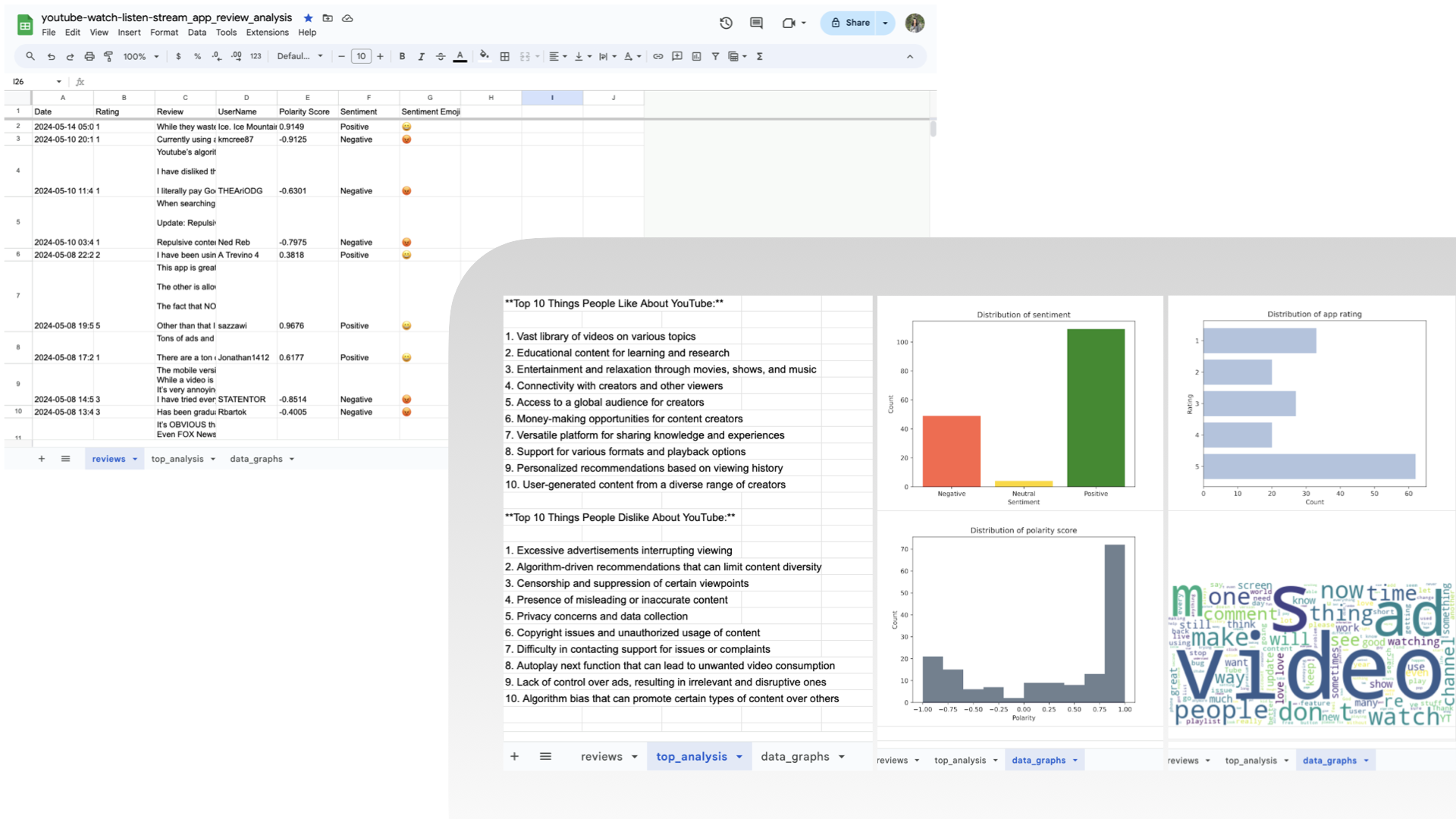
- 🧠 AI-wise Top Liked and Disliked Analysis with Google Gemini Model
- ☁️ WordCloud and Distribution Data Graphs
- 🗂️ Get all the data and analysis in one place - Google Sheet
Example & Result
Output Google Sheet Demo Link : https://docs.google.com/spreadsheets/d/1fp0-D0fspQ4W8nTSor8Oa_WFtEG1kD31JLGzABUJGdo/edit?usp=sharing
Screenshots of the output Google Sheet provide app reviews analysis from app YouTube: Watch, Listen, Stream.
Quickstart
Using the command line interface
-
Clone this repo from GitHub to your local directory
git clone https://github.com/whygreedy/app-store-review-etl.git
-
Change directory to the repo folder just downloaded
cd app-store-review-etl
-
Create a new project on Google Developers Console. Enable Google Drive API and Google Sheets API, and set up OAuth consent screen.
-
Add
credentials_gspread.jsonfile that includes your OAuth Client Credential to the repo folder -
Add
.envfile that includes your Google Gemini API key and the filepath to OAuth Client Credential to the repo folder# your .env file CREDENTIALS_GSPREAD_FILE_PATH='../credentials_gspread.json' GEMINI_API_KEY=<your Gemini API Key> -
Create venv
virtualenv venv -
Activate venv
source venv/bin/activate
-
Install dependencies
pip install -r requirements.txt
-
Change directory to the folder that includes main.py file
cd app_store_review_etl
-
Execute main.py file
python3 main.py -c <app_country> -n <app_name> -d <date_after> -m <ai_model>
By default, we fetch YouTube app store reviews posted after 2024/1/1 ,and using Gemini 1.0 pro model. You could adjust arguments at your needs.
For example, you could fetch UberEats app store reviews posted after 2023/12/1 by the following command.
python3 main.py -n uber-eats-food-delivery -d 2023-12-1
Using app-store-review-etl in a Python script
-
Create venv
virtualenv venv -
Activate venv
source venv/bin/activate
-
Install from PyPI with pip
pip install app-store-review-etl
-
Create a new project on Google Developers Console. Enable Google Drive API and Google Sheets API, and set up OAuth consent screen.
-
Add
credentials_gspread.jsonfile that includes your OAuth Client Credential -
Add
.envfile that includes your Google Gemini API key and the filepath to OAuth Client Credential# your .env file CREDENTIALS_GSPREAD_FILE_PATH='../credentials_gspread.json' GEMINI_API_KEY=<your Gemini API Key> -
Import the package and execute it with a Python Script
# your Python script
from app_store_review_etl import main

main.main()
1 maintainer

Metadata
1 maintainer
Release files for app-store-review-etl 0.1.1
For a detailed explanation of source distributions (sdists) and built distributions (wheels), please see the package formats documentation.
Source distribution (sdist)
| File | Size | Uploaded | |
|---|---|---|---|
| app_store_review_etl-0.1.1.tar.gz | 13.1 kB | Details |
Built distribution (wheel)
| File | Interpreter | ABI | Platform | Reset |
|---|---|---|---|---|
| app_store_review_etl-0.1.1-py3-none-any.whl | Python 3 | none | any | Details |
Total release size: 28.2 kB
Release files / app_store_review_etl-0.1.1.tar.gz
| Download URL | app_store_review_etl-0.1.1.tar.gz |
|---|---|
| Size | 13.1 kB |
| Tags | Source |
|
SHA-256 checksum How to use checksums |
6a90244ece055d337bf4e58bc9aabad600f5da7df78776461907f0cc299dc8e1
|
|
BLAKE2b-256 checksum How to use checksums |
d09875a7b70955a2be3ba00bc3c90ccb597cb8fce6a9fc82a302d932d7f33c2e
|
| Upload date | |
|
Uploaded using Trusted Publishing? What is trusted publishing? |
No |
| Uploaded via |
twine/5.0.0 CPython/3.9.7
|
Release files / app_store_review_etl-0.1.1-py3-none-any.whl
| Download URL | app_store_review_etl-0.1.1-py3-none-any.whl |
|---|---|
| Size | 15.2 kB |
| Tags | Python 3 |
|
SHA-256 checksum How to use checksums |
21efd20b50746afeb978b366b77e4365274a03ce2b8ce9f4ec17b5f8c9a2571e
|
|
BLAKE2b-256 checksum How to use checksums |
0c9143c5d514b1046f5d66404e1e1e1c7fea11f34d9e46a9a2e45256e8160164
|
| Upload date | |
|
Uploaded using Trusted Publishing? What is trusted publishing? |
No |
| Uploaded via |
twine/5.0.0 CPython/3.9.7
|














