
Use FastAPI like Django

Project description
App Boot
English | 中文翻译
AppBoot is a FastAPI project template designed to provide a Django-like structure and development experience.
Technology Stack
- Python 3.9+
- FastAPI
- SQLAlchemy 2.0+
- Pydantic
- Uvicorn
Quick Start
Start a New Project
# Create the project directory
mkdir mysite
cd mysite
# Create a virtual environment to isolate our package dependencies locally
python3 -m venv env
source env/bin/activate  # On Windows use `env\\Scripts\\activate`
# Install appboot and aiosqlite into the virtual environment
pip install appboot aiosqlite
# Set up a new project with a single application
appboot startproject mysite .  # Note the trailing '.' character
# Start the server, application running on http://127.0.0.1:8000
python manage.py runserver
Start a New App 'polls'
python manage.py startapp polls
Create a Model
Define a Question model in polls/models.py.
from datetime import datetime
from sqlalchemy.orm import Mapped
from appboot import models

class Question(models.Model):
    question_text: Mapped[str]
    pub_date: Mapped[datetime]
Create a Schema
Define a QuestionSchema schema in polls/schema.py.
from appboot.schema import ModelSchema
from polls.models import Question

class QuestionSchema(ModelSchema):
    class Meta:
        model = Question
Write CRUD API
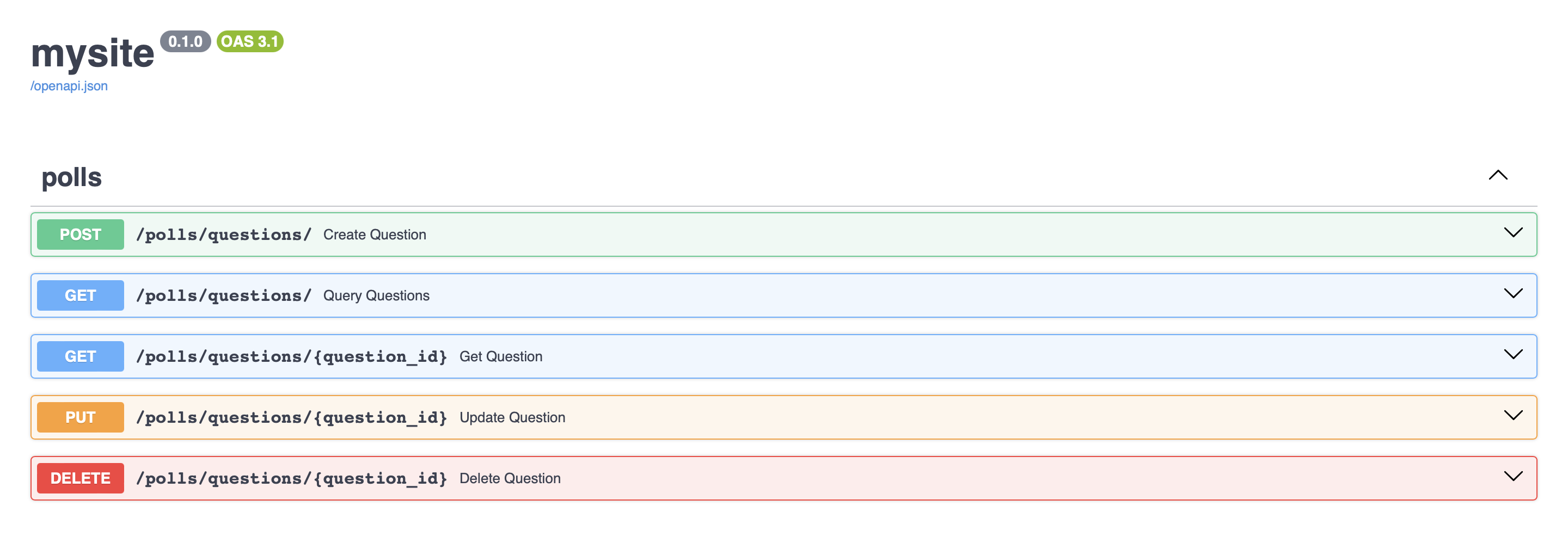
Write the CRUD API in polls/views.py.
from fastapi import APIRouter, Depends
from appboot.db import create_tables
from appboot.params import QuerySchema, QueryDepends, PaginationResult
from polls.models import Question
from polls.schema import QuestionSchema

router = APIRouter(dependencies=[Depends(create_tables)])

@router.post('/questions/', response_model=QuestionSchema)
async def create_question(question: QuestionSchema):
    return await question.create()

@router.get('/questions/', response_model=PaginationResult[QuestionSchema])
async def query_questions(query: QuerySchema = QueryDepends()):
    return await query.query_result(Question.objects.clone())

@router.get('/questions/{question_id}', response_model=QuestionSchema)
async def get_question(question_id: int):
    return await Question.objects.get(question_id)

@router.put('/questions/{question_id}', response_model=QuestionSchema)
async def update_question(question_id: int, question: QuestionSchema):
    instance = await Question.objects.get(question_id)
    return await question.update(instance)

@router.delete('/questions/{question_id}', response_model=QuestionSchema)
async def delete_question(question_id: int):
    instance = await Question.objects.get(question_id)
    return await instance.delete()
Configure API Routes
Wire up the API URLs in mysite/urls.py.
from fastapi import APIRouter
from polls.views import router

root_router = APIRouter()
root_router.include_router(router, prefix='/polls', tags=['polls'])
Testing Our API
python manage.py runserver
We can now access our API directly through the browser at http://127.0.0.1:8000/docs/.
Create Complex Query Schema
Create a QuestionQuerySchema for complex queries in polls/schema.py.
from typing import Optional
from appboot.params import QuerySchema
from appboot.filters import EqField, ContainsField

class QuestionQuerySchema(QuerySchema):
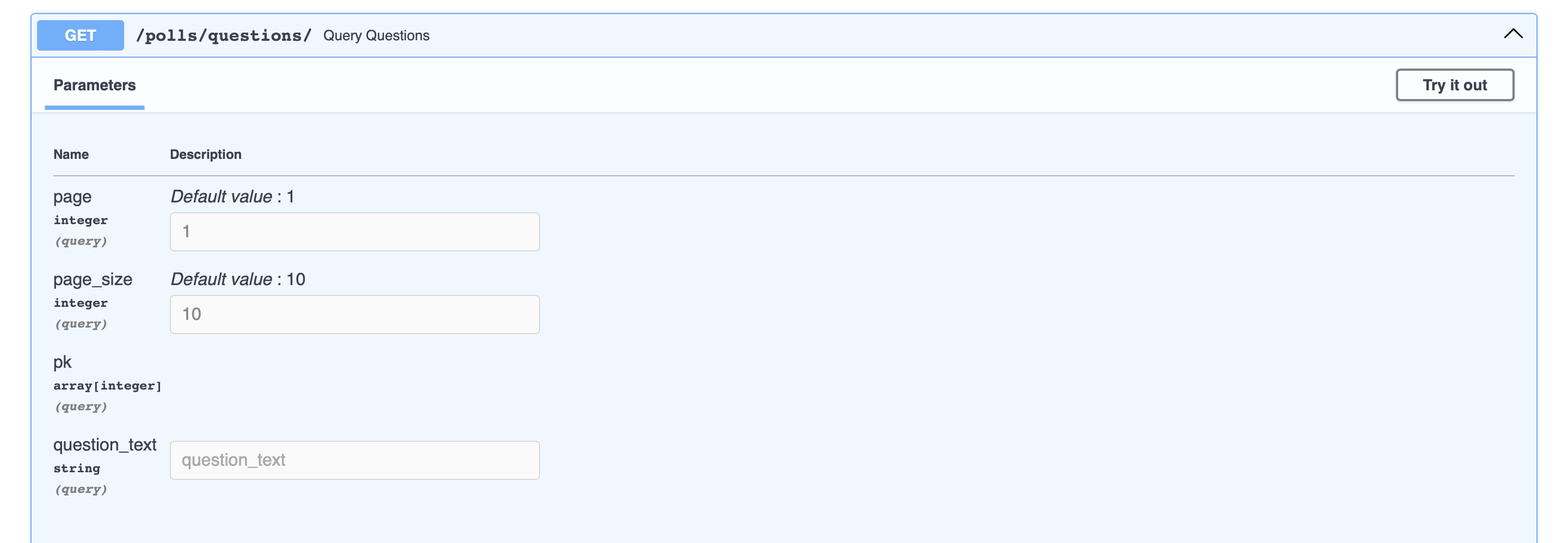
    ids: Optional[list[int]] = EqField(None, alias='pk', columns='id')  # Query questions by ID list
    question_text: Optional[str] = ContainsField(None)  # Fuzzy query question_text
Replace QuerySchema with QuestionQuerySchema in polls/views.py, refresh the docs in the browser, and you will see two new query parameters in the query questions API.
Try Out Examples
Go to Examples for more examples.
Release history Release notifications | RSS feed


Download files
Download the file for your platform. If you're not sure which to choose, learn more about installing packages.
Source Distribution
Built Distribution
Filter files by name, interpreter, ABI, and platform.
If you're not sure about the file name format, learn more about wheel file names.
Copy a direct link to the current filters
File details
Details for the file appboot-0.3.1.tar.gz.
File metadata
- Download URL: appboot-0.3.1.tar.gz
- Upload date:
- Size: 23.6 kB
- Tags: Source
- Uploaded using Trusted Publishing? No
- Uploaded via: poetry/1.7.1 CPython/3.12.4 Darwin/23.5.0
File hashes
| Algorithm | Hash digest | |
|---|---|---|
| SHA256 |
6f3471651e0a7dfca611c811edbe58c2a3dc049d75aebecd350ede5f0fdd2de9
|
|
| MD5 |
9ba1c6fa34f94932d3c7cfe393c713cc
|
|
| BLAKE2b-256 |
6fead178c209f8798279c52c309134a86e1fa9d27e91799f12bdc10b6607a95f
|
File details
Details for the file appboot-0.3.1-py3-none-any.whl.
File metadata
- Download URL: appboot-0.3.1-py3-none-any.whl
- Upload date:
- Size: 30.1 kB
- Tags: Python 3
- Uploaded using Trusted Publishing? No
- Uploaded via: poetry/1.7.1 CPython/3.12.4 Darwin/23.5.0
File hashes
| Algorithm | Hash digest | |
|---|---|---|
| SHA256 |
f3360e42b5560c3abefffc79bbb832d670419982f09e40aa009aa6f633914d5f
|
|
| MD5 |
d7a2eb4dbc20b5c9325081d5d7b06079
|
|
| BLAKE2b-256 |
5cf5d53d7c71d2aa09bba28ab0f78b7539b45678133d35b6c06964d034758921
|






