
Add your description here

Project description
appkit-assistant


AI assistant component for Reflex applications with MCP server integration.
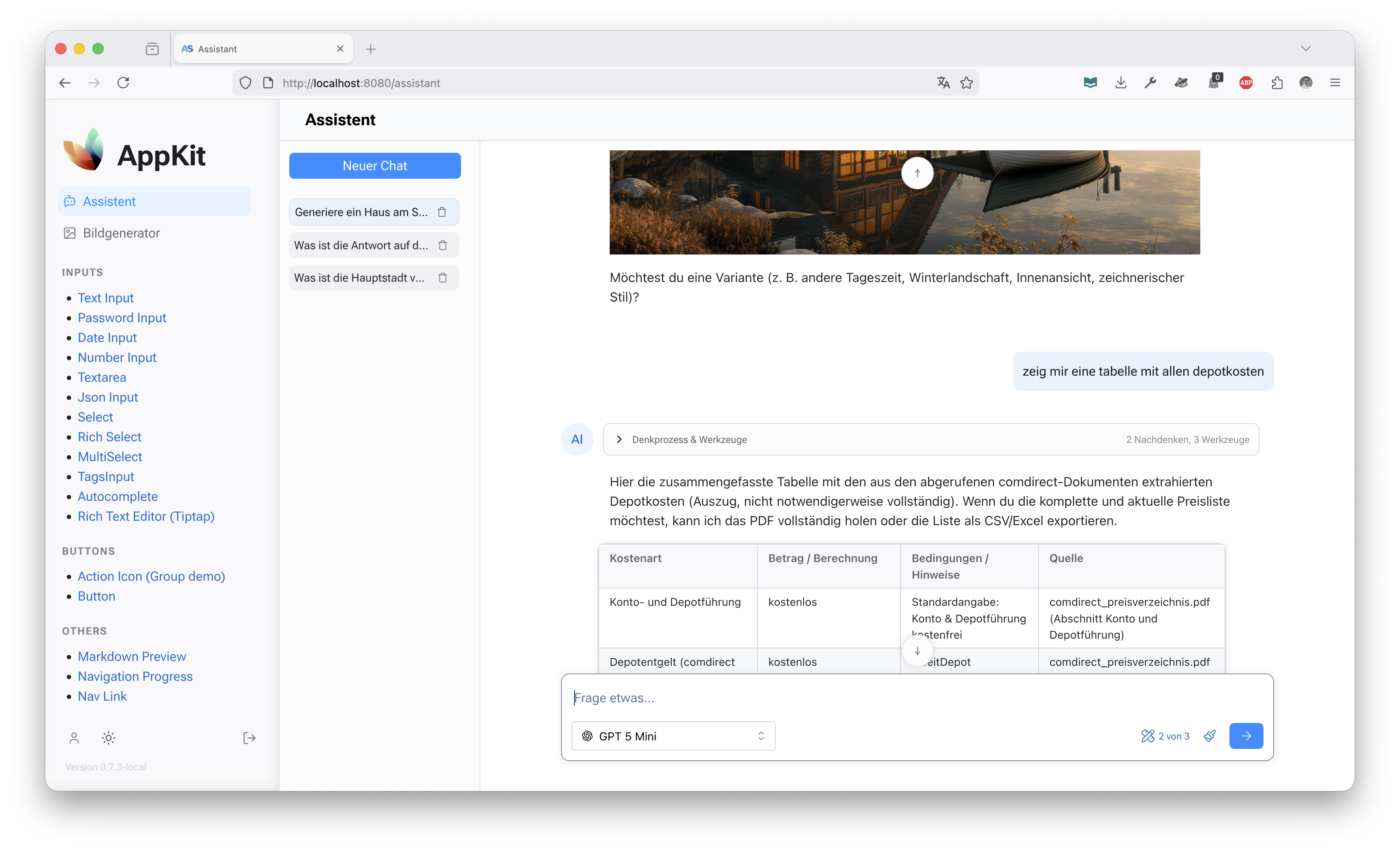
appkit-assistant provides a complete conversational AI interface built on Reflex, featuring OpenAI and Perplexity integrations, Model Context Protocol (MCP) server management, and secure credential handling. It includes both backend processing services and ready-to-use UI components for building AI-powered applications.
✨ Features
- Multi-Model Support - OpenAI Chat Completions, OpenAI Responses API, Perplexity, and fallback Lorem Ipsum processor
- MCP Server Integration - Manage and connect to Model Context Protocol servers as tools
- System Prompt Management - Versioned system prompts with admin editor interface
- Secure Credential Management - Encrypted storage and handling of API keys and server credentials
- Reflex UI Components - Pre-built assistant interface with composer, thread management, and message display
- Streaming Responses - Real-time streaming of AI responses with chunked content
- Thread Management - Persistent conversation threads with state management
🚀 Installation
As Part of AppKit Workspace
If you're using the full AppKit workspace:
git clone https://github.com/jenreh/appkit.git
cd appkit
uv sync
Standalone Installation
Install from PyPI:
pip install appkit-assistant
Or with uv:
uv add appkit-assistant
Dependencies
appkit-commons(shared utilities)openai>=2.3.0(OpenAI API client)
🏁 Quick Start
Basic Setup
- Configure your API keys in your application's configuration:
from appkit_assistant.configuration import AssistantConfig

# In your app configuration
assistant_config = AssistantConfig(
    openai_api_key="your-openai-key",
    perplexity_api_key="your-perplexity-key",
    # Optional: custom OpenAI base URL
    openai_base_url="https://api.openai.com/v1"
)
- Register processors with the ModelManager:
from appkit_assistant.backend.model_manager import ModelManager
from appkit_assistant.backend.processors.openai_chat_completion_processor import OpenAIChatCompletionProcessor
from appkit_assistant.backend.processors.perplexity_processor import PerplexityProcessor

manager = ModelManager()
manager.register_processor("openai", OpenAIChatCompletionProcessor(assistant_config))
manager.register_processor("perplexity", PerplexityProcessor(assistant_config))
- Use the assistant component in your Reflex app:
import reflex as rx
from appkit_assistant.components import Assistant

def assistant_page():
    return rx.container(
        Assistant(),
        height="100vh"
    )
📖 Usage
Model Management
The ModelManager singleton handles all AI processors and models:
from appkit_assistant.backend.model_manager import ModelManager

manager = ModelManager()

# Get all available models
models = manager.get_all_models()

# Get a specific model
model = manager.get_model("gpt-4")

# Set default model
manager.set_default_model("gpt-4")
Processing Messages
Process conversations using the registered processors:
from appkit_assistant.backend.models import Message, MessageType

messages = [
    Message(role="user", content="Hello, how are you?", type=MessageType.TEXT)
]

async for chunk in manager.get_processor_for_model("gpt-4").process(messages, "gpt-4"):
    print(f"Received: {chunk.content}")
MCP Server Management
Manage MCP servers for tool integration:
from appkit_assistant.backend.models import MCPServer

mcp_server = MCPServer(
    name="my-server",
    command="python",
    args=["-m", "my_mcp_server"],
    headers={"Authorization": "Bearer token"}
)

# Use in processing
async for chunk in processor.process(messages, "gpt-4", mcp_servers=[mcp_server]):
    # Handle response with MCP tools
    pass
UI Components
Assistant Interface
The main Assistant component provides a complete chat interface:
from appkit_assistant.components import Assistant

def chat_page():
    return Assistant()
Individual Components
Use individual components for custom layouts:
import reflex as rx
from appkit_assistant.components import ThreadList, composer

def custom_assistant():
    return mn.stack(
        ThreadList(),
        composer(),
        spacing="4"
    )
MCP Server Management UI
Display and manage MCP servers:
from appkit_assistant.components import mcp_servers_table

def servers_page():
    return mcp_servers_table()
System Prompt Editor
Admin interface for managing versioned system prompts:
from appkit_assistant.components.system_prompt_editor import system_prompt_editor

def prompt_editor_page():
    return system_prompt_editor()
🔧 Configuration
AssistantConfig
Configure API keys and settings:
from appkit_assistant.configuration import AssistantConfig

config = AssistantConfig(
    openai_api_key="sk-...",
    openai_base_url="https://custom.openai.endpoint/v1",
    perplexity_api_key="pplx-...",
    google_api_key="AIza..."  # For future Google integrations
)
Processor Registration
Register processors based on available credentials:
from appkit_assistant.backend.processors import (
    OpenAIChatCompletionProcessor,
    PerplexityProcessor,
    LoremIpsumProcessor
)

manager = ModelManager()

if config.openai_api_key:
    manager.register_processor("openai", OpenAIChatCompletionProcessor(config))

if config.perplexity_api_key:
    manager.register_processor("perplexity", PerplexityProcessor(config))

# Always available fallback
manager.register_processor("lorem", LoremIpsumProcessor())
📋 API Reference
Core Classes
ModelManager- Singleton model and processor registryProcessor- Abstract base for AI processorsAIModel- Model metadata and configurationMessage- Conversation message structureMCPServer- MCP server configuration
Component API
Assistant- Complete assistant interfacecomposer- Message input componentThreadList- Conversation thread listMessageComponent- Individual message displaymcp_servers_table- MCP server management tablesystem_prompt_editor- Admin interface for system prompts
State Management
ThreadState- Individual thread stateThreadListState- Thread list management
🔒 Security
[!IMPORTANT] API keys and MCP server credentials are handled securely using the appkit-commons configuration system. Never hardcode secrets in your code.
- Use
SecretStrfor sensitive configuration values - Credentials are encrypted at rest when stored in the database
- MCP server headers support encrypted storage
🤝 Integration Examples
With AppKit User Management
Combine with appkit-user for authenticated assistants:
from appkit_user import authenticated, requires_role

@authenticated()
@requires_role("assistant_user")
def protected_assistant_page():
    return assistant.Assistant()
Custom Processor Implementation
Implement your own AI processor:
from appkit_assistant.backend.processor import Processor
from appkit_assistant.backend.models import AIModel, Chunk, Message

class CustomProcessor(Processor):
    def get_supported_models(self):
        return {
            "custom-model": AIModel(
                id="custom-model",
                text="Custom AI Model",
                icon="🤖"
            )
        }

    async def process(self, messages, model_id, files=None, mcp_servers=None):
        # Your AI processing logic here
        yield Chunk(content="Response from custom model", type="text")
📚 Related Components
- appkit-mantine - UI components used in the assistant interface
- appkit-user - User authentication and authorization
- appkit-commons - Shared utilities and configuration
Release history Release notifications | RSS feed


Download files
Download the file for your platform. If you're not sure which to choose, learn more about installing packages.
Source Distribution
Built Distribution
Filter files by name, interpreter, ABI, and platform.
If you're not sure about the file name format, learn more about wheel file names.
Copy a direct link to the current filters
File details
Details for the file appkit_assistant-1.10.1.tar.gz.
File metadata
- Download URL: appkit_assistant-1.10.1.tar.gz
- Upload date:
- Size: 1.8 MB
- Tags: Source
- Uploaded using Trusted Publishing? No
- Uploaded via: uv/0.11.13 {"installer":{"name":"uv","version":"0.11.13","subcommand":["publish"]},"python":null,"implementation":{"name":null,"version":null},"distro":{"name":"Ubuntu","version":"24.04","id":"noble","libc":null},"system":{"name":null,"release":null},"cpu":null,"openssl_version":null,"setuptools_version":null,"rustc_version":null,"ci":true}
File hashes
| Algorithm | Hash digest | |
|---|---|---|
| SHA256 |
a4567aaa1ce4841249da1fb900e8308d774c0379f74688378a31b5a932d16d6c
|
|
| MD5 |
43b3d94e91cf74289951a54a088f2504
|
|
| BLAKE2b-256 |
5f31edcc2b8f4cf05355729ccfc9e878a75ff92b3efda74107849861d59e6075
|
File details
Details for the file appkit_assistant-1.10.1-py3-none-any.whl.
File metadata
- Download URL: appkit_assistant-1.10.1-py3-none-any.whl
- Upload date:
- Size: 211.9 kB
- Tags: Python 3
- Uploaded using Trusted Publishing? No
- Uploaded via: uv/0.11.13 {"installer":{"name":"uv","version":"0.11.13","subcommand":["publish"]},"python":null,"implementation":{"name":null,"version":null},"distro":{"name":"Ubuntu","version":"24.04","id":"noble","libc":null},"system":{"name":null,"release":null},"cpu":null,"openssl_version":null,"setuptools_version":null,"rustc_version":null,"ci":true}
File hashes
| Algorithm | Hash digest | |
|---|---|---|
| SHA256 |
cbf591e9862c5fba418b31ecc4a808993a197ab5fe2f8996cdc07b8e8ea3052c
|
|
| MD5 |
d5340d52c9e8616de5e848f63732863e
|
|
| BLAKE2b-256 |
415f198a108e1d6868d23d86f2ca8c8c68788db1910b6be30aaf7a3ea9198393
|






