
appkit-imagecreator


Multi-provider AI image generation component for Reflex applications.
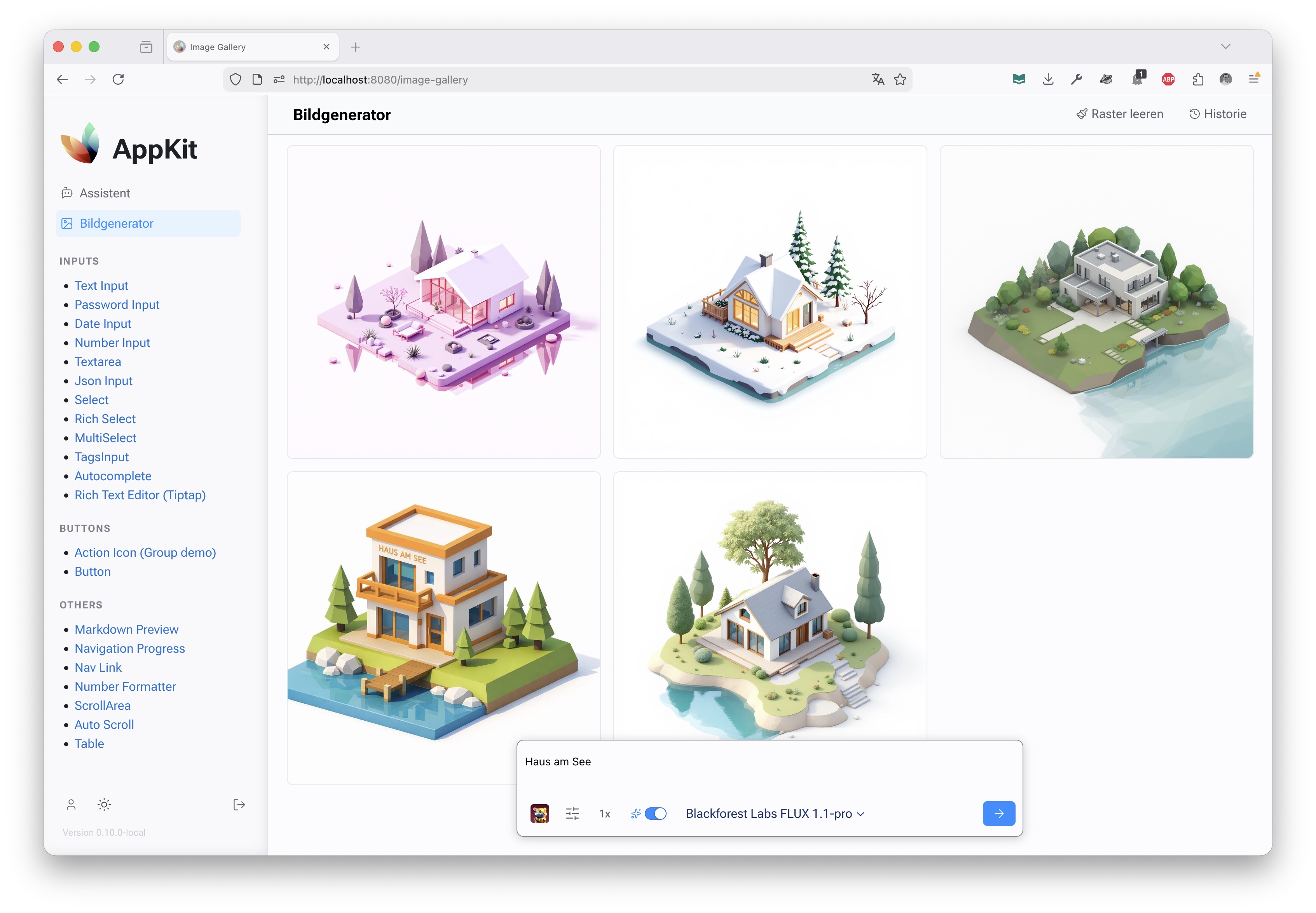
appkit-imagecreator provides a unified interface for generating images using multiple AI providers including Google Gemini (Nano Banana), Azure OpenAI (GPT-Image), and Black Forest Labs (FLUX via Azure). It includes a complete Reflex UI for image generation workflows with prompt enhancement, parameter controls, and image management features.
✨ Features
- Multi-Provider Support - Google Nano Banana (Gemini 2.5/3.0), Azure OpenAI GPT-Image-1, Black Forest Labs FLUX (Azure)
- Unified API - Consistent interface across all image generation providers
- Prompt Enhancement - AI-powered prompt improvement using GPT models
- Interactive UI - Complete image generation interface with scrollable grid, floating prompt bar, and history drawer
- Parameter Control - Configurable image dimensions, steps, negative prompts, and seeds
- Image Management - Download, copy, and organize generated images
- Error Handling - Robust error handling and user feedback
- Streaming Support - Real-time generation progress and results
🚀 Installation
As Part of AppKit Workspace
If you're using the full AppKit workspace:
git clone https://github.com/jenreh/appkit.git
cd appkit
uv sync
Standalone Installation
Install from PyPI:
pip install appkit-imagecreator
Or with uv:
uv add appkit-imagecreator
Dependencies
google-genai>=1.26.0(Google Gemini API)httpx>=0.28.1(HTTP client)appkit-commons(shared utilities)openai>=2.3.0(OpenAI API)
🏁 Quick Start
Basic Configuration
Configure API keys for your preferred providers:
from appkit_imagecreator.configuration import ImageGeneratorConfig

config = ImageGeneratorConfig(
    google_api_key="secret:google_api_key",
    openai_api_key="secret:openai_api_key",
    blackforestlabs_api_key="secret:blackforestlabs_api_key",
    tmp_dir="./generated_images",  # Optional: custom temp directory
)
Using the Image Generator
Generate images using the registry:
from appkit_imagecreator.backend.generator_registry import generator_registry
from appkit_imagecreator.backend.models import GenerationInput

# Get a generator (e.g., Azure GPT-Image-1 Mini)
generator = generator_registry.get("azure-gpt-image-1-mini")

# Create generation input
input_data = GenerationInput(
    prompt="A beautiful sunset over mountains",
    width=1024,
    height=1024,
    negative_prompt="blurry, low quality",
    steps=4,
    enhance_prompt=True,
)

# Generate image
response = await generator.generate(input_data)
if response.state == "succeeded":
    print(f"Generated images: {response.images}")
else:
    print(f"Error: {response.error}")
Using the UI Component
Add the image generator page to your Reflex app:
import reflex as rx
from appkit_imagecreator.pages import image_generator_page

app = rx.App()
app.add_page(image_generator_page, title="Image Generator", route="/images")
📖 Usage
Generator Registry
The registry manages all available image generators:
from appkit_imagecreator.backend.generator_registry import generator_registry

# List all generators
generators = generator_registry.list_generators()
print(generators)
# [
#   {"id": "azure-gpt-image-1-mini", "label": "OpenAI GPT-Image-1 mini (Azure)"},
#   {"id": "nano-banana", "label": "Google Nano Banana"},
#   ...
# ]

# Get a specific generator
generator = generator_registry.get("nano-banana")

# Get default generator
default_gen = generator_registry.get_default_generator()
Generation Input
Configure image generation parameters:
from appkit_imagecreator.backend.models import GenerationInput

input_data = GenerationInput(
    prompt="A cyberpunk city at night with neon lights",
    width=1024,  # Image width
    height=1024,  # Image height
    negative_prompt="blurry, distorted, ugly",  # What to avoid
    steps=4,  # Generation steps (higher = better quality)
    n=1,  # Number of images to generate
    seed=42,  # Random seed for reproducible results
    enhance_prompt=True,  # Use AI to improve the prompt
)
Custom Generators
Implement your own image generator:
from appkit_imagecreator.backend.models import (
    ImageGenerator,
    GenerationInput,
    ImageGeneratorResponse,
    ImageResponseState,
)


class CustomGenerator(ImageGenerator):
    def __init__(self, api_key: str, backend_server: str):
        super().__init__(
            id="custom-gen",
            label="Custom Generator",
            model="custom-model",
            api_key=api_key,
            backend_server=backend_server,
        )

    async def _perform_generation(
        self, input_data: GenerationInput
    ) -> ImageGeneratorResponse:
        # Your generation logic here
        # Save image to temp and return URL
        image_url = await self._save_image_to_tmp_and_get_url(
            image_bytes, "custom", "png"
        )
        return ImageGeneratorResponse(
            state=ImageResponseState.SUCCEEDED, images=[image_url]
        )


# Register your generator
generator_registry.register(CustomGenerator(api_key, backend_server))
UI Components
Main Page
The complete image generator interface:
from appkit_imagecreator.pages import image_generator_page

# Add to your app
app.add_page(image_generator_page, route="/image-generator")
Individual Components
Use specific UI components:
from appkit_imagecreator.components.images import image_grid
from appkit_imagecreator.components.prompt import prompt_input_bar
from appkit_imagecreator.components.history import history_drawer


def custom_layout():
    return rx.box(
        image_grid(),  # Image display grid
        prompt_input_bar(),  # Floating generation controls
        history_drawer(),  # Sidebar history
    )
🔧 Configuration
ImageGeneratorConfig
Configure API keys and settings:
from appkit_imagecreator.configuration import ImageGeneratorConfig

config = ImageGeneratorConfig(
    google_api_key="secret:google_gemini_key",  # For Nano Banana (Gemini) models
    openai_api_key="secret:openai_key",  # For Azure GPT-Image models
    blackforestlabs_api_key="secret:bfl_key",  # For Azure Flux models
    openai_base_url="https://api.openai.com/v1",  # Optional custom endpoint
    tmp_dir="./tmp/images",  # Temp directory for generated images
)
Provider-Specific Setup
Google (Nano Banana / Gemini)
Uses the Google GenAI SDK. Configuration uses google_api_key.
Available Generators:
nano-banana: Google Nano Banana (Gemini 2.5 Flash Image)nano-banana-pro: Google Nano Banana Pro (Gemini 3 Pro Image Preview)
generator = generator_registry.get("nano-banana")
OpenAI (Azure)
Configured for Azure OpenAI endpoints via openai_api_key and openai_base_url.
Available Generators:
azure-gpt-image-1-mini: OpenAI GPT-Image-1 mini (Azure)azure-gpt-image-1.5: OpenAI GPT-Image-1.5 (Azure)FLUX.1-Kontext-pro: Blackforest Labs FLUX.1-Kontext-pro (via compatible endpoint)
gpt_gen = generator_registry.get("azure-gpt-image-1-mini")
Black Forest Labs (Azure)
Uses blackforestlabs_api_key and blackforestlabs_base_url.
Available Generators:
azure-flux-2-pro: Blackforest Labs FLUX.2-pro (Azure)
flux_gen = generator_registry.get("azure-flux-2-pro")
📋 API Reference
Core Classes
ImageGenerator- Abstract base class for image generatorsGenerationInput- Input parameters for image generationImageGeneratorResponse- Response containing generated images or errorsImageGeneratorRegistry- Registry managing all generators
Generators
NanoBananaImageGenerator- Google Nano Banana (Gemini) integrationGoogleImageGenerator- Base Google GenAI integration (for Nano Banana)OpenAIImageGenerator- OpenAI/Azure GPT-Image integrationBlackForestLabsImageGenerator- Black Forest Labs FLUX integration
Component API
image_generator_page()- Complete image generation pageimage_grid()- Main scrollable image gridprompt_input_bar()- Floating input with generation controls (size, style, quality)history_drawer()- Slide-out drawer showing generation history
State Management
CopyLocalState- State for image copy/download operations
🔒 Security
- Use
SecretStrfor API key configuration - Secrets resolved from environment variables or Key Vault
- Temporary images stored securely with unique filenames
- No sensitive data logged in generation processes
🤝 Integration Examples
With AppKit User Management
Restrict image generation to authenticated users:
from appkit_user import authenticated, requires_role
from appkit_imagecreator.pages import image_generator_page


@authenticated()
@requires_role("image_generator")
def protected_image_page():
    return image_generator_page()
Custom Prompt Enhancement
Override prompt enhancement logic:
class CustomGenerator(OpenAIImageGenerator):
    async def _enhance_prompt(self, prompt: str) -> str:
        # Your custom enhancement logic
        enhanced = await self.client.chat.completions.create(
            model="gpt-4",
            messages=[
                {"role": "user", "content": f"Enhance this image prompt: {prompt}"}
            ],
        )
        return enhanced.choices[0].message.content
Batch Generation
Generate multiple images with different parameters:
async def batch_generate(prompts: list[str]) -> list[str]:
    generator = generator_registry.get("azure-gpt-image-1-mini")
    images = []

    for prompt in prompts:
        input_data = GenerationInput(prompt=prompt, n=1)
        response = await generator.generate(input_data)
        if response.state == "succeeded":
            images.extend(response.images)

    return images
📚 Related Components
- appkit-mantine - UI components used in the image generator interface
- appkit-user - User authentication for protected image generation
- appkit-commons - Shared utilities and configuration
- appkit-assistant - AI assistant that can integrate with image generation
1 maintainer

Metadata
1 maintainer
Release files for appkit-imagecreator 1.16.1
For a detailed explanation of source distributions (sdists) and built distributions (wheels), please see the package formats documentation.
Source distribution (sdist)
| File | Size | Uploaded | |
|---|---|---|---|
| appkit_imagecreator-1.16.1.tar.gz | 825.9 kB | Details |
Built distribution (wheel)
| File | Interpreter | ABI | Platform | Reset |
|---|---|---|---|---|
| appkit_imagecreator-1.16.1-py3-none-any.whl | Python 3 | none | any | Details |
Total release size: 883.4 kB
Release files / appkit_imagecreator-1.16.1.tar.gz
| Download URL | appkit_imagecreator-1.16.1.tar.gz |
|---|---|
| Size | 825.9 kB |
| Tags | Source |
|
SHA-256 checksum How to use checksums |
307fd6e298b87cfd09edea497c9d0c5395ab07f832ef07aba2e7229ec27909b1
|
|
BLAKE2b-256 checksum How to use checksums |
3cb176638e5afc4a1b25faa762fd702676bca79a2541024b0b001d52b9a9b842
|
| Upload date | |
|
Uploaded using Trusted Publishing? What is trusted publishing? |
No |
| Uploaded via |
uv/0.12.24 {"installer":{"name":"uv","version":"0.12.24","subcommand":["publish"]},"python":null,"implementation":{"name":null,"version":null},"distro":{"name":"Ubuntu","version":"24.04","id":"noble","libc":null},"system":{"name":null,"release":null},"cpu":null,"openssl_version":null,"setuptools_version":null,"rustc_version":null,"ci":true}
|
Release files / appkit_imagecreator-1.16.1-py3-none-any.whl
| Download URL | appkit_imagecreator-1.16.1-py3-none-any.whl |
|---|---|
| Size | 57.5 kB |
| Tags | Python 3 |
|
SHA-256 checksum How to use checksums |
14ff63269dbe0acd1ae060bb103f1ebd1555878c14ea2450fb709e7b0a21a947
|
|
BLAKE2b-256 checksum How to use checksums |
55f5befdcfd62d589286a83be235bf44a52add62ddf4b35fb49f4e32fc6d51fa
|
| Upload date | |
|
Uploaded using Trusted Publishing? What is trusted publishing? |
No |
| Uploaded via |
uv/0.12.24 {"installer":{"name":"uv","version":"0.12.24","subcommand":["publish"]},"python":null,"implementation":{"name":null,"version":null},"distro":{"name":"Ubuntu","version":"24.04","id":"noble","libc":null},"system":{"name":null,"release":null},"cpu":null,"openssl_version":null,"setuptools_version":null,"rustc_version":null,"ci":true}
|














