
Easy-to-Use Apple Vision wrapper for text extraction and clustering



apple_ocr is a utility for Optical Character Recognition (OCR) that facilitates the extraction of text from images. This Python-based tool is designed to help developers, researchers, and enthusiasts in the field of text extraction and clustering. It leverages a combination of various technologies to achieve this, including the Vision framework provided by Apple.
Features
-
Text Recognition:
apple_ocruses the Vision framework to recognize text within an image. It extracts recognized text and provides information about its confidence levels. -
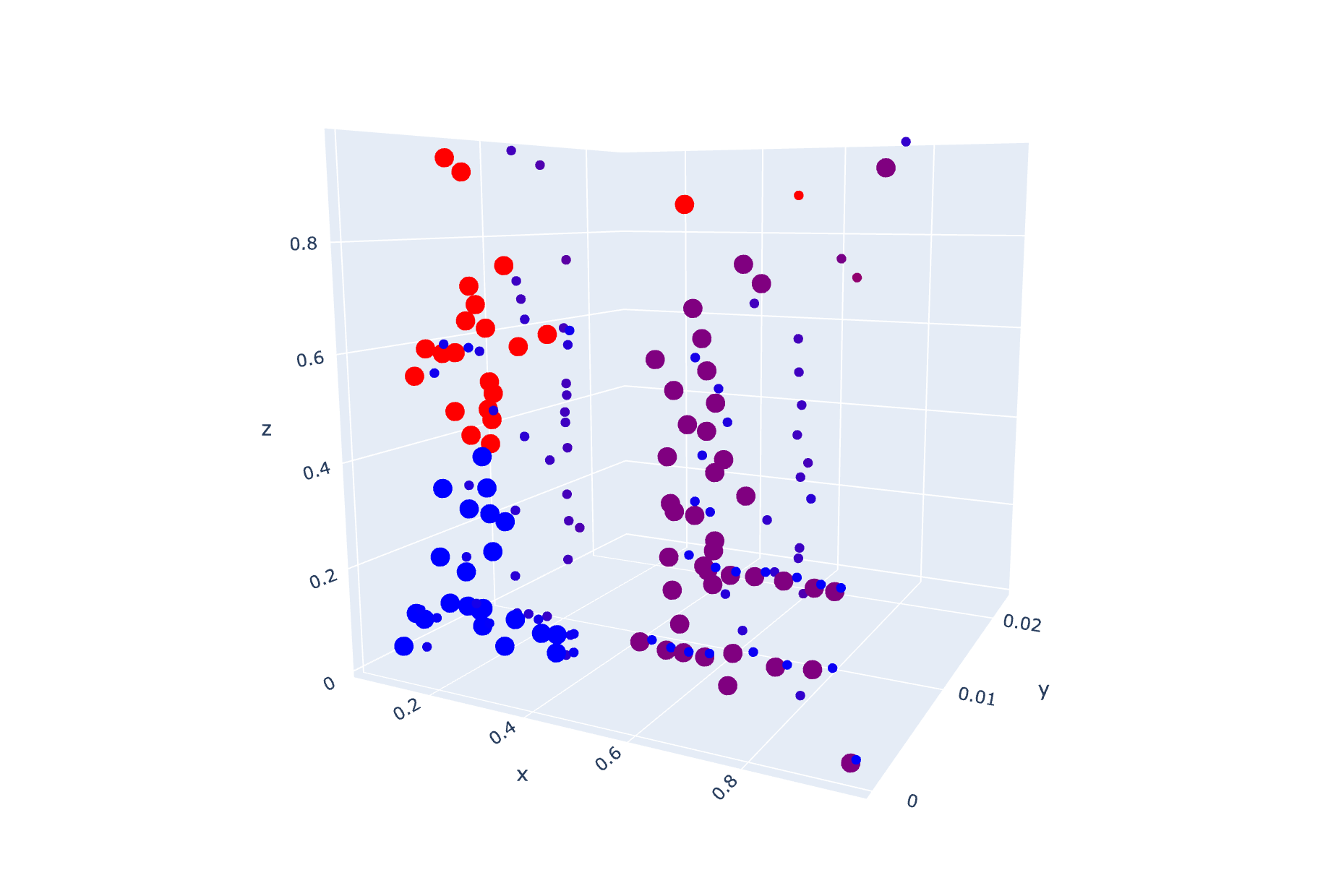
Clustering: The tool can perform K-Means clustering on the extracted data. It groups similar text elements together based on their coordinates.
-
Interactive 3D Visualization:
apple_ocroffers an interactive 3D scatter plot using Plotly, displaying the clustered text elements. This visualization helps users gain insights into the distribution of text and text density.
Dependencies
The script relies on the following Python libraries:
- Torch
- NumPy
- Pandas
- Pillow
- Scikit-learn
- Plotly
- Pyobjc
Usage
Here's how you can use apple_ocr:
-
Installation: Install the required libraries, including
Torch,NumPy,Pandas,Pillow,scikit-learn, andPlotly. -
Initialization: Create an instance of the
OCRclass, providing an image to be processed.
from apple_ocr.ocr import OCR
from PIL import Image

image = Image.open("your_image.png")
ocr_instance = OCR(image=image)
- Text Recognition: Use the
recognizemethod to perform text recognition. It will return a structured DataFrame containing recognized text, bounding box dimensions, text density, and centroid coordinates.
dataframe = ocr_instance.recognize()
- Clustering: Use the
clustermethod to perform K-Means clustering on the recognized text data. This method assigns cluster labels to each data point based on their coordinates.
cluster_labels = ocr_instance.cluster(dataframe, num_clusters=3)
- Visualization: Finally, use the
scattermethod to create an interactive 3D scatter plot. This plot visualizes the clustered text elements, including centroids, text density, and more.
ocr_instance.scatter()
Example
Here's an example of the entire process:
from apple_ocr.ocr import OCR
from PIL import Image

image = Image open("your_image.png")
ocr_instance = OCR(image=image)
dataframe = ocr_instance.recognize()
cluster_labels = ocr_instance.cluster(dataframe, num_clusters=3)
ocr_instance.scatter()
Citing this project
If you use this code in your research, please use the following BibTeX entry.
@misc{louisbrulenaudet2023,
	author = {Louis Brulé Naudet},
	title = {Easy-to-Use Apple Vision wrapper for text extraction and clustering},
	howpublished = {\url{https://github.com/louisbrulenaudet/apple-ocr}},
	year = {2023}
}
Feedback
If you have any feedback, please reach out at louisbrulenaudet@icloud.com.
1 maintainer

Metadata
1 maintainer
Release files for apple-ocr 1.0.8
For a detailed explanation of source distributions (sdists) and built distributions (wheels), please see the package formats documentation.
Source distribution (sdist)
| File | Size | Uploaded | Provenance | Actions |
|---|---|---|---|---|
| apple-ocr-1.0.8.tar.gz | 9.2 kB | Without provenance | Details for apple-ocr-1.0.8.tar.gz |
Built distribution (wheel)
| File | Interpreter | ABI | Platform | Actions Reset |
|---|---|---|---|---|
| apple_ocr-1.0.8-py3-none-any.whl | Python 3 | none | any | Details for apple_ocr-1.0.8-py3-none-any.whl |
Total release size: 18.6 kB
Release files / apple-ocr-1.0.8.tar.gz
| Download URL | apple-ocr-1.0.8.tar.gz |
|---|---|
| Size | 9.2 kB |
| Tags | Source |
|
SHA-256 checksum How to use checksums |
9ede4888ac808d33a6078df019a7fddcff44f7018fe8a481abb24e6aadeb9649
|
|
BLAKE2b-256 checksum How to use checksums |
f243bb901cd3b46019297058a49f3c087486d76ba8cc129f891299463dd4e70d
|
| Upload date | |
|
Uploaded using Trusted Publishing? What is trusted publishing? |
No |
| Uploaded via |
twine/4.0.2 CPython/3.11.7
|
Release files / apple_ocr-1.0.8-py3-none-any.whl
| Download URL | apple_ocr-1.0.8-py3-none-any.whl |
|---|---|
| Size | 9.4 kB |
| Tags | Python 3 |
|
SHA-256 checksum How to use checksums |
5026030e4e3f2bc8e997431c2cb7ef00eeca560d4c67a7a69ac94b7938ac1e74
|
|
BLAKE2b-256 checksum How to use checksums |
b3ba7872de2c0fe42ff79e7cc685cca80dd9905c751fd6f757fa2b4cf473be1e
|
| Upload date | |
|
Uploaded using Trusted Publishing? What is trusted publishing? |
No |
| Uploaded via |
twine/4.0.2 CPython/3.11.7
|
Security for apple-ocr 1.0.8
Provenance
Provenance describes where a file came from. On PyPI, provenance is shared via attestations, which provide a verifiable record of the build or publishing details. View details, limitations and caveats.
No provenance found
None of the files in this release were uploaded with provenance metadata.
A note on package security
PyPI is a repository for distributing packages, not a service for auditing them. While third-party security researchers and our staff do their best to detect and remove malicious packages, PyPI cannot guarantee the quality, security or suitability of any given package.
To learn more about protecting yourself from malicious actors, visit our package security documentation.














