
applepodbar
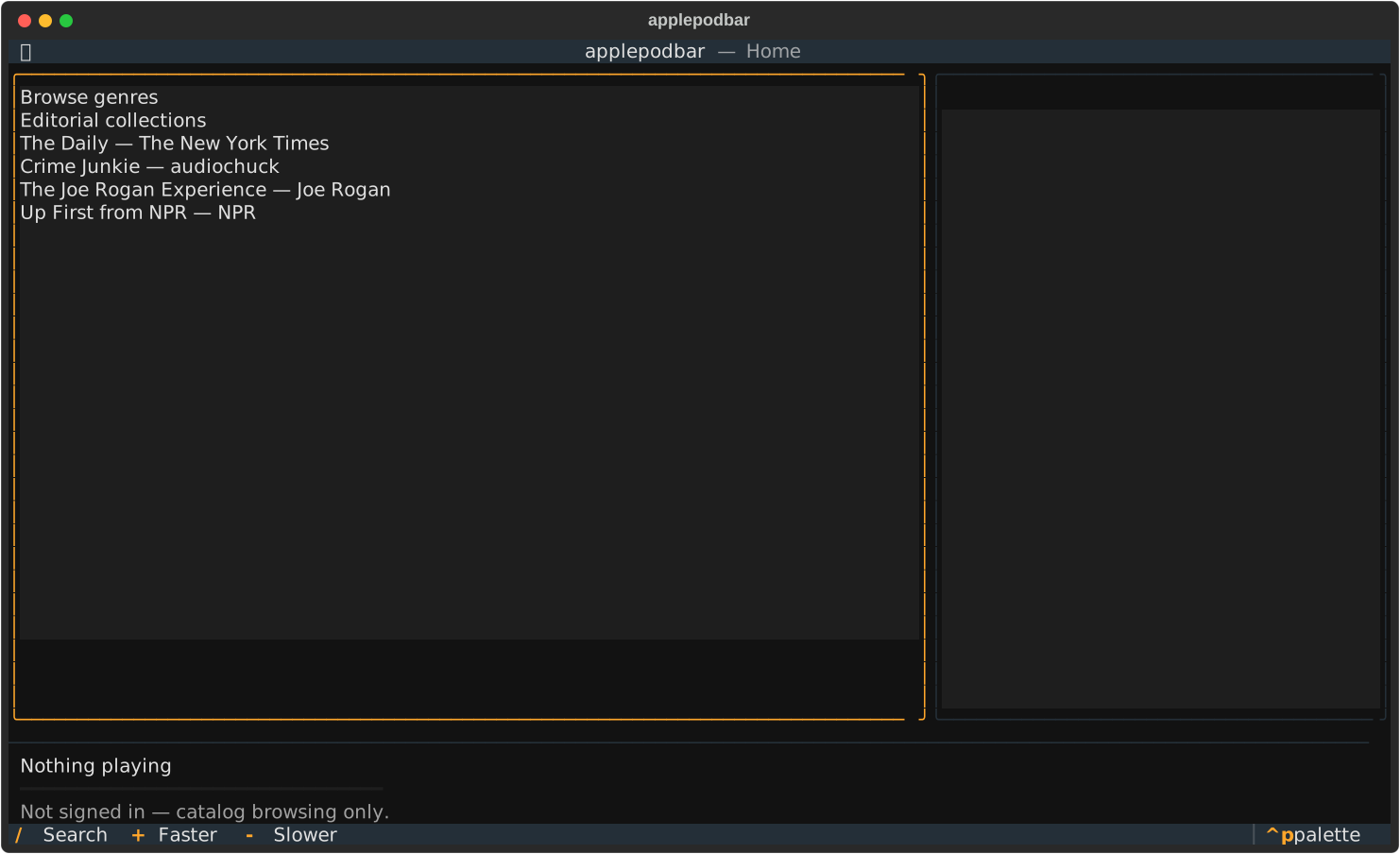
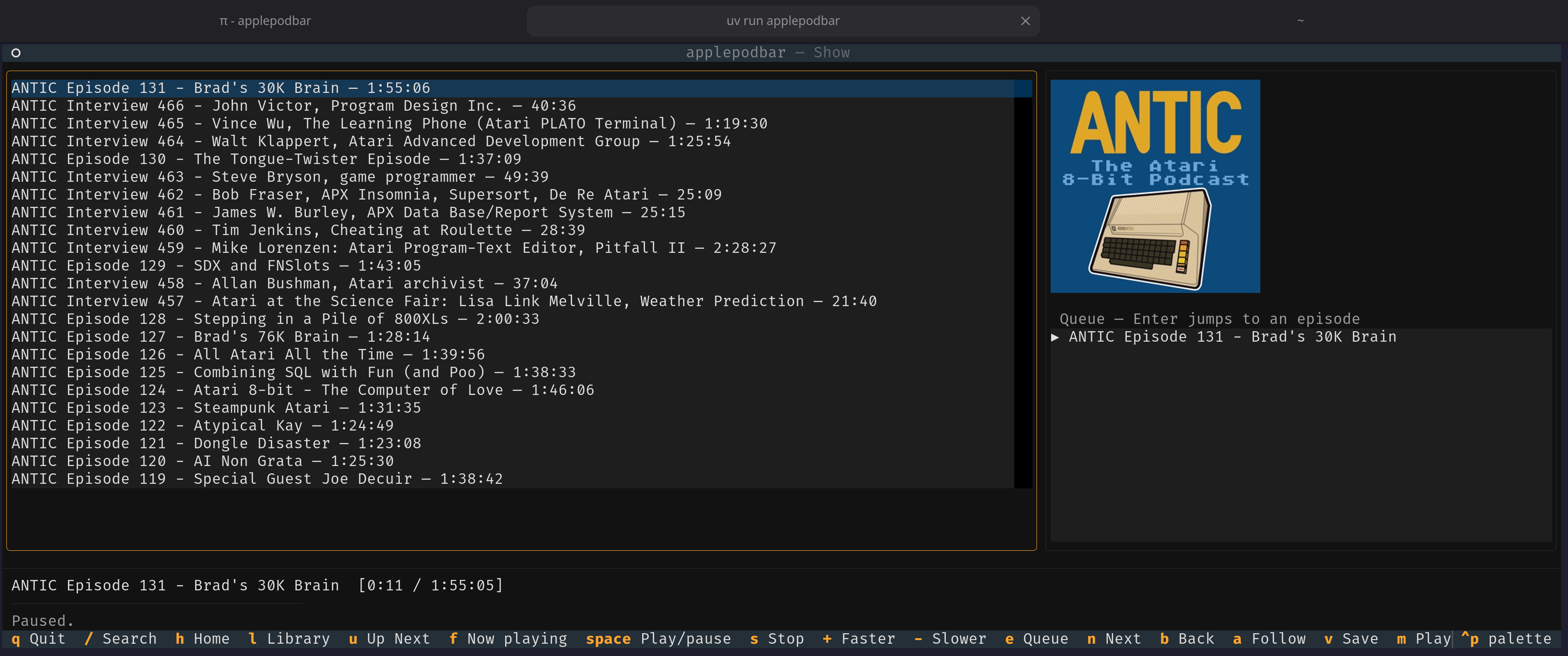
A keyboard-driven terminal podcast player for Apple Podcasts, built with Python and Textual.
Status
Early. Home charts, genre/editorial browse, search, show detail, and free-episode
playback are wired to the AMP catalog. Playwright login is available as an
optional extra. If Apple's web token cannot be found, search and playback fall
back to iTunes Search and publisher RSS. Signed-in Library, Up Next, and
cross-device playback-position sync, and follow/save actions are now wired.
Paid FairPlay content remains out of scope; see docs/SPEC.md.
Features
- Browse and search the Apple Podcasts catalog; play free episodes through
mpv - Signed-in Library, Up Next, follows/saves, and cross-device position sync
- Zero-auth iTunes Search + RSS fallback with local follows and resume positions
- Paid FairPlay episodes are listed but not playable
Requirements
Install
uv tool install 'applepodbar[login]' --with-executables-from playwright
playwright install chromium
applepodbar login
applepodbar
applepodbar login opens a real browser window for you to sign in to Apple
yourself, then saves the session in your OS keyring — applepodbar never sees
or stores your Apple ID password. Run it again if the session expires.
Installation for development
git clone git@github.com:feoh/applepodbar.git
cd applepodbar
uv sync --extra login
uv run playwright install chromium
uv run applepodbar login
uv run applepodbar
Configuration
Configuration lives in the platform-standard user config directory:
<config_dir>/applepodbar/
  config.toml          storefront and playback preferences
  tokens.json          cached developer JWT, written user-only (mode 600)
  local_library.json   local follows and RSS resume positions (mode 600)
OS keyring             media-user-token and browser session cookies
Set [general] catalog_backend = "rss" in config.toml to avoid the private
API altogether. In RSS mode, press a on a show to follow it locally; l
lists locally followed shows. Resume positions stay on this device.
Linux keyring support requires an unlocked Secret Service backend. No account password is handled by applepodbar.
Development
uv run pytest -q
uv run ruff check src tests
uv run ruff format --check src tests
uv run mypy src/applepodbar tests
uv run pyright
uvx prek run --all-files
uv build
Releasing
Publishing a GitHub release runs .github/workflows/publish.yml, which re-runs
the checks, builds, and uploads to PyPI through trusted publishing (no API
token). The release tag must be v plus the pyproject.toml version:
uv version --bump patch        # or minor / major
git commit -am "Release v$(uv version --short)"
git push
gh release create "v$(uv version --short)" --generate-notes
License
MIT — see LICENSE.
1 maintainer

Metadata
1 maintainer
Release files for applepodbar 0.1.1
For a detailed explanation of source distributions (sdists) and built distributions (wheels), please see the package formats documentation.
Source distribution (sdist)
| File | Size | Uploaded | Provenance | Actions |
|---|---|---|---|---|
| applepodbar-0.1.1.tar.gz | 32.4 kB | With provenance | Details for applepodbar-0.1.1.tar.gz |
Built distribution (wheel)
| File | Interpreter | ABI | Platform | Actions Reset |
|---|---|---|---|---|
| applepodbar-0.1.1-py3-none-any.whl | Python 3 | none | any | Details for applepodbar-0.1.1-py3-none-any.whl |
Total release size: 70.5 kB
Release files / applepodbar-0.1.1.tar.gz
| Download URL | applepodbar-0.1.1.tar.gz |
|---|---|
| Size | 32.4 kB |
| Tags | Source |
|
SHA-256 checksum How to use checksums |
78715ec0f6e9240805146f7d4af0da30b25cd5eb186454861e20b4de34570562
|
|
BLAKE2b-256 checksum How to use checksums |
30a998cad8fd11e880b8010b2220bdd62fab3a993418a63b125d993d317be035
|
| Upload date | |
|
Uploaded using Trusted Publishing? What is trusted publishing? |
Yes |
| Uploaded via |
twine/7.0.0 CPython/3.13.14
|
Provenance
Provenance describes where a file came from. On PyPI, provenance is shared via attestations, which provide a verifiable record of the build or publishing details. View details, limitations and caveats.


PyPI Publish Attestation
PyPI verified that this artifact, at this checksum, originated from the publisher listed below.
Signed by GitHub Actions, verified by PyPI on Oct 17, 2026.
Transparency logRelease files / applepodbar-0.1.1-py3-none-any.whl
| Download URL | applepodbar-0.1.1-py3-none-any.whl |
|---|---|
| Size | 38.2 kB |
| Tags | Python 3 |
|
SHA-256 checksum How to use checksums |
640a1291a2eec7ee1ac9c9300758d5b3cf69d9d8c45c83380ea667de613d9966
|
|
BLAKE2b-256 checksum How to use checksums |
264cb39f4ec925836d072d0856bdc0f5c722591685ceb98d3bc34c0fe7554fa3
|
| Upload date | |
|
Uploaded using Trusted Publishing? What is trusted publishing? |
Yes |
| Uploaded via |
twine/7.0.0 CPython/3.13.14
|
Provenance
Provenance describes where a file came from. On PyPI, provenance is shared via attestations, which provide a verifiable record of the build or publishing details. View details, limitations and caveats.
PyPI Publish Attestation
PyPI verified that this artifact, at this checksum, originated from the publisher listed below.
Signed by GitHub Actions, verified by PyPI on Oct 17, 2026.
Transparency logSecurity for applepodbar 0.1.1
Provenance
Provenance describes where a file came from. On PyPI, provenance is shared via attestations, which provide a verifiable record of the build or publishing details. View details, limitations and caveats.
Full provenance
Both files in this release have been uploaded with provenance metadata.
Attestation for applepodbar-0.1.1.tar.gz
PyPI Publish Attestation
PyPI verified that this artifact, at this checksum, originated from the publisher listed below.
Signed by GitHub Actions, verified by PyPI on Oct 17, 2026.
Transparency logA note on package security
PyPI is a repository for distributing packages, not a service for auditing them. While third-party security researchers and our staff do their best to detect and remove malicious packages, PyPI cannot guarantee the quality, security or suitability of any given package.
To learn more about protecting yourself from malicious actors, visit our package security documentation.














