
apprc: Application Runtime Config




AppRC is for Python applications that need configuration to be explicit, inspectable, and pleasant to operate. Instead of spreading environment variables, dotenv files, setup commands, and diagnostics across unrelated code, you declare the runtime contract once and let AppRC build the surrounding workflows from that metadata.
The three strongest parts:
- Typed config contracts: declare application settings once with
rc.Config,rc.ConfigBase,rc.field(...), and@MyRC.config(...). - Deterministic runtime config: load layered dotenv files predictably while keeping normal runtime reads and diagnostics zero-write.
- Generated operator UX: mount ready-made Typer
configcommands and open the same contract in the Textual editor.
Advanced integrations can inspect the same declared contract through
intentional namespaces such as rc.cli, rc.files, rc.storage,
rc.provenance, and rc.schema; normal app code should still start with
import apprc as rc.
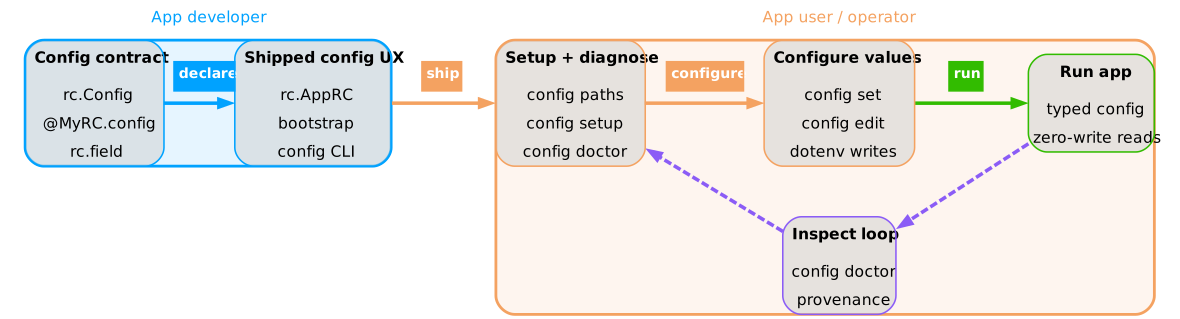
Fig. 1 - AppRC Graphical Abstract: AppRC lets developers ship one typed config contract with generated setup, diagnostics, editing, and runtime config workflows.
Note
For the full system model, see docs/Explanations.md. For exact public names and command references, see docs/References.md.
Table Of Contents
apprc: Application Runtime Config- Installation
- Quickstart
- Runnable Examples
- How AppRC Works
- Generated Workflows
- More Documentation
Install AppRC, declare the runtime contract, and mount the generated config
commands in your Typer application.
Installation
python -m pip install apprc
Install the optional Textual editor when you want config edit:
python -m pip install "apprc[tui]"
AppRC supports Python 3.12 and newer.
Note
For installation and first-setup recipes, see docs/How-To-User-Guides.md.
Quickstart
Use one root import and declare the app contract from that handle:
rc.AppRC, rc.Config or rc.ConfigBase, and rc.field(...) are the complete
declaration API. rc.schema only inspects the normalized result.
Create this standard package layout by hand, or generate a starter with
apprc scaffold config:
myapp/config/
  __init__.py
  __init__.pyi
  _facade.py
  app.py
  sections/
    __init__.py
    __init__.pyi
    _facade.py
    app.py
  bundle.py
  catalog.py
apprc scaffold config \
  --package myapp \
  --user-dotenv \
  --storage \
  --app-id myapp \
  --display-name "My App" \
  --storage-selector-env-key MYAPP_STORAGE \
  --target src
The full declaration can live in one file while learning, but the package layout above is the recommended project structure.
Keep every app-declared config area under config/sections/. Small areas can
be one module, for example sections/client.py. When an area grows, turn it
into a package such as sections/rag/ and keep its local bundle/resources next
to its leaf settings there. Leave config/bundle.py for the top-level app
bundle and config/catalog.py for metadata. Keep package __init__.py files
lightweight; import section classes in bundle.py from leaf modules such as
config.sections.client, not from the config.sections package facade.
from dataclasses import dataclass, field
from pathlib import Path

import typer
import apprc as rc


MyRC = rc.AppRC(
    app_id="myapp",
    display_name="My App",
    config_package="myapp.config",
    user_dotenv=rc.UserDotenv(),
    storage=rc.Storage(selector_env_key="MYAPP_STORAGE"),
)


@MyRC.config("app", prefix="MYAPP_", title="App")
class AppSettings(rc.Config):
    storage_root: Path = rc.field(
        "MYAPP_STORAGE",
        editable=False,
        required=True,
        title="Storage root",
    )
    profile: str = rc.field(
        "MYAPP_PROFILE",
        default="default",
        title="Profile",
        description="Named runtime profile.",
    )
    access_token: str = rc.field(
        "MYAPP_ACCESS_TOKEN",
        required=True,
        secret=True,
        title="Access token",
    )


@MyRC.config("resources", title="Resources")
class PackageResources(rc.ConfigBase):
    package: str = "myapp.resources"


@MyRC.bundle
@dataclass(kw_only=True)
class MyAppConfig:
    app: AppSettings = field(default_factory=AppSettings)
    resources: PackageResources = field(default_factory=PackageResources)
Optionally add packaged defaults in myapp/config/apprc.defaults.env:
MYAPP_PROFILE="default"
Mount AppRC on your Typer application before commands construct runtime config objects:
from myapp.config import MyAppConfig, MyRC

app = typer.Typer()
MyRC.mount_cli(app)


@app.command()
def run() -> None:
    cfg = MyAppConfig()
    typer.echo(f"profile={cfg.app.profile}")
MyRC.mount_cli(...) adds the standard AppRC CLI runtime options, performs
runtime setup for commands that need resolved config, and mounts the generated
config command group. Apps with custom runtime state can pass
advanced options through rc.cli.mount_config_cli(...) or rc.cli.CliRuntime.
Apps that own their Typer callback and extra options can use
rc.cli.CliRuntime as the composable middle layer: the app builds its runtime
state, while AppRC
owns config command mounting, skip policy, context storage, and state
validation. When runtime.prepare(...) skips runtime setup,
session.runtime_setup_skipped is true and session.state is None.
Runtimeful generated config commands require the app callback to leave the
declared state_type on ctx.obj; runtime-independent config commands use
AppRC's stored context instead.
For non-Typer usage, call bootstrap explicitly and then construct config:
MyRC.bootstrap()
cfg = MyAppConfig()
Config() reads the current process environment at construction time.
Bootstrap is needed when AppRC should first merge its managed dotenv files;
it is not a requirement for tests or callers that deliberately use only
constructor values, Python defaults, and the current os.environ.
High-level convenience boundaries that want AppRC defaults without taking
bootstrap options can call MyRC.ensure_bootstrapped(). It performs the
default bootstrap once per AppRC declaration and reuses the successful
result. Keep explicit policy at the application entrypoint: call
MyRC.bootstrap(...) there when storage selection, env files, or precedence
options vary. Libraries should normally accept a constructed config object
from their caller.
rc.field("ENV_KEY") is required when no default is provided.
rc.field("ENV_KEY", default="x") and default_factory=... are optional.
An explicit required=True cannot be combined with either Python fallback;
put the value in apprc.defaults.env and describe it with
packaged_default=..., or pass the value to the config constructor.
secret=True redacts display output; it does not encrypt values, store them
elsewhere, or imply that the field is required.
Install the local library plus its runnable examples from a checkout with:
python -m pip install -e ".[tui]" -e examples/example_apps --no-build-isolation
Start with apprc-examples-lab user-dotenv-with-storage. It opens a disposable
shell with no AppRC files and prints commands for the selected scenario. See
Runnable Examples for the complete inventory.
Note
For the step-by-step integration guide, see docs/How-To-User-Guides.md#integrate-apprc. For the exact import surface, see docs/References.md#public-interfaces.
Runnable Examples
The checkout contains four capability examples, two advanced examples, and two test utilities:
| Command | User dotenv | Storage | What it demonstrates |
|---|---|---|---|
apprc-process-env |
No | No | Process environment and Python defaults without managed user files. |
apprc-user-dotenv |
Yes | No | One managed user dotenv and the user write scope. |
apprc-storage |
No | Yes | Named storage and storage-local values without a user dotenv. |
apprc-user-dotenv-with-storage |
Yes | Yes | Both persistent capabilities and both write scopes. |
apprc-explicit-env-precedence |
Yes | Yes | Normal process precedence versus --env-file-overrides-os-environ. |
apprc-cli-runtime |
Yes | Yes | App-owned Typer state and runtime-independent commands through CliRuntime. |
apprc-examples-lab EXAMPLE |
Depends | Depends | One clean temporary shell with a scenario walkthrough. |
apprc-examples-run-all |
All | All | Automated setup, diagnostics, runtime, and cleanup through installed CLIs. |
Use the lab for manual testing:
apprc-examples-lab process-env
apprc-examples-lab user-dotenv
apprc-examples-lab storage
apprc-examples-lab user-dotenv-with-storage
apprc-examples-lab explicit-env-precedence
apprc-examples-lab cli-runtime
The lab removes inherited APPRC_EXAMPLE_* values. For examples with managed
files, it points <APP>_APPRC_DIR at its temporary root. It does not create
AppRC files before the shell opens. The root is removed on exit. A storage path
that you explicitly choose outside the printed temporary root remains
untouched.
The commands are normal applications. Managed-capability examples use their
configured or default AppRC paths outside the lab and can leave persistent
files. Run config paths before setup and config purge --dry-run before
removal.
Every example exposes config paths, show, doctor, and cleanup-only
purge. setup, set, edit, and migrate appear only when the declaration
contains rc.UserDotenv() or rc.Storage(). Storage declarations also expose
the root --storage NAME_OR_PATH option and config storage ... commands.
The automated example suite checks the common command surface on every app,
the complete storage lifecycle on apprc-storage, name and path
selection, both precedence outcomes, CliRuntime skip/runtime behavior, and
temporary-lab cleanup. It does not claim that every generated command is run
against every example.
See examples/example_apps/README.md for copyable walkthroughs and source links.
How AppRC Works
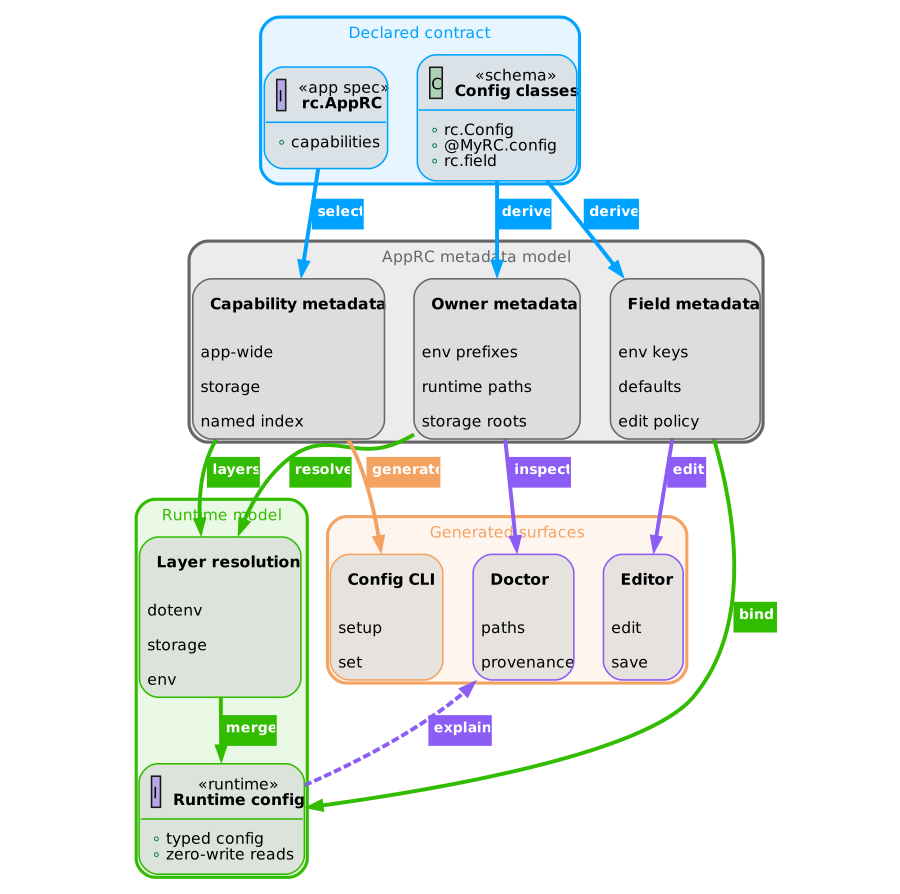
AppRC starts from one declared contract, then uses that contract to load runtime values, inspect configuration health, write explicit setup files, and generate user-facing configuration tools.
 |
|---|
| Fig. 2 - One Contract, Many Workflows: AppRC reuses the same contract metadata for runtime loading, provenance, diagnostics, generated CLI commands, and the editor. |
Mental Model
AppRC has one contract and several workflows built from it.
| Concept | Meaning |
|---|---|
| Config field | One typed setting declared with rc.field("FULL_ENV_KEY", ...). |
| Registered config | A related group of fields declared by @MyRC.config(...). |
| AppRC facade | The app-level contract that selects supported persistence layers. |
| Bootstrap | An optional startup step that merges managed dotenv layers into this Python process. |
| Config construction | A read of Python values and the current os.environ into a mutable config object. |
| Generated CLI | A reusable Typer config command group for inspection and edits. |
| Editor | A Textual view over the same sections, fields, and dotenv layers. |
Note
For the deeper architecture behind registered sections, fields, config layers, provenance, and the zero-write policy, see docs/Explanations.md#runtime-config-model.
Managed File Capabilities
User-wide dotenv overrides and named storage are independent features:
common = {"app_id": "myapp", "config_package": "myapp.config"}

process_only = rc.AppRC(**common)
user_only = rc.AppRC(**common, user_dotenv=rc.UserDotenv())
storage_only = rc.AppRC(**common, storage=rc.Storage())
both = rc.AppRC(
    **common,
    user_dotenv=rc.UserDotenv(),
    storage=rc.Storage(),
)
Capabilities are required by default, which preserves the setup behavior of
earlier releases. Use required=False when an application should expose the
managed layer without making it a prerequisite for every command:
optional_persistence = rc.AppRC(
    **common,
    user_dotenv=rc.UserDotenv(required=False),
    storage=rc.Storage(required=False),
)
An optional declaration still exposes setup, editing, and storage management.
Bootstrap loads it when it exists. With no selected storage, runtime continues
using packaged defaults, explicit dotenv files, and the process environment.
Generated config show also continues when the application's runtime payload
supports a storage-free view.
Invalid selectors and broken selected roots remain errors. A malformed
registry remains an error unless an explicit initialized path uses AppRC's
existing one-run fallback.
A command that needs storage can enforce that requirement at its runtime boundary:
storage_runtime = rc.cli.CliRuntime(
    optional_persistence.kit,
    storage_required=True,
)
This does not change the application declaration. Other runtimes using the
same AppRC can keep storage optional.
rc.Storage() derives MYAPP_STORAGE when selector_env_key is omitted. The
first setup suggests ~/.local/share/myapp/storage/ on every operating system.
Interactive setup first lets the user accept or replace the AppRC directory,
then does the same for the storage root. Both path prompts provide filesystem
completion. Scripts can pass --apprc-dir PATH and --storage-root PATH.
AppRC-managed persistence files are explicit:
| Layer | Default location | Availability and creation |
|---|---|---|
| Packaged defaults | package apprc.defaults.env |
Optional application resource; never created for the user. |
| User dotenv | ~/.local/share/myapp/apprc.user.env |
Only with rc.UserDotenv(); created by setup. |
| Storage registry | ~/.local/share/myapp/apprc.toml |
Only with rc.Storage(); created by storage setup or registry commands. |
| Storage dotenv | <storage-root>/apprc.storage.env |
Only with rc.Storage(); created by setup or storage add. |
The directory containing the declared central files is the AppRC directory.
Set MYAPP_APPRC_DIR to relocate it. AppRC does not split default files between
.config, .local, %APPDATA%, and ~/Library/Application Support.
The complete default layouts are:
# rc.AppRC(...) — process environment only
# No AppRC directory or managed user files.

# rc.AppRC(..., user_dotenv=rc.UserDotenv())
~/.local/share/myapp/
└── apprc.user.env

# rc.AppRC(..., storage=rc.Storage())
~/.local/share/myapp/
├── apprc.toml
└── storage/
    └── apprc.storage.env

# rc.AppRC(..., user_dotenv=rc.UserDotenv(), storage=rc.Storage())
~/.local/share/myapp/
├── apprc.user.env
├── apprc.toml
└── storage/
    └── apprc.storage.env
Additional storage names are user-owned registry entries. Their roots may be
anywhere; they do not gain another storage/<name>/ directory automatically.
Important
Files on disk never enable application capabilities. Python declarations control whether the user dotenv, storage controls, and their write scopes exist. Stale files produce doctor warnings and remain eligible for purge.
Note
For declaration arguments, see docs/References.md#application-declaration.
Runtime Precedence
When dotenv layers are loaded, AppRC merges values in this order:
- optional packaged
apprc.defaults.env - user
apprc.user.env, when declared - selected storage
apprc.storage.env, when storage is selected and present - explicit
--env-filevalues - existing
os.environ
With --env-file-overrides-os-environ, explicit env files move after
os.environ and win over shell exports.
Storage selector resolution accepts registered names and filesystem paths:
- CLI
--storage - process environment or explicit env files, in the order selected by
--env-file-overrides-os-environ selected_storageinapprc.toml
apprc.user.env, apprc.storage.env, and packaged defaults never select a
storage. A direct path must be an existing directory with a readable
apprc.storage.env. Relative selectors such as ./data resolve from the
directory containing apprc.toml, never from the current working directory.
When a path matches one registered root, AppRC reports its name. An initialized
unregistered path is usable for one run; an interactive CLI offers to register
it, while a non-interactive caller performs no registry writes.
Note
For the rationale behind layer order and storage selector resolution, see docs/Explanations.md#runtime-bootstrap and docs/Explanations.md#storage-selection. For exact precedence tables, see docs/References.md#runtime-precedence.
Generated Workflows
Mount the generated workflows when you want your application to expose the same contract to users, setup commands, diagnostics, and the Textual editor.
Config CLI
All declarations get read-only inspection and cleanup commands:
myapp config paths
myapp config doctor
myapp config show
myapp config purge --dry-run
Declarations with rc.UserDotenv(), rc.Storage(), or both also get:
myapp config setup
myapp config migrate --dry-run
myapp config set KEY VALUE --scope DECLARED_SCOPE
myapp config edit
Storage declarations additionally get --storage NAME_OR_PATH and:
myapp config storage add NAME PATH
myapp config storage list
myapp config storage select NAME
myapp config storage rename NAME NEW_NAME
myapp config storage repoint NAME PATH
myapp config storage move NAME PATH
myapp config storage remove NAME
The user write scope exists only with rc.UserDotenv(). The storage write
scope and storage commands exist only with rc.Storage().
config edit requires the optional TUI extra:
python -m pip install "apprc[tui]".
The editor keeps selector errors separate from setup. If a shell variable,
explicit dotenv, or --storage value names an unknown storage, the editor
shows the winning source and the selected_storage value it overrides. Valid
registry entries remain available. Setup appears only for a missing declared
dotenv or storage marker. A missing registered directory exposes
Reconnect, which updates only apprc.toml; Move remains limited to a
new or empty destination. Opening the editor itself writes nothing.
Note
For the generated command table, see docs/References.md#generated-cli-commands.
Setup And Diagnostics
Use config paths before setup to inspect declared paths without writing. Use
config setup or the editor's named setup action to initialize declared files,
then use config doctor when a machine is not runnable.
myapp config paths
myapp config setup --yes --storage-root /absolute/path/to/storage
myapp config doctor
myapp config set access_token secret-value --scope storage
myapp run
Setup creates apprc.user.env only when the application declares
rc.UserDotenv(). For storage applications it registers the initial storage,
records it as selected_storage, and creates apprc.storage.env. The initial
name is default unless an empty registry is opened with a bare
<APP>_STORAGE value, in which case setup uses that requested name. No
selector is written to a dotenv file. A custom
--apprc-dir applies only to the setup process, so setup prints shell-specific
commands that persist MYAPP_APPRC_DIR for later runs.
config doctor reports a status such as storage_not_selected,
storage_not_ready, user_dotenv_not_ready,
storage_registry_not_ready, or runnable.
For optional declarations, a missing user dotenv or absent storage selection
is a warning and the status remains runnable. The JSON payload reports
user_dotenv_required and storage_required so integrations do not have to
infer policy from missing files.
When CliRuntime(storage_required=True) reaches a command without a selected
storage, an interactive terminal offers first-use setup with path completion.
A non-interactive terminal writes nothing and prints the exact
myapp config setup --yes recovery command.
config set changes only the requested dotenv assignment. It preserves
unrelated comments, blank lines, quoting, export prefixes, and ordering. If
the key has multiple active assignments, AppRC updates the first and comments
out the later assignments. The interactive CLI and editor require confirmation
before that cleanup. Non-interactive commands write the change and print a
warning afterward.
User-scoped writes require an existing declared apprc.user.env; run setup
first. Storage-scoped writes require an initialized selected storage. A
process-environment-only declaration has neither write scope and therefore no
setup, set, edit, or migrate command.
AppRC migrates the released 0.19 layout only. Inspect and apply it explicitly:
myapp config migrate --dry-run
myapp config migrate --yes
Migration finds platform-specific 0.19 directories, custom
MYAPP_APPRC_TOML locations, .env.apprc-app, .env.apprc-storage, and
path-valued MYAPP_STORAGE. It converts a path selector into the named
default storage and removes structural selector keys from the migrated user
dotenv. If a bare selector such as MYAPP_STORAGE=ontology is not registered,
interactive migration asks for its existing directory with path completion,
then asks whether to add it or replace an old registry name. Automation must
state the mapping explicitly:
myapp config migrate --storage-root /existing/ontology --yes
myapp config migrate \
  --storage-root /existing/ontology \
  --replace-storage old-name \
  --yes
--yes never chooses a replacement. Migration initializes a missing storage
marker but does not move or delete application data. The unreleased
apprc.app.env name is intentionally ignored.
Package uninstallers do not remove these user-owned files. Before uninstalling
an AppRC application, run config purge --dry-run, review the exact targets,
then run config purge --yes if desired. Purge deletes fixed AppRC files and
registered storage roots strictly inside the AppRC directory. For external
storage roots it deletes only apprc.storage.env and keeps all other data.
It never follows symlinks and removes the AppRC directory only when empty.
Caution
A registered internal storage root is application-owned. config purge
recursively deletes that root, including files AppRC did not create. Always
inspect the dry run first.
Important
Runtime reads and diagnostics do not create files. bootstrap, config paths, config doctor, and opening config edit are zero-write. Editor
actions such as setup, New, and Register write only after confirmation.
For storage-backed applications, bootstrap requires the selected root to
exist and be a directory. Run config setup for a missing marker. If a
registered directory was moved manually, reconnect it with config storage repoint NAME /existing/path; setup does not recreate it.
Note
For doctor troubleshooting, see docs/How-To-User-Guides.md#troubleshoot-config-doctor. For exact status names, see docs/References.md#doctor-statuses.
More Documentation
The README stays short. The detailed manual and maintainer workflow live in the documentation directory.
Detailed Manual
The detailed manual starts at docs/README.md.
Note
Use docs/How-To-User-Guides.md for integration recipes, docs/Explanations.md for the AppRC system model, docs/References.md for exact commands, files, and APIs, and docs/Development.md for maintainer workflow and docs rules.
The repository also ships runnable example CLIs in
examples/example_apps. Each example is its own
package, with a config/ package,
cli.py, and packaged config/apprc.defaults.env defaults so the source tree mirrors
a real app integration. Use apprc-examples-lab to keep manual test state
temporary.
Development
.venv/bin/ruff format .
.venv/bin/ruff check .
.venv/bin/pyright
.venv/bin/pytest
Regenerate the PyPI README after editing this file:
python src/apprc_dev/packaging/pypi_readme.py
Note
For maintainer workflow, documentation rules, and verification commands, see docs/Development.md.
1 maintainer

Release files for apprc 0.24.0
For a detailed explanation of source distributions (sdists) and built distributions (wheels), please see the package formats documentation.
Source distribution (sdist)
| File | Size | Uploaded | |
|---|---|---|---|
| apprc-0.24.0.tar.gz | 268.4 kB | Details |
Built distribution (wheel)
| File | Interpreter | ABI | Platform | Reset |
|---|---|---|---|---|
| apprc-0.24.0-py3-none-any.whl | Python 3 | none | any | Details |
Total release size: 515.6 kB
Release files / apprc-0.24.0.tar.gz
| Download URL | apprc-0.24.0.tar.gz |
|---|---|
| Size | 268.4 kB |
| Tags | Source |
|
SHA-256 checksum How to use checksums |
6767fba6c66516d20daf0c3f277ae0541f0cc361f265372da4d23e788ed635cd
|
|
BLAKE2b-256 checksum How to use checksums |
4c5011f9f63059f4f9419934b3f4624aa12d608dd7fceede0d0835cf1a91df13
|
| Upload date | |
|
Uploaded using Trusted Publishing? What is trusted publishing? |
Yes |
| Uploaded via |
uv/0.12.13 {"installer":{"name":"uv","version":"0.12.13","subcommand":["publish"]},"python":null,"implementation":{"name":null,"version":null},"distro":{"name":"Ubuntu","version":"24.04","id":"noble","libc":null},"system":{"name":null,"release":null},"cpu":null,"openssl_version":null,"setuptools_version":null,"rustc_version":null,"ci":true}
|
Release files / apprc-0.24.0-py3-none-any.whl
| Download URL | apprc-0.24.0-py3-none-any.whl |
|---|---|
| Size | 247.2 kB |
| Tags | Python 3 |
|
SHA-256 checksum How to use checksums |
5174fffa403dd004c7b67c1653f4e684bca501cb07214597027a811c41200f54
|
|
BLAKE2b-256 checksum How to use checksums |
d5106e86caf4be4b86b161655c61ad74f56f418be3b0a5a8802599e554d84ca6
|
| Upload date | |
|
Uploaded using Trusted Publishing? What is trusted publishing? |
Yes |
| Uploaded via |
uv/0.12.13 {"installer":{"name":"uv","version":"0.12.13","subcommand":["publish"]},"python":null,"implementation":{"name":null,"version":null},"distro":{"name":"Ubuntu","version":"24.04","id":"noble","libc":null},"system":{"name":null,"release":null},"cpu":null,"openssl_version":null,"setuptools_version":null,"rustc_version":null,"ci":true}
|














