
Discover sensitive objects in project code

Project description
OWASP Appsec Discovery
OWASP Appsec Discovery cli tool scan provided code projects and extract structured protobuf, graphql, swaggers, database schemas, python, go and java object DTOs, used api clients and methods, and other kinds of external contracts. It scores risk level for found object fields with provided in config static keywords ruleset and store results in own format json or sarif reports for fast integration with exist vuln management systems like Defectdojo.
Cli tool can also use lightweight local LLM models like Llama 3.1 8B from Huggingface or OpenAI compatible APIs and provided prompt to score objects without pre-existing knowledge about assets in code. Small local open source models work fast on common hardware and are just enouth for such classification tasks.
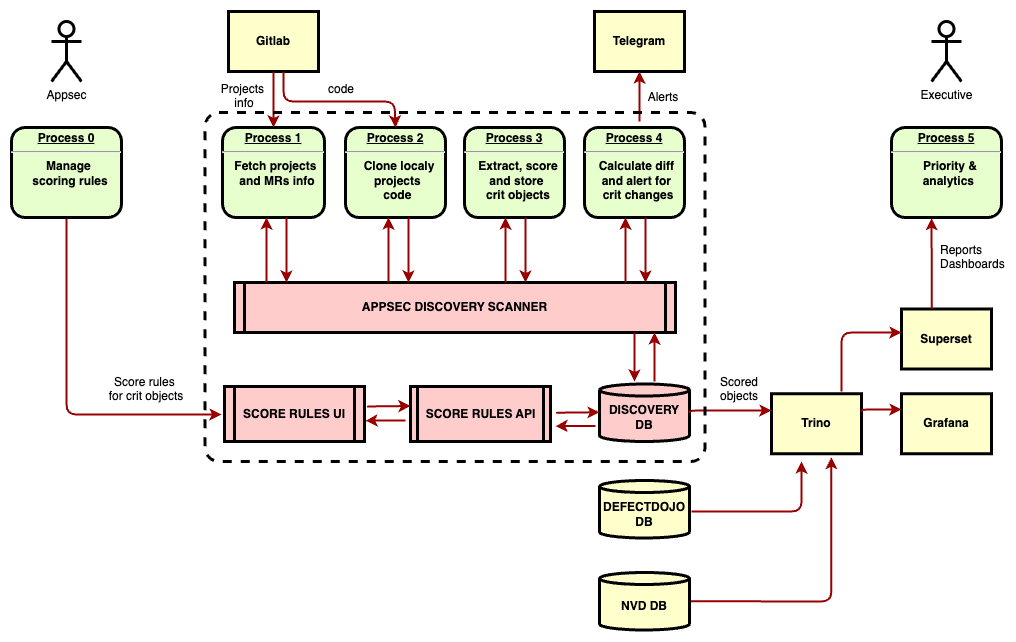
Appsec Discovery service continuosly fetch changes from local Gitlab via api, clone code for particular projects, scan for objects in code and score them with provided via UI rules and LLMs, store result objects with projects, branches and MRs from Gitlab in local db and alert about critical changes via messenger or comments to MR in Gitlab.
Under the hood tool powered by Semgrep OSS engine and specialy crafted discovery rules and parsers that extract particular objects.
Cli mode
Install cli tool:
pip install appsec-discovery
Provided rules in conf.yaml or leave it empty for default list:
score_tags:
  pii:
    high:
      - 'first_name'
      - 'last_name'
      - 'phone'
      - 'passport'
    medium:
      - 'address'
    low:
      - 'city'
  finance:
    high:
      - 'pan'
      - 'card_number'
    medium:
      - 'amount'
      - 'balance'
  auth:
    high:
      - 'password'
      - 'pincode'
      - 'codeword'
      - 'token'
    medium:
      - 'login'
Run on code project folder with swaggers, protobuf and other structured contracts in code and get parsed objects and fields marked with severity and category tags:
appsec-discovery --source tests/swagger_samples

- hash: 40140abef3b5f45d447d16e7180cc231
  object_name: Route /user/login (GET)
  object_type: route
  parser: swagger
  severity: high  <<<<<<<<<<<<<<<<<<<<<<<< !!!
  tags:
  - auth  <<<<<<<<<<<<<<<<<<<<<<<<<<<<<<<< !!!
  file: swagger.yaml
  line: 1
  properties:
    path:
      prop_name: path
      prop_value: /user/login
      severity: medium  <<<<<<<<<<<<<<<<<< !!!
      tags:
      - auth  <<<<<<<<<<<<<<<<<<<<<<<<<<<< !!!
    method:
      prop_name: method
      prop_value: GET
  fields:
    query.param.username:
      field_name: query.param.username
      field_type: string
      file: swagger.yaml
      line: 1
      severity: medium  <<<<<<<<<<<<<<<<<< !!!
      tags:
      - auth  <<<<<<<<<<<<<<<<<<<<<<<<<<<< !!!
    query.param.password:
      field_name: query.param.password
      field_type: string
      file: swagger.yaml
      line: 1
      severity: high    <<<<<<<<<<<<<<<<<< !!!
      tags:
      - auth  <<<<<<<<<<<<<<<<<<<<<<<<<<<< !!!
    output:
      field_name: output
      field_type: string
      file: swagger.yaml
      line: 1
      ...
- hash: 8a878eb2050c855faab96d2e52cc7cf8
  object_name: Query Queries.promoterInfo
  object_type: query
  parser: graphql
  severity: high  <<<<<<<<<<<<<<<<<<<<<<<< !!!
  tags:
  - pii  <<<<<<<<<<<<<<<<<<<<<<<<<<<<<<<<< !!!
  file: query.graphql
  line: 143
  properties: {}
  fields:
    input.PromoterInfoInput.link:
      field_name: input.PromoterInfoInput.link
      field_type: String
      file: query.graphql
      line: 291
    output.PromoterInfoPayload.firstName:
      field_name: output.PromoterInfoPayload.firstName
      field_type: String
      file: query.graphql
      line: 342
      severity: high  <<<<<<<<<<<<<<<<<< !!!
      tags:
      - pii  <<<<<<<<<<<<<<<<<<<<<<<<<<< !!!
    output.PromoterInfoPayload.lastName:
      field_name: output.PromoterInfoPayload.lastName
      field_type: String
      file: query.graphql
      line: 365
      severity: high
      tags:
      - pii  <<<<<<<<<<<<<<<<<<<<<<<<<<< !!!
Score object fields with local LLM model
Replace or combine exist static keyword ruleset with local LLM, fill conf.yaml with choosed LLM and prompt:
ai_local:
  model_folder: "/hf_models"
  model_id: "Neurogen/Vikhr-Llama3.1-8B-Instruct-R-21-09-24-Q4_K_M-GGUF"
  gguf_file: "vikhr-llama3.1-8b-instruct-r-21-09-24-q4_k_m.gguf"
  system_prompt: "You are data security bot, for provided object and it field you must deside does it contain any personal, financial, authorization or other private data with special mesures to store and show."
Run scan with new settings and get objects and fields severity from local AI engine:
appsec-discovery --source tests/swagger_samples --config tests/config_samples/ai_conf_vikhr_7b.yaml

- hash: 2e20a348a612aa28d24c1bd0498eebf0
  object_name: Swagger route /user/login (GET)
  object_type: route
  parser: swagger
  severity: medium  <<<<<<<<<<<<<<<< !!!
  tags:
  - llm-pii  <<<<<<<<<<<<<<<<<<<<<<< !!!
  - llm-auth  <<<<<<<<<<<<<<<<<<<<<< !!!
  file: /swagger.yaml
  line: 83
  properties:
    path:
      prop_name: path
      prop_value: /user/login
    method:
      prop_name: method
      prop_value: get
  fields:
    ...
    Input.password:
      field_name: Input.password
      field_type: string
      file: /swagger.yaml
      line: 83
      severity: medium  <<<<<<<<<<<<<< !!!
      tags:
      - llm-auth  <<<<<<<<<<<<<<<<<<<< !!!
      ...
At first run tool with download provided model from Huggingface into local cache dir, for next offline scans use this dir with pre downloaded models.
Play around with with various models from Huggingface and prompts for best results.
Also you can use external openai campatible LLM api with ai_api section of conf.yaml:
ai_api:
  base_url: "https://api.deepseek.com"
  api_key: "some_api_key"
  model: "deepseek-chat"
  system_prompt: "You are data security bot, for provided object and it field you must deside does it contain any personal, financial, authorization or other private data with special mesures to store and show."
But remember that with great power comes great responsibility!
Integrate scans into CI/CD
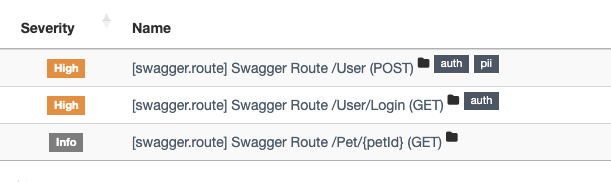
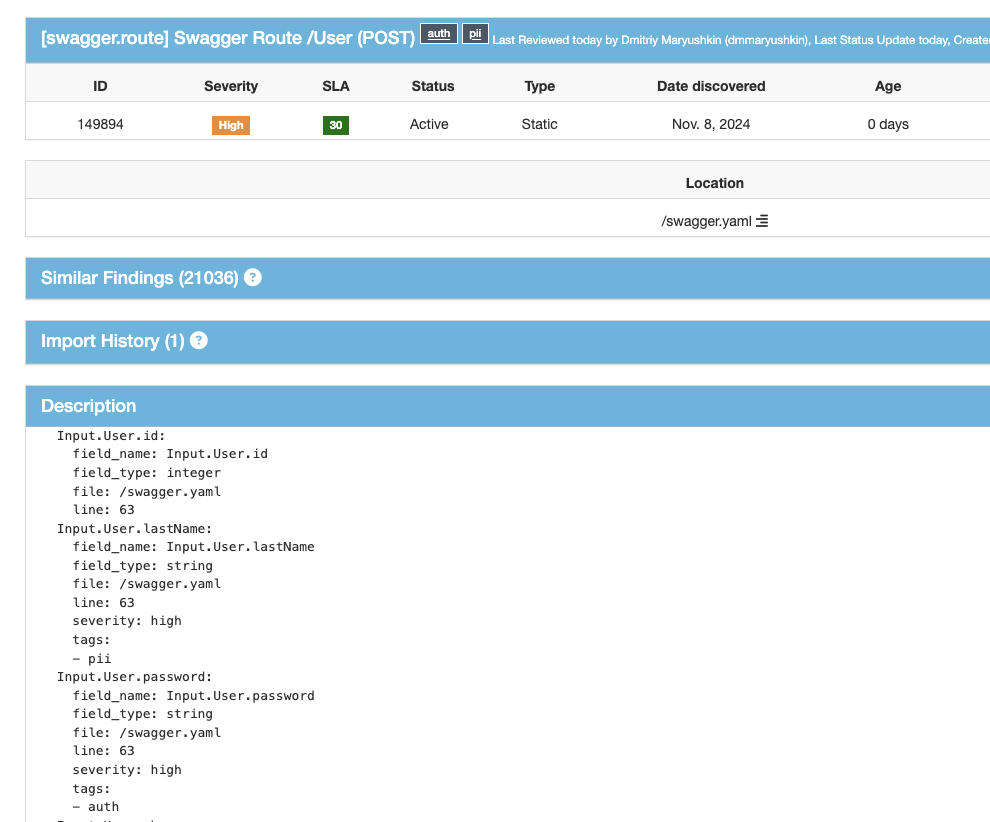
Run scan with sarif output format:
appsec-discovery --source tests/swagger_samples --config tests/config_samples/conf.yaml --output report.json --output-type sarif
Load result reports into vuln management system like Defectdojo:
Service mode
Clone code to local folder:
git clone https://github.com/dmarushkin/appsec-discovery
cd appsec-discovery/appsec_discovery_service
Fillout .env file with your gitlab url and token, change passwords for local db and ui user, for alerts register new telegram bot or use exist one, or just leave TG args empty to only store objects:
POSTGRES_HOST=discovery_db
POSTGRES_DB=discovery_db
POSTGRES_USER=discovery_user
POSTGRES_PASSWORD=some_secret_str
GITLAB_PRIVATE_TOKEN=some_secret_str
GITLAB_URL=https://gitlab.examle.com
GITLAB_PROJECTS_PREFIX=backend/,frontend/,test/
GITLAB_SCAN_TYPES=mains,mrs
PARSERS=all
CACHE_SIZE_GB=5
UI_ADMIN_EMAIL=admin@example.com
UI_ADMIN_PASSWORD=admin
UI_JWT_KEY=some_secret_str
MAX_WORKERS=5
LLM_API_URL=https://api.deepseek.com
LLM_API_KEY=test_key
LLM_API_MODEL=deepseek-chat
LLM_LOCAL_MODEL=Neurogen/Vikhr-Llama3.1-8B-Instruct-R-21-09-24-Q4_K_M-GGUF
LLM_LOCAL_FILE=vikhr-llama3.1-8b-instruct-r-21-09-24-q4_k_m.gguf
LLM_PROMPT="You are data security bot, for provided object and it field you must deside does it contain any personal, financial, authorization or other private data with special mesures to store and show."
LLM_PROMPT_VER="1.0.1"
MR_ALERTS=1
TG_ALERT_TOKEN=test
TG_CHAT_ID=0000000000
Run service localy with docker compose:
docker-compose up --build
Service will continuosly fetch new projects and MRs for provided prefixes from Gitlab api, clone code and scan it for objects, score found ones and save into local postgres db for any analysis.
If sensitive fields in objects added on Merge requests service will alert via provided channel.
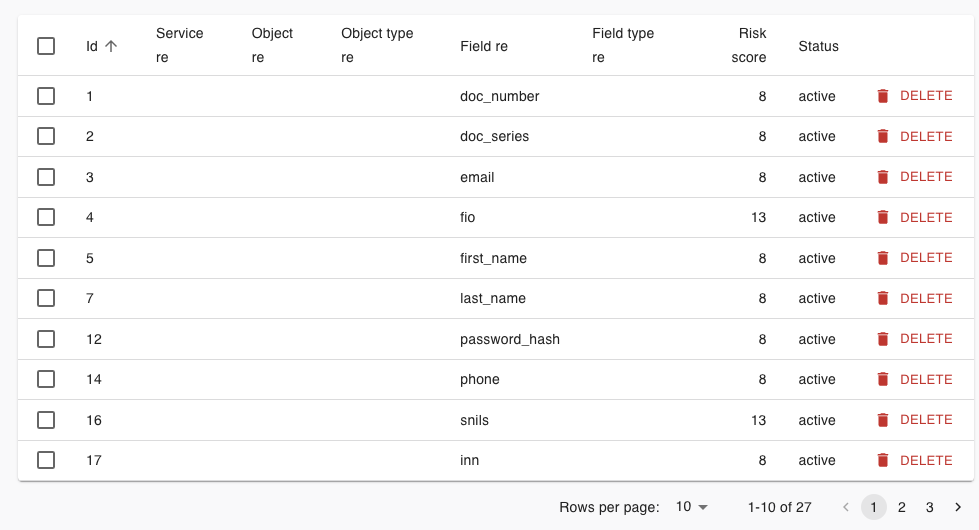
To ajust default rule list authorize in Rules Management UI at http://127.0.0.1/ and make some new rules or make exclude rules for false positives:
For now service does not provide any local UI for parsed and scored objects, so we recomend to use any kind of external analytic systems like Apache Superset, Grafana, Tableu etc.
For prod environments bake Docker images in your k8s env, use external db.
Usage examples
-
Appsec specialists can monitor codebase for critical changes and review them manualy, also sum scores for particular fields and get overall risk score for entire projects, and use it for prioritization of any kind of appsec rutines (triage vulns, plan security audits).
-
Governance, Risk, and Compliance (GRC) specialists can use discovered data schemas for any kind of data governance (localize PII, payment and other critical data, dataflows), restricting access to and between critical services, focus on hardening environments that contain critical data.
-
Monitoring or Incident Response specialists can focus attention on logs and anomalies in critical services or even particular routes in clients traffic.
-
Infrastructure security specialists can use same approach to extract structured data about assets from IaC repositories like terraform or ansible (service now extracts VMs from terraform files).
Release history Release notifications | RSS feed


Download files
Download the file for your platform. If you're not sure which to choose, learn more about installing packages.
Source Distribution
Built Distribution
Filter files by name, interpreter, ABI, and platform.
If you're not sure about the file name format, learn more about wheel file names.
Copy a direct link to the current filters
File details
Details for the file appsec_discovery-0.8.2.tar.gz.
File metadata
- Download URL: appsec_discovery-0.8.2.tar.gz
- Upload date:
- Size: 22.1 kB
- Tags: Source
- Uploaded using Trusted Publishing? No
- Uploaded via: poetry/2.1.3 CPython/3.12.11 Linux/6.11.0-1015-azure
File hashes
| Algorithm | Hash digest | |
|---|---|---|
| SHA256 |
249c9a526ba122389dd0cabd36eaae5c74942c3c5d9e88bfade08814c6b3dac7
|
|
| MD5 |
8036b4f032c9026bd5145981de6620bc
|
|
| BLAKE2b-256 |
af9cb32b53bf25575e658a4fc35e9a07108b56c053e539baa3d6318081cfa5d4
|
File details
Details for the file appsec_discovery-0.8.2-py3-none-any.whl.
File metadata
- Download URL: appsec_discovery-0.8.2-py3-none-any.whl
- Upload date:
- Size: 32.9 kB
- Tags: Python 3
- Uploaded using Trusted Publishing? No
- Uploaded via: poetry/2.1.3 CPython/3.12.11 Linux/6.11.0-1015-azure
File hashes
| Algorithm | Hash digest | |
|---|---|---|
| SHA256 |
498c39ab9562d3d400899cc0b1e1549e7631abfb8bfb75c86ca1ba9a58ed68d5
|
|
| MD5 |
d9046769d9447a8cfdcccd86318de326
|
|
| BLAKE2b-256 |
9572edf00f85817097e6952c5274d55fc68bbedd865e3c9c2025824925993bb3
|






