
Apricity — a local, zero-dependency front-end for the MemPalace personal-memory system. Browse, search, edit, and curate your memories and knowledge graph from your browser.
Verified details
These details have been verified by PyPIProject links
GitHub Statistics
Maintainers

Project description

Apricity
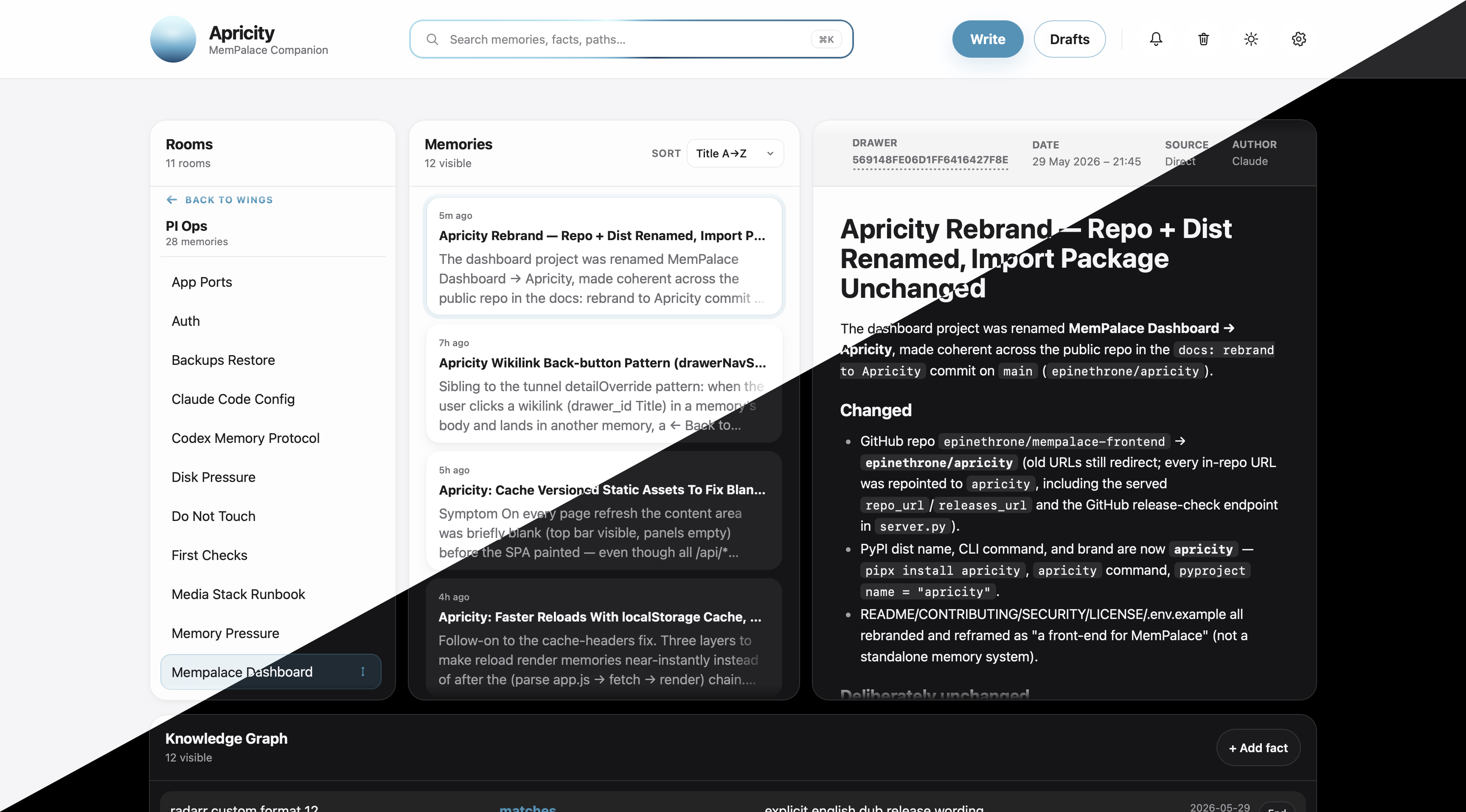
A local, zero-dependency front-end for MemPalace — browse, search, write, edit, and curate your personal-memory store and knowledge graph from your browser.





What is Apricity?
MemPalace gives your AI assistant a structured, durable memory — wings, rooms, drawers, and a knowledge graph, all stored locally. Apricity is the front-end for it. Once you have hundreds of memories, you need a way to see, search, and curate them without dropping to SQL or living inside an MCP shell. That's what Apricity is for.
It is not a memory system of its own — it reads and writes an existing MemPalace install on the same machine, through the official mempalace package. Think of it as the window onto your palace.
- 🏠 Local-first. Binds to
127.0.0.1. Nothing leaves your machine. No telemetry. No accounts. No cloud. - 🪶 Zero runtime dependencies. Pure-Python standard-library server + plain HTML / CSS / vanilla JS front-end. No
pip install, nonpm, no Docker, no build step. - 🛡️ Safe by construction. Every write goes through the official
mempalacePython package. Every destructive action is snapshotted and recoverable. ETag concurrency control prevents lost edits. - ⚡ Fast. Reads the SQLite/Chroma backends directly; a localStorage cache, gzip, and serve-time minification make reloads feel instant.
- ⌨️ Keyboard-driven.
⌘Kto search,Eto edit,Fto maximize/browse — core actions are remappable.
⚠️ Apricity expects an installed and initialised MemPalace instance on the same machine. It does not ship MemPalace itself — install it first from MemPalace/mempalace.
Contents
- Features
- Quickstart
- Configuration
- Securing Apricity
- Keyboard shortcuts
- API reference
- Safety model
- Architecture
- Troubleshooting
- FAQ
- Contributing
- Security
- License
Features
Browse & navigate

The search bar's always-on rotating ring — Apricity's “alive and listening” affordance.
⌘K from anywhere.
- Search across content and metadata, filter by author, and sort by date or title (with a configurable default).
⌘Kfocuses it from anywhere;Enterjumps to the first match. - Three panes — a Rooms sidebar (wings → rooms, iOS-style drill-down), a Memories list, and a Detail view.
- Browse mode — maximize the Memories panel into an adaptive multi-column grid; toggle with
F. - Wiki-style links —
[[drawer_id|Display Title]]references in memory content become clickable jumps to the linked memory, with one-click back-navigation. - URL state — the current wing / room / memory / query / sort survive reloads and are linkable.
Write & edit

The inline WYSIWYG editor — circular toolbar, live bold/italic,
## → heading autoformat, and callouts. No modal, no raw-Markdown round-trip.
- Inline visual editor — a WYSIWYG editor for bold/italic, headings, lists, links, and callouts, with Markdown autoformatting and HTML→Markdown conversion on save. No modal, no raw-Markdown round-trip.
- Edit metadata — change content, title, wing, and room, or move a memory between rooms, with content-hash ETag protection against concurrent edits.
- Optimistic saves — edits apply instantly and revert automatically (with a notification and a retry affordance) if the server rejects them.
- Drafts inbox — stage partial memories, edit them in place, and file them into the palace when ready.
Curate & recover

Nothing is ever lost — every delete is snapshotted into Recently deleted, one click from restore.
- Delete a single memory, a whole room, or a whole wing — every delete is snapshotted to a recoverable log.
- Recently deleted — restore a deleted memory with one click (optimistically), or purge the log.
- Knowledge graph — view triples, add new facts, invalidate stale ones, and explore a force-directed graph visualisation.
- Tunnels — cross-room / cross-wing links surfaced inline as room chips; create and delete them, bind them to specific memories, and inspect them on a dedicated tunnel page.
Stay in the loop

The bell rings as each model files or revises a memory — per-model avatars, created vs updated at a glance.
- Notifications — a bell that surfaces newly created and updated memories with the originating model's avatar (Claude, Codex, …), distinguishing created from updated.
- Recently-updated markers — memories touched recently get a relative-time marker that clears once you've viewed them.
- Live polling — optional background refresh (15 / 30 / 60 s) that pauses when the tab is hidden, with an optional sound and LAN-wide "seen" sync so dismissing on one device clears it everywhere.
Make it yours

Auto / Light / Dark — follow the system or pick a side; your choice is persisted.
- Tools panel — a power-user sheet that surfaces MemPalace's MCP tools: knowledge-graph query + timeline, tunnels (list, create, delete, find, follow, traverse), diary (read / write), stats, and maintenance (taxonomy, duplicate check, hook settings, sync, reconnect, AAAK spec). Hidden by default; enable it in Settings. See the API reference for the underlying endpoints.
- Settings — a redesigned sheet with sidebar navigation: Display (theme, reduce-motion, relative time, title/name polishing, panel-control reveal), Notifications, remappable keyboard Shortcuts, Trash, Backup, Account, and an About pane with an update-available check.
- Theme — Auto / Light / Dark, overriding or following the system preference, with your choice persisted.
- Auth — optional username + password lock with PBKDF2-SHA256 hashing and HTTP-only session cookies (12-hour default, 30-day "Remember me").
Quickstart
Prerequisites
- Python 3.11 or newer (Apricity itself uses only the standard library — no
pip installrequired). - A working MemPalace install with its own venv. Apricity shells out to it for writes, so it must be importable from
$MEMPALACE_PYTHON_BIN.
Run from a clone (no install step)
The whole server is one file of standard-library Python, so the simplest way to run Apricity is straight from a checkout:
git clone https://github.com/epinethrone/apricity
cd apricity
python3 server.py            # equivalent to `python -m mempalace_dashboard`
Then open http://127.0.0.1:8765.
Install as a command
Prefer an isolated, on-PATH install? Use pipx (or uv tool install):
pipx install apricity
apricity
[!NOTE] The PyPI package is named
apricity. If it isn't published yet, install from a clone (above) or from a GitHub Release in the meantime.
There's no build step and no third-party runtime dependencies — the package is published purely so installing it is one command. If your MemPalace install lives somewhere non-standard, copy .env.example to .env (or export the variables in your shell) and adjust the paths before launching.
First-run checklist
- ✅ MemPalace itself is installed and you've successfully filed at least one memory through it.
- ✅
~/.mempalace/palace/chroma.sqlite3and~/.mempalace/knowledge_graph.sqlite3exist (or you've pointedMEMPALACE_PALACE_DB/MEMPALACE_KG_DBat where they actually live). - ✅
MEMPALACE_PYTHON_BINpoints at a Python that canimport mempalace. - ✅ You opened Apricity, clicked Settings, and set a username + password.
Configuration
All filesystem locations default to the standard MemPalace home (~/.mempalace). Override with environment variables if your installation differs (see .env.example for a starter file):
| Variable | Default | Purpose |
|---|---|---|
PORT |
8765 |
Port Apricity listens on. |
MEMPALACE_HOME |
~/.mempalace |
Root for all of Apricity's data. |
MEMPALACE_PALACE_DB |
<HOME>/palace/chroma.sqlite3 |
The Chroma SQLite backend. |
MEMPALACE_KG_DB |
<HOME>/knowledge_graph.sqlite3 |
The knowledge-graph SQLite database. |
MEMPALACE_INBOX |
<HOME>/dashboard-inbox |
Where drafts are staged before filing. |
MEMPALACE_VERSIONS |
<HOME>/dashboard-versions.jsonl |
Append-only log of deletions (powers Recently deleted). |
MEMPALACE_CREDENTIALS |
<HOME>/dashboard-credentials.json |
Username + PBKDF2 hash. Mode 0600. |
MEMPALACE_SESSIONS |
<HOME>/dashboard-sessions.json |
Active session tokens. Mode 0600. |
MEMPALACE_PREFERENCES |
<HOME>/dashboard-preferences.json |
Server-side UI preferences (sort, theme, notification settings). |
MEMPALACE_PYTHON_BIN |
~/.local/share/mempalace-venv/bin/python |
Python that can import mempalace. |
MEMPALACE_TOKEN |
(unset) | Optional shared-secret used by scripts via the X-Auth-Token header. Coexists with the cookie flow. |
Securing Apricity
- Start the server, open the UI, click Settings.
- Choose a username and password (≥ 8 characters).
- Save — you're logged in immediately and Apricity refuses every other client until they sign in.
Credentials are stored as pbkdf2_sha256$200000$<salt>$<hash> and never leave the host.
If you forget the password, delete ~/.mempalace/dashboard-credentials.json and ~/.mempalace/dashboard-sessions.json and restart the server — Apricity reverts to open setup mode so you can re-enroll.
For scripted access, set MEMPALACE_TOKEN=<some-secret> in the environment and send it as the X-Auth-Token header. This coexists with the cookie flow; it does not replace it.
Keyboard shortcuts
Four actions are remappable under Settings → Shortcuts (defaults shown); ⌘K and Esc are fixed.
| Shortcut | Action | Remappable |
|---|---|---|
F |
Maximize / Browse mode | ✅ |
E |
Edit the selected memory | ✅ |
X |
Close / collapse the current panel or sheet | ✅ |
Backspace |
Delete the focused item (with confirmation) | ✅ |
⌘K / Ctrl+K |
Focus the search box (inserts a link inside the editor) | — |
Esc |
Close any open sheet — permanent fallback for X |
— |
Enter (in search) |
Jump to the first matching memory | — |
Single-key shortcuts only fire when you're not typing in a field. Full details in the wiki.
API reference
All endpoints are JSON over HTTP. Auth is by session cookie (mempalace_session) or X-Auth-Token header when MEMPALACE_TOKEN is set.
| Method | Path | Auth | Purpose |
|---|---|---|---|
GET |
/health |
open | Liveness + whether auth is active. |
GET |
/api/session |
open | Current auth state. |
POST |
/api/login |
open | {username, password, remember} — issues a session cookie. |
POST |
/api/logout |
open | Clears the session. |
GET |
/api/palace |
auth | Full palace snapshot (wings, drawers, triples, stats). |
GET |
/api/search?q=… |
auth | Filtered subset of drawers + triples. |
GET |
/api/versions |
auth | Recently deleted snapshots (powers Recently deleted). |
POST |
/api/memories |
auth | File a new memory. |
POST |
/api/memories/update |
auth | Patch content / wing / room of an existing drawer; supports ETag. |
POST |
/api/delete |
auth | Delete a drawer, room, or wing ({scope, …, confirm: "DELETE"}). |
GET |
/api/drafts |
auth | List drafts; ?id=<draft-id> returns one with body. |
POST |
/api/drafts |
auth | Save a new draft. |
POST |
/api/drafts/update |
auth | Replace a draft in place. |
POST |
/api/drafts/delete |
auth | Remove a draft. |
POST |
/api/drafts/commit |
auth | File a draft into the palace. |
POST |
/api/versions/restore |
auth | Recreate a deleted memory from a snapshot. |
POST |
/api/versions/delete |
auth | Remove one snapshot from the log. |
POST |
/api/versions/clear |
auth | Wipe the snapshot log ({confirm: "CLEAR"}). |
POST |
/api/facts |
auth | Add a knowledge-graph triple. |
POST |
/api/facts/invalidate |
auth | Mark a triple as ended. |
GET |
/api/settings |
auth | Whether credentials are configured + username. |
POST |
/api/settings/credentials |
auth | Set or rotate the username + password. |
GET |
/api/kg/query?entity=…&direction=…&as_of=… |
auth | Query KG facts about an entity. |
GET |
/api/kg/timeline?entity=… |
auth | Chronological view of an entity's facts. |
GET |
/api/kg/stats |
auth | Knowledge-graph aggregate stats. |
GET |
/api/graph/stats |
auth | Palace graph stats. |
GET |
/api/taxonomy |
auth | Current wing/room taxonomy tree. |
GET |
/api/checkpoint |
auth | Memories-filed-away state (recent checkpoint). |
GET |
/api/aaak-spec |
auth | AAAK spec reference. |
GET |
/api/diary?agent_name=…&last_n=…&wing=… |
auth | Read agent diary entries (latest last_n, capped at 200). |
POST |
/api/diary |
auth | Write a diary entry ({agent_name, entry, topic?, wing?}). |
GET |
/api/tunnels?wing=… |
auth | List tunnels (optionally filtered by wing). |
POST |
/api/tunnels |
auth | Create a tunnel ({source_wing, source_room, target_wing, target_room, label?, source_drawer_id?, target_drawer_id?}). |
POST |
/api/tunnels/delete |
auth | Delete a tunnel by ID. Snapshotted to the versions log before deletion. |
GET |
/api/tunnels/find?wing_a=…&wing_b=… |
auth | Find tunnels between two wings. |
GET |
/api/tunnels/follow?wing=…&room=… |
auth | List tunnels reachable from a room. |
GET |
/api/traverse?start_room=…&max_hops=… |
auth | Graph-traverse from a starting room (max_hops capped at 5). |
POST |
/api/check-duplicate |
auth | Check whether content is a near-duplicate ({content, threshold?}). |
GET |
/api/hooks |
auth | Current hook settings (silent-save, desktop-toast). |
POST |
/api/hooks |
auth | Update hook settings ({silent_save?, desktop_toast?}). |
POST |
/api/sync |
auth | Sync from a project tree ({apply?, wing?, project_dir?}). Slow — runs with a 5-minute timeout. |
POST |
/api/reconnect |
auth | Force-reconnect the MemPalace backend. |
Example — file a memory from the command line:
curl -X POST http://127.0.0.1:8765/api/memories \
  -H "Content-Type: application/json" \
  -H "X-Auth-Token: $MEMPALACE_TOKEN" \
  -d '{"wing":"notes","room":"general","title":"hello","content":"first memory from curl"}'
Safety model
- No raw DB writes. Every mutation routes through the official
mempalacePython package — Apricity never modifies SQLite directly. - Snapshot before destruction. Every delete (memory, room, wing, tunnel) appends a record to the versions log so the content is recoverable. Edits aren't snapshotted as history — they're protected from accidental overwrite by ETag concurrency instead.
- ETag concurrency. The edit form sends the content hash it was opened with; the server refuses to overwrite if it has changed.
- Confirmation values. Bulk deletes and snapshot wipes require an exact-string confirmation in the request body.
- No plaintext secrets. Credentials are hashed with PBKDF2-HMAC-SHA256 (200 000 iterations, 16-byte salt). Sessions are stored server-side; cookies are
HttpOnly+SameSite=Lax. - Loopback by default. The server binds to
127.0.0.1. If you put it behind a reverse proxy, terminate TLS there and keep the upstream on loopback.
Architecture
┌────────────────────┐   HTTP/JSON   ┌───────────────────────┐  subprocess  ┌─────────────────┐
│ Browser (vanilla   │ ────────────► │ server.py             │ ───────────► │ mempalace venv  │
│ HTML + JS, no      │ ◄──────────── │ (stdlib only,         │ ◄─────────── │ (writes only)   │
│ build step)        │   snapshots   │  ThreadingHTTPServer) │              └─────────────────┘
└────────────────────┘               │                       │  read-only
                                     │                       │ ─────────────► palace/chroma.sqlite3
                                     │                       │ ─────────────► knowledge_graph.sqlite3
                                     └───────────────────────┘
- Reads go directly against the SQLite files for speed.
- Writes are dispatched to a child Python that imports
mempalace— keeps Apricity in lock-step with the canonical schema. - State that belongs to Apricity (drafts, snapshots, credentials, sessions, preferences) lives in
$MEMPALACE_HOMEalongside the palace data so a single backup captures everything.
The Python import package is still named
mempalace_dashboard(hencepython -m mempalace_dashboardand the directory layout below) — only the distribution, command, and brand areapricity.
Troubleshooting
Apricity loads but the palace is empty
The UI rendered, but Wings: 0 and the list is empty.
- Confirm
~/.mempalace/palace/chroma.sqlite3exists. If it doesn't, MemPalace itself hasn't been initialised on this machine. - If your palace lives elsewhere, set
MEMPALACE_PALACE_DBandMEMPALACE_KG_DBto the correct absolute paths and restart. - Check the server log — Apricity reports the exact paths it tried to open.
"mempalace package not found" when writing
Reads work, but every save / delete fails with a subprocess error mentioning ModuleNotFoundError: No module named 'mempalace'.
MEMPALACE_PYTHON_BINpoints at a Python that can'timport mempalace. Run it manually:$MEMPALACE_PYTHON_BIN -c "import mempalace; print(mempalace.__file__)"
- Fix the path, or install
mempalaceinto that venv, then restart Apricity.
I forgot my password
rm ~/.mempalace/dashboard-credentials.json ~/.mempalace/dashboard-sessions.json
Restart the server and re-enroll via Settings. This does not touch your memories.
Port 8765 is already in use
PORT=9000 python3 server.py
I want to reach Apricity from another machine on my LAN
The server binds to 127.0.0.1 deliberately. Put it behind a reverse proxy (Caddy, nginx, Tailscale Serve) that terminates TLS and forwards to the loopback port. Never expose the raw port to the public internet — Apricity is designed for a trusted host.
FAQ
Is this an official MemPalace project?
No. Apricity is a community front-end that talks to the official mempalace package. The MemPalace project itself lives at MemPalace/mempalace.
Does it work offline? Yes. The server is loopback-only and the front-end is vendored — no CDNs, no analytics, no outbound calls (except an optional, cached check of the GitHub releases API to tell you when a new Apricity version is out).
Do my memories leave my machine?
Never. Apricity reads and writes only files under $MEMPALACE_HOME. There's no network code in the data path.
Can I run multiple instances on one host?
Yes — give each one its own PORT and (if you want isolated palaces) its own MEMPALACE_HOME.
Why no pip install requirement?
The whole server is one file of standard-library Python. Keeping it dependency-free means you can audit it, vendor it, or run it on a fresh box without thinking about supply chains.
Can I script against it?
Yes. Set MEMPALACE_TOKEN=… and pass it as X-Auth-Token. See API reference.
Contributing
Issues, ideas, and PRs are welcome. See CONTRIBUTING.md for the development loop, code conventions, and how to file a useful bug report.
If you're adding a feature, please open an issue first to talk through the shape of it — Apricity values being small and dependency-free, so not every feature is the right fit.
Security
If you find a vulnerability, please do not open a public issue. See SECURITY.md for the disclosure process.
License
MIT © Apricity contributors.
Project details
Verified details
These details have been verified by PyPIProject links
GitHub Statistics
Maintainers
Release history Release notifications | RSS feed

Download files
Download the file for your platform. If you're not sure which to choose, learn more about installing packages.
Source Distribution
Built Distribution
Filter files by name, interpreter, ABI, and platform.
If you're not sure about the file name format, learn more about wheel file names.
Copy a direct link to the current filters
File details
Details for the file apricity-0.6.0.tar.gz.
File metadata
- Download URL: apricity-0.6.0.tar.gz
- Upload date:
- Size: 3.8 MB
- Tags: Source
- Uploaded using Trusted Publishing? Yes
- Uploaded via: twine/6.1.0 CPython/3.13.12
File hashes
| Algorithm | Hash digest | |
|---|---|---|
| SHA256 |
7a5f0b96ca7e77b1c85438a0132efb10a4ef2c81d65e818ccc2f830997f4e148
|
|
| MD5 |
d97c93a58ebd0f4fe562f49fbeb2402c
|
|
| BLAKE2b-256 |
b4c8580f19bc37fccb12f166867ac438e50d15d29292968af4d60b66e93b5d13
|
Provenance
The following attestation bundles were made for apricity-0.6.0.tar.gz:
Publisher:
release.yml on epinethrone/apricity
-
Statement:
-
Statement type:
https://in-toto.io/Statement/v1 -
Predicate type:
https://docs.pypi.org/attestations/publish/v1 -
Subject name:
apricity-0.6.0.tar.gz -
Subject digest:
7a5f0b96ca7e77b1c85438a0132efb10a4ef2c81d65e818ccc2f830997f4e148 - Sigstore transparency entry: 1675998846
- Sigstore integration time:
-
Permalink:
epinethrone/apricity@cdfb96664c5257f391abedec6d34b1af8fb56d64 -
Branch / Tag:
refs/tags/v0.6.0 - Owner: https://github.com/epinethrone
-
Access:
public
-
Token Issuer:
https://token.actions.githubusercontent.com -
Runner Environment:
github-hosted -
Publication workflow:
release.yml@cdfb96664c5257f391abedec6d34b1af8fb56d64 -
Trigger Event:
push
-
Statement type:
File details
Details for the file apricity-0.6.0-py3-none-any.whl.
File metadata
- Download URL: apricity-0.6.0-py3-none-any.whl
- Upload date:
- Size: 3.8 MB
- Tags: Python 3
- Uploaded using Trusted Publishing? Yes
- Uploaded via: twine/6.1.0 CPython/3.13.12
File hashes
| Algorithm | Hash digest | |
|---|---|---|
| SHA256 |
3ae1553381923e863961b082915c67f8b407686741f68f5dd83e2b89ba5a31c6
|
|
| MD5 |
d327c6d34dde1fca6abe5bc4d7797686
|
|
| BLAKE2b-256 |
8d9f44fc5a65d7ca77e3534c7d13534083ea389d95695f9c058d24db916f975f
|
Provenance
The following attestation bundles were made for apricity-0.6.0-py3-none-any.whl:
Publisher:
release.yml on epinethrone/apricity
-
Statement:
-
Statement type:
https://in-toto.io/Statement/v1 -
Predicate type:
https://docs.pypi.org/attestations/publish/v1 -
Subject name:
apricity-0.6.0-py3-none-any.whl -
Subject digest:
3ae1553381923e863961b082915c67f8b407686741f68f5dd83e2b89ba5a31c6 - Sigstore transparency entry: 1675998851
- Sigstore integration time:
-
Permalink:
epinethrone/apricity@cdfb96664c5257f391abedec6d34b1af8fb56d64 -
Branch / Tag:
refs/tags/v0.6.0 - Owner: https://github.com/epinethrone
-
Access:
public
-
Token Issuer:
https://token.actions.githubusercontent.com -
Runner Environment:
github-hosted -
Publication workflow:
release.yml@cdfb96664c5257f391abedec6d34b1af8fb56d64 -
Trigger Event:
push
-
Statement type:






