Generate and detect ArUco/AprilTag cubes for 6-DOF pose estimation

Project description

aprilcube

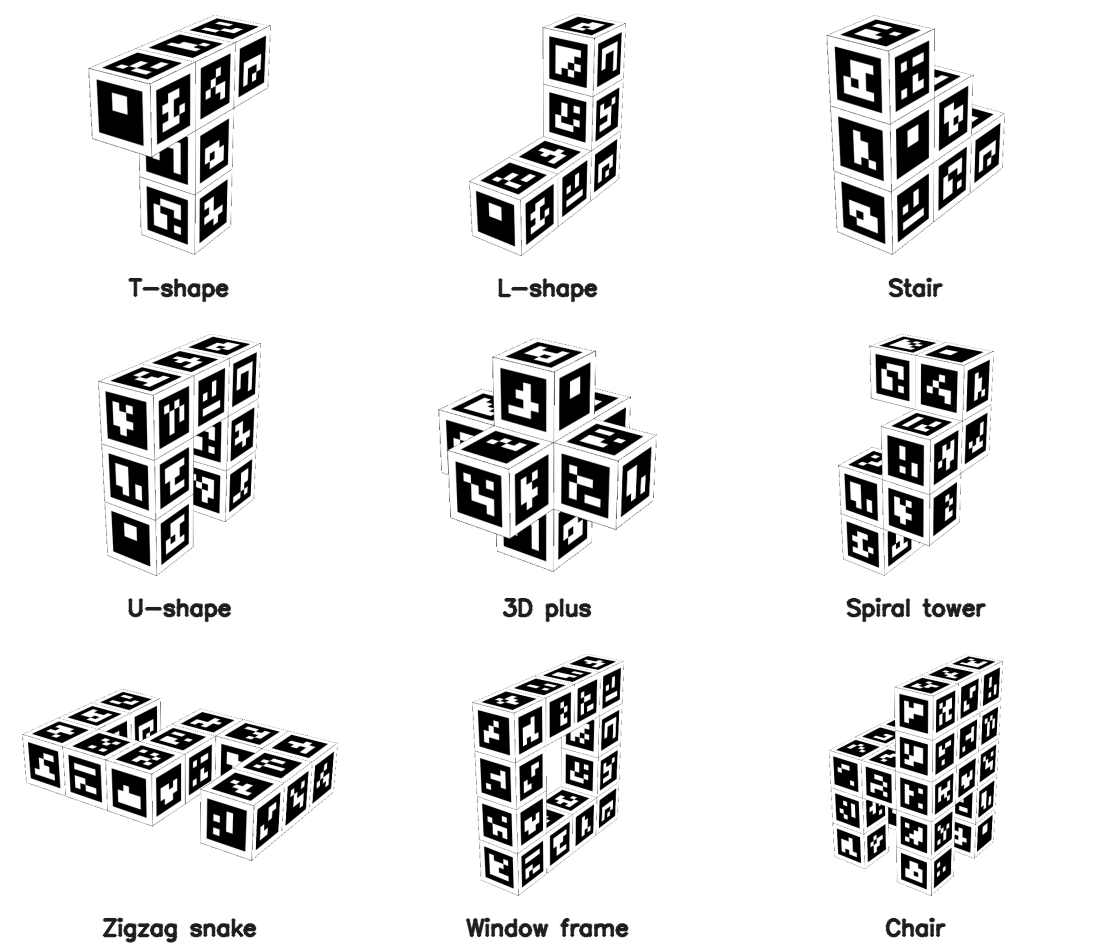
Generate 3D-printable cubes/cuboids with ArUco or AprilTag fiducial markers on all 6 faces, then detect their 6-DOF pose from a camera.

Overview

aprilcube is a two-part pipeline:

  1. Generator — Creates a multi-color 3MF file with markers on every face, ready for dual-color 3D printing (Bambu Studio / AMS)
  2. Detector — Detects the cube in a camera image and estimates its full 6-DOF pose (rotation + translation)

The cube geometry is fully parameterized: grid layout, tag dictionary, tag size, margins, borders. Both modules share the same config, so the detector knows the exact 3D position of every tag corner.

Installation

pip install .

# Or editable install for development
pip install -e .

Requires Python 3.10+ and installs opencv-contrib-python and numpy.

Python API

import aprilcube

# Create a detector from config.json and camera intrinsics
det = aprilcube.detector("my_cube/config.json", {"fx": 800, "fy": 800, "cx": 320, "cy": 240})

# Process a frame (BGR numpy array)
result = det.process_frame(frame)

if result["success"]:
    rvec = result["rvec"]       # Rodrigues rotation vector (3x1)
    tvec = result["tvec"]       # Translation vector in mm (3x1)
    error = result["reproj_error"]  # Reprojection error in pixels
    faces = result["visible_faces"] # Set of visible face names

aprilcube.detector(cube_cfg, intrinsic_cfg, **kwargs)

Creates a CubePoseEstimator ready to process frames.

Arg Type Description
cube_cfg str | Path Path to config.json from aprilcube generate
intrinsic_cfg str | Path | dict | np.ndarray Camera intrinsics (see below)
enable_filter bool Enable Kalman temporal smoothing (default: True)
filter_config KalmanFilterConfig | None Custom filter tuning
dist_coeffs np.ndarray | None Override distortion coefficients

intrinsic_cfg formats:

# Path to calibration JSON (keys: "camera_matrix", optional "dist_coeffs")
det = aprilcube.detector("config.json", "calib.json")

# Dict with fx, fy, cx, cy
det = aprilcube.detector("config.json", {"fx": 800, "fy": 800, "cx": 320, "cy": 240})

# 3x3 numpy camera matrix directly
K = np.array([[800, 0, 320], [0, 800, 240], [0, 0, 1]], dtype=np.float64)
det = aprilcube.detector("config.json", K)

Direct class access

from aprilcube import CubePoseEstimator, CubeConfig, KalmanFilterConfig
from aprilcube.generate import TagPatternGenerator, CubeMeshBuilder, ThreeMFWriter

CLI

Generate a cube

aprilcube generate [options]

Equivalent to the old python generate_cube.py. All arguments are the same:

# Simple cube, one tag per face
aprilcube generate --grid 1x1x1 --dict 4x4_50 --tag-size 30

# 2x2 cube with AprilTags
aprilcube generate --grid 2x2x2 --dict apriltag_36h11 --tag-size 20

# Flat calibration box
aprilcube generate --grid 5x4x1 --dict 4x4_100 --tag-size 15 -o flat_box

# Large cube with fine cell control
aprilcube generate --grid 3x3x3 --dict 6x6_250 --cell-size 2.5 --margin-cell 2 --border-cell 2

Options

Arg Default Description
-g, --grid 1x1x1 Tags per dimension: WxHxD
-d, --dict 4x4_50 ArUco/AprilTag dictionary
-t, --ids auto Tag IDs: range (0-23) or comma-separated
--tag-size 30 Tag size in mm
--cell-size Cell size in mm (alternative to --tag-size)
--margin-cell 1 Gap between adjacent tags, in cells
--border-cell 1 Outer border per face edge, in cells
-o, --output aruco_cube Output directory
--extruder 1 Bambu Studio extruder number
--invert Swap black/white

Grid Format (--grid WxHxD)

The grid specifies how many tags along each axis (X, Y, Z):

Grid Shape Faces
1x1x1 Cube 1 tag per face, 6 total
2x2x2 Cube 4 tags per face, 24 total
5x4x1 Flat box 20 tags top/bottom, narrow side strips
1x1x3 Tall pillar 3 tags on tall sides, 1 on caps

A 2D shorthand RxC is also supported for backward compatibility (e.g., 2x3 expands to a cuboid).

Supported Dictionaries

ArUco: 4x4_50, 4x4_100, 4x4_250, 4x4_1000, 5x5_*, 6x6_*, 7x7_*, aruco_original

AprilTag: apriltag_16h5, apriltag_25h9, apriltag_36h10, apriltag_36h11

Output

The output directory contains:

my_cube/
  cube.3mf              # Multi-color 3MF for Bambu Studio (paint_color attribute)
  config.json           # All parameters needed by the detector
  thumbnail.png         # 6-view preview with dimensions, tag IDs, and axis indicators
  mujoco/
    cube.xml            # MuJoCo MJCF model (references cube.obj + cube_atlas.png)
    cube.obj            # Wavefront OBJ mesh with UV coordinates
    cube.mtl            # Material file referencing the atlas texture
    cube_atlas.png      # Texture atlas (3×2 grid of all 6 face textures)

config.json example:

{
  "dict": "4x4_100",
  "grid": "2x2x2",
  "tag_ids": [0, 1, 2, "..."],
  "faces": {
    "+X": [0, 1, 2, 3],
    "-X": [4, 5, 6, 7],
    "+Y": [8, 9, 10, 11],
    "-Y": [12, 13, 14, 15],
    "+Z": [16, 17, 18, 19],
    "-Z": [20, 21, 22, 23]
  },
  "tag_size_mm": 24.0,
  "cell_size_mm": 4.0,
  "box_dims": [60.0, 60.0, 60.0]
}

mujoco/cube.xml can be loaded directly in MuJoCo for simulation:

python -m mujoco.viewer --mjcf my_cube/mujoco/cube.xml

The OBJ mesh + atlas texture are standard formats and can also be opened in Blender, MeshLab, etc. The coordinate frame matches the detector's 6-DOF pose output (origin at cube center, units in meters).

How the Detector Works

The detection pipeline runs per-frame and combines several techniques for robust, accurate 6-DOF pose estimation from 3D-printed fiducial cubes.

1. ArUco Detection (tuned for 3D-printed surfaces)

The OpenCV ArUco detector is configured with parameters optimized for markers printed on FDM surfaces:

  • Sub-pixel corner refinement (CORNER_REFINE_SUBPIX, win=5, 50 iterations, 0.01px accuracy) — critical for PnP accuracy since corner localization error directly propagates into pose error
  • Wide adaptive thresholding (window 3–53px, step 4) — handles the uneven surface texture and slight color bleeding typical of multi-material FDM prints
  • Relaxed candidate filtering (min perimeter 1%, max 400%, polygon approx 5%) — allows detection at oblique viewing angles where markers appear as thin parallelograms
  • High-resolution bit sampling (8 pixels/cell, 13% ignored margin) — improves bit decoding under perspective distortion from steep viewing angles

2. Multi-Face PnP

Unlike single-marker pose estimation (which suffers from the planar degeneracy problem), all detected tag corners across all visible faces are aggregated into a single PnP solve:

  • >=6 points: solvePnPRansac with the SQPNP solver, 200 iterations, 3px reprojection threshold, 99% confidence. SQPNP is a non-iterative solver that handles the general (non-planar) case efficiently.
  • 4-5 points: Direct solvePnP with SQPNP (not enough points for RANSAC).
  • Levenberg-Marquardt refinement (solvePnPRefineLM) on the RANSAC inlier set for sub-pixel pose accuracy.

Having tags on multiple faces of a known 3D geometry eliminates the planar ambiguity and provides 3D point spread, which dramatically improves pose stability compared to single-face detection.

3. Error-State Kalman Filter

For video/streaming mode, an error-state extended Kalman filter provides temporal smoothing and prediction:

Translation state — standard linear KF with constant-velocity model:

  • State: [x, y, z, vx, vy, vz] (position + velocity in mm and mm/s)
  • Process noise: white-noise jerk model (sigma_accel = 2000 mm/s²)

Rotation state — multiplicative error-state formulation on unit quaternions:

  • Nominal state: unit quaternion q (maintained separately, updated multiplicatively)
  • Error state: [dθx, dθy, dθz, ωx, ωy, ωz] (small-angle rotation error + angular velocity)
  • Process noise: sigma_alpha = 30 rad/s²
  • After each correction step, the error rotation is folded back into the nominal quaternion and reset to zero

This avoids the singularities and normalization issues of filtering quaternions or Euler angles directly.

Adaptive measurement noise — the measurement covariance R is scaled per-frame based on:

  • Reprojection error (higher error → less trust)
  • Number of detected tags (fewer tags → less trust)
  • Inlier ratio from RANSAC (lower ratio → less trust)

Mahalanobis gating — innovation outlier rejection:

  • Soft gate (χ² > 16): inflate measurement noise 10× (down-weight but don't discard)
  • Hard gate (χ² > 100) or 3+ consecutive outliers: full state re-initialization

KF prediction serves dual purpose:

  • Provides initial guess to PnP solver for faster convergence and disambiguation
  • Acts as fallback when detection fails (brief occlusion, motion blur), bridging gaps using the velocity model

Pipeline Summary

Frame → Grayscale → ArUco detect → Filter to cube IDs → Identify visible faces
  → Aggregate 2D-3D correspondences → PnP (with KF prediction as initial guess)
  → LM refinement → Kalman update → Filtered 6-DOF pose

How Cube Size Is Calculated

All dimensions are quantized to cell_size:

cell_size = tag_size / marker_pixels
axis_cells = 2 * border + N * marker_pixels + (N-1) * margin
axis_mm = axis_cells * cell_size

For --grid 2x2x2 --dict 4x4_100 --tag-size 24 --margin-cell 1 --border-cell 1:

  • cell_size = 24 / 6 = 4 mm
  • axis_cells = 2*1 + 2*6 + 1*1 = 15
  • box = 15 * 4 = 60 mm per axis → 60 x 60 x 60 mm cube

Face Coordinate System

Tags are assigned to faces in this order: +X, -X, +Y, -Y, +Z, -Z. Each face has a defined "right" and "down" direction (viewed from outside) such that cross(right, down) = outward normal, ensuring correct triangle winding.

Printing

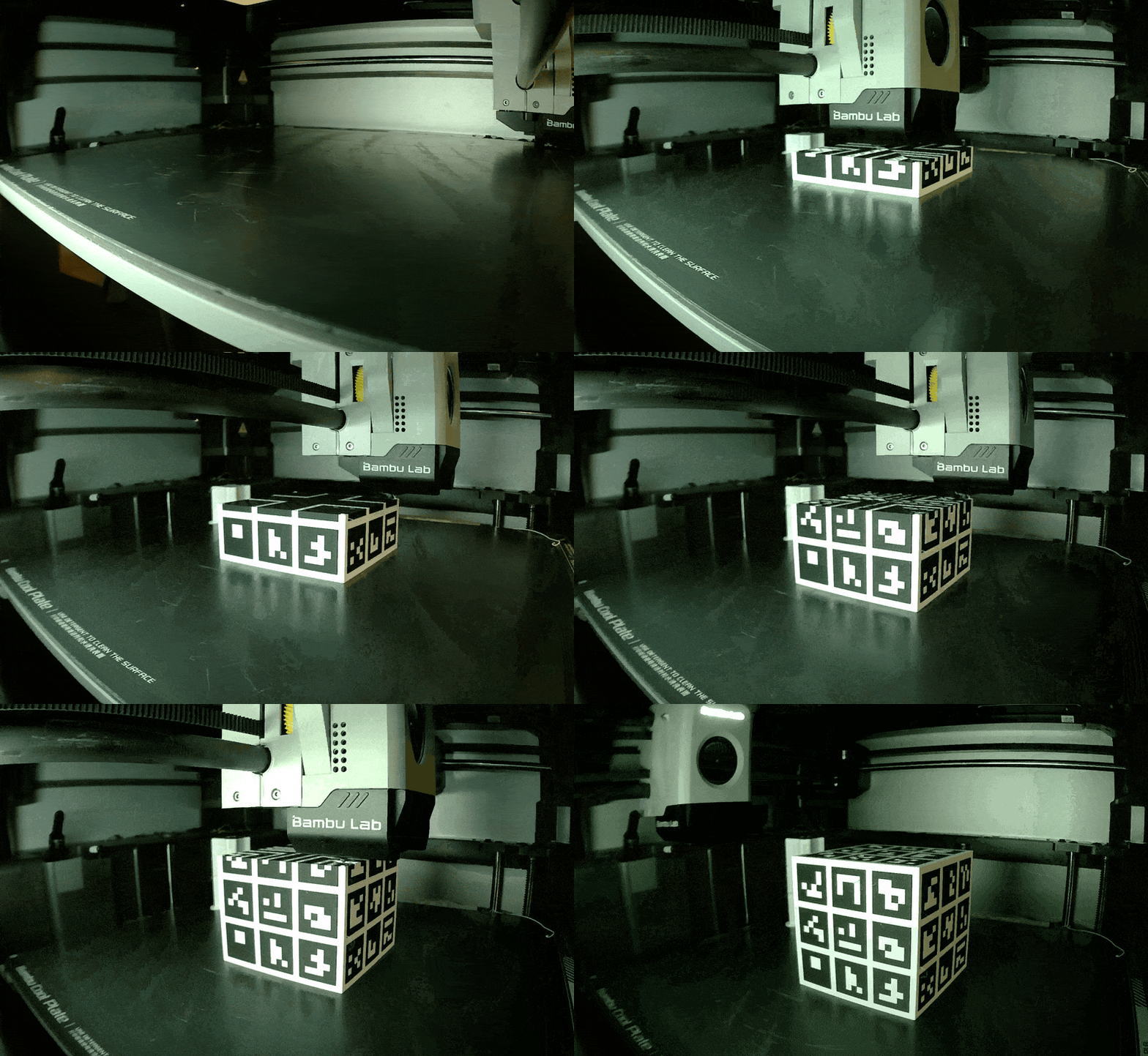
Designed for dual-color FDM printing on Bambu Lab printers with AMS (Automatic Material System).

Supported Printers

Any Bambu Lab printer with AMS or AMS Lite:

  • Bambu X1 / X1C — AMS (4 slots)
  • Bambu P1S / P1P — AMS Lite (4 slots)
  • Bambu A1 / A1 mini — AMS Lite (4 slots)

Setup

  1. Open cube.3mf in Bambu Studio
  2. Assign filament colors: extruder 1 = black, extruder 2 = white (PLA recommended)
  3. Slice and print — the 3MF uses paint_color attributes for automatic color assignment

License

MIT

Project details


Download files

Download the file for your platform. If you're not sure which to choose, learn more about installing packages.

Source Distribution

aprilcube-0.1.0.tar.gz (23.3 MB view details)

Uploaded Source

Built Distribution

If you're not sure about the file name format, learn more about wheel file names.

aprilcube-0.1.0-py3-none-any.whl (31.8 kB view details)

Uploaded Python 3

File details

Details for the file aprilcube-0.1.0.tar.gz.

File metadata

  • Download URL: aprilcube-0.1.0.tar.gz
  • Upload date:
  • Size: 23.3 MB
  • Tags: Source
  • Uploaded using Trusted Publishing? No
  • Uploaded via: twine/6.2.0 CPython/3.14.0

File hashes

Hashes for aprilcube-0.1.0.tar.gz
Algorithm Hash digest
SHA256 aeaeed0d98f252496fe539c2b2a4cb7898c01ebd1dafe9a38a7e67cca389b854
MD5 9a14068224fc0f12786c9b9ce4cb70a3
BLAKE2b-256 ad0656f459d2e5d07f45a11829c09a9c828b2d965ded2f2b79f11d017ca6dee2

See more details on using hashes here.

File details

Details for the file aprilcube-0.1.0-py3-none-any.whl.

File metadata

  • Download URL: aprilcube-0.1.0-py3-none-any.whl
  • Upload date:
  • Size: 31.8 kB
  • Tags: Python 3
  • Uploaded using Trusted Publishing? No
  • Uploaded via: twine/6.2.0 CPython/3.14.0

File hashes

Hashes for aprilcube-0.1.0-py3-none-any.whl
Algorithm Hash digest
SHA256 b3f0d1b2a33081dc59168e0c94eeaf37258458c8f39cbe2e483cd61051e0db74
MD5 a925732c7eb552c14459f38a234d6baa
BLAKE2b-256 da3dce1b22c13ef2ce0ab6eb1b14a0bc670cdfd3cbc2700ccbdd5b6deeff76b5

See more details on using hashes here.

Supported by

AWS Cloud computing and Security Sponsor Datadog Monitoring Depot Continuous Integration Fastly CDN Google Download Analytics Pingdom Monitoring Sentry Error logging StatusPage Status page