
This release is a pre-release and may not be stable for production use.
apt-mirror2
apt-mirror2 is the Python/asyncio reimplementation of the
apt-mirror developed as drop-in replacement for the latest.
This project should be suitable as a general apt-mirror replacement.
One of the main advantages of the apt-mirror2 over the apt-mirror - you should never conclude with a broken mirror in the case that apt-mirror2 returns an exit code of 0.
This is ensured by data integrity checks at all stages of mirroring.
Requirements
Python 3.10 is the minimum supported version. PyPy 3.10 (7.3) is also supported.
For additional dependencies, please refer to the pyproject.yml and/or requirements.txt.
Installation
Container (Docker/Podman)
Container images are available in the Docker Hub under aptmirror/apt-mirror2 repository and in the Red Hat Quay.io inder apt-mirror2/apt-mirror2 repository.
You can try them using
docker run -it --rm docker.io/aptmirror/apt-mirror2 --help
or
docker run -it --rm quay.io/apt-mirror2/apt-mirror2 --help
You may wish to use podman command instead of docker.
Image variants
aptmirror/apt-mirror2:latest
aptmirror/apt-mirror2:<version>
Images based on debian:stable image.
aptmirror/apt-mirror2:slim
aptmirror/apt-mirror2:<version>-slim
Images based on debian:stable-slim image.
aptmirror/apt-mirror2:alpine
aptmirror/apt-mirror2:<version>-alpine
Images based on alpine:3 image.
PyPi
PyPi package is available under the name apt-mirror:
pip install apt-mirror
apt-mirror --help
Distro packages
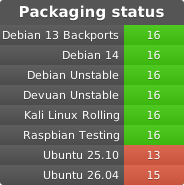
Debian
apt-mirror2 is available in the Debian Unstable (sid). Please note that as of now, apt-mirror2 does not
replace apt-mirror in the Debian and thus package provides apt-mirror2 executable and
/etc/apt/mirror2.list configuration file.
Packagecloud builds
Debian (bookworm, trixie) and Ubuntu (22.04, 24.04) packages are available in the Packagecloud repository.
Quick automated repository setup:
curl -s https://packagecloud.io/install/repositories/nE0sIghT/apt-mirror2/script.deb.sh | sudo bash
Package installation:
sudo apt-get install apt-mirror2
For manual steps, please refer to the Packagecloud repository.
Build from source with virtualenv
It's possible to use apt-mirror2 from a virtualenv:
# Let's work in the home folder
cd

# Create virtualenv
virtualenv ~/venv/apt-mirror2
source ~/venv/apt-mirror2/bin/activate

# Clone apt-mirror2 source code
git clone https://gitlab.com/apt-mirror2/apt-mirror2
cd apt-mirror2

# Install requirements
pip install -r requirements.txt

# Install apt-mirror2 into virtualenv
python setup.py install

apt-mirror --help
Usage
As the drop-in replacement for the apt-mirror, this project supports same CLI syntax.
usage: apt-mirror [-h] [--version] [configfile]

positional arguments:
  configfile  Path to config file. Default /etc/apt/mirror.list

options:
  -h, --help  show this help message and exit
  --version   Show version
apt-mirror compatibility
Most of apt-mirror configuration directives are supported.
As of now proxy for FTP repositories are not supported.
File lists (ALL, NEW, MD5, SHA256, SHA512) are not written by default, but you can enable them with the write_file_lists option.
In addition there are some enhancements available:
- Repositories without MD5 hashsums are correctly mirrored
- Old index files are properly cleaned and don't produce errors during the mirror processing
- Standard source.list
[ arch=arch1,arch2 ]can be used to specify multiple repository architectures for mirroring. - Multiple codenames (or flat folders) can be specified using comma as delimiter.
mirror_path URL PATHoption may be used to specifyPATHto use for saving mirror files instead of the path that is generated fromURL.- Additional configurations are loaded from the
*.listfiles in the directory named the same as theconfigfilewith the.dsuffix. Eg/etc/apt/mirror.list.d/*.list. - Rate limit is enforced for overall download rate.
- Slow download rate protection is enabled by default and can be configured via
mirror.list. - Non-zero exit code is returned if some of required files were not downloaded due to network or server errors or no repositories were configured.
- HTTP user agent can be configured via
user_agentconfiguration. - Configuration variables are exposed to the postmirror_script.
by-hashlist option can be used to control whetherAcquire-By-HashRelease option should be respected or enforced.- Mirror wipe protection is available and configurable via
wipe_size_ratioandwipe_count_ratiosettings. - Per-repository log files are available in the
var_pathfolder distsfolder is almost atomicaly replaced using move instead of copy/link- Native Prometheus metrics are supported
Common problems
LocalProtocolError: Max outbound streams is n, n open
This warning may appear with HTTP2 mirrors when you have too much nthreads configured. You may either
lower nthreads value or disable http2 via http2-disable option. As of now, apt-mirror2 has no control over HTTP2 concurrent streams value used by
httpx/h2 client, but does limit the count of simultaneously downloaded files (which still can exceeds maximum outbound streams due to unknown reasons).
RuntimeError: can't start new thread
Long story short: upgrade Docker.
Look to this issue for more solutions.
dists folder is missing after running apt-mirror2
This is usually a result of errors in your source mirror. You should see some warnings either about missing files in the source or problems with metadata files.
There should be a Metadata movement skipped because of download errors message in the log file and apt-mirror2 should exit with non-zero code.
You could try to change your mirror source, report this problem to mirror owner, or increase the timeouts in your mirror.list.
License
GNU General Public License v3.0 or later
1 maintainer

Metadata
1 maintainer
Release files for apt-mirror 14a1
For a detailed explanation of source distributions (sdists) and built distributions (wheels), please see the package formats documentation.
Source distribution (sdist)
| File | Size | Uploaded | |
|---|---|---|---|
| apt_mirror-14a1.tar.gz | 512.4 kB | Details |
Built distribution (wheel)
| File | Interpreter | ABI | Platform | Reset |
|---|---|---|---|---|
| apt_mirror-14a1-py3-none-any.whl | Python 3 | none | any | Details |
Total release size: 579.4 kB
Release files / apt_mirror-14a1.tar.gz
| Download URL | apt_mirror-14a1.tar.gz |
|---|---|
| Size | 512.4 kB |
| Tags | Source |
|
SHA-256 checksum How to use checksums |
f1a5b0c92ec3e74fb30963936426f4830ce2be71b377c50e12daf89c9c169fbd
|
|
BLAKE2b-256 checksum How to use checksums |
c12d93c609572be61fc61fde4ae41c18c02d3c3a3fd05f6e3ae6534a1ce374db
|
| Upload date | |
|
Uploaded using Trusted Publishing? What is trusted publishing? |
Yes |
| Uploaded via |
twine/6.1.0 CPython/3.12.10
|
Release files / apt_mirror-14a1-py3-none-any.whl
| Download URL | apt_mirror-14a1-py3-none-any.whl |
|---|---|
| Size | 67.0 kB |
| Tags | Python 3 |
|
SHA-256 checksum How to use checksums |
d5174530e51563c786951ec7c6f4ab1d21de5028c4cbb0b49d33cf6b080f1360
|
|
BLAKE2b-256 checksum How to use checksums |
ef9783de75db523bd72b875e8c02722b2a89a117115515a72e6695be50987d1e
|
| Upload date | |
|
Uploaded using Trusted Publishing? What is trusted publishing? |
Yes |
| Uploaded via |
twine/6.1.0 CPython/3.12.10
|














