



Apygee (apogee + `py`) is a lightweight Python package for creating, manipulating and visualizing Kepler orbits.
Installation
pip install apygee
Usage
The main export of Apygee is the Orbit class, which stores the keplerian elements and provides easy access to the astrodynamical properties of the orbit. It also contains methods for visualizing the orbit, and for performing mauevers in order to transfer to other orbits.
from apygee import Orbit, MU_EARTH

orbit = Orbit([2e6], mu=MU_EARTH)
print(orbit)
Orbit([a=2e+6, e=0, i=0, Ω=0, ω=0, θ=0], μ=3.99e+14, type='circular')
Apygee provides conversion functions between cartesian and keplerian elements, as provided by the exports kep_to_cart and cart_to_kep. The Orbit class also has a from_cart constructor to facilitate conversion.
Examples
For interactive versions, see the notebook in the examples directory.
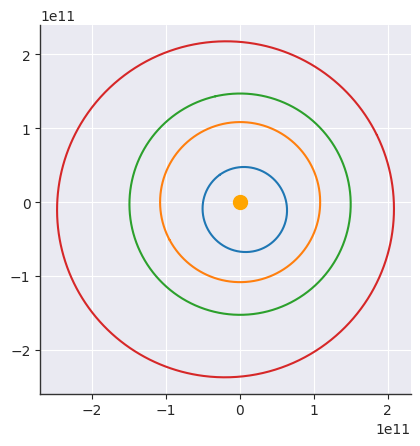
Plot the rocky planets in 2d
import matplotlib.pyplot as plt
from apygee import MERCURY, VENUS, EARTH, MARS

MERCURY.plot()
VENUS.plot()
EARTH.plot()
MARS.plot()

plt.scatter([0], [0], s=100, color="orange")
<matplotlib.collections.PathCollection at 0x7fc0896a9280>
Plot an orbit in 3d
import numpy as np
import matplotlib.pyplot as plt
from apygee import Orbit, MU_EARTH

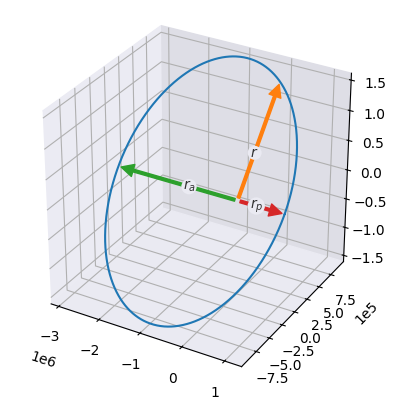
orbit = Orbit([2e6, 0.45, np.pi / 3, 0, 0, np.pi / 2], mu=MU_EARTH)

# To plot in 3d, create a 3d axis before calling `.plot`
ax = plt.axes(projection="3d")
orbit.plot(show=["r", "r_p", "r_a"])
Plot orbital elements in 3d
import matplotlib.pyplot as plt
from apygee import Orbit, MU_EARTH

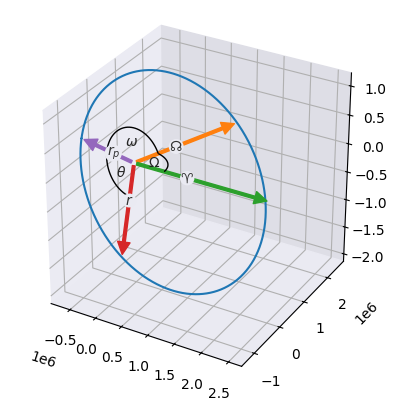
orbit = Orbit([2e6, 0.45, np.pi / 3, np.pi / 2.5, np.pi * 0.8, np.pi / 2], mu=MU_EARTH)

# To plot in 3d, create a 3d axis before calling `.plot`
ax = plt.axes(projection="3d")
orbit.plot(show=["r_p", "r", "theta", "n", "omega", "x", "Omega"])
Visualize an orbit
from apygee import Orbit, MU_EARTH

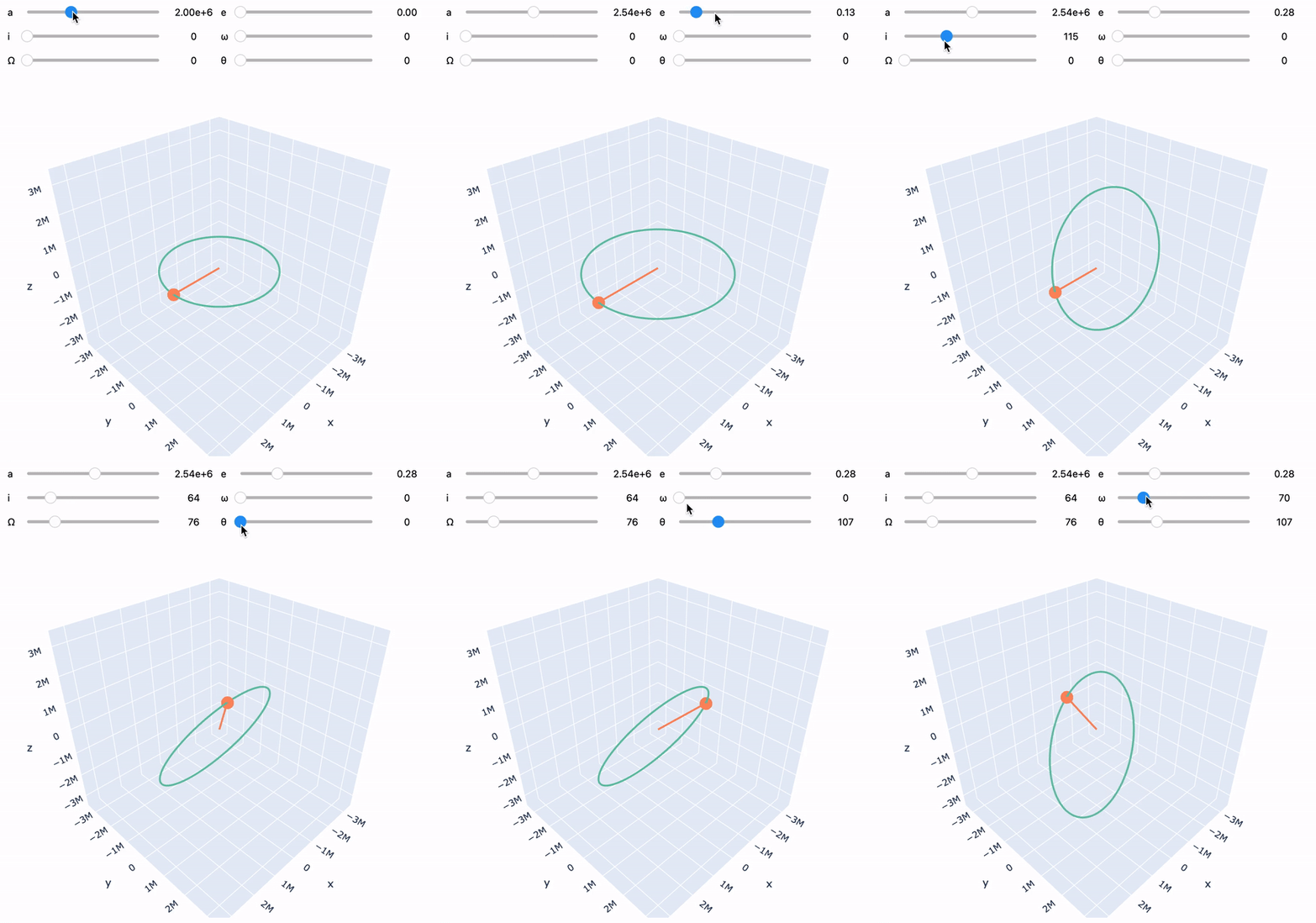
orbit = Orbit([2e6], mu=MU_EARTH)
orbit.visualize()
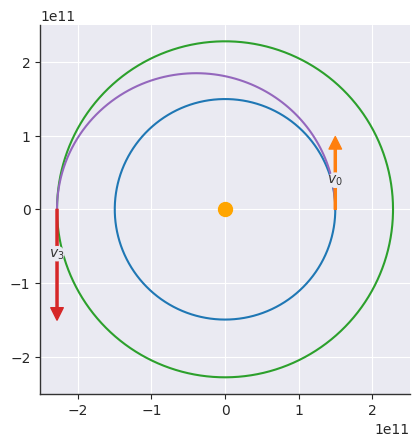
Hohmann transfer from Earth to Mars
import numpy as np
import matplotlib.pyplot as plt
from apygee import Orbit, EARTH, MARS, MU_SUN

earth = Orbit([EARTH.a], mu=MU_SUN).at_theta(0)
mars = Orbit([MARS.a], mu=MU_SUN).at_theta(np.pi)
transfer = earth.hohmann_transfer(mars)

# Note: the velocities are *not* drawn to scale! Only the direction is "correct"
earth.plot(show=["v"], labels={"v": "$v_0$"})
mars.plot(show=["v"], labels={"v": "$v_3$"})
transfer.plot(thetas=np.linspace(0, np.pi, 100))
plt.scatter([0], [0], s=100, color="orange")

v0 = earth.at_theta(0).v_vec
v1 = transfer.at_theta(0).v_vec
dv1 = np.linalg.norm(v1 - v0)
print(f"Δv1 = {dv1/1e3:.2f} km/s")

v2 = transfer.at_theta(np.pi).v_vec
v3 = mars.at_theta(np.pi).v_vec
dv2 = np.linalg.norm(v3 - v2)
print(f"Δv2 = {dv2/1e3:.2f} km/s")

dv = dv1 + dv2
print(f"Total Δv = {dv/1e3:.2f} km/s")

dt = transfer.at_theta(np.pi).t - transfer.at_theta(0).t
print(f"Δt = {dt/3600/24:.2f} days")
Δv1 = 2.94 km/s
Δv2 = 2.65 km/s
Total Δv = 5.59 km/s
Δt = 258.86 days
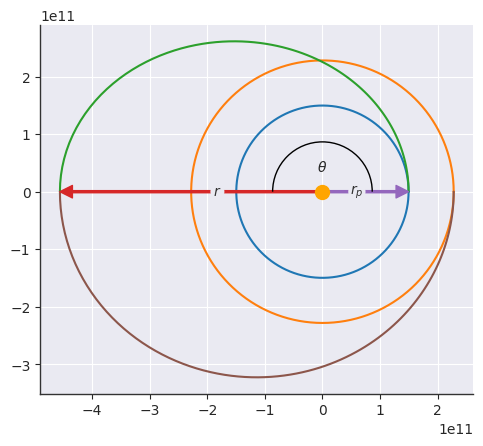
Bielliptic (or double Hohmann) transfer from Earth to Mars
import numpy as np
import matplotlib.pyplot as plt
from apygee import Orbit, EARTH, MARS, MU_SUN

earth = Orbit([EARTH.a], mu=MU_SUN).at_theta(0)
mars = Orbit([MARS.a], mu=MU_SUN).at_theta(np.pi)
[transfer1, transfer2] = earth.bielliptic_transfer(mars, ra=mars.ra * 2)

earth.plot()
mars.plot()
transfer1.plot(thetas=np.linspace(0, np.pi, 100), theta=np.pi, show=["r", "r_p", "theta"])
transfer2.plot(thetas=np.linspace(np.pi, 2 * np.pi, 100))
plt.scatter([0], [0], s=100, color="orange", zorder=3)

v0 = earth.at_theta(0).v_vec
v1 = transfer1.at_theta(0).v_vec
dv1 = np.linalg.norm(v1 - v0)
print(f"Δv1 = {dv1/1e3:.2f} km/s")

v2 = transfer1.at_theta(np.pi).v_vec
v3 = transfer2.at_theta(np.pi).v_vec
dv2 = np.linalg.norm(v3 - v2)
print(f"Δv2 = {dv2/1e3:.2f} km/s")

v4 = transfer2.at_theta(0).v_vec
v5 = mars.at_theta(2 * np.pi).v_vec
dv3 = np.linalg.norm(v5 - v4)
print(f"Δv3 = {dv3/1e3:.2f} km/s")

dv = dv1 + dv2 + dv3
print(f"Total Δv = {dv/1e3:.2f} km/s")
Δv1 = 6.77 km/s
Δv2 = 1.94 km/s
Δv3 = 3.73 km/s
Total Δv = 12.44 km/s
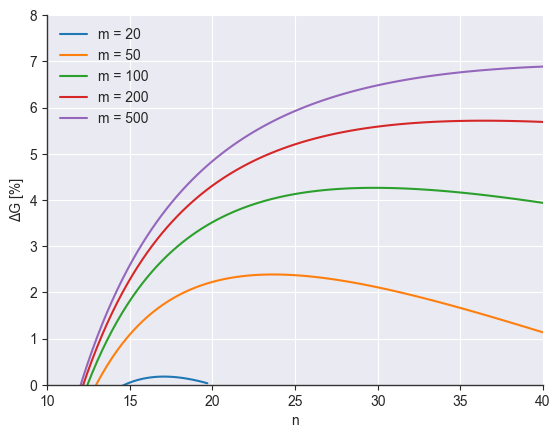
Computing delta-v gain for Bielliptic over Hohmann transfer
from itertools import product
from apygee import Orbit, EARTH, MU_SUN
import matplotlib.pyplot as plt
import numpy as np

plt.style.use(
    [
        "seaborn-v0_8-darkgrid",
        {
            "axes.spines.top": False,
            "axes.spines.right": False,
            "axes.edgecolor": (0.2, 0.2, 0.2),
            "axes.linewidth": 1,
            "xtick.major.size": 3.5,
            "ytick.major.size": 3.5,
        },
    ]
)


def hohmann(n, m):
    r1 = EARTH.a
    r2 = n * r1

    orbit1 = Orbit([r1], MU_SUN)
    orbit2 = Orbit([r2], MU_SUN)
    transfer = orbit1.hohmann_transfer(orbit2)

    v0 = orbit1.at_theta(0).v_vec
    v1 = transfer.at_theta(0).v_vec
    dv1 = np.linalg.norm(v1 - v0)

    v2 = transfer.at_theta(np.pi).v_vec
    v3 = orbit2.at_theta(np.pi).v_vec
    dv2 = np.linalg.norm(v3 - v2)

    return dv1 + dv2


def bielliptic(n, m):
    r1 = EARTH.a
    r2 = n * r1
    ra = m * r1

    orbit1 = Orbit([r1], MU_SUN)
    orbit2 = Orbit([r2], MU_SUN)
    [transfer1, transfer2] = orbit1.bielliptic_transfer(orbit2, ra=ra)

    v0 = orbit1.at_theta(0).v_vec
    v1 = transfer1.at_theta(0).v_vec
    dv1 = np.linalg.norm(v1 - v0)

    v2 = transfer1.at_theta(np.pi).v_vec
    v3 = transfer2.at_theta(np.pi).v_vec
    dv2 = np.linalg.norm(v3 - v2)

    v4 = transfer2.at_theta(0).v_vec
    v5 = orbit2.at_theta(2 * np.pi).v_vec
    dv3 = np.linalg.norm(v5 - v4)

    return dv1 + dv2 + dv3


ns = np.linspace(10, 40, 100)
ms = np.array([20, 50, 100, 200, 500])


def filter_nm(x):
    [n, m] = x

    if not m > n:
        return False

    if not (n > 1 and m > 1):
        return False

    return True


nns = []
mms = []
GGs = []


for n, m in filter(filter_nm, product(ns, ms)):
    dvh = hohmann(n, m)
    dvb = bielliptic(n, m)
    G = -(dvb - dvh) / dvh * 100

    nns.append(n)
    mms.append(m)
    GGs.append(G)


res = np.vstack([nns, mms, GGs]).T

for m in np.unique(res[:, 1]):
    mask = res[:, 1] == m
    plt.plot(res[mask, 0], res[mask, 2], label=f"m = {m:.0f}")

plt.xlabel("n")
plt.ylabel("ΔG [%]")
plt.xlim([10, 40])
plt.ylim([0, 8])
plt.legend()
<matplotlib.legend.Legend at 0x7fc07ec34b30>
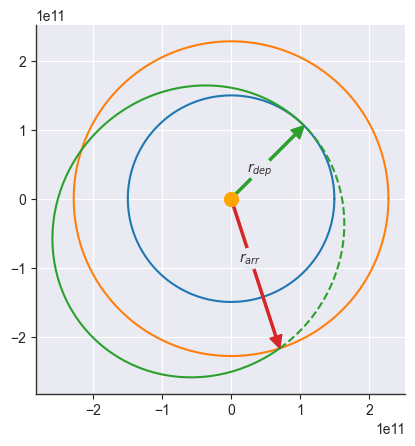
General coplanar transfer
import numpy as np
import matplotlib.pyplot as plt
from apygee import Orbit, EARTH, MARS, MU_SUN

theta_dep = np.pi / 4
theta_arr = 8 * np.pi / 5

earth = Orbit([EARTH.a], mu=MU_SUN)
mars = Orbit([MARS.a], mu=MU_SUN)
transfer = earth.coplanar_transfer(mars, theta_dep, theta_arr)

earth.plot()
mars.plot()
transfer.plot(
    thetas=np.linspace(theta_dep, theta_arr, num=100) - transfer.omega,
    theta=theta_dep - transfer.omega,
    labels={"r": r"$r_{dep}$"},
    show=["r"],
    c="tab:green",
)
transfer.plot(
    thetas=np.linspace(theta_arr, theta_dep + 2 * np.pi) - transfer.omega,
    theta=theta_arr - transfer.omega,
    labels={"r": r"$r_{arr}$"},
    show=["r"],
    c="tab:green",
    ls="--",
)
plt.scatter([0], [0], s=100, color="orange", zorder=3)
<matplotlib.collections.PathCollection at 0x7fc07ec355b0>
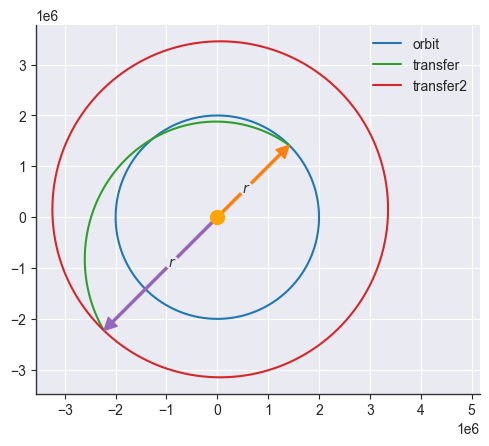
Impulsive shot
import matplotlib.pyplot as plt
from apygee import Orbit, MU_EARTH

theta = np.pi / 4
dtheta = np.pi

orbit = Orbit([2e6], mu=MU_EARTH)
orbit.plot(theta=theta, show=["r"], label="orbit")

# Providing `dv` as a scalar requires passing the angle `x` (see below for visualization)
transfer = orbit.impulsive_shot(dv=3e3, x=np.pi / 3, theta=theta)
transfer.plot(thetas=np.linspace(transfer.theta, transfer.theta + dtheta, 100), label="transfer")

# Alternatively, provide `dv` as a vector:
theta2 = dtheta + (theta - transfer.omega)
transfer2 = transfer.impulsive_shot(dv=[3e3, 1e3, 2e3], theta=theta2)
transfer2.plot(theta=transfer2.theta, show=["r"], label="transfer2")

plt.scatter([0], [0], s=100, color="orange", zorder=3)
plt.xlim(np.array(plt.xlim()) * [1, 1.4])
plt.legend(loc="upper right")
<matplotlib.legend.Legend at 0x7fc07ecdd010>
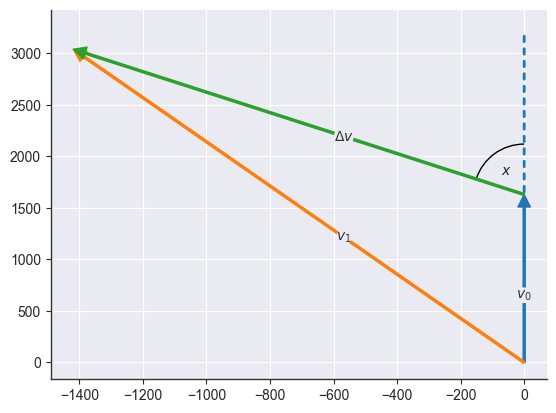
The angle x is measured between the dv vector and v0, which we can visualize using the utility functions plot_vector and plot_angle:
from apygee.plot import plot_vector, plot_angle
from apygee.utils import angle_between, rotate_vector

orbit = Orbit([150e6], MU_EARTH)
theta = 0
x = 0.789
dv = 2e3

v0 = orbit.at_theta(theta).v_vec

uv = v0 / np.linalg.norm(v0)
dv_vec = rotate_vector(uv, orbit.h_vec, x) * dv
v1 = v0 + dv_vec

plot_vector(v0, text="$v_0$")
plot_vector(v1, text="$v_1$")
plot_vector(dv_vec, origin=v0, text=r"$\Delta v$")

plot_angle(v0, dv_vec, origin=v0, text="$x$")
plot_vector(
    v0,
    origin=v0,
    arrow_kwargs=dict(arrowstyle="-", color="#1f77b4", lw=2, ls=(0, (2, 2.5))),
)

print(angle_between(dv_vec, v0), x)
0.789 0.789
Contributing
Contributions are welcome! For bug reports or feature requests, please submit an issue on the GitHub repository.
Sources
This course is mainly based on the courses "Fundamentals of Astrodynamics" and "Numerical Astrodynamics" that I attended at TU Delft, taught by the wonderful Kevin Cowan. In addition, the following sources are used:
- Orbital Mechanics & Astrodynamics. (n.d.). Retrieved from https://orbital-mechanics.space/
- Bate, R. R., Mueller, D. D., White, J. E., & Saylor, W. W. (2020). Fundamentals of Astrodynamics (Revised and updated second edition). Dover Publications, Inc.
- Curtis, H. D. (2020). Orbital Mechanics for Engineering Students (4th ed.). Elsevier. ISBN 978-0-08-102133-0.
- de Pater, I., & Lissauer, J. J. (2015). Planetary Sciences (2nd ed.). Cambridge: Cambridge University Press.
License
This project is licensed under the terms of the MIT license.
1 maintainer

Metadata
1 maintainer
Release files for apygee 1.0.5
For a detailed explanation of source distributions (sdists) and built distributions (wheels), please see the package formats documentation.
Source distribution (sdist)
| File | Size | Uploaded | Provenance | |
|---|---|---|---|---|
| apygee-1.0.5.tar.gz | 28.1 kB | Without provenance | Details |
Built distribution (wheel)
| File | Interpreter | ABI | Platform | Reset |
|---|---|---|---|---|
| apygee-1.0.5-py3-none-any.whl | Python 3 | none | any | Details |
Total release size: 54.8 kB
Release files / apygee-1.0.5.tar.gz
| Download URL | apygee-1.0.5.tar.gz |
|---|---|
| Size | 28.1 kB |
| Tags | Source |
|
SHA-256 checksum How to use checksums |
d2500768f3d7fe31180715bef58b8c40f5ab270a9e5778ef0ee4d08213e9b1d3
|
|
BLAKE2b-256 checksum How to use checksums |
86dba6622b6a8bf663acf873189f024cd015af6c82cbbcf7111c48f302190b54
|
| Upload date | |
|
Uploaded using Trusted Publishing? What is trusted publishing? |
Yes |
| Uploaded via |
twine/5.0.0 CPython/3.12.3
|
Release files / apygee-1.0.5-py3-none-any.whl
| Download URL | apygee-1.0.5-py3-none-any.whl |
|---|---|
| Size | 26.7 kB |
| Tags | Python 3 |
|
SHA-256 checksum How to use checksums |
4064d7060540f44114a474f0f718ca8b57e3cf05af8e8545593381473d031a90
|
|
BLAKE2b-256 checksum How to use checksums |
fd5482f0008be1e4011a56ef062334e8c6744d7497e286ef266ff792ce707337
|
| Upload date | |
|
Uploaded using Trusted Publishing? What is trusted publishing? |
Yes |
| Uploaded via |
twine/5.0.0 CPython/3.12.3
|
Security for apygee 1.0.5
Provenance
Provenance describes where a file came from. On PyPI, provenance is shared via attestations, which provide a verifiable record of the build or publishing details. View details, limitations and caveats.
No provenance found
None of the files in this release were uploaded with provenance metadata.
A note on package security
PyPI is a repository for distributing packages, not a service for auditing them. While third-party security researchers and our staff do their best to detect and remove malicious packages, PyPI cannot guarantee the quality, security or suitability of any given package.
To learn more about protecting yourself from malicious actors, visit our package security documentation.














